CPU Naming Decoded
Decoding CPU names. — Every letter. Every digit. No guesswork.
A Ryzen 7 9800X3D and a Core Ultra 7 265K aren't named randomly — every segment of the name encodes generation, tier, architecture and feature set. Once you can read the names, comparing CPUs becomes far easier.
- to memorise total
- 7 letters
- gaming uplift
- X3D = +25%
- same CPU, no iGPU
- F = -R400
Why CPU names look like a barcode
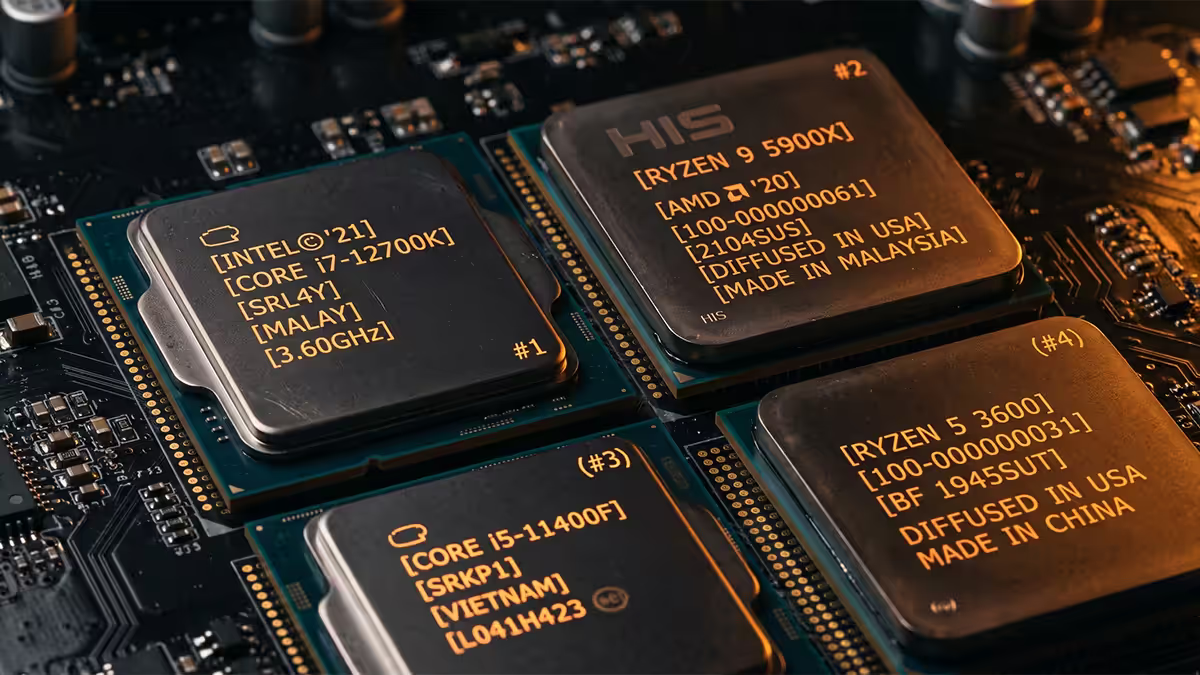
A modern CPU model name like Ryzen 7 9800X3D looks intimidating, but every character is doing real work. It tells you the tier (Ryzen 7), the generation (9000-series), the underlying architecture (Zen 5), the SKU within that tier (the 800 step), and a feature suffix (X3D — 3D V-Cache).
Both AMD and Intel use this segmented naming because they ship dozens of variants per generation. Decoding the name gives you most of what you need to know before you read a single benchmark — minimum core count, intended use case, OC potential, and whether the chip has integrated graphics.
The good news: once you've learned the system for one brand, you've nearly learned the other. Both use the same general pattern.
Intel Core Ultra and Core i — decoded
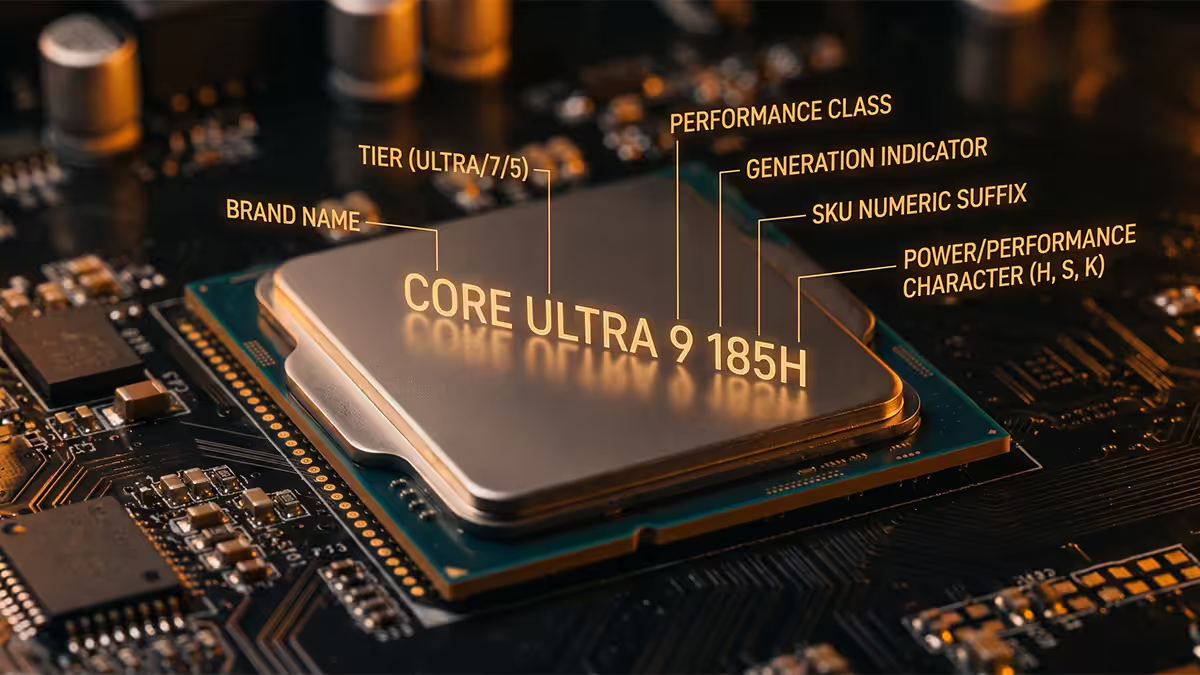
Starting with the 15th generation desktop chips, Intel moved from "Core i7-14700K" naming to "Core Ultra 7 265K." The structure is similar but the segments are slightly rearranged.
Tier (Core Ultra 3 / 5 / 7 / 9): the broad class of chip. Ultra 3 = entry, Ultra 5 = mid-range, Ultra 7 = enthusiast, Ultra 9 = flagship. Replaces the legacy i3/i5/i7/i9 naming for Arrow Lake desktop and newer.
Generation: the first digit (or two) after the tier. "265K" starts with 2 → 15th generation (gen 15 = "2" in Core Ultra naming). On legacy Core i chips: "14900K" starts with 14 → 14th generation. "13700K" → 13th gen, etc.
SKU number: the remaining digits identify the specific model. Higher SKU within the same tier = more cores, higher clocks, or both. A 265 is faster than a 245 inside the same Core Ultra 7 family.
Suffix: K = unlocked for overclocking; F = no integrated graphics; KF = both unlocked and no iGPU; T = lower TDP (35W for SFF/HTPC); no suffix = locked multiplier, factory iGPU.
AMD Ryzen — decoded
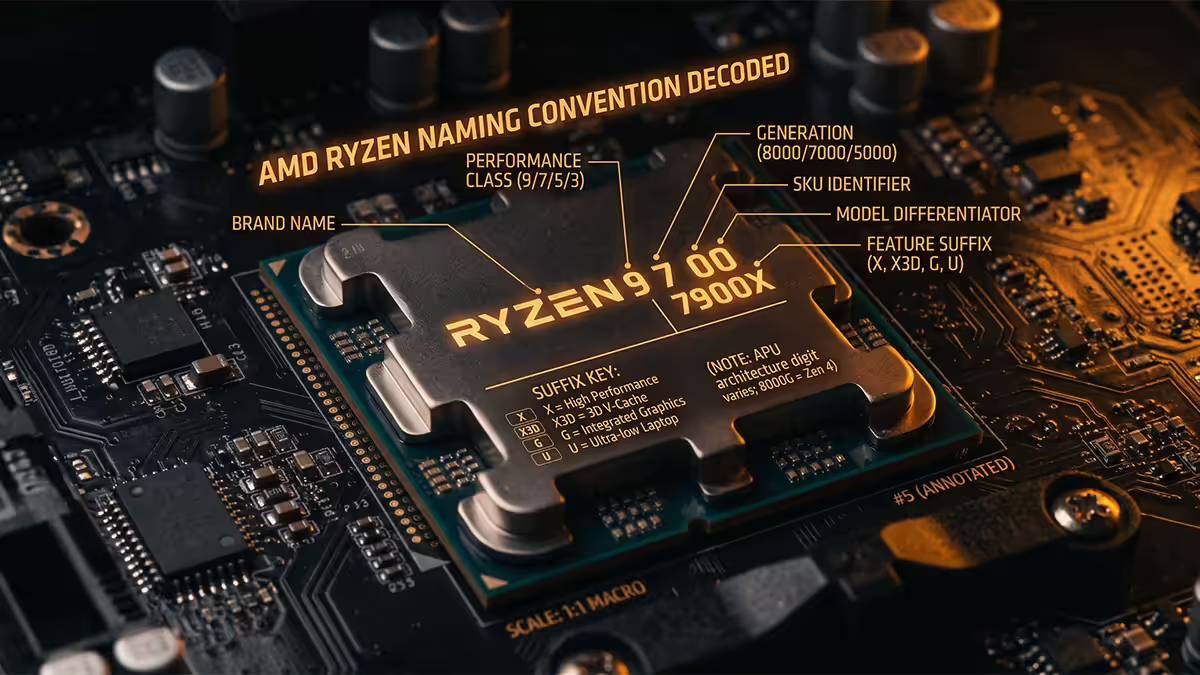
AMD uses a similar structure but with one additional segment baked into the digits: the Zen architecture generation.
Tier (Ryzen 3 / 5 / 7 / 9): identical role to Intel's Core Ultra tiers. Ryzen 3 = entry, Ryzen 5 = mid-range, Ryzen 7 = enthusiast, Ryzen 9 = flagship.
Generation: first digit after the tier. 9000-series = current desktop (2024–2026), 7000-series = previous gen (still strong value), 5000-series = AM4 socket legacy. AMD is currently on the 9000-series for AM5 desktop.
Zen architecture: the second digit indicates the underlying core architecture. Confusingly, this doesn't always match the generation number. A Ryzen 7 9800X3D uses Zen 5 (the "8" in "9800"). A Ryzen 7 7800X3D uses Zen 4 (the "8" in "7800"). When in doubt, check the spec sheet.
SKU number: last two digits. Higher = more cores or higher clocks within the same family. 9800 beats 9700 in clocks; 9950 beats 9900 in cores.
Suffix: X = factory-boosted (slightly higher clocks); X3D = 3D V-Cache for gaming; G = integrated Radeon graphics (APU); no suffix = base SKU. On laptops: U = ultra-low-power; H = high-performance; HX = highest-tier mobile; HS = balanced perf/efficiency.
Every suffix you'll encounter
If you only memorise one section of this guide, make it this one. Suffix letters carry the most practical information per character on the entire SKU.
| Suffix | Brand | What it means |
|---|---|---|
| X3D | AMD | 3D V-Cache — best gaming performance per dollar |
| X | AMD | Factory-boosted clocks above base SKU |
| G | AMD | APU — integrated Radeon graphics, no discrete GPU needed for light gaming |
| K | Intel | Unlocked multiplier — overclockable on Z-series boards |
| F | Intel | No integrated graphics — R200–R400 cheaper, needs discrete GPU |
| KF | Intel | Unlocked AND no iGPU — best overclocking value for GPU owners |
| T | Intel | 35W TDP — SFF, HTPC, server use |
| U | Both | Ultra-low-power laptop (15–28W) |
| H | Both | High-performance laptop (35–55W) |
| HX | Both | Highest-tier laptop (55–65W) — desktop-class in a thicker chassis |
| HS | AMD | Balanced laptop perf/efficiency (35–45W) |
The two suffixes you'll see most in SA gaming builds: X3D (AMD's gaming-cache chip) and KF (Intel's unlocked-without-iGPU). Both deliver the most performance per Rand at their respective tiers when paired with a discrete GPU.
Comparing Ryzen and Core across brands
A common mistake: assuming a "Ryzen 7" and a "Core Ultra 7" are equivalent because the tier number matches. They're not. The tier number is a within-brand position only.
The actual cross-brand competitive landscape in May 2026 looks roughly like this:
| Tier | AMD | Intel |
|---|---|---|
| Flagship gaming | Ryzen 7 9800X3D | Core Ultra 9 285K |
| Flagship productivity | Ryzen 9 9950X | Core Ultra 9 285K |
| Enthusiast all-round | Ryzen 7 9700X | Core Ultra 7 265K |
| Mid-range gaming | Ryzen 5 9600X / 7600X3D | Core Ultra 5 245K |
| Budget gaming | Ryzen 5 7500F / 8400F | Core i5-14400F |
| Office / browsing | Ryzen 5 8600G (APU) | Core i3-14100 |
For pure gaming in 2026, AMD's X3D chips hold a clear lead — a Ryzen 7 9800X3D will outperform the Core Ultra 9 285K in most game engines despite being a tier "lower" in the naming. For heavily-multithreaded productivity (rendering, code compilation, simulation), Intel's high-end Core Ultra 9 maintains an edge.
Practical rule: if your build is gamer-first, default to AMD X3D. If it's creator-first, check benchmarks for your specific app — both brands lead in different workloads.
When newer ≠ better
Generations move forward, but performance doesn't always. The 3D V-Cache (X3D) chips in particular create odd cross-generational results.
Famous example: the Ryzen 7 7800X3D (Zen 4, 2023) still outperforms the Ryzen 7 9700X (Zen 5, 2025) in pure gaming because the X3D cache offsets the newer architecture's modest IPC gains. The 9800X3D (Zen 5 + X3D) reclaims the lead, but the 7800X3D was the gaming king for two solid years against newer non-X3D chips.
Last-gen flagship vs current-gen mid-range is another common scenario. A Core i9-14900K (2023) still beats a Core Ultra 5 245K (2025) in productivity benchmarks despite being two generations behind, because the i9 has more cores and a higher power budget.
Always check actual benchmarks for the specific workload (game, app, render engine) before assuming the higher generation number wins.
Mobile vs desktop suffix conventions
Laptop CPU naming adds a power-tier suffix that desktop chips don't use. Memorising these three letters will save you from buying an underpowered laptop CPU.
| Suffix | Typical TDP | Best for |
|---|---|---|
| U | 15–28W | Ultrabook, all-day battery, light office work |
| P | 28W | Mid-range thin-and-light laptops (Intel) |
| H | 35–55W | Gaming laptops, creator workstations |
| HS | 35–45W (AMD) | Balanced perf/battery in thinner chassis |
| HX | 55–65W | Flagship gaming laptops — desktop-class |
A specific 2026 example: the Ryzen 7 8845HS and Ryzen 7 8540U are both eight-core mobile chips. The 8845HS sustains ~45W and pushes 5.1 GHz boost; the 8540U sustains ~15W and tops out at 4.9 GHz boost. The HS-suffixed chip will be 30–50% faster in real workloads despite the similar core count and clock speed on paper.
When laptop shopping, always check the CPU suffix first — the difference between H and U at the same model number is enormous.
SA picks by use case (May 2026)
| Use case | Best pick | SA price |
|---|---|---|
| Pure gaming flagship | Ryzen 7 9800X3D | R8,200–R9,200 |
| Gaming + light creator | Ryzen 7 7700X / 9700X | R5,800–R7,200 |
| Productivity flagship | Core Ultra 9 285K / Ryzen 9 9950X | R12,500–R14,500 |
| Best value mid-range | Ryzen 5 7600X / Core Ultra 5 245K | R4,200–R5,800 |
| Budget gaming with GPU | Core i5-14400F / Ryzen 5 7500F | R3,200–R3,800 |
| iGPU-only office/HTPC | Ryzen 5 8600G (APU) | R4,200–R4,800 |
Key takeaways
- Both brands follow [tier][gen][SKU][suffix] — once you can parse one, you can parse the other.
- X3D (AMD) is the gaming king; KF (Intel) is the discrete-GPU value pick; G (AMD APU) handles iGPU-only builds.
- Tier numbers don't map across brands — Ryzen 7 and Core Ultra 7 aren't equivalent without checking benchmarks.
- Newer isn't always better — the 7800X3D still beats many newer non-X3D chips in gaming.
- On laptops, the H/HS/HX vs U distinction matters more than the SKU number — TDP defines the chip's real ceiling.
Frequently asked questions
What does the X3D suffix on a Ryzen CPU mean?
X3D indicates AMD's 3D V-Cache — stacked L3 cache that boosts gaming by 15–30%. Ryzen 7 9800X3D has 96 MB L3 (vs 32 MB on the 9700X). Trade-off: slightly lower productivity perf vs the non-X3D equivalent.What does the K suffix mean on an Intel Core CPU?
K means unlocked multiplier — overclockable. K chips also have higher base/boost clocks. Pair with a Z-series board to unlock OC features; on B-series boards the K becomes largely redundant.What does the F suffix mean on Intel CPUs?
F means integrated graphics is disabled. R200–R400 cheaper than the non-F chip. Perfect when you have a discrete GPU. Downside: no display output if your GPU fails.What does the G suffix mean on AMD Ryzen?
G means the chip has integrated Radeon graphics (APU). Ryzen 5 8600G can run Valorant, CS2 and Rocket League without a discrete GPU. Popular in office and budget builds.How do I compare AMD Ryzen and Intel Core CPUs across brands?
Ignore the digits and compare on benchmarks. Ryzen 7 9700X and Core Ultra 7 265K are roughly tier-equivalent but trade wins in different workloads. Use Tom's Hardware, TechPowerUp or Hardware Unboxed for your specific game/app.Is a newer CPU always better than an older one?
Not always. Ryzen 7 7800X3D often outperforms the current Ryzen 7 9700X in gaming despite being a generation older. Core i9-14900K still beats many newer mid-tier Core Ultras in productivity.What is the difference between Intel Core i and Core Ultra?
Core Ultra is Intel's renamed lineup from 15th gen (Arrow Lake desktop). New naming reflects P-core/E-core split and dedicated NPU for AI. Core Ultra 7 265K replaces what would have been Core i7-15700K.What do U and H suffixes mean on laptop CPUs?
U = low-power (15–28W) for ultrabooks. H = high-performance mobile (35–55W) for gaming/creator laptops. HX = highest tier (55–65W) — desktop-class chips in laptop chassis.
Get the Evetech app
Exclusive app-only prices, daily flash sales, and free delivery on orders over R4,000 — download the app and start saving.