Hardware Explainer · FSR
AMD FSR explained — frame generation for everyone.
— Open source. Any GPU. FSR 4 closes the gap.
DLSS gets the headlines but FSR has done quiet, important work — it’s the upscaler that runs on any GPU, including the integrated graphics in your laptop and the consoles in millions of homes. FSR 4’s AI-accelerated path on RDNA 3+ has closed much of the quality gap with DLSS. Here’s what each version does, where it shines, and when FSR is the right call over the green team’s alternative.
- source & spec
- Open
- nvidia / amd / intel
- Any GPU
- closes the gap
- FSR 4
What FSR actually is
FSR stands for FidelityFX Super Resolution — AMD’s family of upscaling technologies launched in 2021 to counter NVIDIA’s DLSS. The core idea is the same as DLSS: render the game at a lower internal resolution, then reconstruct the output to your target resolution for big FPS gains. The execution is meaningfully different — FSR is open-source, hardware-agnostic and largely shader-based, which means it runs on any GPU manufactured in roughly the last decade.
AMD’s reasoning for the open-source approach was strategic and pragmatic. NVIDIA’s DLSS requires Tensor Cores (RTX 20-series and newer); AMD wanted upscaling that worked on its full GPU range including the integrated graphics in Ryzen APUs and the Radeon hardware inside the Steam Deck, PS5 and Xbox Series consoles. The result: FSR is the only major upscaler used in console games, and it powers the upscaled output on millions of devices that DLSS can never touch.
FSR’s history is a study in catch-up engineering. FSR 1 was spatial-only (no temporal data) and showed it — image quality lagged DLSS 2 by a wide margin. FSR 2 added temporal accumulation and closed much of the gap. FSR 3 added Frame Generation. FSR 4 is AMD’s first AI-accelerated version on RDNA 3+ hardware, finally rivalling DLSS in image quality on supported AMD cards. Each version raised the bar; FSR 4 is the one that made the comparison genuinely competitive.
FSR vs DLSS — the honest comparison
Both are excellent technologies. They aim at the same problem with very different approaches, and the right answer depends almost entirely on what GPU you have and which game you’re playing.
| Attribute | FSR | DLSS |
|---|---|---|
| GPU compatibility | Any modern GPU | NVIDIA RTX only |
| Source available | Open source | Proprietary |
| Hardware acceleration | Shader-based (FSR 1-3); AI on RDNA 3+ (FSR 4) | Tensor Core AI inference |
| Image quality (Quality preset) | Good (FSR 3), Excellent (FSR 4) | Excellent |
| Frame Generation | Works on any GPU (FSR 3) | RTX 40+ only (DLSS 3), RTX 50 for MFG (DLSS 4) |
| Per-game adoption | ~450 titles + all consoles | ~600 titles, PC only |
| Driver-level upscaling | RSR works in any game | NIS (older, less effective) |
When DLSS wins: image quality at the same preset is typically sharper with fewer artefacts, especially in fast motion and fine detail. If you own an RTX card and the game supports both, DLSS is the default pick.
When FSR wins: compatibility. FSR works on every GPU including the GTX cards (no Tensor Cores), Intel Arc, AMD APUs, the Steam Deck and consoles. FSR 3 Frame Generation specifically works on cards that DLSS Frame Gen cannot touch — a GTX 1660 or RTX 2060 can use FSR 3 Frame Gen but not DLSS Frame Gen.
FSR 4 changes the calculus. On supported AMD hardware (RX 7000-series and newer), FSR 4’s image quality is genuinely close to DLSS — within margin of error in many scenes, slightly behind in fine detail. If you’re shopping for an AMD card in 2026, you no longer have to accept “second-best upscaling” as part of the trade-off.
FSR 1 to FSR 4 — what each version added
| Version | Year | Key innovation |
|---|---|---|
| FSR 1 | 2021 | Spatial upscaling (Lanczos + edge enhancement) |
| FSR 2 | 2022 | Temporal accumulation, motion vectors |
| FSR 3 | 2023 | Frame Generation + fluid motion frames |
| FSR 4 | 2025 | AI-accelerated upscaling (RDNA 3+) |
FSR 1 was AMD’s first attempt and frankly showed it. The spatial-only approach used Lanczos resampling with edge contrast enhancement — no temporal data, no motion vectors. Image quality was acceptable at the Quality preset but degraded sharply at lower presets. The advantage was simplicity: FSR 1 was a single shader pass, trivial to integrate, and ran on hardware as old as the GTX 970. Used in early Steam Deck launch titles.
FSR 2 caught up. AMD adopted the temporal-accumulation approach that DLSS 2 used — drawing on previous frames with per-pixel motion vectors to reconstruct detail. Image quality jumped significantly. FSR 2 became the baseline for console upscaling on Xbox Series X|S and PS5, and the default cross-platform option in many AAA titles. Still no AI inference — purely traditional algorithmic upscaling — but the gap to DLSS 2 narrowed considerably.
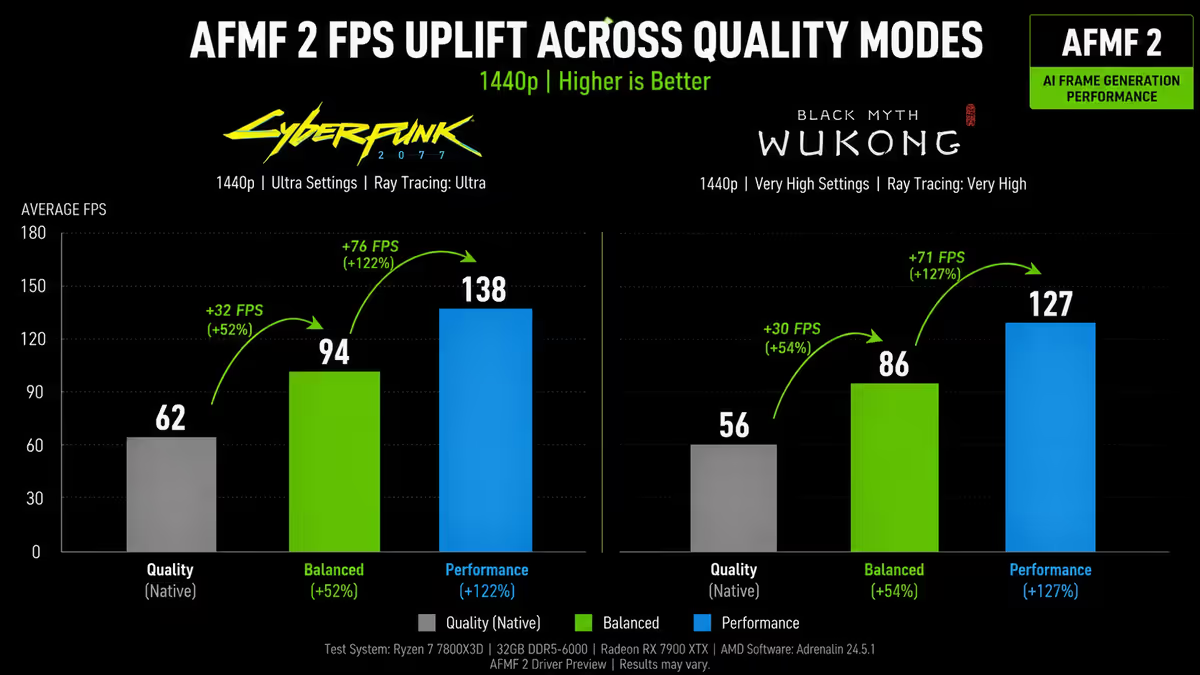
FSR 3 added Frame Generation, AMD’s answer to DLSS 3 Frame Gen. Crucially, FSR 3 Frame Gen works on any GPU (NVIDIA, AMD, Intel) — it doesn’t require optical flow accelerator hardware the way DLSS 3 does. This made high-frame-rate gameplay available to non-RTX-40-series owners for the first time.
FSR 4 is the big one. AMD’s first AI-accelerated upscaling, running on the machine-learning units in RDNA 3+ hardware. The image quality leap is substantial — FSR 4 produces noticeably sharper images with fewer artefacts than FSR 3 at the same preset, finally putting FSR on competitive footing with DLSS. FSR 4 will fall back to FSR 3 quality on older or non-AMD hardware.
Frame Generation — FSR 3’s biggest win
FSR 3’s Frame Generation works similarly to DLSS 3 Frame Gen: the GPU renders two real frames and uses motion vectors plus optical-flow analysis to generate an interpolated frame between them. The on-screen result is roughly doubled perceived FPS.
The key difference: FSR 3 Frame Generation runs in software, using compute shaders rather than dedicated optical-flow hardware. This means it works on virtually any modern GPU — Radeon RX 5000-series and up, GeForce GTX 16-series and up, RTX 20-series and up, Intel Arc. The trade-off is slightly less accurate interpolation than DLSS 3 Frame Gen, which can produce more noticeable artefacts in fast motion.
When FSR 3 Frame Generation shines:
- You own a GTX 16-series, RTX 20-series or RTX 30-series card — DLSS Frame Gen is unavailable but FSR Frame Gen works fine.
- You own an AMD card and a game supports FSR Frame Gen but not DLSS.
- You’re playing a single-player AAA title where the latency cost is acceptable.
When to turn FSR Frame Generation off:
- Competitive shooters — same reasoning as DLSS Frame Gen. Counter-Strike 2, Valorant, Apex Legends.
- Base frame rate below ~45 FPS — interpolation degrades and feels sluggish.
- VR titles — interpolation latency is unacceptable in head-tracked rendering.
FSR 4 — AI acceleration finally arrives
FSR 4 is AMD’s response to the persistent “DLSS just looks better” criticism that dogged FSR 2 and 3. By moving from pure algorithmic upscaling to AI inference on RDNA 3+ hardware, AMD has finally produced an upscaler that competes with DLSS on image quality grounds.
FSR 4 uses the machine-learning units (AMD’s term for ML-optimised compute) on RX 7000-series and newer GPUs to run a trained neural network similar in concept to DLSS. The network was trained on game footage at supersampled resolutions, and the result is reconstruction that handles fine detail, transparent surfaces and fast motion much better than FSR 3.
Where FSR 4 still trails DLSS: very fine detail (chain-link fences, distant foliage) is reconstructed slightly less cleanly. Fast-moving small particles can show more shimmer. These are noticeable in side-by-side analysis videos; in actual gameplay at 1440p or 4K, most players cannot tell the difference.
Where FSR 4 matches DLSS: large-scale image fidelity, anti-aliasing quality, and temporal stability in mid-paced scenes. For the typical AAA gameplay scenario at 1440p Quality preset, FSR 4 and DLSS Quality produce visually equivalent output.
Quality presets — same names, similar trade-offs
FSR exposes the same four preset names as DLSS, with very similar internal render scales. The naming convention is identical and they map almost one-to-one in render percentage.
| Preset | Internal render scale | Typical FPS gain |
|---|---|---|
| Quality | 67% (e.g. 1707×960 → 1440p) | 30-40% |
| Balanced | 59% of target | 40-55% |
| Performance | 50% (e.g. 1280×720 → 1440p) | 55-75% |
| Ultra Performance | 33% of target | 80-120% |
As with DLSS, Quality is the sweet spot at 1440p and Balanced at 4K. Performance and Ultra Performance show their compromises more clearly with FSR 2/3 than with DLSS — the AI training data in DLSS gives it an edge at lower internal resolutions where there’s less information to work with. FSR 4 narrows this gap considerably on supported hardware.
GPU compatibility — works on practically everything
This is FSR’s biggest practical advantage. FSR 1, 2 and 3 (including Frame Generation) run on hardware as old as:
- NVIDIA: GeForce GTX 10-series, 16-series, RTX 20-series, RTX 30-series, RTX 40-series, RTX 50-series.
- AMD: Radeon RX 5000-series, 6000-series, 7000-series, 9000-series (RDNA 4). Some older RX 500/Vega support too.
- Intel: Arc A-series, B-series, integrated Xe graphics on 11th-gen Core and newer.
- Integrated graphics: Ryzen 6000-series APUs and newer, Steam Deck.
- Consoles: Xbox Series X|S, PlayStation 5 (custom FSR-based upscaling used in most cross-platform titles).
FSR 4’s AI-accelerated path requires AMD RDNA 3+ (RX 7000-series and newer). On older or non-AMD hardware, FSR 4 falls back to FSR 3 quality automatically — you still get the feature, just not the best version.
Per-game implementation — adoption is broad
FSR adoption has been particularly strong in titles that need cross-platform parity (console + PC). Notable implementations in 2026:
Excellent FSR implementations:
- Starfield — Bethesda’s launch title for FSR 2, generally clean.
- Forza Horizon 5 — FSR 2 added post-launch, performs well at all presets.
- Avatar: Frontiers of Pandora — supports both FSR 3 and DLSS, FSR 3 Frame Gen looks great.
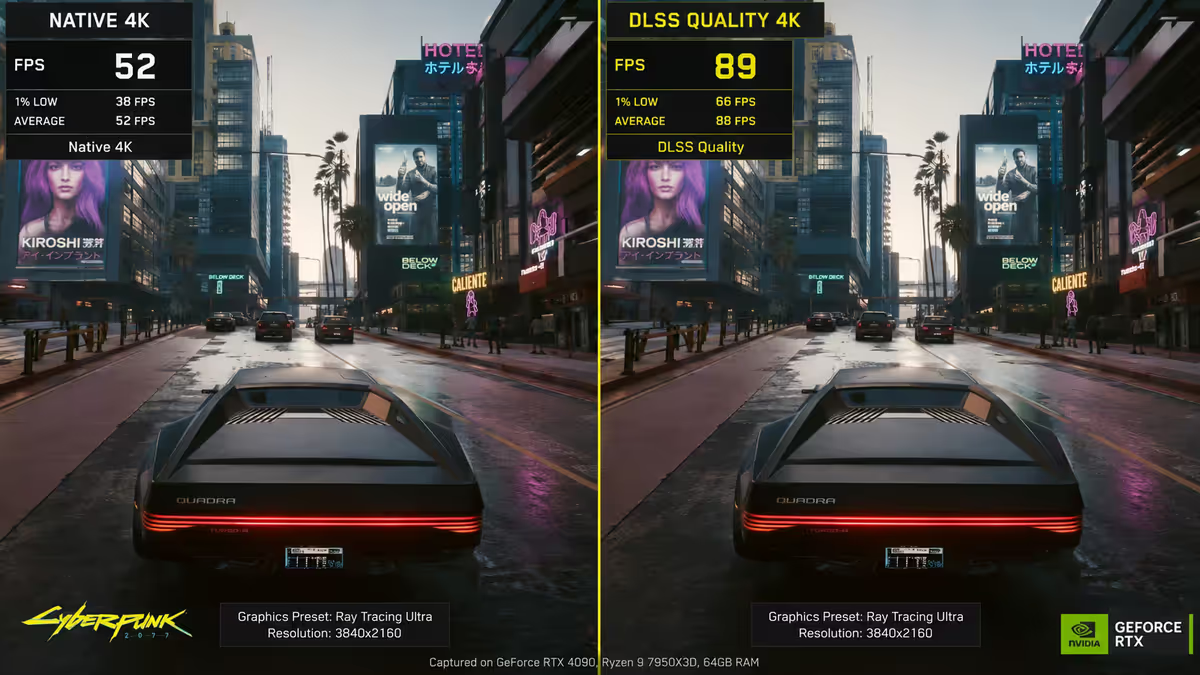
- Cyberpunk 2077 — FSR 3 added in updates, decent though DLSS still leads here.
- Call of Duty: Modern Warfare III / Warzone — competitive titles where FSR 1 is preferred for latency consistency.
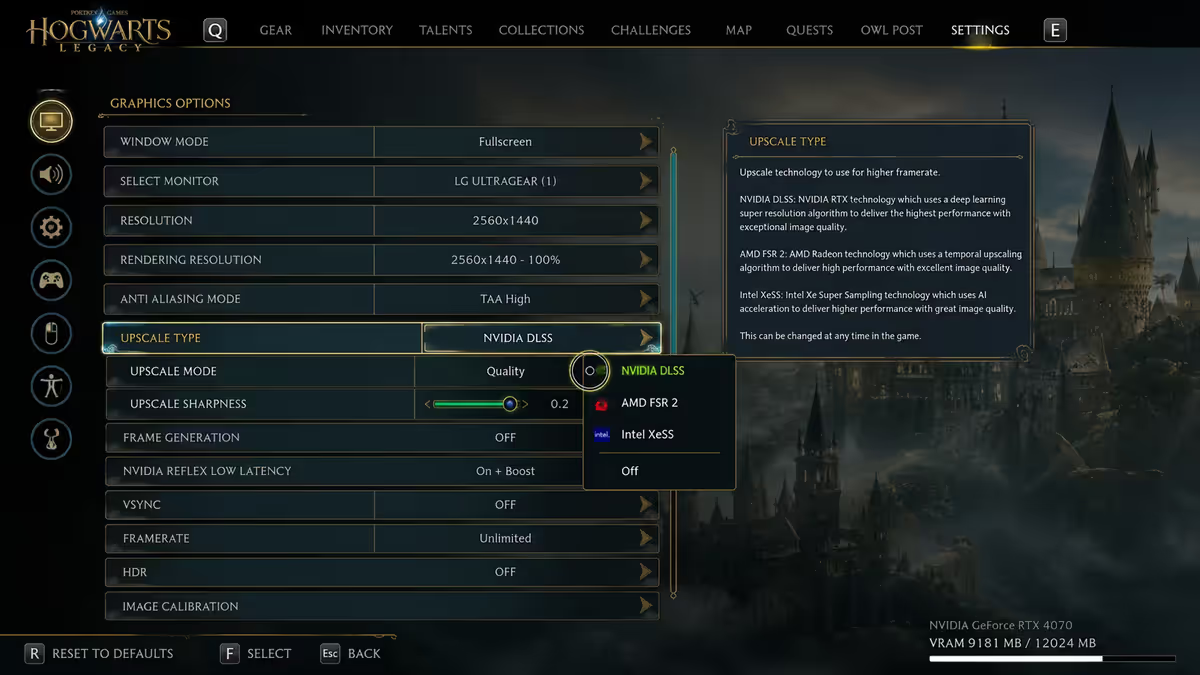
Good FSR implementations: Hogwarts Legacy, Diablo IV, The Last of Us Part I, Spider-Man Remastered, F1 24.
Notable cases where FSR matters most:
- Counter-Strike 2 — supports FSR 1 only (no upscaler in main settings, but spatial RSR works at driver level).
- Console titles ported to PC — FSR is often the only upscaler available because the console version used it.
- Indie titles — FSR’s lower integration complexity makes it the default upscaler for small studios.
Radeon Super Resolution — driver-level FSR
RSR (Radeon Super Resolution) is FSR 1 baked into the AMD driver. Instead of the game integrating FSR, you set the game to render at a lower resolution; the driver intercepts the output and upscales it using the FSR 1 spatial algorithm. Works in virtually any DirectX 11/12 or Vulkan game on AMD Radeon hardware.
When RSR makes sense:
- Older games that don’t support modern FSR or DLSS — RSR works regardless of game support.
- Esports titles where you want every frame and don’t care about image quality nuances.
- When you need a quick FPS boost in a title with no built-in upscaler.
Limitations: RSR is spatial-only (no temporal data), so image quality is closer to FSR 1 than FSR 2/3/4. It works only on AMD Radeon hardware via the AMD Software (Adrenalin) driver. NVIDIA has its equivalent in NIS (NVIDIA Image Scaling), which works similarly. Both are useful tools but not substitutes for proper in-game FSR/DLSS integration.
Radeon Boost is a related feature: dynamic resolution scaling that drops resolution during fast camera motion (when the eye can’t see fine detail anyway) and restores it when motion slows. Combined with RSR, it can recover meaningful FPS in older titles.
Common FSR mistakes
Using FSR 1 when FSR 2/3 is available. Some games still expose FSR 1 in their settings menu for backwards compatibility. If you see both, always pick FSR 2 or FSR 3 — the temporal upscaler produces dramatically better image quality.
Using FSR Performance preset at 1080p. Internal 540p source resolution is too low for the algorithm to reconstruct cleanly. Stick to Quality or play at native. The same caveat applies to DLSS at this resolution — upscaling tech wants higher target resolutions to shine.
Picking FSR over DLSS on an RTX card. Unless the game lacks DLSS or you specifically want FSR 3 Frame Generation on a card too old for DLSS 3, DLSS will produce a sharper image. The exception is older RTX 20/30-series cards that benefit from FSR Frame Gen.
Enabling RSR and in-game FSR simultaneously. If a game has FSR built in, use that — not RSR. Doubling up causes the GPU to upscale twice and image quality suffers. Disable RSR for any game with native FSR support.
Expecting FSR 4 quality on FSR 3 hardware. FSR 4’s AI acceleration requires AMD RDNA 3+. Older AMD GPUs and all non-AMD GPUs fall back to FSR 3 quality. Don’t be disappointed when your RTX 4070 or RX 6700 XT doesn’t get the FSR 4 quality bump.
Key takeaways
- FSR is AMD’s open-source upscaler — works on any GPU including NVIDIA, Intel, consoles and integrated graphics.
- FSR 4 (RDNA 3+) is AI-accelerated and finally competitive with DLSS image quality. Use it on supported AMD cards.
- FSR 3 Frame Generation works on any GPU — unlike DLSS Frame Gen which requires RTX 40+. Single-player only.
- On an RTX card, prefer DLSS where available. On an AMD card or in DLSS-less titles, FSR is the default.
- Radeon Super Resolution (RSR) provides driver-level FSR 1 upscaling for older games without built-in FSR support.
Frequently asked questions
What is AMD FSR and how does it work?
FSR (FidelityFX Super Resolution) is AMD’s upscaling technology. Renders the game at lower internal resolution and reconstructs to your target. Open-source, hardware-agnostic, runs on any modern GPU including NVIDIA, Intel and integrated graphics. FSR 4 is AI-accelerated on RDNA 3+.FSR vs DLSS — which is better?
DLSS typically produces sharper images at the same preset. FSR 4 has narrowed the gap. Bigger differentiator: compatibility. FSR works on any GPU; DLSS only on RTX. Match the upscaler to your GPU.What’s the difference between FSR 1, 2, 3 and 4?
FSR 1: spatial only. FSR 2: temporal accumulation. FSR 3: + Frame Generation. FSR 4: AI-accelerated on RDNA 3+, finally competitive with DLSS image quality.Does FSR Frame Generation work on NVIDIA cards?
Yes — FSR 3 Frame Generation runs on RTX cards, even some GTX cards, Intel Arc and AMD. Purely shader-based, no proprietary hardware needed. Useful for RTX 20/30-series owners who can’t use DLSS Frame Gen.What is Radeon Super Resolution (RSR)?
Driver-level FSR — AMD Adrenalin upscales any DirectX/Vulkan game even without built-in FSR support. Quality is FSR 1 level (spatial only). Useful for older titles. Set game resolution lower, RSR upscales output.Is FSR 4 only for AMD GPUs?
FSR 4’s AI-accelerated path needs RDNA 3+ (RX 7000-series and newer). Falls back to FSR 3 quality on older or non-AMD hardware. Future versions may broaden hardware support.Which games support FSR in 2026?
Over 450 titles plus all current-gen consoles — Starfield, Cyberpunk, Hogwarts Legacy, Avatar, Forza Horizon 5, Call of Duty: MW3, Marvel Rivals. FSR is the default upscaler on Xbox Series X|S and PS5.Should I use FSR if I have an NVIDIA GPU?
Only if the game lacks DLSS, or if you want FSR 3 Frame Gen specifically (works without RTX 40+). Otherwise prefer DLSS in titles that offer both.
Get the Evetech app
Exclusive app-only prices, daily flash sales, and free delivery on orders over R4,000 — download the app and start saving.