Hardware Explainer
What the chipset letters actually mean. — B, X, Z, E decoded for 2026.
A B650 board runs the same Ryzen 7 at the same FPS as a R12,000 X870E. So what is the extra money buying? PCIe lanes, M.2 slots, USB ports, VRM headroom. Here's the real ladder.
- tier ladder
- B → X → E
- in SA stock
- 4 vendors
- price band
- R3.5k–R18k
What the chipset actually does
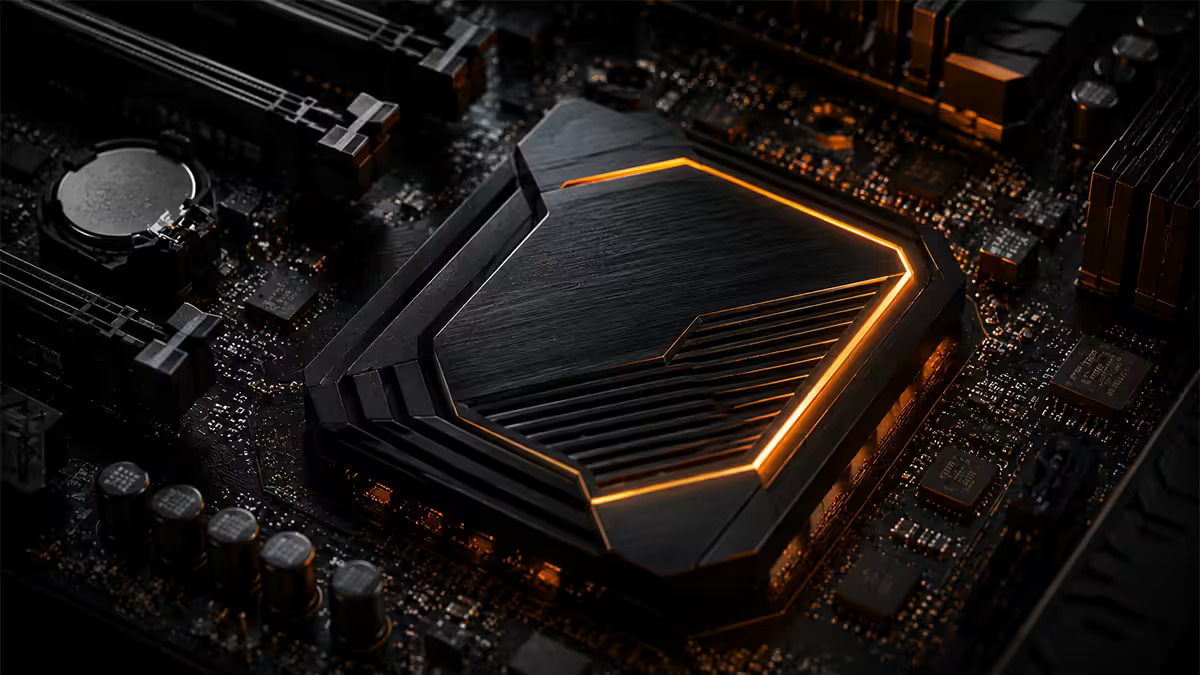
The chipset — sometimes called the PCH (Platform Controller Hub) — is the silicon that sits underneath that small branded heatsink between your bottom M.2 slots. It is not what runs your games. Your CPU does that. The chipset is a glorified I/O controller: it expands the limited number of PCIe lanes coming directly out of the CPU into the array of USB ports, SATA connectors, secondary M.2 slots, audio and networking you see on the board.
A modern Ryzen 9000 CPU exposes only 28 usable PCIe 5.0 lanes directly. Sixteen of those go to the GPU, four to your primary M.2 NVMe SSD, four to the chipset. The chipset then takes those four lanes and explodes them into dozens of downstream connections. The bigger and more expensive the chipset, the more I/O it can present.
That is why a R4,000 B650 board and a R12,000 X870E board can run the same Ryzen 7 7700X at virtually identical frame rates in Cyberpunk 2077 — the CPU is doing the work. The X870E is buying you a richer I/O pool, sturdier voltage regulation and more future-proof spec sheets, not extra raw performance.
AMD letters decoded — A, B, X and E
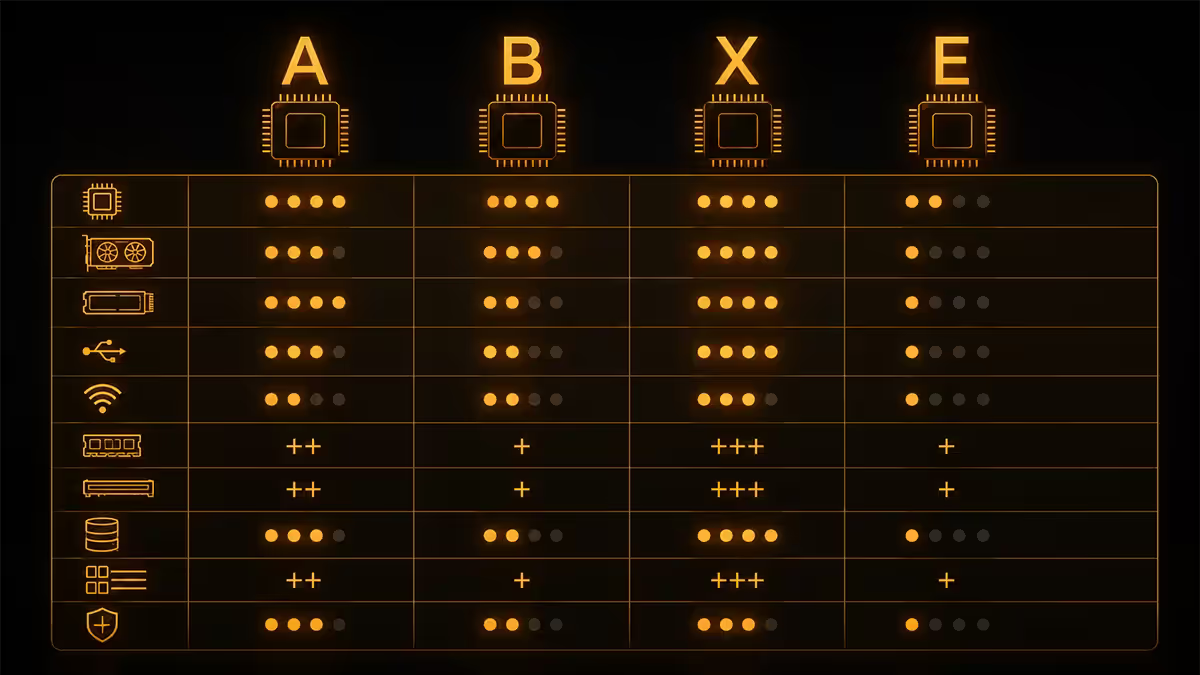
AMD's AM5 platform (Ryzen 7000, 8000, 9000) currently ships four chipset tiers in SA retail. The naming pattern is consistent: first letter = tier, three-digit number = generation.
| Chipset | Tier & target buyer | SA price band |
|---|---|---|
| A620 | Budget OEM only — Ryzen 5 5500 / 7500F | R2,200–R3,000 |
| B650 / B850 | Mainstream — Ryzen 5/7, single GPU + one fast NVMe | R3,500–R6,500 |
| X670 / X870 | Enthusiast — Ryzen 9, multi-NVMe, stronger VRM | R5,500–R10,000 |
| X670E / X870E | Extreme — flagship dual-die, full PCIe 5.0, USB4 mandatory | R8,000–R18,000 |
Important difference between tiers. On AMD, the B-series is not crippled like it is on Intel. Every B650 and B850 board allows full CPU overclocking, Curve Optimizer tuning and Precision Boost Overdrive. The difference between B and X is purely about I/O capacity, lane count and the strength of the VRM stages — not whether you can push your CPU.
The E suffix. X870 vs X870E adds mandatory PCIe 5.0 on both the GPU slot and at least one M.2, mandatory USB4 (40Gbps) and tighter spec compliance for VRM count. In real-world gaming the difference is zero. In a workstation moving 40Gbps over USB4 every day, it matters.
Intel letters decoded — H, B and Z
Intel's chipset naming is older and uses a slightly different ladder. H-series is the entry tier (rarely seen at retail in SA), B-series is mainstream, Z-series is enthusiast and the only tier that allows CPU overclocking.
| Chipset | Tier & target buyer | SA price band |
|---|---|---|
| H610 / H810 | Budget OEM — i3 office builds | R2,000–R2,800 |
| B760 / B860 | Mainstream — i5, no CPU OC, supports XMP | R3,200–R5,500 |
| H770 / H870 | Mid-tier — extra PCIe lanes, still no CPU OC | R4,500–R6,500 |
| Z790 / Z890 | Enthusiast — i7/i9, full CPU OC unlocked | R6,000–R15,000 |
The critical Intel rule. If you want to overclock the CPU multiplier on a Core i7 or Core i9, you must buy a Z-series motherboard. B760, B860, H770 and H870 all refuse to unlock the multiplier. This is not a BIOS quirk — Intel disables it at the silicon level. Memory XMP profiles work on all tiers; only CPU multiplier OC is gated.
For most SA builders running a Core i5 or running a Core i7 at stock speeds with Intel's already-aggressive Turbo Boost, a B860 board makes perfect sense. The Z890 premium is purely for overclockers.
The overclocking rule — AMD vs Intel
This single difference shapes the whole shopping decision and is the source of constant confusion online.
- AMD: every B-series and X-series chipset supports full CPU overclocking. Buy the chipset that matches your I/O needs.
- Intel: only Z-series supports CPU multiplier overclocking. If you bought an unlocked K-series chip (i7-14700K, i9-14900K, Core Ultra 9 285K) and dropped it on a B760 board, you're paying for performance you cannot access.
The corollary: if you bought a non-K Intel CPU (i5-14400, i5-13400F), the Z-series board is wasted money. There's no multiplier to unlock. Match the chipset to whether you intend to push the CPU manually.
What each tier actually gets you
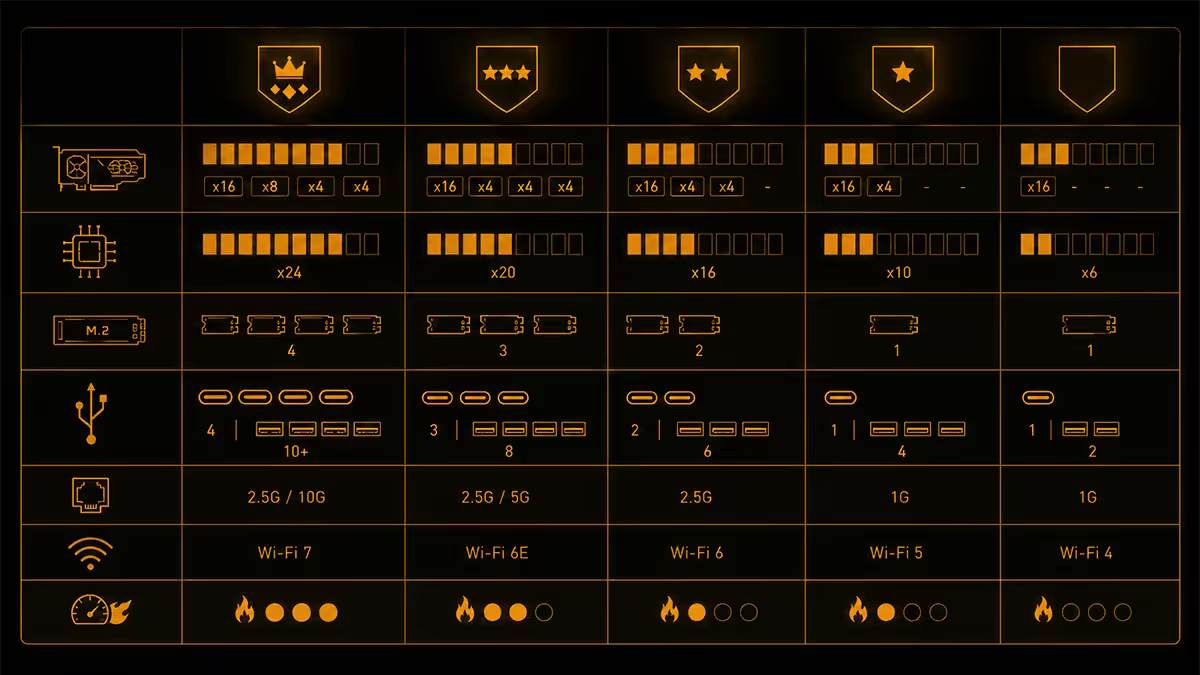
Past the brand and the letter, the real differences appear in the spec sheet. Here's what genuinely changes as you climb the ladder.
PCIe lanes and slots
B-series boards typically expose the CPU's primary PCIe 5.0 ×16 slot for the GPU and one PCIe 5.0 ×4 M.2 slot. Secondary slots run at PCIe 4.0 speeds and share bandwidth with each other. X-series and E-series boards add more native lanes, so you can populate a second M.2 NVMe at full speed without losing GPU bandwidth.
M.2 slots
Entry B-series: 1–2 M.2 slots. Mid B / X-series: 3 M.2 slots. Flagship X870E: 4–5 M.2 slots, with at least two running PCIe 5.0. If you intend to run a dedicated game SSD, a separate Windows SSD and a project drive, count slots carefully.
USB ports and USB4
B-series typically gives you 6–8 rear USB ports, with USB 3.2 Gen 2 (10Gbps) as the fastest. X870 mandates USB4 (40Gbps) — equivalent to Thunderbolt 4 — for external GPU docks, fast SSD enclosures and high-bandwidth peripherals.
VRM power stages
A budget B650 may ship with 8+2 VRM stages at 50A each. A premium X870E ships 18+2+1 stages at 90A each. Real impact: under sustained heavy all-core workloads (Blender renders, video encoding), the premium VRM stays cooler and throttles less. For gaming, the difference is zero.
Networking — 2.5GbE and WiFi 7
B-series: usually 1GbE LAN, often WiFi 6 if WiFi is included. X-series: 2.5GbE standard, usually WiFi 6E. X870E: mandatory 2.5GbE plus WiFi 7. In SA, where home fibre tops out at 1Gbps for most ISPs and home routers are mostly WiFi 5 or 6, the premium networking is rarely usable in practice.
Across the 200,000+ custom PCs we’ve shipped from our Centurion warehouse, the most common upgrade we wish customers hadn’t done is jumping from a B-series to an E-series board “to future-proof.” On a Ryzen 7 build, that R6,000 spend on the chipset upgrade buys precisely zero additional FPS — and the money would have moved them from an RX 7800 XT to an RX 7900 XT, which doubles their gaming experience. Right-size the motherboard. Spend the difference on GPU or SSD capacity.
Behind the Build · From our service bench
Brand tiers — MSI, ASUS, Gigabyte, ASRock in SA
All four major board makers have strong SA retail presence. Brand differences matter less than the specific chipset and SKU you pick within each brand's lineup.
| Brand | Mainstream line | Enthusiast / flagship |
|---|---|---|
| ASUS | PRIME, TUF Gaming | ROG Strix, ROG Maximus |
| MSI | PRO, Tomahawk | MAG, MPG, MEG ACE |
| Gigabyte | UD, Aorus Elite | Aorus Pro, Aorus Master, Aorus Xtreme |
| ASRock | PG Lightning, Steel Legend | Phantom Gaming, Taichi |
Recommended chipset-CPU pairings for 2026
| Your CPU | Right chipset tier | Example board |
|---|---|---|
| Ryzen 5 7600 / 7600X | B650 (mainstream) | ASRock B650M PG Lightning |
| Ryzen 7 7700X / 9700X | B650 or B850 | MSI B650 Tomahawk WiFi |
| Ryzen 9 7900X / 9900X | X670 or B850 | ASUS TUF X670E-PLUS |
| Ryzen 9 9950X / 9950X3D | X670E or X870E | Gigabyte X870E Aorus Pro |
| Core i5-14400F / Ultra 5 245K | B760 or B860 | MSI PRO B860-A WiFi |
| Core i7-14700K / Ultra 7 265K | Z790 or Z890 | ASUS TUF Z890-PLUS WiFi |
| Core i9-14900K / Ultra 9 285K | Z890 (Z790 with BIOS) | MSI MPG Z890 Edge TI WiFi |
Common chipset shopping mistakes
Over-buying for non-K Intel CPUs. Pairing a Core i5-14400F (non-K, can't overclock) with a Z890 board adds R3,000–R5,000 of zero-value silicon. Buy a B860 or H870 instead.
Buying a budget B650 for a Ryzen 9 9950X. The cheap VRM will run hot and throttle under sustained all-core load, slowing your Blender renders and turning your CPU into furnace fuel. Match the VRM tier to the CPU's sustained power draw.
Confusing chipset gen with CPU gen. AM5 chipsets are mostly forward-compatible — a B650 will run a 9950X3D after a BIOS update. But X670 cannot accept a Ryzen 1000 CPU; the sockets are different (AM5 vs AM4). Always confirm socket compatibility before pairing.
Ignoring M.2 slot count. A 1-slot B650 board will frustrate you the moment you add a second NVMe SSD. Count M.2 slots in your spec sheet, especially if you plan a game drive separate from your boot drive.
Key takeaways
- Chipset is the I/O controller — not the engine. CPU does the work; chipset routes USB, M.2 and SATA.
- AMD B-series supports full CPU overclocking. Intel B-series does not — only Z-series unlocks the multiplier.
- E suffix (X870E) means mandatory PCIe 5.0 across the GPU and one M.2, plus USB4. Workstation feature, not a gaming one.
- The premium tier buys you M.2 slots, USB ports and VRM headroom — not extra FPS at stock.
- Right-size the chipset to your CPU and spend savings on GPU or storage. 80% of SA builders are best served by a B-tier board.
Frequently asked questions
What's the difference between B650 and X670 motherboards?
B650 is mainstream (R3,500–R6,000), supports CPU OC, PCIe 5.0 GPU slot and one PCIe 5.0 M.2. X670 (R5,500–R9,000) adds dual chipset dies for more lanes, more M.2 slots and stronger VRMs. For Ryzen 5 or 7 builds, B650 is the right tier.What does the E in X870E stand for?
E means Extreme — flagship AM5 chipset with full PCIe 5.0 across GPU and one M.2, mandatory USB4 (40Gbps), premium VRMs and WiFi 7. Only needed for Ryzen 9 with serious overclocking or content workflows.Can I overclock my CPU on a B-series motherboard?
On AMD — yes. Every B650/B850 supports CPU and memory overclocking. On Intel — no. CPU multiplier OC is locked to Z-series only. B760/B860 still support memory XMP.Does a more expensive motherboard make my PC faster?
Not directly. A R15,000 X870E runs the same Ryzen 7 at virtually identical FPS as a R4,500 B650. Premium boards buy more M.2 slots, USB ports and VRM headroom — not FPS.What is a chipset and where is it on the motherboard?
The chipset is an I/O controller chip under a heatsink between the bottom M.2 slots. CPU handles compute; chipset expands PCIe lanes into USB, SATA and audio controllers.How do I know if my chipset supports my CPU?
Check the motherboard's CPU support list. AM5 chipsets all support Ryzen 7000/8000/9000 after BIOS update. Intel chipsets are stricter — B760/Z790 = 12th–14th Gen, B860/Z890 = Core Ultra Series 2.Do I need WiFi 7 or 2.5GbE Ethernet?
In SA, usually no. Home fibre is mostly 100–500Mbps. WiFi 6E remains adequate. Only matters with local NAS transfers, multi-gig home network or fibre above 1Gbps.Which motherboard brand is best in SA?
All four (ASUS, MSI, Gigabyte, ASRock) are reliable. ASUS TUF widely stocked with strong local RMA. MSI Tomahawk best value. Gigabyte Aorus strong VRMs. ASRock Steel Legend punches above its weight in budget tiers.
Get the Evetech app
Exclusive app-only prices, daily flash sales, and free delivery on orders over R4,000 — download the app and start saving.