Motherboard Buying Guide
How to choose a motherboard. — Pick the chipset, skip the marketing.
The motherboard you pick determines what CPU you can run, how much you can upgrade later, and where your build's I/O ends. Marketing tries to sell you headroom you'll never use — this guide separates "needed" from "nice".
- typical SA range
- R1.5-6k
- sweet spot
- B850 / B860
- is enough for most
- 2 × M.2
Socket compatibility comes first
Your CPU's socket dictates which motherboards you can buy. There's no flexibility here — AMD AM5 CPUs only fit AM5 motherboards, Intel LGA 1851 CPUs only fit LGA 1851 boards. Don't shop motherboards until you've decided your CPU.
- AM5 — for all AMD Ryzen 7000, 8000, 9000 (and likely 10000+) chips. Motherboards: B650, B850, X670, X870
- LGA 1851 — for Intel Core Ultra (Series 2 onwards). Motherboards: B860, H810, Z890
- LGA 1700 — Intel 12th, 13th, 14th gen Core. Older platform, B760 and Z790 boards. New CPU buyers should skip this in 2026
Chipset tiers — what the letters mean
Chipsets are the motherboard's "brain" — they control I/O bandwidth, USB ports, M.2 lanes and overclocking support. Within a socket, chipsets are tiered:
| Chipset | For | Use case | SA price |
|---|---|---|---|
| B850 (AMD) | Mainstream | Ryzen 5 / 7. Sweet spot. | R3,000-R5,000 |
| X870 / X870E (AMD) | Enthusiast | Ryzen 9. Overclocking. More M.2. | R5,500-R10,000 |
| B650 (AMD, last-gen) | Budget | Cheaper but watch BIOS support. | R2,500-R4,000 |
| B860 (Intel) | Mainstream | Core Ultra 5 / 7. Solid value. | R2,800-R4,800 |
| Z890 (Intel) | Enthusiast | Core Ultra 9. Overclocking. | R5,500-R10,000+ |
| H810 (Intel) | Budget | Office / non-gaming only. | R2,000-R3,000 |
The decision rule: Use B-series unless you have a Ryzen 9 / Core Ultra 9 AND you'll actually overclock or fill four M.2 slots. Most builders don't.
ATX vs Micro-ATX vs Mini-ITX
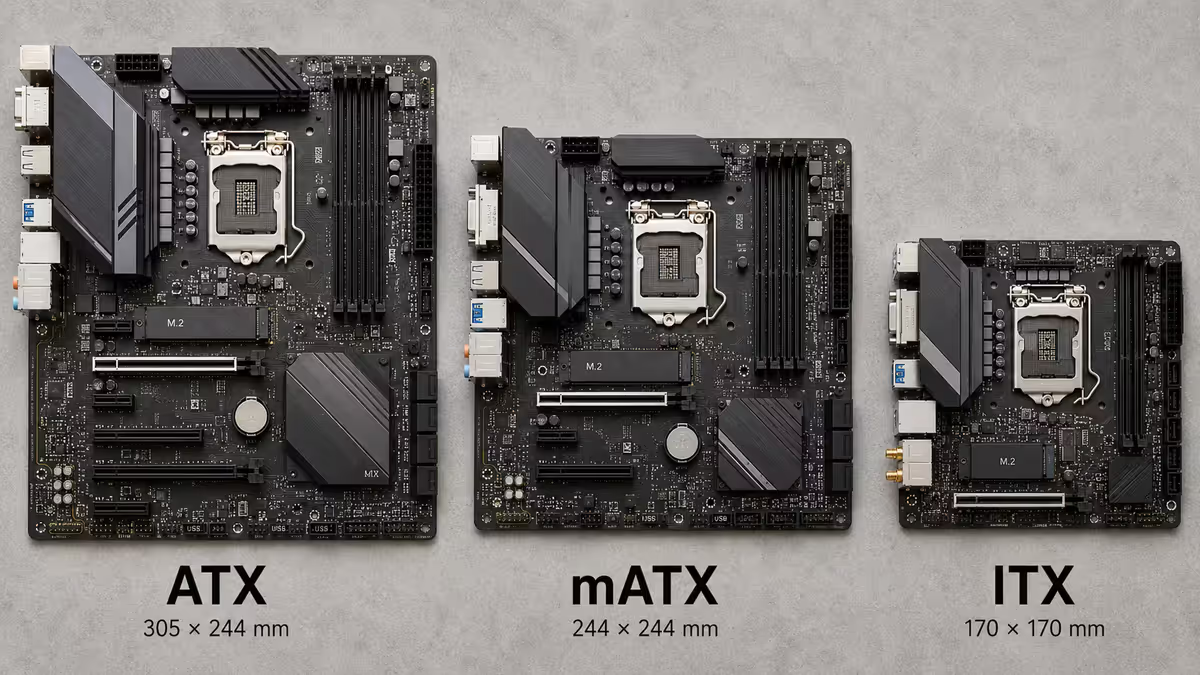
Three sizes, three trade-offs. The right size depends on your case and how much you want to expand.
| Form Factor | Title | Description |
|---|---|---|
| ATX (305 × 244 mm) | Default | Full features, 4 RAM slots, 2-4 PCIe slots, 3-4 M.2 slots. Best for normal builds. |
| Micro-ATX (244 × 244 mm) | Compact + cheaper | 4 RAM slots, 1-2 PCIe, 1-3 M.2 slots. Fits any ATX case too. |
| Mini-ITX (170 × 170 mm) | Small form factor | 2 RAM slots, 1 PCIe, 1-2 M.2. Pricey, premium feature. |
For most builders, ATX is the right pick. Micro-ATX makes sense for budget builds in compact cases. Mini-ITX is a specific aesthetic / portability choice that costs a premium — only worth it if you actually want a small footprint.
Features that matter (and don't)
M.2 slots
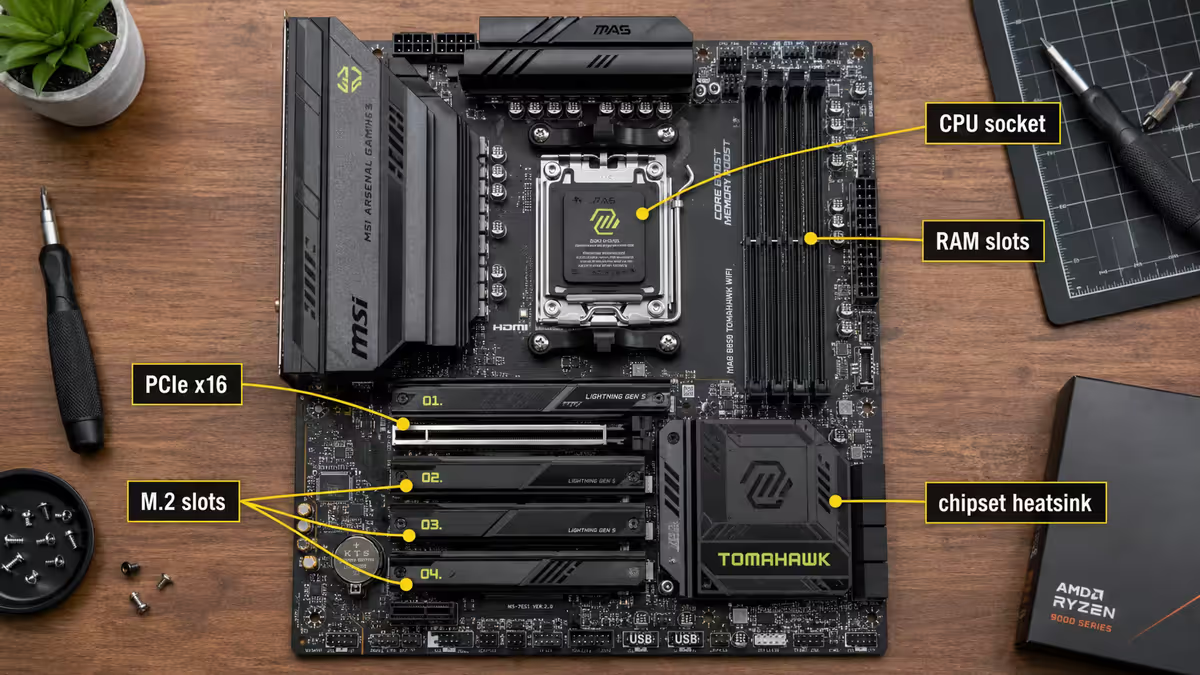
Two M.2 slots is enough for most. One for your boot SSD, one spare. Check whether all slots run at full speed — some boards share lanes between M.2 slots and PCIe or SATA, halving speeds when both are populated. The motherboard manual's "block diagram" tells you the truth marketing won't.
USB ports
Modern boards have 6-12 USB ports. Look for at least four USB-A ports for peripherals, two USB-C ports (one front, one rear) for modern devices, and at least one USB 3.2 Gen 2 (10 Gbps) for fast external storage. USB 4 is nice but only matters if you'll use it.
Networking
2.5GbE ethernet is now standard. Wi-Fi 6E is the practical sweet spot for SA — most fibre ISPs (Openserve, Vumatel, MetroFibre, Frogfoot) ship Wi-Fi 6 routers. Wi-Fi 7 motherboards cost an extra R200-R500 and only pay off if you upgrade your router too.
Audio
Most boards use Realtek ALC4080 or similar codecs — perfectly fine for headphones, speakers and gaming headsets. Premium audio chips (ESS Sabre DACs) only matter if you have R5,000+ headphones, and even then a USB DAC is usually a better upgrade.
RGB headers
Don't pay extra for RGB. Most B-series and X-series boards include 2-3 ARGB headers and 1-2 RGB headers as standard — that's enough for case fans plus a strip or two. The boards that promote "more RGB" are usually charging a premium for software you'll use once.
VRM quality — only matters at the top end
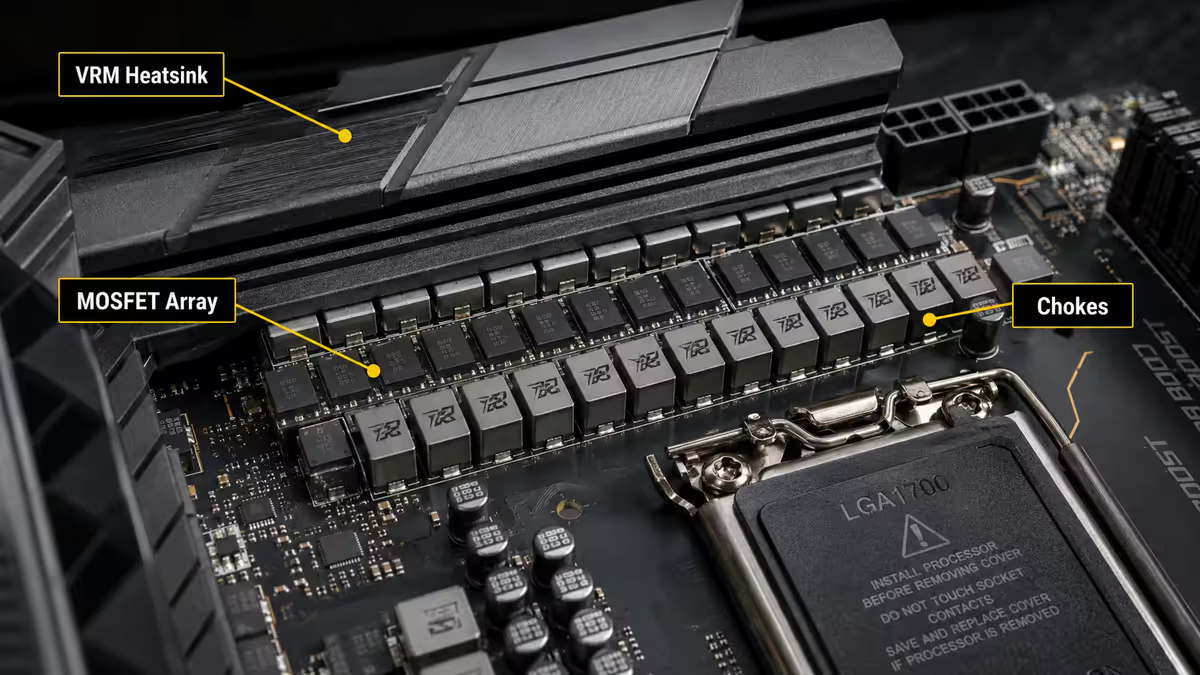
VRM (Voltage Regulator Module) converts your PSU's 12V output to the precise low voltages your CPU needs. Higher-quality VRMs allow CPUs to draw more sustained power without throttling.
For Ryzen 5/7 and Core Ultra 5/7, any current B-series or above board has VRMs that handle the load fine. Don't pay extra here.
For Ryzen 9 9950X3D, Core Ultra 9 285K, or any chip you'll overclock, VRM quality starts to matter. Look for boards with 14+ power phases, dedicated VRM heatsinks (not just the chipset heatsink extended over the VRMs), and good airflow over the VRM area. Hardware Unboxed and Buildzoid on YouTube test specific boards and produce VRM quality tiers — worth Googling before you finalise.
Recommended boards by use case (May 2026)
| Use case | Board | SA price |
|---|---|---|
| AMD Ryzen 5 / 7 mainstream | MSI B850 Tomahawk WiFi or ASUS TUF B850-Plus WiFi | R3,800-R4,800 |
| AMD Ryzen 9 enthusiast | ASUS ROG Strix X870-F or Gigabyte X870 Aorus Elite | R7,500-R9,500 |
| Intel Core Ultra 5 / 7 mainstream | MSI B860 Tomahawk WiFi or ASUS TUF B860-Plus WiFi | R3,500-R4,500 |
| Intel Core Ultra 9 enthusiast | ASUS ROG Strix Z890-F or MSI MAG Z890 Tomahawk | R6,500-R9,000 |
| Compact mATX gaming | MSI B850M Project Zero or ASUS Prime B860M-A WiFi | R3,200-R4,200 |
| Mini-ITX small form factor | ASUS ROG Strix B850-I or Gigabyte B860I Aorus Pro | R5,500-R7,500 |
Common motherboard mistakes
Buying X870 / Z890 for a mainstream CPU. The extra R2,000-R4,000 buys features (extra M.2 slots, better overclocking) that a Ryzen 5/7 or Core Ultra 5/7 never uses. Spend the difference on the GPU instead.
Ignoring case form factor. An ATX motherboard doesn't fit a Mini-ITX case. Confirm your case supports the motherboard size before ordering. Most mid-towers handle ATX and mATX; ITX requires a specifically ITX case.
Underspeccing for a high-end CPU. The opposite of mistake one. Putting a Ryzen 9 9950X3D into a cheap B650 board with weak VRMs throttles the chip under sustained load. Match the board's VRM quality to the CPU's power requirements.
Buying for theoretical future upgrades. "But what if I want a second GPU later" — you almost certainly won't. Multi-GPU gaming has been dead since 2020. Don't pay for PCIe slots you'll never populate.
Skipping built-in Wi-Fi to save R200. Adding it later via USB or PCIe always costs more and uses up a slot. Built-in Wi-Fi 6E or 7 is one of the cheapest upgrades on a modern board.
Key takeaways
- Match the chipset to your CPU's power needs. B850 / B860 covers most builds.
- X870 / Z890 only pays off for Ryzen 9 / Core Ultra 9 chips or genuine overclocking.
- ATX is the right size for most. mATX is a budget shortcut. ITX is a specific aesthetic / portability choice.
- Two M.2 slots is enough. Built-in Wi-Fi 6E is the standard. RGB doesn't need a premium.
- AMD AM5 keeps your upgrade path open through 2027+. Intel LGA 1851 historically supports 2-3 generations.
Frequently asked questions
What motherboard chipset should I pick for an AMD Ryzen CPU?
For Ryzen 5 and 7, B850 is the sweet spot — full features, PCIe 5.0 GPU support, good VRMs, R3,000-R5,000. For Ryzen 9 9950X / 9950X3D, step up to X870 for better VRMs and more M.2 slots.What motherboard chipset should I pick for an Intel Core Ultra CPU?
For Core Ultra 5 and 7, B860 covers everything most builders need. For Core Ultra 9 285K or overclocking, Z890 adds higher RAM speed support and stronger VRMs.What's the difference between B850 and X870 motherboards?
X870 has roughly 30-50% more I/O — extra USB 4, more PCIe Gen 5 M.2 slots, more SATA, sometimes built-in Wi-Fi 7. Also typically higher-quality VRMs. For Ryzen 5/7, B850 is enough.What is a VRM and does it matter?
VRM converts your PSU's 12V to the precise low voltages your CPU needs. Higher-quality VRMs allow CPUs to draw more power for longer without throttling. Only matters for high-power CPUs like Ryzen 9 or Core Ultra 9.Do I need Wi-Fi 7 on my motherboard?
Only if your network supports it. Most SA fibre routers are still Wi-Fi 6. For now, Wi-Fi 6E on the motherboard is the practical sweet spot.ATX vs Micro-ATX vs Mini-ITX — what should I buy?
ATX is the default and supports the most expansion. Micro-ATX is smaller and cheaper. Mini-ITX is tiny and premium-priced. Most builders should pick ATX or mATX.How many M.2 slots do I need on a motherboard?
Two M.2 slots is enough for most — one boot SSD, one expansion. Three or four is only worth paying for if you'll actually fill them.Should I get a motherboard with built-in Wi-Fi?
Yes — it's a small price uplift (R200-R500) and saves adding a USB Wi-Fi dongle or PCIe card later. Most B850/X870/B860/Z890 boards include Wi-Fi 6E or 7 as standard.
Get the Evetech app
Exclusive app-only prices, daily flash sales, and free delivery on orders over R4,000 — download the app and start saving.