Gaming Laptop Buying Guide
How to choose a gaming laptop.
— Specs that matter, specs that don't, SA prices.
What makes a gaming laptop a gaming laptop
A laptop becomes a "gaming laptop" when it has three things working together: a discrete GPU (RTX or Radeon RX, not integrated graphics), a thermal design capable of sustaining that GPU's power draw under load, and a high-refresh display to take advantage of the FPS the GPU produces. Pull any one of those out and you have a Frankenstein build — an integrated-graphics ultrabook with a 165Hz screen is not a gaming laptop.
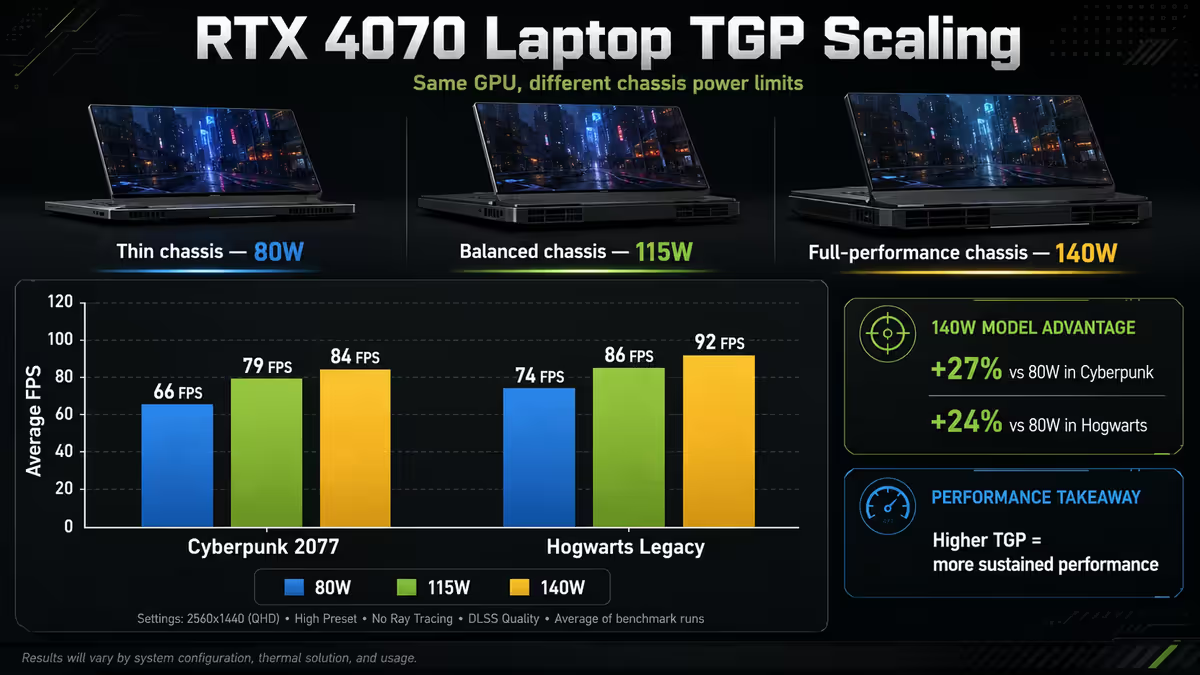
The single most important — and most misunderstood — concept in laptop gaming is TGP (Total Graphics Power). The same GPU chip (e.g. RTX 4070 mobile) can be configured to run anywhere from 60W to 150W depending on the laptop's thermal design. A 60W RTX 4070 in a thin-and-light chassis performs roughly like a desktop RTX 3060. A 140W RTX 4070 in a chunky cooler-heavy chassis performs roughly like a desktop RTX 4060 Ti. Same name, very different performance. Always check TGP in the spec sheet or reviews before buying.
The second most important concept is mobile GPU naming versus desktop. NVIDIA quietly dropped the "Mobile" or "Max-Q" suffix from naming a few years ago. A laptop's "RTX 4070" is not the desktop RTX 4070 — it's typically a cut-down chip with fewer CUDA cores, lower clock speeds and a TDP capped between 60-140W (vs the 200W desktop card). For 2026, expect the laptop variant to deliver roughly the same FPS as the desktop tier below it (laptop RTX 4070 ≈ desktop RTX 4060 Ti).
GPU mobile classes — what each tier actually delivers
Here's what to expect from each NVIDIA RTX mobile GPU tier in 2026, assuming a competent (not premium) thermal design:
| Mobile GPU | ~Desktop equivalent | Best for | SA laptop price tier |
|---|---|---|---|
| RTX 4050 mobile | ~ RTX 3050 desktop | 1080p medium-high, casual | R22k-R28k |
| RTX 4060 mobile | ~ RTX 3060 desktop | 1080p high, esports | R28k-R35k |
| RTX 4070 mobile | ~ RTX 4060 Ti desktop | 1440p high, DLSS-friendly | R38k-R48k |
| RTX 4080 mobile | ~ RTX 4070 desktop | 1440p ultra, light 4K | R52k-R65k |
| RTX 4090 mobile | ~ RTX 4070 Ti desktop | 4K-capable, RT-friendly | R75k-R110k |
| RTX 5070 / 5080 / 5090 mobile | +15-25% over RTX 40 mobile | New 2026 launches | R45k-R130k |
For most SA gamers in 2026, the RTX 4070 mobile is the right pick. It comfortably drives the 1440p 165-240Hz screens that are now standard on R40k-class laptops, supports DLSS 3 Frame Generation for the games that need it, and costs roughly R12-15k less than RTX 4080 mobile models while delivering 80-85% of the gaming experience.
The RTX 4080 mobile step-up makes sense only if you specifically want ray-tracing-on gameplay or you're confident the laptop chassis has the thermals to actually feed 140W+ to the GPU. In thin chassis (ASUS Zephyrus G14, Razer Blade 14) the 4080 throttles to performance levels barely above the 4070. In thick chassis (MSI Raider, Lenovo Legion 7i, ASUS Strix Scar 18) the 4080 stretches its legs.
AMD Radeon mobile (RX 7700S / 7800S) exists but is rare in SA retail — only a handful of ASUS Advantage and Framework 16 models stock it. The ray-tracing gap and DLSS-vs-FSR delta still favour NVIDIA for laptop gaming buyers, despite AMD's strong desktop value.
CPU choice — Intel Core Ultra HX or AMD Ryzen HX
Two viable platforms in 2026 mid-range gaming laptops. Both produce excellent gaming machines; the choice tilts based on what you do outside of games.
Intel Core Ultra HX (Arrow Lake HX / Raptor Lake HX refresh)
- Strengths: Slightly better single-threaded performance (helps in CPU-bound esports like CS2 and Valorant), Thunderbolt 5 connectivity standard, broader laptop model availability in SA.
- Weaknesses: Significantly higher power draw on battery, generally hotter chassis, shorter unplugged battery life.
- Best fit: Desktop replacement use, always plugged in, esports focus, Thunderbolt-eGPU plans.
AMD Ryzen 9 HX (Zen 4/5 HX series)
- Strengths: Substantially better battery efficiency (30-50% longer unplugged for productivity), comparable gaming performance, cooler under sustained load.
- Weaknesses: Fewer model options in SA retail at the budget end, Thunderbolt 5 less common (USB4 standard instead).
- Best fit: Dual-purpose work/gaming machine, frequent travel, gaming on the move.
For gaming alone, the CPU choice barely moves the FPS counter — the GPU does 90% of the work in modern AAA games. Most 2026 RTX 4070-class laptops perform within 2-4% of each other regardless of CPU brand at the same GPU class. The CPU decision is really about everything else: how the laptop behaves unplugged, how warm it gets, how quiet it stays.
Screen specs that actually matter
The screen is the thing you'll be staring at for the next 3-5 years. Don't skimp here — but don't over-pay for specs that don't translate to better gameplay either.
Resolution
1080p on a 15-16" laptop screen looks fine but lacks the crispness of 1440p. Stick to 1080p only on budget builds (R22k-R30k) where the GPU can't push 1440p anyway.
1440p (QHD or 2560×1600 / 2880×1800 16:10) is the modern sweet spot — sharp enough to look premium, light enough for an RTX 4070 to drive at high refresh. Most R35k+ laptops in 2026 ship 1440p as default.
4K on a laptop screen is mostly marketing. At 16" panel size the 1440p-vs-4K visual difference is barely perceptible from normal use distance, but 4K halves your FPS. Skip 4K unless you specifically want it for video editing/colour work.
Refresh rate
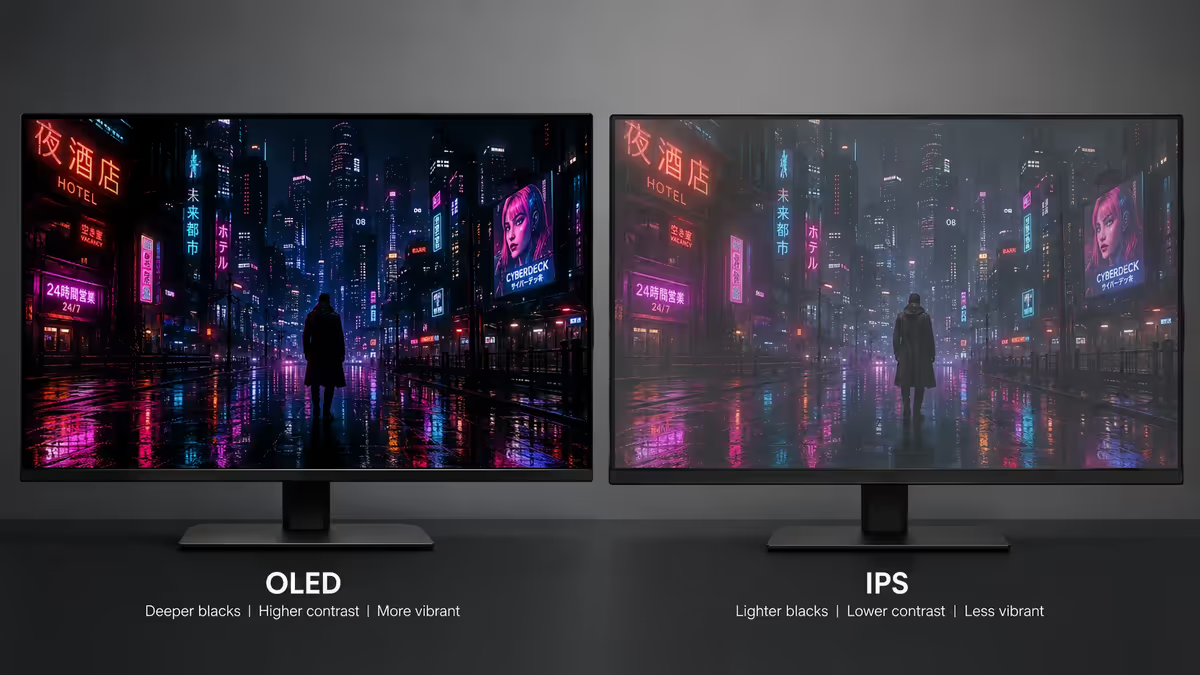
165Hz is the modern baseline in 2026. 240Hz is becoming standard on R40k+ models and worth the upgrade. 360Hz panels exist on top-tier esports machines (ASUS ROG Strix Scar G18, MSI Titan, Razer Blade) but are niche overkill for non-pro players. OLED 240Hz panels are the new premium standard for single-player gaming — visible difference vs IPS, contrast is dramatic, motion clarity is best-in-class. R5-R8k premium over equivalent IPS.
Panel type
IPS is the default — good colours, decent viewing angles, fast modern response times (around 3ms). OLED is the new gold standard — perfect blacks, instant pixel response, vibrant colours. The downsides: risk of burn-in over 4-5 years if static UI elements are constant, and OLED at desk distance can show pixel structure on smaller panels. Mini-LED exists on top-tier ASUS ROG and MSI machines — IPS-like longevity with OLED-like contrast. Premium price.
RAM and storage — what to buy, what to upgrade
16GB DDR5 is the 2026 floor. 32GB is the comfortable spec if you keep Chrome + Discord + Spotify + OBS open while gaming, or if you do creative work alongside gaming. 64GB is overkill for pure gaming but useful if you're a content creator running multiple After Effects sessions.
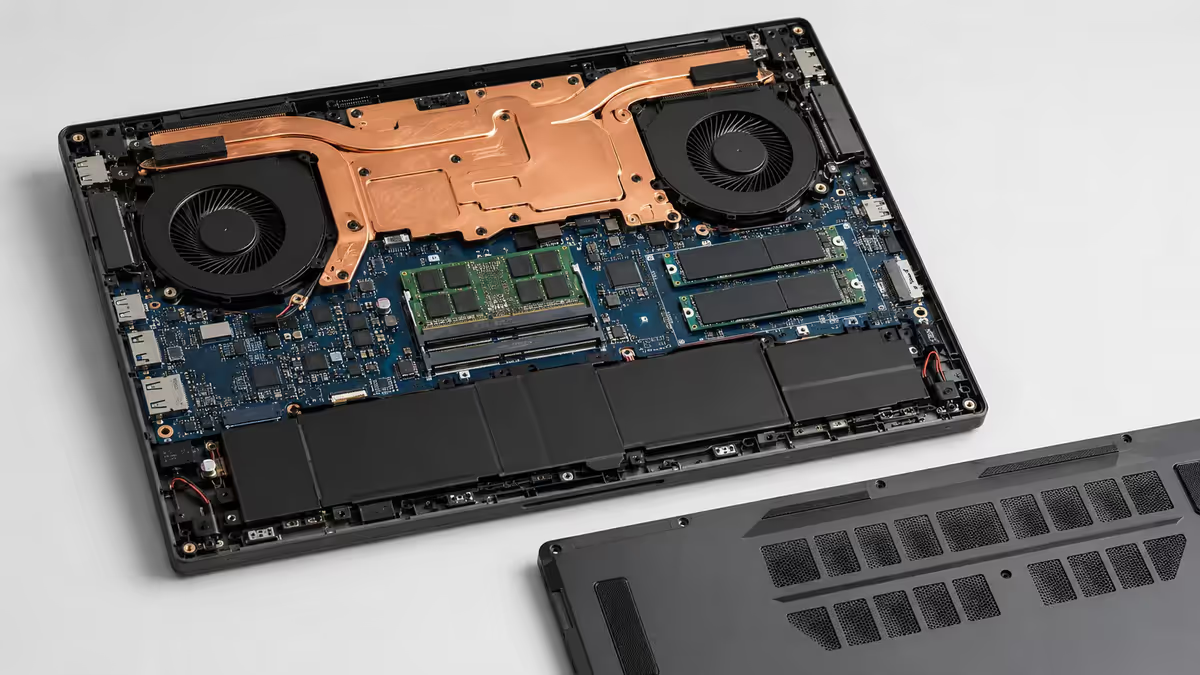
Verify RAM upgradability before buying. Most R35k+ laptops have two SO-DIMM slots — buy 16GB now and add another stick later if needed. Some thin-and-light gaming laptops (ASUS Zephyrus G14, MSI Stealth, Razer Blade 14) solder RAM directly to the motherboard — you cannot upgrade. If you buy a soldered-RAM model, get 32GB at purchase even if you don't think you need it.
For storage, 1TB NVMe is the 2026 floor. Modern AAA games are 80-150GB each — Call of Duty: Modern Warfare is 200GB+ on its own. A 512GB SSD fills up within 3-4 game installs. 2TB is the comfortable target for serious gamers. Verify the laptop has a second M.2 slot for future expansion — most mid-range and premium models do, but some ultra-thin gaming laptops only have one slot.
PCIe Gen 4 is the standard; Gen 5 NVMe is appearing in premium 2026 models. The Gen 5 speed bump is mostly invisible in gaming today but will matter for DirectStorage-enabled titles in the future. Not worth paying a premium for Gen 5 in 2026 unless you specifically benefit.
Thermals and noise — the hidden spec
Thermals are the single biggest determinant of whether you're happy with your laptop in year two and three. A well-cooled RTX 4070 outperforms a thermally-throttled RTX 4080. Two laptops with identical spec sheets can be 20-25% apart in sustained gaming performance based on cooling design.
What good cooling looks like in 2026:
- Dual fans minimum, triple fans on premium machines (ASUS ROG Strix Scar 18, MSI Raider 18).
- Vapour chamber heat-spreader (not just heat pipes) for the GPU on R45k+ machines.
- Top and rear exhaust vents (not just bottom) for sustained airflow when on a desk.
- Quick-access intake vents not blocked when used on a lap or soft surface.
- Liquid metal applied to CPU/GPU factory (premium ASUS ROG models, some MSI Stealths) for 5-8°C lower temps.
Acoustics are the hidden trade-off. All gaming laptops are loud under load — the question is how loud and what frequency. ASUS ROG and Lenovo Legion are generally the quietest under sustained gaming. Acer Predator Helios and MSI Titan are the loudest. Headphones solve most of this in practice, but if you'll be sharing the room with others, look at noise-floor reviews on Notebookcheck.
Undervolting transforms a lot of laptops. A 50-80mV CPU undervolt and 30-50mV GPU undervolt typically drops temps 8-12°C with zero performance loss, sometimes a small gain because the chip stays out of throttle. ASUS Armoury Crate, MSI Center and Lenovo Vantage all support easy undervolting in 2026. Spend 30 minutes after first boot tuning this — pays off for the lifetime of the machine.
Battery life — the truth
Every gaming laptop is dishonest about battery life. The marketing number assumes light productivity at low brightness. Real-world numbers:
| Use case | Intel HX laptop | AMD Ryzen HX laptop |
|---|---|---|
| Marketing claim | "Up to 10 hours" | "Up to 12 hours" |
| Light productivity (Office, browser) | 4-6 hours | 6-9 hours |
| Mixed work + Zoom | 3-5 hours | 5-7 hours |
| Gaming on battery | 45-75 minutes | 50-80 minutes |
| Video playback | 5-7 hours | 7-10 hours |
Gaming on battery is essentially pointless across every gaming laptop — they all throttle aggressively to protect battery life and you'll see 40-60% of plugged-in performance. Don't buy a gaming laptop expecting to game unplugged for hours. Buy it expecting to game on mains power, and to have a usable productivity experience away from the wall.
If unplugged use is important to you, lean AMD Ryzen. The efficiency advantage is real and consistent across every 2026 model we've tested.
SA pricing tiers and brand picks (mid-2026)
Entry tier (R22k-R30k) — RTX 4050 / 4060 mobile
Best picks: Acer Nitro V 16, HP Victus 16, Lenovo LOQ 15IRX9, ASUS TUF Gaming F15. Get 1080p 144-165Hz panels, RTX 4060 (or 4050 at the bottom), Intel i5/i7 or Ryzen 5/7. Avoid the absolute bottom of the range — 8GB RAM and 512GB SSD models will frustrate you within 6 months.
Mid tier (R32k-R45k) — RTX 4060 / 4070 mobile
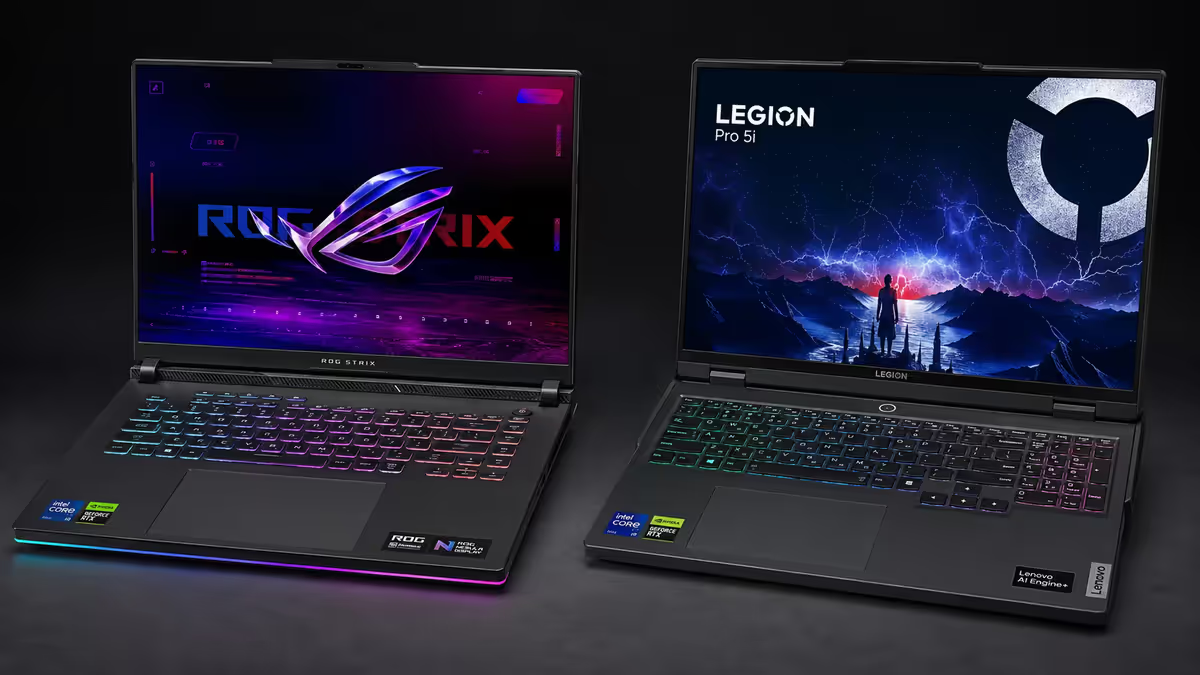
Best picks: ASUS ROG Strix G16, MSI Vector 16, Lenovo Legion Pro 5i, HP Omen 16, Acer Predator Helios 16. This is the volume tier — 1440p 165-240Hz, RTX 4070 mobile, 16-32GB DDR5, 1TB NVMe. Most SA gamers should land here. Excellent thermal designs across the category in 2026.
Premium tier (R48k-R70k) — RTX 4080 mobile + premium chassis
Best picks: ASUS ROG Strix Scar 16/18, Lenovo Legion Pro 7i, MSI Raider GE78 HX, Razer Blade 16. 1440p or 4K mini-LED panels, RTX 4080 mobile at high TGP, 32GB DDR5, premium thermal designs. Worth the step-up only if you want maxed settings + ray tracing.
Halo tier (R75k+) — RTX 4090 mobile / RTX 5080-5090 mobile
Best picks: ASUS ROG Strix Scar 18, MSI Titan 18 HX, Lenovo Legion 9i, Alienware m18. Effectively desktop replacements with portability as a side benefit. Heavy (3-3.5kg), thick, but uncompromised.
Common gaming laptop mistakes
Buying GPU class without checking TGP. "RTX 4070 mobile" alone tells you almost nothing — the same name spans 60W to 140W variants with 25%+ FPS differences. Always check the spec sheet TGP or read a benchmark from someone who measured it. Notebookcheck and Jarrod's Tech are gold standard sources.
Ignoring thermal design for spec sheets. A thermally-throttled RTX 4080 frequently performs worse than a well-cooled RTX 4070 in sustained gaming. Read sustained-performance reviews, not just peak-benchmark numbers. The Witcher 3 hour-two test tells you more than the Cyberpunk 2-minute benchmark.
Buying laptops with soldered RAM. Razer Blade 14, ASUS Zephyrus G14, some MSI Stealth models have non-upgradable RAM. If you buy these, get 32GB at purchase or you'll regret it in 18-24 months. Verify the spec sheet says "2× SO-DIMM" rather than "soldered" or "non-removable".
Skipping the OLED upgrade in 2026. If you're at the R40k+ tier and OLED is offered for a R5-R7k premium, take it. The visual difference vs IPS in single-player AAA games is genuinely transformative. Skip OLED only if you're an esports player worried about burn-in from static HUD elements.
Expecting desktop performance from a laptop. A R40k laptop ≈ R28k desktop in raw gaming performance. The premium pays for portability — accept that going in. If you don't actually need to move it, build a desktop and save R12-15k.
Not undervolting. 30 minutes with ASUS Armoury Crate or Intel XTU at first boot drops temps 8-12°C and prolongs lifetime substantially. Free FPS preservation. Skip this and you'll be thermal-throttling within 18 months.
Key takeaways
- Sweet spot 2026 SA gaming laptop: RTX 4070 mobile + 16GB DDR5 + 1TB NVMe + 16" 1440p 165-240Hz IPS, in the R38k-R48k band.
- Check TGP (Total Graphics Power) — same-named GPUs range 60-140W with 25%+ FPS difference between extremes.
- Thermals matter more than peak specs — sustained performance reviews trump 2-minute benchmark spikes.
- AMD Ryzen HX wins on battery efficiency by 30-50%; Intel HX wins on Thunderbolt and esports CPU performance.
- Verify RAM and SSD are upgradable. Soldered RAM is the silent killer of long-term value.
Frequently asked questions
What is the best gaming laptop GPU in 2026?
RTX 4070 mobile (or RTX 5070 mobile in new releases) — drives 1440p 165Hz comfortably, supports DLSS 3, R38k-R48k band. RTX 4060 mobile for budget; RTX 4080 mobile if thermals support it.Is Intel HX or AMD Ryzen HX better for gaming laptops?
Both competitive. Intel wins on single-thread for esports and Thunderbolt. AMD wins on battery efficiency by 30-50%. GPU matters more than CPU for gaming itself.What screen refresh rate do I need on a gaming laptop?
165Hz baseline in 2026. 240Hz becoming standard on R40k+ models. OLED 240Hz is the new premium for single-player.How much RAM do I need in a gaming laptop in 2026?
16GB DDR5 floor. 32GB comfortable target. Verify upgradability — soldered RAM is non-upgradable, must spec 32GB at purchase.How much storage do I need in a gaming laptop?
1TB NVMe floor. 2TB target. Modern AAA games are 80-150GB each. Verify second M.2 slot for future expansion.Does battery life matter on a gaming laptop?
For gaming itself, no — every gaming laptop is 1-2 hours unplugged regardless. For productivity, yes — AMD Ryzen models deliver 6-9 hours office work vs 4-6 for Intel HX.Which gaming laptop brands are best in South Africa?
ASUS ROG, MSI, Lenovo Legion top tier. Acer Predator/Nitro for value. HP Omen/Victus solid mainstream. Razer Blade premium but limited SA stock. Avoid no-name OEM.Is a gaming laptop a good buy compared to a desktop in 2026?
For raw value, no — R35k desktop matches R45k laptop. For portability, yes. Mobile GPUs run at 60-80% of desktop equivalent TDP. Worth it if mobility matters.
Related guides
Get the Evetech app
Exclusive app-only prices, daily flash sales, and free delivery on orders over R4,000 — download the app and start saving.