Laptop Guide · Size Comparison
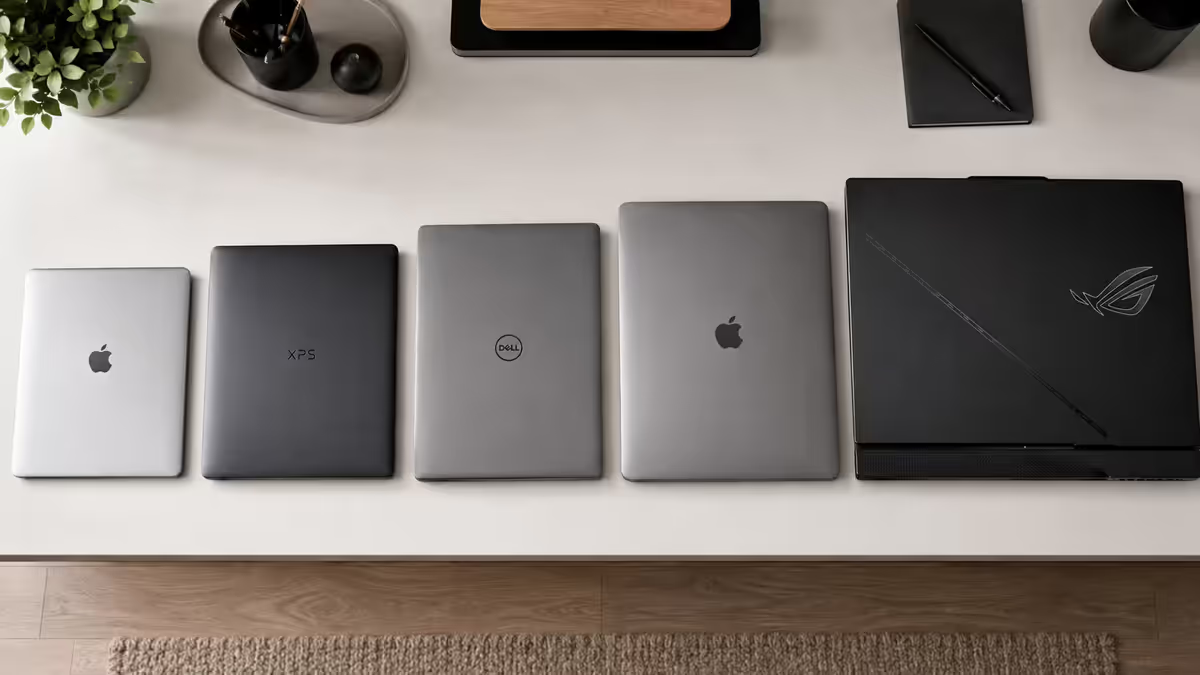
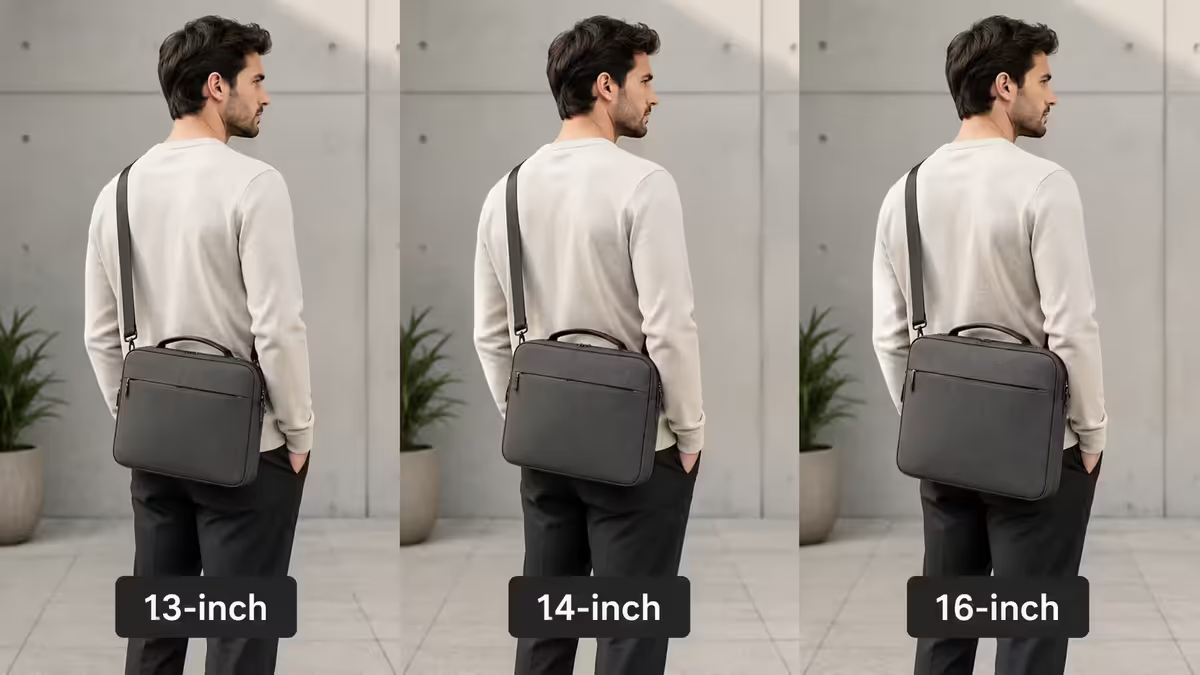
13" · 14" · 15" · 16" · 17" — Which laptop screen size is right for you?
Pick the wrong size and you'll regret it daily. The good news: there's a sensible default for almost every use case, and the modern 14-inch sweet spot covers more people than any other size.
- portability sweet spot
- 14"
- desk sweet spot
- 16"
- aspect ratio winner
- 16:10
Why screen size matters more than you'd think
Screen size affects daily comfort more than almost any other laptop spec. Get it right and the laptop disappears into your workflow. Get it wrong and you'll fight it for the next 3-4 years — either lugging a brick that's heavier than you need, or squinting at a screen that's too small for the work you actually do.
Three factors interact:
- Physical footprint — how much desk and bag space the laptop takes.
- Screen real estate — how much you can see and edit simultaneously.
- Weight and battery — bigger screens generally mean heavier laptops and shorter battery life under load.
The right size for you is the smallest screen that comfortably handles your daily multitasking pattern. For knowledge work in 2026, that target has shifted from "15.6 inch" (the 2010s default) to "14 inch" (the modern sweet spot) — because better aspect ratios and thinner bezels deliver more usable screen at a smaller footprint.
13 inch — peak portability
Footprint: roughly 300 × 210 mm. Weight: 1.0-1.4 kg. Battery: 15-22 hours light use.
13 inch is the smallest mainstream laptop size that still has a usable keyboard. It's the territory of MacBook Air, Microsoft Surface Laptop Go, Lenovo X1 Nano, ASUS Zenbook S 13, and Dell XPS 13. These laptops disappear into a bag.
Best for:
- Students carrying a laptop between lectures all day.
- Consultants and business travellers in and out of meetings.
- Anyone whose primary work happens at a desk with an external monitor — the laptop becomes a portable terminal.
- Writers and email-heavy users who don't need multi-window multitasking.
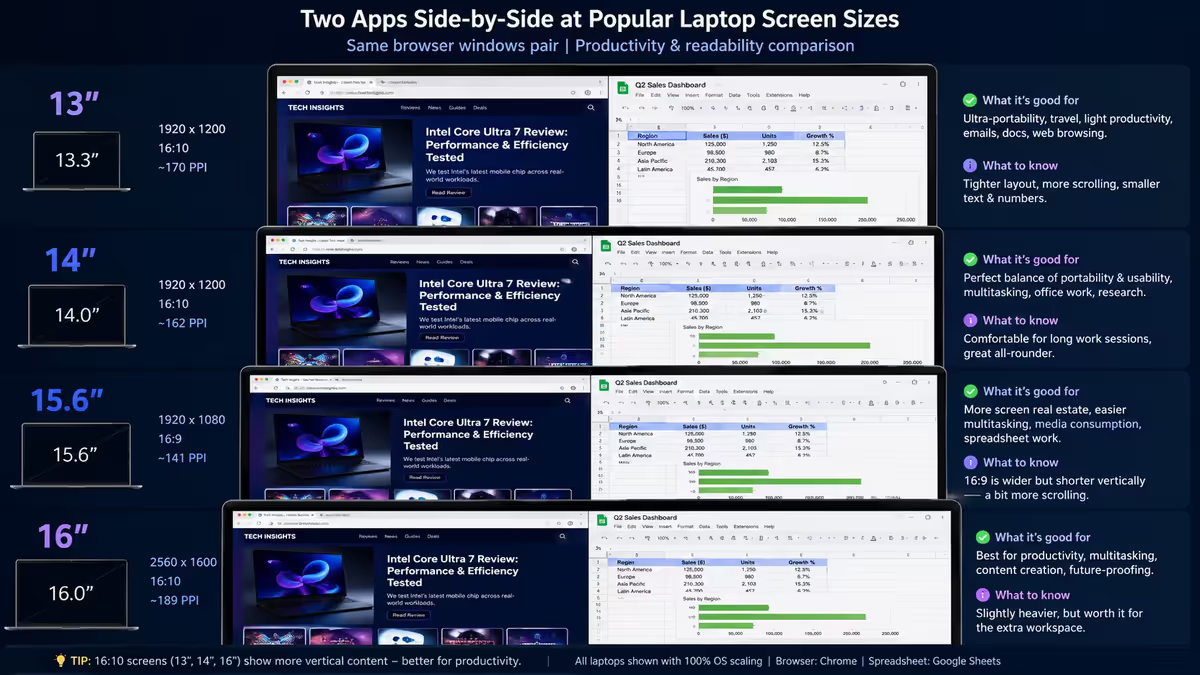
Trade-offs: two browser windows side-by-side feel cramped. Excel spreadsheet work past 6-8 columns is painful. Video editing is workable but tight. The keyboard is sometimes shrunk to fit (smaller arrow keys, narrower Function row).
14 inch — the modern sweet spot
Footprint: roughly 315 × 220 mm. Weight: 1.2-1.6 kg. Battery: 12-18 hours light use.
14 inch is where the industry has converged for flagship ultraportable laptops. Apple MacBook Pro 14, Dell XPS 14, Lenovo ThinkPad X1 Carbon, ASUS Zenbook 14, HP EliteBook 845 G11, Microsoft Surface Laptop 7 (14"). The same chassis footprint as a 13" laptop from 2020, but with meaningfully more screen, thanks to thinner bezels and the 16:10 aspect ratio.
Best for:
- The vast majority of professionals — knowledge workers, developers, designers, marketers.
- Anyone who works at a desk most of the time but travels with the laptop weekly.
- Creative work where the laptop is the primary editing surface (Premiere, Lightroom, Figma).
- Students who need real screen real estate but don't want to lug a 2 kg machine.
The 14" advantage: two browser windows side-by-side actually work. Spreadsheets are usable. Video editing timelines have room. Daily portability remains. It's the closest thing to "no compromises" in modern laptops.
15 inch — the legacy choice
Footprint: roughly 360 × 240 mm. Weight: 1.5-2.0 kg. Battery: 8-12 hours light use.
15.6 inch was the default mainstream laptop size for two decades. Most budget and business laptops still ship in this size — Dell Inspiron 15, HP Pavilion 15, Lenovo IdeaPad 5, ASUS Vivobook 15. Some gaming laptops too (MSI Cyborg 15, ASUS TUF Gaming A15).
Best for:
- Budget buyers — 15.6 inch is where the entry-level pricing lives.
- Business buyers in conservative procurement environments where 15.6 inch is the default in tender specifications.
- Specific business laptops with strong keyboards (ThinkPad T-series) — though even ThinkPad is shifting to 14" and 16".
The 15" problem in 2026: it's no longer the best-balanced choice. It's a touch too big for daily portability (1.7-2.0 kg with a 360 mm-wide footprint) and a touch too small for serious desk work (16:9 aspect ratio = less vertical screen than a 14" 16:10). New flagship designs have skipped it — Apple, Dell XPS, Lenovo X1 lines all went from 13" + 16" with no 15" option in between.
16 inch — the new 15"
Footprint: roughly 360 × 250 mm. Weight: 1.8-2.4 kg. Battery: 8-14 hours light use.
16 inch is the modern mainstream-creator-laptop size. Apple MacBook Pro 16, Dell XPS 16, Lenovo Legion Pro 7i 16, ASUS ROG Zephyrus G16, MSI Vector 16. By using thinner bezels and 16:10 aspect ratio, vendors fit a 16" screen in roughly the same external dimensions as a 2010s 15.6" laptop — making 16" the new mainstream default for any laptop that prioritises screen real estate.
Best for:
- Creators — video editors, photographers, 3D artists, illustrators.
- Developers running multiple IDE panes, terminal, browser docs side-by-side.
- Gamers who want bigger screen on the go (gaming laptops at 16" are the new standard).
- Anyone whose laptop primarily lives on a desk but moves occasionally between rooms or to client sites.
Worth knowing: 16" laptops typically have stronger thermal headroom (more chassis volume for fans and heat pipes), which means the H-series CPUs and discrete GPUs in them sustain higher performance under load than the same chips in a 14" chassis. If you'll push the laptop hard, 16" usually delivers measurably better sustained performance.
17 inch — desk-replacement only
Footprint: roughly 400 × 290 mm. Weight: 2.2-3.0 kg. Battery: 3-6 hours under gaming load, 6-8 hours light use.
17 inch laptops are a specific niche in 2026 — gaming and mobile-workstation desktop-replacements. ASUS ROG Strix Scar 17, MSI Titan 18 HX (the only 18-inch survivor), Lenovo Legion Pro 7i 16 (which has effectively replaced 17"), Razer Blade 16 (formerly Blade 17). The category has shrunk; many vendors have moved to 16" as the top of their mainstream lineup.
Best for:
- Single-PC users who want a desktop replacement that occasionally moves between rooms.
- Mobile workstations — engineers running CAD, scientific simulation, AI training on the road.
- Gaming-focused users who travel rarely but want one device for everything.
Don't buy 17" if: you commute with it daily, use it at coffee shops, or care about battery life. The 17" chassis carries significant cooling and is rarely under 2.4 kg. The footprint doesn't fit on most economy-class plane trays.
Aspect ratio — the secret variable
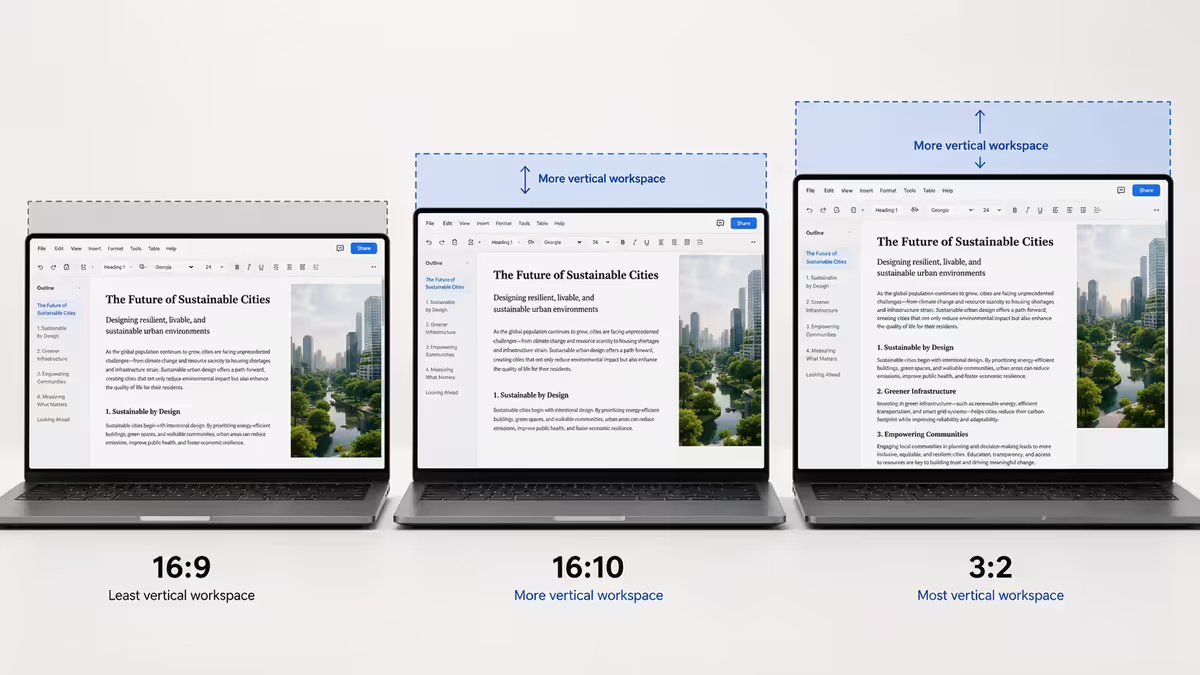
Same diagonal, different aspect ratio = very different usable screen. This is one of the biggest under-appreciated factors in modern laptops.
| Aspect | Best for | Found on |
|---|---|---|
| 16:9 (wide) | Movies, gaming, video editing timeline | Budget laptops, most gaming laptops |
| 16:10 (slightly taller) | General purpose — best all-rounder | MacBook, XPS, X1 Carbon, Zenbook, ROG flagship |
| 3:2 (squarish) | Documents, spreadsheets, code | Microsoft Surface, some Huawei MateBook |
| 3:2 with notch | Productivity + webcam quality | MacBook Pro 14/16 (effectively 16:10.4) |
The shift from 16:9 to 16:10 is the single biggest laptop-display improvement of the last five years. A 14" 16:10 display has roughly 11% more usable vertical pixels than a 14" 16:9 display — enough to show an extra paragraph of text in a document, two extra rows in a spreadsheet, and two more lines of code in an IDE. It also makes the chassis better-proportioned for typing because the keyboard sits relatively closer to the user's hands.
3:2 (Surface Pro, Surface Laptop) goes further — even more vertical screen for the same diagonal. Great for documents, spreadsheets, code; suboptimal for video (more black bars). 3:2 is a strong choice if you do significant document work; 16:10 if you want a balanced compromise.
Resolution pairing by screen size
Match the resolution to the size for sharp text without wasted GPU/battery overhead:
| Screen size | Minimum | Ideal |
|---|---|---|
| 13" | 1920×1200 (FHD+) | 2560×1600 (QHD+) or higher |
| 14" | 1920×1200 | 2880×1800 (MacBook Pro 14) or 2560×1600 |
| 15"-16" | 1920×1200 | 2560×1600 or 3072×1920 / 4K |
| 17" | 2560×1440 | 3840×2160 (4K) for creator workflows |
Avoid 1366×768 at any size in 2026 — it's a budget-laptop spec hold-over that delivers visibly fuzzy text. Even on 13" laptops, 1920×1200 should be the minimum starting point.
Avoid 1080p on 17" — pixel density drops below 130 PPI, making text look blurry at normal viewing distance. At 17", 2K or 4K is the right pairing.
Refresh rate by laptop category
Refresh rate matters most for gaming and motion smoothness — less so for productivity. Match the panel rate to the use case:
- Business / productivity: 60-90 Hz is fine. ThinkPad / EliteBook / Latitude category.
- Creator / general consumer: 90-120 Hz. MacBook Pro, XPS, X1 Carbon, Zenbook all default to this range.
- Gaming: 144-240 Hz. Anything below 144 Hz feels slow in shooters.
- Pro gaming / competitive esports: 240-480 Hz. ROG Strix Scar, Razer Blade Pro, Alienware m18.
Note that higher refresh rate panels consume more battery — a 120 Hz panel can use 15-20% more power than a 60 Hz panel at the same brightness. Many laptops now support dynamic refresh (LTPO panels), automatically dropping to 60 Hz for static content to save battery.
Weight and battery trade-offs
Bigger screen + more powerful chip = heavier laptop and shorter battery life under load. The exact trade-off varies by chassis design, but the relationship is consistent:
| Daily carry | Acceptable weight | Typical battery |
|---|---|---|
| Hand-carry to meeting | Under 1.3 kg | 12-20 hr light |
| Backpack, daily commute | Under 1.6 kg | 10-15 hr light |
| Backpack, occasional travel | Under 2.0 kg | 8-12 hr light |
| Desktop replacement | Above 2.0 kg (OK) | 3-8 hr load |
Watch out for battery spec inflation. Manufacturer "up to 18 hours" battery claims are usually measured at minimum brightness on a video loop with Wi-Fi off — closer to "screen on with nothing running" than real-world use. Subtract 30-40% for realistic mixed-use battery life.
How to test laptop screen size in SA
Specs on a website only tell you so much. Some laptops feel right in hand and some don't — and the only way to confirm is to handle the actual device. SA retailers with display stock to physically test:
- iStore (Sandton, Canal Walk, V&A Waterfront, Gateway) — full MacBook range on display, can compare 13/14/16 side-by-side.
- Incredible Connection (most malls) — Dell, HP, Lenovo, ASUS mainstream sizes usually on display.
- HiFi Corp — broad consumer-laptop range, often with hands-on stock.
- Officescape and Makro — business and entry-level laptops for keyboard / form-factor testing.
What to do in-store: open the laptop, type a few sentences, scroll a website, open two browser windows side-by-side. Pick it up — feel the weight. Try the trackpad. The 30 seconds spent doing this will tell you more than a 1,000-word review.
Common laptop screen size mistakes
Buying 13" thinking "I want portable" without testing the screen real estate. The 100-200 g weight saving over 14" doesn't justify the daily cramped-screen pain for most knowledge workers. 14" is portable enough for everyone except true daily-travel commuters.
Buying 15.6" because "it's the default". 15.6" was the right answer for the 2010s. In 2026 it's stuck between portable and desk-friendly — 14" 16:10 has more usable screen at less weight; 16" has more screen at similar weight.
Buying 17" expecting all-day portability. 17" laptops are desktop replacements. The weight, footprint and battery life all assume the laptop lives on a desk. If you travel with it daily, you'll be miserable.
Ignoring aspect ratio. A 14" 16:10 has more usable productivity area than a 14" 16:9. Premium laptops use 16:10 or 3:2; budget laptops still ship 16:9. Worth paying R3,000-R5,000 more for the better aspect ratio if budget allows.
Pairing 4K with a 13" or small 14" panel. The pixel density above ~250 PPI exceeds what most users can see at typical viewing distance. You pay in battery life and OS scaling complexity (some apps still don't scale cleanly). 2.5K is usually the sharpness sweet spot at 13-14".
Key takeaways
- 14 inch is the modern sweet spot for most users — best balance of portability and screen real estate.
- 16 inch is the new 15.6 — the right size for creators and gamers thanks to 16:10 aspect ratio.
- 13 inch only for travel-heavy users; 17 inch only for desktop-replacement use.
- 16:10 aspect ratio gives 11% more vertical screen vs 16:9 — biggest under-appreciated laptop spec.
- Pair resolution to size: 1920×1200 minimum, 2560×1600 ideal at 14-16", 4K only for 16-17" creator/gaming.
Frequently asked questions
What is the best laptop screen size for most people?
14 inch — same chassis as 13" but more screen via 16:10 aspect ratio and thinner bezels. 1.2-1.6 kg, 8-14 hours battery, comfortable for two-app multitasking.Is a 13 inch laptop too small for work?
Workable but cramped for multi-window multitasking. Good for travel-heavy users, students who type a lot, or anyone who docks to an external monitor at home.What is the difference between 16:9, 16:10 and 3:2 laptop displays?
Aspect ratio = vertical-to-horizontal pixel ratio. 16:9 is legacy/wide. 16:10 is modern standard — 11% more vertical screen vs 16:9. 3:2 is Surface-style, even taller, best for documents.Is 17 inch a portable laptop size?
No — 17" laptops are desktop-replacement category. 2.2-3.0 kg, 400 mm wide footprint, 3-6 hour gaming battery. Move between rooms occasionally, not daily commute.What screen resolution should I pair with each laptop size?
13": 1920×1200 minimum, 2560×1600 ideal. 14": 1920×1200 to 2880×1800. 15-16": 2560×1600 or 4K. 17": at least 2560×1440, 4K for creator work.Is 14 inch enough for video editing?
Workable for occasional editing, particularly on high-resolution panels (MacBook Pro 14, XPS 14). Professionals editing daily usually prefer 16" for better timeline visibility.What is the new 15 inch laptop?
16 inch — has effectively replaced 15.6 inch as the standard mainstream creator/gaming laptop size. Better aspect ratio + thinner bezels = more screen at similar chassis footprint.How heavy is too heavy for a daily-carry laptop?
Under 1.3 kg comfortable for hand-carry; under 1.6 kg fine in a backpack daily; under 2.0 kg occasional travel; above 2.0 kg desktop replacement.
Get the Evetech app
Exclusive app-only prices, daily flash sales, and free delivery on orders over R4,000 — download the app and start saving.