Gaming Keyboard Buying Guide
How to choose a gaming keyboard. — Switch type decides everything.
Every other spec on the box matters less than the four millimetres of mechanical switch travel under your fingertips. Get switch and layout right, the rest is preference.
- defines feel
- Switch
- sweet-spot layout
- TKL/75%
- future-proof
- Hot-swap
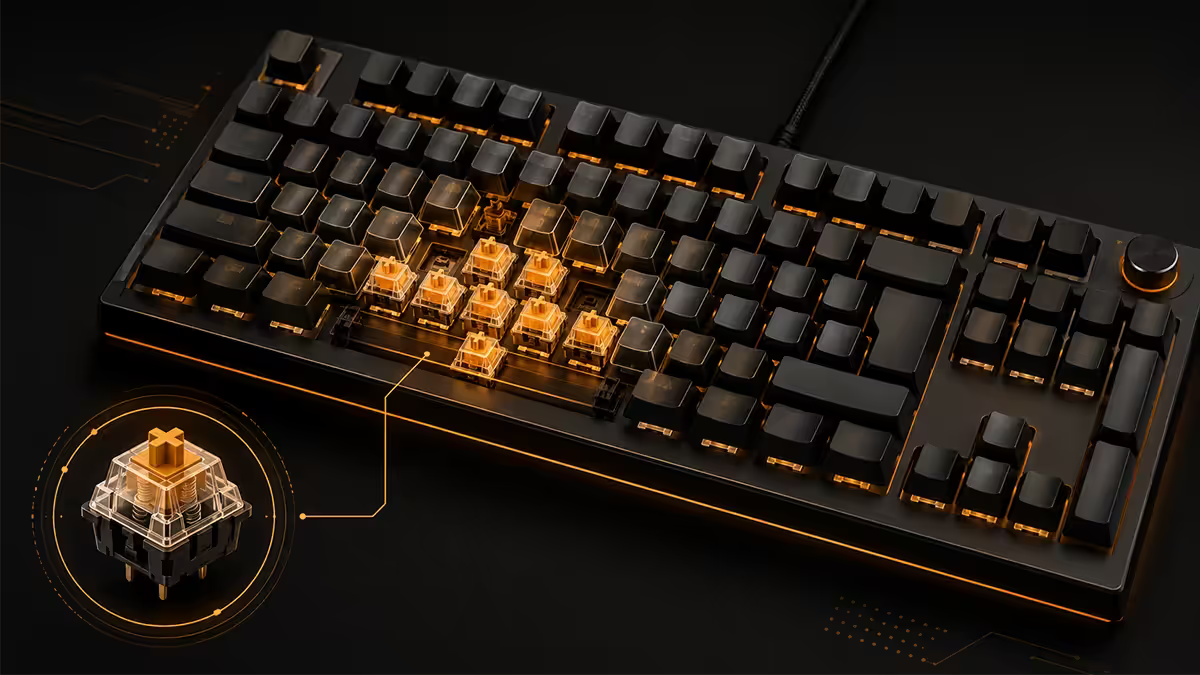
Switch type matters more than every other spec
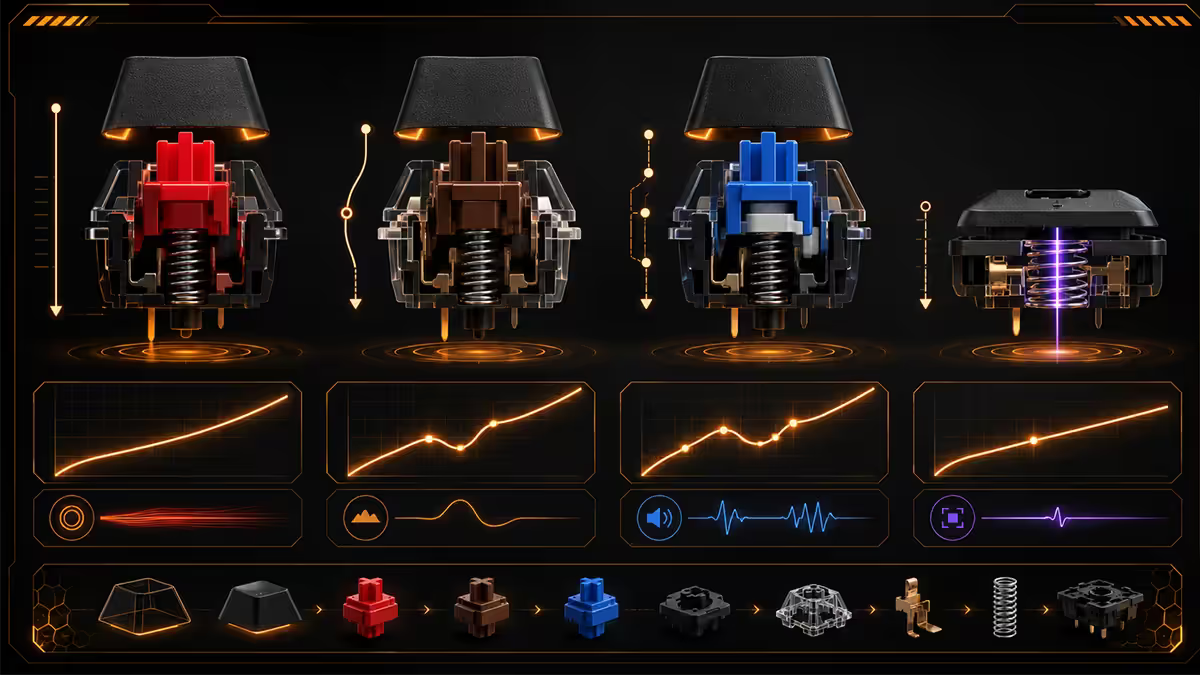
Every keyboard decision flows from the switch. Whether you'll enjoy your keyboard for the next five years comes down to whether the switch under your fingers matches how you want to type. Spec sheets, RGB modes, software ecosystems — all secondary.
Mechanical switches divide into three families based on their force curve and the feedback they give at the actuation point.
| Switch family | Feel | Best for |
|---|---|---|
| Linear (Red, Yellow) | Smooth, no bump | Competitive gaming, fast double-tapping |
| Tactile (Brown, Clear) | Small bump at actuation | Typists who also game, hybrid use |
| Clicky (Blue, Green) | Bump + audible click | Pure typing — office or solo only |
| Analog / Hall Effect | Variable actuation depth | Racing sims, joystick-style movement in FPS |
Linear switches — the competitive gaming default
Linear switches have a smooth, uniform force curve from top to bottom — no tactile bump, no click, just a clean press. Cherry MX Red (45g) is the original; Gateron Yellow (50g) is the consensus favourite in 2026 for gaming because it's smoother out of the box. Akko Crystal, Kailh Box Red, and Outemu Sky V3 are excellent budget alternatives.
Why linear wins for gaming: fast double-tapping (no bump to "reset" past), consistent press feel that you can rely on under stress, and quieter operation than tactile or clicky switches. Most pro CS2, Valorant and Apex players use linear switches.
Tactile switches — for typists who game
Tactile switches add a small bump roughly halfway through the keypress, right at the actuation point. You feel the moment the key registers, which makes typing more accurate and less prone to accidental triggers. Cherry MX Brown is the classic; Gateron Brown, Akko Lavender, Holy Pandas and Glorious Pandas are excellent in 2026.
Tactiles are ideal if you spend most of your day typing — emails, code, university essays — and game in the evenings. The bump that helps you type accurately doesn't significantly slow you down in most games outside the most competitive shooters.
Clicky switches — pure typing or pure ego
Clicky switches add an audible click on top of the tactile bump. Cherry MX Blue, Kailh Box White, Outemu Lemon. Genuinely satisfying to type on, genuinely unbearable for everyone else in the room — especially in a shared house, on a Discord call, or in any office that hasn't gone fully remote. Most buyers regret clicky switches within a month. If you're set on the sound, get hot-swap and try them; if you hate them you can swap to tactiles.
Hall Effect & analog switches — the enthusiast frontier
Hall Effect switches (Wooting 60HE/80HE, Razer Huntsman V3 Pro, SteelSeries Apex Pro) use a magnetic sensor instead of a physical contact. Two superpowers: adjustable actuation depth (set how far to press before the key registers, from 0.1 mm to 4 mm) and rapid trigger (the key resets the moment you start lifting it, not at a fixed point). Both meaningfully improve competitive game responsiveness. Premium pricing (R4,000-R8,000 in SA) but a generational improvement for serious FPS players.
Hot-swap — the single most worth-it feature
Hot-swap PCBs have plastic sockets where each switch sits. You can pull a switch out with a small puller (usually included), drop a new switch in, and the keyboard works again — no soldering iron required. Same keyboard, different switch, in 60 seconds per key.
Why this matters: switch preference changes over time. You might buy your first keyboard with Cherry Reds because every YouTube reviewer recommends them, then discover six months later that you actually prefer tactiles, or want quieter linears for late-night gaming. With hot-swap, that's a R600 switch swap. Without, it's a R2,500 new keyboard.
Hot-swap costs roughly R200-R500 more than the equivalent soldered board. That premium pays itself back the first time you swap switches. In 2026, every keyboard above R1,500 in SA should be hot-swap unless you have a very specific reason to choose soldered.
Brands offering hot-swap: Keychron, Glorious, Akko, Ducky, Asus ROG, Royal Kludge, Wooting, Drop, NuPhy, Epomaker. Razer adopted hot-swap in 2024 on the BlackWidow V4 75% and Huntsman V3. Logitech still solders most of their gaming line (one of the few reasons not to default to Logitech G).
Layout — 60%, 65%, 75%, TKL or Full?
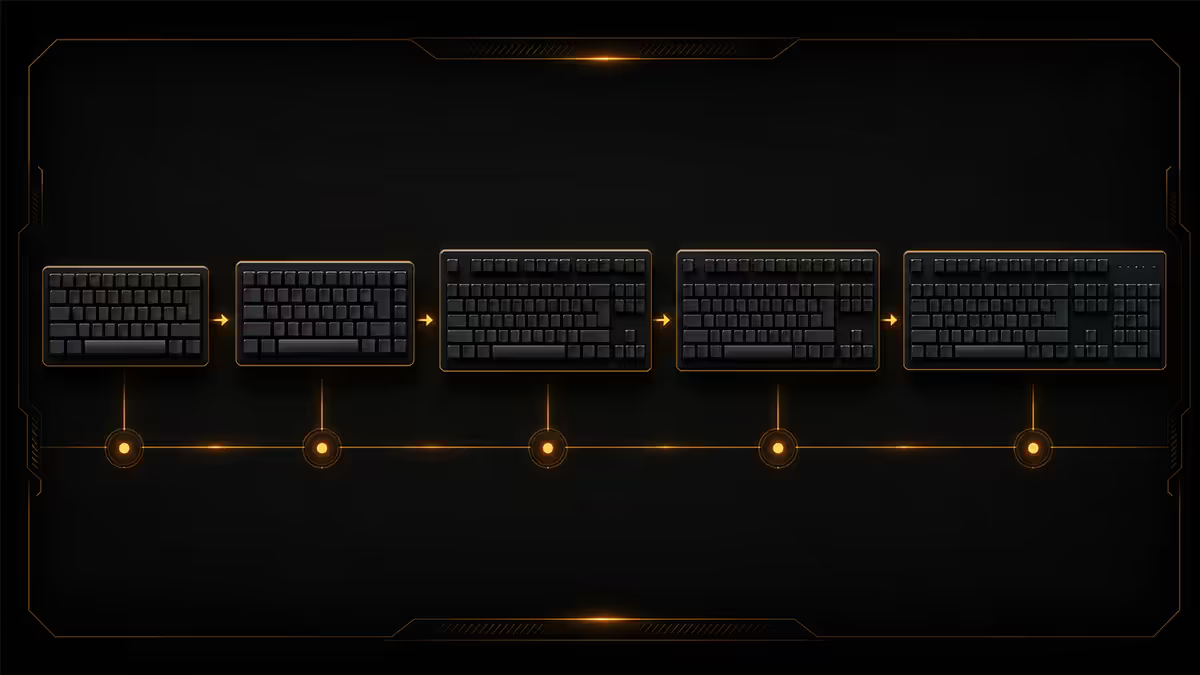
Layout choice trades desk space for keys you may or may not use. The right answer depends on how much desk space your mouse swing needs and whether you actually use the numpad.
| Layout | Keys | Pros / Cons |
|---|---|---|
| 60% | ~61 | Tiny footprint · No arrows, no F-row (Fn-layer) |
| 65% | ~68 | Arrows + nav · Still no F-row |
| 75% | ~84 | Modern sweet spot · F-row + arrows + nav cluster |
| TKL (80%) | ~87 | Standard minus numpad · Most desk-friendly full feature |
| 96% / 1800 | ~96 | Full keys, compressed numpad · Compromise pick |
| Full size | 104+ | Numpad included · Best for spreadsheets & data entry |
60% and 65% — minimum desk footprint
60% boards (Ducky One 3 Mini, Razer Huntsman Mini, Keychron K7) have no F-row, no arrows, no nav cluster, no numpad. Everything past the alphanumeric block is accessed through a Function-layer. Tiny footprint — leaves maximum desk room for mouse swing, ideal for low-DPI competitive players. Steep learning curve for the Fn-layer though.
65% adds arrows and 3-4 nav keys (Page Up/Down, Home/End, Delete). Far more usable day-to-day than 60% while keeping a small footprint. Keychron K6 Pro, Ducky One 3 SF, Royal Kludge RK68. Sleeper sweet spot if you want compact without learning a heavy Fn-layer.
75% — the 2026 default
75% boards (Keychron Q1, Asus ROG Azoth 75%, Razer BlackWidow V4 75%, Akko PC75B) keep the function row above the numbers, arrows in their proper place, and a compressed nav cluster on the right. You give up almost nothing in functionality compared to TKL but the keyboard is 15-20% narrower. The best balance of feature-completeness and desk space.
TKL — for those who want a familiar layout
TKL (tenkeyless) is full-size minus the numpad. Logitech G Pro X TKL, Ducky One 3 TKL, Corsair K70 TKL. Standard key spacing, separated nav cluster, familiar for anyone moving from a Full-size board. Slightly wider than 75% but no learning curve.
Full-size — only if you actually use the numpad
Full-size boards only justify the desk footprint if you use the numpad. Accountancy, data entry, Excel power users, anyone who lives in Notion/spreadsheets — full-size is right. Everyone else should consider a standalone numpad instead and free up the desk room for their mouse arm.
Keycap material — PBT outlasts ABS by years
Keycaps are the surface your fingers touch eight hours a day. The plastic they're made from determines how they look in two years.
ABS keycaps are cheaper, smoother, and shinier when new. They also develop a greasy gloss on heavily used keys (WASD, spacebar, common letters) within 6-12 months of daily use. Lettering printed on ABS often wears off entirely after a year. Most budget keyboards (under R1,200) ship with ABS.
PBT keycaps are slightly textured, denser, and resist shine and wear for 5+ years. Lettering on PBT is usually double-shot (a second plastic moulded into the cap, can't wear off) or dye-sublimated (dye seeped into the plastic, fades extremely slowly). Every keyboard above R2,000 in 2026 should ship with double-shot PBT — if it doesn't, that's a red flag for cost-cutting elsewhere.
Custom PBT sets cost R500-R1,500 in SA and transform any keyboard's appearance. GMK clone sets (cheaper, MX-stem-compatible) are widely sold by Wootware, Evetech and the small SA mechanical-keyboard scene.
Build quality — gasket-mounted feels better than tray
Plate mounting — how the keyboard's metal plate (which holds the switches) attaches to the case — affects feel and sound more than spec sheets suggest.
Tray-mounted (cheapest, most common) screws the plate directly to the bottom case. Stiffer feel, slightly louder, more hollow sound. Most budget and mid-range keyboards.
Gasket-mounted suspends the plate on small rubber or silicone gaskets between the plate and the case. Softer, slightly bouncy feel with every keypress, deeper "thock" sound profile. Far more pleasant to type on for long sessions. Premium keyboards above R3,000 increasingly use gasket mounting (Keychron Q-series, Asus ROG Azoth, Glorious GMMK 3 Pro).
O-ring / sandwich / top mount are variations on the same principle — isolating the plate to reduce stiffness and improve sound. All preferable to bare tray mounting for typing comfort.
Other build details that matter: case material (aluminium > plastic for rigidity), included foam (poron foam between plate and PCB dampens "ping" from springs), stabilisers (lubed and tuned stabilisers eliminate rattle on space, shift and enter keys). Premium boards do this in the factory; mid-range you may need to lube stabilisers yourself for the best feel.
Wired vs wireless — close enough to coin-flip
In 2026, the wired-vs-wireless argument is largely settled: modern gaming wireless keyboards have latency within 1-2 ms of wired. The difference is invisible to humans.
Wireless wins when: you move the keyboard between desks (work and home), you hate cable management, you have a tidy desk aesthetic, or you want to use the same keyboard between PC and Mac/iPad. Logitech Lightspeed, Razer HyperSpeed, Keychron 2.4 GHz and Asus ROG SpeedNova are all genuinely fast wireless protocols.
Wired wins when: you value the R500-R800 saving (wireless typically costs more), you never want to charge anything, or you want polling rates above 1000 Hz (some wireless tops out at 1 kHz; wired can hit 4-8 kHz).
Bluetooth-only is fine for typing (10-15 ms latency, not noticeable for normal use), but not recommended for competitive gaming. Most boards that offer Bluetooth also offer 2.4 GHz dongle — use the dongle for gaming, Bluetooth for travel.
RGB lighting and software
RGB is purely aesthetic. A keyboard with RGB doesn't game better than one without. The keys aren't more visible in the dark unless you set single-colour underlighting to white (in which case a white-LED-only board does the same job for less money).
RGB typically costs R300-R600 of the keyboard's price. If you don't care about lighting, look at the white-LED-only versions of Keychron, Akko and Royal Kludge boards — they save you money and look cleaner.
Software ecosystems matter more than RGB in practice. Each major brand has its own:
- Razer Synapse — feature-rich, demanding (250+ MB RAM, persistent processes), polarising. Powerful macros, profile per game.
- Logitech G HUB — clean UI, lighter than Synapse, occasionally finicky with detection.
- Corsair iCUE — most comprehensive, but heaviest on system resources (400+ MB RAM idle).
- Asus Armoury Crate — improving but historically the most aggressive on always-running services.
- VIA / QMK — open-source, runs locally in a browser (VIA Web), no background process. Used by Keychron Q-series, Drop, custom boards. The enthusiast pick.
If you hate always-on background apps, the VIA/QMK ecosystem is the answer — configure once via web app, settings stored on the keyboard, no software needed afterwards.
SA brand picks by tier and use case
| Tier | Recommended | SA price |
|---|---|---|
| Entry mechanical | Redragon K552, Akko 3068B, Keychron C1 Pro | R800-R1,500 |
| Mid hot-swap wired | Keychron K2/K6/K8 Pro, Royal Kludge RK84 | R1,800-R3,000 |
| Mid hot-swap wireless | Keychron K-Pro series wireless, Akko 5075B Plus | R2,500-R3,800 |
| Premium gaming | Asus ROG Strix Scope II 96, Razer BlackWidow V4 75% | R3,500-R6,000 |
| Premium wireless | Logitech G Pro X TKL Lightspeed, Razer Huntsman V3 Pro | R4,500-R7,500 |
| Premium typing / hybrid | Asus ROG Azoth 75%, Ducky One 3 Mini/SF, Keychron Q1 v2 | R4,000-R8,000 |
| Enthusiast / analog | Wooting 80HE, Glorious GMMK 3 Pro, Keychron Q-series | R6,000-R12,000+ |
Common keyboard buying mistakes
Buying based on RGB alone. A flashy R600 membrane keyboard with RGB is a worse experience than a R1,200 mechanical with single-colour backlighting. RGB is the easiest spec to fake — the switch underneath is what matters.
Soldered keyboards in 2026. Hot-swap is now standard above R1,500 SA pricing. Soldered-only at that tier means the manufacturer cheaped out. Demand hot-swap.
ABS keycaps on R2,000+ boards. At that price double-shot PBT is the baseline. If the spec sheet doesn't mention PBT, assume ABS — and downgrade your expectation of how the board will look in two years.
Clicky switches in a shared house or office. Cherry MX Blues sound exciting on a YouTube video. They sound unbearable to anyone else within 10 metres. Buy clicky only if you live alone and live in a detached room.
Picking layout based on aesthetic, not use. A 60% board looks gorgeous on the desk but loses its sparkle the 15th time you reach for an F5 that doesn't exist. Match layout to your actual workflow.
Key takeaways
- Switch type defines everything else — linear for gaming, tactile for hybrid use, clicky only if you live alone.
- Hot-swap is worth R200-R500 of the price — try switches without buying a new board.
- TKL or 75% is the 2026 sweet spot — full functionality, room for your mouse arm.
- Double-shot PBT keycaps outlast ABS by 5-10× — non-negotiable above R2,000.
- Modern wireless gaming keyboards have latency invisible to humans — pick by lifestyle, not by FPS paranoia.
Frequently asked questions
What switch type is best for gaming?
Linear (Cherry MX Red, Gateron Yellow) for competitive shooters — smooth, fast double-tap. Tactile (MX Brown) for typists who also game. Clicky is rarely chosen for gaming.Are hot-swap keyboards worth the extra cost?
Yes — R200-R500 premium pays itself back the first time you swap switches. Standard above R1,500 in 2026.60%, TKL or Full size — which layout is best?
75% or TKL is the modern sweet spot. 60% saves desk space, Full only if you use the numpad daily.ABS vs PBT keycaps — which lasts longer?
PBT lasts 5-10× longer than ABS. ABS shines on heavily used keys within 6-12 months; PBT keeps its texture for years.Wired or wireless gaming keyboard?
Modern 2.4 GHz wireless (Lightspeed, HyperSpeed) is within 1-2 ms of wired — invisible to humans. Bluetooth-only has higher latency, fine for typing not for competitive gaming.What is gasket mounting and does it matter?
Gasket mounting suspends the plate on rubber gaskets — softer, bouncier feel and a deeper sound. Genuinely better for typing comfort; minimal gaming difference.Do I need RGB on a gaming keyboard?
No — purely aesthetic. RGB doesn't improve gameplay. White-LED-only versions are cheaper and look cleaner.Which gaming keyboards are best value in SA?
Entry: Redragon K552, Akko 3068B. Mid: Keychron K-series Pro. Premium: Logitech G Pro X TKL, Asus ROG Azoth. Enthusiast: Wooting 80HE.
Get the Evetech app
Exclusive app-only prices, daily flash sales, and free delivery on orders over R4,000 — download the app and start saving.