Comparison · Keyboards 2026
Wired vs wireless gaming keyboard. — The latency gap closed. The tournament rules didn't.
For five years the answer was easy: wired for serious gaming, wireless for compromise. In 2026 the top-tier 2.4GHz boards genuinely match wired latency — but battery life, tournament rules and price still matter.
- 2.4GHz latency
- <1 ms
- RGB-off battery
- 100-200 h
- SA price range
- R1.5K-R6K
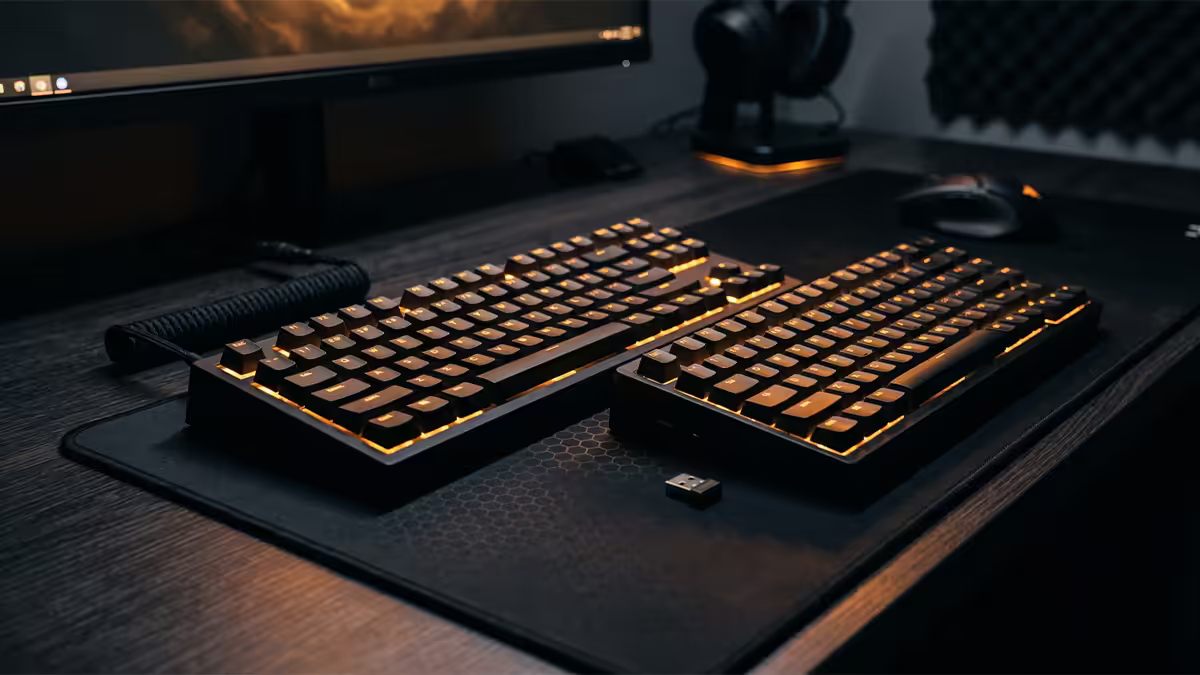
Latency reality — 2026 closed the gap
In 2020 a wired keyboard had a real, measurable advantage over wireless — 1-2ms end-to-end vs 4-8ms typical wireless. By 2026 the top-tier 2.4GHz wireless boards have closed that gap to functional zero. Razer HyperSpeed Wireless, Logitech LIGHTSPEED, Asus ROG SpeedNova and Corsair SLIPSTREAM XT all publish (and reviewers verify) sub-1ms latency at 1,000-8,000Hz polling.
| Connection | Typical latency | Polling |
|---|---|---|
| Wired (USB-C, 1000Hz) | 0.5-1ms | 1,000Hz |
| Wired (premium, 8000Hz) | 0.125-0.5ms | 8,000Hz |
| 2.4GHz flagship (Razer/Logitech/Asus) | 0.5-1ms | 1,000-8,000Hz |
| 2.4GHz mid-range | 1-3ms | 500-1,000Hz |
| Bluetooth 5.x | 5-15ms | 125-500Hz |
Translating those numbers to what you feel: under 2ms is indistinguishable from wired for the overwhelming majority of human reflexes. 5-15ms (Bluetooth) is where you start feeling vague sluggishness in fast-paced shooters. Anything over 20ms is consciously slow.
2.4GHz vs Bluetooth — both real, totally different jobs

Premium wireless keyboards in 2026 ship with two radios: a 2.4GHz dongle for gaming, and Bluetooth 5.3 for general computing. They aren't interchangeable — they exist for different reasons.
2.4GHz proprietary (dongle)
A custom radio protocol over the 2.4GHz band, talking only to the matched USB dongle. The point: guarantee polling rate and latency by owning the channel and pipeline end-to-end. No Bluetooth handshake overhead, no audio sharing the radio, no Windows stack between the chip and the OS input layer. Result: sub-1ms.
Downside: needs a free USB-A port for the dongle, and the dongle is a small thing that gets lost easily. Most premium boards include a magnetic dongle storage clip.
Bluetooth 5.3
Standard, multi-device, no extra dongle, but goes through a generic OS stack with higher inherent latency. Great for typing emails on three devices, awful for ranked Valorant. Most premium boards include both — use 2.4GHz for the gaming PC and Bluetooth as the secondary path to a laptop or iPad.
Battery life & weight — the practical reality
Battery life: the headline numbers (200+ hours, 600+ hours) you see on the box assume RGB completely off. With per-key RGB at moderate brightness, real-world life on a Logitech G915 X, Keychron Q3 HE Wireless or Asus ROG Strix Scope II Wireless lands at 30-60 hours of mixed use. Cranked-RGB-and-Stream all night drops it to 8-15 hours.
The fix is two-fold. First: USB-C charging while you keep typing — no break in play, fully topped up in 1-2 hours. Second: most modern boards offer per-key RGB profiles that idle dim and brighten when typing, halving battery use without sacrificing the look.
Weight: the often-overlooked spec. Wireless boards carry a battery (50-130g) and frequently use plastic cases to stay under 1kg total. Premium wired aluminium boards (Wooting 80HE, Glorious GMMK Pro) are 1.5-2.2kg. If you LAN-port (bring your board to events), light wireless is genuinely easier to live with than heavy wired metal.
Tournament rules — wired is still the law
This is the single biggest reason competitive players still buy wired. Official tournament organisers — including SA's rAge LAN, DGL, ACGL, Mettlestate and international Riot/Valve/EA events — almost universally mandate wired peripherals for the supplied tournament PCs. The rationale:
- Interference risk. 50+ wireless boards in a single hall on the same 2.4GHz channels would be chaos.
- Dead battery risk. A mid-match flat-battery is a forfeit.
- Auditability. Wired devices can't perform mid-match software tricks that wireless protocols technically allow.
If you're at a LAN with your own rig you bring (BYOC areas), policies are usually looser — but verify, because confiscation at the door is the norm at major events. For 99% of pro players the practical answer is: own a wired keyboard for tournaments, own a wireless for daily life.
Hot-swap reality on wireless boards
Hot-swap sockets let you change out switches without soldering — pop the old one, drop the new one in. It's become standard at the enthusiast tier. The myth: wireless boards can't hot-swap. The reality: most 2026 premium wireless boards support it.
| Board | Wireless? | Hot-swap? |
|---|---|---|
| Keychron Q3 HE Wireless | 2.4GHz + BT | Yes — full HE socket |
| Asus ROG Azoth | 2.4GHz + BT | Yes — mechanical |
| NuPhy Halo75 V2 | 2.4GHz + BT | Yes — mechanical |
| Lemokey L3 | 2.4GHz + BT | Yes — mechanical |
| Logitech G915 X | 2.4GHz + BT | No — low-profile soldered |
| Razer DeathStalker V3 Pro | 2.4GHz | No — low-profile soldered |
The pattern: full-height boards usually hot-swap; low-profile slim boards usually don't. If switch tuning matters to you, target the Keychron Q-HE Wireless line, NuPhy or Lemokey families.
Hall Effect — the 2026 premium standard
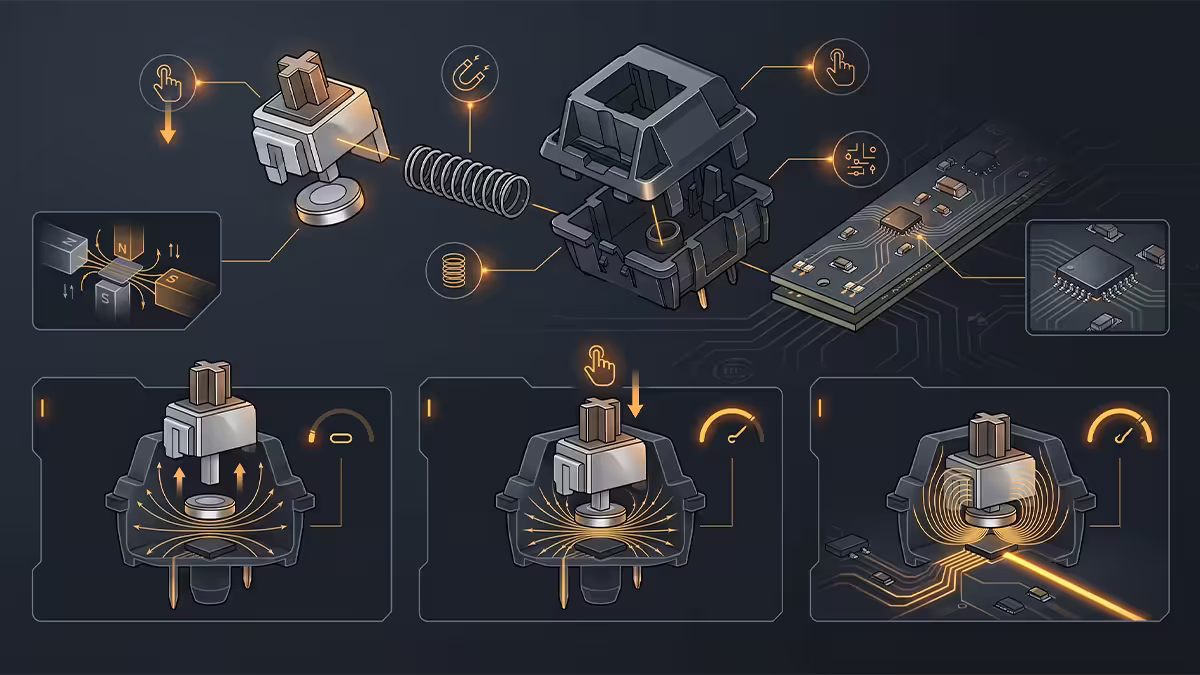
Hall Effect (HE) switches use magnetic field sensing instead of metal contacts. The transformative feature: per-key analog actuation depth. You set how far you have to press for each key to register — and even use them as analog (controller-trigger style) input.
For gamers, the headline features that HE unlocks:
- Rapid Trigger. The switch resets the moment you start lifting — letting you spam-tap A/D for CS2 strafing faster than any mechanical switch can.
- Adjustable actuation 0.1-4mm. Light-trigger 0.2mm for FPS keys, deeper 2-3mm for movement keys to reduce mis-presses.
- Analog input. WASD as analog stick — variable walk speed in racing/sim/adventure games.
- Dual-action. Two functions on the same key based on press depth.
The flagships in SA 2026 are the Wooting 80HE (wired, R5,500-R6,500), Wooting 60HE+ (wired, R3,500-R4,200), Keychron Q3 HE Wireless (R4,200-R5,500) and the more affordable Akko 5075B Plus HE (R2,400-R2,800). For CS2, Valorant, Apex, Marvel Rivals players the HE feature set is genuine performance — not marketing fluff.
SA buying picks — wired and wireless tiers
| Use case | Pick | SA price |
|---|---|---|
| Best value wired · TKL | Royal Kludge R75 / Akko 3098B | R1,400-R1,900 |
| Best value wireless · TKL | Keychron K10 Pro / NuPhy Halo75 | R2,400-R3,200 |
| Tournament wired flagship | Wooting 80HE / Mountain Everest 60 | R5,500-R6,800 |
| Wireless flagship daily-driver | Keychron Q3 HE Wireless / Logitech G915 X | R4,800-R6,200 |
| Compact 60% wireless | Wooting 60HE+ (wired) / Akko 5075B Plus HE | R3,500-R4,200 |
| Razer / Logitech competitive | Razer Huntsman V3 Pro / Logitech G Pro X TKL | R4,200-R5,500 |
| Budget under R1,000 | Redragon Kumara K552 / Royal Kludge RK61 | R550-R950 |
Common keyboard buying mistakes
Believing the "wireless is laggy" myth from 2020. True at the time, false now at the flagship tier. Reviewers measure under-1ms 2.4GHz routinely.
Using Bluetooth for gaming. Even on a premium board, Bluetooth latency is 5-15ms. Switch to the 2.4GHz dongle when gaming, Bluetooth for general use.
Skipping wired when you LAN. If you go to a tournament you'll be turned away with a wireless board. Bring a wired backup.
Paying for RGB you'll never look at. If you stream and the keyboard's on camera — fine. If you don't, save R500-R1,500 by skipping the RGB-bling tier and putting it into switch quality instead.
Buying a soldered low-profile wireless then realising you wanted to tune switches. Hot-swap matters more than people think a year into ownership. If unsure — get hot-swap.
Key takeaways
- Flagship 2.4GHz wireless matches wired at <1ms latency in 2026. The old "wired is faster" rule no longer applies at the top tier.
- Bluetooth is 5-15ms — for productivity and multi-device, never for competitive gaming.
- SA LAN tournaments (rAge, DGL, ACGL, Mettlestate) mandate wired. Bring a wired board if you compete.
- Hall Effect (Wooting, Keychron Q-HE, Akko HE) is the premium standard — Rapid Trigger and analog input are real gains.
- RGB on full pelt drains batteries 5-8× faster — set per-key idle dimming and you'll regain most of the headline runtime.
Frequently asked questions
Is wireless gaming keyboard latency noticeable in 2026?
No — for the top tier. Razer HyperSpeed Wireless, Logitech LIGHTSPEED, Asus ROG SpeedNova and Corsair SLIPSTREAM XT all deliver under 1ms 2.4GHz dongle latency in 2026, which is identical to or better than most wired keyboards (1-2ms total chain). Bluetooth is a different story — 5-15ms is normal and you'll feel it in competitive shooters. The gap that mattered in 2020 doesn't exist anymore at the premium end.How long does a wireless gaming keyboard battery last?
With RGB off — 100 to 200 hours on 2.4GHz (Logitech G915 X, Keychron Q3 HE wireless), 200+ hours on Bluetooth. With RGB at full pelt — 8 to 20 hours. Most users land at 30-50 hours of mixed use between charges. USB-C top-up while you keep typing solves the rest. Battery anxiety is mostly a 2018-era concern.Can you use a wireless keyboard in a tournament?
Depends on the tournament. Most major SA LAN events (rAge LAN, DGL, ACGL, Mettlestate) and the international Valve / Riot / EA events still mandate wired peripherals for the official tournament PCs — wireless devices are confiscated at the door because of interference and dead-battery risk during a match. If you compete at LAN, you need a wired keyboard. Casual play and home practice — wireless is fine.Is 2.4GHz wireless better than Bluetooth for gaming?
Yes, by a wide margin. 2.4GHz wireless via a USB dongle runs at 1,000-8,000Hz polling and sub-1ms latency on flagship boards. Bluetooth tops out at 125-500Hz polling, 5-15ms latency, and is subject to interference from any other 2.4GHz device. Use Bluetooth for casual laptop typing, never for competitive gaming. Most premium boards offer both modes — use 2.4GHz when you can.What is a Hall Effect keyboard and is it worth it?
Hall Effect (HE) switches use magnets instead of metal contacts, allowing analog actuation — you set your own activation depth, rapid trigger (instant reset for spam), and continuous analog input (like a controller trigger). The Wooting 60HE+ and 80HE, Keychron Q-HE series and Akko 5075B Plus HE are the leaders. In 2026 they're worth it if you play CS2, Valorant, Apex or any FPS where actuation control matters. For productivity-only — overkill.Can I hot-swap switches on a wireless keyboard?
On most premium 2026 wireless boards, yes. The Keychron Q-HE Wireless, K10 Pro, K15 Pro, Mountain Everest 60 and Asus ROG Azoth all support full hot-swap with wireless functionality intact. Lower-end wireless boards (Logitech G715, Razer DeathStalker V3) typically don't hot-swap because their switch design is welded for battery efficiency. Check before buying if hot-swap matters.Do wireless gaming keyboards support multiple devices?
Most premium 2026 wireless boards (Keychron, Logitech, NuPhy, Lemokey) support 2.4GHz to a gaming PC plus Bluetooth pairing to two or three other devices (laptop, iPad, phone) with a 1-second switch via Fn+key. This is genuinely useful — one keyboard becomes the desk's universal input. Wired-only keyboards obviously can't do this.Should I buy wired or wireless for LAN portability?
Wireless wins if you go to LANs often — fewer cables to manage and pack. But: bring a USB-C cable just in case, verify the LAN's tournament rules accept wireless (most don't), and test the 2.4GHz dongle behaviour in heavy RF environments (which LANs are). Many pros take both a wireless daily-driver and a backup wired board for tournament-mandated PCs.
Get the Evetech app
Exclusive app-only prices, daily flash sales, and free delivery on orders over R4,000 — download the app and start saving.