Wireless vs Wired Mouse · 2026
Wireless or wired? — In 2026, the cable lost the argument.
A decade ago wireless was a compromise — battery anxiety, latency tax, weight penalty. In 2026 the flagship wireless mice match wired latency, weigh less than 60 grams, and last a week between charges. The serious case for staying wired has thinned to almost nothing.
- wireless 2.4GHz
- <1 ms
- flagship battery
- 95 hrs
- flagship weight
- 53-60 g
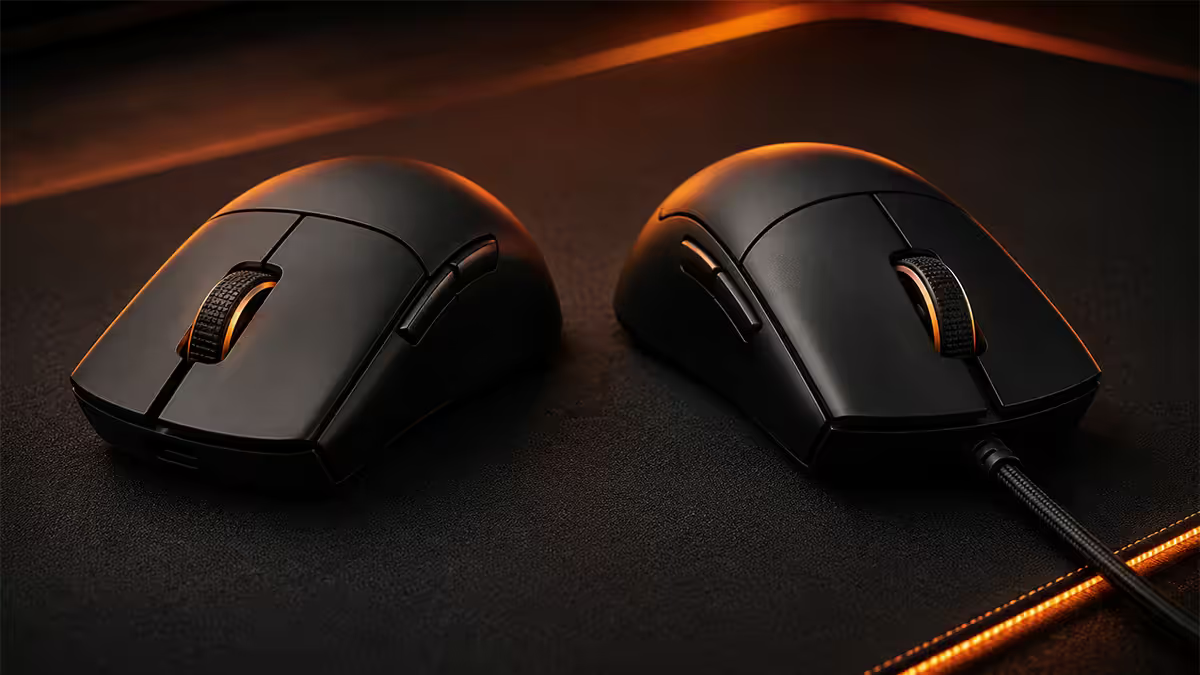
The 2026 reality — wireless caught up
Five years ago wireless gaming meant compromise. The cable was faster, lighter once you accepted the drag, and you never had to think about battery. The 2024-2026 flagship generation closed that gap on every axis at once.
What changed:
- Polling parity. Logitech LIGHTSPEED, Razer HyperSpeed Wireless and Pulsar 2.4GHz all report within 1ms of a wired equivalent at 1000Hz polling. At 4000Hz HyperPolling, the wireless version is within 0.25ms.
- Battery breakthrough. Lower-power sensors (PixArt PAW3950, Razer Focus Pro 35K, Logitech HERO 2) plus higher-density batteries deliver 70-100 hours per charge, with USB-C fast-charging from 0-30% in 5 minutes for emergency rounds.
- Weight savings. Without a cable tether, manufacturers can build hollow shells that hit 50-60g — often lighter than the wired version of the same mouse.
- Wireless charging ecosystems. Logitech PowerPlay charges the mouse while you play via an embedded pad. Razer Wireless Charging Puck adds a magnetic drop-and-go station.
The cumulative effect: a 2026 wireless flagship is faster, lighter and lower-friction than the wired flagship from 2021.
Latency — 2.4GHz vs cable
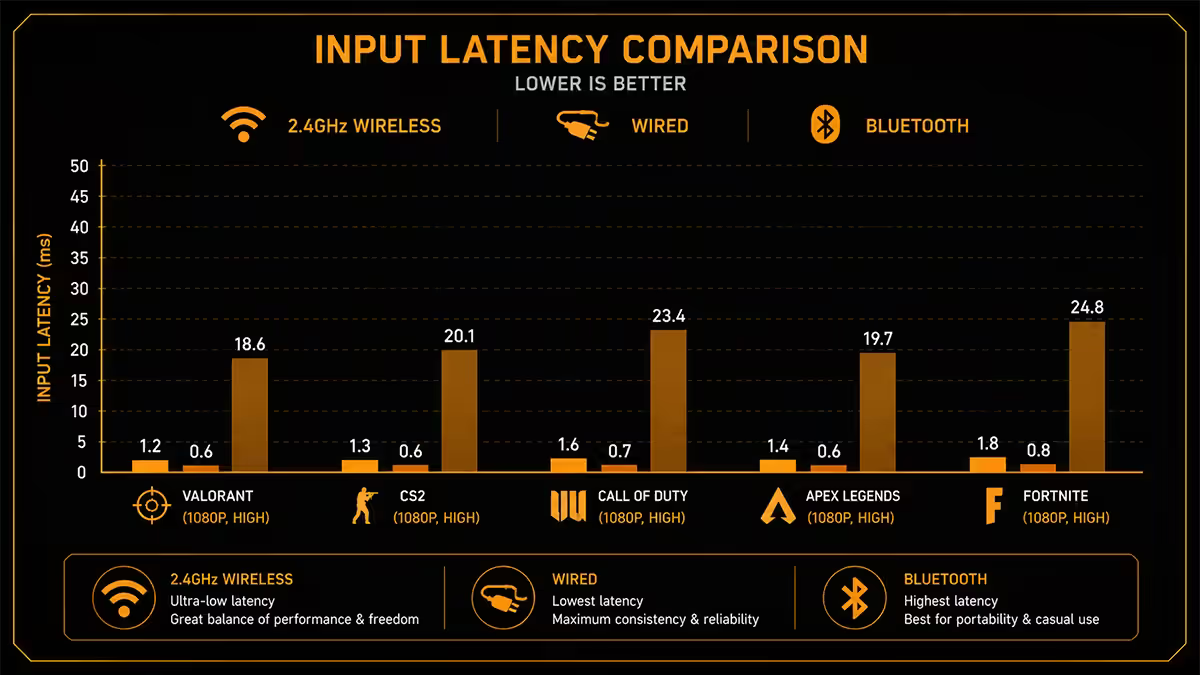
The honest measurement: a top-tier wired mouse at 1000Hz polling adds roughly 0.5ms of input lag from sensor to game. A top-tier wireless mouse at 1000Hz polling (LIGHTSPEED, HyperSpeed) adds roughly 1ms.
| Connection | Click-to-screen latency | Real-world feel |
|---|---|---|
| Wired USB 1000Hz | ~0.5 ms | Indistinguishable from sensor floor |
| 2.4GHz dongle 1000Hz (LIGHTSPEED / HyperSpeed) | ~1 ms | Indistinguishable from wired in blind tests |
| Wired USB 8000Hz HyperPolling | ~0.125 ms | Tournament tier |
| 2.4GHz 8000Hz HyperPolling | ~0.25 ms | Tournament tier, wireless |
| Bluetooth (5.0+) | 8-15 ms | Unsuitable for FPS gaming |
| Old "2.4GHz wireless" (2018-) | 4-8 ms | Lag perceptible in shooters |
The 0.5ms wireless-vs-wired gap at 1000Hz is roughly 1/8 of one frame on a 240Hz monitor (4.16ms per frame). Below the threshold of human perception, and dwarfed by your own input variance.
Battery life and charging UX
Flagship 2026 wireless mice rate 70-100 hours of continuous use at 1000Hz polling with RGB lighting off. Realistic everyday use (4-6 hours/day, mixed work and gaming) means charging roughly once a week.
What kills battery life:
- HyperPolling. 4000Hz roughly halves battery life. 8000Hz roughly quarters it.
- RGB lighting. Full RGB on = 30-40% battery reduction.
- High DPI. Driving the sensor at 16000+ DPI uses 10-15% more power than at 800 DPI.
- Sleep timeout disabled. Some users disable auto-sleep to avoid wake-up lag — costs continuous drain.
Charging options:
- USB-C cable (universal). Every flagship ships with one. 5-minute charge = 30% battery on most models.
- Charging dock. Drop the mouse on a stand at end of session — always topped up. Available for Razer Viper V3 Pro, Logitech G Pro X Superlight 2 (separate purchase).
- Logitech PowerPlay. Special mousepad with an embedded wireless charging module — keeps the mouse battery topped up while you use it. R1,800-R2,500 separate purchase, works with G502 X PLUS, G Pro X Superlight 2, G903 etc.
- Razer Wireless Charging Puck. Magnetic drop-charging accessory — R600-R900.
Weight and cable drag
Weight is the underrated wireless win. The 2026 flagship list:
- Razer Viper V3 Pro: 53g — the lightest mainstream flagship.
- Pulsar X2H Mini: 54g.
- Logitech G Pro X Superlight 2: 60g.
- Endgame Gear OP1 8K (wired): 50g — the wired benchmark.
- Razer DeathAdder V3 Pro: 63g (ergonomic shape).
Cable drag matters more than weight. A 60g wireless mouse with no cable feels lighter in actual motion than a 50g wired mouse with even the best paracord cable. The drag isn't grams — it's micro-jerks on every reset, friction against the mousepad edge, and tension that resists the wrist flick.
If you must run wired, get a quality paracord/braided cable (Razer Speedflex, Glorious Ascended Cord, custom paracord) or a bungee (Razer Mouse Bungee V3, BenQ Zowie Camade). They massively reduce the perceived drag — but never eliminate it.
2.4GHz dongle vs Bluetooth — never confuse them
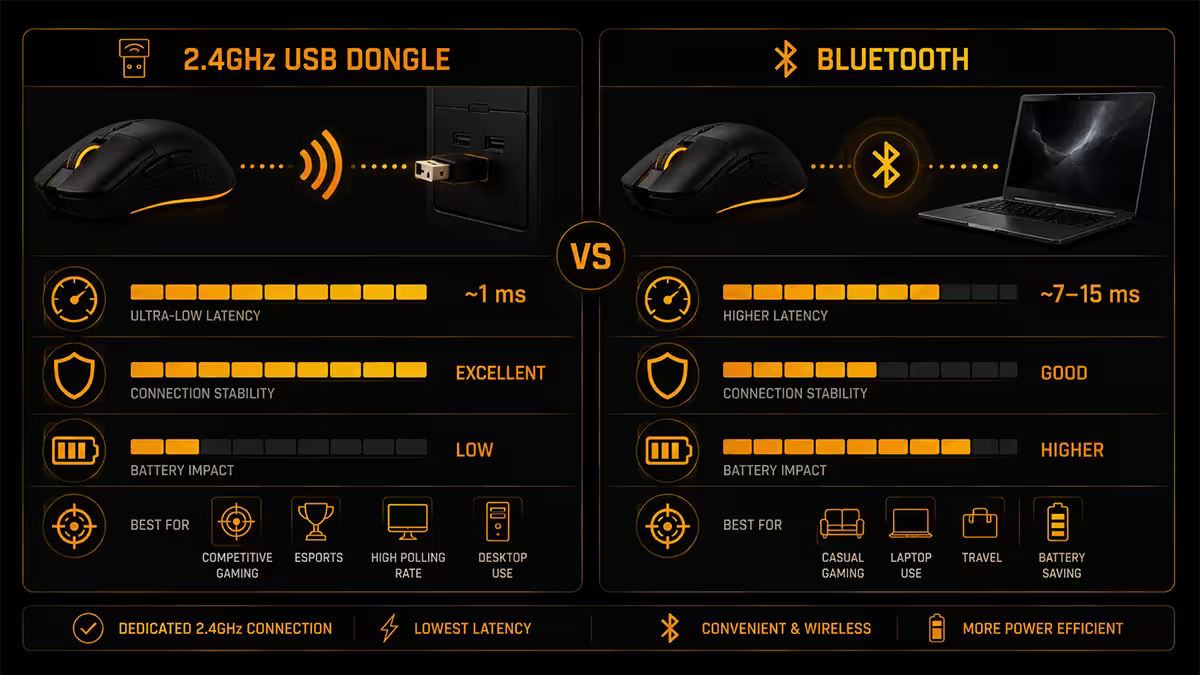
Most flagship wireless mice support both 2.4GHz (dedicated dongle) and Bluetooth (built into Windows/laptops). They are not the same thing.
- 2.4GHz dongle: dedicated low-latency radio. 1ms response. Supports 1000-8000Hz polling. Range typically 3-10m. Use this for gaming.
- Bluetooth 5.0+: general-purpose radio. 8-15ms response. Typically capped at 125-250Hz polling. Works without a dongle. Use this for travel / laptop pairing.
Almost every flagship lets you switch between modes with a button on the bottom of the mouse — typically labelled with "1" (2.4GHz) and "2" or BT (Bluetooth). Switch to BT when working from a coffee shop with a laptop and no USB port. Switch back to 2.4GHz for the desk.
The 2026 flagship picks
| Mouse | Strengths | SA price |
|---|---|---|
| Logitech G Pro X Superlight 2 | 60g · LIGHTSPEED · 95hr · 32K HERO 2 · best ecosystem | R4,200-R4,800 |
| Razer Viper V3 Pro | 53g · HyperSpeed · 8000Hz HyperPolling · Focus Pro 35K | R5,200-R5,800 |
| Pulsar X2H / X2H Mini | 54g · ergonomic shape · PAW3950 · best value flagship | R3,500-R4,200 |
| Endgame Gear OP1 8K (wired) | 50g · pure wired · 8000Hz · uncompromised flagship | R3,200-R3,800 |
| Razer DeathAdder V3 Pro | 63g · ergonomic palm grip · HyperSpeed · 90hr | R4,500-R5,200 |
| Glorious Model O 2 Wireless | 62g · BAMF 2.0 · 4000Hz · best value light mouse | R2,200-R2,800 |
| Logitech G502 X PLUS | 106g · 13 buttons · MMO/productivity wireless | R3,400-R4,000 |
The ecosystem question. If you already own Logitech peripherals (G915 keyboard, G Pro headset), G HUB lets you manage everything from one place — and the LIGHTSPEED Receiver can pair multiple devices to one dongle. Same logic for Razer Chroma and Razer Synapse. Don't mix ecosystems unless you have a strong reason.
When to still pick wired in 2026
There are honest cases for staying wired:
- Budget. Entry wired gaming mice (Razer Basilisk V3, Logitech G203 Lightsync, Cooler Master MM310) start at R450-R900. Entry wireless flagships start around R1,500-R1,800.
- Strong preference for never charging. If "forgetting to charge" genuinely bothers you, a wired mouse removes the concern entirely. Valid lifestyle pick.
- Public LAN café or shared rig. Wireless dongles get stolen or lost. Wired mice are tethered.
- Absolute lowest possible latency (esports tournament). 0.5ms wired vs 1ms wireless. The pros at Major events still mostly run wired flagships (Endgame Gear OP1 8K, Logitech G Pro Wireless wired mode) at the highest level — the margin is real even if vanishingly small.
- Magnetic / hall-effect mice. Some Wooting and SteelSeries premium configurations remain wired-only for adjustable-actuation tech.
For everyone else — gamers, streamers, casual competitive players, office workers who want a single mouse for both — wireless is the right pick in 2026.
Key takeaways
- 2026 flagship wireless mice match wired latency at under 1ms — well below human perception.
- Battery life 70-100 hours at 1000Hz. HyperPolling 4000-8000Hz halves or quarters that.
- Always use the 2.4GHz dongle for gaming. Bluetooth (8-15ms) is for laptop pairing only.
- Top four picks: G Pro X Superlight 2, Razer Viper V3 Pro, Pulsar X2H, Endgame Gear OP1 8K (wired).
- Stay wired only for tight budget, LAN café use, esports tournament tier, or hall-effect flagship features.
Frequently asked questions
Is a wireless gaming mouse worth it in 2026?
Yes for almost everyone. 2024-2026 flagships hit 1ms tournament latency, 70-100hr battery, 53-60g weight. The cable disadvantage that mattered five years ago is gone.Does wireless add input lag for gaming?
2.4GHz dongle wireless measures within 1ms of wired — below human perception. Bluetooth adds 8-15ms and is unsuitable for FPS. Always use the dongle for gaming.How long do wireless gaming mice last on a charge?
Flagships rate 70-100 hours at 1000Hz, RGB off. HyperPolling 4000Hz halves it, 8000Hz quarters it. Typical real-world: charge once a week.What is the difference between 2.4GHz dongle and Bluetooth?
2.4GHz is dedicated low-latency radio (1ms, 1000-8000Hz). Bluetooth is general-purpose (8-15ms, low polling). Use 2.4GHz for gaming, Bluetooth for laptop pairing.Are wireless mice lighter than wired?
Often yes. G Pro X Superlight 2 is 60g, Viper V3 Pro 53g. Even slightly heavier wireless feels lighter in motion because there's no cable drag.Which wireless gaming mouse is best in 2026?
G Pro X Superlight 2 (best ecosystem), Razer Viper V3 Pro (lightest, 8000Hz), Pulsar X2H (best value flagship), Endgame Gear OP1 8K (wired option).What is HyperPolling 4000Hz / 8000Hz?
Mouse reports position 4000-8000 times/sec instead of standard 1000Hz. Latency drops to 0.25ms or 0.125ms. Tangible on 240Hz+ monitors; costs CPU and 2-4x battery drain.Should I buy a charging dock or USB-C cable?
USB-C cable ships with every flagship — works for everyone. Dock is for always-topped-up convenience. Logitech PowerPlay is the only system that charges while you play.
Get the Evetech app
Exclusive app-only prices, daily flash sales, and free delivery on orders over R4,000 — download the app and start saving.