Hardware Explainer · Gaming
What is a CPU, and what does it actually do in games?
People obsess over GPUs and forget the chip that runs the game. The CPU simulates the world, drives AI, handles physics, queues every draw call. Skimp here and your frame rate caves at the exact moment the action gets interesting.
- draw calls per second
- 60-240×
- thread sets the ceiling
- 1 main
- x3d gain in sims
- +30 fps
What a CPU actually is
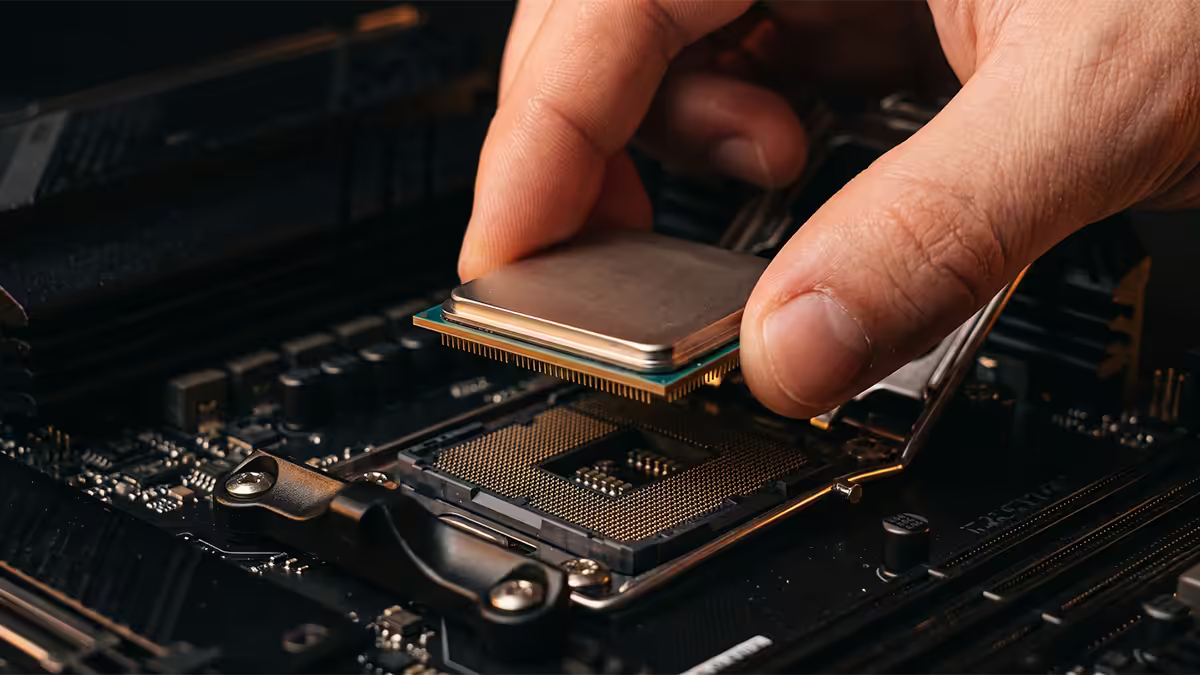
The Central Processing Unit is the chip that executes instructions — billions of them per second, in order, one (or a few) at a time per core. It's a general-purpose calculator: it can do anything, but only a few things at once. The graphics card, by contrast, is a wide-parallel specialist that crunches thousands of pixels simultaneously but isn't built for branching, sequential decision-making.
In a game, that distinction matters. The world is full of decisions — should this enemy step left or right, did the bullet hit the wall, is the player about to fall off the ledge, what does this sound emitter need to play. Decisions are sequential. The CPU is built for them. The GPU is built to render what those decisions produce.
Modern desktop CPUs from AMD (Ryzen 7000/9000 series) and Intel (Core Ultra 200 series) typically have 6 to 16 cores, run at 4.5-5.7 GHz, and have several layers of on-chip cache (L1, L2, L3) to keep the most-used data physically close to the cores.
Anatomy of a single game frame
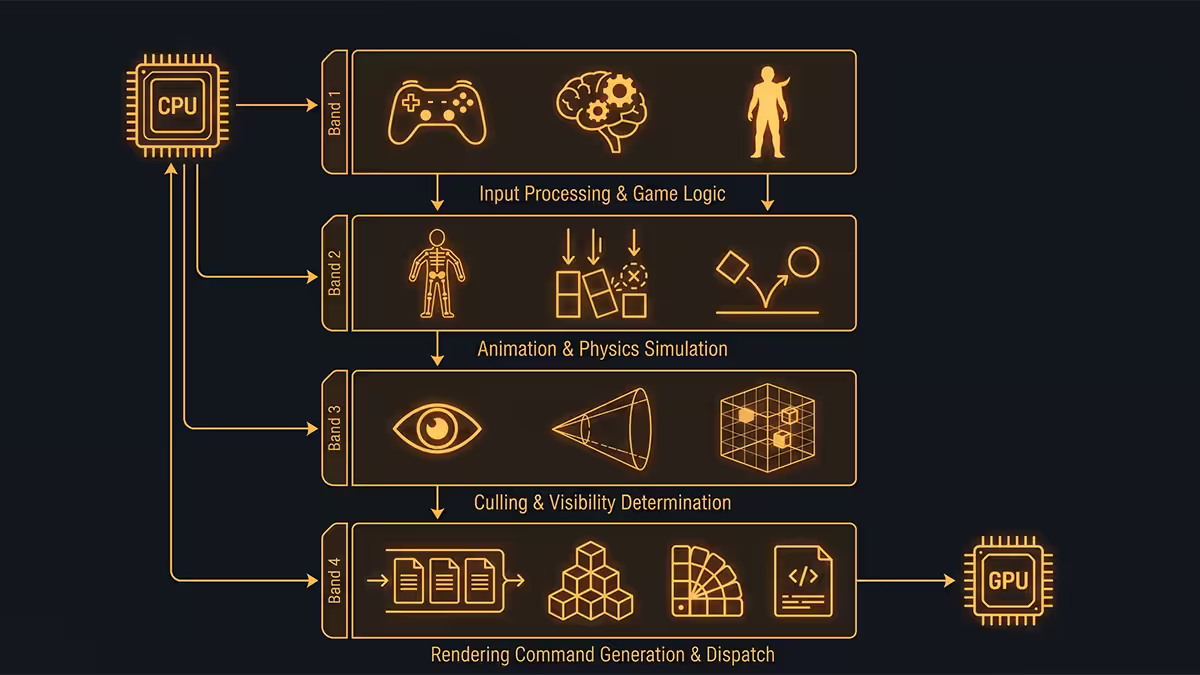
Every frame your monitor shows is the result of a roughly 60-times-per-second relay race between CPU and GPU. At 144 fps it's happening 144 times a second. Inside each frame, the CPU runs through a predictable sequence:
- Read input. Did the player move the mouse, press a key, click? Input gets timestamped and queued.
- Simulate. Update positions, run physics (gravity, collisions), tick down timers, evaluate damage formulas.
- AI. Each NPC checks its state machine — patrol, attack, flee, take cover. Pathfinding runs for any unit that needs a new route.
- Animation blending. Skeletons interpolate between keyframes; the CPU produces the bone matrices the GPU will use to skin the meshes.
- Audio mix. Spatial audio positions every emitter relative to the listener, applies occlusion, mixes the buses.
- Network. In multiplayer, the CPU reconciles server snapshots, predicts movement, replays input.
- Build the draw list. Cull what the camera can't see, sort by material, queue every visible object's draw call.
- Submit. Hand the draw list to the GPU. Move on to the next frame.
If any one of those steps takes too long, the whole frame is late. A 60 Hz target gives the CPU 16.7 ms per frame. A 144 Hz target gives you 6.9 ms. A 240 Hz competitive target gives you 4.2 ms. Every microsecond the CPU spends on AI is a microsecond it can't spend on draw calls.
Cores and threads — explained simply
A core is a physical processing unit on the CPU die. A 6-core CPU has six independent little brains, each able to execute its own instructions. A thread is a stream of work that a core is running. With SMT (Simultaneous Multi-Threading — AMD's name) or Hyper-Threading (Intel's name), one core can interleave two threads at once to keep its execution units fed during the moments when one thread is waiting for memory.
So a 6-core CPU usually shows up as "6 cores, 12 threads" in Task Manager. That second thread per core is real but not as powerful as a second physical core — typical SMT uplift is 20-30% of an extra core, not 100%.
| CPU class | Core / thread | Real-world feel |
|---|---|---|
| Entry gaming | 6c / 12t (Ryzen 5 7600, Core Ultra 5 245) | Excellent for pure gaming. Tight for streaming + game on same PC. |
| Mainstream | 8c / 16t (Ryzen 7 7700, 7800X3D) | Sweet spot. Plenty of headroom for game + Discord + browser + stream. |
| Enthusiast / creator | 12-16c / 24-32t (Ryzen 9 7900X/9950X3D) | Overkill for pure gaming. Pays off when compiling, rendering, simulating. |
| Workstation | 24-64c (Threadripper) | Not faster for games — fewer high-clock cores often loses to mainstream chips. |
More cores does not equal more frames. Past 8 cores, gaming returns flatten dramatically. The Ryzen 7 7800X3D — only 8 cores — outperforms the 16-core 7950X in most games because of the cache, not despite the lower core count.
Single-thread vs multi-thread performance
Most game engines have a main thread that handles the game loop — read input, simulate, build the draw list. That main thread can't easily be split across multiple cores because each step depends on the previous one. So the speed of one core often sets the frame rate ceiling.
This is why CPUs are benchmarked separately for single-thread and multi-thread performance. Tools like Cinebench R24 give you both numbers. For gaming, the single-thread score is the more honest predictor of frame rate; the multi-thread score predicts how well the chip will compile code, render video, or run heavy productivity work.
Modern reality: game engines are getting better at multi-threading. DX12 and Vulkan let render thread work spread across cores. Unreal Engine 5's Nanite scales with thread count. So multi-thread does matter — but single-thread is still the dominant factor for most titles in 2026.
X3D and why cache changes everything
AMD's 3D V-Cache (the "X3D" suffix on chips like 7800X3D, 9800X3D, 9950X3D) is a stacked layer of additional L3 cache sitting on top of the CPU die. The Ryzen 7 7800X3D has 96 MB of L3 cache versus the regular 7700X's 32 MB. The 9800X3D has the same 96 MB but on a faster Zen 5 core.
Why does cache matter? Because fetching data from system memory takes 100+ cycles — a near-eternity in CPU time. Fetching from L3 cache takes ~12 cycles. Every time a game's main thread needs data it didn't predict, the core stalls waiting for memory. The bigger the cache, the more of the game's hot data lives close to the cores.
Where X3D dominates:
- Simulation games — MS Flight Simulator, Cities Skylines 2, Factorio, Stellaris.
- MMOs with crowded zones — WoW raids, FF14 hunt trains.
- Esports at very high FPS — CS2, Valorant where 400+ fps stresses memory.
- Open-world streaming — Cyberpunk crowd density, Starfield cities.
Where X3D doesn't matter as much: 4K-bound games where the GPU is the limit, lighter esports already hitting refresh-rate caps, and productivity work (the X3D variants typically have slightly lower clocks than non-X3D, so they lose in Cinebench).
CPU vs GPU bottleneck — the resolution question
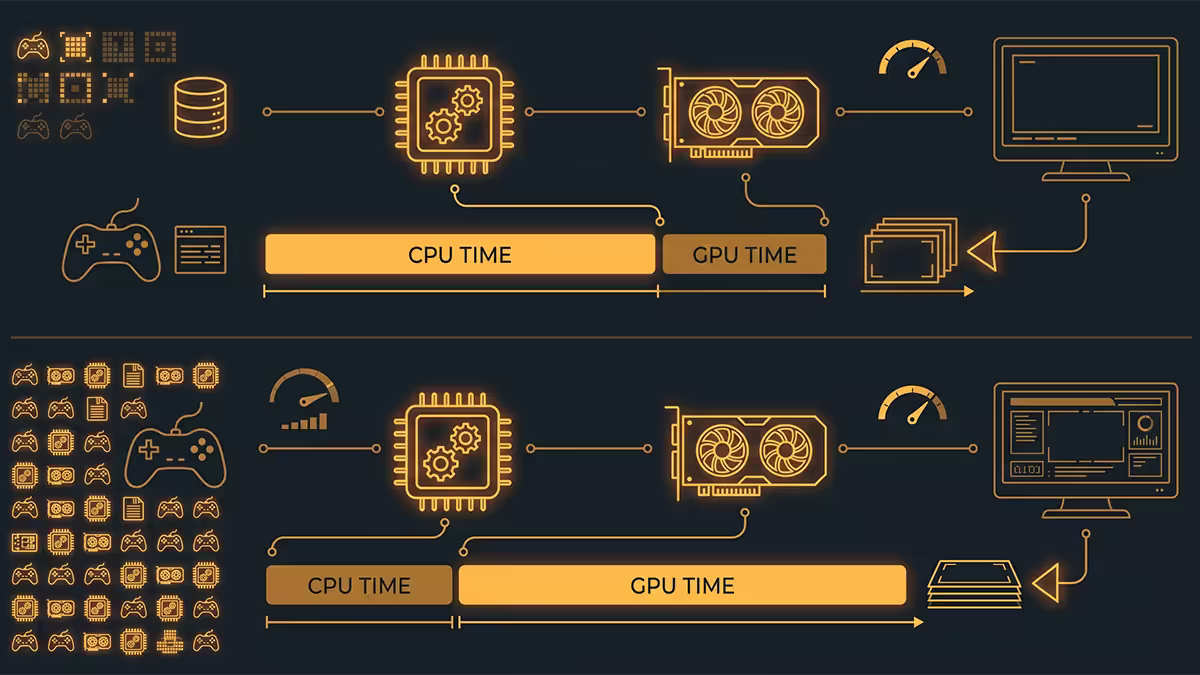
A common beginner question: "Is the CPU or GPU more important?" The honest answer is both, but the bottleneck shifts with resolution.
At 1080p, the GPU finishes each frame quickly. There's a good chance the CPU is the limit — it can't produce draw calls fast enough to keep the GPU busy. You'll see the GPU sitting at 60-85% usage while the CPU's main thread is pinned. Frame rate is capped by CPU.
At 4K, every frame has 4× the pixels to render. The GPU is suddenly the slow part of the relay race. The CPU finishes its work and waits. GPU sits at 99% usage; CPU sits at 30-40%. Frame rate is capped by GPU.
At 1440p, you sit in the middle — closer to GPU-bound with modern AAA, closer to CPU-bound in competitive esports.
Across 200,000+ custom PCs we've built in Centurion, the same conversation comes up daily: "I bought a 4080. Why aren't my frames going up?" In nearly every case the answer is the same — they paired it with a four-year-old quad-core CPU at 1080p. The GPU sat half idle while the main CPU thread was pinned flat out. A R6,000 CPU upgrade unlocked the R25,000 GPU. Match the chip to the resolution, not to the GPU price tag.
Behind the Build · From our test bench
1% lows tell the truth about CPU
Average frame rate is a misleading number. A game that averages 144 fps but stutters to 40 fps every time a new chunk loads is a worse experience than a game that holds a flat 100 fps. The metric that catches this is the 1% low — the average frame time of the worst 1% of frames in a benchmark run.
A weak CPU shows up dramatically in 1% lows. Average frame rate might look fine because most frames are quick, but when the AI subsystem suddenly has to recalculate 50 paths or a new texture streams in, the CPU stalls for 30 ms — a single 33 fps frame in an otherwise 144 fps game. You feel that as a stutter.
CapFrameX (free), MSI Afterburner with RTSS, PresentMon — all let you log 1% lows. A healthy gaming CPU produces 1% lows that sit within 25-30% of the average. A struggling CPU produces 1% lows half the average frame rate or less.
When to upgrade your CPU vs your GPU
Open a game. Press Ctrl + Shift + Esc for Task Manager. Open MSI Afterburner overlay if you have it. Play 5 minutes. Then check:
- GPU usage averaging below 95%? CPU is the bottleneck. A CPU upgrade will give you more frames.
- GPU usage pinned at 99% the whole time? GPU is the bottleneck. A CPU upgrade will give you almost nothing.
- Bouncing between 70% and 99%? You're alternating — heavy scenes are GPU-bound, light scenes are CPU-bound. Either upgrade helps a bit.
For most 1440p and 4K gamers in 2026, GPU upgrades come first. A Ryzen 5 7600 or Core Ultra 5 245K is still strong enough to feed a 4080-class card at 4K. For 1080p high-refresh competitive players, CPU upgrades unlock the difference between 240 fps and 400 fps in CS2 or Valorant.
Key takeaways
- The CPU runs the game's simulation, AI, physics, audio and produces the draw calls. The GPU paints what the CPU describes.
- Single-thread speed sets the frame rate ceiling in most engines. More cores past 8 rarely helps gaming.
- X3D's stacked L3 cache transforms sim, MMO and esports performance by hiding slow memory.
- 1080p is often CPU-bound. 4K is almost always GPU-bound. Match the chip to your resolution.
- 1% lows reveal CPU truth. If averages look fine but the game feels jittery, blame the CPU.
Frequently asked questions
What does the CPU actually do while I'm gaming?
The CPU simulates the game — physics, AI behaviour, animations, audio mixing, network logic, and the draw calls that tell the GPU what to render. The GPU paints the picture, but the CPU decides what's happening.What's the difference between a core and a thread?
A core is a physical processing unit on the CPU die. A thread is a stream of instructions that core can work on. SMT/Hyper-Threading lets one core run two threads, so 6 cores often shows as 12 threads.Is a CPU or GPU more important for gaming?
Both matter — but the bottleneck shifts with resolution. 1080p is often CPU-bound. 4K is almost always GPU-bound. Sim-heavy games are CPU-bound at any resolution.What is an X3D CPU and why is it good for gaming?
X3D is AMD's 3D V-Cache — stacked L3 cache that triples the on-die memory pool. Games with heavy sim or streaming run dramatically better because data sits in fast cache instead of slow RAM.Why is my CPU usage low but my frame rate is bad?
Total CPU usage is averaged across all cores. If one main thread is pinned at 100% while others idle, total looks like 25% but you're still CPU-bottlenecked. Check per-core in Task Manager's Performance tab.When should I upgrade my CPU instead of my GPU?
If your GPU sits below 95% in games, the CPU is your bottleneck. If GPU is pinned at 99%, upgrade the GPU. For 4K gamers, GPU upgrades almost always come first.What does single-thread vs multi-thread mean?
Single-thread is how fast one core executes. It sets the frame rate ceiling in most engines. Multi-thread is the total throughput across all cores, used for streaming, compiling and a few modern engines.What CPU do I need for 1440p / 4K gaming in 2026?
1440p high-refresh: Ryzen 7 7700/7800X3D or Core Ultra 7 265K. 4K: any modern 6-core. Spend saved CPU budget on a bigger GPU at 4K.
Get the Evetech app
Exclusive app-only prices, daily flash sales, and free delivery on orders over R4,000 — download the app and start saving.