Laptop Weight Buying Guide
Laptop weight. — How heavy is too heavy for you?
Every 500g you add to a laptop is shoulder strain on your daily commute. Every 500g you subtract is battery, screen size or GPU power. Here's how to find the right balance.
- ultraportable
- 1.0-1.4 kg
- standard
- 1.4-1.8 kg
- desktop replacement
- Over 2 kg
The five weight categories — pick the band that fits you
Laptops fall into five practical weight bands, each with a distinct use case. The number on the spec sheet matters; the number under your shoulder strap matters more.
| Category | Weight | Reference models |
|---|---|---|
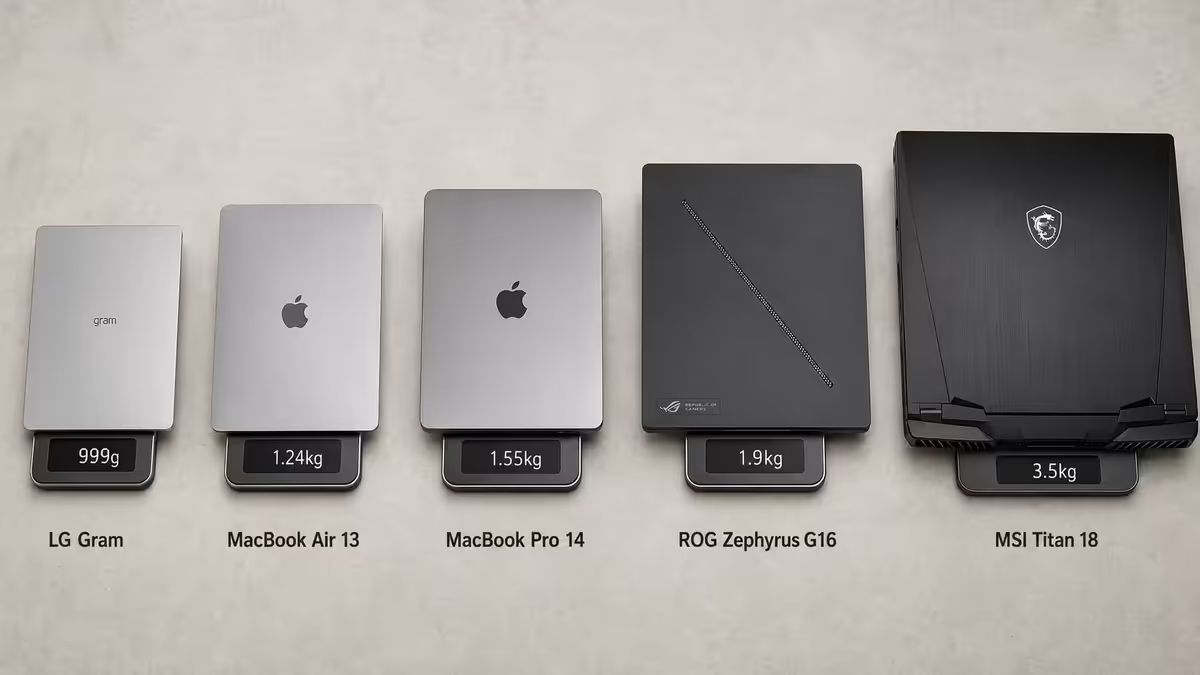
| Ultralight | Under 1.0 kg | LG Gram 14, ASUS ZenBook S 13 OLED |
| Ultraportable | 1.0 - 1.4 kg | MacBook Air 13" M3 (1.24kg), Lenovo Yoga Slim 7 |
| Standard | 1.4 - 1.8 kg | MacBook Pro 14" M4 (1.55kg), Dell XPS 15 |
| Gaming / workstation | 1.8 - 2.2 kg | ROG Zephyrus G16 (1.9kg), Legion Slim 7 |
| Desktop replacement | 2.2 - 3.0 kg+ | ROG Strix Scar 17 (3.0kg), MSI Titan 18 (3.5kg) |
MacBook Air 13" M3 at 1.24kg is the reference point most buyers know. If you've held one, you've held the upper end of the ultraportable category. Everything below that feels like nothing in a backpack. Everything 30-50% heavier (around 1.6-1.8kg) starts to feel like a real laptop.
What each kilogram actually feels like
Weight on paper is abstract. Here's what each band feels like in real use:
Under 1.0 kg — barely there
In a backpack, you'll forget it's in there. In one hand, you can comfortably hold it open for a 20-minute reading session. The trade-off: usually 13" screen, smaller battery (40-55Wh), and weight-shaving means less rigid chassis. Best for: heavy commuters, students with full backpacks, frequent travellers.
1.0-1.4 kg — comfortable daily carry
The MacBook Air territory. Carried under-arm, you notice it but it doesn't bother you. In a backpack with other items, it's an unobtrusive component. This is the sweet spot for most knowledge workers who carry their laptop 4-5 days a week. Battery typically 50-70Wh, screens 13-14", premium build quality usually intact.
1.4-1.8 kg — "real" laptop weight
Where most premium 14-15" laptops live. Under-arm carry for more than 20 minutes becomes uncomfortable. In a backpack, fine for 60-90 minutes; you notice it. The MacBook Pro 14" and Dell XPS 15 sit here. Best for: hybrid workers carrying 2-3 days a week, students.
1.8-2.2 kg — "noticeably heavy"
Gaming laptops and workstation 16" machines. Carrying under-arm for 10 minutes will start to ache. Backpacks tolerate it but with one heavy laptop and a 1.5L water bottle plus charger, your shoulder will tell you about it on a 40-minute Gautrain commute. Best for: home-base workers who travel to office 1-2 days a week.
Over 2.2 kg — desktop replacement
17" gaming and workstation rigs. These are realistically desk-bound machines that travel rarely. Carrying one for a 30-minute walk feels like carrying a heavy textbook the same distance. Best for: stationary work with occasional travel to client sites or LAN parties.
Backpack carry vs hand carry — they're very different
The same laptop feels very different depending on how you carry it. Backpacks distribute weight across two shoulders and the lumbar; the perceived load is roughly half of the actual mass. Under-arm or single-strap carries concentrate the load on one shoulder or one hand, and the perceived weight is closer to actual or even higher.
Practical implication: a 2.0kg laptop in a proper backpack with hip belt feels like a 1.0kg laptop in your hand. The same 2.0kg laptop in a single-strap messenger bag feels worse than a 1.4kg laptop carried in hand for the same distance.
If you walk 10+ minutes between transport modes (parking → office, Gautrain station → office, Uber drop-off → meeting), invest in a good backpack with proper weight distribution. Salomon, Osprey, Peak Design and Targus all offer ~R900-R2,500 options that change the math on laptop weight tolerance.
Screen size correlation — bigger screens mean more weight
There's a near-direct relationship between screen size and laptop weight. Larger screens need larger chassis, bigger battery, bigger keyboard deck, more internal volume. This relationship has a few rules-of-thumb worth knowing:
| Screen size | Typical weight range | Reference point |
|---|---|---|
| 13" | 0.9 - 1.4 kg | MacBook Air 13" M3 (1.24kg) |
| 14" | 1.3 - 1.7 kg | MacBook Pro 14" M4 (1.55kg) |
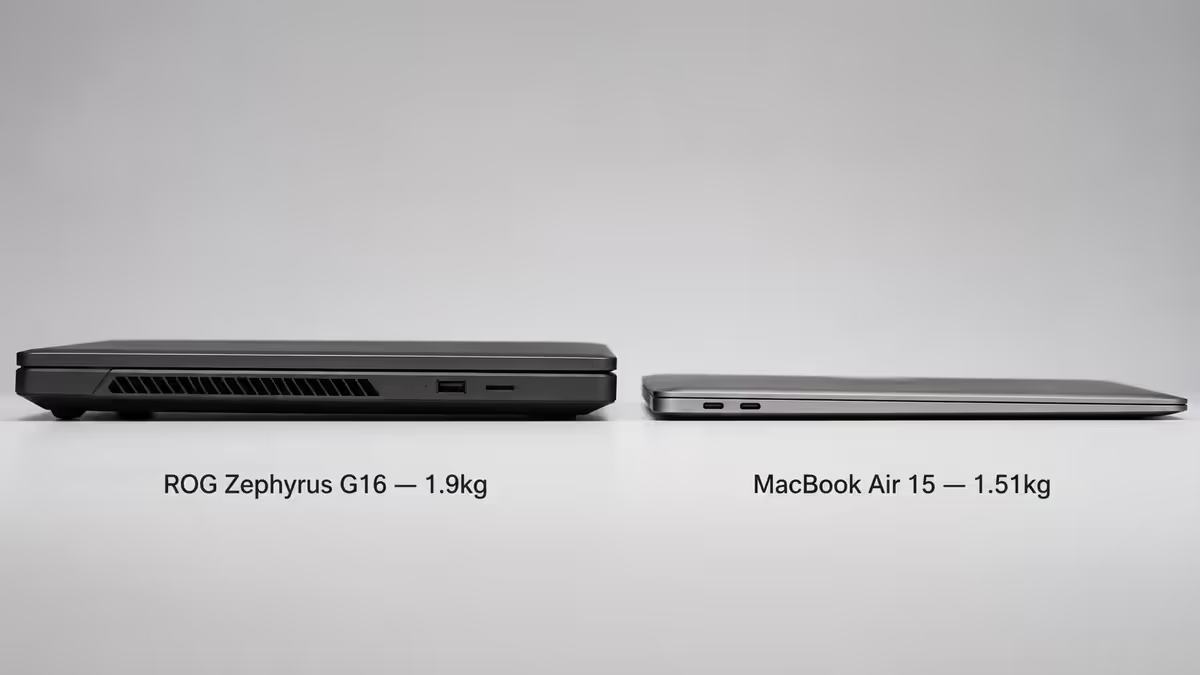
| 15" | 1.5 - 2.0 kg | MacBook Air 15" (1.51kg), Dell XPS 15 (1.85kg) |
| 16" | 1.8 - 2.5 kg | MacBook Pro 16" M4 Max (2.14kg), ROG Zephyrus G16 (1.9kg) |
| 17-18" | 2.5 - 3.5 kg+ | ROG Strix Scar 17 (3.0kg), MSI Titan 18 (3.5kg) |
The 14" sweet spot: large enough for serious productivity (spreadsheets, code editor with multiple panes, video timelines), light enough for daily carry. The 14" 1.4-1.6kg category has the lowest buyer regret rate of any laptop class.
The 13" trade-off: lighter but cramped for productivity work. Most users find 13" inadequate for daily 8-hour work without an external monitor; great as a travel/secondary device.
The 17"+ reality: these are essentially portable desktops. Worth it if your workflow needs the screen real estate (CAD, video editing, multi-window data work) and you have a permanent desk setup with occasional travel. Daily commute with a 17" is something most people stop doing after 2-3 weeks.
The GPU's weight cost — about 300-500g for gaming laptops
A dedicated GPU adds three things that all add weight: the GPU silicon itself plus its VRAM and PCB (50-80g), the dedicated cooling system for the GPU (~200-300g — extra heat pipes, vapour chambers, fans), and the bigger battery needed because gaming laptops drain power 3-5× faster (~100-150g extra battery for the same runtime).
Net effect: a 16" gaming laptop with RTX 4070 weighs 2.0-2.4kg. The same chassis with integrated graphics (Intel Arc, AMD Radeon 880M) weighs 1.6-1.8kg. That 400g difference is the GPU tax — and it's the difference between "daily carry tolerable" and "noticeably heavy" for most users.
Daily carry vs occasional carry — pick category by frequency
The single best predictor of laptop-weight regret is honest reflection on how often you actually carry the laptop. Not how often you think you should, not how often you'd like to — how often you actually do.
- 4-5 days/week carry (full hybrid commuter, university student) → target 1.0-1.6kg. Anything over 1.8kg becomes a chore by month 2.
- 2-3 days/week carry (part-time hybrid, occasional client visits) → 1.4-1.9kg is comfortable. You feel the heavier machines but they're not punishing.
- 1 day/week or less carry (mostly desk-based work, occasional travel) → up to 2.2kg is fine. The desk is your primary environment; weight matters only for the occasional trip.
- Rare travel only (LAN parties, client demos, holiday work) → no upper limit. A 3kg desktop replacement is genuinely better than a 1.2kg ultraportable if you don't carry it daily.
Test in person before buying — SA retailers with demo units
No spec sheet tells you what a laptop feels like in your hand. SA retailers with reliable demo units:
- iStore (Sandton City, V&A, Gateway, etc.) — full Apple range physically available. MacBook Air and Pro are stocked across all configurations. Pick up the 13" Air, then the 16" Pro, and feel the 900g difference.
- Incredible Connection (most major malls) — Asus, Lenovo, HP, Dell ranges across multiple weight classes. Demo units vary by store; the larger flagship stores (Sandton, Canal Walk, Gateway) carry the widest selection.
- Officescape (corporate fit-out specialists) — premium ThinkPad and HP EliteBook lineups, plus some ASUS ProArt and ROG. Best place to feel the X1 Carbon (sub-1kg territory) and Lenovo Legion gaming range side-by-side.
What to test: pick the laptop up with one hand and hold it for 30 seconds. Carry it under your arm around the store for 60 seconds. Open the screen with one hand (the hinge action and weight balance matters). If you'll typing on the laptop on your lap (Uber, plane), check the weight distribution — front-heavy laptops are uncomfortable on the lap.
Real-world commute weight — laptop is only part of it
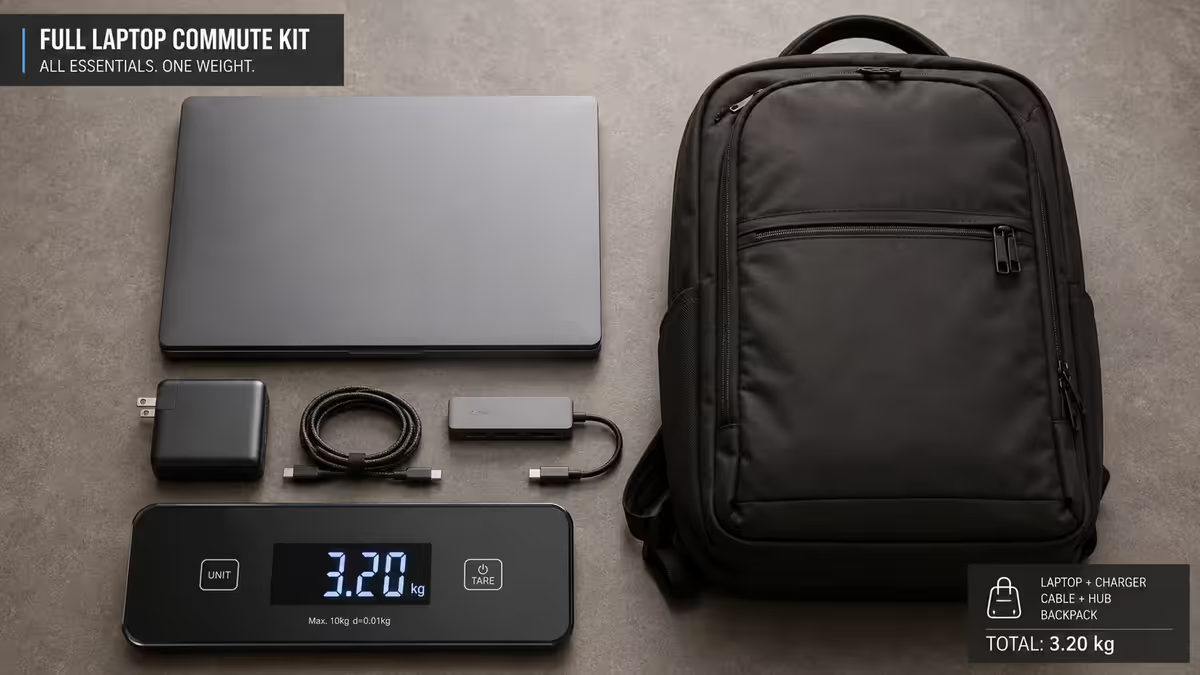
When you sling your bag over your shoulder, the laptop is only part of what's on you. The realistic commute total: laptop + charger + cables + bag = laptop weight × ~1.5.
Typical breakdown:
- Charger: 200-450g. Modern GaN chargers (Apple 70W, Anker Nano) are 200g; older multi-output and 100W+ are 350-500g.
- USB-C cable + dongles: 100-200g for the average kit (USB-C charging cable, ethernet dongle, HDMI dongle).
- Bag itself: 400-900g empty. A premium backpack (Peak Design Everyday) is 1.0kg empty; a light messenger bag is 400g.
- Other items: notebook, pen, headphones, water bottle, lunch — easily another 800-1500g.
Net total for a "1.4kg laptop" commute: 1.4kg laptop + 250g charger + 150g cables + 700g bag + 1.0kg other = 3.5kg total on your shoulder. The same setup with a 2.0kg gaming laptop becomes 4.1kg total. The 600g laptop-weight difference is 17% of total carry load — not insignificant.
SA pricing per weight class — what each band costs
| Class / weight | Reference SA models | SA price (May 2026) |
|---|---|---|
| Ultralight (under 1.0kg) | LG Gram 14, ASUS ZenBook S 13 OLED | R26,000 - R35,000 |
| Ultraportable (1.0-1.4kg) | MacBook Air 13" M3, Lenovo Yoga Slim 7 | R22,000 - R32,000 |
| Standard (1.4-1.8kg) | MacBook Pro 14" M4, Dell XPS 15, ASUS ZenBook 14 OLED | R28,000 - R55,000 |
| Gaming / workstation (1.8-2.2kg) | ROG Zephyrus G16, Legion Slim 7, MacBook Pro 16" | R32,000 - R85,000 |
| Desktop replacement (2.2kg+) | ROG Strix Scar 17, MSI Titan 18, Razer Blade 18 | R45,000 - R140,000+ |
Common laptop weight mistakes
Buying for occasional use that becomes daily use. The classic. You buy a 2.2kg gaming laptop "for the occasional LAN" and find yourself carrying it daily for a project. Two months in, the 2.2kg feels like 5kg. Be honest about carry frequency before committing.
Ignoring the charger weight. A "1.2kg ultraportable" with a 500g brick charger isn't really a 1.2kg portable experience — it's 1.7kg+. Premium laptops with GaN charging bricks (Apple, ASUS ZenBook, MacBook line) keep the total down. Check the charger spec, not just the laptop.
Buying 17" when 16" would do. The 17" form factor adds 500g-1kg over a 16" with similar internals. Unless you specifically need the screen real estate (CAD, multi-window data work), the 16" is the smarter buy.
Trusting only the spec-sheet weight without picking it up. Two laptops can have the same listed weight but feel completely different in hand depending on weight distribution. A front-heavy 1.5kg laptop feels worse than a balanced 1.7kg one.
Discounting the bag weight. A 1.0kg backpack adds 1.0kg to every commute. A 400g messenger bag saves 600g daily but distributes weight worse. Match the bag to the laptop weight, not the brand aesthetic.

Key takeaways
- For daily 3-5 day carry, target 1.0-1.6kg. The 14" 1.4-1.6kg sweet spot has the lowest regret rate.
- The GPU tax is real — discrete graphics add 300-500g. Skip the GPU if you don't truly need it.
- Real-world commute weight = laptop × ~1.5 once charger, cables and bag are included.
- Test in person — pick up, carry, hold open. The number on the spec sheet doesn't tell you the in-hand feel.
- Be brutally honest about carry frequency. The biggest regret comes from buying for fantasy use cases.
Frequently asked questions
What's the ideal laptop weight for daily commuting?
For 4-5 days/week carry, target 1.0-1.4kg. The 14" 1.4-1.6kg category has the lowest regret rate (~5%). Above 1.8kg becomes noticeably heavy on multi-stop commutes.Is 2kg too heavy for a laptop?
For desk-bound work with occasional travel, no. For daily carry 3-5 days/week, yes — most users describe 2kg+ as 'noticeably heavy' on real commutes. Gaming laptop buyers are the most-regret category for this reason.Why are gaming laptops so much heavier than work laptops?
Three factors: discrete GPU + cooling (300-500g), bigger battery for higher power draw (100-150g), and beefier cooling system overall. Net result: roughly 400g over an equivalent integrated-GPU laptop.How does screen size affect laptop weight?
Strongly. 13" laptops 0.9-1.4kg, 14" 1.3-1.7kg, 15" 1.5-2.0kg, 16" 1.8-2.5kg, 17"+ 2.5kg-3.5kg+. The 14" form factor is the sweet spot for most users.How much extra weight does the charger and cables add?
Charger 200-450g, cables/dongles 100-200g, bag 400-900g, other items 800-1500g. Total commute load = laptop weight × ~1.5.Should I test laptop weight in person before buying?
Yes, where possible. SA retailers with demo units: iStore, Incredible Connection (larger flagship stores), Officescape. Pick up, hold for 30 seconds, carry under-arm for 60 seconds.Does the chassis material affect weight much?
Yes. Magnesium alloy (LG Gram, MSI Prestige) saves 200-400g vs aluminium. Plastic saves weight but loses rigidity. Aluminium is the strength-to-weight sweet spot for premium ultrabooks.What's the lightest laptop you can buy in SA right now?
LG Gram 14 at around 999g — under 1kg for a 14" laptop. ASUS ZenBook S 13 OLED at 1.0kg flat. MacBook Air M3 13" at 1.24kg is the well-known reference. Sub-1kg laptops trade off battery size and screen tech for the weight reduction.
Get the Evetech app
Exclusive app-only prices, daily flash sales, and free delivery on orders over R4,000 — download the app and start saving.