Business Laptop Buying Guide
How to choose a business laptop.
Battery first. Build quality second. Specs third.
- battery target
- 10-14 hrs
- portable target
- Sub-1.3 kg
- security must
- Hello + FP
What matters — in the right order
A business laptop is bought for what it's like to use 8 hours a day for 3-5 years, not for what its benchmark scores look like in a launch review. The single biggest mistake we see is buyers leading with CPU/RAM specs and ignoring the things they'll actually feel daily: battery, keyboard, build quality, weight.
The right order:
- Battery life — the difference between a tool that follows you anywhere and one tethered to a power point.
- Weight — anything over 1.5kg becomes "I'll leave it at the office today" weight on the commute.
- Keyboard — you'll type millions of characters on it. The cheapest difference is also the most felt.
- Build quality — a R28,000 chassis that survives three years of bag drops vs a R22,000 chassis that flexes when you open it.
- Display — IPS 1200p is the sweet spot for office work; OLED only if colour accuracy matters.
- CPU — Intel Core Ultra 7, AMD Ryzen AI 7 or Snapdragon X Elite are all fine. Pick by battery and software compatibility.
- RAM and storage — 16GB / 512GB minimum; 32GB / 1TB for power users.
- Warranty — 3-year onsite is worth the R2,500-R5,000 extra cost.
CPU — Intel, AMD or Snapdragon ARM
In 2026 all three CPU families deliver excellent productivity performance. The differences live in efficiency (battery), software compatibility (legacy x86 apps), and AI features (NPU performance for Windows 11 AI features).
| CPU family | Battery | Compatibility | Best for |
|---|---|---|---|
| Intel Core Ultra 7 (Lunar/Panther Lake) | 12-15 hrs | Universal (x86) | Mainstream business, safest pick |
| AMD Ryzen AI 7/9 (Strix Point) | 10-13 hrs | Universal (x86) | Stronger productivity per Rand |
| Snapdragon X Elite (ARM) | 14-18 hrs | x86 emulation for legacy | Best battery, modern apps only |
| Apple M3/M4 (macOS only) | 15-20 hrs | macOS native | Mac-friendly business workflows |
Intel Core Ultra 7 — the safe default
Lunar Lake and the newer Panther Lake chips have closed the battery gap that Intel was previously losing. Core Ultra 7 268V / 288V (Lunar Lake) deliver 12-15 hours of real-world battery on a typical 60-70Wh business chassis. Full x86 compatibility means every legacy enterprise app, every weird industry-specific tool, every COM-based plug-in works without consideration.
AMD Ryzen AI 7 / 9 — strong productivity per Rand
Strix Point chips (Ryzen AI 9 HX 370 / 365) deliver 25-35% more multi-threaded performance per Rand than equivalently-priced Intel parts. Battery life trails Intel by 1-2 hours in identical chassis but is still excellent — 10-13 hours. Great pick for spreadsheet-heavy work, light data analysis, or any user who runs CPU-intensive tasks regularly.
Snapdragon X Elite — best battery, modern app caveats
ARM-based, with industry-leading battery life (14-18 hours real-world on the Surface Laptop 7 and ThinkPad X1 Carbon ARM). Standby behaviour is excellent — the laptop wakes from sleep instantly and holds charge for days. Caveat: legacy x86 applications run in emulation (Prism). Modern apps (Microsoft 365, Adobe Creative Cloud, Chrome, Edge, Slack, Zoom, Teams) are ARM-native. Older or niche enterprise software may struggle or fail to run.
RAM and storage
RAM: 16GB is now the entry-level floor for business use in 2026. Modern Windows 11, Microsoft 365 desktop apps, multiple browser tabs, Teams in the background, OneDrive sync — all of this comfortably exceeds 8GB before you even open an Excel workbook. 32GB is the right pick for: power users running heavy spreadsheets with multiple connected data sources, anyone running virtual machines for development or testing, anyone editing photos/videos on the side.
Storage: 512GB SSD is the minimum; 1TB is the sweet spot. Storage cannot be upgraded on most modern business laptops (soldered NVMe is increasingly common on the thinnest models). Buy enough storage on day one — the cost differential between 512GB and 1TB is typically R1,500-R2,500, which is much cheaper than replacing a laptop two years later because you ran out of space.
NVMe Gen 4 is standard on business laptops at this tier — typical sequential read/write 5,000+ MB/s. This is more than enough for any office workload; faster Gen 5 NVMe (often advertised on consumer laptops) buys nothing measurable for business use.
Screen, keyboard and trackpad
Screen
14-inch is the most popular business size — light enough to carry, large enough for productive work. 13-inch and 15-inch both have buyers but represent the extremes. 16-inch is desktop-replacement territory.
Resolution targets:
- 1080p / 1920×1200 — minimum acceptable. Fine for office work, light on battery. Best value tier.
- 1200p / 1920×1200 IPS — the sweet spot. 16:10 aspect ratio gives extra vertical pixels for spreadsheets, documents and code. Most premium business laptops ship at this resolution as standard.
- 2.8K / 3K OLED — for creative pros. Worth the R3,000-R6,000 premium if you do design, photo or video work. Slightly shorter battery, slight burn-in risk over 3-5 years.
- 4K / 3840×2400 — over-spec for most business users. Heavy battery cost, marginal everyday benefit on a 14-inch panel.
Keyboard
The single feature that separates premium business laptops from consumer machines. ThinkPad keyboards are the gold standard (curved keycaps, longer travel, TrackPoint nub for cursor navigation without leaving the home row). HP EliteBook and Dell Latitude keyboards are excellent. Most ASUS ExpertBook keyboards are good. Avoid laptops where keyboard reviews mention shallow travel, mushy feedback or excessive flex.
Backlit keyboard is mandatory. No business laptop in 2026 ships without it. Two-stage brightness with auto-off is standard.
Trackpad
Microsoft Precision Touchpad certification means all 4-finger gestures work consistently. Glass surfaces beat plastic. Larger trackpads (5"+ wide) handle multi-finger gestures more comfortably. Apple's trackpad on the MacBook Air remains the industry benchmark; Windows machines now come close, especially on premium Dell and Lenovo.
Security features that matter
Business laptops handle company data — security features should be checked as deliberately as battery life. Three hardware features are non-negotiable in 2026:
- Fingerprint scanner — usually integrated into the power button. Logs you in 50+ times a day in less than 1 second each.
- IR camera with Windows Hello support — looks at you, logs you in. Privacy shutter on premium models physically blocks the camera when not in use.
- TPM 2.0 module — hardware-rooted encryption key storage. Required for BitLocker full-disk encryption, which is required by most corporate security policies.
Additional features worth looking for:
- Camera privacy shutter — physical slider that covers the webcam lens.
- FIDO2 / WebAuthn support — for passwordless authentication into web apps.
- Corporate-managed BIOS (ThinkShield, HP Wolf Security, Dell Trusted Workspace) — for IT-managed deployments.
- SmartCard reader — common in government / public sector deployments.
- Kensington / Noble lock slot — for physical theft prevention in office or hot-desk environments.
Warranty and support
Business laptops should ship with at least 1-year warranty as standard. The smart spend on a business laptop is the warranty upgrade — extending to 3-year next-business-day onsite coverage typically costs R2,500-R5,000 and pays for itself the first time you need a part replaced without sending the machine away for two weeks.
| Programme | Vendor | Includes |
|---|---|---|
| ThinkPad ProSupport | Lenovo | 3-yr NBD onsite, accidental damage option |
| Dell ProSupport Plus | Dell | 3-yr NBD onsite, accidental damage, SupportAssist |
| HP Care Pack Active Care | HP | 3-yr NBD onsite + AI-powered support |
| ASUS Premium Care | ASUS | 3-yr global perfect warranty, accidental damage |
| AppleCare+ | Apple | 3-yr coverage + 2 incidents accidental damage |
SA availability: Lenovo ProSupport, Dell ProSupport Plus and HP Active Care all have local SA on-site presence. Response is typically next business day in major metros (Johannesburg, Cape Town, Durban, Pretoria, Centurion), 2-3 days in regional centres. Apple Care+ in SA covers in-store / mail-in service only — no onsite option.
SA brand picks — premium, mid-tier, budget
Premium tier (R30,000-R45,000)
For senior professionals, road warriors, and anyone for whom the laptop is the primary work tool. MIL-STD-810 build, 14+ hour real battery, premium keyboards, 3-year onsite warranty as standard or available.
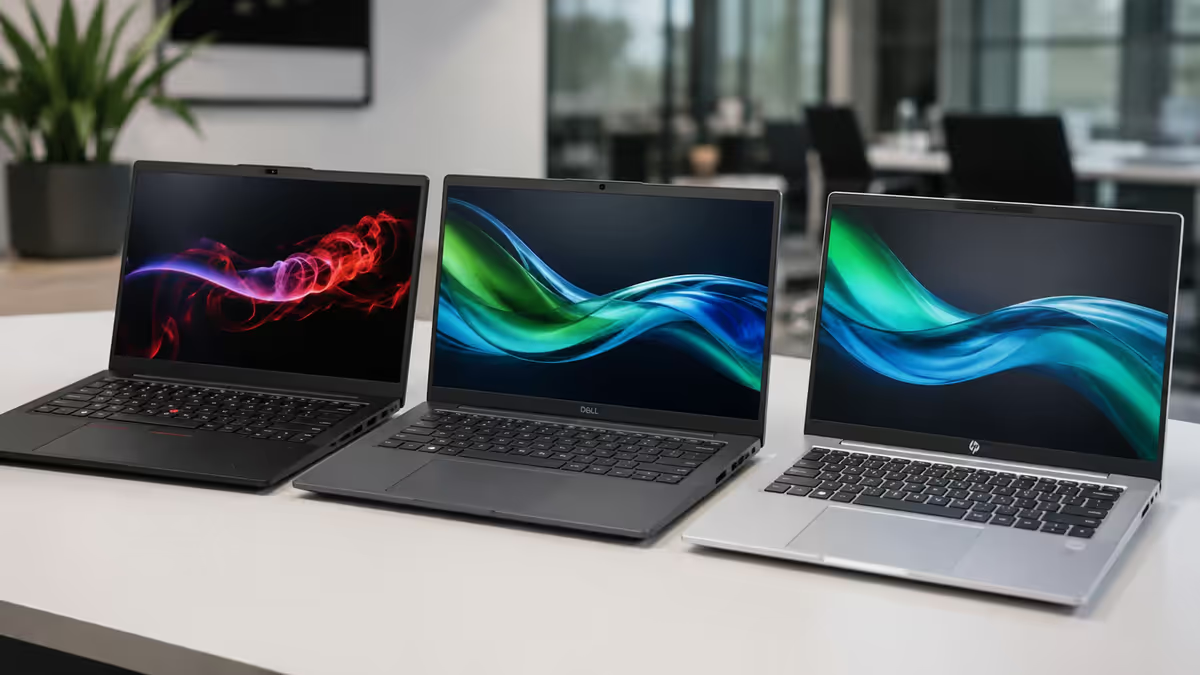
- Lenovo ThinkPad X1 Carbon Gen 12 — 14" 1200p IPS or 2.8K OLED, Intel Core Ultra 7, 16-32GB, 1.09kg. The benchmark for premium business laptops. R36,000-R44,000.
- Dell Latitude 7450 / 7455 — 14" 1200p IPS, Intel Core Ultra 7 or Snapdragon X Elite. Excellent keyboard, ProSupport ecosystem. R34,000-R42,000.
- HP EliteBook 1040 G11 — 14" 1200p IPS, Intel Core Ultra 7, HP Sure Sense AI features. Excellent build, slightly heavier than ThinkPad. R33,000-R41,000.
- Microsoft Surface Laptop 7 (Business) — 13.8" or 15", Snapdragon X Elite. Best-in-class battery, sleek design. R32,000-R40,000.
- Apple MacBook Air M4 (15") for Mac-friendly orgs — 15" 2K, Apple M4. Best-in-class battery and silent operation. R29,000-R38,000.
Mid-tier (R18,000-R28,000)
Solid corporate-grade options for mainstream business use. Slightly heavier, slightly shorter battery than premium tier, but durable and well-supported.
- Lenovo ThinkPad T14 Gen 5 — 14" IPS, Intel Core Ultra 5/7 or Ryzen AI 7. R22,000-R28,000.
- Dell Latitude 5450 / 5455 — 14" IPS, Intel or Snapdragon. R20,000-R27,000.
- HP EliteBook 840 G11 — 14" IPS, Intel Core Ultra 5/7. R21,000-R28,000.
- ASUS ExpertBook B5 / B9 — 14"/15.6" IPS or OLED, Intel Core Ultra. Lightweight, good value. R19,000-R25,000.
- Lenovo Yoga Pro 7 — 14" 2.8K OLED, Intel Core Ultra 7. Premium consumer-business crossover. R23,000-R28,000.
Budget tier (R12,000-R18,000)
Acceptable for light office use but compromise on build, battery and keyboard. Better for occasional-use roles (receptionist, hot-desk, secondary device) than primary-tool buyers.
- Lenovo ThinkPad E14 / E16 — 14"/16" IPS, Intel Core 5 or Ryzen 5/7. R14,000-R18,000.
- Dell Vostro 14 / 16 — 14"/16" IPS, Intel Core 5/7. R13,000-R17,000.
- HP ProBook 440 / 450 G11 — 14"/15.6" IPS, Intel Core Ultra 5. R13,000-R18,000.
- ASUS ExpertBook B1 / B3 — 14"/15.6" IPS, Intel Core 5/7. R12,000-R16,000.

Key takeaways
- Buy in order: battery → weight → keyboard → CPU → spec. Battery and keyboard are felt every day; CPU and spec rarely.
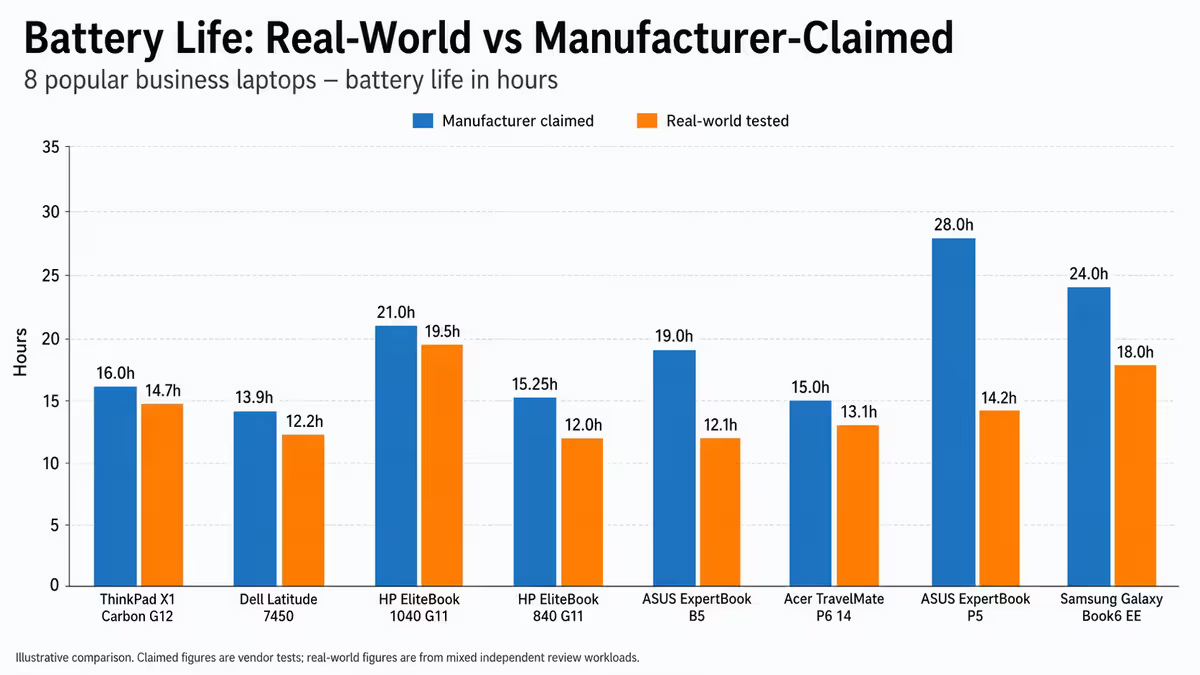
- Target 10-14 hours real-world battery (manufacturer figures are 25-30% overstated). Under-12-hour models lead to returns.
- 16GB RAM minimum in 2026; 32GB for power users. 512GB SSD floor, 1TB sweet spot. Storage often non-upgradable.
- Insist on fingerprint scanner, IR camera with shutter and TPM 2.0. The security baseline is not optional in 2026.
- Upgrade to 3-year onsite warranty — R2,500-R5,000 well spent. ProSupport, Active Care, ThinkShield are all available in SA.
Frequently asked questions
What battery life should I look for in a business laptop?
10-14 hours real-world. Manufacturer figures are 25-30% overstated. 60Wh battery minimum.Intel, AMD or Snapdragon ARM for a business laptop?
Intel Core Ultra 7 is the safest. AMD Ryzen AI delivers more productivity per Rand. Snapdragon X Elite has best battery but watch x86 compatibility.How much RAM and storage for a business laptop?
16GB / 512GB minimum. 32GB / 1TB for power users. Storage is often non-upgradable — buy enough on day one.Is OLED worth it on a business laptop?
For creative pros yes. For office work, IPS at 1200p is the better-value sweet spot.What security features matter on a business laptop?
Fingerprint scanner, IR camera + privacy shutter, TPM 2.0 are mandatory. FIDO2 / WebAuthn and corporate BIOS for managed deployments.How important is the warranty for a business laptop?
Critical. Upgrade to 3-year onsite NBD for R2,500-R5,000. Pays for itself the first time you need a part replaced.Should I buy a touchscreen 2-in-1 for business?
Only if you use a stylus daily or specifically need touch input. Adds weight and reduces battery without daily value for most.What's the best business laptop in SA in 2026?
Premium: ThinkPad X1 Carbon Gen 12, Dell Latitude 7450, HP EliteBook 1040. Mid-tier: ThinkPad T14, ASUS ExpertBook B5. Budget: ThinkPad E14, Dell Vostro.
Get the Evetech app
Exclusive app-only prices, daily flash sales, and free delivery on orders over R4,000 — download the app and start saving.