Laptop Buying Guide
How to choose laptop RAM — 8GB vs 16GB vs 32GB.
Soldered RAM has changed everything. On most new ultrabooks, the capacity you buy is the capacity you keep — for the lifetime of the laptop. Pick wrong and there's no fixing it later. Pick right and you'll stretch a single laptop to five comfortable years.
- of 2026 ultrabooks soldered
- ~70%
- 2026 practical minimum
- 16GB
- expected useful life
- 5 yrs
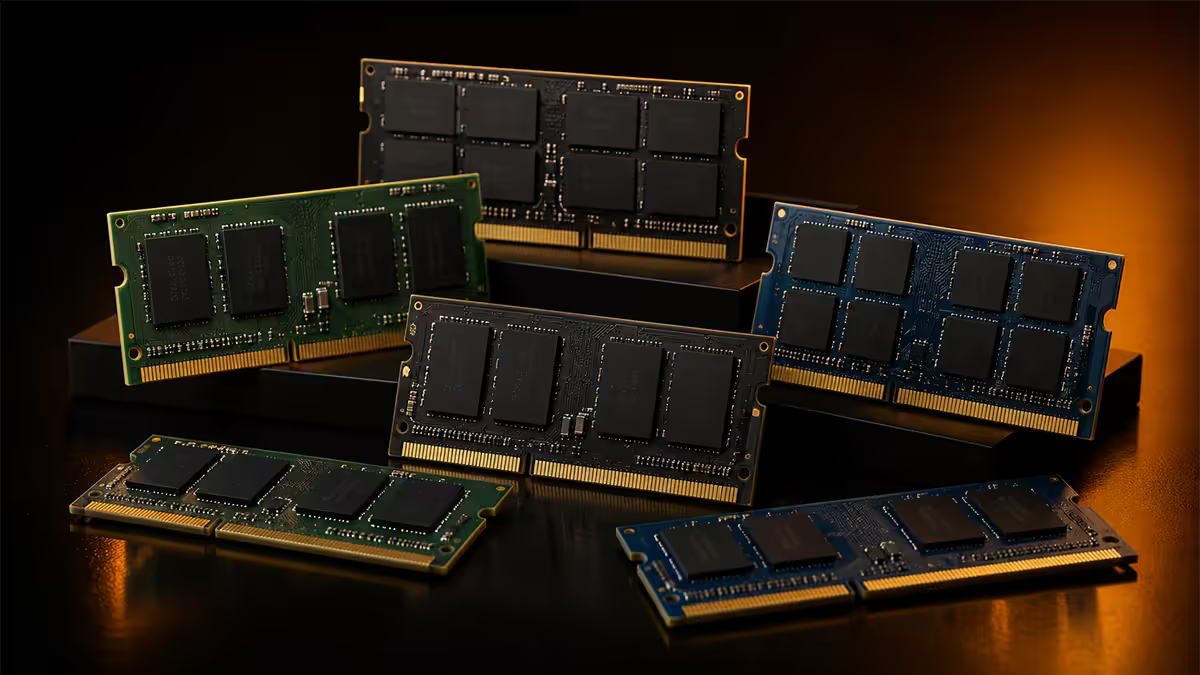
Soldered vs SO-DIMM — the upgrade reality of 2026
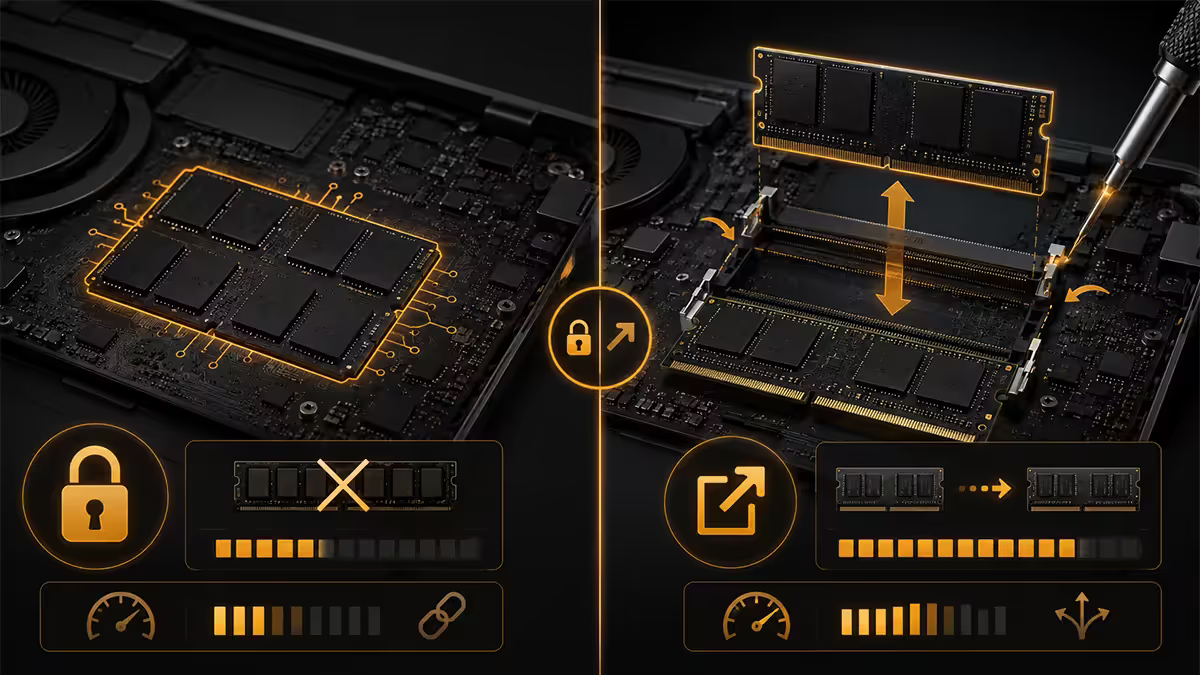
This is the single most important thing to understand about modern laptop RAM. Across the 2024-2026 generation, the majority of premium ultrabooks have moved to soldered LPDDR5 memory. The RAM is physically attached to the motherboard during manufacturing — there are no slots, no clips, no upgrade path.
Why? Soldered LPDDR5 sits directly next to the CPU (often on the same package), runs at higher speeds, draws less power, and lets manufacturers build thinner laptops. The trade is permanent: what you buy is what you keep.
What's soldered in 2026:
- Apple MacBook Air / Pro (entire range) — unified memory on the M-series SoC.
- Dell XPS 13 / 14 / 16 — LPDDR5x soldered.
- Lenovo ThinkPad X1 Carbon / Yoga / Nano — LPDDR5 soldered.
- ASUS ZenBook S / Vivobook S premium — mostly soldered.
- HP Spectre / EliteBook Ultra / OmniBook Ultra — soldered.
- Microsoft Surface Laptop / Pro / Studio — soldered.
- Samsung Galaxy Book4 / 5 Edge — soldered.
What still has SO-DIMM slots:
- Gaming laptops — ASUS ROG Strix/G-Series, MSI Stealth/Vector/Raider, Acer Predator, Lenovo Legion, HP Omen, Dell Alienware m-series.
- Mobile workstations — Lenovo ThinkPad P-series, Dell Precision, HP ZBook.
- Budget/mainstream laptops — most HP Pavilion, ASUS Vivobook (non-S), Lenovo IdeaPad and Acer Aspire models still ship with at least one SO-DIMM slot.
8GB / 16GB / 32GB — how to choose

8GB is genuinely obsolete for new Windows laptops in 2026. A clean Windows 11 24H2 install plus Chrome with 10 tabs already pushes 8GB into swap-paging territory. The laptop will feel slow from day one and worse with every Windows update. Only acceptable if:
- It's a ChromeOS Chromebook (the OS uses far less RAM).
- It's a budget Windows machine for a single-task user (kids' school work, one browser tab, a video player).
- It's literally all your budget allows.
16GB is the 2026 practical minimum. Handles:
- Windows 11 + Office 365 + Teams + Slack + Chrome with 20 tabs without paging.
- Light Lightroom edits, casual Premiere Pro, Adobe Express.
- Esports gaming (CS2, Valorant, League).
- Visual Studio Code, IntelliJ, light Docker work.
- 2-3 year useful life for a typical user.
32GB is the right choice for any soldered ultrabook you want to keep 4-5+ years, or for any of:
- Video editing (Premiere Pro, DaVinci Resolve, Final Cut).
- Photo editing with large catalogues (Lightroom, Capture One).
- 3D and CAD (Fusion 360, Blender, SolidWorks).
- Software development with large IDEs and multiple containers.
- Virtual machines (running Linux or Windows inside macOS or vice versa).
- Data analysis (Python with large datasets, Tableau, Power BI).
- Gaming laptops where you'll run modern AAA games.
64GB is workstation territory. Only relevant for serious 4K-8K video editors, professional 3D animators, ML/AI developers, or anyone running multiple heavy VMs simultaneously. The price premium over 32GB is steep on laptops (usually R6,000-R12,000 difference).
| Use profile | Recommended laptop RAM | If soldered, jump to |
|---|---|---|
| Student, browsing, Office | 16GB | 16GB (don't compromise) |
| Office work, mixed apps | 16GB | 32GB for 5-year life |
| Creator (photo/video light) | 32GB | 32GB |
| Developer / DevOps | 32GB | 32GB or 64GB |
| Gaming laptop (AAA) | 32GB | Usually SO-DIMM upgradeable |
| Heavy creator (4K video, 3D) | 64GB | 64GB workstation |
LPDDR5 vs DDR5 — when each shows up
There are two main memory types in current laptops, and the choice is made by the laptop manufacturer rather than by you. Understanding which is which helps you read spec sheets.
LPDDR5 / LPDDR5x (Low-Power DDR5) is found in ultrabooks. It's always soldered, always packaged close to the CPU, and runs at high effective speeds (6400-8533 MT/s on LPDDR5x). The "LP" denotes low-power optimisation — important for all-day battery life on thin laptops. Cannot be upgraded.
DDR5 SO-DIMM is found in gaming laptops, workstations, and most mainstream laptops above R10,000. Slots in via standard SO-DIMM interfaces (smaller version of desktop DIMM). Runs at 5600-6400 MT/s typically. Can be swapped or expanded.
DDR4 SO-DIMM is still around in budget laptops and refurbished business gear. Acceptable for low-end use but the platform is end-of-life — avoid for new purchases unless price is the only consideration.
Apple unified memory — the side note
Apple Silicon (M3, M4, M5 series in MacBooks) does memory completely differently. The RAM sits on the same chip package as the CPU, GPU, Neural Engine and media engines, and all of them share the same pool. This is called unified memory architecture (UMA).
Practical implications:
- 16GB on Apple ≈ 24-32GB Windows DDR5 in mixed video/photo workloads where the GPU needs frequent access to large textures. The Windows GPU has to copy assets across PCIe to its own VRAM; the Mac just reads directly from system memory.
- Memory bandwidth is enormous — M4 Pro hits 273 GB/s, M4 Max hits 546 GB/s. Compared to typical laptop LPDDR5x at 89-120 GB/s.
- No upgrade ever — once you pick 16/24/32/48GB at order time, that's the unit forever. Apple charges aggressively for higher tiers (R6,000+ for a 16→32GB step).
For gaming and Windows-app heavy use, traditional DDR5 Windows laptops still benchmark more favourably title-by-title. For Adobe Premiere, Final Cut Pro, Logic Pro, Xcode and any work where GPU + CPU share data heavily, the Apple unified memory model is genuinely the most efficient option in 2026.
How to check laptop RAM specs before buying
Reading a 2026 laptop spec sheet correctly takes 30 seconds if you know where to look. Here's the checklist:
- Total capacity — e.g. "16GB". Easy.
- Memory type — "LPDDR5", "LPDDR5x", "DDR5", "DDR4". Tells you which platform.
- Speed — e.g. "6400 MT/s". Higher is better, within reason.
- Memory channels — "Dual-channel" or "Single-channel". Always look for dual.
- Upgradeability — "Soldered / On-board" means no upgrade. "2x SO-DIMM slots, up to 64GB" means yes upgrade.
- Maximum supported capacity — important if you're buying with 16GB but plan to upgrade to 32GB later (only on SO-DIMM systems).
If the spec sheet doesn't mention SO-DIMM, assume soldered. If you're not certain, ask the vendor before checkout — most reputable SA retailers (Evetech, Hi-Online, Takealot tech sellers, Incredible Connection) can confirm this on request.
Future-proofing — what to budget for 2030
RAM needs creep upward roughly 30-50% every 4 years for a typical user. 8GB was fine in 2018; 16GB became standard around 2021; 32GB is the new normal for 2026 power users.
If you're buying a laptop in 2026 with the intention of keeping it until 2030-2031:
- For SO-DIMM laptops: start with 16GB if budget tight, plan a 32GB upgrade in year 3-4.
- For soldered ultrabooks: pay for 32GB now or accept a shorter useful life.
- For Apple: 16GB will likely still be acceptable in 2030 thanks to UMA, but 24GB gives you more headroom.
- For workstation use: 32GB minimum, 64GB if budget allows.
The single biggest mistake we see is buying the marketed-as-base configuration (8GB or 16GB soldered) because it's R3,000 cheaper, then needing to replace the laptop in 2-3 years because the OS has bloated past the available RAM. The total cost of ownership is far higher than paying the upgrade premium up front.
SA laptop RAM pricing in 2026
| Upgrade scenario | SA cost | Notes |
|---|---|---|
| 16GB SO-DIMM DDR5 (single stick) | R1,200-R1,800 | Crucial, Kingston, G.Skill widely available |
| 32GB (2x16GB) SO-DIMM DDR5 kit | R2,800-R4,200 | Best-value upgrade path on gaming laptops |
| 32GB (2x16GB) SO-DIMM DDR4 kit | R1,800-R2,500 | For older AM4-era and budget DDR4 laptops |
| 16GB→32GB soldered (manufacturer config) | +R3,000-R5,500 | BTO premium at order time |
| Apple 16GB→32GB unified upgrade | +R6,000-R8,000 | Apple's notoriously steep memory tax |
| Apple 16GB→48GB or 24→64GB | +R8,500-R15,000 | Workstation Mac territory |
Common laptop RAM mistakes
Buying 8GB Windows soldered because it's R3,000 cheaper. You'll feel the pain on day one and replace the laptop early.
Assuming you can upgrade the RAM later. Check the spec sheet before purchase. If it doesn't say SO-DIMM, assume soldered.
Buying based on marketing-page memory speed alone. A faster MT/s on a thinner laptop won't outperform a slower MT/s with a better CPU and discrete GPU for real workloads.
Apple-tax shock at upgrade time. A base MacBook Air with 16GB suddenly becomes a R36,000 MacBook Air with 32GB. Budget for the upgrade at the start, or accept the 16GB ceiling.
Mismatching SO-DIMM kits on gaming laptops. Same rule as desktop: buy a matched pair, don't mix existing sticks with new sticks.
Ignoring single-channel hybrid configurations. Some "thin and light" laptops ship 8GB soldered + 1 empty SO-DIMM. Adding an 8GB stick gives you 16GB but the dual-channel benefits are mixed at best. Buy 16GB soldered up front instead.
Key takeaways
- Soldered RAM is the new normal on premium ultrabooks — the capacity you buy is the capacity you keep.
- 16GB is the 2026 practical minimum; 32GB the safer pick for 5-year life on any soldered system.
- Gaming laptops and workstations still ship SO-DIMM — upgradeable, swappable.
- Apple unified memory is roughly 1.5-2x as effective per GB for GPU-heavy work versus Windows DDR5.
- Always verify "SO-DIMM" in spec sheets before buying — if absent, assume soldered.
Frequently asked questions
How much RAM do I need in a laptop in 2026?
16GB minimum for any new Windows laptop. 32GB for creators, developers, or anyone wanting 5+ years of useful life. 8GB is borderline obsolete for Windows.Is laptop RAM upgradeable in 2026?
Mostly no on ultrabooks — soldered. Gaming laptops and workstations still ship SO-DIMM and are upgradeable. Mainstream laptops vary — check the spec sheet for "SO-DIMM" or "user-replaceable".What's the difference between LPDDR5 and DDR5?
LPDDR5 is soldered ultrabook memory, runs higher speeds (6400-8533 MT/s), no upgrade. DDR5 SO-DIMM runs 5600-6400 MT/s but is swappable.Is 8GB RAM still usable for a laptop in 2026?
Only for ChromeOS Chromebooks. Windows 11 on 8GB pages constantly in 2026. Apple has stopped shipping 8GB on M-series Macs.How does Apple's unified memory compare?
16GB Apple unified ≈ 24-32GB Windows DDR5 for mixed GPU/CPU workloads. Bandwidth far higher. But Apple charges aggressively for upgrades, and there is no aftermarket option.How do I check my laptop RAM specs?
Check the spec sheet for capacity, type (LPDDR5/DDR5), speed, dual-channel, and crucially "SO-DIMM slots" vs "soldered/on-board". If SO-DIMM isn't mentioned, assume soldered.How much does laptop RAM upgrade cost in SA?
Gaming SO-DIMM 32GB kit R2,800-R4,200. Soldered ultrabook 16→32GB BTO premium R3,000-R5,500. Apple 16→32GB R6,000-R8,000.Will adding RAM void my warranty?
On user-accessible SO-DIMM laptops, no — manufacturers expect upgrades. On soldered laptops, upgrade isn't possible. Lenovo, ASUS ROG and Dell Precision explicitly support user RAM upgrades.
Get the Evetech app
Exclusive app-only prices, daily flash sales, and free delivery on orders over R4,000 — download the app and start saving.