RAM Buying Guide
How to choose RAM. — 32 GB, DDR5-6000, CL30. Done.
RAM is one of the cheapest big upgrades you can make to a 2026 build — and one of the easiest to overthink. This guide cuts through the spec-sheet chatter and tells you the kit to buy.
- sweet spot
- 32 GB
- target speed
- DDR5-6000
- target latency
- CL30
How much RAM you actually need in 2026
RAM sizing has moved in 2026. What was comfortable two years ago is now the floor. Here's where each capacity actually lives:
Browsing, Word, email. Windows 11 idle eats 6-7 GB. Not for gaming.
Casual gaming + browser. Tight on modern AAA titles with Discord + Spotify running.
Gaming, streaming, multitasking. Headroom for years. Where almost everyone should land.
Video editing, 3D, virtual machines, local AI models, large databases.
Why 32 GB is now the floor: Modern AAA games routinely allocate 12-16 GB of system RAM at high settings. Windows 11 plus Edge/Chrome plus Spotify plus Discord plus Steam plus a few background apps already sits at 14-18 GB before you've launched anything heavy. 16 GB worked in 2022; it gets uncomfortable in 2026.
DDR5 vs DDR4 — DDR5 only in 2026
If you're building new, this isn't a choice. Every current AMD AM5 and Intel LGA 1851 platform uses DDR5 exclusively — you can't even slot DDR4 into them. DDR4 lives on only for upgrades to older platforms (LGA 1700, AM4).
DDR5 is roughly 30% more expensive per GB than DDR4 at equivalent quality, but it delivers 1.5-2× the bandwidth, ships with on-module power management for stability, and pairs cleanly with current CPUs. There's no scenario in 2026 where a new build benefits from being on DDR4.
Speed and CL latency — where the marketing lies
DDR5 kits ship at speeds from 4800 MT/s (the JEDEC default) up to 8000 MT/s and beyond. Manufacturers love to market the top numbers. But for gaming and most productivity:
- DDR5-6000 CL30 is the sweet spot. AMD's memory controller runs cleanest at exactly 6000 MT/s and CL30 latency. Intel Core Ultra is more flexible but also stable here.
- DDR5-6400 CL32 is a small step up — 2-3% extra performance for 10-15% extra cost. Marginal.
- DDR5-7200 CL34 and faster can give 1-3% extra FPS in specific titles, but at 30-50% price premium and real stability risk on AMD. Often won't run at rated speed without manual tuning.
- DDR5-4800 (default) is what your kit runs at if you forget to enable XMP / EXPO — and what most "budget" kits are rated for. Costs you 15-20% gaming performance.
Always buy as a dual-channel kit
Modern CPUs have two memory channels. To use both, you need two RAM sticks installed in the right slots. A single 32 GB stick technically works but runs in single-channel mode — meaning you've halved your memory bandwidth and lost 10-25% gaming performance.
The right approach:
- Buy a 2-stick kit (2 × 16 GB for 32 GB total, or 2 × 32 GB for 64 GB total)
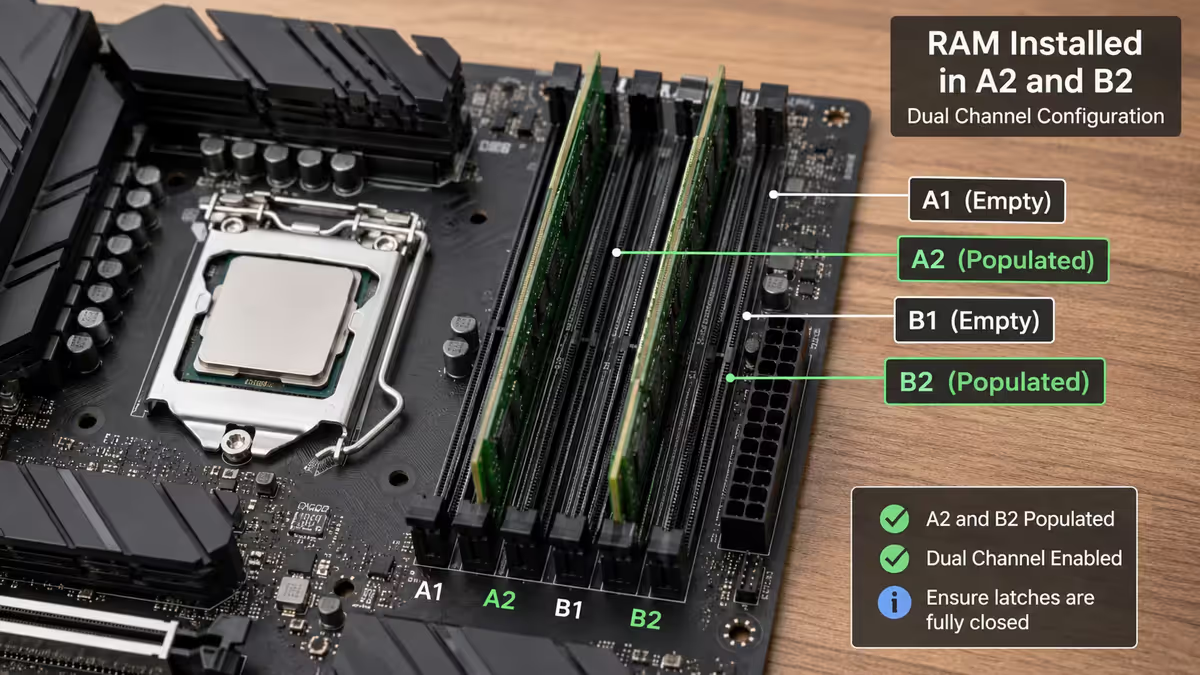
- Install both sticks. Most motherboards use slots A2 and B2 for dual-channel — the second and fourth slots from the CPU
- Check your motherboard manual to confirm the correct slot positions
Four sticks isn't always better. AMD Ryzen and Intel Core Ultra both struggle to run four sticks at rated XMP/EXPO speeds. If you need 64 GB, get a 2 × 32 GB kit, not 4 × 16 GB.
XMP (Intel) and EXPO (AMD)
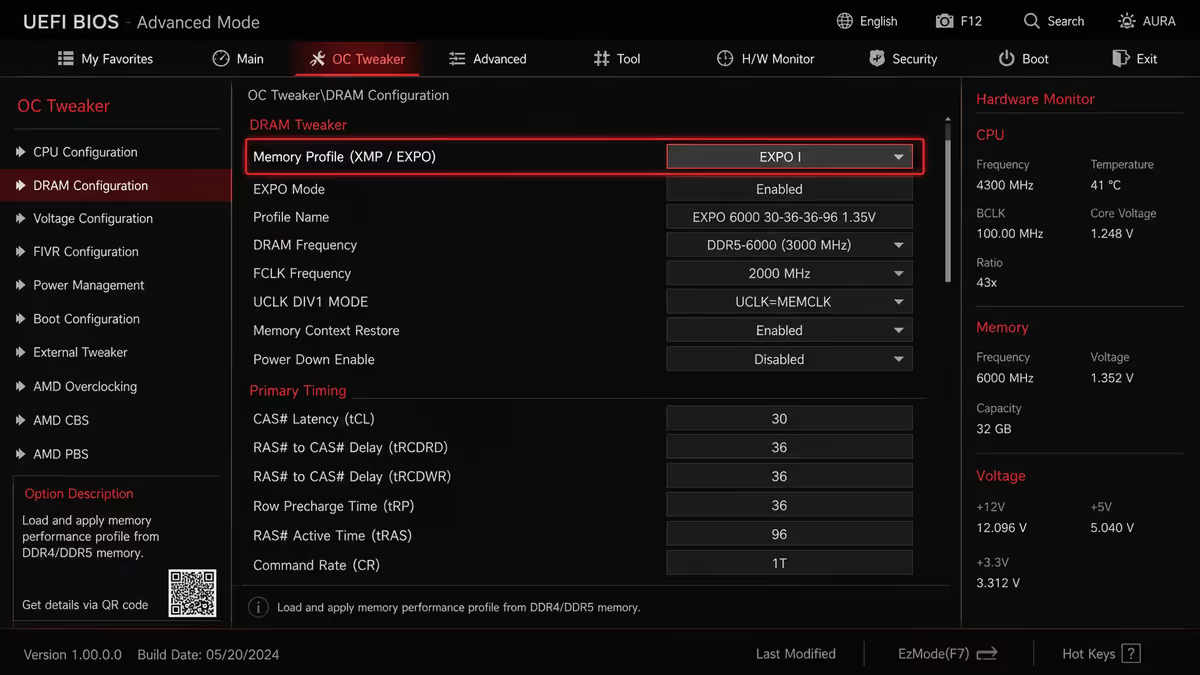
Your RAM kit's advertised speed — DDR5-6000, DDR5-7200 — is the speed it's capable of, not the speed it runs at out of the box. Without enabling a memory profile, every DDR5 kit defaults to 4800 MT/s, losing 15-25% of its rated performance.
The profiles that fix this:
- XMP 3.0 — Intel's standard. Stored on the RAM module, enabled in BIOS
- EXPO — AMD's equivalent. Same idea, AMD-optimised timings. Kits often ship with both XMP and EXPO profiles
How to enable — Boot to BIOS (usually Del or F2 at startup), find the memory section (called AI Tweaker on ASUS, OC on MSI, Tweaker on Gigabyte). Set the profile dropdown to Profile 1 or Auto. Save and exit. Takes 30 seconds, costs nothing, gives you back 15-25% memory performance.
Brands and recommended kits
Trusted brands in South Africa
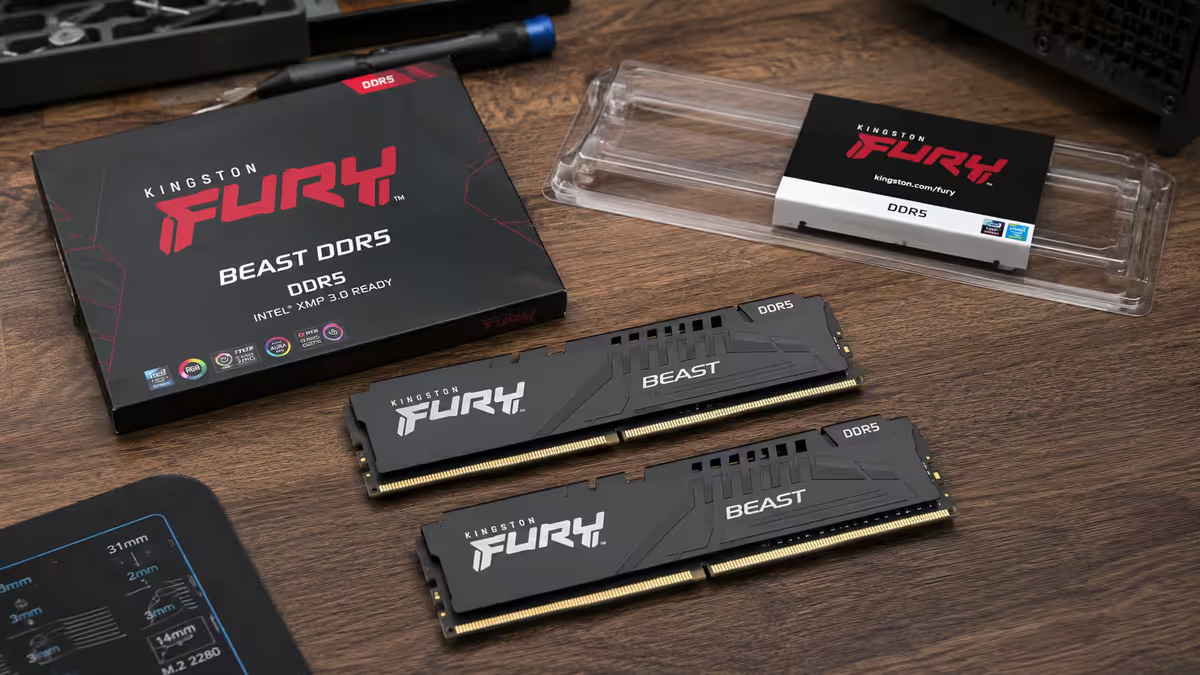
- Kingston Fury Beast / Renegade — reliable, often the best value at DDR5-6000 CL30. Lifetime warranty
- Corsair Vengeance / Dominator — premium build, RGB options, lifetime warranty
- G.Skill Trident Z / Ripjaws — popular with enthusiasts, top-tier overclocking headroom, lifetime warranty
- TeamGroup T-Force / T-Create — value pick, solid quality, often cheapest at the same spec
- Crucial Pro / Ballistix — Crucial owns Micron, so they make their own chips. Stable and reasonably priced
Recommended 2 × 16 GB DDR5-6000 CL30 kits
| Kit | Best for | SA price |
|---|---|---|
| Kingston Fury Beast 32 GB DDR5-6000 CL30 | Value sweet spot | R1,800-R2,300 |
| Corsair Vengeance 32 GB DDR5-6000 CL30 | Premium build, no RGB | R2,200-R2,800 |
| Corsair Vengeance RGB 32 GB DDR5-6000 CL30 | RGB build | R2,500-R3,200 |
| G.Skill Trident Z5 32 GB DDR5-6000 CL30 | Enthusiast / OC headroom | R2,500-R3,300 |
| TeamGroup T-Create 32 GB DDR5-6000 CL30 | Cheapest quality option | R1,700-R2,100 |
Common RAM mistakes
Buying a single 32 GB stick. You've halved your memory bandwidth. Two 16 GB sticks installed correctly always beat one 32 GB stick at the same spec.
Skipping XMP / EXPO. Your DDR5-6000 kit will run at 4800 MHz until you enable the profile. 15-20% gaming performance left on the table for the sake of one BIOS setting.
Paying for DDR5-7200 or faster. 1-3% extra performance in specific titles for 30-50% more money and real instability risk on AMD. Not worth it.
Mixing kits. Two kits of the same brand, speed and timings should work but isn't guaranteed. Different chip batches can refuse to play nicely. The safe path is one kit at the capacity you need.
Installing in the wrong slots. Two sticks in slots A1 and A2 won't run dual-channel. Use A2 and B2 — typically the 2nd and 4th slots from the CPU. Motherboard manual confirms.
Key takeaways
- 32 GB is the 2026 sweet spot. 64 GB for creator work. Don't go below 32 GB.
- DDR5-6000 CL30 is the right target for both AMD and Intel. Faster speeds rarely pay off.
- Always buy a 2-stick kit, install in slots A2 and B2, enable dual channel.
- Enable XMP or EXPO in BIOS after first boot. Without it, you lose 15-20% memory performance.
- Stick with trusted brands (Kingston, Corsair, G.Skill, TeamGroup, Crucial). Lifetime warranty across the board.
Frequently asked questions
How much RAM do I need in 2026?
32 GB is the sweet spot for gaming, productivity and streaming. 16 GB still works for pure browsing and office. For creator work (video editing, 3D, AI), step up to 64 GB.DDR5 vs DDR4 — which should I buy?
DDR5 in 2026. All current AMD AM5 and Intel LGA 1851 platforms use DDR5 only. DDR4 is end-of-life for new builds.What is the best DDR5 speed for gaming?
DDR5-6000 CL30 is the sweet spot for both AMD Ryzen and Intel Core Ultra. Faster speeds give 1-3% extra FPS at significant cost premium and stability risk.What does CL30 mean on RAM?
CL stands for CAS Latency. Lower numbers are faster. CL30 means the RAM takes 30 clock cycles to respond. At DDR5-6000, CL30 translates to roughly 10 nanoseconds of actual latency.Do I need dual channel RAM?
Yes. Always buy RAM as a dual-channel kit (typically 2 × 16 GB) and install both sticks in slots A2 and B2. A single 32 GB stick performs significantly worse.Do I need to enable XMP or EXPO?
Yes — almost always. Without enabling, your DDR5-6000 RAM runs at the default 4800 MHz, costing 15-20% gaming performance. Enable in BIOS — takes 30 seconds.Can I mix different RAM kits?
It's risky. Different batches use different chips even at the same spec. The safest path is to buy a single 2-stick kit at the capacity you need.How much RAM should I budget in a R20,000 PC?
R1,800-R3,500 for a quality 32 GB DDR5-6000 CL30 kit. RAM is one of the cheapest performance upgrades — don't economise here.
Get the Evetech app
Exclusive app-only prices, daily flash sales, and free delivery on orders over R4,000 — download the app and start saving.