PC Case Buying Guide
How to choose a PC case.
— Airflow first. RGB last.
- default size
- Mid ATX
- fans typical
- 3-6
- sweet spot
- R900-R2,500
Form factor — pick mid-tower ATX unless space forces smaller
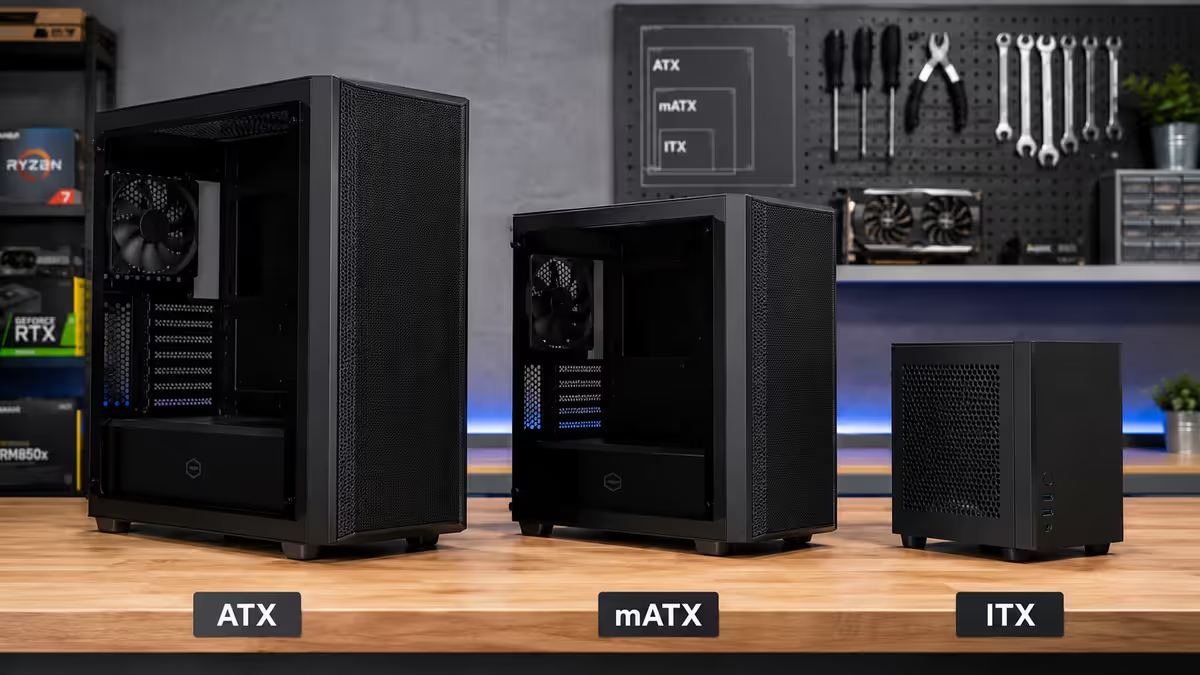
PC cases come in five practical sizes. Full-tower (huge, dual-system or extreme cooling builds), mid-tower ATX (the default for most builds), mATX (micro-ATX) (compact desktop builds), ITX (mini-ITX) (small-form-factor PCs near the size of a console), and cube / showcase cases (display builds).
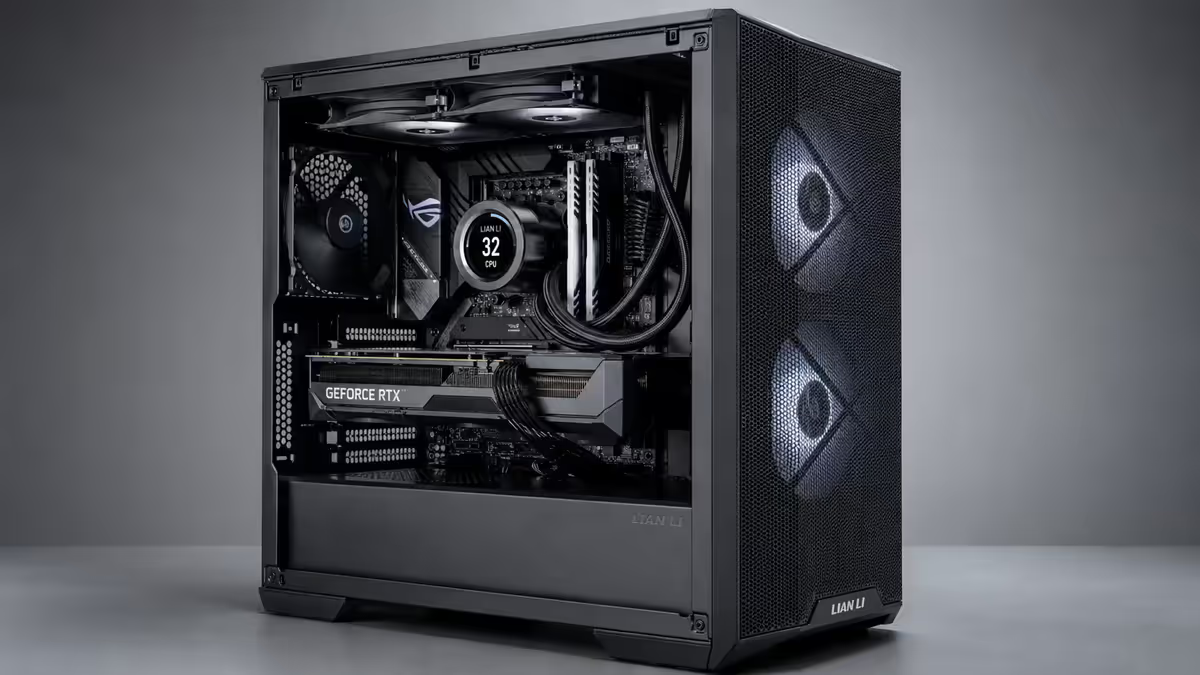
For most builders, mid-tower ATX is the answer. It fits any motherboard size, supports any GPU you can buy in 2026, takes a 360mm AIO, has room for cable management, and assembles in an evening. Smaller cases sound clever in theory and frustrating in practice — they cost more per square cm, run hotter, restrict GPU and cooler choice, and turn cable routing into an ordeal.
| Case size | Best for | GPU limit | SA price band |
|---|---|---|---|
| Full-tower | Workstations, dual-loop water cooling | ≥420mm | R2,500-R6,000+ |
| Mid-tower ATX | Default for gaming & creator builds | 360-410mm | R900-R2,500 |
| mATX | Compact desktop, simple builds | 280-340mm | R900-R1,800 |
| ITX (Mini) | Console-sized SFF builds | 260-330mm | R1,800-R3,500 |
| Cube / Showcase | Display centrepiece builds | Varies | R2,000-R5,000 |
Airflow — the single biggest design choice
A PC case is, at its core, a thermal box. Air has to enter cool, pass over the GPU and CPU, and exit warm. The front panel determines how much air enters. This is the most important spec — far more than RGB, glass, or steel thickness.
Cases fall into three airflow categories:
| Type | Summary | Notes |
|---|---|---|
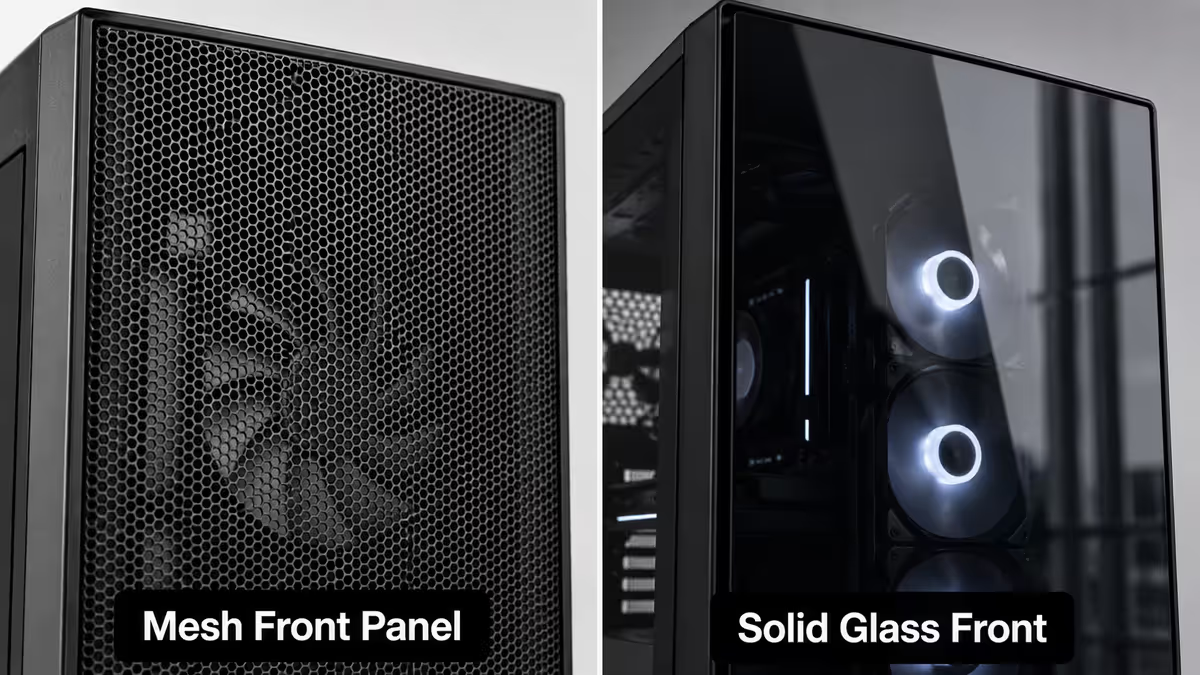
| Mesh front | Best airflow | 5-15°C lower CPU/GPU temps. Slightly louder at idle. The right pick for hot SA summers. |
| Vented sides only | Compromise | Glass or solid front + perforated sides. Looks cleaner but airflow is ~70% of mesh. |
| Solid front | Avoid for gaming | Pretty but heat traps. Only fine for low-power office builds or specialised silent builds. |
The mesh deception: some cases use "mesh-look" front panels that are mostly decorative plastic with tiny perforations — they restrict airflow heavily despite the marketing. The test: hold the panel up to light. Real airflow mesh has obvious large perforations you can see through clearly. Fake mesh blocks light almost completely.
Positive vs negative pressure: set your case so total intake CFM (front + bottom fans) slightly exceeds total exhaust CFM (rear + top fans). This is "positive pressure" — air leaves through filtered intakes rather than entering through unfiltered gaps, dramatically reducing dust buildup. For most builds: 3 front intakes + 1 rear exhaust is naturally positive.
Fan support — three to six is the practical range
Most mid-tower ATX cases ship with 2-3 fans included and support up to 6-8 total. For a typical gaming build, you want:
| Fan position | Job | Typical count |
|---|---|---|
| Front (intake) | Pull cool air in over GPU/CPU | 2-3 × 120mm or 2 × 140mm |
| Rear (exhaust) | Push hot CPU air out | 1 × 120mm or 140mm |
| Top (exhaust or AIO) | Exit warm air, mount 360mm AIO | 2-3 × 120mm (optional) |
| Bottom | Intake for GPU directly | 1-2 × 120mm (rarely used) |
Don't over-fan. Adding a 7th and 8th fan rarely improves temperatures more than 1-2°C, but it adds noise, dust, and clutter. Three intakes + one exhaust covers the vast majority of builds. Add top fans only if you're running a 360mm AIO at the top.
140mm vs 120mm fans: 140mm fans move more air at lower RPM, meaning quieter operation for the same airflow. If your case supports 140mm fans, use them. If it's 120mm only, that's fine too — the difference is real but modest.
GPU and cooler clearance — the spec sheet matters
The most common case sizing mistake: ordering a fancy case, then discovering your RTX 5090 / RX 9070 XT doesn't fit. Modern flagship GPUs reach 320-360mm long. Mid-range cards sit at 270-310mm. Always cross-reference your specific card's length to the case's "max GPU length" spec.
CPU cooler clearance: if you're running a tower air cooler (Noctua NH-D15, be quiet! Dark Rock Pro, Thermalright Peerless Assassin), check "max CPU cooler height" — most full-size air coolers need ~160-170mm of clearance. Slim mid-towers sometimes only allow 155mm, blocking the largest coolers.
Radiator clearance: for AIO water cooling, three numbers matter — supported radiator length (240mm, 280mm, 360mm), supported radiator thickness (most cases handle 27mm; thicker 30mm+ radiators may not fit), and RAM clearance if the rad mounts at the top of the case.
Cable management — first-time builders should care most
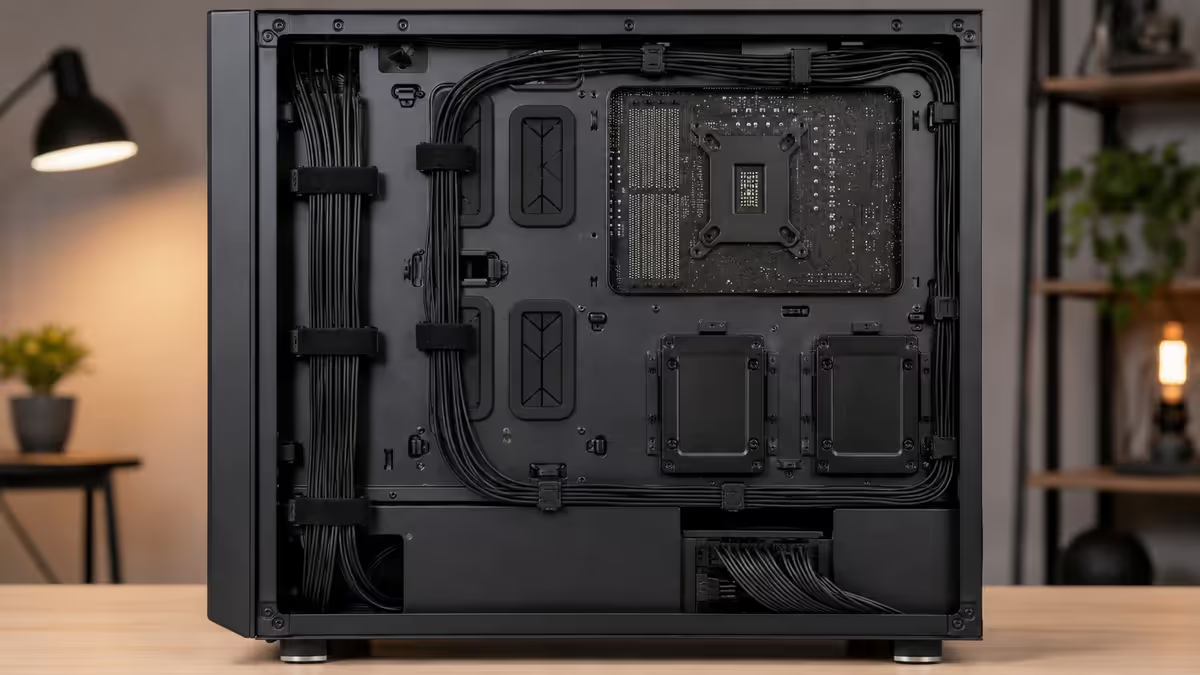
A well-designed case turns the cable-routing afternoon into a 30-minute job. Look for:
- ≥20mm clearance behind the motherboard tray — enough room to hide thick PSU cables.
- Pre-routed cable cutouts with rubber grommets — for the 24-pin, GPU power and CPU 8-pin lines.
- Multiple velcro straps sewn into the back panel for tying cables down.
- PSU shroud at the bottom — hides the PSU and extra cable length.
- Top-mounted CPU power cutout — the EPS 8-pin runs the cleanest if there's a passage near the top of the motherboard.
Cases like the Lian Li Lancool 216, NZXT H7 Flow, Corsair 4000D Airflow, and Fractal North are designed around exactly these features. Older budget cases or cheap unbranded chassis often skip several of them — you'll spend three times as long routing cables and the result still looks messy.
Recommended PC cases by use case
| Use case | Pick | SA price |
|---|---|---|
| Best value mid-tower | Lian Li Lancool 216 or MSI MAG Forge 320R | R1,400-R1,800 |
| Quiet, classic look | Fractal Design North or Pop Air | R1,900-R2,400 |
| Pure airflow, no compromise | NZXT H7 Flow or Corsair 4000D Airflow | R1,800-R2,500 |
| Showcase / RGB build | Lian Li O11 Dynamic EVO or NZXT H9 Elite | R3,500-R5,500 |
| Budget mid-tower | Cooler Master MasterBox MB511 or Phanteks Eclipse P400A | R900-R1,400 |
| Compact mATX | Lian Li Lancool 207 or NZXT H5 Flow | R1,500-R2,200 |
| SFF / ITX | Lian Li A4-H2O or NZXT H1 V2 | R2,800-R5,000 |
Common PC case mistakes
Buying for looks first, airflow second. The prettiest case with a solid glass front will run 10°C hotter than an ugly mesh case with identical components. Pick airflow first; pick aesthetics from the airflow-good shortlist.
Going too small. ITX builds are cool projects, not better PCs. They cost more, run hotter, take longer to build, and limit your GPU and cooler choice. Only go ITX if size is non-negotiable.
Ignoring GPU clearance. Flagship GPUs are huge in 2026 — measure twice, order once. The number printed on the GPU box (e.g., 336mm length, 4-slot) needs to fit your case's published clearances.
Falling for the fan count. Eight pre-installed fans don't make a case better than one with three. Quality of fan placement and front-panel design matter much more than raw count.
Skipping dust filters. SA dust is real, especially in winter. Make sure your case has magnetic or slide-out dust filters on the front intake and PSU intake. Cleaning takes 5 minutes every 3 months — a build without filters needs a deep clean every 6 weeks.
Key takeaways
- Mid-tower ATX is the default — pick smaller only if space genuinely demands it.
- Real mesh front panel beats glass / solid front by 5-15°C on identical components.
- Three to six fans is the practical range. Don't over-fan — diminishing returns past four.
- Always cross-reference your GPU's length and slot count to the case spec sheet.
- Cable management features (≥20mm rear clearance, grommets, velcro, PSU shroud) save hours.
Frequently asked questions
What size PC case do I need — ATX, mATX or ITX?
Mid-tower ATX is the default. It fits any motherboard, takes any GPU, supports 360mm AIOs, and is easy to build inside. Choose mATX or ITX only if desk/shelf space genuinely demands smaller — small builds cost more, run hotter, and limit GPU/cooler choice.Mesh front vs solid glass front — which is better?
Mesh front, almost always. 5-15°C lower temps than solid glass or plastic fronts. Mesh examples: Fractal North, NZXT H7 Flow, Lancool 216, Corsair 4000D Airflow.How many fans does a PC case need?
Three to six. The standard layout is 2-3 front intakes + 1 rear exhaust. Add 3 top fans only if mounting a 360mm AIO. More than six is diminishing returns and extra noise.Will my GPU fit in this case?
Compare "max GPU length" on the case spec to your card's length. Flagship 2026 GPUs reach 320-360mm. Mid-tower ATX usually fits 360-410mm. Smaller mATX cases sometimes only 280-320mm.Do I need a tempered glass side panel?
Only if you want to see the build. Glass adds 10-20% to cost and weight but doesn't affect cooling. If the build will be on display, choose thumbscrew or hinged glass — pull-off panels scratch easily.What's the difference between real mesh and "mesh-look" fronts?
Real airflow mesh has large perforations you can see through clearly. "Mesh-look" panels are decorative plastic with tiny holes that restrict airflow. Lancool 216, NZXT H7 Flow, Corsair 4000D Airflow are real mesh.How important is cable management for a PC case?
Very important for first-time builders. Look for ≥20mm rear-tray clearance, rubber grommets, velcro straps, and a PSU shroud — these features make assembly a 30-minute job instead of an afternoon.Can I fit a 360mm radiator in my case?
Most mid-tower ATX cases support 360mm AIOs. Verify three things on the spec: max rad length, max rad thickness (some cases only fit slim 27mm rads), and RAM clearance if mounting at the top.
Get the Evetech app
Exclusive app-only prices, daily flash sales, and free delivery on orders over R4,000 — download the app and start saving.