Hardware Explainer · Ports & Protocols
USB-C, Thunderbolt 4 & Thunderbolt 5 — same hole, four different speeds, three power tiers.
Every modern laptop has at least one USB-C port. None of them tell you what it can actually do. Here's how to read the spec sheet — and what the difference between 480 Mbps and 120 Gbps looks like through the exact same plug.
- Thunderbolt 5
- 80 Gbps
- PD EPR ceiling
- 240W
- TB5 cable, SA
- R900-R1,800
Connector vs protocol — the source of all confusion
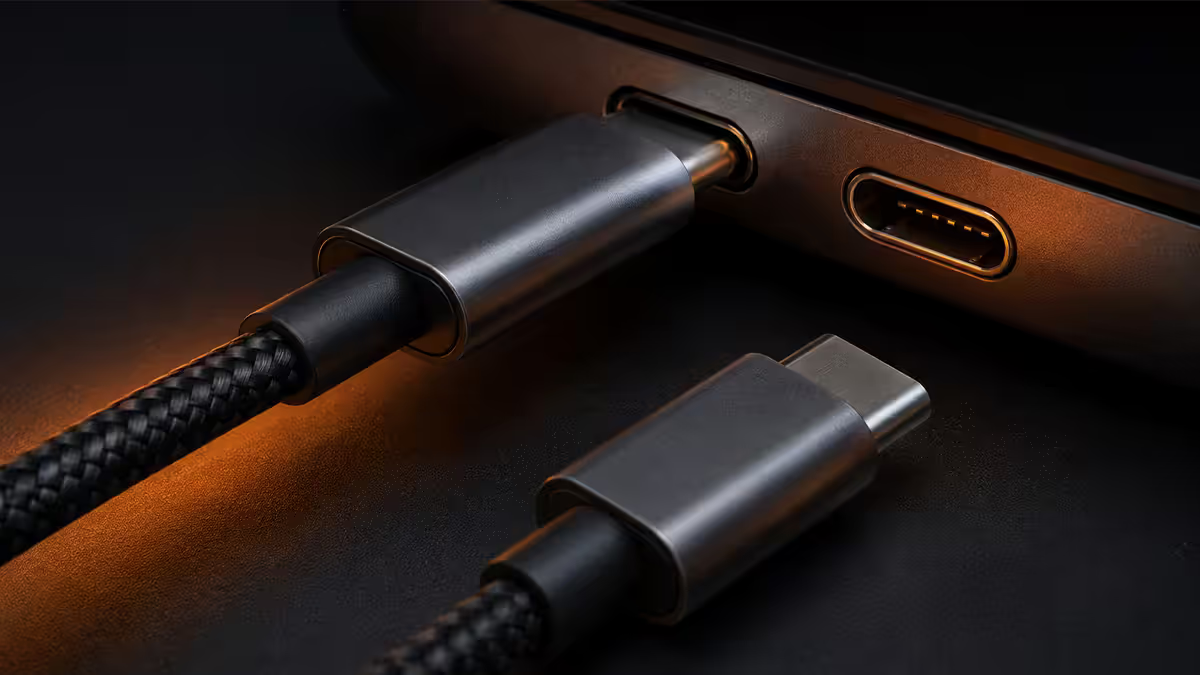
USB-C is a connector shape. A small reversible oval with 24 pins, defined by the USB Implementers Forum in 2014. That's all it specifies — the plug, the socket, the pin layout. It says nothing about speed, power or video.
USB4, Thunderbolt 4 and Thunderbolt 5 are protocols. They define how data moves through those 24 pins. The same physical USB-C port can run any of the following protocols, depending on what's wired up behind it:
- USB 2.0 — 480 Mbps. Yes, in 2026, some "USB-C" ports on cheap monitors and accessories still run only USB 2.0.
- USB 3.2 Gen 1 — 5 Gbps. Common on budget laptops as the secondary USB-C port.
- USB 3.2 Gen 2 — 10 Gbps. Mid-range laptop standard.
- USB 3.2 Gen 2×2 — 20 Gbps. Used on some Asus and HP business laptops; not as common as it should be.
- USB4 v1 — 20 or 40 Gbps. Most premium 2023-2025 laptops.
- USB4 v2 — 80 Gbps. 2026 flagship laptops.
- Thunderbolt 3 — 40 Gbps. Intel-licensed predecessor that became USB4's foundation.
- Thunderbolt 4 — 40 Gbps, with mandatory feature set.
- Thunderbolt 5 — 80 Gbps symmetric / 120 Gbps display-asymmetric.
The USB 3.2 naming disaster
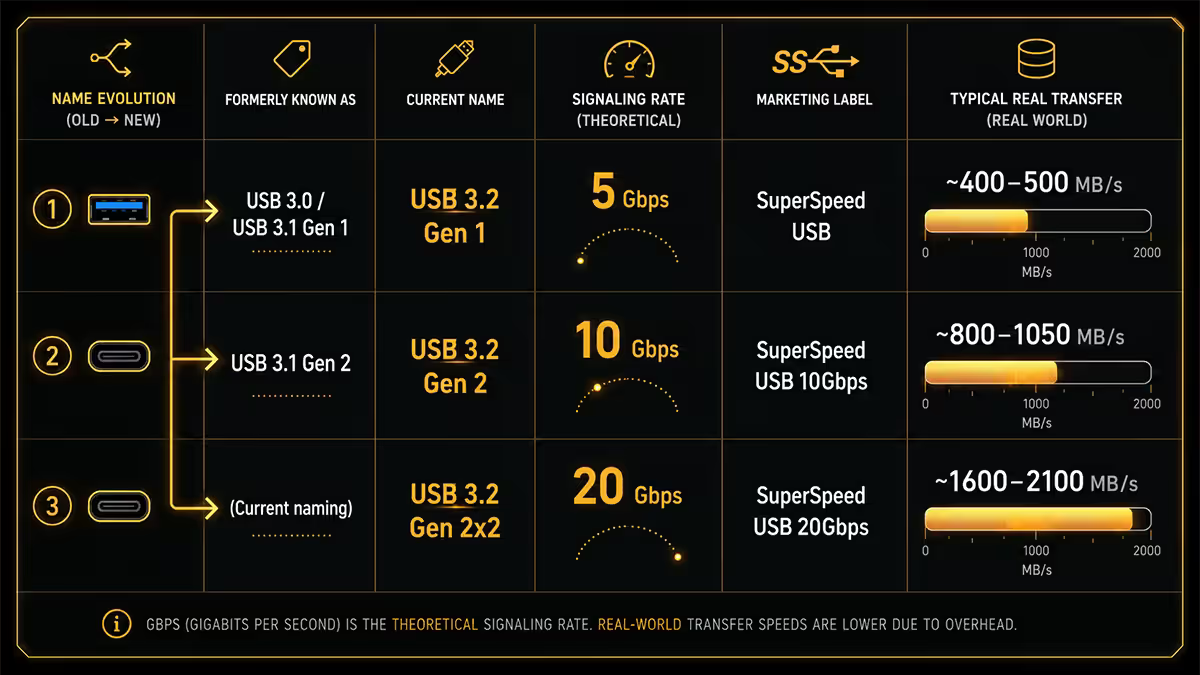
The USB-IF made an inexplicable decision in 2019 to rename every existing USB 3.x spec under the "USB 3.2" umbrella. The result is the most confusing naming convention in modern computing:
| USB 3.2 name | Original name | Speed |
|---|---|---|
| USB 3.2 Gen 1 | USB 3.0 / USB 3.1 Gen 1 | 5 Gbps |
| USB 3.2 Gen 2 | USB 3.1 Gen 2 | 10 Gbps |
| USB 3.2 Gen 2×2 | (new in 3.2) | 20 Gbps |
| SuperSpeed USB 5Gbps | USB 3.2 Gen 1 marketing name | 5 Gbps |
| SuperSpeed USB 10Gbps | USB 3.2 Gen 2 marketing name | 10 Gbps |
| SuperSpeed USB 20Gbps | USB 3.2 Gen 2×2 marketing name | 20 Gbps |
The USB-IF then tried to fix this in 2022 by introducing the "USB 5Gbps", "USB 10Gbps", "USB 20Gbps", "USB 40Gbps" and "USB 80Gbps" marketing labels. The numeric labels are actually useful — but most laptop manufacturers still list spec sheets with the old "Gen 1/2/2×2" naming. Both will exist in retail listings through 2027.
USB4 — Thunderbolt set free
USB4 is what happened when Intel donated Thunderbolt 3's underlying protocol to the USB-IF as royalty-free. It uses the same physical layer as TB3 (and TB4), the same 40 Gbps signalling, the same tunnelling architecture for DisplayPort and PCIe — but is open and freely implementable.
USB4 has two relevant versions in 2026:
- USB4 v1 (2019, refreshed 2022) — 20 Gbps or 40 Gbps. Mandatory DisplayPort Alt Mode, optional PCIe tunnelling.
- USB4 v2 (2023, broadly shipping 2026) — 80 Gbps symmetric or 120 Gbps asymmetric. Mandatory DisplayPort 2.1, mandatory PCIe tunnelling at higher tiers.
USB4 v2 and Thunderbolt 5 are functional twins at the silicon level. The distinction lies in certification: Thunderbolt 5 mandates a stricter feature set (minimum PD wattage, minimum simultaneous high-bandwidth peripherals, daisy-chain support) that USB4 v2 leaves optional. So a "USB4 v2" port might do everything a TB5 port does — or it might cap at the basics.
Thunderbolt 4 vs Thunderbolt 5 — what changed
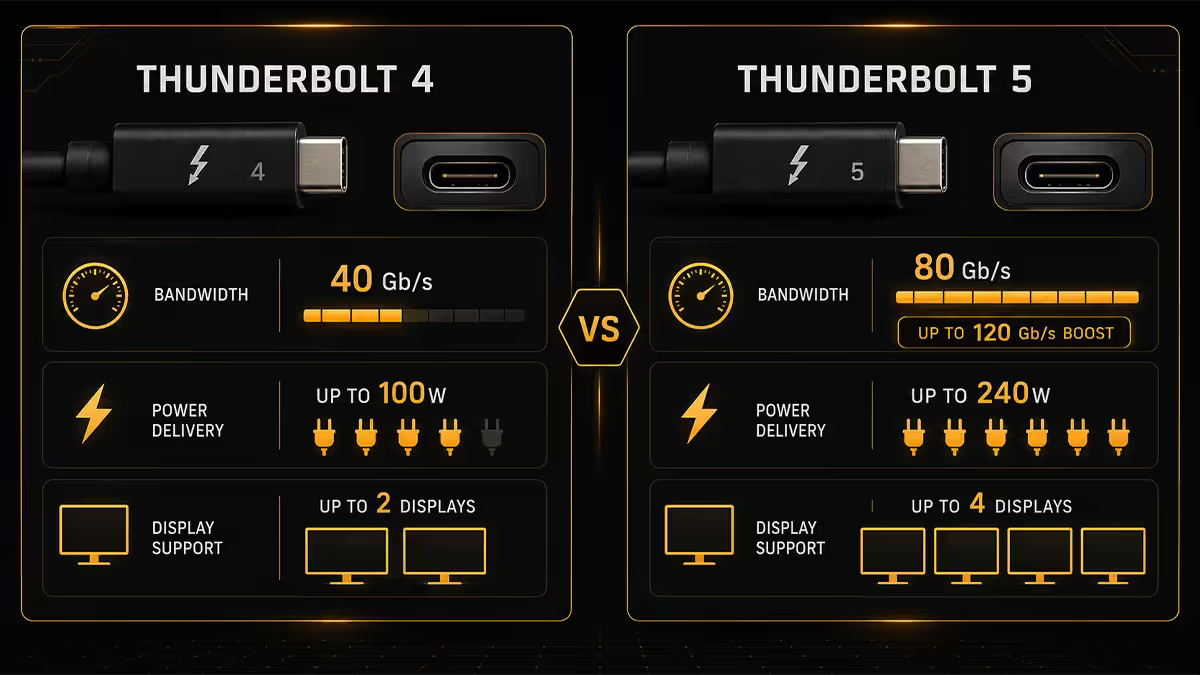
| Spec | Thunderbolt 4 | Thunderbolt 5 |
|---|---|---|
| Bandwidth | 40 Gbps (bi) | 80 Gbps (bi) / 120 Gbps display-async |
| DisplayPort | DP 1.4 + DSC | DP 2.1 |
| Max displays | Dual 4K / Single 8K | Triple 4K 144Hz / Dual 8K |
| PCIe lane | PCIe 3.0 ×4 (32 Gbps) | PCIe 4.0 ×4 (64 Gbps) |
| Power Delivery | 100W | 240W (EPR) |
| Daisy chain | Up to 6 devices | Up to 6 devices |
| Backward compat | TB3, USB4 v1, USB-C | TB4, TB3, USB4 v1/v2, USB-C |
| SA laptop availability 2026 | Mid-range and up | Flagships (M4 MacBook Pro, Core Ultra 200H Pro/Max) |
The two big TB5 jumps: the bandwidth doubles (more on the asymmetric 120 Gbps below), and the PCIe lane upgrades to 4.0 ×4 — which is what makes eGPUs realistic on this generation. PCIe 4.0 ×4 is enough to feed a mid-range modern GPU without crippling it.
About that asymmetric 120 Gbps: Thunderbolt 5's "bandwidth boost" mode dynamically reallocates lanes — 120 Gbps to the display, 40 Gbps back to host — when paired with a DP 2.1 monitor that requests it. It's not a true 120 Gbps symmetric link; it's a clever way to feed an 8K 60Hz or 4K 240Hz panel without compromising data bandwidth.
Power Delivery — when 240W matters
USB Power Delivery (PD) is the negotiation protocol that lets devices request specific voltages and currents over USB-C. The current spec supports up to 240W via the EPR (Extended Power Range) addition, doubling the previous 100W ceiling.
| PD tier | Max power | Typical use |
|---|---|---|
| PD 1.0 / 2.0 | 60W (20V/3A) | Phones, tablets, small laptops |
| PD 3.0 | 100W (20V/5A) | Most laptops 2020-2024 |
| PD 3.1 EPR | 140W (28V/5A) | Mid-range gaming laptops |
| PD 3.1 EPR (high) | 180W (36V/5A) | Workstation laptops |
| PD 3.1 EPR (max) | 240W (48V/5A) | Gaming laptops, all-in-ones |
240W matters because gaming laptops finally don't need barrel jacks. A Razer Blade 16 or Lenovo Legion 9i with TB5 can charge over a single USB-C cable from a 240W GaN brick — same connector as your phone, just a different cable rating.
DisplayPort Alt Mode — when USB-C carries video
DisplayPort Alt Mode lets a USB-C cable carry a DisplayPort video signal alongside USB data, by reassigning some of the 24 pins. It's how most "USB-C to monitor" connections work in 2026.
Three things to know:
- Not every USB-C port supports DP Alt Mode. Some ports are data-and-power-only. Check the port icon — a small monitor or DisplayPort logo confirms video support.
- Bandwidth shares with USB data. A USB4 v1 port doing 4K 60Hz HDR uses about half its 40 Gbps on video; the other half remains for USB.
- Thunderbolt always supports video. If the port has the Thunderbolt lightning bolt icon, video output is guaranteed.
There's also HDMI Alt Mode (specified but extremely rare in laptops — never standardised) and MHL Alt Mode (mostly dead). For practical purposes, DP Alt Mode is the only video standard you'll meet over USB-C.
eGPU in 2026 — realistic finally?
For years, external GPUs over Thunderbolt have been a "kind of works" category. Performance penalties of 25-35% versus internal PCIe, finicky driver setups, and Apple's eGPU drop on Apple Silicon all kept eGPUs in the niche tinkerer category.
Thunderbolt 5 changes the realistic ceiling. Sustained PCIe 4.0 ×4 bandwidth is enough to feed an RTX 5070 or RX 9070 with only marginal performance loss (5-15% versus the same GPU in a desktop PCIe 5.0 slot). For laptop users who want desktop-class gaming at home but a slim travel laptop, this finally works in 2026.
Current state of play:
- Windows on Intel/AMD x86 with TB5 — best eGPU experience. Driver maturity is solid; setups like Razer Core X V2 and ASUS XG Mobile work well.
- Windows with TB4 — still viable for RTX 4070-class GPUs and below. Performance ~70-80% of internal.
- Apple Silicon M4 with TB5 — supports DisplayLink and display chaining beautifully, but eGPU compute remains restricted. Apple still gates GPU drivers internally.
- ChromeOS / Linux — partial eGPU support; depends on distro and kernel version.
How to actually read a laptop spec sheet
Here's the practical lookup pattern for any laptop you're considering — applies equally to a R12,000 ultrabook and a R65,000 mobile workstation:
- Look for explicit "Thunderbolt 4" or "Thunderbolt 5" labels. Anything with that label is certified to a known feature set.
- If it says "USB-C with DisplayPort" — assume USB 3.2 Gen 2 (10 Gbps) unless explicitly stated otherwise.
- If it says "USB4" — check if it's v1 (40 Gbps) or v2 (80 Gbps). The marketing label "USB4 40Gbps" or "USB4 80Gbps" tells you.
- Look at the PD wattage. Some laptops have USB-C charging but only at 65W or 100W — they need a dedicated cable spec.
- Count Thunderbolt ports specifically. A laptop with three USB-C ports might only have one TB port; the others are slower.
SA pricing — dock and cable reality
| Accessory | SA price band | Notes |
|---|---|---|
| USB4 v2 / TB5 cable (1m) | R900-R1,800 | Certified e-marker chip is essential |
| Thunderbolt 4 cable (0.8m) | R600-R1,200 | Anker, CalDigit, Cable Matters |
| 240W PD EPR cable | R350-R700 | 5A capable, often 100W shown by mistake |
| Thunderbolt 4 dock (CalDigit TS4) | R7,500-R10,500 | Dual 4K, 18 ports, 98W charging |
| Thunderbolt 5 dock (early 2026) | R12,000-R18,000 | OWC, CalDigit launches, scarce stock |
| Razer Core X V2 eGPU enclosure | R7,800-R9,500 | TB5 model, GPU sold separately |
| ASUS XG Mobile (TB5, 2026) | R26,000-R42,000 | Includes mobile RTX 5070/5080 |
Key takeaways
- USB-C is the plug. USB4, Thunderbolt 4 and Thunderbolt 5 are protocols — same hole, very different speeds.
- USB4 v2 (80 Gbps) and Thunderbolt 5 (80 / 120 Gbps async) are functional twins; TB5 mandates a stricter feature set.
- 240W charging requires a PD EPR-rated cable. Most USB-C cables only handle 60-100W.
- DisplayPort Alt Mode is how USB-C carries video — but not every USB-C port supports it.
- Thunderbolt 5 finally makes eGPU realistic — PCIe 4.0 ×4 closes the gap to internal GPUs.
Frequently asked questions
Is USB-C the same as Thunderbolt?
No. USB-C is the connector shape; Thunderbolt is a protocol running over it. Every Thunderbolt port is USB-C, but not every USB-C port is Thunderbolt.What is the difference between Thunderbolt 4 and Thunderbolt 5?
TB4 is 40 Gbps, 100W PD, DP 1.4. TB5 is 80 Gbps (or 120 Gbps async to display), 240W PD, DP 2.1, PCIe 4.0 ×4.What is USB4 and how does it relate to Thunderbolt?
USB4 is the royalty-free, USB-IF-managed version of Thunderbolt 3's underlying tech. USB4 v2 (80 Gbps) and Thunderbolt 5 are functional twins; TB5 mandates a stricter feature set.How much power does USB-C deliver?
Up to 240W via PD EPR. Most older cables cap at 100W. Check the cable rating before assuming gaming-laptop charging.Can I run an external GPU (eGPU) over Thunderbolt or USB4?
Yes. TB4/USB4 caps at ~70-85% of internal PCIe performance. TB5 closes that gap to within ~10%. Best on Windows x86; Apple Silicon has GPU driver restrictions.Why doesn't my laptop's USB-C port output video?
Because not every USB-C port supports DisplayPort Alt Mode. Look for a monitor or lightning bolt icon next to the port; Thunderbolt ports always support video.Are Apple Silicon Thunderbolt ports the same as Intel ones?
Functionally yes for docks and displays. Apple Silicon restricts eGPU drivers and supports fewer simultaneous high-bandwidth peripherals than Intel platforms.What cable do I need for Thunderbolt 5?
A certified Thunderbolt 5 or USB4 v2 80 Gbps cable. Passive runs cap at ~1 m; active TB5 cables go 2-3 m. R900-R1,800 in SA.