Hardware Explainer · DLSS
DLSS explained — should you use it?
Free FPS from the AI playbook.
- from lower res
- AI upscale
- free fps boost
- 30-50%
- quality presets
- Q/B/P
What DLSS actually is
DLSS stands for Deep Learning Super Sampling, and it is the single most impactful feature NVIDIA has added to consumer GPUs since the introduction of ray tracing. In simple terms: your GPU renders the game at a lower internal resolution than your monitor, then a trained neural network reconstructs the output to your native resolution. The result is significantly higher frame rates with image quality that — in most modern titles — is indistinguishable from native rendering, and sometimes visibly sharper.
DLSS runs on dedicated silicon. Every RTX-series GPU from NVIDIA (RTX 20-series onwards) contains Tensor Cores — specialised processors designed to execute the matrix maths underpinning neural network inference. The AI model itself was trained by NVIDIA on terabytes of game footage rendered at extreme supersampled resolutions; the network learned to predict what the high-res frame would look like, given a lower-res one plus motion vectors and depth data from the game engine.
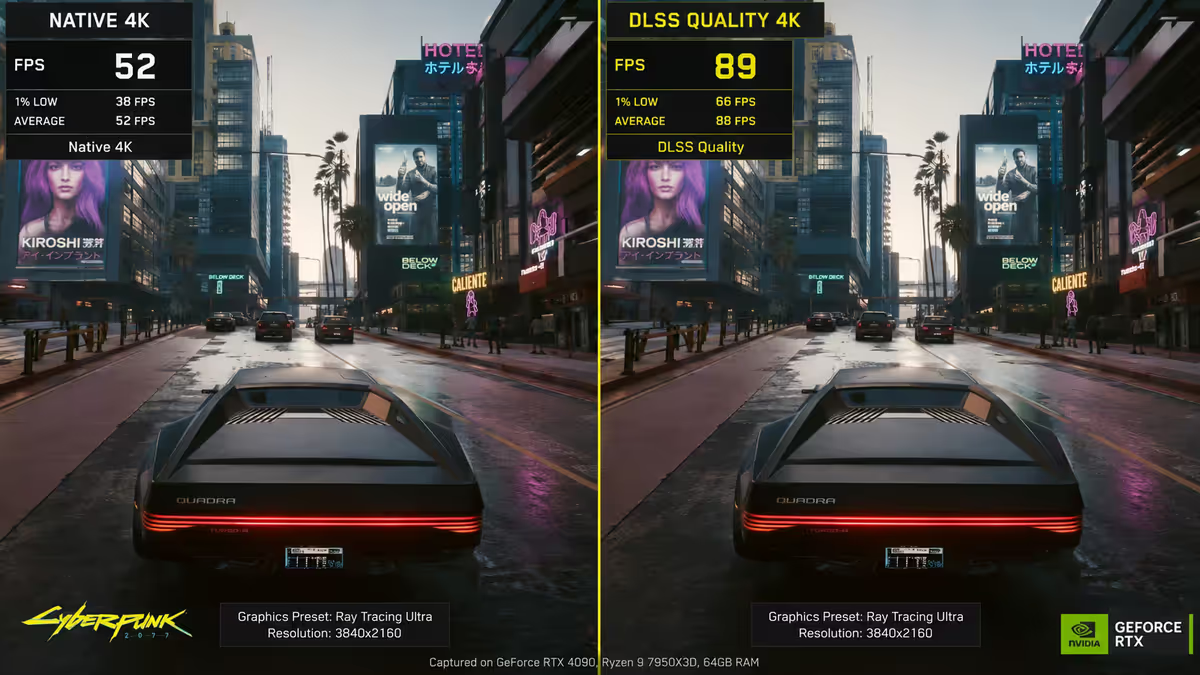
The practical impact in 2026: if your monitor is 1440p and your GPU can't quite hit your target frame rate (say, 100+ FPS in Cyberpunk 2077 with path tracing on), DLSS turns the GPU into a card that can hit that target, without you noticing the compromise. That's why it is — and we don't say this lightly — the most important graphics feature of the past five years.
How AI upscaling works (in plain English)
Every frame, the game engine renders the scene at the reduced resolution you've selected via the DLSS preset. So if you've set DLSS Quality at a 1440p target, the GPU is actually rendering at roughly 1707 × 960 internally. That's the heavy lifting done at a fraction of the pixel count, which is where the FPS savings come from.
The engine also passes additional data to the DLSS pipeline: motion vectors (per-pixel movement direction from the previous frame), depth buffer data, and the previous reconstructed frame. The Tensor Cores then run the trained neural network, which takes all this information and outputs a clean, sharp, native-resolution frame. The whole inference pass takes 1-3 milliseconds on a modern RTX card — far less than the rendering time saved.
Because DLSS uses temporal accumulation (drawing on previous frames), it produces particularly clean anti-aliasing — edges look smoother than they typically do with traditional TAA. The trade-off: in fast-moving scenes or scenes with lots of fine detail (foliage, chain-link fences, particle effects), the network can introduce subtle ghosting or shimmer where it hasn't quite worked out what should be there.
DLSS 2 vs 3 vs 3.5 vs 4 — what's the difference?
NVIDIA has shipped four major DLSS versions, each adding new capabilities. Importantly, the version a game uses is decided by the developer (with some user-side ability to swap DLLs in PC games), and the GPU you own dictates which features you can actually access.
| Version | What it adds | Minimum GPU |
|---|---|---|
| DLSS 2 | AI upscaling baseline | RTX 20-series |
| DLSS 3 | + Frame Generation | RTX 40-series |
| DLSS 3.5 | + Ray Reconstruction (better RT denoising) | All RTX |
| DLSS 4 | + Multi-Frame Gen + Transformer upscaler | RTX 50-series (MFG) |
DLSS 2 introduced the modern AI upscaling we describe above. Any RTX card from a GTX-to-RTX upgrade onwards supports it. DLSS 3 kept the upscaler but added Frame Generation — the GPU inserts an AI-generated frame between every two rendered frames, effectively doubling the perceived frame rate. This required the optical flow accelerator hardware introduced on RTX 40-series cards, so older RTX users got upscaling but not Frame Gen.
DLSS 3.5 added Ray Reconstruction — a new AI denoiser that replaces the traditional hand-tuned denoiser in ray-traced and path-traced games. The result: dramatically cleaner reflections, shadows and global illumination, particularly noticeable in Cyberpunk 2077 with path tracing enabled. Ray Reconstruction works on all RTX GPUs that support DLSS.
DLSS 4, launched with the RTX 50-series, introduces two key changes. Multi-Frame Generation can insert up to three AI-generated frames between each rendered one (so a 60 FPS render becomes 240 FPS perceived), but is locked to RTX 50-series hardware. The other DLSS 4 change is software: a new Transformer-based upscaler (replacing the older CNN model) that improves image quality across all RTX cards via driver updates. If you own an RTX 20/30/40 card, you still benefit from the better upscaler — you just can't use MFG.
Quality presets — what each setting actually renders
DLSS exposes four upscaling presets in most games, plus DLAA (which we'll get to in a moment). The preset name describes the trade-off between rendered resolution and final output quality.
| Preset | Internal render scale | Typical FPS gain |
|---|---|---|
| Quality | 67% of target (e.g. 1707×960 → 1440p) | 30-40% |
| Balanced | 58% of target | 40-55% |
| Performance | 50% of target (e.g. 1280×720 → 1440p) | 55-75% |
| Ultra Performance | 33% of target | 80-120% |
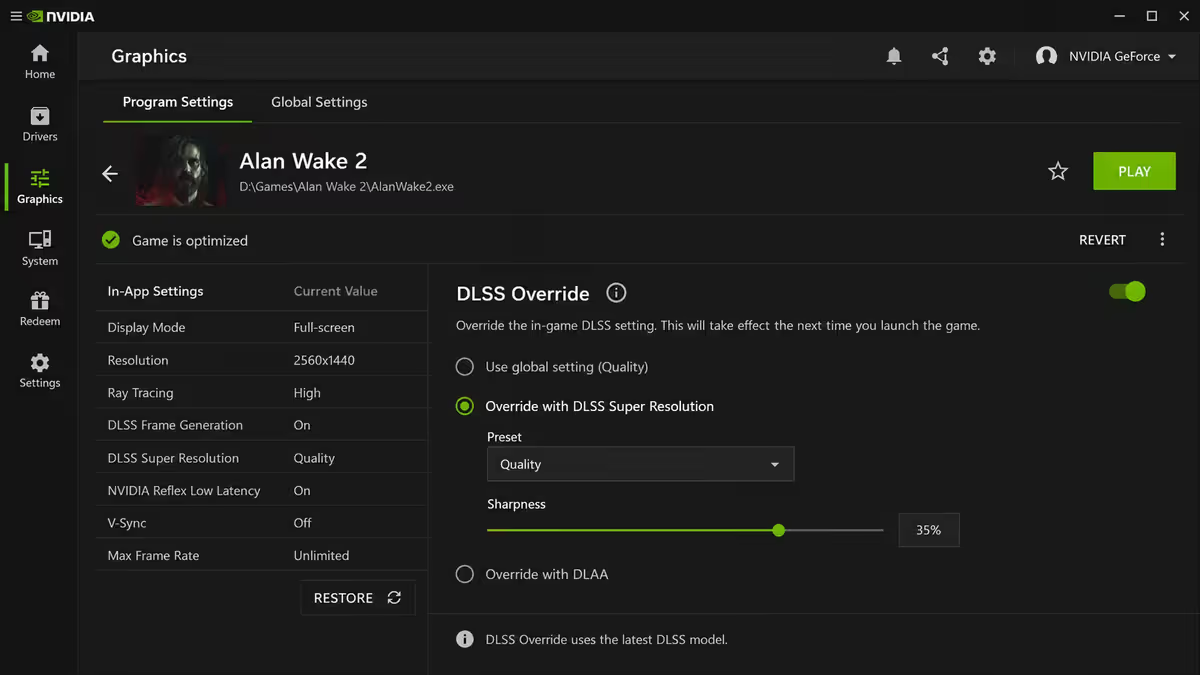
For most 1440p builds, Quality is the sweet spot. The internal 1707×960 render is close enough to native that the AI reconstruction lands at a quality level the eye can't distinguish from real 1440p in motion. You get a 30-40% FPS boost for what amounts to a free lunch.
For 4K builds on mid-tier cards (RTX 4070, 5070, etc.), Balanced often produces the best subjective trade-off. The internal render is 2227 × 1253 — still close to 1440p natively — and the AI reconstruction to 4K is excellent. Performance is also viable at 4K because the internal 1080p source is high enough resolution to give the AI plenty to work with.
At 1080p, DLSS Quality renders internally at only 1280 × 720, and you'll start to see more artefacts in fine detail. 1080p gamers benefit least from DLSS — Performance and Ultra Performance modes are too aggressive at this resolution. Stick with Quality if you want to use DLSS at 1080p, or just don't use it.
Frame Generation — when to turn it on
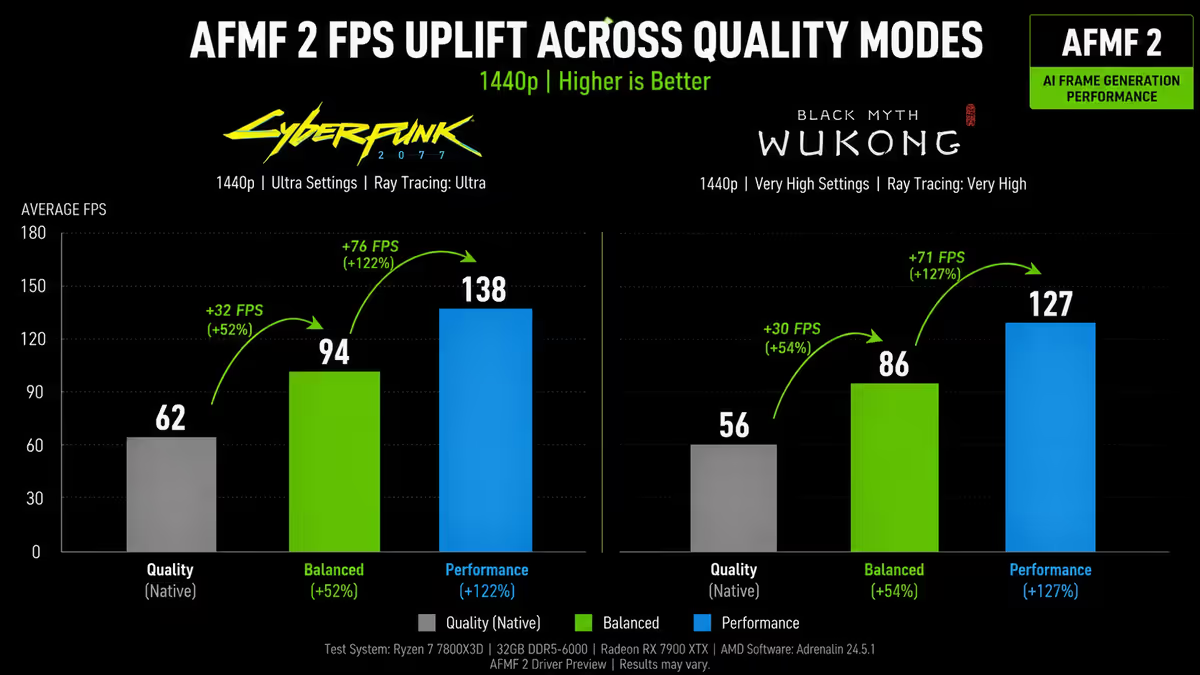
DLSS 3 introduced Frame Generation (FG), which is conceptually different from upscaling. Where DLSS upscaling reconstructs each rendered frame at higher resolution, Frame Generation creates entirely new frames that didn't exist in the original render. The GPU renders frame A and frame B normally, then uses AI to interpolate a synthetic frame between them. The on-screen result is double the perceived frame rate.
The catch: Frame Generation adds input latency. The GPU must briefly hold frame B before showing the interpolated frame, so your actions are reflected on screen slightly later than they would be without FG. Typical latency cost is 10-20ms, and NVIDIA Reflex (built into all FG titles) compensates for much of it by reducing other latency in the pipeline.
When to use Frame Generation:
- Single-player AAA titles with story focus — Cyberpunk, Alan Wake 2, Hogwarts Legacy, Black Myth: Wukong, Avatar.
- Slow-paced strategy and simulation — MSFS 2024, Cities: Skylines II.
- Anywhere you're below 60 FPS rendered and need to push past it for smoothness.
When to turn Frame Generation off:
- Competitive shooters — Counter-Strike 2 (no DLSS at all), Valorant, Marvel Rivals, Apex Legends.
- When your base frame rate is below ~50 FPS — interpolation quality degrades and latency feels worse.
- VR titles — FG isn't supported in most VR runtimes, and the latency would be a nightmare anyway.
DLAA — Deep Learning Anti-Aliasing for native quality
DLAA is the often-overlooked sibling of DLSS. It uses exactly the same AI neural network as DLSS, but instead of upscaling from a lower internal resolution, it renders at your native target resolution and uses the AI purely for anti-aliasing and detail enhancement.
There's no FPS gain from DLAA — and a small cost from the additional Tensor Core inference time — but image quality is the best available. DLAA replaces the traditional TAA (Temporal Anti-Aliasing) that nearly every modern game uses by default, eliminating the slightly softened, smeary look TAA introduces. Edges are crisper, fine detail more visible, and motion clarity improved.
When DLAA makes sense: you have FPS headroom (you're already comfortably above your target frame rate), you want maximum visual fidelity, and you've found native rendering with TAA softer than you'd like. Use DLAA in slower-paced titles where you want every pixel to count.
Per-game implementation quality varies
DLSS is integrated by game developers, not bolted on by NVIDIA. The same DLSS version can produce very different results in two games depending on how well the integration was done — motion vectors, transparent surfaces, particle effects and UI overlays all need careful handling.
Excellent DLSS implementations (2026):
- Cyberpunk 2077 — gold standard, especially with DLSS 3.5 Ray Reconstruction.
- Avatar: Frontiers of Pandora — dense foliage handled cleanly.
- Black Myth: Wukong — fast combat, sharp detail, minimal ghosting.
- Alan Wake 2 — Remedy nailed the integration, ray-traced reflections look phenomenal with RR.
- Microsoft Flight Simulator 2024 — long view distances benefit massively from DLSS.
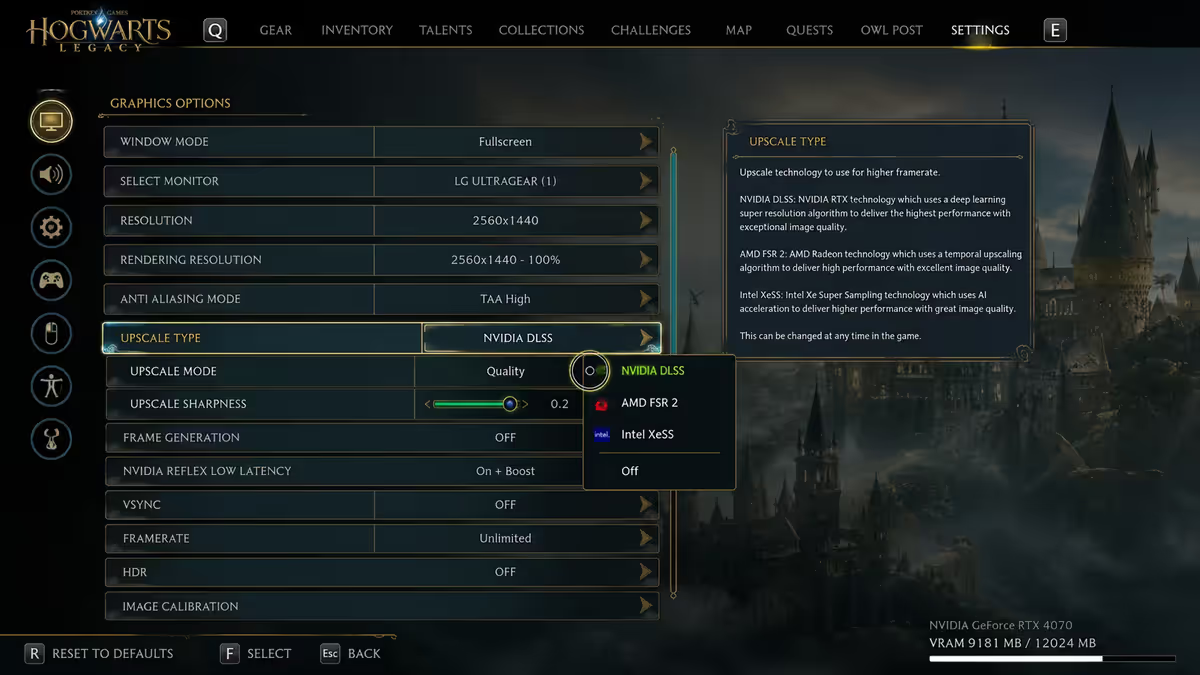
Good implementations: Hogwarts Legacy, Diablo IV, The Last of Us Part I, Spider-Man Remastered, Forza Horizon 5.
Notable missing or weak implementations:
- Counter-Strike 2 — no DLSS at all. Valve prioritises latency consistency for competitive play.
- Valorant — no DLSS. Same competitive reasoning.
- Older Unreal Engine 4 titles — DLSS plugins added late often show more ghosting than newer UE5 integrations.
- Some MMOs — DLSS is implemented but UI elements can artefact during quick camera moves.
Common DLSS artefacts and how to spot them
DLSS isn't perfect. Even in titles with excellent integration, there are scenarios where the AI struggles to reconstruct what should be on screen.
Ghosting on fast-moving objects. Cars passing across the screen, NPCs running past, projectiles — anything moving quickly can leave a faint trail of pixels behind it. DLSS 4's Transformer model has significantly reduced this, but you'll still see it occasionally in titles that haven't updated their integration.
Particle effect breakdown. Smoke, fire and explosion particles render at the internal resolution and don't reconstruct as cleanly as solid geometry. You may notice particles look "pixellated" or shimmer in motion. Some games render particles at full native resolution as a workaround, but not all.
Fine detail blur. Chain-link fences, telephone wires, distant foliage, hair detail — anything pixel-thin can be lost in the lower-resolution internal render. The AI sometimes fills it in correctly, sometimes blurs it together. Less common with Quality preset, more common with Performance.
UI shimmer. Some games render game-world UI elements (health bars on enemies, waypoint markers) through the DLSS pipeline, which can cause subtle shimmer or aliasing. Best implementations render UI at native resolution as a separate pass.
Common DLSS mistakes
Leaving DLSS off because "native is better." Common misconception, especially among PC gamers from the pre-RTX era. In 2026, DLSS Quality at 1440p or 4K is genuinely competitive with native rendering — often visibly sharper than native + TAA. Try it before dismissing it.
Cranking to Ultra Performance everywhere. Ultra Performance is designed for 8K targets or extreme path tracing scenarios. At 1080p or 1440p, the internal render becomes too small for the AI to reconstruct cleanly. Stick to Quality and Balanced unless you have a specific reason.
Enabling Frame Generation in competitive shooters. Frame Gen adds latency. In CS2 or Valorant — even setting aside the fact those titles don't support DLSS — a 15ms latency increase costs you reaction time in gunfights. Single-player only.
Not updating the DLSS DLL on older games. A 2021 game shipped with DLSS 2.1 will look significantly better with the latest DLL dropped in. TechPowerUp maintains a comprehensive DLSS DLL archive. Don't do this for online games with anti-cheat.
Confusing DLSS with FSR or XeSS. All three are upscalers but DLSS is NVIDIA-only, hardware-accelerated and AI-trained. FSR works on any GPU (open source, hardware-agnostic). XeSS is Intel's equivalent — runs best on Intel Arc, decently on others. If you have an RTX card, DLSS is almost always the right pick when available.
Key takeaways
- DLSS is the single biggest "free FPS" feature in modern gaming. Turn it on for any AAA single-player title that supports it.
- Quality preset is the sweet spot at 1440p; Balanced at 4K on mid-tier cards. Stick with Quality at 1080p or skip DLSS entirely.
- Frame Generation (DLSS 3+) and Multi-Frame Gen (DLSS 4) for single-player only. Never in competitive shooters.
- DLAA renders at native and uses the same AI for anti-aliasing — best image quality available when you have FPS headroom.
- Per-game implementation varies. Cyberpunk, Avatar, Alan Wake 2 are excellent. CS2 and Valorant don't support DLSS at all.
Frequently asked questions
What is DLSS and what does it actually do?
DLSS (Deep Learning Super Sampling) is NVIDIA's AI-based upscaling. The GPU renders at a lower internal resolution; a trained neural network reconstructs the output to native, gaining 30-50% FPS at near-identical quality. Runs on Tensor Cores in RTX 20-series and newer.What is the difference between DLSS 2, 3, 3.5 and 4?
DLSS 2 is baseline upscaling (all RTX). DLSS 3 adds Frame Generation (RTX 40+). DLSS 3.5 adds Ray Reconstruction (all RTX). DLSS 4 adds Multi-Frame Generation (RTX 50 only) plus a new Transformer upscaler that works on all RTX cards via drivers.Which DLSS preset should I use — Quality, Balanced or Performance?
Quality (67% render scale) for 1440p and 1080p — near-indistinguishable from native. Balanced (58%) for 4K on mid-tier RTX. Performance (50%) for 4K on lower-tier RTX. Ultra Performance (33%) is for 8K only.Does DLSS introduce input lag?
DLSS upscaling adds negligible latency. DLSS 3/4 Frame Generation adds 10-20ms — NVIDIA Reflex (built into FG titles) compensates for most of it. Off for competitive shooters; on for single-player AAA.What's the difference between DLSS and FSR?
DLSS is NVIDIA-proprietary, AI-accelerated on Tensor Cores. FSR is AMD's open-source, hardware-agnostic alternative — works on any GPU including NVIDIA. DLSS typically produces sharper images; FSR 4 has narrowed the gap.Does DLSS Quality look as good as native resolution?
At 1440p and 4K — yes, often visibly sharper than native + TAA. At 1080p, internal 720p source shows some artefacts in fine detail. Quality always; skip lower presets at lower targets.What is DLAA and how does it differ from DLSS?
DLAA uses the same AI as DLSS but renders at native, not lower. Replaces TAA with cleaner anti-aliasing. No FPS gain (small cost) but best image quality. Use when you have headroom.Which games support DLSS in 2026?
Over 600 titles — Cyberpunk 2077, Hogwarts Legacy, Alan Wake 2, Black Myth: Wukong, Avatar, MSFS 2024 and most AAA from 2023 onwards. Notable exceptions: CS2, Valorant — competitive titles that prioritise latency consistency.
Get the Evetech app
Exclusive app-only prices, daily flash sales, and free delivery on orders over R4,000 — download the app and start saving.