Glossary · Chipset
What is a chipset? — The motherboard's quiet traffic controller.
The CPU does compute. The chipset does everything else — storage, USB, networking, secondary slots, the entire I/O routing fabric that makes a motherboard a computer rather than a bare processor. B650 vs X870 vs Z890 isn't trim level. It's the upgrade ceiling for the life of the board.
- AM5 socket lifespan
- 5+ yrs
- chipset link cap
- ~16 GB/s
- SA board range
- R1,500–R12k
What is a chipset?
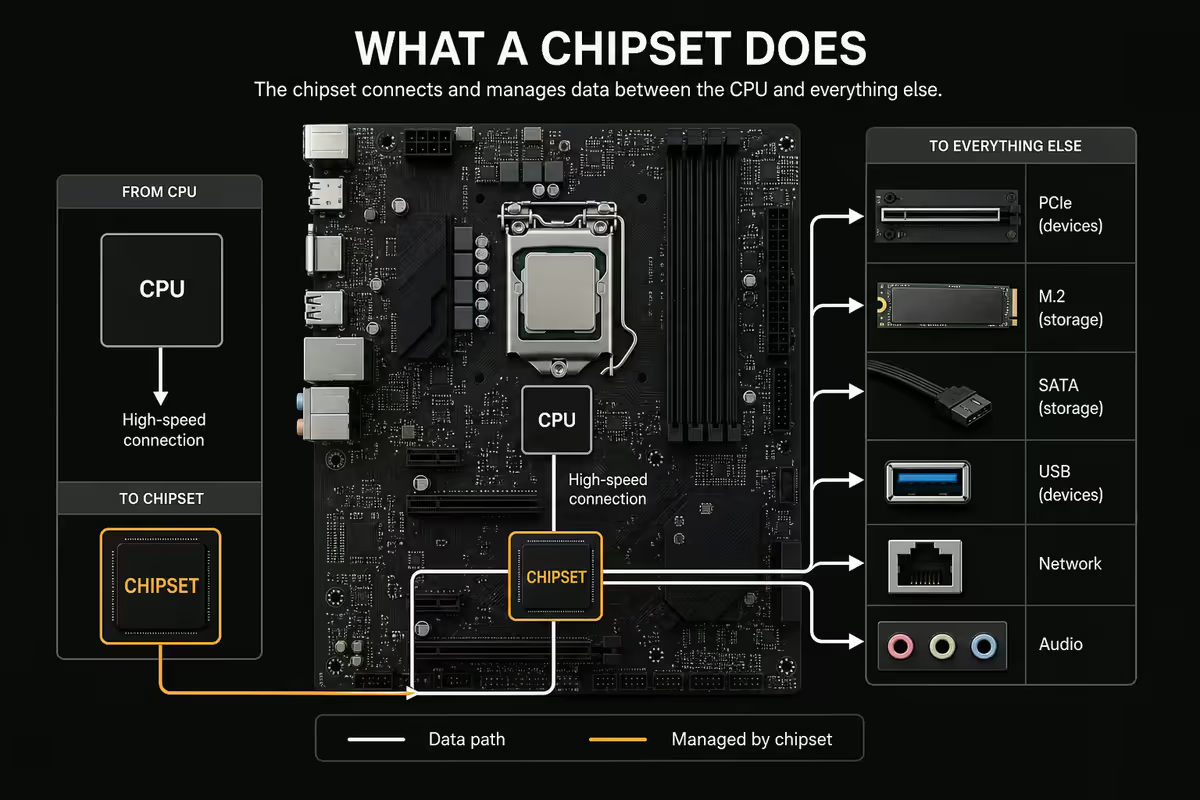
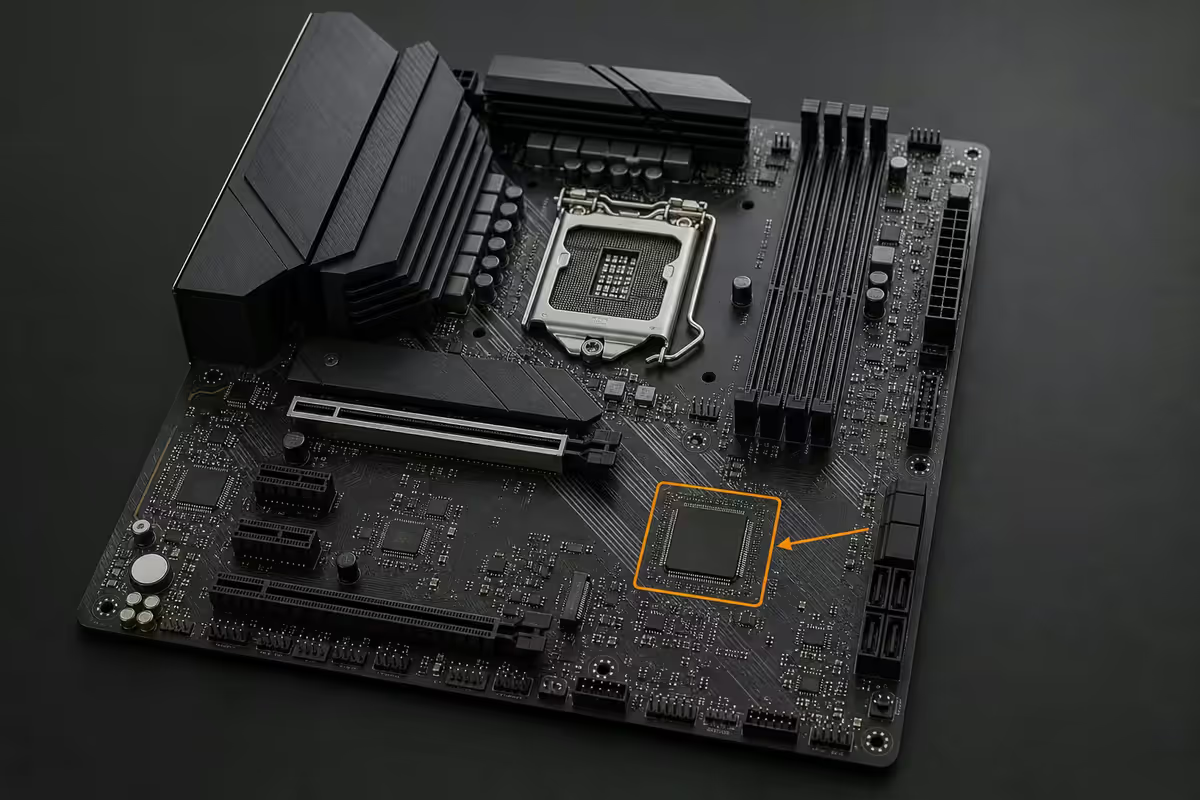
A chipset is the I/O hub controller that sits between the CPU and most peripherals. In 2026 it's a single chip — Intel calls it the PCH (Platform Controller Hub), AMD calls it the FCH (Fusion Controller Hub) — typically tucked under a heatsink near the centre or lower edge of the motherboard. The CPU performs compute; the chipset routes everything else.
Think of it as the building's traffic controller. The CPU is the office: brains, decisions, productivity. The chipset is the lobby and corridor system: every storage drive, USB device, network adapter, secondary PCIe card and audio output flows through the chipset's controllers before reaching the CPU. Without it, the CPU has no way to talk to most of the hardware in the case.
What the chipset physically provides: extra PCIe lanes (for secondary M.2 NVMe slots, secondary PCIe slots, USB4 controllers), SATA controllers (typically 4–8 SATA ports), USB controllers (USB 2.0 / 3.2 Gen 1 / Gen 2 / Gen 2x2), audio codec routing, 2.5 GbE or 10 GbE networking PHY, and platform-level features like memory overclocking unlock and BIOS-level fan control.
Northbridge and Southbridge — the historical context
If you came of building age before about 2010, you might remember motherboards having two chipset chips — the Northbridge and the Southbridge — connected by a high-speed bus across the board.
The Northbridge handled fast traffic: CPU-to-RAM memory controller, CPU-to-GPU PCIe link. It sat near the CPU socket, ran hot, and was the performance-critical chip.
The Southbridge handled slow I/O: SATA storage, USB devices, audio, BIOS, networking, low-speed PCIe. It sat lower on the board, ran cooler, and was the connectivity chip.
From roughly 2008 (AMD) and 2011 (Intel) onward, both manufacturers integrated the Northbridge directly into the CPU die. The memory controller moved to the CPU. The PCIe controller moved to the CPU. The Northbridge as a separate chip disappeared. What remained — the single chipset chip on modern motherboards — is the direct descendant of the Southbridge. Modern "chipset" is technically what your grandfather's PC called the Southbridge.
The terminology dropped because there's no longer a North/South split worth distinguishing. But occasionally you'll still see references to "Northbridge" in legacy documentation — that's now the CPU's I/O die, not a separate chip.
What the chipset enables — beyond the CPU's own I/O
Modern CPUs ship with some I/O built directly into the chip — typically a primary x16 PCIe slot, a primary M.2 NVMe slot, USB controllers and basic networking. Everything beyond that comes from the chipset.
| I/O Feature | From CPU (direct) | From Chipset (added) |
|---|---|---|
| Primary PCIe x16 GPU slot | Yes | — |
| Primary M.2 NVMe slot | Yes (x4 Gen5) | — |
| Secondary M.2 NVMe slots | Sometimes 1 more | 2–4 more |
| SATA ports | — | 4–8 ports |
| USB 3.2 Gen 2 / Gen 2x2 ports | 2–4 ports | 4–10 ports |
| USB4 / Thunderbolt 4 | — | 1–4 ports (X870, Z890) |
| Secondary PCIe slots (x4, x8) | — | 1–3 slots |
| 2.5 GbE / 10 GbE networking | — | Yes |
| SATA / NVMe RAID | — | Chipset-level |
| Memory overclocking | — | Chipset tier-gated |
This is why a motherboard with the same CPU socket but a different chipset tier can have wildly different I/O: an A620 board with the same Ryzen 7 9700X has 4 SATA ports, 1 M.2 slot and no memory overclocking, while an X870E with the same chip has 8 SATA, 4 M.2, dual USB4, 10 GbE and full memory tuning. The CPU is identical; the chipset is the upgrade ceiling.
AMD chipset families — A620 to X870E
AMD's AM5 socket (Ryzen 7000 / 9000) currently has four mainstream chipsets, each with a clear use-case position.
| Chipset | Tier | Key features |
|---|---|---|
| A620 | Budget | PCIe Gen4 only, no memory OC, ~4 chipset lanes, basic USB and SATA |
| B650 | Mainstream | PCIe Gen5 NVMe option, memory OC, USB 3.2 Gen 2, 4–6 SATA |
| B650E | Mainstream Enthusiast | Mandatory Gen5 for both GPU and primary NVMe |
| X670 | Enthusiast | Dual-chip design (~24 chipset lanes), more USB, more SATA |
| X670E | Enthusiast Extreme | X670 + mandatory Gen5 for GPU and storage |
| X870 | 2024+ Refresh | X670 with native USB4 / Thunderbolt 4 standard |
| X870E | 2024+ Flagship | Dual-chipset, USB4 standard, Gen5 everywhere, enthusiast VRM |
The honest mainstream pick in 2026: B650 / B650E. R1,800–R3,500 in SA. Full memory OC support, plenty of USB and SATA for typical builds, Gen5 NVMe support. The price gap to X670E or X870E (R3,500–R7,500) buys USB4 / Thunderbolt, dual chipset and a 10 GbE NIC — features you might not use day one but are increasingly valuable in 2027–2028.
Intel chipset families — H810 to Z890
Intel's LGA1851 socket (Core Ultra 200 series) has three mainstream chipsets. The tier structure is simpler than AMD's but the gap between budget and enthusiast is large.
| Chipset | Tier | Key features |
|---|---|---|
| H810 | Budget | No CPU overclocking, no memory OC, basic I/O, 4 SATA, 1 M.2 |
| B860 | Mainstream | Memory XMP support, more USB and SATA, multi-GPU split |
| Z890 | Enthusiast | Full CPU + memory OC, USB4 standard, 10+ USB 3.2, dual NIC support |
| W880 | Workstation | ECC RAM support, vPro for enterprise, workstation-tier I/O |
The honest mainstream pick: B860 for non-K Core Ultra chips. R2,000–R4,500 in SA. Plenty of features for gaming and productivity. If you've bought a K-suffix Core Ultra (overclock-capable) you need Z890 to actually unlock the OC — pairing a K chip with a B860 board is leaving performance on the table.
Why chipset choice matters at purchase
The chipset is a permanent decision. You can swap the CPU within the same socket family. You can add RAM. You can replace the GPU, the storage, the cooler, the PSU, the case. The chipset is welded to the motherboard, and the motherboard is the structural skeleton of the build. To change the chipset you replace the entire board — which means draining the AIO, repasting the CPU, redoing the cable management. It's a four-hour build over a single afternoon.
The honest cost-benefit:
- Stepping up from B650 to X870E typically costs R3,000–R6,000 more in SA.
- The X870E gives you USB4 / Thunderbolt 4 (~R2,500–R4,000 value as an add-in card), an extra M.2 slot (~R600 motherboard adapter cost), 10 GbE networking (~R1,500 add-in card value) and dual chipset lanes (no aftermarket equivalent).
- If you'd buy any of those add-in cards anyway, X870E is cheaper than B650 + cards.
- If you'd never buy any of those add-in cards, B650 is the right answer.
Socket longevity — AMD vs Intel
The chipset chooses your motherboard. The motherboard chooses your socket. The socket determines whether you can upgrade the CPU in two years without buying a new board.
AMD AM5 socket longevity: AMD has publicly committed to AM5 support through at least 2027, meaning a 2022 X670E motherboard will accept a Ryzen 9000 CPU in 2025 (after a BIOS update) and is expected to accept a Ryzen 10000 / 11000 CPU when those generations launch. This is genuinely excellent value — buy the board once, upgrade the CPU three times across five years.
Intel LGA1851 socket longevity: Historically Intel has changed socket every 1–2 generations. LGA1700 ran 12th, 13th and 14th gen Core. LGA1851 launched with Core Ultra 200 series in 2024 and is expected to support one or two further generations before Intel transitions to its next socket. Less generous than AMD, but workable for a 3–4 year build cycle.
What this means at purchase: if you intend to upgrade the CPU during the life of the build without replacing the motherboard, AM5 is the safer bet. AM5 plus a B650E / X870E board gives you a strong upgrade path through 2027+ on the same socket. Intel LGA1851 plus B860 / Z890 is fine if you're a one-and-done builder, less ideal if you upgrade silicon mid-cycle.
Key takeaways
- The chipset is the I/O hub — adds PCIe lanes, SATA, USB and networking that the CPU itself doesn't have.
- Modern motherboards have one chipset (called PCH on Intel, FCH on AMD). The historical Northbridge moved into the CPU.
- Chipset doesn't affect gaming performance — it decides what else you can add to the system.
- AMD families: A620 (budget), B650 / B650E (mainstream), X670/X870/X870E (enthusiast).
- Intel families: H810 (budget), B860 (mainstream), Z890 (enthusiast / required for K overclocking).
- AM5 socket longevity through 2027+. Intel sockets typically last 1–2 generations.
Frequently asked questions
What does a motherboard chipset actually do?
A chipset is the I/O hub controller that sits between the CPU and most peripherals — storage, USB, networking, audio, secondary PCIe slots. In 2026 it's a single chip (called PCH on Intel, FCH on AMD) that adds PCIe lanes, SATA ports, USB controllers and other connectivity that the CPU itself doesn't have built-in. The CPU does compute; the chipset routes everything else. Together they form the system's data nervous system.What is the difference between Northbridge and Southbridge?
Historical terms from the early-2000s era when motherboards had two separate chipset chips. The Northbridge handled fast traffic (CPU-to-RAM, CPU-to-GPU). The Southbridge handled slow I/O (SATA, USB, audio, BIOS). From roughly 2008 onward, AMD and Intel both integrated the Northbridge into the CPU itself, leaving only the Southbridge as a single chipset chip. Modern chipsets are technically the descendant of the Southbridge, but the terminology has dropped.Why does the chipset name matter when buying a motherboard?
The chipset determines the upgrade ceiling. B650 supports memory overclocking but limited PCIe Gen5 storage. X670E supports dual chipset chips and full Gen5 across both GPU and storage. Intel B860 caps overclocking; Z890 unlocks it. Z890 also supports more chipset PCIe lanes, more USB4 / Thunderbolt and more total SATA ports. The chipset name encodes the upgrade ceiling for the life of the board — picking it wrong means buying a new board to add features you should have started with.What is the difference between B650, X670 and X870 on AMD?
All three use AM5 socket and support Ryzen 7000/9000 CPUs. B650 is the mainstream tier: PCIe Gen4 chipset link, 8–12 chipset lanes, basic USB and storage. X670 doubles the chipset (it's actually two B650-class chips chained together) for ~24 chipset lanes, dual NVMe Gen5 support and beefier USB. X870 (2024+) is X670's refresh with native USB4 / Thunderbolt 4 and slightly improved Gen5 support. X870E is the high-end variant with dual chipset chips and enthusiast VRM.Can I upgrade my CPU without changing the chipset?
Within the same socket family, usually yes — with a BIOS update. AMD AM5 is committed to support through 2027+, meaning a 2022 X670E board will run a Ryzen 9000 CPU after a BIOS flash. Intel changes socket more aggressively: LGA1700 ran 12th/13th/14th gen, then LGA1851 arrived with Core Ultra 200 series in 2024 with no backward compatibility. Generally: AMD socket longevity is excellent; Intel socket longevity is one to two generations max.Does the chipset affect gaming performance?
Effectively no. Gaming performance depends on CPU, GPU and RAM speed — not on the chipset. A Ryzen 9 9800X3D performs identically in games on a B650 board, X670E board or X870E board, assuming all three have adequate VRM and memory speeds. Where chipset matters is the upgrade ceiling — adding extra NVMe drives, USB4 docks, capture cards or 10 GbE NICs. The chipset doesn't make games run faster; it just determines what else you can add to the system.What is the chipset PCIe link and why does it bottleneck?
The chipset connects to the CPU through a dedicated 4-lane PCIe link — DMI (Intel) or Infinity Fabric (AMD). All chipset-fed devices share this ~16 GB/s aggregate link upstream to the CPU. In isolation, any single chipset-fed NVMe or USB device performs fine. But if you simultaneously copy from one chipset-NVMe to another while downloading at 10 GbE through a chipset-NIC and running USB devices, the aggregate traffic saturates the link. CPU-direct lanes never share this bottleneck.Are there low-cost chipsets that skip features?
Yes. AMD A620 is the budget AM5 chipset — same socket as B650/X670 but limited to PCIe Gen4 (no Gen5 NVMe), no memory overclocking, fewer chipset lanes. Intel H810 and B860 are the budget equivalents on LGA1851. Picking a budget chipset saves R800–R2000 on the board but locks out memory tuning, fast storage and future PCIe Gen5 GPU bandwidth gains. For an entry-level office or basic gaming build, A620 / H810 is fine; for anything enthusiast-tier, B650 / B860 minimum.
Get the Evetech app
Exclusive app-only prices, daily flash sales, and free delivery on orders over R4,000 — download the app and start saving.