Flight Sim Peripheral Guide
How to choose a flight sim controller.
You don't need to spend R20,000 to enjoy MSFS or DCS. You also can't realistically fly an F-18 with the Logitech Extreme 3D forever. The right controller is the one that matches the simulator you actually play.
- upgrade ladder
- 4 tiers
- over potentiometer
- Hall sensor
- SA price range
- R1.5k-R30k
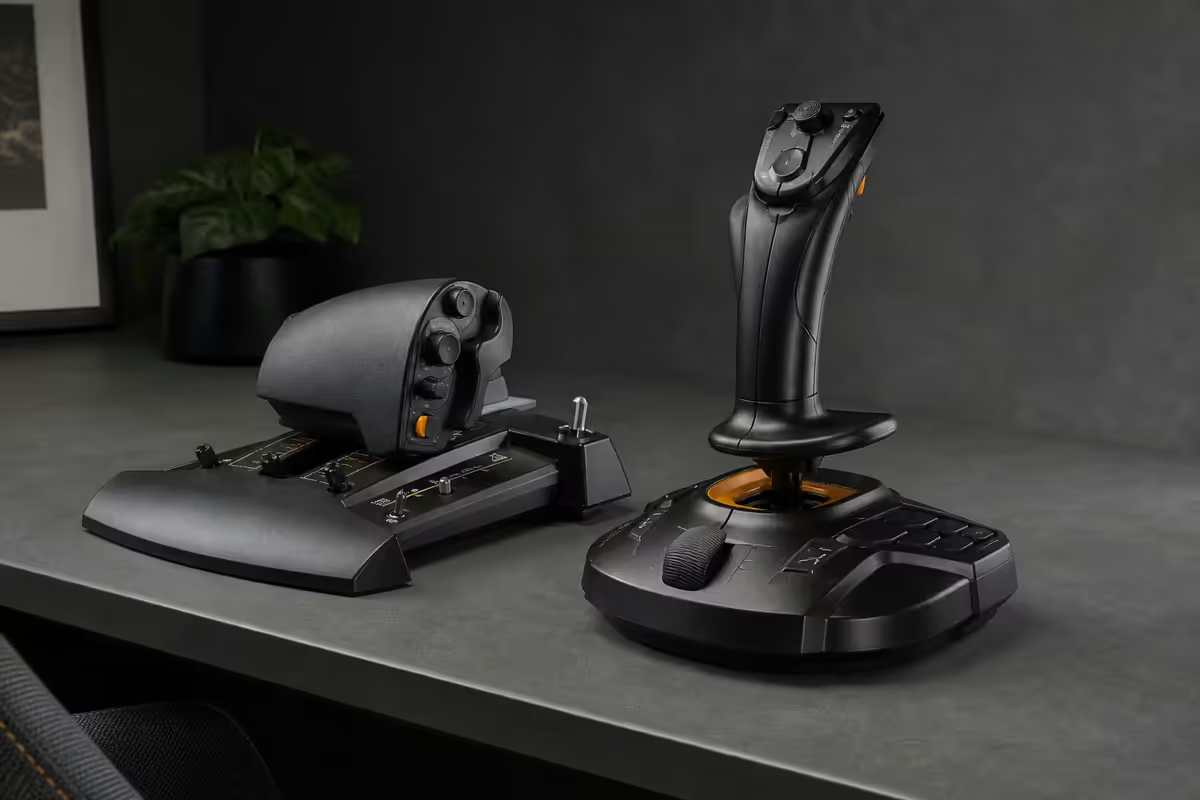
Joystick vs HOTAS vs HOSAS — which suits your sim
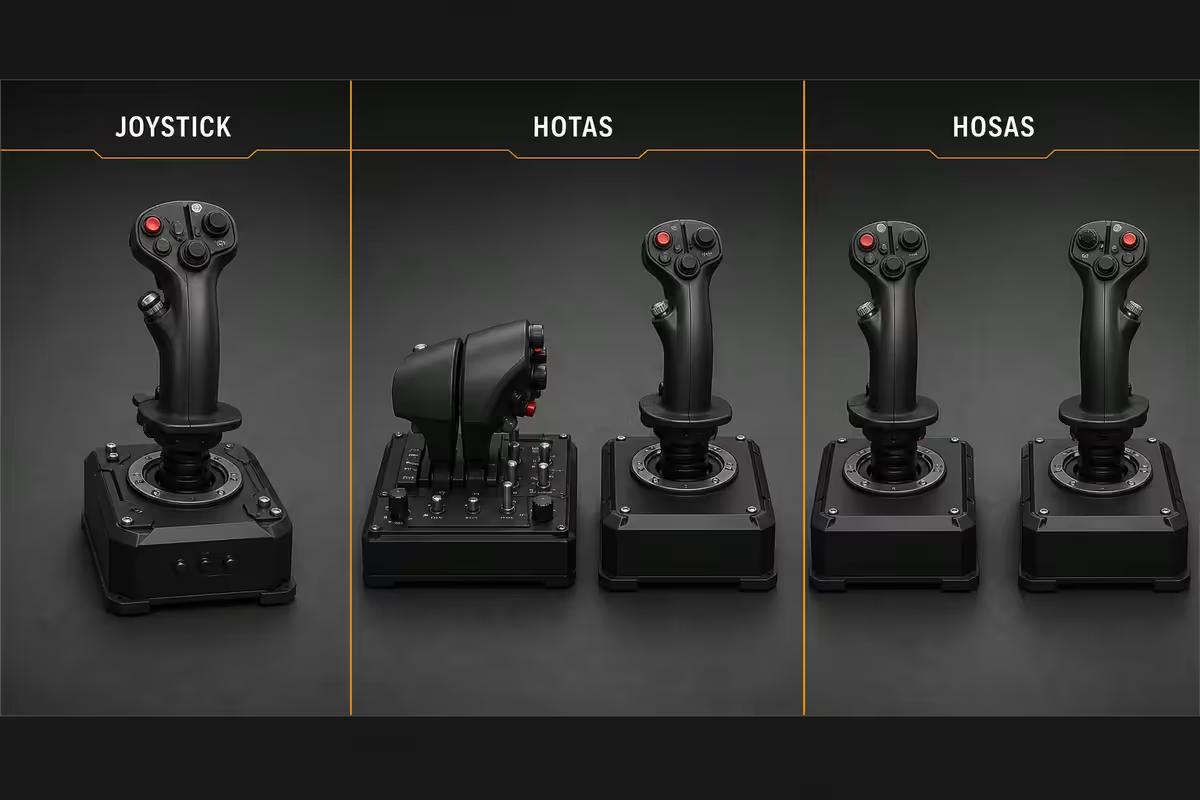
The first decision isn't about brand. It's about whether you fly atmospheric craft or spaceships, and how serious you are about long sessions.
| Setup | Best for | What it's missing |
|---|---|---|
| Joystick (single) | MSFS casual, Star Wars Squadrons | Separate throttle precision |
| HOTAS (stick + throttle) | MSFS serious, DCS, IL-2 | Rudder pedals (for props/helos) |
| HOSAS (twin-stick) | Star Citizen, Elite Dangerous, 6DOF | Throttle control (uses analogue Z) |
| Gamepad | Tubeliners in MSFS, console gaming | Analogue precision, button count |
HOTAS is the classic flight sim setup — joystick in your right hand (or left if you fly Russian), throttle quadrant in the other. Originated in the F-16 cockpit (where it gets its name) and copied by every major combat sim since. You can keep your hands on stick and throttle and never reach for the keyboard.
HOSAS emerged from Star Citizen and Elite Dangerous communities where space flight rewards independent control of strafe axes (left/right, up/down) in addition to pitch/roll/yaw. A twin-stick setup gives you six analogue axes in two hands. Atmospheric flight doesn't benefit from this.
Single joystick with built-in throttle slider works for casual atmospheric flight but you're limited by the slider — throttle resolution is poor and your stick hand has to release the grip to adjust power.
Hall sensor vs potentiometer — why it matters
Every joystick has sensors that convert physical stick position to digital signals. Two technologies dominate, and the difference shows up in long-term feel.
Potentiometers are sliding electrical contacts — variable resistors that change as the stick moves. Cheap, simple, mechanically reliable for the first 6-18 months. Then the contacts oxidise and wear, producing the dreaded "spike" (instant input jumps even when you're not moving the stick) and "deadzone drift" (centre position no longer reads zero).
Hall effect sensors detect a magnet's position via magnetic field — no physical contact, no wear. Resolution is finer (12-16 bit vs ~10 bit on pots), centre is permanent, and the stick feels the same in year 5 as year 1.
Stick recommendations by budget
R1,200-R2,000 — entry / "see if I like this":
- Logitech Extreme 3D Pro (~R1,400). Single stick with throttle slider, 12 buttons, 8-way hat switch. Pots. Battle-tested, available everywhere in SA.
- Thrustmaster T.Flight HOTAS X (~R1,900). Separate stick + throttle, pots, decent button layout for first HOTAS.
R3,000-R5,500 — first proper HOTAS:
- Thrustmaster T.16000M FCS (~R3,000). Hall sensor stick, ambidextrous grip, 16 buttons. Pair with TWCS throttle (~R2,000) for a full HOTAS at R5,000 total. The mainstream "real flight sim" entry point.
- Logitech G X56 HOTAS (~R4,500). Twin throttles for twin-engine fans, mini analogue stick on throttle for view-look, RGB. Pots on stick X/Y (downside).
R6,000-R15,000 — enthusiast tier:
- VKB Gladiator NXT EVO (~R5,500). Hall sensors throughout, premium build quality, fully replaceable spring sets. Pair with VKB STECS Mini throttle (~R5,000) or T.16000M throttle for budget.
- Thrustmaster HOTAS Warthog (~R12,000-R15,000). Metal construction, replica of A-10C controls. Pots on X/Y stick (yes — even at this price). Best for DCS A-10C Warthog purists.
R20,000+ — the commitment:
- Virpil VPC Constellation Alpha + base + MongoosT-50 throttle (~R20,000-R28,000). Modular — every component upgradeable. CNC aluminium grips. Used by DCS competitive pilots. Imported via Yuppiechef-style specialists in SA, expect 4-8 week lead time.
- Winwing Orion 2 throttle + F-16 grip (~R18,000-R25,000). Up-and-coming competitor to Virpil — newer, better availability via Takealot+ resellers in SA.
Rudder pedals — when they matter
Rudder controls the yaw axis. On a single joystick, rudder is usually mapped to the stick's twist axis — you rotate the grip left or right. This works but is imprecise and tiring on long flights.
You need rudder pedals if:
- You fly helicopters in DCS, X-Plane or MSFS. Pedals control tail rotor — essential for hover.
- You fly propeller GA (Cessna 172, Cirrus, Bonanza) in MSFS and want proper rudder coordination on takeoff and landing.
- You fly WWII warbirds in IL-2 Sturmovik or DCS — torque effects require constant rudder input.
- You fly aerobatic or formation flight where the rudder is constantly active.
SA pedal options:
- Thrustmaster TFRP Rudder (~R3,500). Entry option. Pots, plastic, slidey on hard floors. Works for casual use.
- Thrustmaster TPR (~R7,500). Step up — metal pendulum design, smoother throw, all-metal construction.
- VKB STECS Mini Throttle/Pedals or VKB Sim T-Rudder (~R5,000-R7,500). Hall sensor pedals.
- MFG Crosswind V3 (~R14,000-R18,000). Premium standard. CAM-controlled spring with adjustable resistance. Imported from Poland via specialty channels.
Head tracking — bigger gain than any stick upgrade
Of every immersion upgrade in flight sims, head tracking is the single most transformative. The ability to look around the cockpit by moving your head rather than pressing a key changes how you fly.
TrackIR 5 (R3,500-R4,500): NaturalPoint's commercial product. IR camera on your monitor, reflective dots on a clip mounted to a cap or headphone. Tracks head in 6DOF (yaw, pitch, roll, plus translation x/y/z). Industry standard since 2005, supported by every flight sim out of the box. Build quality is excellent.
OpenTrack (free): open-source tracking that works with cheaper IR setups. Build a clip with three IR LEDs and resistors for under R100, or buy a pre-built TrackClip Pro clone on AliExpress for R200-R400. Use a modified PS3 Eye camera (R300 used) or any IR-modded webcam. Delivers 80-90% of TrackIR's quality for a fraction of the price. The catch — initial setup takes an evening.
VR headsets (Quest 3, Pimax Crystal, Valve Index): step further again. Full immersion. The catch — text in cockpits is hard to read at lower headset resolutions, and motion sickness is a real risk on first sessions.
MSFS 2024 bindings — what works out of the box
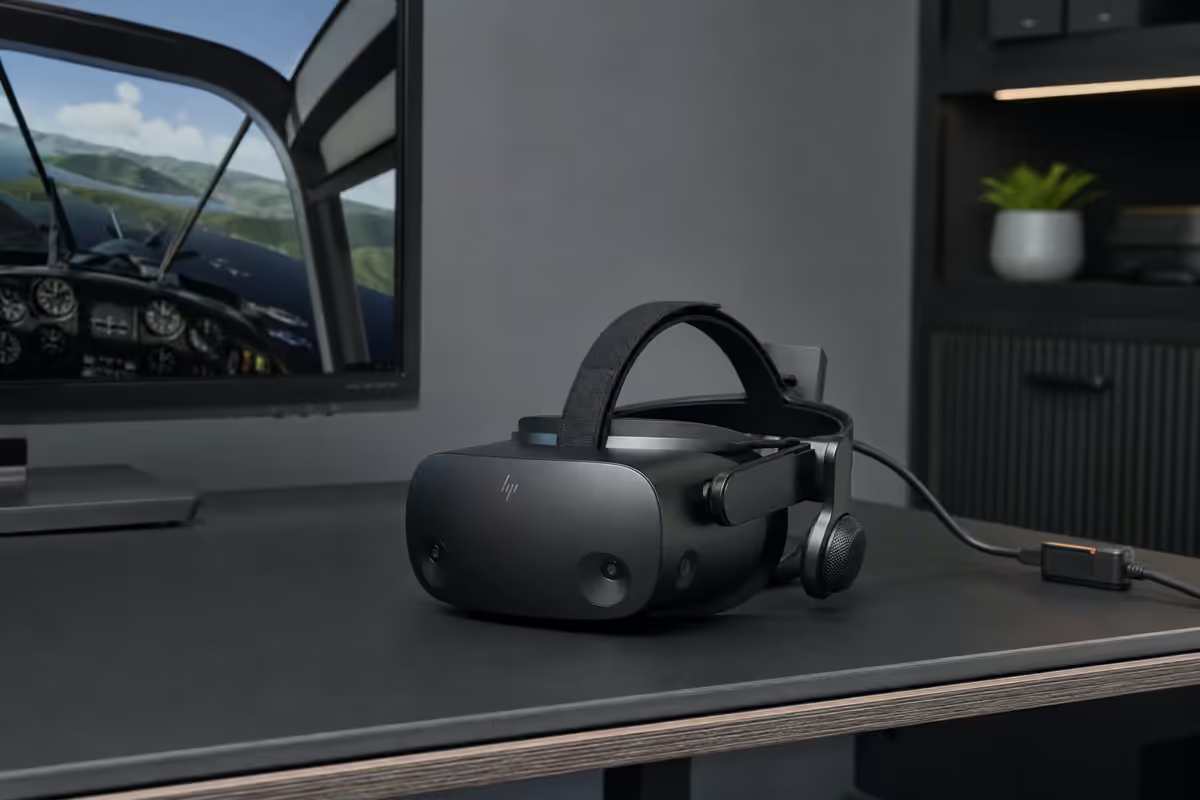
Microsoft Flight Simulator 2024 detects most popular controllers automatically and applies sensible default bindings.
Auto-detected with sensible defaults:
- Thrustmaster T.Flight HOTAS X / 4 / One — full bindings including hat switches.
- Thrustmaster T.16000M — both stick and TWCS throttle recognised.
- Logitech Extreme 3D Pro, G X52, X56 — preset bindings ship with the game.
- Xbox controller — comprehensive defaults including assistance modes.
- VKB Gladiator NXT, Virpil VPC — recognised but require manual binding pass for full button mapping (community profiles exist).
Profiles to download:
- flightsim.to hosts community-made controller profiles for every common stick. Free, downloadable as XML, drop into MSFS Controls.
- For DCS, the same profiles share via the official DCS forums and Steam Workshop.
- Star Citizen profiles for HOSAS setups via the community subreddit and SC Community Hub.
Binding tips: map the view hat switch on the stick to look around the cockpit (or "look back" if your sim allows). Bind landing gear, flaps, autopilot toggle to throttle base buttons — frequently used during takeoff and approach when your hands shouldn't leave the controls.
SA flight sim upgrade ladder
| Tier | Setup | Total SA budget |
|---|---|---|
| Just starting out | Logitech Extreme 3D Pro OR Xbox controller | R1,500 |
| First HOTAS | Thrustmaster T.Flight HOTAS X + OpenTrack | R2,500 |
| First proper HOTAS + hall sensors | T.16000M + TWCS Throttle + TrackIR | R9,000 |
| Helicopter / WW2 enthusiast | Add Thrustmaster TFRP rudder pedals | R12,500 |
| Enthusiast all-in | VKB Gladiator NXT + STECS throttle + TrackIR + TFRP | R18,000-R22,000 |
| Commitment tier | Virpil base + Alpha + MongoosT-50 + MFG Crosswind + TrackIR | R45,000+ |
| VR option (replaces TrackIR) | Quest 3 + Air Link or Pimax Crystal Light | R12,000-R30,000 |
Common mistakes
Buying expensive sticks before establishing the habit. R2,000 pot stick first to confirm you'll actually play flight sims for 100+ hours, then upgrade.
Ignoring throttle quality. The throttle gets as much use as the stick during atmospheric flight. A great stick paired with a wobbly cheap throttle slider is a frustration. Match the budget on both sides.
Putting head tracking last. Head tracking is the single biggest immersion upgrade and often costs less than the stick. Buy it earlier in your ladder.
Buying pedals "just in case". If you don't fly props, helos or WW2 warbirds, R3,500-R8,000 sitting on the floor doing nothing. Buy pedals when you're sure you fly aircraft that need them.
Mixing brands without checking software. Virpil + VKB + Thrustmaster mixed in one rig works but requires their respective configuration tools running simultaneously. Possible. Tedious. Single-brand setups are easier to maintain.
Key takeaways
- HOTAS for atmospheric flight. HOSAS for space sims. Joystick for casual. Match to your simulator.
- Hall sensors over potentiometers — no wear, no spike, no drift. R3,000 hall stick beats R2,000 pot for 5+ years.
- Head tracking transforms immersion. TrackIR (R4,000) or free OpenTrack — bigger gain than any stick upgrade.
- Rudder pedals only if you fly props, helicopters or WW2 aircraft. Otherwise the twist axis is fine.
- SA ladder: R1.5k Logitech → R5k T.16000M HOTAS → R12k VKB enthusiast → R30k+ Virpil commitment.
Frequently asked questions
What's the difference between joystick, HOTAS and HOSAS?
Joystick = single stick with built-in throttle slider, simplest setup. HOTAS (Hands On Throttle And Stick) = separate joystick plus separate throttle unit, the traditional flight sim setup since the 1990s. HOSAS (Hands On Stick And Stick) = twin joysticks, one in each hand, popular for Star Citizen and Elite Dangerous where six-degrees-of-freedom space flight rewards two analogue inputs over throttle. HOTAS for atmospheric flight (MSFS, DCS), HOSAS for space.Are hall sensor controllers better than potentiometer?
Yes. Hall effect sensors use magnetic field detection with no physical contact between moving parts — they don't wear out, don't develop deadzone drift, and don't suffer the "spiky input" problem that potentiometers develop after 1-2 years. Logitech Extreme 3D and Thrustmaster T.Flight HOTAS X use pots. Thrustmaster T.16000M, VKB Gladiator NXT, Virpil VPC and Winwing all use hall sensors. The difference matters most on the X/Y axes of the stick.Do I need rudder pedals for flight sims?
For propeller aircraft and helicopters — yes, dramatically. Rudder input from a twist-grip stick is imprecise and tiring. For jet aircraft in MSFS or DCS — useful but not essential, since fly-by-wire systems coordinate rudder automatically at cruise. For helicopters in DCS or X-Plane, pedals are mandatory. Quality pedals are R3,500-R8,000 in SA (Thrustmaster TFRP, VKB STECS Mini, MFG Crosswind for premium).What's the best flight sim controller under R2,000?
Logitech Extreme 3D Pro (R1,200-R1,500) — pots, built-in throttle slider, 12 buttons, hat switch. Or Thrustmaster T.Flight HOTAS X (R1,700-R2,100) — separate stick and throttle, pots but proper HOTAS layout for first-time sim flyers. Step up to Thrustmaster T.16000M (R2,500-R3,000) for hall sensors at this entry tier.Is Virpil or VKB better for serious flight sim?
Both are excellent at the enthusiast tier. VKB Gladiator NXT EVO (R4,500-R6,500) has the better ergonomics out of the box and is more available in SA via specialist resellers. Virpil VPC Constellation Alpha (R7,500-R12,000+) is the modular benchmark — separate base, separate stick grip, separate throttle, all upgradeable. For DCS combat enthusiasts buying once for 10 years, Virpil. For a great experience without the import wait, VKB.Do I need head tracking for flight sims?
Yes, head tracking transforms flight sim immersion more than any control upgrade. TrackIR 5 (R3,500-R4,500) is the proven premium option. OpenTrack with a R200 IR clip and any webcam delivers 80% of TrackIR's quality for under R500. Free. Both let you look around the cockpit by moving your head — critical for spotting traffic in air-to-air combat or finding the runway on visual approach.What's the SA flight sim upgrade ladder?
R1,500 entry: Logitech Extreme 3D Pro. R3,000-R5,000 first proper HOTAS: Thrustmaster T.16000M + TWCS throttle or T.Flight HOTAS One. R8,000-R15,000 enthusiast: VKB Gladiator NXT EVO + STECS throttle, or Thrustmaster Warthog. R20,000-R30,000+ commitment tier: Virpil VPC Constellation Alpha + MongoosT-50 throttle + MFG Crosswind pedals. Add TrackIR (R4,000) or OpenTrack (R500) at any tier.Does MSFS 2024 work better with HOTAS than gamepad?
For tubeliner airliners (A320, 737, 787) — gamepad or even mouse+keyboard works fine since most flight is autopilot. For GA props (Cessna 172, Cirrus SR22, Bonanza) — HOTAS makes a substantial difference in control feel. For bush flying or aerobatics — HOTAS or quality joystick is essential. MSFS 2024 ships with sensible default bindings for Thrustmaster, Logitech, Virpil and VKB controllers, recognised automatically on plug-in.
Get the Evetech app
Exclusive app-only prices, daily flash sales, and free delivery on orders over R4,000 — download the app and start saving.