PC Speakers Buying Guide
How to choose PC speakers. — Two cabinets. The whole room.
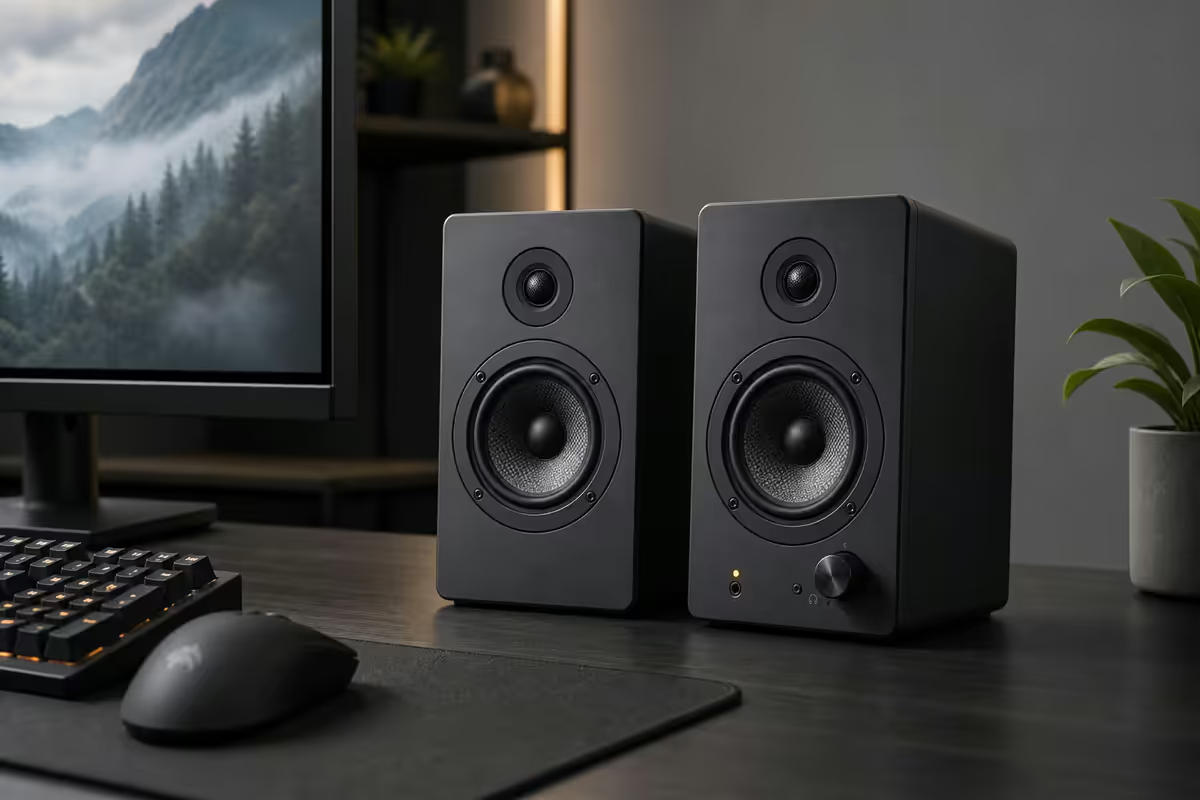
The desktop speaker market is split between RGB plastic theatre and real audio engineering. The price gap is smaller than you think — and a R2,500 pair of bookshelf monitors will outlast and outperform three rounds of gamer-branded throwaways.
- SA price band
- R500-R10k+
- channel configs
- 2.0 / 2.1 / 5.1
- audible range
- 40Hz-20kHz
2.0 vs 2.1 vs 5.1 — channels for the desktop
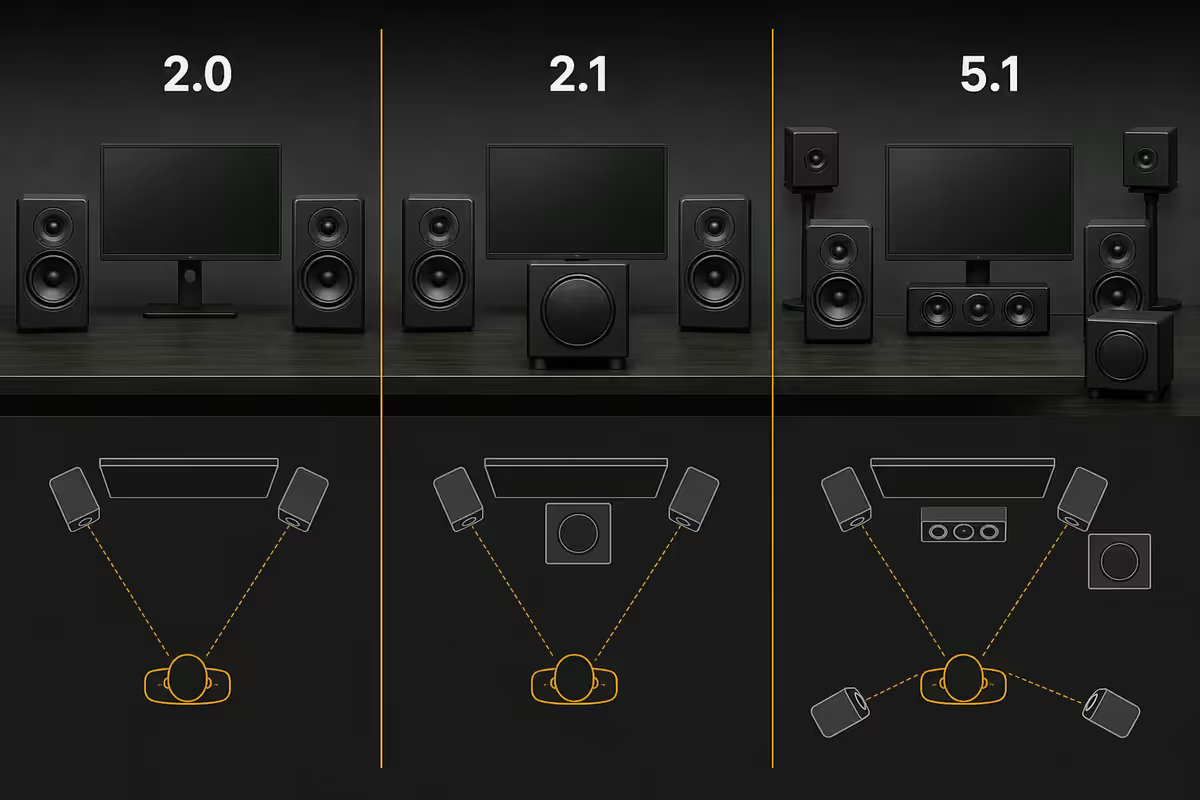
The first decision is how many cabinets land on your desk. The marketing numbers (2.0, 2.1, 5.1, 7.1) describe the channel count: full-range speakers plus subwoofer.
| Config | What you get | Right for |
|---|---|---|
| 2.0 stereo | Two full-range speakers, no sub | Most desks — clean and simple |
| 2.1 with sub | Two satellites + dedicated subwoofer | Bass-heavy music, films, large desks |
| 5.1 surround | Front L/R + centre + rear L/R + sub | Lounge HTPC setups, 2m+ listening |
| 7.1 surround | Front L/R + centre + side L/R + rear L/R + sub | Dedicated home cinema only |
The desktop reality: at 50-80cm from a screen, your ears physically cannot separate rear-channel cues the way a 2m sofa distance allows. Routing five satellites and a subwoofer around a desk is the equivalent of running a six-cylinder engine in a go-kart — the engineering exists, but the chassis can't use it.
A clean 2.0 pair of active bookshelf monitors (Edifier R1280T, Audioengine A2+) at the same price as a 5.1 plastic set will deliver more honest sound, better imaging, and longer service life. Add a subwoofer later if you crave low-end — most active monitors include a sub-out for exactly this upgrade path.
Active vs passive — active is the default
Active speakers have the amplifier built into one cabinet (usually the right). You plug the power cable into the wall, the signal cable into your PC, and they work. Almost every PC speaker sold in 2026 is active.
Passive speakers require a separate stereo amplifier or AV receiver to drive them. The two parts (speakers + amp) can be mixed and matched, and the upgrade path is open-ended. The cost: an extra box on or under your desk, an extra power cable, and the requirement that you know what you're buying on both sides.
For almost every desktop builder the answer is active. The signal chain is shorter, the cable mess is smaller, and the engineering is dedicated to the cabinet shape. Passive only makes sense if:
- You already own a quality stereo amp or AV receiver and want to add desk speakers to it.
- You're building a long-term hi-fi setup that will outlive your PC by a decade.
- You want speakers (like Klipsch RP-600M) that don't ship in an active variant.
The "active monitor" framing matters because gamer-branded brands rarely sell active monitors — they sell 2.1 satellite sets in plastic enclosures. Brands like Edifier, Audioengine, KRK, Presonus and JBL sell active monitors derived from studio reference designs, and at the same price tier they will outclass the plastic competition every time.
Connectivity — 3.5mm, USB, Bluetooth, optical
The connector on the back of the speaker determines how clean the signal gets from your motherboard to the drivers. Modern active speakers usually offer two or three of these.
3.5mm analogue (the workhorse)
Every PC has one, every speaker accepts one. The signal is converted to analogue inside your motherboard, sent down the wire, and amplified by the speaker. With a good codec (Realtek ALC1220, ALC4080, ESS Sabre on premium boards) the output is clean enough that you won't hear any difference between 3.5mm and USB.
USB with built-in DAC
USB-DAC speakers (Audioengine A2+ USB, Creative Pebble Pro, Edifier S350DB) handle the digital-to-analogue conversion inside the speaker, bypassing your motherboard's audio circuitry entirely. Useful if your build has a noisy chassis ground (cheap PSU, ground loop, GPU coil whine bleeding into audio). For most modern boards, the difference is inaudible.
Bluetooth (convenience, not gaming)
Bluetooth adds 100-200ms of audio latency — fine for music and YouTube, noticeable in competitive games where footstep direction matters. Most decent active monitors now ship with Bluetooth alongside their wired inputs (Edifier R1280DB, Audioengine A2+ Wireless), so you can stream from your phone without giving up wired performance.
Optical (TOSLINK) and coax S/PDIF
Found on premium active monitors (Edifier S350DB, S1000 MkII, S2000 MkIII). Carries a clean digital signal from PC to speaker, bypassing motherboard noise like USB does. Useful if you've already got an optical out on your soundcard or motherboard. Otherwise overlook it — it's not the difference between a good and bad setup.
SA price tiers — where the value lives
The South African market has three honest tiers. The gaps between them are where you'll feel diminishing returns the hardest.
| Tier | SA price band | What you should buy |
|---|---|---|
| Budget desktop | R500-R1,500 | Logitech Z313, Creative Pebble Pro, Z407 |
| Mid-range value | R2,000-R4,000 | Edifier R1280T / R1280DB, Logitech Z625 |
| Enthusiast / desk hi-fi | R5,000-R12,000 | Audioengine A2+, Edifier S350DB, S1000 MkII |
| Audiophile / studio | R12,000-R25,000+ | Audioengine A5+, Edifier S2000 MkIII, KRK Rokit 8 |
Where the value cliff sits: at the R2,500 Edifier R1280T price point. Below that, plastic enclosures and bundled satellite sets dominate. Above R10,000, the law of diminishing returns kicks in hard — a R15,000 Audioengine A5+ is better than a R3,000 R1280T, but not five times better.
The sweet spot for SA buyers: R2,500-R4,500. Edifier R1280T, R1280DB, R1700BT or Logitech Z625 all live here. Spend less and you compromise enclosure and driver; spend more and you're paying for incremental refinement that's mostly inaudible to non-trained ears.
Recommended PC speakers by use case
| Use case | Pick | SA price |
|---|---|---|
| Ultra-budget desktop | Logitech Z313 (2.1) | R850-R1,100 |
| Compact / small desk | Creative Pebble Pro (USB-C) | R1,400-R1,700 |
| Mid 2.1 with bass | Logitech Z625 THX 2.1 | R3,000-R3,800 |
| Best value (most builders) | Edifier R1280T (2.0 active) | R2,500-R3,000 |
| Best value + Bluetooth | Edifier R1280DB (2.0 + BT + optical) | R3,200-R3,800 |
| 5.1 for HTPC / lounge setup | Logitech Z906 5.1 | R8,500-R10,500 |
| Desk monitor — reference | Audioengine A2+ Wireless | R8,500-R10,000 |
| Enthusiast 2.1 active | Edifier S350DB (2.1 + sub) | R8,000-R9,500 |
| Audiophile / studio reference | Audioengine A5+ or Edifier S2000 MkIII | R12,000-R18,000 |
| Powered studio monitor (pair) | KRK Rokit 5 G4 / Presonus Eris 4.5 | R6,500-R9,000 |
Positioning, isolation and room reality
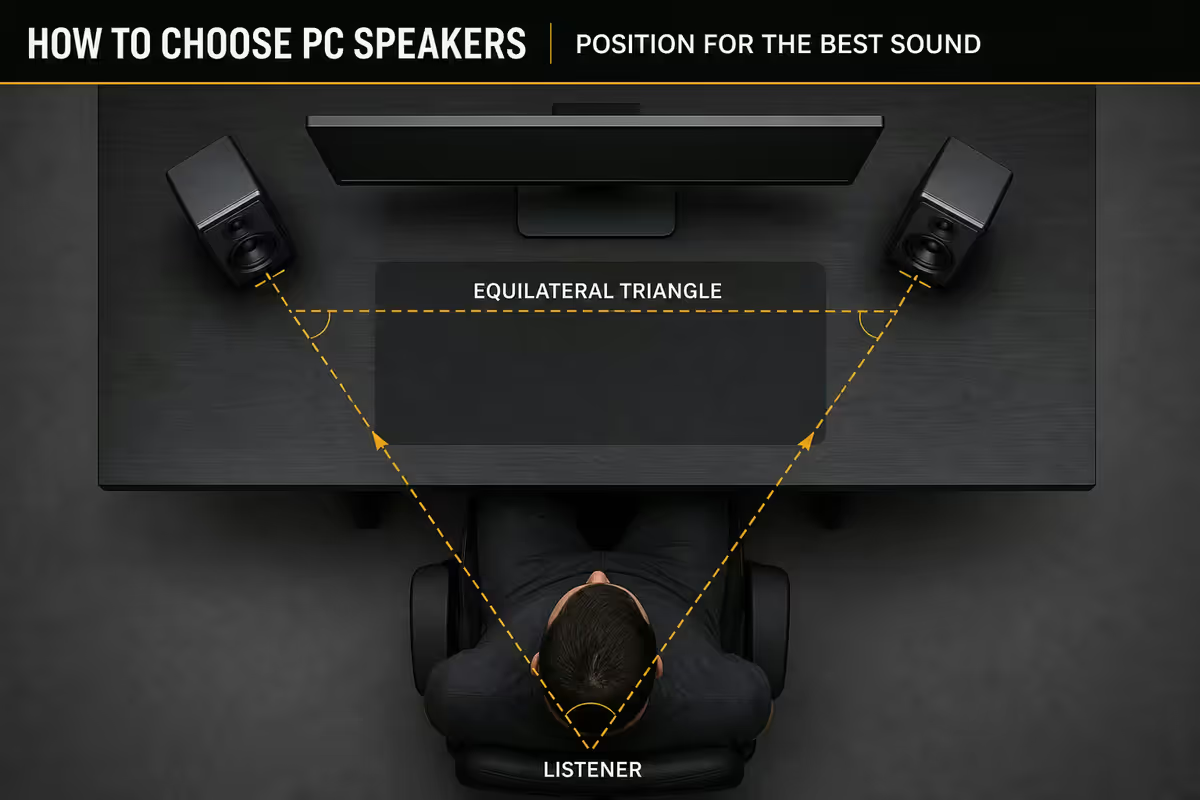
A R2,500 pair of speakers correctly positioned will outperform a R5,000 pair stuffed into the wrong corner. The room is half the equipment.
The equilateral triangle
Form an equilateral triangle between your two speakers and your head. If they're 70cm apart, sit 70cm back. Angle the speakers inward so the tweeters point directly at your ears. This is the "sweet spot" — the place where stereo imaging actually works.
Tweeter at ear height
When you're seated normally, the tweeters (the small driver at the top of each cabinet) should be at ear height — not pointed at your chest. Most desk surfaces are too low to achieve this naturally, which is why isolation pads or speaker stands matter. A R200 pair of Auralex Mopads or IsoAcoustics ISO-155 tilters buys more audible clarity than a R1,000 upgrade in speakers.
Keep them off the back wall
Bookshelf monitors with rear bass-reflex ports need 10-20cm of breathing space behind them. Slammed against a wall, the bass becomes a boomy, indistinct rumble. Front-ported designs (like Audioengine A2+) tolerate close-to-wall placement better.
Avoid corners
Corners reinforce bass frequencies in muddy, irregular ways — the worst possible spot for accurate sound. If your desk lives in a corner, pull the speakers as far from the corner walls as you can and consider acoustic panels behind the screen.
Common PC speaker mistakes
Buying 5.1 for a desk. At 50cm from the screen your ears can't separate the rear channels. The five satellites + sub end up as expensive desk clutter that sounds worse than a good 2.0 pair at the same price. Save 5.1 for lounge HTPC setups with 2m+ listening distance.
Putting the subwoofer on the desk. A 2.1 sub on a thin MDF top turns your entire desk into a vibration source. Bass becomes tactile slop. Subs go on the floor — ideally on an isolation pad or sub stand.
Slamming bookshelf speakers against the wall. Rear-ported designs need 10-20cm of breathing room. Up against the wall the bass becomes boomy and the soundstage collapses forward. Pull them out.
Buying gamer-branded plastic at the Edifier price. At R2,500-R3,000 you can have an RGB plastic 2.1 set or a wood-cabinet Edifier R1280T 2.0 pair. The Edifier will sound noticeably better, look more grown-up on the desk, and last longer. RGB doesn't fix tinny tweeters.
Ignoring tweeter height. Most desks place speakers below ear level, beaming the high frequencies into your chest instead of your ears. Treble disappears and the soundstage feels low and chesty. Stands or isolation pads — R200-R400 — are the cheapest meaningful upgrade in audio.
Treating "frequency response" as the spec that matters. A R600 plastic speaker rated "40Hz-20kHz" rolls off so badly at the extremes that the spec is meaningless. Driver size and cabinet construction predict real-world sound far better than marketing-sheet frequency numbers.
Key takeaways
- Edifier R1280T (R2,500-R3,000) is the value king — active 2.0 wood cabinets outclass plastic 2.1 sets at every tier.
- Skip 5.1 for a desktop — your ears can't separate rear channels at 50-80cm. Save it for HTPC lounge setups.
- Active is the desk default. Passive only makes sense if you already own a good amp or AV receiver.
- 3.5mm beats USB on most modern motherboards. USB DAC matters only if your audio chain has noise.
- Position is half the equipment. Equilateral triangle, tweeters at ear height, 15cm off the back wall.
- R200 isolation pads buy more audible clarity than R1,000 of speaker upgrade. Decouple from the desk.
Frequently asked questions
What PC speakers should I buy in South Africa?
For most desktops, Edifier R1280T active bookshelf monitors (R2,500-R3,000) are the value pick — real wood cabinets, dedicated amp, clean stereo image at desk distance. Budget builders should grab the Logitech Z313 2.1 (R900-R1,200) or Creative Pebble Pro (R1,500). Audiophile end: Audioengine A2+ Wireless (R8,500-R10,000) or Edifier S2000 MkIII (R12,000+). Skip 5.1 unless you sit 2m+ back from the screen.2.0 vs 2.1 vs 5.1 — what's the difference for desktop use?
2.0 is a stereo pair only. 2.1 adds a subwoofer for low frequencies. 5.1 is five satellites plus a sub for surround sound. At a typical desk distance of 50-80cm, 5.1 is wasted — your ears can't separate the rear channels at that range. 2.0 from good bookshelf monitors (Edifier R1280T, Audioengine A2+) usually beats a cheap 2.1 set. Add a subwoofer later if you crave bass — most active monitors have a sub output.Active vs passive PC speakers — which is right?
Active (powered) speakers have the amplifier built into one cabinet. You plug them straight into your PC with a 3.5mm, USB or Bluetooth cable and they work. Almost every PC speaker sold today is active. Passive speakers need a separate amplifier or AV receiver — only worth it if you already own quality amp hardware or want to build a long-term hi-fi setup around your PC. For 99% of desks, active is the answer.Do I need a USB DAC built into my PC speakers?
USB-DAC speakers (Audioengine A2+, Creative Pebble Pro, Edifier S350DB) bypass your motherboard's audio circuitry — useful if you have a noisy onboard codec or hear hiss through 3.5mm. For most modern motherboards (Realtek ALC1220, ALC4080) the 3.5mm output is clean enough that USB makes no audible difference. Pick USB if your build has a noisy chassis ground; pick 3.5mm if your motherboard audio is decent and you want fewer cables.Should I buy gamer-branded speakers or audio-brand speakers?
For the same money, audio-brand speakers (Edifier, Audioengine, Klipsch) almost always outclass gamer-branded plastic. RGB and 'gamer DNA' marketing doesn't drive better sound. A R3,000 Edifier R1280T will sound noticeably better than a R3,000 RGB-laden gamer 2.1 set. The exception: if you genuinely need a built-in mic, surround virtualisation or specific game-engine features, dedicated PC speaker brands serve that niche.How do I position my PC speakers on a desk?
Form an equilateral triangle between the two speakers and your head — speakers about 60-80cm apart, angled inward so their tweeters point at your ears. Tweeters at ear height when seated (use isolation pads or stands to raise them). Keep them 15cm away from the back wall to avoid bass boom. Don't slam them into corners. A R200 pair of isolation pads (Auralex Mopads, IsoAcoustics ISO-155) buys more clarity than a R1,000 speaker upgrade.What frequency range matters for PC speakers?
Most desktop speakers reach 50Hz-20kHz, which covers everything you'll hear in games, music and video. Sub-bass below 40Hz (movie explosions, electronic music drops) needs either a subwoofer or larger bookshelf monitors like Edifier S350DB. Frequency-response numbers in marketing are often optimistic — pay more attention to driver size (4-inch woofer minimum for clean low-mids) and cabinet material (real MDF or wood beats plastic every time).Are Bluetooth PC speakers good enough for gaming?
Bluetooth adds 100-200ms of latency — fine for music and YouTube, noticeable in competitive games where audio cues matter. Use the 3.5mm or USB input for gaming and reserve Bluetooth for streaming music from your phone. Modern Edifier and Audioengine sets accept both, so you don't have to choose. Bluetooth-only speakers (no wired input) are a poor fit for a primary PC setup.