Standing Desk Buying Guide
How to choose a standing desk.
The wrong sit-stand desk creaks under load, lifts unevenly and gets abandoned within a month. The right one runs silently for a decade. Here's how to spend your R6,000 — or R12,000 — without regret.
- load & longevity
- Dual motor
- height range
- 68-118cm
- SA price band
- R3k-R12k+
Sit-stand discipline — the 50-50 rule
The most expensive standing desk on earth is useless if you stop standing after week two. The single biggest reason new owners abandon their desk isn't the hardware — it's getting the habit wrong.
The 50-50 rule: aim for roughly equal time sitting and standing across the work day, in 30-45 minute blocks. Standing all day causes leg and lower-back fatigue just as readily as sitting all day causes lumbar issues. Alternation is what makes the desk worth the money.
Build the habit gradually:
- Week 1-2: 15 minutes of standing per hour, max two hours per day.
- Week 3-4: 30 minutes per hour, building to three hours per day.
- Week 5+: 30-45 minute blocks, total 3-4 hours of standing per 8-hour day.
Motor count — single vs dual
The single biggest hardware decision. The market splits cleanly:
| Frame type | Best for | SA price band |
|---|---|---|
| Single motor | Laptop only, single monitor, light user | R3,000-R5,500 |
| Dual motor (recommended) | Tower PC + dual monitors + arms | R6,000-R9,500 |
| Three-stage dual motor | Tall users, wider height range | R8,500-R12,000 |
| Premium dual motor (LINAK) | Heavy commercial use, 10-year frame | R12,000-R20,000 |
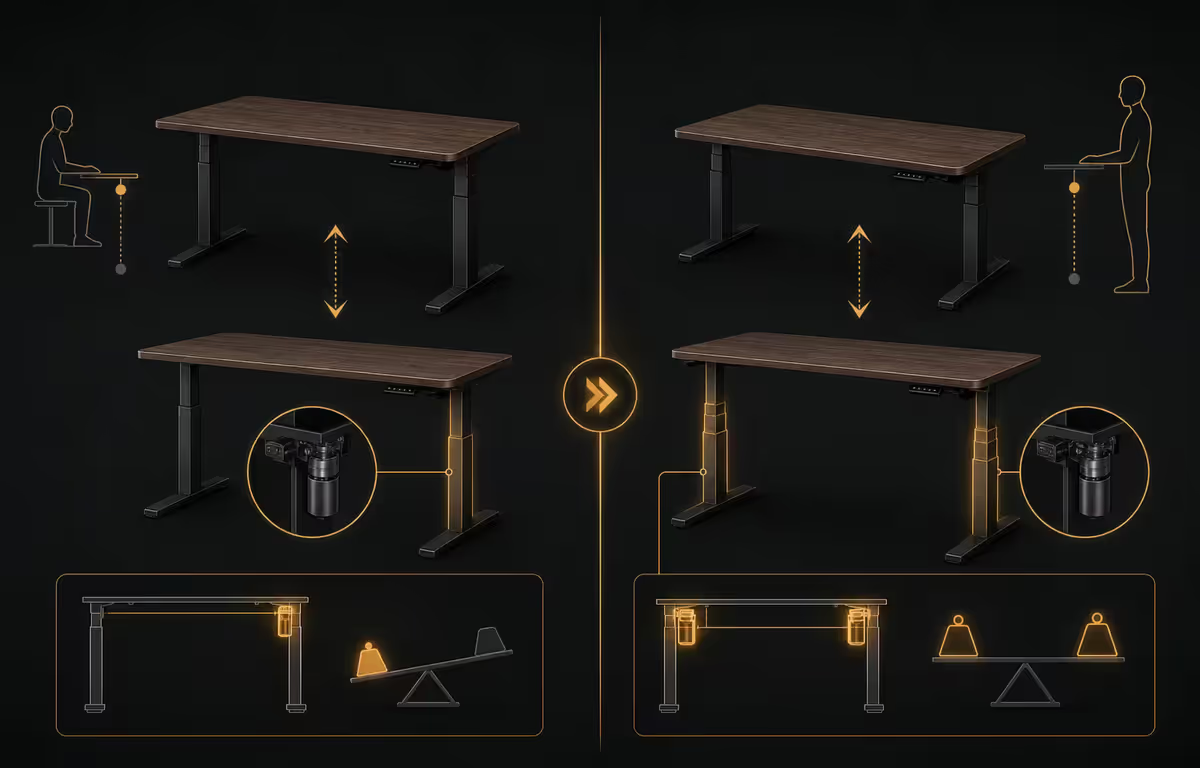
Why dual motor wins: two synchronised motors lift each leg independently, so weight imbalance (heavy CPU tower on the right, light laptop on the left) doesn't tilt the desktop or strain the controller. Single-motor desks use one motor and a belt linkage — fine for light loads but the belt stretches over time and one side starts lifting before the other.
Three-stage refers to telescoping legs with three nested segments rather than two. That gives you both a lower minimum height (good for shorter users) and a higher maximum (good for tall users). Two-stage frames are cheaper but the range is narrower.
Load capacity — what you actually need
The number on the spec sheet rarely matches the way most people actually load a desk. Here's what real-world setups weigh:
- Single 27" monitor + laptop + accessories: 15-25kg
- Dual 27" monitors + monitor arms + accessories: 30-45kg
- Dual monitors + tower PC on desk + accessories: 50-65kg
- Triple monitor setup + tower + arms + audio interface: 65-85kg
Target a frame with at least 1.5x your expected load. A 60kg setup wants an 80kg+ rated frame. The cushion absorbs imbalance, future upgrades and natural wear. It also keeps the motor from working at peak every transition, which extends motor life.
Height range — match your body
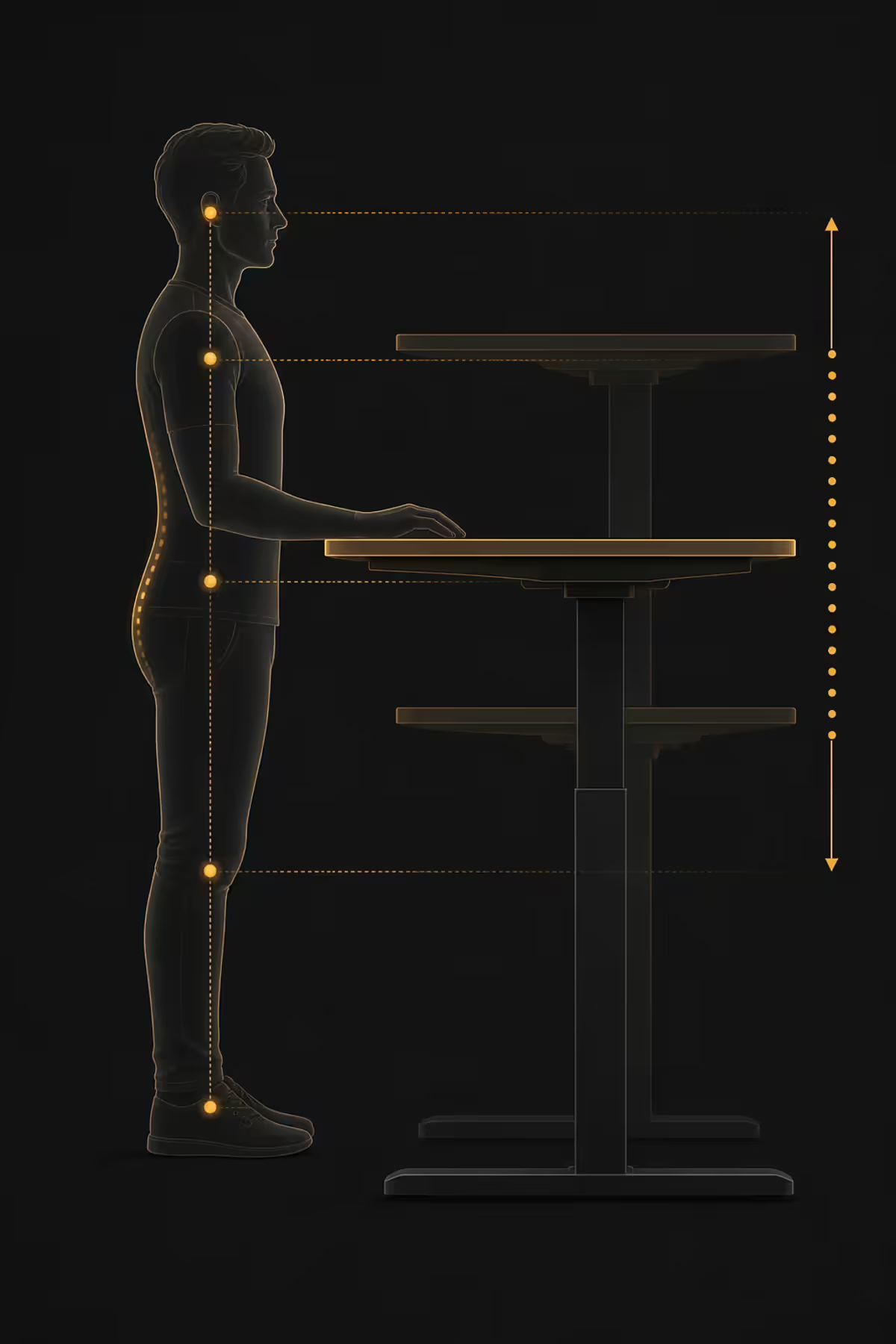
Standing-desk height is measured from floor to the top of the desktop. Quality dual-motor frames typically reach 65-128cm. Cheaper frames are narrower (e.g., 72-118cm), which excludes both short and tall users.
Quick sizing rule: when sitting, your forearms should rest parallel to the floor with elbows at 90 degrees. When standing, the same — forearms parallel, elbows at 90 degrees. For a 1.75m user, that's roughly 72cm sitting, 108cm standing. Add or subtract 5cm per 10cm of height difference.
| User height | Sit height | Stand height |
|---|---|---|
| 1.55m-1.65m | 65-70cm | 96-103cm |
| 1.65m-1.75m | 70-74cm | 103-110cm |
| 1.75m-1.85m | 74-78cm | 110-118cm |
| 1.85m-1.95m | 78-82cm | 118-125cm |
| 1.95m+ | 82cm+ | 125cm+ |
Tall users (1.90m+) should confirm the desk reaches at least 125cm before purchase. Many budget frames cap at 118cm, which leaves taller users hunching their shoulders to type. Short users (under 1.65m) need 65cm or lower so feet stay flat on the floor when seated.
Programmable presets & cable management
Three to four programmable height presets are the unsung hero feature. Without presets, every transition means holding the up or down button, watching, and stopping when you reach the right height. With presets, one button press transitions you to your saved sit or stand height automatically.
That small difference — button vs hold-button — is what makes the habit stick. Friction kills behaviour change. R500-R800 spent on a preset controller is the best money you'll spend on the desk.
Cable management matters more on standing desks than fixed desks. Every cable that runs from a wall socket up to the desktop has to stretch and bunch as the desk rises 50cm. Without management, cables snag on the floor, pull on devices, and eventually fail at the connector.
What to look for:
- Cable management tray under the desktop — keeps power strips and adapters off the floor and out of sight.
- Cable hooks on the column or crossbeam — guides cables vertically.
- Cable sleeve (separate purchase, R200-R400) — bundles 8-10 cables into a single neat tube.
- Anti-collision sensor on the controller — stops the desk if it bumps anything during transition. Standard on dual-motor frames, often missing on single-motor.
Convert your existing desk — frame-only option
The best-kept secret of the standing-desk world: you don't have to buy a complete desk. Frame-only kits (R5,000-R8,000) give you the motorised base; you provide the desktop.
Why this beats buying complete:
- Keep a desktop you already love. If your current top is a 180cm solid oak you spent R6,000 on three years ago, why throw it away?
- Custom sizing. Retail desks stop at 180cm wide and 80cm deep. Frame-only supports 200cm+ desktops and any depth.
- Cheaper for premium tops. A 25mm solid bamboo desktop from a local supplier costs R2,500-R3,500. A bundled premium top is often R4,500+.
- Future upgrades. Replace the desktop without replacing the frame.
Requirements: the underside of your desktop must be flat. Most frames mount with 8-12 screws across the crossbeam — the holes are pre-drilled in the frame, so you drill into the underside of your top to match. If your desktop is thinner than 18mm, the frame screws may break through; thicker than 40mm and the bolts won't reach. Confirm both before ordering.
Across the <strong>office fit-outs</strong> we've delivered for Centurion and Sandton tenants, the breakdown pattern tells the real story. Single-motor desks from sub-R5,000 brands <strong>fail far too often within four years</strong> — usually the controller, sometimes the motor itself. Dual-motor frames from JIECANG, LINAK and the SA Ergo Group line <strong>almost never do</strong> across the same window. Buy the dual-motor frame once and forget about it. Buy the cheap one twice.
Behind the Build · From our office fitout team
Top picks by budget — South Africa, 2026
| Tier | Pick | SA price |
|---|---|---|
| Budget single-motor (laptop user) | IKEA Bekant sit-stand 160cm | R6,000-R7,500 |
| Best value dual-motor | Ergo Group dual-motor + bamboo 140cm top | R6,500-R7,500 |
| Mid-tier dual-motor | Standing Desk SA Pro + melamine 160cm | R8,000-R9,500 |
| Three-stage tall user | FlexiSpot E7 frame + 180cm bamboo | R10,000-R12,000 |
| Premium commercial | LINAK DL5 frame + custom solid wood | R14,000-R20,000+ |
| Frame-only conversion (best value) | Ergo Group dual-motor frame, BYO desktop | R5,000-R6,500 |
| Premium gamer desk | Secretlab Magnus Pro 150cm | R18,000-R22,000 |
Desktop material — bamboo wins for most
Bamboo (R2,500-R4,000 for 160cm). The sweet spot. Light enough to be kind to the motors, strong enough to take heavy monitors and arms, environmentally renewable, looks premium and resists heat marks from coffee cups. SA humidity swings don't bother it.
Melamine-faced MDF (R1,500-R3,000). The budget standard. Heavier than bamboo, prone to chipping at edges over time, especially if monitor-arm clamps are tightened repeatedly. Fine if you treat the desk like a tool, not furniture.
Solid wood — oak or ash (R4,000-R7,000). Beautiful but heavy (45-60kg for a 160cm top). The weight eats into your usable load budget and stresses single-motor frames. Use only with three-stage dual-motor frames. Treat with hardwax oil annually.
Key takeaways
- Dual motor, 80kg+ rated, three programmable presets — the non-negotiables for an 8+ year desk.
- Follow the 50-50 rule — equal sit and stand time in 30-45 minute blocks, built gradually.
- Height range must cover both your seated and standing elbow-at-90 heights. Tall users need 125cm+ top end.
- Frame-only conversion (R5k-R6.5k) is the best-value path if you already love your desktop.
- Bamboo is the optimal desktop material for SA — light on motors, premium look, handles humidity.
Frequently asked questions
Single motor or dual motor standing desk?
Dual motor for anything heavier than a single monitor and laptop. Single-motor frames creak past 30kg of sustained load and tend to wear out within 2-3 years. Dual-motor desks lift smoothly and last 8-10 years.What load capacity do I actually need?
Aim for 80kg+ if you run dual monitors, a tower PC and arms. Target at least 1.5x your real-world load — the cushion handles imbalance, upgrades and longevity.What height range matters for a standing desk?
For 1.70m-1.85m users, you want 68-118cm range. Tall users (1.90m+) need 125cm+. Short users (under 1.65m) need 65cm or lower bottom end.Are programmable presets worth the extra money?
Yes. Three to four memory presets let you transition with one button press — the friction difference between hold-button and one-tap is what makes the habit stick.How do I follow the 50-50 sit-stand rule?
Aim for roughly equal time sitting and standing across the day, in 30-45 minute blocks. Build the habit gradually — 15 min/hour for two weeks, then 30 min/hour.Complete desk or frame-only conversion?
Frame-only (R5,000-R8,000) is the best-value path if you already have a desktop you like, or want a wider/deeper top than retail offers. Most frames support 120-200cm wide tops.What desktop material — bamboo, MDF or solid wood?
Bamboo is the sweet spot — light, strong, premium look, handles SA humidity. Melamine MDF for budget. Solid wood looks great but is heavy and only suits dual-motor frames.Which brands are reliable in South Africa?
Ergo Group and Standing Desk SA are the SA-focused specialists with 5-year warranties. IKEA Bekant is the budget benchmark. Avoid no-name AliExpress — no local replacement parts when they fail.