Standing Desk Converter Guide
How to choose a standing desk converter.
You don't need to throw out your desk to get the standing benefit. A R1,500 converter sits on top and gives you the 2:1 routine that does most of the work. Here's the honest spec sheet.
- sit-to-stand ratio
- 40 : 20
- typical load
- 15-25 kg
- SA spend tier
- R1.5k-R10k
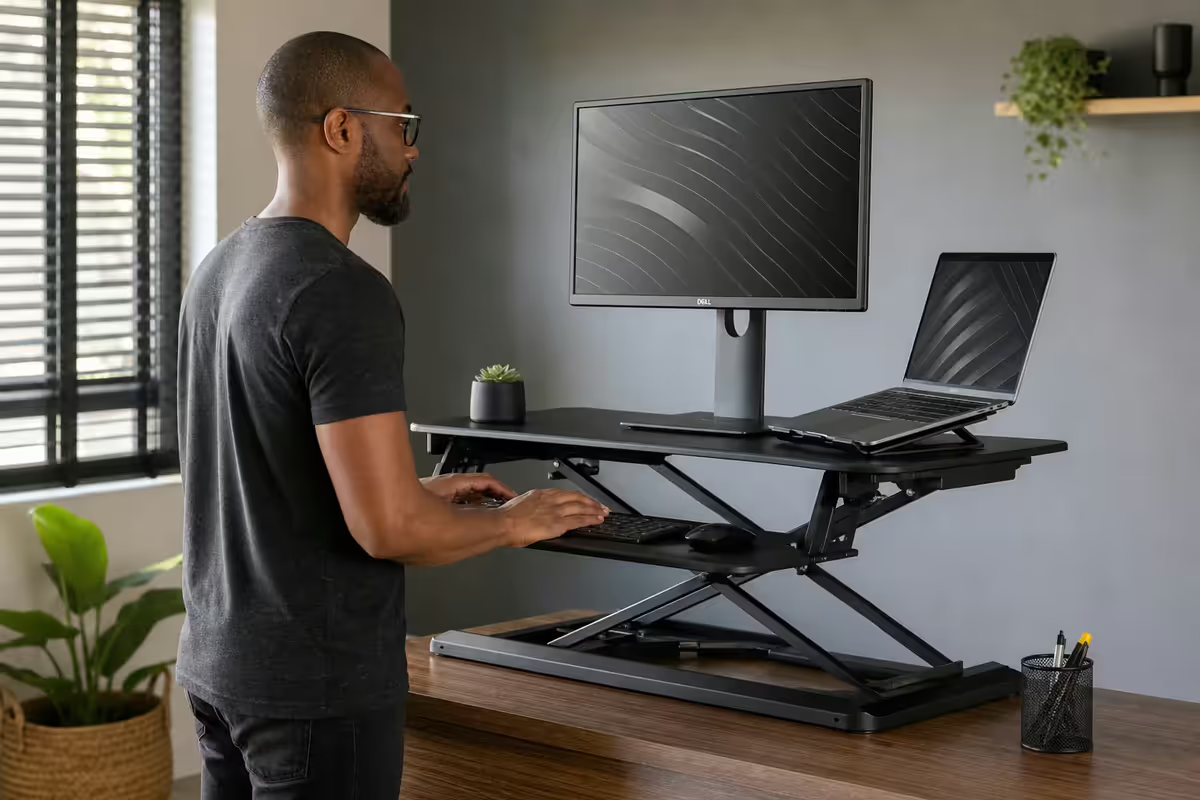
Converter vs full motorised desk
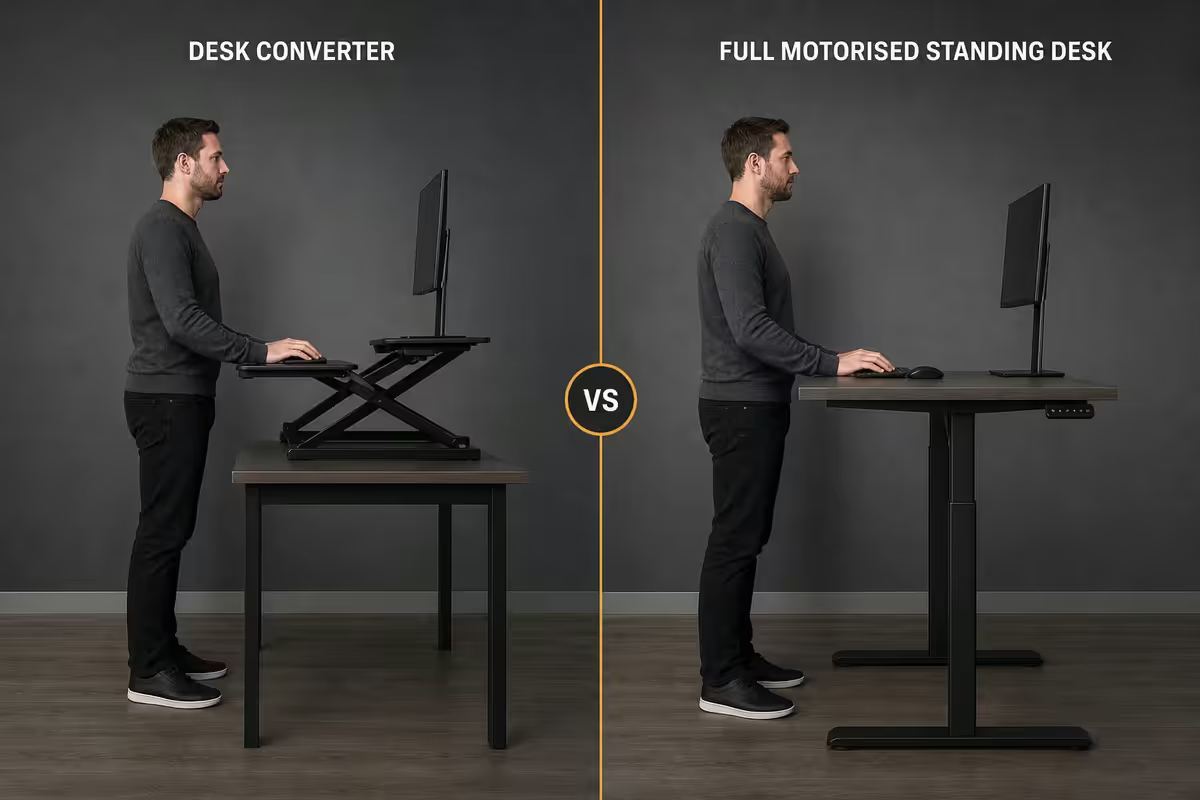
First decision: do you replace the desk or add a converter on top? Both deliver the standing benefit. The trade-off is space, budget and whether you actually love your current desk.
| Approach | Pros | SA spend |
|---|---|---|
| Standing desk converter | Keeps current desk, portable, rental-friendly | R1,500-R10,000 |
| Full motorised desk | Full width, no shake, memory presets | R4,500-R18,000 |
| DIY platform / IKEA hack | Cheap, fixed height only | R300-R800 |
Pick a converter if: you rent, you love your desk, you share a workspace, you want to test whether standing fits your work before committing, or you have under R5k to spend.
Pick a full motorised desk if: you have space, R4,500+ budget, multiple users with different heights, or you want zero platform shake when typing in standing mode.
Weight capacity — the spec people get wrong
Weight capacity is where converters fail in the field. Manufacturers quote optimistic specs; real-world loads exceed expectations within months.
Typical desk loads:
- 27-inch monitor: 4-7 kg (with stand)
- 32-inch ultrawide: 8-12 kg
- Laptop: 1.5-3 kg
- Mechanical keyboard: 1-2 kg
- Mouse, webcam, lamp, mug, notepads, headphones: 3-5 kg combined
Typical totals: single-monitor laptop setup = 12-18 kg. Dual-monitor desktop with peripherals = 22-30 kg. Heavy creator setup (32" ultrawide + speakers + dock) = 30-40 kg.
Rule of thumb: buy a converter rated for at least 1.5x your actual load. A 20kg load needs a 30kg-rated converter for headroom. Overloading causes droop, wobble, and shortened lift-spring life within 6-12 months.
Height range — match your body
Standing height isn't one-size-fits-all. Your elbows should sit at 90° when your hands are on the keyboard in standing position. For most adults, that's about 60% of your standing height (the elbow rule).
| User height | Standing desk height (elbow level) | Min. converter lift needed |
|---|---|---|
| 1.55-1.65m | 93-101 cm | ~30 cm lift |
| 1.65-1.75m | 101-108 cm | ~38 cm lift |
| 1.75-1.85m | 108-115 cm | ~45 cm lift |
| 1.85m+ | 115-122 cm | ~50 cm lift |
Most converters lift 35-43cm from the original desk surface. If your desk is already 75cm and you're 1.85m tall, you'll need a converter at the top of its lift range — uncomfortable. Either start with a lower base desk (60-65cm) or buy a converter with a 50cm+ max lift like the VariDesk Pro Plus 36.
Single vs dual monitor support
Platform width determines how many monitors fit comfortably on top of the converter.
- 60-70cm platform — single 24" or 27" monitor, no room for dual.
- 75-90cm platform — single 32" / 34" ultrawide, OR laptop + single external monitor.
- 90-100cm platform — dual 24" monitors side-by-side, tight.
- 100cm+ platform — dual 27" monitors comfortably, room for peripherals.
Alternative: use a monitor arm clamped to the rear of the desk (not the converter). The arm stays at constant height, but the keyboard tray on the converter moves up and down. This works for any monitor count but increases neck angle at standing height — you'll need to compensate by raising the monitor angle.
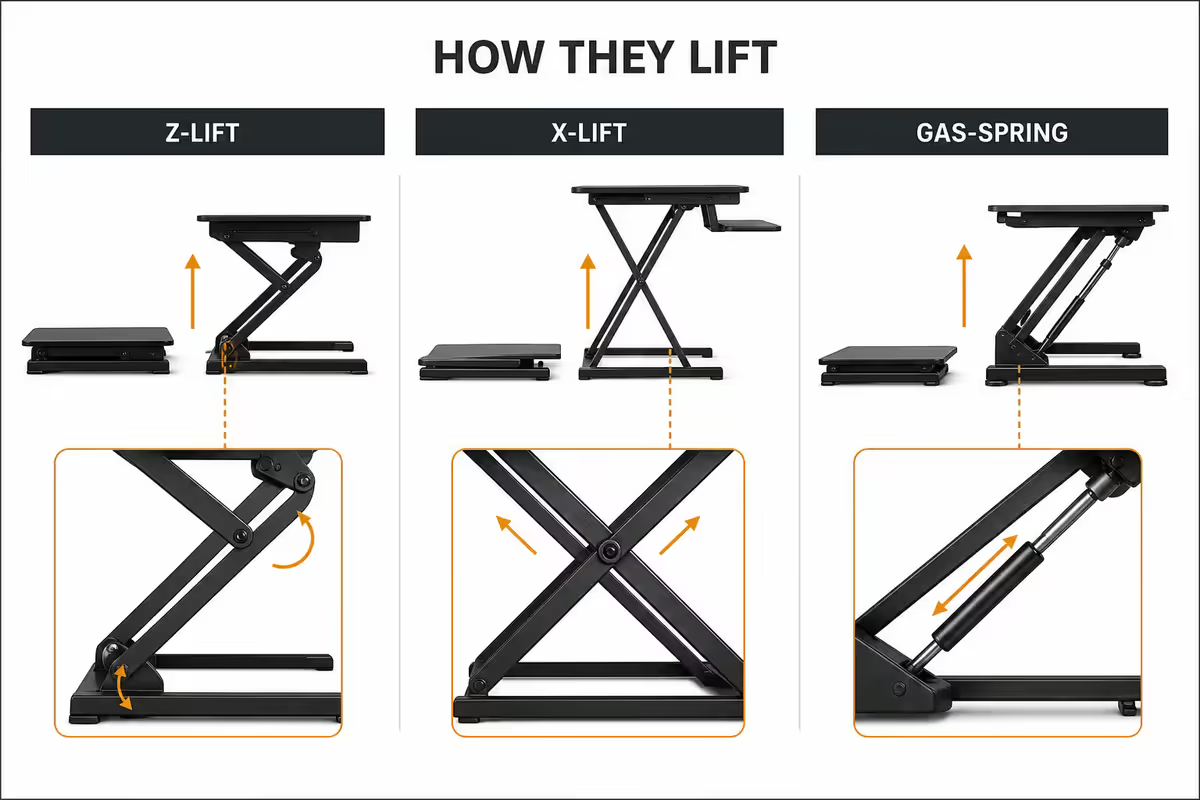
Lift mechanism — Z-lift, X-lift, gas-spring
How the converter raises affects stability, smoothness and durability.
Gas-spring assist (entry): VIVO DESK-V000B, basic Takealot converters. Cheap, light, but wobbles when typing in standing mode. Lift force can deteriorate over 2-3 years.
Z-frame (mid-tier): FlexiSpot M3M, Stand Steady X-Elite Pro. Better stability than gas-spring, smoother lift, supports 20-25 kg comfortably. The default mid-range choice.
X-lift (premium): VariDesk Pro Plus, Ergotron WorkFit-T. Scissor-style mechanism is the most stable available, supports 30-40 kg, but the converter itself is heavy (20-25 kg) and bulky.
Electric column (luxury): Ergotron WorkFit-TL, FlexiSpot M7. Motorised lift, programmable presets, but R8,500+ — at that price you should consider a full motorised desk.
The 2:1 sit-to-stand routine
A converter is only useful if you actually alternate. The evidence-based default routine is 2:1 — 40 minutes seated, 20 minutes standing, repeated through the workday. Build to 2-4 hours total standing across an 8-hour day.
How to start:
- Week 1: 10-15 minutes standing per hour. Use a phone timer.
- Week 2: 15-20 minutes standing per hour.
- Week 3: 20 minutes standing per hour — the maintainable target.
- Long term: alternate every meeting, every break, naturally without timers.
Wear flat-soled shoes (or barefoot on an anti-fatigue mat). Thick running trainers shift your centre of mass and make standing posture worse, not better.
Recommended standing desk converters
| Use case | Pick | SA price |
|---|---|---|
| Entry budget (R1.5k-R3k) | VIVO DESK-V000B | R1,500-R2,200 |
| Single monitor + laptop | Stand Steady X-Elite Pro | R2,500-R3,200 |
| Mid-tier dual monitor | FlexiSpot M3M | R3,500-R4,500 |
| Workhorse 25kg+ load | VariDesk Pro Plus 36 | R6,500-R8,500 |
| Premium small footprint | Ergotron WorkFit-T | R7,500-R9,500 |
| Motorised converter | Ergotron WorkFit-TL | R10,000-R13,500 |
| Full motorised desk (at this spend) | FlexiSpot E1 frame + top | R6,500-R8,500 |
| Anti-fatigue mat (essential add-on) | Imprint CumulusPRO or generic | R450-R1,800 |
Common standing desk converter mistakes
Buying the cheapest converter on Takealot. Sub-R1,500 converters have wobble at standing height that makes typing miserable. By month 3 you'll be back to sitting all day. Spend at least R2,500 even for entry use.
Underestimating the platform footprint. A standing desk converter takes up the front 60-90cm of your desk depth. Measure your desk; verify the converter fits with room behind for cables and a coffee mug.
Skipping the anti-fatigue mat. Hard floors transmit shock through knees and lower back. After 3 weeks of standing without a mat, your back complains louder than before you bought the converter. R450-R1,800 is the cheapest pain reducer on the list.
Standing 6 hours a day. The benefit is alternation. People who push to maximise standing time report worse back pain than moderate alternators. 2-4 hours total standing is the sustainable target.
Forgetting cable length. Raising your monitor 35-45cm adds slack requirements to every cable. Your HDMI / DisplayPort / power leads need to be long enough to accommodate the lift without tugging. Budget new cables if yours are 1m and tight.
Key takeaways
- Spend at least R2,500-R3,500. Sub-R1,500 converters wobble; sustainable use needs Z-frame stability.
- Calculate real load honestly. Buy a converter rated 1.5x your actual desk weight.
- Run the 2:1 routine — 40 minutes seated, 20 minutes standing. Build gradually.
- Add an anti-fatigue mat. Hard floors over time damages backs more than the converter helps them.
- Over R4,500, consider a full motorised desk instead. Better stability and full width.
Frequently asked questions
Converter vs full motorised standing desk — which should I buy?
A converter sits on top of your existing desk and raises a 60-90cm wide platform between sitting and standing height. Cost R1,500-R4,500 in SA. A full motorised standing desk replaces your desk entirely with an electric column-driven frame. Cost R4,500-R10,000+. Converters are perfect if you love your current desk, work in a rental, or are testing whether standing actually fits your workflow. Full motorised desks are better if you have the space, the budget and you're certain you'll use the standing function — they offer the full desk width, no platform shake, and presets for multiple users.What weight capacity do I actually need?
Calculate honestly. A 27-inch monitor weighs 4-7kg, a laptop 2-3kg, mechanical keyboard 1.5kg, plus webcam, lamp, mug and notepads — typical desk load is 15-20kg. Add a second monitor and you're at 25-30kg. Buy a converter rated for at least 1.5x your actual load. The VIVO DESK-V000B handles 15kg comfortably; FlexiSpot M3M handles 25kg; VariDesk Pro Plus 36 handles 35kg. Overloading any converter causes droop, wobble and shortened lift-spring life within 6-12 months.Do I really need dual monitor support?
If you currently run two monitors and refuse to let go, yes. Check the converter's top-platform width: 90cm is the minimum for two 24-inch monitors side-by-side, 100cm+ for two 27-inch. Single-monitor converters (60-75cm platforms) are cheaper and sturdier but lock you into one screen. Many SA users run a laptop + external monitor combo, which fits comfortably on a 75cm single-tier converter.What's the right sit-to-stand routine?
The Mayo Clinic 2:1 ratio is the evidence-based standard: 40 minutes seated, 20 minutes standing, repeat through the workday. Total standing time builds to 2-4 hours per day spread over the workday — not in one long block. Standing all day is just as bad as sitting all day; both cause specific musculoskeletal issues. Build up gradually: 15 minutes standing per hour for the first week, increase to 20 minutes per hour over a month. Use a timer or your desk's reminder feature (FlexiSpot, Yo-Yo, Ergotron all include this).VIVO vs FlexiSpot vs VariDesk vs Ergotron — which is best?
VIVO DESK-V000B (R1,500-R2,200) is the entry budget pick — gas-spring assist, 16kg capacity, fine for a single monitor + laptop. FlexiSpot M3M (R3,500-R4,500) is the mid-tier sweet spot — Z-frame stability, 25kg capacity, smoother lift, dual monitor friendly. VariDesk Pro Plus 36 (R6,500-R8,500) is the workhorse — X-lift mechanism is the most stable on the market, 35kg capacity, but heavy at 25kg itself. Ergotron WorkFit-T (R7,500-R9,500) is the premium pick — surface-glide motion, smallest footprint when collapsed, lifetime warranty on the lift.Should I just buy a full motorised standing desk instead?
If you're spending more than R4,500 on a converter, the maths usually points to a full electric desk. The Cougar Mars Pro 120 (R4,500-R5,500), FlexiSpot E1 / E7 frame + top (R6,500-R8,500) and Mecer Lifestyle Pro (R5,500-R7,000) all deliver a real motorised standing desk with full width, no platform shake, and memory presets. The trade-off is space — full desks are bigger, harder to move and require disassembly when relocating. Converters win if you rent, share an office, or have a desk you love.Does standing actually have health benefits?
Yes, but the gains plateau quickly. Studies (Mayo Clinic, BMJ 2019) show standing 2-4 hours of an 8-hour workday reduces back pain reports by 32%, improves alertness by 15%, and burns about 50 extra calories per day — not life-changing, but real. The bigger health win is alternation: changing posture every 30-40 minutes reduces musculoskeletal load regardless of whether you're sitting or standing. The desk's benefit comes from making the alternation easy, not from making you stand all day.What about anti-fatigue mats?
Essential if you're standing more than 90 minutes per day. Hard floors transmit shock through your knees and lower back; an anti-fatigue mat (Ergotron WorkFit Floor Mat, Imprint CumulusPRO, generic standing mat at Builders Warehouse) absorbs that load. Look for 19-25mm thickness, polyurethane core (not foam — foam compresses permanently in 6 months), and a slightly raised edge to prevent tripping. SA pricing: R450-R1,800. Use slippers / barefoot or thin-soled shoes; thick running trainers on a fatigue mat is unstable.