Planning · Budget Allocation
How to plan your PC build budget. — The 40/30/15/10/5 rule.
Most "underperforming" builds aren't underspent — they're misallocated. The R30,000 build that disappoints usually has a R10,000 CPU and R3,000 GPU. Here's the framework that prevents it.
- GPU
- 40%
- CPU + MB
- 30%
- Everything else
- 30%

Why allocation matters more than budget size
Two builders come to Evetech with R30,000 each. Builder A leaves with a Ryzen 9 9950X, B650 motherboard, 32GB RAM, RTX 5060 8GB, 1TB SSD, 750W PSU and a case. Builder B leaves with a Ryzen 7 9700X, B650 motherboard, 32GB RAM, RTX 5070 12GB, 2TB SSD, 750W PSU and a case. Same money. Builder B's PC plays Cyberpunk 2077 at 25% higher FPS.
The difference is allocation. Builder A spent on what felt like a "premium component" (the 16-core CPU) instead of what determines gaming FPS (the GPU). Builder B followed the 40/30/15/10/5 rule and got the right pairing.
Allocation is harder than budget size. Anyone can save more money. Few first-time builders correctly proportion the spend across components — and that's where the most common "I spent R30k and my PC is slow" stories come from.
The 40/30/15/10/5 rule
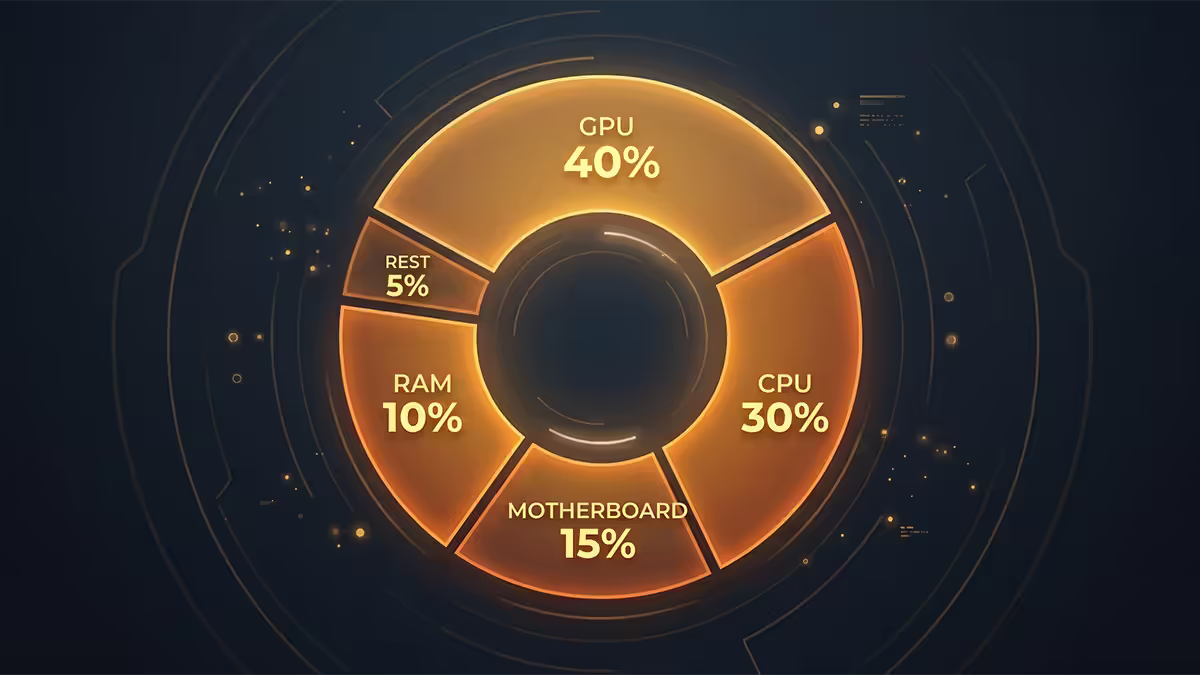
Determines 70-85% of gaming FPS at any resolution above 1080p. Largest single line item.
Buy them together — they must match (AM5 to AM5, LGA1851 to LGA1851). Account for both.
32GB DDR5 + 2TB NVMe for mid-range and up. 16GB + 1TB for budget tier.
Don't undercut. Cheap PSU risks every other component; cheap case kills cooling.
The remaining 5% covers Windows licence, thermal paste, cables, anti-static wristband, and minor extras. Most builds end up at 4-6% here.
Budget tier shifts — the rule isn't rigid
| Budget tier | GPU | CPU + MB | RAM + SSD | PSU + Case + Cooler |
|---|---|---|---|---|
| Entry (R12-15k) | 35% | 38% | 14% | 13% |
| Budget (R15-20k) | 37% | 38% | 15% | 10% |
| Mid-range (R25-35k) | 40% | 33% | 14% | 13% |
| High-end (R55-65k) | 42% | 30% | 13% | 15% |
| Enthusiast (R85k+) | 42% | 27% | 14% | 17% |
Why entry tier shifts to CPU+MB-heavy: below R6,000, GPU choices are constrained — the RTX 4060 / RX 7600 at R5,500 is the floor. You can't allocate more to GPU because there's nothing meaningful to buy. So CPU+MB takes a slightly larger share.
Why high-end shifts to GPU-heavy: CPU returns diminish above the Ryzen 7 9800X3D / Core Ultra 7 class for gaming. Spending R8,000 vs R6,800 on a CPU gains 2-4% FPS; spending R3,000 more on a higher GPU tier gains 15-25%. The maths consistently favours GPU at the top.
Worked examples — see the rule in practice
R15,000 budget breakdown
| Component | Target % | Allocated | SA pick |
|---|---|---|---|
| GPU | 37% | R5,500 | RTX 4060 8GB |
| CPU + MB | 38% | R5,700 | Ryzen 5 7500F + B650M |
| RAM + SSD | 15% | R2,500 | 16GB DDR5 + 1TB NVMe |
| PSU + Case + Cooler | 10% | R1,300 | 550W Bronze + mesh case + air cooler |
| Total | 100% | R15,000 | — |
R30,000 budget breakdown
| Component | Target % | Allocated | SA pick |
|---|---|---|---|
| GPU | 40% | R12,000 | RTX 5070 12GB |
| CPU + MB | 33% | R10,000 | Ryzen 7 9700X + B650 WiFi |
| RAM + SSD | 14% | R4,200 | 32GB DDR5-6000 + 2TB NVMe |
| PSU + Case + Cooler | 13% | R3,800 | 750W Gold + premium case + air cooler |
| Total | 100% | R30,000 | — |
R60,000 budget breakdown
| Component | Target % | Allocated | SA pick |
|---|---|---|---|
| GPU | 42% | R25,000 | RTX 5080 16GB premium variant |
| CPU + MB | 30% | R18,000 | Ryzen 9 9950X3D + X670E |
| RAM + SSD | 13% | R8,000 | 32GB DDR5 + 2TB Gen 5 + 4TB Gen 4 |
| PSU + Case + Cooler | 15% | R9,000 | 1000W Platinum + premium case + 360mm AIO |
| Total | 100% | R60,000 | — |
The two most common allocation mistakes
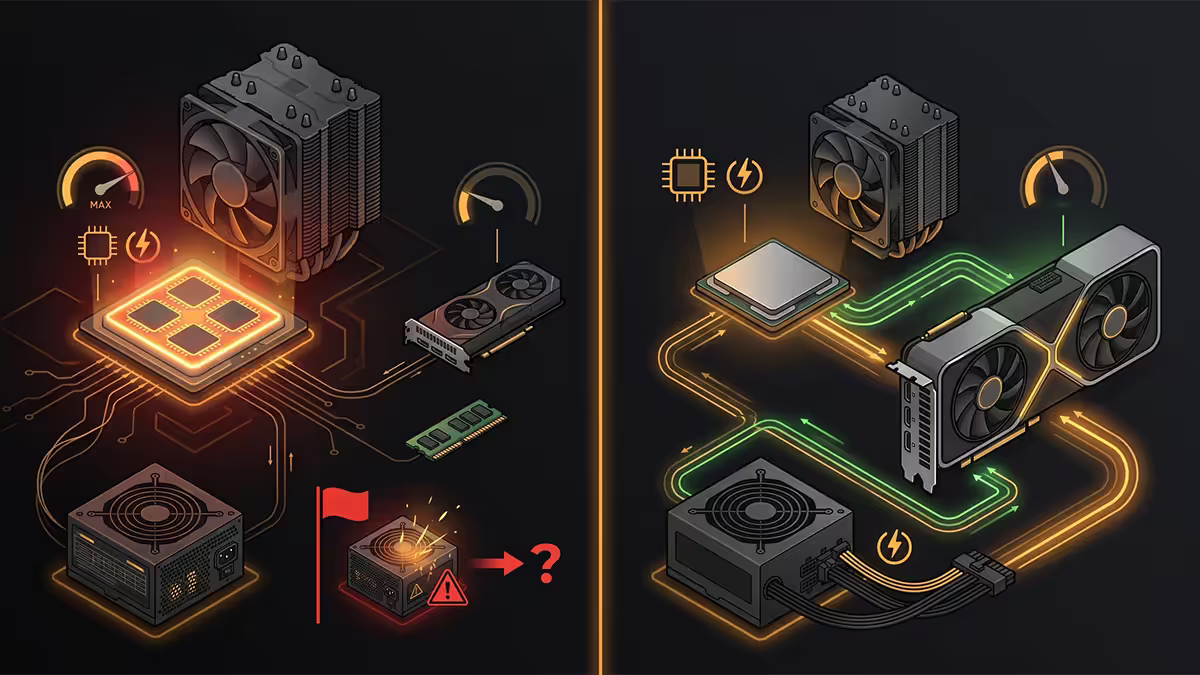
Mistake 1 — CPU-heavy build
Spending R10,000 on a Ryzen 9 chip and R3,000 on a GPU. Looks impressive on paper, devastating on FPS. The CPU sits idle waiting for the GPU to finish frames. Common reasoning: "more cores = better" or "I'll upgrade the GPU later." The future GPU upgrade often never happens, and meanwhile the build underperforms a balanced spend by 20-30%.
Mistake 2 — Cheap PSU and case
Saving on the PSU drops you below 80+ Bronze tier — risking surge damage, voltage instability, or outright failure that takes the GPU with it. Saving on the case drops you below mesh-front with proper airflow — your components run 10-15°C hotter, lifespan shortens, fan noise increases. The 10% allocation for PSU + case + cooler is a floor, not a target to minimise.
Don't forget the line items outside the build
| Extra | Typical SA cost | Notes |
|---|---|---|
| Windows 11 Home OEM key | R1,500-R2,200 | Required for fresh builds |
| Monitor (1440p 165Hz) | R3,000-R6,000 | Match to GPU's target resolution |
| Keyboard + mouse | R800-R3,000 | Mechanical KB + decent mouse |
| Gaming headset | R500-R2,500 | Wired vs wireless tradeoffs |
| UPS for load shedding | R3,500-R6,000 | Pure sine wave, essential in SA |
| Router/ONT mini-UPS | R1,200-R1,500 | Keeps fibre online during outages |
| Anti-static + cable ties + extras | R200-R400 | Building accessories |
Budget an additional 25-40% on top of PC budget for the complete setup. R30,000 PC + R3,500 monitor + R1,500 keyboard + R1,000 mouse + R600 headset + R4,000 UPS + R2,000 Windows = R42,600 complete setup.
Where to save, where to splurge — universal rules
Save here without regret
- Case (within reason). R750 mesh-front mid-tower is fine for budget builds. R1,500-R2,500 for premium. Don't go below R750.
- SSD brand for storage drives. Lexar NM790 matches Samsung 990 Pro performance for R600 less.
- RAM speed (slightly). DDR5-6000 is the AM5 sweet spot. Faster RAM (DDR5-7200+) adds 2-4% performance for 30-50% more cost.
- RGB and aesthetics. Decorative RGB adds nothing to performance. Save these for higher tiers if budget is tight.
Don't compromise here
- PSU quality and wattage. Branded 80+ Gold minimum. Wattage = (CPU TDP + GPU TDP + 80W) × 1.4.
- GPU at the right tier. The 40% allocation matters. Going down a tier (e.g., RTX 4060 instead of 4070) is the biggest performance compromise.
- Aftermarket CPU cooler. R450-R800 for a Thermalright PA SE drops temps 10-15°C vs stock coolers.
- Branded GPU variant. ASUS Dual, MSI Ventus, Sapphire Pulse, PowerColor Hellhound. Avoid unknown brands at any tier.
Key takeaways
- The 40/30/15/10/5 rule: GPU 40%, CPU+MB 30%, RAM+SSD 15%, PSU+Case+Cooler 10%, extras 5%.
- Budget tier (R15k) shifts toward CPU+MB; high-end (R60k+) shifts toward GPU. Both for clear reasons.
- The biggest mistake: spending more on CPU than GPU. Costs you 20-30% FPS at the same total budget.
- Don't cut PSU or case below floor. Cheap PSU risks everything else; cheap case kills cooling.
- Budget extras separately — Windows, monitor, peripherals, UPS adds 25-40% on top of PC budget.
Frequently asked questions
How should I split my PC build budget?
40/30/15/10/5: GPU/CPU+MB/RAM+SSD/PSU+Case+Cooler/Extras. Shifts slightly at extremes.Why does GPU get 40% of the budget?
Determines 70-85% of gaming FPS above 1080p. Skimping on GPU is the most common budget mistake — bottleneck on day one.What's the cheapest viable gaming PC budget?
R12-15k for a genuine new-parts 1080p high gaming PC. Below R12k forces too many compromises.Should I save on the case to spend more on GPU?
A little. R750 mesh mid-tower is the floor. Below that hits poor airflow and frustration. Cap case at R1,500-R2,500.Is 16GB RAM enough or budget for 32GB?
R15k: 16GB fine. R20k+: budget 32GB from day one. The R900-R1,200 jump is the easiest decision in any non-budget build.How much for peripherals?
5-15% of PC budget separately. R30k build → R3-6k peripherals. Monitor is the biggest line — match to build's target resolution.Should I budget extra for SA load shedding (UPS)?
Yes — R3,500-R6,000 pure sine wave UPS. Non-negotiable in SA. Plus R1,200 router mini-UPS.What's the worst budget mistake first-timers make?
Buying a R10k CPU and R3k GPU. Looks impressive, underperforms balanced spend by 20-30%. Match the 40/30 ratio always.
Get the Evetech app
Exclusive app-only prices, daily flash sales, and free delivery on orders over R4,000 — download the app and start saving.