Gaming Chair Ergonomics Guide
How to set up your gaming chair.
Most gaming chairs leave the showroom set for a 6-foot-2 esports pro and get used by everyone else exactly as delivered. The chair isn't broken — the dials are wrong. Ten minutes of careful setup is the difference between a back you trust and one that flares up by Wednesday.
- knees & elbows
- 90°
- work recline
- 100-110°
- SA price range
- R2.5k-R15k
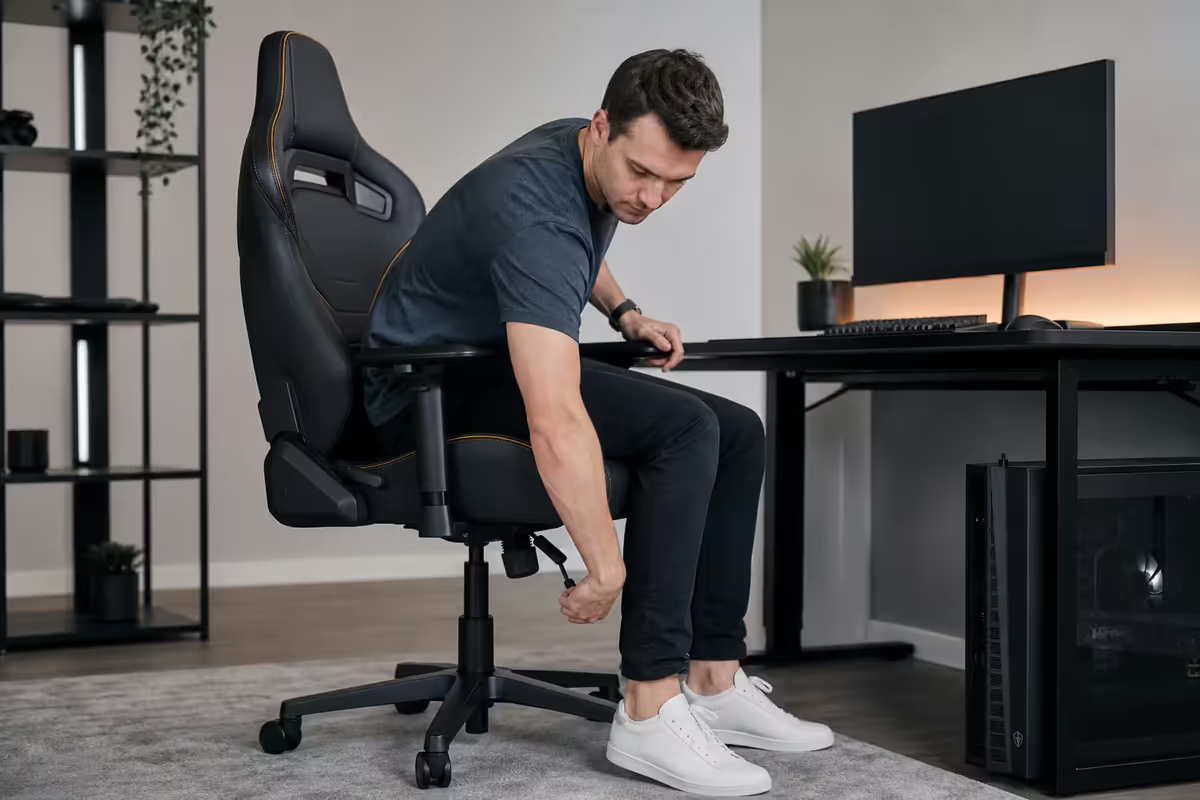
Chair height & feet position
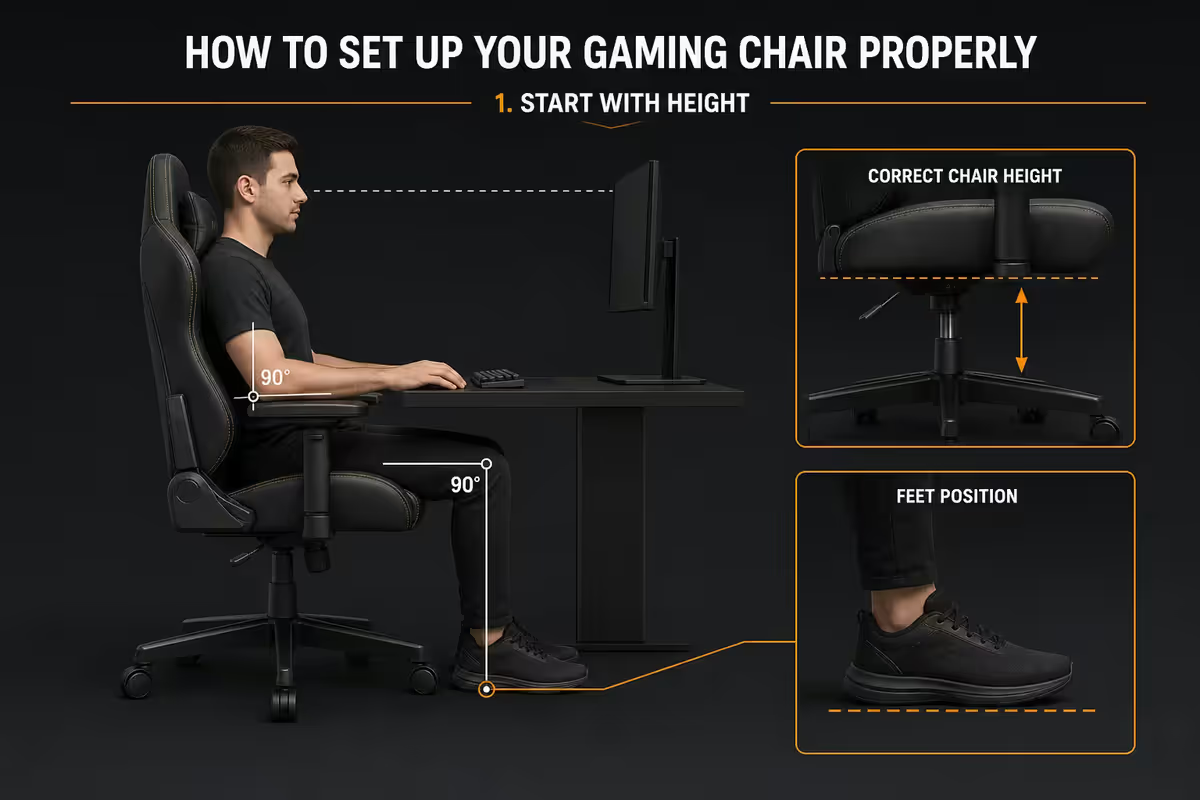
Start at the floor and work up. Almost every postural problem people blame on their chair starts with the seat being one or two centimetres off the ideal height.
The rule: sit fully back into the chair, set the seat so your feet are completely flat on the floor and your knees sit at roughly 90°. Thighs should be parallel to the ground, not sloping down (chair too high) or sloping up (chair too low). For most South African adults this lands the seat pan between 42cm and 52cm off the floor — but measure your own body, not a spec sheet.
If your desk is too high to drop your chair this low, you have two options: raise the desk (standing-desk converter, riser blocks) or add a footrest so your feet still rest flat at the higher seat height. Letting your feet dangle squashes the underside of your thighs and cuts circulation, which is the leading cause of "my legs go numb after an hour" complaints.
Seat depth & lumbar support
With height set, sit fully back so your lower back touches the backrest. Now check seat depth — the distance from the front edge of the seat pan to the back of your knee.
The three-finger rule: there should be a gap roughly three fingers wide between the front of the seat and the back of your knee. If the seat is so deep it presses into the back of your knee, your hips will slide forward through the day and your lumbar support stops doing its job. Some better chairs have a slidable seat pan that fixes this; on a fixed-depth chair you simply use a wedge cushion or accept the trade-off.
Lumbar pillow placement
This is the single most common gaming-chair setup mistake. The lumbar pillow almost always ships strapped near the middle of the backrest — too high for almost everyone. It should sit at belt-line height, filling the inward curve of your lower back around the L3-L5 vertebrae.
Sit fully back, slide the pillow down until it tucks naturally into your spine's hollow, then tighten the straps. If the pillow pushes your shoulders forward or feels like it's between your shoulder blades, it's too high. Move it down 5-10 cm at a time until your shoulders sit naturally back without effort.
Headrest pillow
The headrest pillow supports the base of your skull, not the middle of your neck and not the top of your head. Adjusted right, it lets you rest your head back gently when you take a 30-second break or watch a cutscene, without forcing your chin forward when you sit upright to work. For most people, the bottom of the pillow sits roughly at the top of the shoulders.
Armrests done right
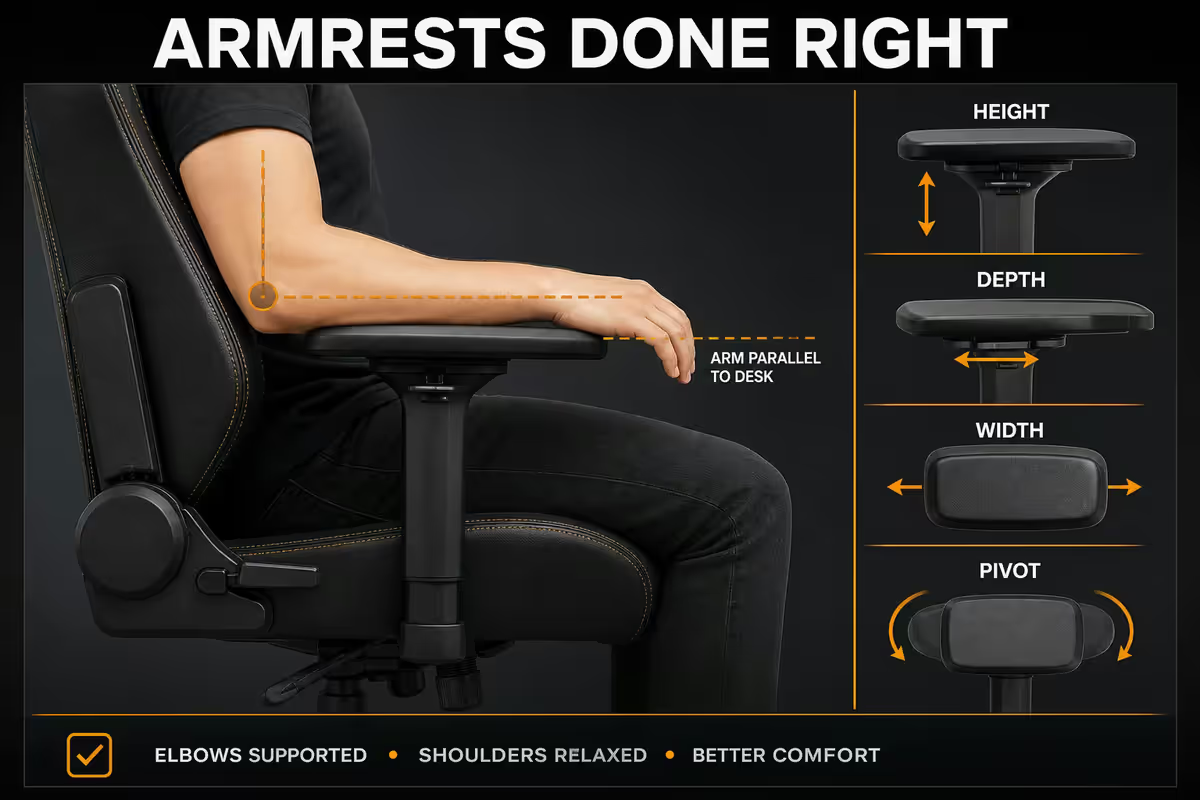
Armrests are where 4D adjustment finally earns its premium. Cheap chairs ship with height-only armrests; the result is forearms either floating in midair (rolled shoulders) or pinned upward (shrugged shoulders).
The setup: sit at your desk in normal typing position. Your elbows should rest on the armrests at roughly 90°, shoulders relaxed downward, forearms parallel to the desk surface. The top of the armrest should sit level with your keyboard or just barely below it — never higher than the keyboard, which would force you to shrug.
With 4D armrests, you also get inward/outward slide and angle-rotation. Slide them inward so they support your forearms close to your sides (not flared out like a starfish), and angle them slightly inward so your wrists stay neutral on the keyboard rather than bent outward.
- Height — elbows at 90°, shoulders down, level with desk.
- Depth (forward/back) — armrest pad under your elbow, not under your wrist.
- Width (in/out) — pulled inward so your shoulders aren't flared.
- Angle — tilted slightly inward to support a straight-wrist keyboard posture.
When you're not at the desk — gaming on a controller, reading, watching — the armrests can move out of the way. Most decent 4D armrests fold down or slide outward so the chair can pull right up to the desk.
Recline, tilt-tension & the break discipline
Two separate controls, often confused. Recline angle sets where the backrest locks. Tilt-tension sets how much push-back force you need to recline against (typically a knob under the seat).
Recline angle
For focused desk work and typing, lock the backrest at 100-110° from horizontal — slightly past upright. This opens the hip angle and reduces lumbar compression compared to a strict 90° posture. For gaming, breaks, video, or any time you're not actively typing, 115-135° is fine and arguably healthier than staying frozen at one angle for hours.
A locked recline is not the goal. The goal is postural variety — change the angle every 30-60 minutes. A chair that can rock freely (tilt-tension calibrated, not locked) is doing more for your spine than a chair frozen rigid at the perfect angle.
Calibrating tilt-tension
Sit upright. Lean back with light pressure. The backrest should push back to upright with a gentle, controlled motion — not snap forward, not collapse open. Tighten the tilt knob if the chair flops backward under any weight; loosen it if leaning back feels like a gym set.
The break discipline
The single best ergonomic habit you can build is a recline-and-break cycle. Every 30-45 minutes, push the lever, lean back to 130°, look at the ceiling for 60 seconds. It resets shoulder tension, gives your eyes a focal-distance break, and decompresses your lumbar discs in a way no perfect upright posture can. Then sit back up and work.
The honest take on racing-style chairs
Time for the part nobody selling gaming chairs likes to say out loud: a racing-bucket chair was never designed for sitting at a desk for eight hours. Those side bolsters exist to hold a driver in place under lateral G-forces. The deep bucket exists to lock a fixed hip angle so you don't slide during a hairpin turn at 220 km/h.
Translated into a desk chair, that design produces a few real problems for long typing sessions:
- The side bolsters dig in on shoulders and outer thighs for anyone who isn't built like a small-frame racing driver.
- The seat pan is often narrow, forcing a too-tight hip angle.
- The deep bucket locks your hips in place — postural variety becomes harder, not easier.
- The headrest pillow sits where a helmet would be, not where a relaxed head naturally rests.
This isn't a reason not to buy one. They look fantastic, many are genuinely comfortable, the build quality on mid-range and up has gotten very good, and for younger gamers or shorter sessions they're absolutely fine. But understand the trade you're making: you're buying for aesthetic, brand, and gaming aspiration, not for clinical ergonomics. If your back is already complaining, no amount of dialling in a racing-bucket chair will outperform a properly designed ergonomic office chair.
Gaming chair vs ergonomic office chair
Here's a straight comparison of what your money buys at each tier in South Africa in 2026.
| Tier & price | Gaming chair | Ergonomic office chair |
|---|---|---|
| Entry · R2,500-R4,500 | Generic PU leather racing-style, height & recline, basic lumbar pillow | Mesh-back with basic lumbar, adjustable height, no armrest depth |
| Mid · R4,500-R8,000 | Better foam, 4D armrests, magnetic pillows, 5-year frame warranty | Proper synchro tilt, adjustable lumbar, seat slide, height-adjustable arms |
| Premium · R8,000-R15,000 | Secretlab Titan Evo, Razer Iskur V2 — cold-cured foam, hybrid lumbar | Steelcase Series 1, ErgoChair Pro, Herman Miller Sayl — full ergonomic adjustment |
| Halo · R15,000+ | Herman Miller x Logitech, Secretlab Titan NEO — leather, hybrid mesh | Herman Miller Aeron, Steelcase Leap, Humanscale Freedom — class-leading ergo |
| Long-session comfort | Good with dial-in. Bolsters limit some body shapes. | Generally superior over 6+ hour days. |
| Looks & stream presence | Wins outright. | Conservative. |
| Best for | Mixed gaming + work, 2-6 hour sessions, aesthetics matter | Full-time desk work, existing back issues, longevity priority |
Monthly maintenance checklist
A R3000 gaming chair maintained for ten minutes a month lasts four to five years. Ignored, it lasts eighteen months and ends up as that wobbly squeaking thing nobody wants to sit in. The maintenance routine is short and almost embarrassingly simple.
Every month (10 minutes)
- Tighten every screw. Use the bundled Allen key. The seat base, backrest tilt bolts, armrest mounts and wheelbase all loosen with normal use. Loose screws cause squeaks and accelerate frame fatigue.
- Gas-lift test. Sit down, pump the chair fully up, then drop it fully down. Any sponginess, slow drift downward when you're sitting, or sudden uncontrolled drop means the cylinder is on borrowed time. Replacement cylinders are R250-R500 in SA and self-installable in 5 minutes with two spanners.
- Wheelbase check. Roll the chair across the floor. Squeaks or wobbles mean a caster needs replacing — they pop in/out without tools.
- Wipe down PU leather with a barely-damp microfibre cloth. No solvents, no methylated spirits — they crack the synthetic top layer. Vacuum fabric upholstery weekly.
Every 6 months
- Drop of silicone spray on the recline mechanism and tilt-tension knob threads. Stops squeaks before they start.
- Inspect the seat pan welds from underneath. Hairline cracks here are the warning sign that the chair is past its useful life — replace before failure.
Common gaming-chair setup mistakes
Leaving the lumbar pillow where it shipped. 95% of factory-strapped lumbar pillows sit too high. Slide it down to belt-line.
Setting the chair too high so feet dangle. Often because the desk is too high. Lower the chair and add a footrest, or raise the desk.
Armrests above keyboard height. Forces shoulder shrug all day. Drop the armrests until they sit level with or just below the keyboard.
Recline locked rigid at one angle. The body needs postural variety. Calibrate tilt-tension and let the chair rock; lean back on breaks.
Using a too-large or too-small chair. Sizing matters more than spec sheet. A bucket too deep or bolsters too wide can't be adjusted out.
Skipping the monthly screw-tighten. The single highest-impact maintenance habit. Ten minutes, every month, no exceptions.
Cleaning PU leather with methylated spirits. Cracks the synthetic surface within months. Damp microfibre only.
Key takeaways
- Set seat height so feet are flat and knees sit at 90°. Three-finger gap behind the knees on the seat pan.
- Slide the lumbar pillow down to belt-line height — almost every factory-shipped pillow sits too high.
- Armrests at elbow level, level with the keyboard, shoulders down. 4D is worth the upgrade.
- Work at 100-110° recline, break at 115-135°. Postural variety beats finding one perfect angle.
- Racing-bucket chairs aren't clinical ergonomics. If your back already aches, a proper ergonomic office chair will treat you better.
Frequently asked questions
What's the correct height for a gaming chair?
Set the seat so your feet are flat on the floor and your knees sit at 90° with thighs parallel to the floor. For most adults that's a seat pan 42-52cm off the floor. If feet dangle, lower the chair or add a footrest.Where should the lumbar pillow sit on a gaming chair?
At belt-line height, filling the inward curve of your lower back (L3-L5). Almost every factory pillow ships too high — slide it down until it tucks into your natural curve when you sit fully back.How should I set the armrests on a gaming chair?
Elbows at 90° with shoulders relaxed, armrest top level with the keyboard. With 4D armrests, also slide inward toward your sides and angle slightly inward for a neutral wrist on the keyboard.Is a racing-style gaming chair actually ergonomic?
Not really — the racing-bucket shape was designed to hold a driver under G-forces, not to support 8 hours of typing. They look great and many are comfortable, but a proper ergonomic office chair will serve a desk worker's back better.When should I upgrade from a gaming chair to a proper ergonomic chair?
When you start noticing lower-back ache mid-afternoon, hip stiffness when you stand, or you've moved into a job with 8+ desk hours. An R6,000-R12,000 ergonomic chair outperforms most sub-R10,000 gaming chairs on long-session comfort.How do I maintain a gaming chair to make it last?
Monthly: tighten every screw with the bundled Allen key, gas-lift test (pump up/down for sponginess), wipe PU leather with damp microfibre only. Every 6 months: silicone spray on the recline mechanism. Maintained, a R3,000 chair lasts 4-5 years.What's the right recline angle for gaming and working?
100-110° for focused desk work. 115-135° for gaming, breaks or video. Vary your posture across the day instead of locking into one angle — postural variety beats finding one perfect number.What size gaming chair should I buy for a teenager or smaller adult?
Most racing-style chairs are sized for 175-190cm adults. For teens or under ~165cm, look at DXRacer Junior, smaller-frame Secretlab Titan or compact local brands. Try before you buy where possible — wrong size can't be corrected by adjustment.
Get the Evetech app
Exclusive app-only prices, daily flash sales, and free delivery on orders over R4,000 — download the app and start saving.