WFH Setup Guide · South Africa
The complete work from home setup. — Built for South Africa. Built for the long haul.
Most WFH setup guides are written for the US or Europe — and miss the things that make working from home in SA different. UPS is mandatory, not optional. The chair will outlast everything else. And spending the right percentage on the right line items matters far more than spending more in total.
- complete setup tiers
- R8k-R25k
- default monitor
- 27" 1440p
- SA-specific musts
- Chair + UPS
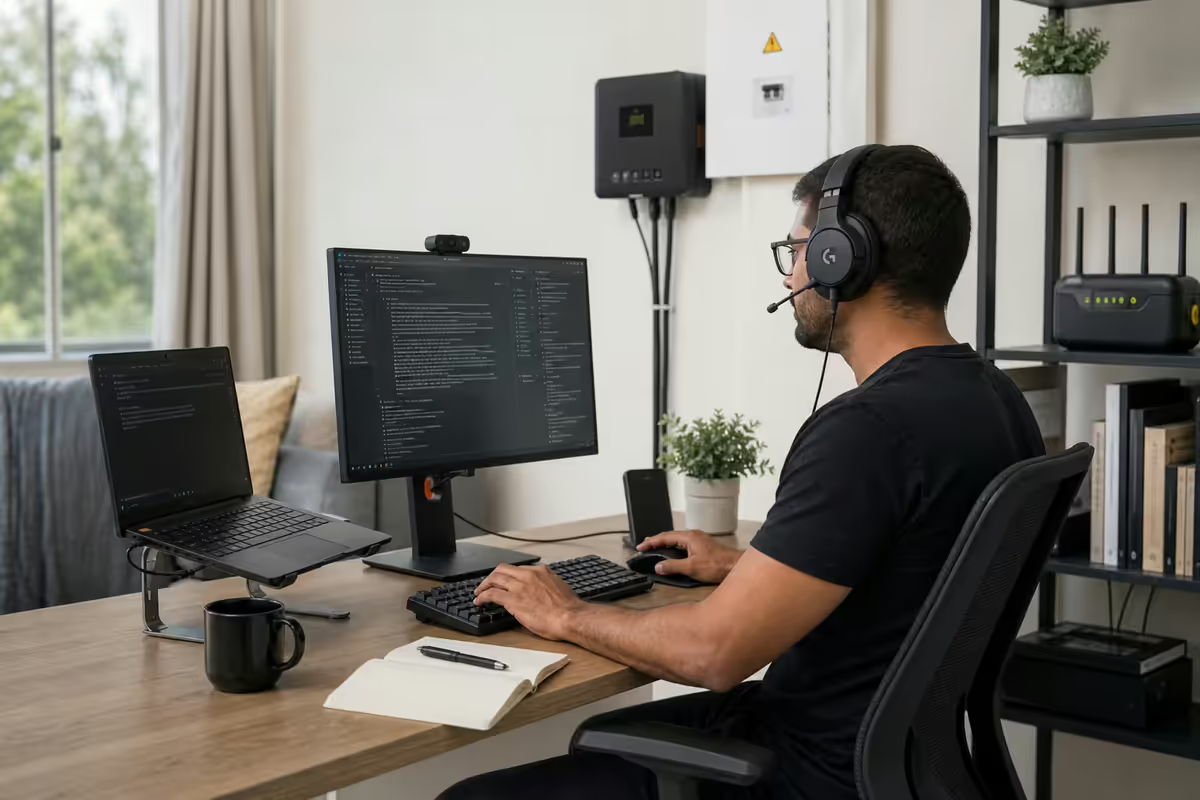
Where most WFH setups overspend and underspend
After helping thousands of customers spec WFH setups out of our Centurion warehouse, the patterns are remarkably consistent. People consistently overspend on visible status items (large 4K monitors, RGB peripherals, premium webcams they barely use) and consistently underspend on the things that determine whether they can comfortably work eight hours a day for years (chair, lighting, UPS).
The overspend pattern:
- Large 4K monitors that nobody's GPU can drive smoothly for daily work.
- Streaming-grade USB condenser microphones for occasional Zoom calls.
- RGB peripherals that contribute nothing to productivity.
- Multiple webcams for "future content creation" that never happens.
- Premium docking stations on laptops that already have enough ports.
The underspend pattern:
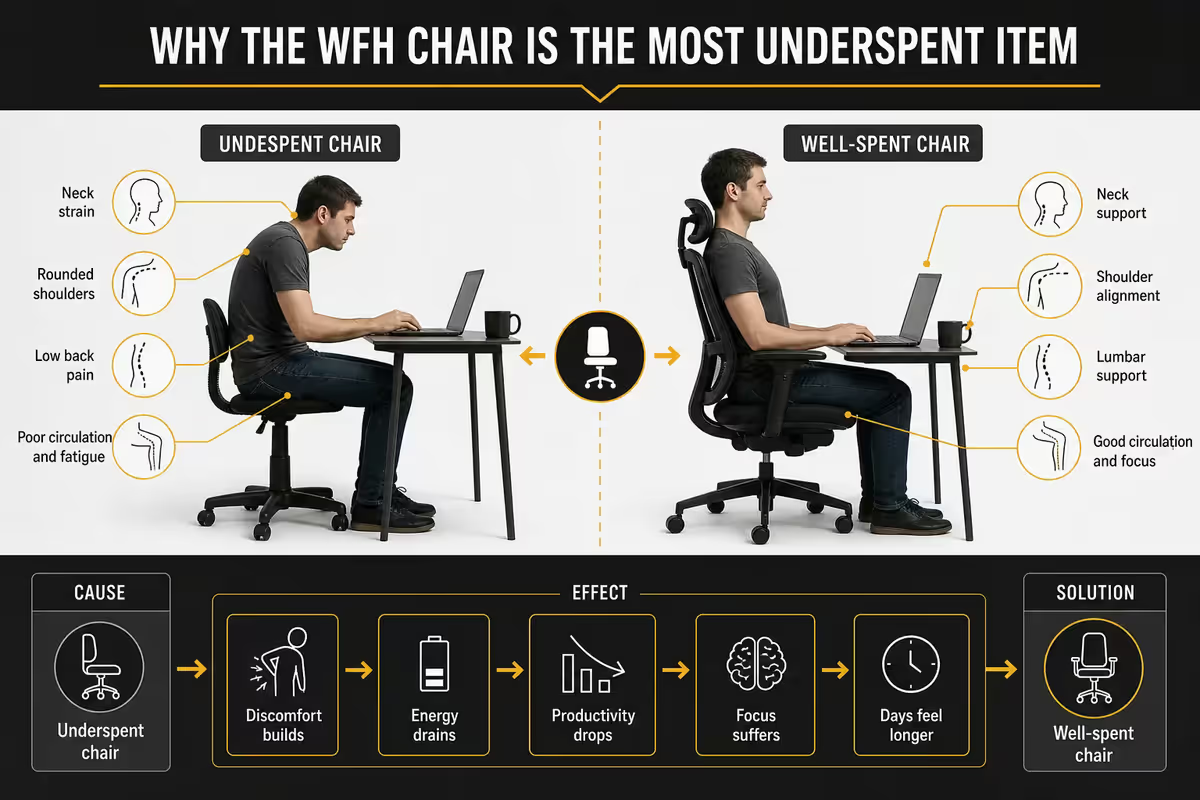
- The chair — bought as a R1 200 "office chair" that destroys posture within six months.
- Lighting — overlooked entirely; a R600 bias light transforms every call.
- UPS — skipped until first load shedding mid-call kills the deal.
- Headphones — old earbuds reused; ANC headphones pay for themselves in three months of better focus.
- Monitor height — buying a monitor without considering arm/stand height; neck pain follows.
The rough budget allocation that works: chair 25-30%, monitor 20-25%, UPS 10-15%, audio + headphones 10-15%, keyboard + mouse 8-12%, webcam + lighting 5-8%, desk 8-15% (if buying new). Anything wildly out of these ratios usually means you're solving the wrong problem.
The desk decision
The desk is the least exciting purchase and the one you'll touch the least frequently, but its dimensions determine how much else fits. Three real options:
Fixed-height standard desk (R1 500-R4 500)
A flat rectangular desk 120-160cm wide, 60-75cm deep, at 72-75cm height. Adequate for most users. Width matters more than depth — under 120cm and a 27" monitor + keyboard + mousepad becomes cramped. SA picks: Mr Price Home Sky range (R1 500-R3 000), @Home Studio Desk (R3 500), or any solid wood desk from Coricraft or Wetherlys if budget allows (R5 000-R12 000 with longevity).
Height-adjustable / standing desk (R4 500-R12 000)
Electric or manual crank height-adjustable. The case for standing desks in 2026 is well-established — alternating sitting and standing every 30-60 minutes reduces back pain risk substantially over long careers. Mecer Adjustable Standing Desk (R4 500-R6 500), Flexispot E5 or E7 (R5 500-R8 500 via takealot import), Ergonomics Direct frames (R6 500-R10 000) with custom tops are the SA picks.
Desk converters / risers (R1 500-R3 500)
A converter sits on top of your existing desk and raises monitor + keyboard to standing height. Less elegant than a full standing desk but a fraction of the price. Varidesk-style risers from Flexispot or Mecer work well if you can't replace your existing desk.
Desk depth tip: 70cm minimum to comfortably fit a 27" monitor at the right viewing distance (60-80cm from eyes). 75-80cm is ideal. 60cm desks are too shallow — your monitor ends up too close, causing eye strain and a forward-leaning posture.
The chair — your most underspent line
If you read only one section of this guide, read this one. The chair is the single most important purchase in your WFH setup, and the one most South African remote workers underspend dramatically. A bad chair worn for eight hours a day for five years quietly destroys your back, hips and shoulders. A good chair pays back its premium in physiotherapy visits avoided.
What makes a chair "ergonomic"
- Adjustable seat height — knees at 90° with feet flat on floor.
- Adjustable lumbar support — adjustable both height and depth to fit your spine curve.
- Adjustable armrests — height and ideally width and pivot, so elbows rest at 90° while typing.
- Synchronised tilt mechanism — the seat and back tilt together at a comfortable ratio (typically 2:1) so you can recline without your feet leaving the floor.
- Seat depth adjustment / sliding seat — important for taller or shorter users; the seat should support the thighs without pressing behind the knees.
- Quality mesh or breathable fabric — 8 hours on solid foam vs mesh is a difference you feel in summer SA heat.
SA chair tiers in 2026
| Tier | Pick | SA price |
|---|---|---|
| Budget functional | Officescape Mercury / Bagua basic mesh | R2 500-R3 500 |
| Sweet spot ergonomic | Officescape Tornado / Ergohuman Lite / Sihoo Doro C300 | R5 500-R8 500 |
| Premium ergonomic | Ergohuman Elite, Ergochair Pro, Sihoo Doro S300 | R9 500-R15 000 |
| True top-tier | Herman Miller Aeron (SA importer), Steelcase Leap | R18 000-R32 000 |
| Gaming-chair tier (avoid for WFH) | DXRacer / Secretlab / GTRacing | R4 500-R12 000 |
Skip "gaming chairs" for WFH use. Despite their popularity, racing-style gaming chairs (Secretlab, DXRacer, GTRacing) are designed for short gaming sessions, not eight-hour work days. The thick padding compresses, the lumbar pillows fall out of position, and the bucket-seat shape restricts blood flow over long days. Office ergonomic chairs are designed for sustained sitting.
Try before buying where possible. Officescape, Wantitall and Takealot all have showrooms in major SA cities. Chairs are deeply personal — a chair perfect for a 1.6m frame can be miserable for a 1.9m frame.
Monitor priorities for productivity
For work-from-home productivity specifically, the priorities differ from gaming. Refresh rate is irrelevant above 75Hz. Resolution matters enormously. Panel ergonomics — height adjustment, swivel, tilt — matter more than people realise.
The 2026 default: 27" 1440p IPS at 75-100Hz with full ergonomic stand (height, tilt, swivel, pivot). Pixel density of 109 PPI is sharp at desk distance. Width fits side-by-side documents or Slack + browser. Pricing settled at R4 500-R7 500 for solid IPS panels.
Step-up options:
- 32" 4K IPS at 60-75Hz for designers, video editors, developers wanting more vertical real estate (R12 000-R18 000).
- 34" ultrawide 1440p (3440×1440) — excellent for productivity, replaces dual monitors gracefully (R8 500-R14 000).
- Dual 27" 1440p — still the productivity power-user setup, total cost similar to one premium ultrawide.
Worth avoiding for WFH: curved gaming monitors (the curve helps gaming, not productivity), 144Hz+ panels at the cost of resolution or panel type (refresh rate is not visible in document work), VA panels in office lighting (contrast is great but viewing angles are not).
Keyboard for all-day typing
For anyone typing more than two hours a day, a mechanical keyboard is the right call. Reduced typing fatigue, 10-15× longer lifetime than membrane, and the customisation lets you tune typing feel to your preference. Modern mechanical keyboards are no longer the loud clicky stereotype — quiet linear switches deliver mechanical feel without disturbing meetings.
Switch types for typing
- Linear switches (no tactile bump): Cherry MX Red, Gateron Yellow, Akko Cream Yellow. Smooth keystroke, no tactile feedback. Good for fast typers.
- Tactile switches (small bump mid-press): Cherry MX Brown, Gateron Brown, Akko Lavender Purple. Tactile feedback signals key registration. The default WFH recommendation.
- Quiet variants (most appropriate for WFH): Cherry MX Silent Red, Gateron Yellow Pro (lubed), Akko Silent Pink. Mechanical feel without the noise of standard switches.
- Clicky switches (avoid for WFH): Cherry MX Blue, Kailh Box White. Loud audible click. Inappropriate for shared workspaces or video calls.
Layout choices
Full-size (104 keys): with number pad. Best for accountants, anyone entering numbers heavily.
Tenkeyless / TKL (87 keys): without number pad. Frees up desk space for mouse. The modern WFH default for non-accountant users.
75% / 65% / 60%: compact layouts dropping function row and navigation cluster. Tighter desk fit but requires keyboard shortcut adaptation.
SA keyboard picks
| Tier | Pick | SA price |
|---|---|---|
| Budget mechanical | Redragon Kumara K552 / Royal Kludge RK68 | R900-R1 500 |
| Sweet spot WFH | Keychron K2 / K8 / V-series, Logitech MX Mechanical | R1 800-R3 500 |
| Premium WFH | Keychron Q1 / Q3 (custom builds) | R4 500-R7 500 |
| Quality membrane (alternative) | Logitech MX Keys S | R2 200-R2 800 |
Mouse ergonomics for long sessions
The gaming mouse advice (under 80g, flagship sensor) doesn't apply to WFH. For productivity, the priorities are ergonomic shape, programmable buttons for workflow shortcuts, and wireless freedom — not weight or sensor speed.
Vertical mice (Logitech MX Vertical, Anker Vertical) rotate the wrist 57° from horizontal, reducing pronation strain. People who develop wrist pain from standard mice swear by them. Adoption curve: takes 1-2 weeks to feel natural.
Logitech MX Master 3S / 4 (R2 800-R3 600) is the modern WFH gold standard. Heavy (140g — irrelevant for productivity), excellent shape, MagSpeed scroll wheel for fast document navigation, multi-device pairing, USB-C charging. Pairs with the MX Keys for a complete Logitech ecosystem.
Trackballs (Logitech Ergo M575, Kensington Expert Mouse) are niche but loved by their users — no wrist movement required, just thumb or finger to roll the ball. Take a month to get used to but eliminate the most common form of wrist strain.
Webcam and lighting
Lighting matters more than camera. A R600 ring light or bias light dramatically improves any webcam, including the bad built-in laptop webcams. Camera resolution beyond 1080p delivers diminishing returns for video calls — Zoom and Teams downsample to 720p at the network layer anyway.
Webcam picks:
- Logitech C920e / C922 (R1 200-R1 600) — the default. 1080p, autofocus, plug-and-play.
- Logitech Brio 500 (R2 400-R2 800) — better low-light, USB-C, magnetic mount.
- Logitech Brio 4K (R3 400-R3 800) — overkill for most, useful for content creators.
- Phone as webcam — Camo or Continuity Camera (Mac) turn your iPhone/Android into a 4K webcam, often better than dedicated USB cameras for image quality.
Lighting picks:
- Ring light (R500-R1 500) — 10-18" diameter, sits behind monitor or clipped to laptop. Diffused, even lighting for face.
- Bias light behind monitor (R300-R800) — reduces eye strain over long days; the LED strip behind monitor (Philips Hue Play or generic) costs little and pays off in reduced afternoon fatigue.
- Key light + fill (premium R3 000+) — Elgato Key Light, Lume Cube Panel. For content creators or executive face-to-camera roles.
Headphones — the most-worn item
Headphones are the single most-worn item in any WFH setup — often six to eight hours a day. The lifetime value of a great pair is enormous. ANC over-ear is the modern WFH standard.
| Tier | Pick | SA price |
|---|---|---|
| Budget ANC | Anker Soundcore Space Q45 | R2 200-R2 700 |
| Mid-tier | Sony WH-CH720N / JBL Tour One M2 | R3 500-R4 800 |
| Default WFH gold standard | Sony WH-1000XM5 / XM6 | R6 000-R7 500 |
| Premium / pro | Bose QuietComfort Ultra / Apple AirPods Max | R7 500-R11 500 |
| Call-focused headsets | Jabra Evolve2 65 / Logitech Zone Vibe 100 | R3 500-R5 500 |
For most users, the Sony WH-1000XM5 is the right pick — exceptional noise cancelling for open-plan or noisy environments, multipoint Bluetooth for simultaneous phone + laptop connection, 30-hour battery, comfortable for full days. The XM6 (2025 release) brings minor refinements but the XM5 remains the sweet spot price-wise.
Network and UPS — SA-specific essentials
Fibre internet
In 2026, fibre is the only realistic primary connection for serious WFH. 50 Mbps down / 25 Mbps up is the comfortable floor for video conferencing. 100 Mbps fibre handles everything including multi-participant Zoom and large file uploads. Major SA ISPs: Afrihost, Webafrica, RSAWeb, Cool Ideas, Mweb, Vox. Underlying fibre infrastructure: Openserve (Telkom), Vumatel, Frogfoot, Octotel, Metrofibre.
Failover (4G/5G)
For business-critical WFH, pair fibre with a 4G/5G failover SIM. A Huawei B535 or RUTX50 router with a Telkom, Vodacom or MTN data SIM kicks in automatically if fibre drops. Add R250-R450/month for a decent data package; well worth it if your work can't tolerate downtime.
UPS / battery backup — non-negotiable in SA
Load shedding in 2026 remains a regular occurrence in SA — stage 2-3 is typical, stage 4-6 returns periodically when grid strain spikes. Every Eskom outage without a UPS interrupts your work, kills file saves, and risks Zoom call abandonment mid-meeting. A line-interactive UPS is mandatory, not optional.
| UPS tier | Use case | SA price |
|---|---|---|
| Small (650-900VA) | Single PC/laptop, 30-45 min runtime | R1 500-R2 500 |
| Mid (1200-1600VA) | PC + monitor + router, 1.5-3 hr runtime | R3 000-R5 000 |
| Large (2000VA+) or inverter battery | Full setup including lighting, 4-8 hr runtime | R6 000-R15 000 |
| Solar + inverter (whole-room) | Off-grid resilient, all-day backup | R30 000-R85 000 |
SA UPS picks: Mecer 1200VA / 2000VA line-interactive (R3 000-R5 000), Eaton Ellipse 1600VA (R3 500-R4 500), APC Back-UPS Pro 1500 (R4 200-R5 500). For longer outages, pair with a 50-100Ah lithium battery + inverter for 6-12 hours of full setup running.
Complete setup tiers — R8k / R15k / R25k
R8 000 tier — bare-bones functional
For someone starting WFH or on a tight budget, this gets you up and running with no major regrets but several upgrade paths:
- Desk: R1 800 — Mr Price Home or Coricraft basic.
- Chair: R2 500 — Officescape Mercury or equivalent mesh basic.
- Monitor: R2 200 — 24" 1080p IPS (LG, Samsung, AOC).
- Keyboard + mouse: R600 — Logitech MK270 wireless combo.
- Webcam: R250 — phone-as-webcam via Camo, or skip and use laptop cam.
- Headphones: R650 — basic ANC (Sony WH-CH520 or similar).
- UPS: R0 here — borrowed or share existing.
R15 000 tier — comfortable mid-range
The sweet spot for most SA WFH workers. Lasts 5-7 years with no major pain points:
- Desk: R3 500 — solid 140cm × 75cm or basic height-adjustable.
- Chair: R5 500 — Officescape Tornado / Ergohuman Lite (this is the most important line).
- Monitor: R5 200 — 27" 1440p IPS with full ergonomic stand.
- Keyboard: R1 200 — Keychron K2 or K8 with quiet linears.
- Mouse: R900 — Logitech MX Master 3S (refurb) or quality MX Anywhere.
- Webcam: R1 200 — Logitech C920e.
- Headphones: R2 200 — Anker Space Q45 ANC.
- UPS: R3 500 — Mecer 1200VA line-interactive.
- Lighting: R500 — bias light strip + small ring light.
R25 000 tier — premium 5+ year setup
If WFH is permanent and the company allowance allows it, this tier holds up brilliantly for 5-7+ years:
- Desk: R6 500 — Flexispot E5 or Mecer height-adjustable with quality top.
- Chair: R8 500 — Ergohuman Elite or Sihoo Doro S300.
- Monitor: R7 500-R12 000 — 27" 1440p OLED, or 32" 4K IPS, or dual 27" 1440p.
- Keyboard: R2 800 — Logitech MX Mechanical or Keychron Q1.
- Mouse: R3 200 — Logitech MX Master 4 + Logitech MX Vertical second mouse.
- Webcam: R2 500 — Logitech Brio 500.
- Headphones: R6 500 — Sony WH-1000XM5.
- UPS: R5 000 — Mecer 2000VA + small inverter battery for longer runtime.
- Lighting: R1 200 — Elgato Key Light Air + Philips Hue bias light.
Common WFH setup mistakes
Underspending the chair. The single most-regretted line item. A R1 500 office chair used eight hours a day fails within 18 months and damages your back along the way. The minimum viable WFH chair is R5 000-R6 000 ergonomic.
Skipping the UPS. Every SA WFH worker who skips the UPS hits their first mid-call load shedding outage and immediately regrets it. R3 500 for a Mecer 1200VA prevents the loss of a single sales meeting forever.
Buying gaming chairs for office work. The marketing is everywhere; the bucket-seat racing-style chairs are not designed for eight-hour daily use. Ergonomic office chairs win every time for sustained sitting.
Ignoring monitor height. Top of monitor should be at eye level when seated upright. Most people set their monitor too low (laptop screen height directly) and develop neck strain. Use a monitor arm or stack of books to raise to proper height.
Buying a 4K monitor without considering your CPU/GPU. Driving 4K productivity smoothly on an Intel UHD integrated GPU or older laptop is painful. Check whether your laptop has an HDMI 2.1 or DisplayPort 1.4 port and can drive 4K at 60Hz before buying.
Cheap webcam, no lighting. Spending R3 000 on a 4K webcam in a dim room delivers worse video than a R1 200 1080p webcam with a R600 ring light. Lighting first, camera second.
No cable management. An accumulation of charging cables, USB hubs and dongle proliferation tangled on a desk visibly stresses the people who work there. Spend R200-R500 on cable trays, velcro ties and clips. Pays back in mental clarity within a week.
Key takeaways
- R15k is the SA sweet spot for a complete WFH setup that holds up for 5+ years without major regrets.
- Chair first — 25-30% of total budget. R5 500+ ergonomic chair, not gaming chair, not R1 500 office chair.
- 27" 1440p IPS is the default monitor. Full ergonomic stand with height/tilt/swivel/pivot.
- UPS (1200VA+ line-interactive) is non-negotiable in SA. Load shedding will happen mid-call.
- Lighting matters more than camera resolution. R600 ring light + bias light beats a 4K webcam in poor light.
Frequently asked questions
How much should I spend on a work-from-home setup in South Africa?
R8 000 for bare-bones, R15 000 for comfortable mid-tier (sweet spot), R25 000 for premium 5+ year setup. Chair should be 25-30% of total budget.What size monitor is best for working from home?
27" 1440p IPS at 75-100Hz with full ergonomic stand. R4 500-R7 500 sweet spot. 32" 4K or 34" ultrawide if doing design/video work.Do I need a UPS for work from home in South Africa?
Yes — non-negotiable. Mecer 1200VA-2000VA line-interactive (R3 000-R5 000) covers laptop + monitor + router for 1.5-3 hours.Is a mechanical keyboard worth it for working from home?
Yes for anyone typing more than two hours daily. Quiet linear or tactile switches (Cherry MX Silent Red, Gateron Yellow, Akko). Avoid clicky Blue switches in shared spaces.What webcam should I use for video calls?
Logitech C920e or C922 (R1 200-R1 600) covers most users. Step up to Brio 500 (R2 400) for client-facing work. Avoid built-in laptop webcams.What headphones should I get for working from home?
Sony WH-1000XM5 (R6 000-R7 500) is the default. Bose QuietComfort Ultra is a sidegrade. Anker Space Q45 (R2 500) is the value pick.What internet speed do I need to work from home in SA?
50/25 Mbps fibre is the floor. 100 Mbps fibre is comfortable. Add 4G/5G failover for business-critical use.Where do most WFH setups overspend versus underspend?
Overspend: large 4K monitors, RGB peripherals, premium microphones. Underspend: chair (the most important line), lighting, UPS, headphones.