Monitor Comparison · 27" vs 32"
27 inch vs 32 inch. — Pick the right size for your desk and your games.
Five inches isn't a small jump. It changes pixel density, viewing distance, GPU demand and the way your eyes work mid-fight. The right pick depends on your desk depth, the games you play, and what your wallet has left after the GPU.
- 27" @ 1440p
- 109 PPI
- 32" @ 4K
- 138 PPI
- 32" viewing distance
- 70-90 cm
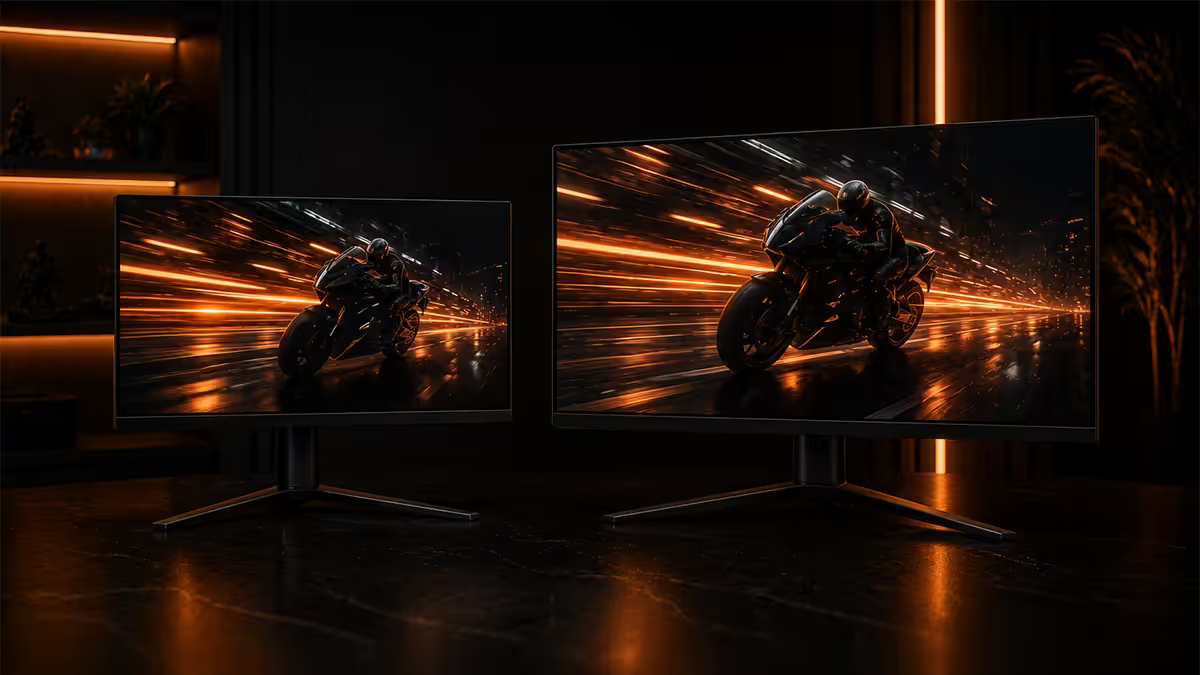
Viewing distance math (and SA desk reality)
The right monitor size starts with a measuring tape, not a spec sheet. The viewing distance you have available — eye-to-screen — determines the size that fills your field of view comfortably without forcing your eyes to dart side-to-side mid-game.
There's a usable rule from cinema and broadcast engineering. The ideal viewing distance equals roughly 1.2 to 1.5 times the horizontal width of the panel. For a 27 inch 16:9 monitor (597 mm wide), that puts you at 72-90 cm for a "cinema" feel, or 60-72 cm for a more immersive "performance" position. For a 32 inch 16:9 (708 mm wide), the equivalent is 85-106 cm for cinema, 70-85 cm immersive.
Now measure your desk. A typical SA flat desk runs 60-70 cm deep from front edge to back. Subtract the depth of the monitor stand (10-15 cm), then add the distance from the back of the desk to your eye position (usually -5 to +5 cm from the desk's back edge, depending on chair height). The net eye-to-screen is usually 55-70 cm on standard desks.
That distance is the natural fit for a 27 inch panel. A 32 inch monitor at the same distance forces your eyes wider than is comfortable for full-screen tracking — you'll lose peripheral information in fast games and feel mild fatigue in long sessions. The fix is either a deeper desk (70-80 cm) or a monitor arm that lets the panel sit further back than a stand allows.
Pixel density at every combination
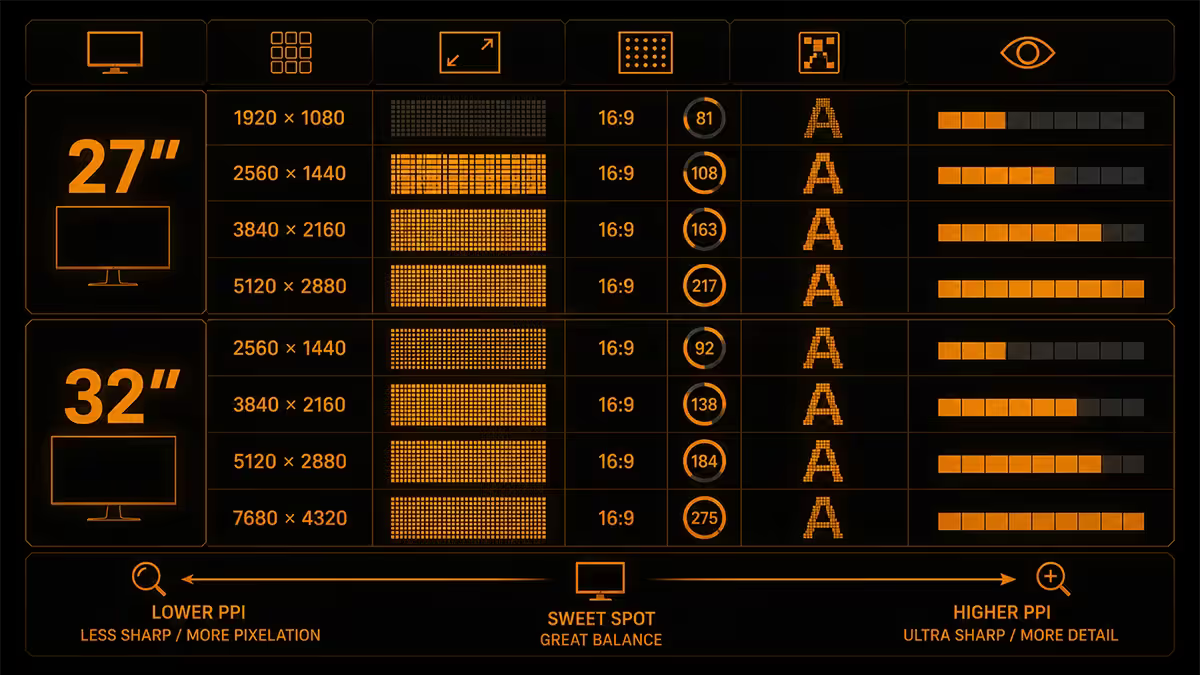
Pixel density (PPI — pixels per inch) is the second variable. The higher the PPI, the sharper the image at any given viewing distance, the smaller individual UI elements feel, and the less aliasing you'll see in game UI and text.
| Size + resolution | PPI | Sharpness at desk |
|---|---|---|
| 24" @ 1080p | 92 | Acceptable — visible pixels close up |
| 27" @ 1080p | 82 | Soft — avoid in 2026 |
| 27" @ 1440p | 109 | Sharp — gaming sweet spot |
| 27" @ 4K | 163 | Razor sharp — productivity / design |
| 32" @ 1080p | 69 | Pixel-visible — do not buy |
| 32" @ 1440p | 92 | Usable — slightly soft |
| 32" @ 4K | 138 | Excellent — immersion + sharp |
The two cells worth dwelling on: 27 inch 1440p (109 PPI) and 32 inch 4K (138 PPI). Both deliver visually sharp images at typical desk distances. The 32 inch 1440p combo (92 PPI) is usable but represents the most common buyer regret in this size class — the panel looks fine in the showroom and noticeably softer once it's a metre from your face.
The 27" 1440p sweet spot — why it stayed king
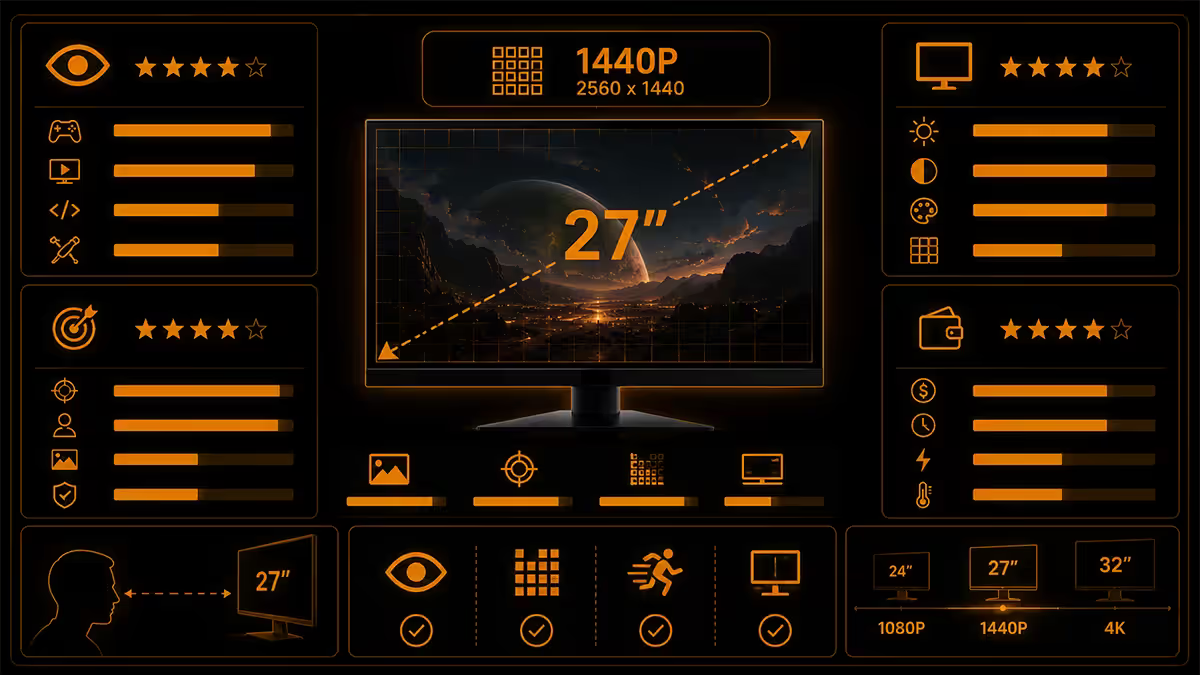
For five years now, 27 inch 1440p has been the gaming monitor centroid for a stack of reasons that haven't moved. The panel fits a standard desk. The PPI is excellent. The GPU demand is moderate. The price has dropped from R7,000+ in 2020 to R3,500-R5,500 in 2026 for solid IPS models with 165-180 Hz refresh.
For competitive gaming specifically, 27 inch lets your eyes naturally track the whole panel without micro-saccades. Your field of view (around 35 degrees horizontal at 65 cm viewing distance) maps cleanly onto a 27 inch 16:9 panel. You see the centre HUD and the edges of the screen in the same fixation. On a 32 inch panel at the same distance, you have to actively scan side-to-side to read both — fine for slower games, costly for esports.
For 1440p output, an RTX 4060 Ti or RX 7700 XT hits 80-100 fps in modern AAA at high settings — affordable GPU territory by 2026 standards. Drop to medium settings or older titles and the same GPU pushes 144-165+ fps for high-refresh gaming. The pair is the cheapest combo that feels modern.
32" 4K — the immersion play
32 inch 4K is the upgrade if you have the desk space, the GPU budget, and a preference for single-player cinematic gaming or content creation. The 138 PPI is sharp. The screen real estate at 100% scaling gives you twice the working area of 1440p. HDR-capable 32 inch 4K OLED panels (MSI MPG 322URX, LG 32GS95UE) deliver image quality that genuinely makes you stop and stare in slower games.
The cost reality. 32 inch 4K IPS gaming monitors run R8,500-R14,000 in SA at decent refresh rates (160-240 Hz). 32 inch 4K OLED enters at R18,000-R28,000. And the GPU tax: 4K at 60-120 fps in modern AAA at high settings demands RTX 4070 Ti Super or 4080 minimum; competitive 4K at 144+ fps is RTX 5080/5090 territory.
Windows scaling at 4K on a 32 inch panel is comfortable at 100% scaling — text is small but readable. Many users prefer 125% scaling for office work, then drop back to 100% for gaming. This contrasts with 27 inch 4K, which essentially mandates 150-175% scaling to keep text readable, which fights some older applications.
Immersion vs eye-tracking — game type matters
Beyond the maths, the size choice reflects what you play. Different game genres reward different field-of-view characteristics.
Where 27" wins
- Competitive FPS (Valorant, CS2, Apex, Rainbow Six) — full-screen tracking matters more than immersion. Eyes-on-everything matters.
- MOBAs (League, Dota 2) — you need to see the minimap, HUD and centre of action without darting eyes.
- Strategy (StarCraft 2, Civ 7, AoE 4) — UI scaling and unit density work better at 27".
- Browser/work primary — text reading at 109 PPI is comfortable, 138 PPI requires scaling.
Where 32" wins
- Single-player cinematic (Cyberpunk 2077, Red Dead Redemption 2, Black Myth: Wukong) — the bigger panel turns games into experiences.
- Open-world RPGs (Elden Ring, Baldur's Gate 3) — immersion outweighs eye-tracking effort.
- Content creation (video editing timelines, photo work, 3D modelling) — screen real estate is the win.
- Couch-distance dual-purpose — if your "desk" is actually a coffee table and you sit 100 cm+ back, 32" is correct.
Dual monitor or single — the hybrid setup
For productivity, two 27 inch monitors side-by-side gives you about 50% more usable screen area than a single 32 inch 4K (because 4K at 100% scaling is dense but the second physical screen doubles task separation). For gaming, dual monitors are awkward — the bezel gap sits dead-centre of your view and most games can't span the gap cleanly.
The hybrid setup that's increasingly common among streamers, traders and developers: a 32 inch primary in front of you, plus a 24-27 inch vertical secondary to the side. The primary handles the active task (gaming, video editing, IDE). The vertical secondary handles chat, Discord, OBS dashboards or documentation. Total desk footprint stays manageable on a 140 cm wide desk.
Worth knowing: most 27 inch 1440p monitors support portrait rotation natively. Most 32 inch 4K panels don't (they're too tall in portrait orientation) — so the secondary is usually 24 inch 1080p or 27 inch 1440p in portrait, with the 32 inch primary in landscape.
What "TV as monitor" gets wrong
It's tempting to look at the price gap — a 55 inch LG B4 OLED costs about the same as a 32 inch gaming OLED — and conclude the TV is the smarter buy. For most desk setups, it isn't. Three reasons.
First, viewing distance. A 55 inch panel demands at least 1.2-1.5 metres of viewing distance to take in the whole screen without your eyes ricocheting. Most desks place you 60-80 cm from the panel. At that distance, a 55 inch TV is overwhelming, you can't see corners simultaneously, and small text and game UI sit too far from centre to read.
Second, input lag. Most modern TVs have a Game Mode that drops input lag to 8-15 ms — fine for most games. But it's still 2-3× higher than a gaming monitor's 0.5-1 ms input lag. For competitive games that matter.
Third, subpixel layout. OLED TVs use WBGR or RGBW subpixel arrangements optimised for video playback, not text rendering. Reading text on a 55 inch OLED at 80 cm distance shows mild chromatic fringing on small fonts that gaming monitors don't have.
When TV-as-monitor does work: a separate "couch gaming" setup where you sit 2-3 metres back and use a controller. Game Mode at 4K 120 Hz on a 55-65 inch OLED is gorgeous. As your primary desk monitor though, the 32 inch dedicated gaming display is the safer pick.
Monitor picks by use case
| Use case | Size + resolution | SA price |
|---|---|---|
| Competitive gaming (esports) | 27" 1440p 240 Hz IPS | R5,500-R8,000 |
| 1440p AAA gaming sweet spot | 27" 1440p 165 Hz IPS | R3,500-R5,500 |
| 4K AAA cinematic gaming | 32" 4K 144 Hz IPS | R8,500-R14,000 |
| Cinematic / HDR enthusiast | 32" 4K 240 Hz OLED | R18,000-R28,000 |
| Productivity / design | 27" 4K 60 Hz IPS | R5,500-R8,500 |
| Streamer hybrid (primary) | 32" 4K 144 Hz + 24" 1080p vertical | R10,500-R16,000 combined |
| Budget 1440p | 27" 1440p 144 Hz VA | R2,800-R3,800 |
Key takeaways
- Measure your desk first. Under 65 cm depth = 27" or monitor arm needed.
- 27" 1440p 165 Hz IPS is the gaming sweet spot — 109 PPI, RTX 4060/4070 territory.
- 32" 4K 144 Hz is the immersion play — 138 PPI, needs RTX 4070 Ti minimum.
- Avoid 32" 1440p — 92 PPI looks soft and represents the most common buyer regret.
- Hybrid 32" + vertical 24/27" is the modern streamer/dev go-to.
Frequently asked questions
Is a 27 inch or 32 inch monitor better for gaming?
For competitive gaming at typical desk distance (50-70 cm), 27 inch is better — your eyes can track the whole screen without head movement, and the pixel density at 1440p is excellent (109 PPI). For immersive single-player gaming and content viewing, 32 inch at 4K is better — bigger picture, cinematic feel, but you need at least 70-90 cm viewing distance to take in the whole panel without darting your eyes.What viewing distance do I need for a 27 inch monitor?
For 27 inch at 1440p, the optimal viewing distance is 60-75 cm (roughly arm's length from your eyes to the screen). At 4K resolution, you can sit a bit closer (50-65 cm) because the pixel density is higher. SA flat desks are typically 60-70 cm deep, so 27 inch with the monitor at the back of the desk gives you the right distance naturally.What viewing distance do I need for a 32 inch monitor?
For 32 inch at 4K, the optimal viewing distance is 70-90 cm. At 1440p the optimal distance increases to about 85-100 cm because individual pixels become noticeable closer than that. If your desk is 55-65 cm deep, a 32 inch monitor will sit too close — you'll have to track your eyes side-to-side. Measure your desk before buying.Is 1440p enough on a 32 inch monitor?
At 32 inches, 1440p delivers 92 PPI (pixels per inch). That is usable but visibly less sharp than a 27 inch 1440p panel at 109 PPI. Text shows mild aliasing, game UI looks softer. If you can stretch the budget to 32 inch 4K (138 PPI), do it — the visual upgrade is substantial. If budget forces 1440p, accept the softer image or stay with a 27 inch panel.Is 27 inch 4K worth it?
27 inch 4K delivers 163 PPI — extraordinarily sharp, no visible pixel structure at any practical viewing distance. The downside: 4K gaming demands a serious GPU (RTX 4070 minimum for AAA at high settings) and Windows scaling at 150-175% is required for normal text size. For pure productivity or photo editing it is gorgeous. For gaming, 27 inch 1440p at high refresh tends to be the better value pick.Will a 32 inch monitor work like a small TV?
At normal viewing distance from a desk chair, a 32 inch monitor fills your central field of view much like a 55-65 inch TV does from a couch. Quality 32 inch gaming monitors handle HDR, high refresh and low latency better than most TVs, but TVs deliver larger panels at similar cost. If you want to game from a couch, get a 55-65 inch OLED TV. If you want to game from a desk, the 32 inch monitor is the right pick.Should I buy a 32 inch monitor or two 27 inch monitors?
For productivity, two 27 inch monitors deliver more usable screen area and better task separation — one for the work, one for chat/reference. For gaming, a single 32 inch is better because dual monitors require constant neck movement and bezel gaps split the action. The hybrid: a 32 inch primary plus a smaller 24-27 inch vertical secondary for chat, IDE or Discord. That setup is increasingly common for streamers and devs.What about ultrawide instead of 27 or 32 inch?
34-inch and 49-inch ultrawides (21:9 and 32:9 aspect ratios) are excellent for immersive single-player games and productivity, but they have downsides. Many esports games don't support ultrawide (Valorant adds black bars at 21:9, CS2 supports it but with FoV restrictions). Streaming overlays often break. Ultrawide is a gorgeous primary if you mostly play single-player games like Cyberpunk, BG3 and sims. For competitive multiplayer, 27 inch 16:9 stays the safer pick.
Get the Evetech app
Exclusive app-only prices, daily flash sales, and free delivery on orders over R4,000 — download the app and start saving.