Streaming + Gaming Build Guide
Best PC for streaming & gaming. — Your stream PC is your gaming PC.
NVENC ended the dual-PC era for everyone except the top 1%. Modern RTX silicon encodes your stream while you game with zero noticeable performance loss. Here's the SA build math that actually wins.
- dedicated encoder
- NVENC
- SA upload need
- 10+ Mbps
- SA build range
- R35k–R85k
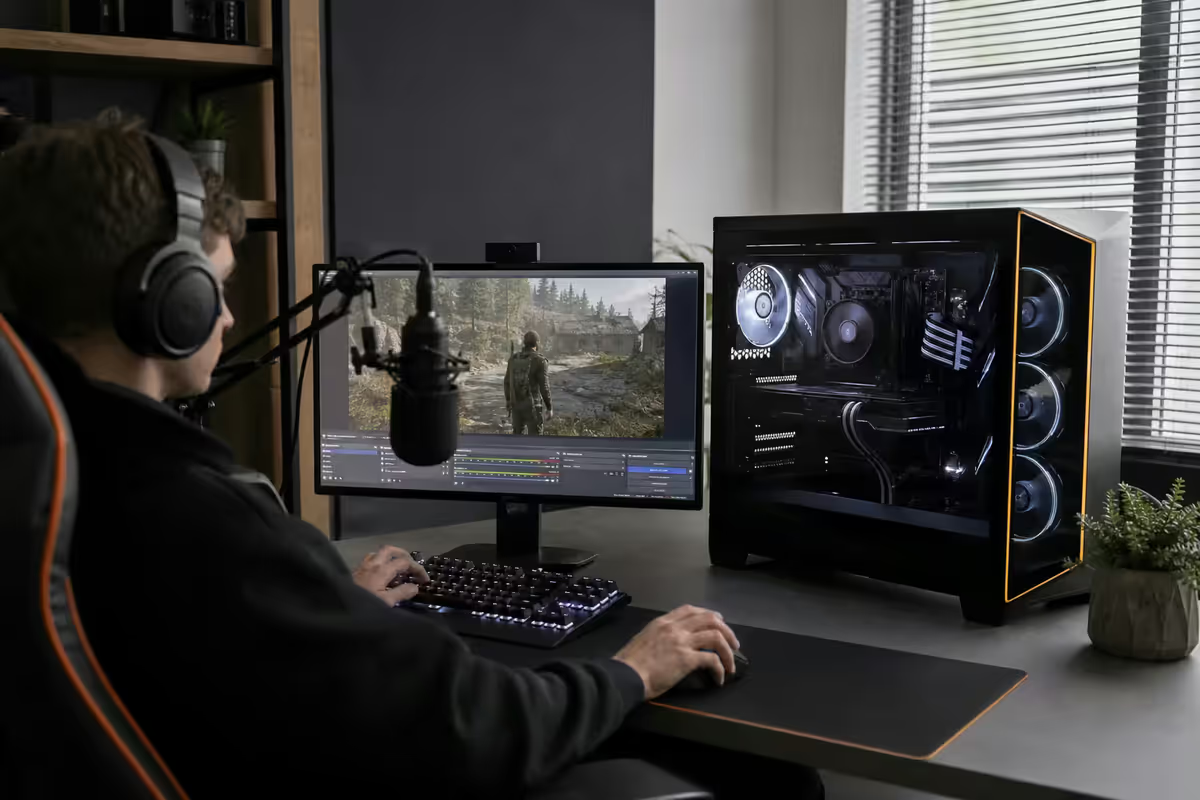
What a streaming + gaming PC actually does
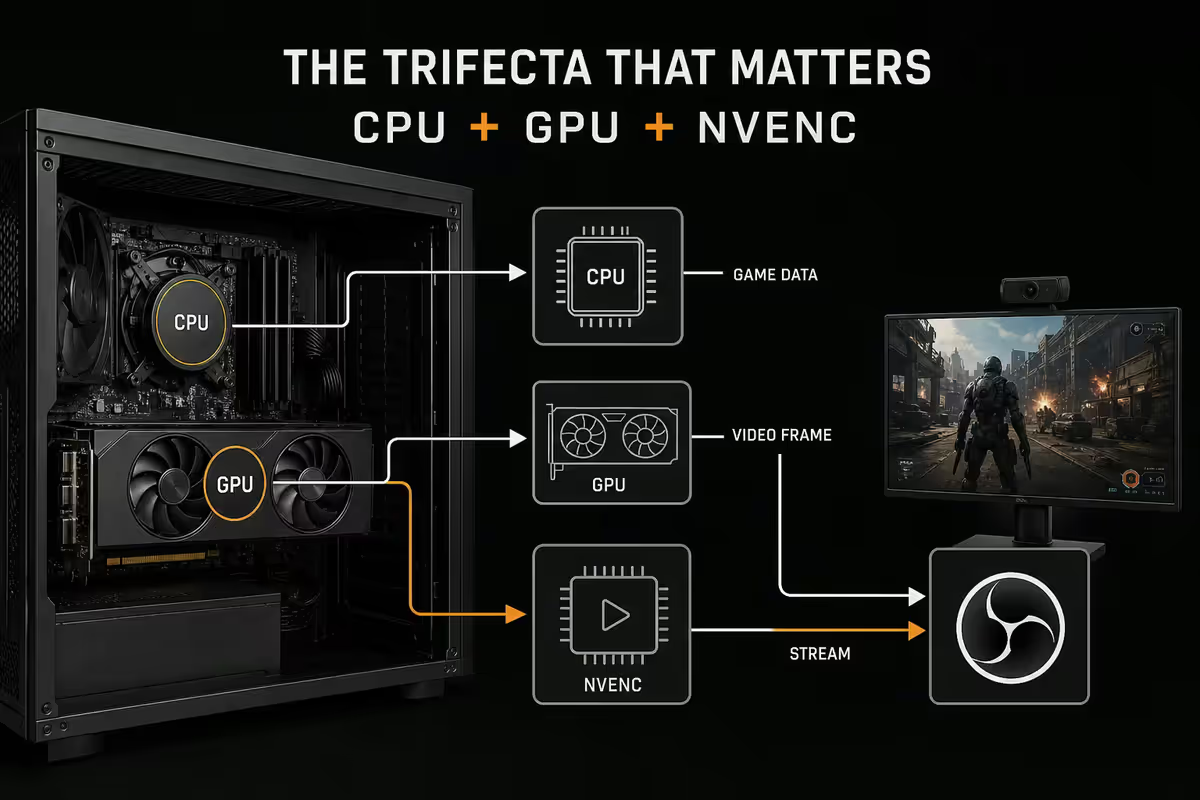
Your PC runs the game (CPU + GPU + RAM + storage), composites the OBS scene (CPU + GPU), encodes the stream (NVENC silicon), pulls webcam + audio (USB), runs browser sources + chat + alerts (CPU + RAM), routes audio between game / mic / Discord (CPU), and uploads the resulting stream (network). All simultaneously, with no dropped frames.
The fact this works on a single PC at all is a small miracle of dedicated silicon — and the reason NVENC matters more than any other single decision in this build.
Single-PC vs dual-PC — honest, in 2026
For most of streaming history, dual-PC was the answer. You gamed on one PC, captured its output to a second PC dedicated to OBS encoding. That era is essentially over for anyone outside the top 1% of streamers.
| Setup | Pros | Cons |
|---|---|---|
| Single-PC + NVENC | Cheaper, simpler, NVENC is "free" CPU | Game share GPU with browser sources, OBS scenes |
| Dual-PC + capture card | Isolated streaming, zero game impact | 2× cost, capture latency, sync complexity |
Use single-PC + NVENC if you're an emerging streamer, you run simple scenes (game + cam + chat), you play single-player or mid-tier competitive, and you have 20+ Mbps fibre upload.
Consider dual-PC if you're a top-tier full-time streamer with affiliate / partnered status, you play frame-sensitive esports at the pro level (Valorant, CS2, R6S), you run scene-heavy production with multiple cameras + green screen + complex overlays, or you also need the stream PC to do podcast/video editing offline.
CPU + GPU + NVENC — the trifecta that matters
The biggest 2026 shift: NVIDIA's 9th-gen NVENC encoder on RTX 50-series GPUs supports AV1 hardware encoding. AV1 at the same bitrate is dramatically better-looking than H.264 — and Twitch finally rolled out AV1 ingest in late 2025. This means an RTX 5060 streaming AV1 at 6Mbps looks better than the old x264 fast preset at 8Mbps on a dual-PC setup. Free quality.
| GPU | NVENC | Best for | SA price |
|---|---|---|---|
| NVIDIA RTX 5060 | 9th-gen, AV1 | Floor for serious streaming | R9,500–R11,500 |
| NVIDIA RTX 5070 | 9th-gen, AV1 | Sweet spot, 1440p game + stream | R14,500–R17,000 |
| NVIDIA RTX 5070 Ti | 9th-gen, dual AV1 | 4K stream + heavy ray-traced games | R20,000–R24,000 |
| NVIDIA RTX 5080 | 9th-gen, dual AV1 | Top tier — multi-stream, 4K, max RT | R26,000–R32,000 |
CPU sizing:
- Ryzen 7 9700X (8 cores) — sweet spot. Handles OBS + Game + Discord + chat + browser sources with thread headroom.
- Ryzen 7 9800X3D — best gaming chip in 2026. The 3D V-cache wins in competitive esports.
- Core Ultra 7 265K — Intel's E-core hybrid handles background tasks (OBS, alerts) on E-cores while P-cores stay free for the game.
- Ryzen 9 9950X — only if you also do video editing on the same PC.
SA upload bandwidth — what actually works
Streaming is upload-bound, not download. Most ISPs market download speeds prominently and upload as a footnote. For streaming, only upload matters.
| SA connection | Upload speed | Stream quality possible |
|---|---|---|
| ADSL (legacy) | 1–2 Mbps | Not viable — 480p only |
| Fibre 10/10 (Vumatel basic) | 10 Mbps | 1080p60 at 6 Mbps NVENC AV1 |
| Fibre 20/20 (most SA streamers) | 20 Mbps | 1080p60 at 8 Mbps + dual stream |
| Fibre 50/50 or 100/100 | 50–100 Mbps | 1440p60 or 4K60 to YouTube |
| Fixed LTE / 5G FWA | Variable | Avoid — too jittery for live |
Fibre is the only honest answer in SA for serious streaming. Vumatel, Octotel, Frogfoot, MetroFibre all offer 20/20 packages for around R650–R900/month uncapped. That's the baseline streaming connection. Avoid fixed LTE and 5G fixed wireless — both introduce jitter that becomes audible buffer events for viewers.
Bitrate math for SA streamers
Bitrate is the data rate of your encoded stream — measured in Kbps. Higher bitrate = better quality + more upload bandwidth used. Each platform caps the maximum bitrate they'll accept.
| Resolution | Recommended bitrate | Upload needed |
|---|---|---|
| 720p60 NVENC AV1 | 3,500–4,500 Kbps | 6 Mbps |
| 1080p60 NVENC H.264 | 6,000–8,000 Kbps | 10 Mbps |
| 1080p60 NVENC AV1 (Twitch) | 5,000–7,000 Kbps | 9 Mbps |
| 1440p60 NVENC AV1 (YouTube) | 10,000–15,000 Kbps | 20 Mbps |
| 4K60 NVENC AV1 (YouTube) | 18,000–25,000 Kbps | 32 Mbps |
Add 20% overhead for TCP/IP overhead, packet retransmission and headroom. Then add the audio bitrate (typically 160 Kbps). Then leave headroom for browser, Discord, Spotify — all running simultaneously. The "Upload needed" column above already accounts for these.
Microphone + audio interface chain
Audio is where streams sound professional or amateur. Picture quality is mostly automatic at decent bitrates — but bad audio you can hear in the first 10 seconds.
| Tier | Mic + interface | SA price |
|---|---|---|
| Beginner USB | Shure MV7+ (USB + XLR) | R6,500–R7,500 |
| Solid USB | Rode NT-USB+ or HyperX QuadCast 2 | R3,500–R5,500 |
| XLR step-up | Shure SM7B + Focusrite Scarlett Solo | R8,500–R12,500 |
| Show-grade mixing | Shure SM7dB + GoXLR Mini | R12,500–R16,500 |
| Broadcast tier | Rode PodMic USB or Procaster + Rodecaster Duo | R14,500–R22,000 |
The Shure MV7+ is the right answer for most streamers at R6,500–R7,500. It's USB + XLR (so you can upgrade later to a mixer), has hardware-level voice isolation built in (kills keyboard noise), and sounds genuinely close to an SM7B at a third of the chain cost.
Add a boom arm: Rode PSA1+ (R3,500) or Elgato Wave Mic Arm LP (R2,500). A mic on a desk picks up keyboard noise no matter how good the mic; on a boom arm it doesn't.
ZAR build tiers — R35k, R55k, R85k
R35,000 — Emerging streamer
| Component | Spec |
|---|---|
| CPU | AMD Ryzen 7 9700X |
| Cooler | Arctic Liquid Freezer III 240 |
| Motherboard | B650E Gigabyte / MSI Tomahawk |
| RAM | 32GB DDR5-6000 (2× 16GB) |
| GPU | NVIDIA RTX 5060 8GB (NVENC AV1) |
| Storage | 1TB Gen4 NVMe + 2TB SATA SSD (VODs) |
| PSU | 750W 80+ Gold |
| Case | Lian Li Lancool 216 / NZXT H7 Flow |
| Mic | Shure MV7+ USB |
| Total | ~R35,000 (with mic) |
R55,000 — Working creator / serious streamer
| Component | Spec |
|---|---|
| CPU | AMD Ryzen 7 9800X3D or Core Ultra 7 265K |
| Cooler | Arctic Liquid Freezer III 360 |
| Motherboard | X870 ASUS Strix-A / Gigabyte Master |
| RAM | 32GB DDR5-6000 (2× 16GB) |
| GPU | NVIDIA RTX 5070 12GB |
| Storage | 1TB Gen4 NVMe (OS) + 2TB Gen4 NVMe (games + VODs) |
| PSU | 850W 80+ Gold |
| Case | Lian Li O11 Dynamic Evo / Fractal North |
| Mic chain | Shure SM7B + Focusrite Scarlett Solo + Rode PSA1+ arm |
| Total | ~R55,000 (with mic + arm) |
R85,000 — Full-time creator / esports streamer
| Component | Spec |
|---|---|
| CPU | AMD Ryzen 7 9800X3D or Ryzen 9 9950X3D |
| Cooler | Arctic Liquid Freezer III 420 |
| Motherboard | X870E Gigabyte Master / ASUS ROG Crosshair |
| RAM | 64GB DDR5-6000 (2× 32GB) |
| GPU | NVIDIA RTX 5080 16GB |
| Storage | 2TB Gen4 NVMe (OS) + 4TB Gen4 NVMe (games + VODs) + 4TB SATA archive |
| PSU | 1000W 80+ Platinum |
| Case | Lian Li O11 Dynamic Evo XL / Fractal Define 7 XL |
| Mic + show chain | Shure SM7dB + GoXLR Mini + Elgato Stream Deck XL + Elgato Facecam Pro |
| Total | ~R85,000 (with show chain) |
Camera + Stream Deck + the rest
Beyond the core PC + mic, four peripherals upgrade the show quality without adding to the PC build cost:
- Webcam — Logitech Brio 4K (R3,500–R4,500) for solid 1080p60 from a USB cam. Elgato Facecam Pro (R8,500–R12,000) for genuinely DSLR-grade picture quality.
- Stream Deck — Elgato Stream Deck (R3,500–R4,500) for scene switching, alerts, hotkeys. Stream Deck XL (R5,500–R7,500) for show-grade production.
- Key light — Elgato Key Light Air (R5,500–R6,500) — the difference between "this person has a window" and "this person looks washed out."
- Green screen — Elgato Green Screen MT (R4,500–R5,500) collapsible. Eliminate it if your room background is clean.
Of the 200,000+ custom PCs we've shipped from Centurion, the streamer category is where NVENC genuinely changed our recommendation pattern. From 2019–2022 we shipped a lot of dual-PC setups. From 2023 forward, NVENC AV1 on RTX 40 and 50-series killed the case for it almost completely. Today, almost all of our streamer builds ship single-PC. The few who go dual-PC are full-time partnered streamers running multi-cam production or pro esports with frame-perfect requirements.
Behind the Build · From our service bench
Recommended streaming + gaming builds at a glance
| Tier | Best for | SA price |
|---|---|---|
| Emerging streamer | Growing channel, 1080p60 NVENC AV1 | ~R35,000 |
| Working creator | Partnered, 1080p60 + 1440p game, full show chain | ~R55,000 |
| Full-time / esports | 4K stream or 1440p competitive, show-grade production | ~R85,000 |
| + 27" 1440p 240Hz | Competitive esports monitor | +R7,500–R12,000 |
| + Fibre 20/20 uncapped | Reliable stream upload | +R650–R900/month |
Key takeaways
- Single-PC + NVENC AV1 is the right answer for most streamers. Dual-PC is yesterday's solution.
- RTX 5060 floor, RTX 5070 sweet spot, RTX 5080 for top-tier 4K streamers.
- Ryzen 7 9700X / 9800X3D + 32GB DDR5 handles game + OBS + Discord + chat with thread headroom.
- Fibre 20/20 minimum for serious streaming. ADSL and fixed LTE are not viable.
- Spend on the mic before you spend on a 4K cam. Audio quality is what makes a stream sound pro.
Frequently asked questions
Single-PC vs dual-PC streaming in 2026?
Single-PC + NVENC is the right call for most streamers in 2026. NVIDIA's 9th-gen NVENC encoder on RTX 5060+ uses dedicated silicon — it doesn't steal CPU cycles from your game. A single RTX 5070 PC streams 1080p60 at 8Mbps with zero noticeable performance impact while gaming. Dual-PC setups only make sense for top streamers running scene-heavy production (multiple cameras, green screen, complex overlays) or pro gaming with esports-grade frame consistency.What CPU do I need for streaming and gaming?
Ryzen 7 9700X or 9800X3D (8-core) for sweet-spot streaming + gaming. Ryzen 9 9950X (16-core) if you also do video editing on the same PC. The CPU mostly handles OBS scene compositing, alert overlays, browser sources, audio mixing and the game itself — meaningful thread headroom matters. Core Ultra 7 265K is the strong Intel alternative. Avoid Ryzen 5 9600X if you're also planning to multitask Discord, browsers and stream chat tools.What GPU should I get for streaming?
RTX 5060 (8GB) is the absolute floor for serious streaming. RTX 5070 (12GB) is the sweet spot — strong NVENC encoder + 12GB VRAM for modern games at 1440p. RTX 5070 Ti / 5080 if you stream 4K or play games with heavy ray tracing. AMD Radeon's AMF encoder has improved but NVENC is still meaningfully better for streaming quality at low bitrates — important on SA bandwidth.What upload speed do I need to stream in SA?
Minimum 10 Mbps upload for 1080p60 at 8Mbps bitrate. Realistically 20+ Mbps upload for headroom and YouTube simulcast. Fibre in SA: Vumatel, Octotel, Frogfoot uncapped 20/20 - 200/200 packages all work well. Wireless / fixed LTE is too jittery for live streaming — packet loss kills viewer experience. If you're streaming from anywhere outside fibre coverage, lower your bitrate and resolution accordingly.What's the bitrate math for SA streamers?
Twitch caps at 8 Mbps for 1080p60 partners; YouTube allows up to 51 Mbps. Account for ~20% overhead (TCP/IP, retransmission). So 8 Mbps Twitch = 10 Mbps minimum upload. 1080p60 high-quality = 6,000–8,000 Kbps video + 160 Kbps audio. 1440p60 = 10,000–15,000 Kbps. 4K60 = 18,000–25,000 Kbps. NVENC compresses notably better than x264 medium at these bitrates.Do I need a capture card?
Only if you go dual-PC (capturing the gaming PC's output on the streaming PC) or if you're capturing a console (PlayStation, Xbox, Switch). For single-PC streaming, the GPU handles capture internally with zero extra hardware. Capture cards add 30–60ms of latency and R3,500–R15,000 of cost. Skip them unless you actually need them. Top options for dual-PC: Elgato 4K X (R12,500–R15,000), AVerMedia Live Gamer 4K 2.1 (R7,500–R9,500).What microphone and audio interface should I get?
USB mics (Shure MV7+, Rode NT-USB+) work fine for solo streamers at R5,000–R7,500. XLR mic + audio interface (Shure SM7B + Focusrite Scarlett Solo) gives broadcast-quality audio at R8,500–R12,500 combined. Pair with a Rode PSA1 boom arm (R3,500). The Stream Deck Audio path with a GoXLR Mini lets you mix multiple sources for show-quality production (R7,500–R8,500).What's the cheapest viable streaming + gaming PC in SA?
Around R35,000 for serious work: Ryzen 7 9700X, 32GB DDR5-6000, RTX 5060 8GB, 1TB Gen4 NVMe, B650E motherboard, 750W Gold PSU, plus a Shure MV7+ USB mic. Drop below R35k and you compromise either the GPU's NVENC quality or the RAM that OBS + game + Discord + chat needs simultaneously.
Get the Evetech app
Exclusive app-only prices, daily flash sales, and free delivery on orders over R4,000 — download the app and start saving.