Build Guide · White Aesthetic
How to build a white aesthetic gaming PC — Every cable visible. No place to hide.
White builds are unforgiving. Every cable shows, every fingerprint shows, every yellowing component shows. Done right, they're the cleanest aesthetic in PC building — bright, contemporary, photograph-ready. Done wrong, they're an expensive eyesore by year two. Here's how to get it right the first time.
- every component
- All visible
- cost premium
- +10-15%
- make or break
- Cables
What "white aesthetic" actually means in 2026
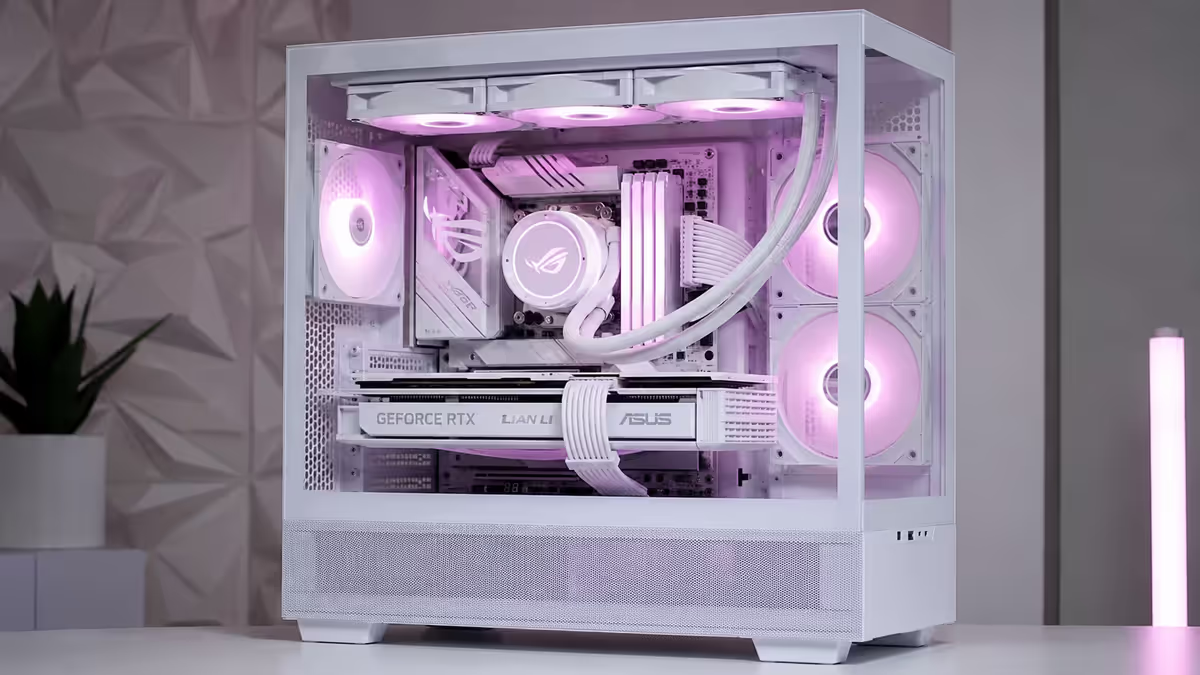
There's a spectrum to white builds, and your budget and patience will dictate where on it you land. At the entry end is a "white case, normal everything else" build — visually fine, but the contrast between the white case interior and a standard black motherboard / black GPU is jarring through a glass side panel. At the high end is a fully white build: white case, white motherboard, white GPU shroud, white RAM, white AIO, white fans, white modular PSU cables, even white-on-white M.2 heatsinks.
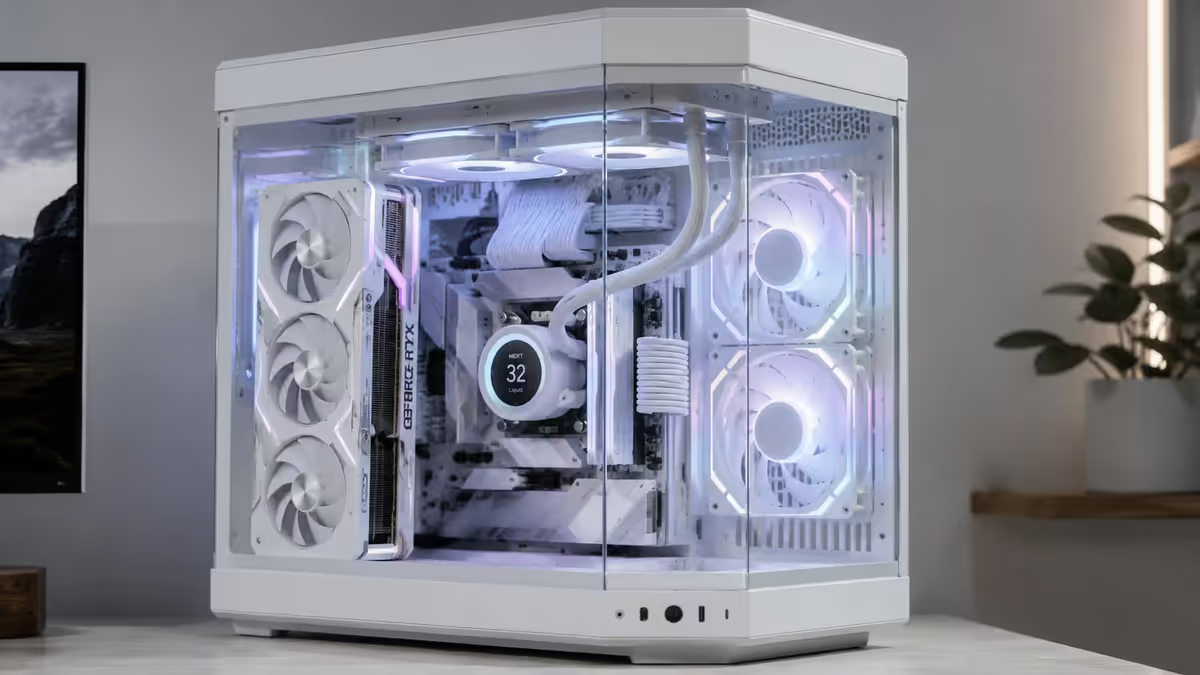
The full-white build is the photograph-ready aesthetic that dominates Instagram and YouTube PC channels — and it's significantly harder to pull off than it looks. Every component on the visible side of the motherboard must be the right shade of white (there's a wider range than you'd expect — bone white, snow white, pure white, off-white, eggshell). Cables must be sleeved white, not bundled black extensions. Fingerprints, dust and yellowing become highly visible enemies.
The middle ground — and one we recommend to most customers — is a white case + white fans + white cables + black motherboard + black GPU approach. This "white shell, black core" look is timeless, easier to source components for, less prone to yellowing (heat-exposed components stay black anyway), and produces strong contrast that photographs beautifully. About 60% of "white build" customers at Evetech land here once they see the cost ceiling of fully-white builds.
White case picks for SA in 2026
The case is the foundation of any aesthetic build. White cases have proliferated since 2022, and SA stock is now reliable across the major retailers (Evetech, Wootware, Rebel Tech, Takealot).
| Case | Style | SA price |
|---|---|---|
| Lian Li Lancool 217 Snow | High airflow, dual front fans included | R3,400 |
| NZXT H7 Flow White | Minimalist, clean cable management | R3,800 |
| Hyte Y60 White | Vertical GPU showcase, dual chamber | R4,600 |
| Hyte Y70 White | Larger dual chamber, optional screen | R5,500 |
| Corsair iCUE 4000X White | Three RGB fans included, lighting-focused | R3,200 |
| Phanteks NV5 White | Pillarless front, dual chamber-ish | R3,900 |
| Phanteks NV7 White | E-ATX support, premium proportions | R5,800 |
| Asus ROG Hyperion GR701 White | Massive showcase case, E-ATX | R8,500 |
Our pick for most builders: the Lian Li Lancool 217 Snow. Excellent airflow, comes with two 170mm front fans included (saves R600), large glass panel showing the full motherboard side, and clean cable management on the reverse side. R3,400 puts it firmly in the value sweet spot.
For showcase builds: Hyte Y60 White or Y70 White. The dual-chamber layout puts the GPU vertically across the front of the case, behind a wraparound triple-pane glass enclosure. Eye-catching, photogenic, but cable management is harder (everything is visible from three sides) and airflow is mid-pack compared to traditional layouts.
White motherboard variants
White-edition motherboards have proliferated in 2026 — every major brand now offers white variants of their mid-to-high tier B650, B850, X870 (AMD) and Z890 (Intel) boards. Premium of R500-R1,500 over the black equivalent.
For AMD AM5 builds:
- ASUS ROG Strix B850-A Gaming WiFi — clean white PCB, white VRM heatsinks, R5,200.
- MSI MPG B850 Edge TI WIFI — striking white-and-silver finish, R5,800.
- Gigabyte B850 Aorus Stealth ICE — ICE variant with all rear connectors, R5,500.
- ASRock B850 Steel Legend WiFi (white variant) — value pick at R4,600.
For Intel LGA 1851 builds:
- ASUS ROG Strix Z890-A Gaming WiFi — flagship-tier white finish, R7,500.
- MSI MPG Z890 Edge TI WIFI — white VRM and I/O shroud, R7,800.
- Gigabyte Z890 Aorus Stealth ICE — rear-connector ICE variant, R8,200.
The rear-connector or "stealth" boards (Gigabyte's Aorus Stealth, MSI's PRO Project Zero) are particularly suited to white builds — all power and data connectors route through the motherboard tray rather than the visible side, which dramatically cleans up the front-side cable picture. The Z890 Aorus Stealth ICE is gorgeous in person but requires a compatible case with motherboard-tray cable cutouts (Lian Li V3000 Plus, Hyte Y70 Stealth, ASUS BTF cases).
White GPU options for RTX 50 and RX 9000
White GPUs are the limiting factor for many SA builds — stock is more limited than black variants, prices run higher, and not every tier gets a white option from every AIB partner.
| GPU | White variant | SA price range |
|---|---|---|
| RTX 5090 | Asus ROG Strix White, MSI Suprim X White | R52,000-R58,000 |
| RTX 5080 | Asus ROG Strix White, Gigabyte Aero | R26,000-R31,000 |
| RTX 5070 Ti | MSI Suprim White, ASUS TUF White | R18,500-R21,000 |
| RTX 5070 | Gigabyte Aero, MSI Suprim White | R13,500-R15,500 |
| RTX 5060 Ti | Gigabyte Aero, ASUS DUAL White | R10,000-R11,500 |
| RX 9070 XT | ASUS TUF Gaming White, Sapphire | R13,000-R14,500 |
Asus ROG Strix White Edition remains the gold-standard white card — clean white shroud, white backplate, integrated white LED accents. MSI Suprim White is the more understated alternative with a brushed-finish look. Gigabyte Aero White is the value pick — same cooling as the Gaming OC variant at a small premium for the white shroud.
If you can't find a white variant at your target GPU tier — common for the RTX 5050/5060 entry tier — consider a third-party white shroud kit (V1Tech, JM Mods, EKWB white blocks if going custom loop). The shroud swap is straightforward but voids warranty on most cards, so factor that into the decision.
White RAM and storage
RAM is the easiest component to find in white — every major brand stocks white DDR5 kits, often with white-and-pastel RGB heatspreaders.
Top white RAM picks:
- G.Skill Trident Z Royal Neo White — crystalline diffuser top, premium DDR5 6400-8000 MT/s, R3,200-R4,800 for 32GB.
- Corsair Vengeance RGB DDR5 White — clean white heatspreader with iCUE software, R2,800-R3,600.
- Kingston Fury Beast DDR5 White — minimalist white finish, no RGB option for clean builds, R2,400-R3,000.
- TeamGroup T-Force Delta RGB White — full-length RGB strip, budget-friendly, R2,200-R2,800.
- Lexar Ares RGB White — value pick, decent timings, R2,000-R2,600.
Storage: NVMe drives are usually hidden under motherboard M.2 heatsinks, so colour matters less. If your motherboard's M.2 heatsink is white-themed (most white motherboards now match), there's nothing to do. If you want a visible 2.5" SSD on the side of the chassis — increasingly rare — Samsung 870 EVO White and Crucial MX500 in white packaging are available but cosmetic only.
White cooling — fans and AIO
Cooling is where white builds either come together or fall apart. Fans are highly visible (often through both side panels and the front mesh), and they're the most heat-exposed visible components — so yellowing risk is highest here.
Top white case fan picks:
- Lian Li UNI Fan SL120 V2 White — daisy-chain RGB, premium build, R650 per fan or R1,800 for a 3-pack.
- Lian Li UNI Fan TL120 LCD White — with integrated LCD displays, R1,200 each (showcase use only).
- NZXT F120 RGB White — value RGB fans, daisy-chain compatible, R450 per fan.
- Corsair iCUE LINK QX120 White — premium iCUE LINK ecosystem, R750 each.
- Arctic P12 White — budget non-RGB option for back/top exhaust, R200 each.
- Noctua NF-A12x25 G2 Chromax Swap-O White — premium non-RGB, anti-vibration mounts, R750 each.
For AIO liquid coolers:
- NZXT Kraken Elite 360 White — large display on pump, premium SA stock at Wootware/Evetech, R5,500.
- Arctic Liquid Freezer III 360 White — best price/performance, R3,200.
- Corsair iCUE H150i ELITE LCD White — integrated LCD, R5,800.
- Lian Li Galahad II Trinity White — clean look, daisy-chain compatible fans included, R3,800.
- MSI MAG CoreLiquid 360R V2 White — value option, R2,800.
For air coolers in white: Noctua NH-D15 G2 Chromax (white kit) remains the king. R2,400 with the chromax white covers. Be Quiet Dark Rock Pro 5 White Edition is the dual-tower alternative at R2,200.
White cables and PSU choice
Cables make or break a white build. The 24-pin ATX, 8-pin CPU and 16-pin GPU cables are the most visible — and the most likely to ruin the aesthetic with their stock-grey or stock-black sleeving.
Three approaches:
- White modular PSU with bundled white cables — Corsair RM850x White, MSI MEG Ai1000P White, Lian Li EDGE White. PSU and cables matched out of the box. Mid-quality sleeving. R3,200-R5,800.
- Standard PSU + custom WAH-rated white cable kit — premium PET sleeved cables from CableMod, ModeMyMods or Pexon. UV-stable, individually heatshrunk, cable combs included. R1,500-R3,000 for the cable kit on top of your existing PSU.
- Bundled white cable extensions — budget approach. Sleeved extensions that plug into your stock PSU cables. Visible double-connector at the back. Quality varies; budget extensions yellow within 18 months. R400-R900 for a full kit.
Our recommendation for premium builds: Lian Li EDGE 1000W White PSU (R4,800) or Corsair RM1000x SHIFT White (R4,500) + CableMod Pro ModFlex white cable kit (R2,500). The Lian Li EDGE places its modular cable connections on the side, dramatically cleaning up the cable picture in dual-chamber cases.
Cable management is non-negotiable
In a black build, messy cables blend into the dark interior and the eye doesn't focus on them. In a white build, every cable shows against the bright background — and the eye is drawn to every kink, sag and bundle of zip-ties.
The basic cable management techniques become mandatory:
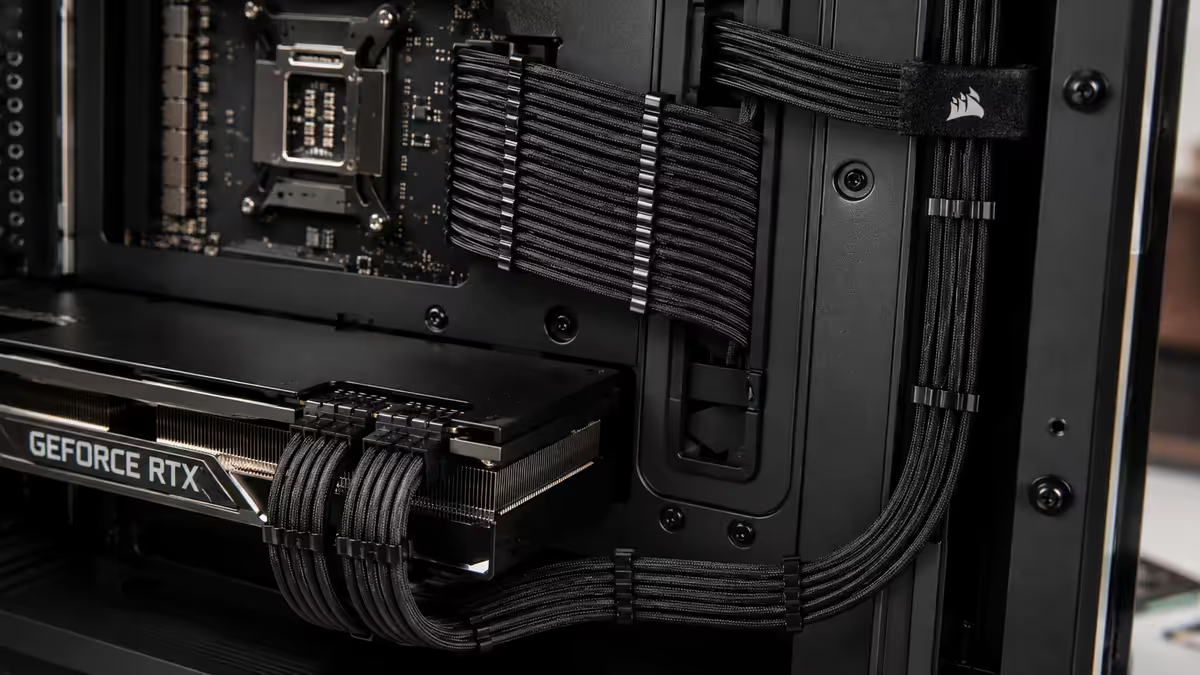
- Cable combs for the 24-pin and PCIe power cables — keeps individual wires perfectly parallel. R150-R300 per comb set.
- Velcro straps behind the motherboard tray for cable bundles — never zip-ties (they damage cables on removal). R80-R150 per pack.
- Routing through cable cutouts with rubber grommets — every cable should disappear into a hole and re-emerge precisely where it terminates.
- Custom-length cables for showcase builds — eliminates the slack-loop sag entirely. Add R1,500-R2,500 for a full custom-length kit.
Budget an extra 2-3 hours for cable management on a white build vs a standard build. Plan the cable routes before installing components — once the GPU is in place, you can't re-route the 24-pin easily without removing it.
RGB theme integration with white
RGB on white components requires restraint. The white surfaces reflect and amplify whatever colour you set, so full-saturation rainbow looks juvenile and busy. Two themes work consistently well:
Pastel theme. Set RGB to pastel ranges — light blue (cyan-leaning), soft pink, ice mint, lavender. The colours read as subtle washes against the white surfaces rather than aggressive saturation. Works particularly well with single-colour static lighting rather than animation. Pairs beautifully with our recommended ice-pink aesthetic builds.
Monochromatic white RGB ("6500K cool white"). Pure white RGB on white components produces a near-monochromatic showcase look. Subtle, premium, and photographs exceptionally well. The trade-off: it looks identical to "no RGB at all" in some lighting, so you're paying for RGB components without much visual benefit. Best for builders who want the option of switching to colour for events.
Avoid: full-saturation rainbow cycling, red+green Christmas combinations, anything moving faster than slow breathing. Tame the chaos — white builds are about cleanliness, not maximalism.
The 10-15% cost premium explained
| Component | White variant premium | Worth it? |
|---|---|---|
| Case (white vs black) | +R200-R600 | Yes — foundation of the look |
| Motherboard (white edition) | +R500-R1,500 | Yes — most visible PCB |
| GPU (white shroud) | +R800-R2,500 | Yes — biggest visual component |
| RAM (white heatspreader) | +R200-R500 per kit | Yes — usually negligible cost |
| Fans (3-6 white units) | +R600-R1,800 total | Yes — buy premium UV-stable |
| AIO (white loop) | +R400-R1,000 | Yes — visible from multiple angles |
| PSU + custom cables | +R1,500-R3,000 | Yes — cables make the build |
| Total premium on R30,000 build | +R3,000-R4,500 | 10-15% |
When white aesthetic is the wrong call
White builds aren't right for every situation. Honest disclosure of where white falls short:
Pets and kids. A white case parked under a desk catches everything — paw prints, sticky fingers, dust raised by movement. If you have young children or shedding pets in the room, white surfaces require constant cleaning. Black is more forgiving.
Smokers in the house. Cigarette tar yellows white surfaces permanently and rapidly. Within 12-18 months a white build in a smoker's room will be unmistakably stained. The damage is not removable.
Direct sunlight on the build. UV exposure accelerates yellowing on even quality polymers. A PC parked next to a sunny north-facing window will yellow faster than one in a shaded interior position. Common in SA living rooms — consider position before committing.
Frequent component swappers. White-edition motherboards and GPUs hold their value worse than black equivalents on the second-hand SA market (FaceTech, Carbonite, PC.co.za forums). If you upgrade every 18 months, expect lower resale on white parts.
Workstation use. White builds suit gaming and content creation showcases. For pure work-focused PCs hidden under a desk, the premium delivers no value. Stick with standard parts and put the saving toward better performance.
Common white build mistakes
Mixing white shades across brands. NZXT pure-white + Phanteks off-white + Lian Li snow-warm-white in the same build looks worse than just using black components alongside the white case. Pick one brand's white tone and stick to it for the highly visible components.
Skimping on cables. Spending R30,000 on premium white components and pairing with R400 bundled white extensions wastes the entire effort. Cables are the most-photographed, most-visible part of a showcase build. Budget appropriately.
Ignoring the back of the motherboard tray. Even on a single-glass-panel case, the back panel comes off during builds and at component swaps. A rats' nest of cables behind the tray suggests poor build quality — keep it tidy even if it's never seen during normal use.
Full rainbow RGB. Aggressive saturation cycling looks juvenile against white surfaces. Pastel themes, monochromatic white, or strategically placed single-colour accents read as premium. RGB chaos reads as gamer-stereotype.
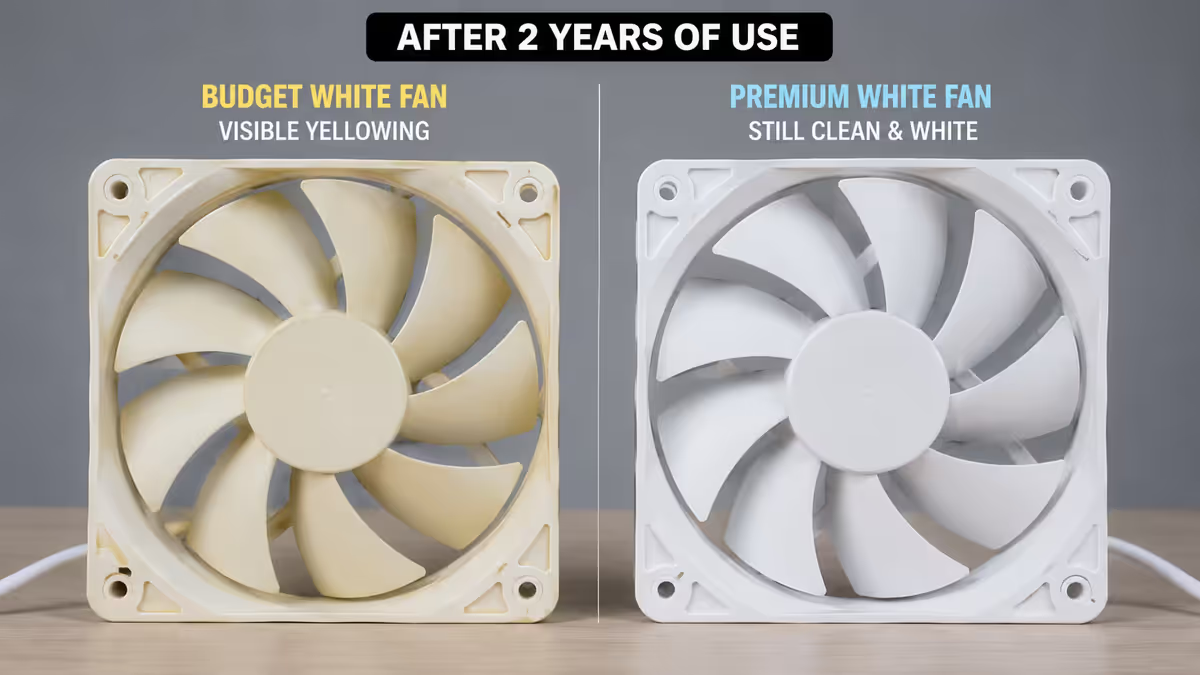
Forgetting about yellowing. Cheap white components yellow. Budget builds with R200 white fans and R400 cable extensions will need replacement within 24 months. Either spend more upfront or accept the eventual re-buy.
Key takeaways
- White aesthetic builds carry a 10-15% cost premium over standard parts. Plan for it, don't skimp on the visible components.
- Cable management is non-negotiable. WAH-rated white cables + combs + velcro routing — budget R1,500-R3,000 for cables alone.
- Budget white fans yellow within 18 months. Spend on premium UV-stable Lian Li UNI, Noctua Chromax or Corsair iCUE LINK.
- Match white shades within one brand where possible. Mixing pure-white and off-white between brands looks worse than mixing white and black.
- RGB on white: pastels or monochromatic white. Avoid full-saturation rainbow — it overpowers the clean aesthetic.
Frequently asked questions
What does it cost extra to build an all-white PC?
10-15% premium across the full parts list vs standard-colour. White motherboards and GPUs cost R500-R1,500 more than black counterparts. Custom WAH-rated white cables add R1,500-R3,000.Which white case is best in South Africa in 2026?
Lian Li Lancool 217 Snow (R3,400) for value. NZXT H7 Flow White (R3,800) for minimalist. Hyte Y60/Y70 White for vertical GPU showcase. Corsair iCUE 4000X White, Phanteks NV5 White round out the options.Do white PC components turn yellow over time?
Cheap ABS plastic yellows from UV and heat — visible at 18-24 months. Quality UV-stable polymers stay white 5+ years. Worst: budget fans and cable extensions. Best: premium cases and WAH cables.What is WAH PSU cable rating and why does it matter?
WAH (Wires And Holders) standard for premium custom cables — UV-stable PET sleeving, individually heatshrunk connectors, cable combs. For white builds, WAH cables stay white years longer than bundled extensions.Can I mix white and black components in an aesthetic build?
Yes — and often better than full white. White shell + black motherboard/GPU is timeless, less expensive, and avoids yellowing on heat-exposed components. Strong contrast photographs beautifully.What white GPU should I buy in 2026?
Asus ROG Strix White (premium, RTX 5080/5090), MSI Suprim White (RTX 5070 Ti+), Gigabyte Aero White (RTX 5070+). AMD: Asus TUF White (RX 9070 XT), Sapphire NITRO+ White (RX 9070 XT).What RGB theme works best with white components?
Pastels (light blue, soft pink, ice mint, lavender) or monochromatic white. Avoid full-saturation rainbow cycling — clashes with white surfaces and reads as juvenile.Are white aesthetic builds harder to keep clean?
Yes — fingerprints, dust and pet hair show dramatically. Monthly compressed air, microfibre cloth on glass, avoid hand contact during builds. Smokers should reconsider — tar yellowing is permanent.
Get the Evetech app
Exclusive app-only prices, daily flash sales, and free delivery on orders over R4,000 — download the app and start saving.