Peripheral Guide · Mouse Sizing
Big hands. Right mouse. — Measure first. Match the shell to the palm.
Most mouse reviews quote weight and DPI numbers and skip the only spec that actually matters for comfort — whether the shell fills your palm in the grip you use. For 19cm+ palms, this changes everything.
- large-hand palm
- 19cm+
- mouse length
- 125-138mm
- modern weight
- 60-90g
How to measure your hand — the only spec that matters
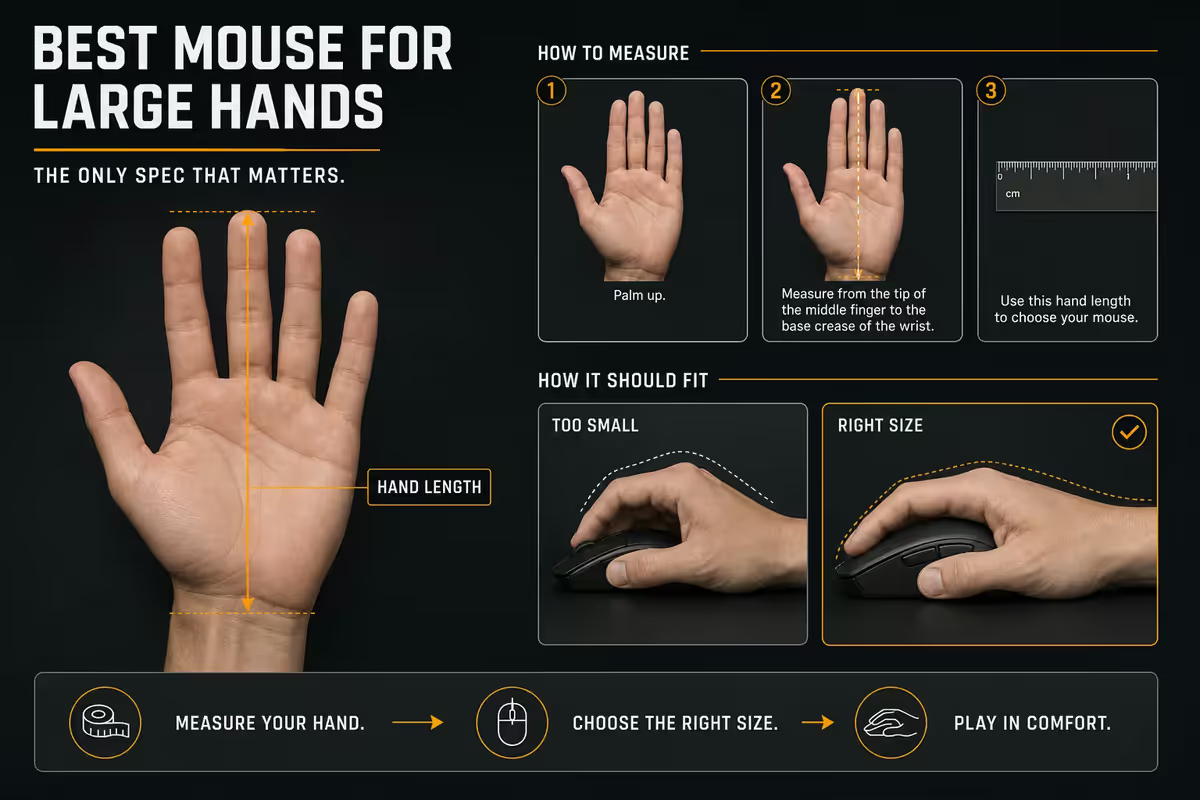
Every mouse recommendation starts with measurement. Without it, every "best mouse for large hands" list is guessing. Two measurements give you the answer:
Palm length. Place your hand flat on a table, fingers straight and relaxed. Measure from the wrist crease (where your hand meets your wrist) to the base of your middle finger (the knuckle, not the fingertip). Use centimetres.
Palm width. Measure across your knuckles when your hand is relaxed, fingers loosely together. This catches whether your hand is narrow-long (pianist) or broad-square (rugby player) for the same overall length.
| Hand class | Palm length | Palm width |
|---|---|---|
| Small | < 17cm | < 8.5cm |
| Medium | 17-19cm | 8.5-10cm |
| Large | 19-20.5cm | 10-11cm |
| Extra large | > 20.5cm | > 11cm |
If you measure 19cm+ in length or 10cm+ in width, this guide is for you. The "20cm+ extra-large" category narrows the choice further — discussed in the picks below.
Grip styles — what big hands actually use
Three grip styles dominate, and your grip determines what shape the mouse needs to be. For large hands:
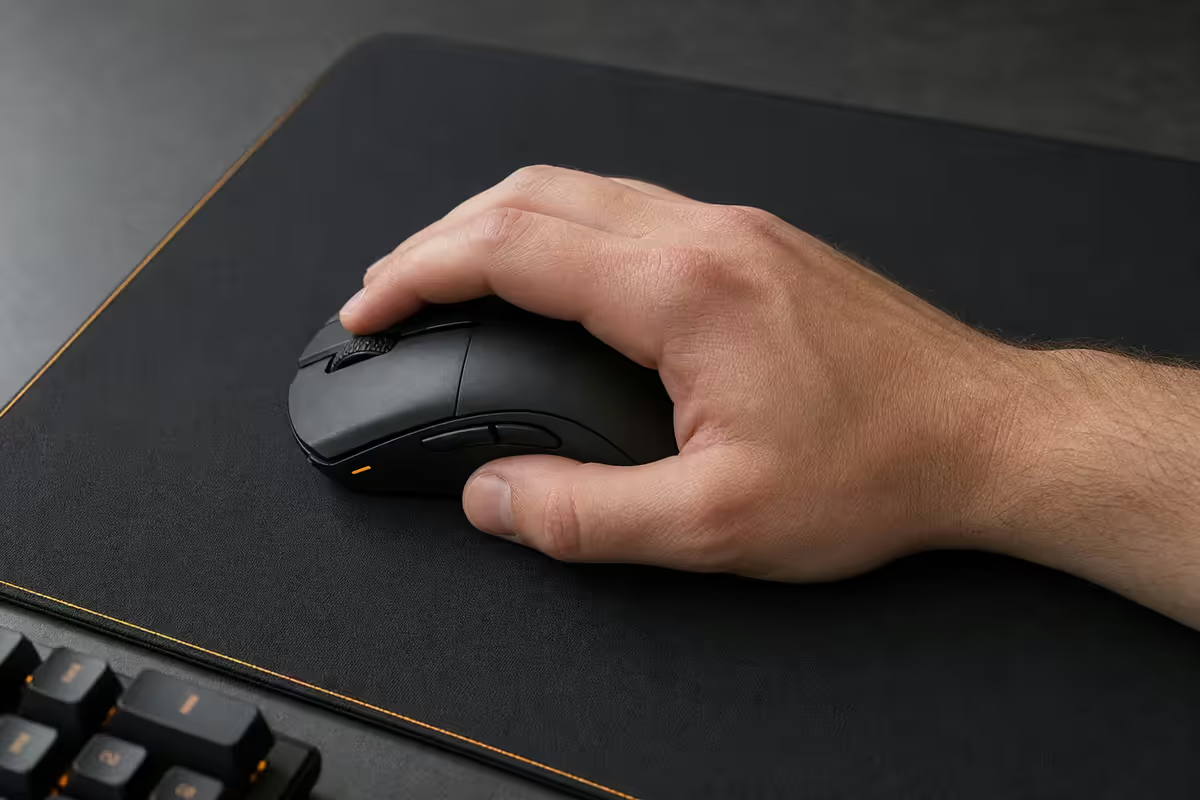
Palm grip. The entire palm rests on the mouse shell. Fingers lay flat. Big hands palm-grip everything they touch by default. What you need: a mouse that fills the palm — length 130mm+, hump 38mm+, width 65mm+. Logitech G502, Razer Basilisk V3, Razer DeathAdder V3 are designed exactly for this.
Claw grip. Palm rests on the back of the mouse; fingers arch over the buttons. Used for FPS micro-adjustments and faster flicks. What you need: medium-large symmetrical shapes 125-132mm long with shorter humps (37-39mm). Logitech G Pro X Superlight 2, Razer Viper V3 Pro, Pulsar X2H, Endgame Gear OP1 8K work here.
Fingertip grip. Only the fingertips touch the mouse, palm hovers. Used by some competitive FPS pros for the lightest movements. Big-hand reality: few people with 19cm+ palms naturally fingertip-grip — the lever ratio is awkward. If you do, go for the smallest "esports" shapes regardless of hand size (around 120-126mm).
Most large-handed gamers in 2026 settle on either palm grip (everyday, MMO, mixed work) or claw grip (FPS) and own two mice — one of each. The "do everything with one mouse" approach pushes toward ergonomic palm-grip shapes that compromise the FPS feel.
Ergonomic vs symmetrical for big hands
Ergonomic shapes
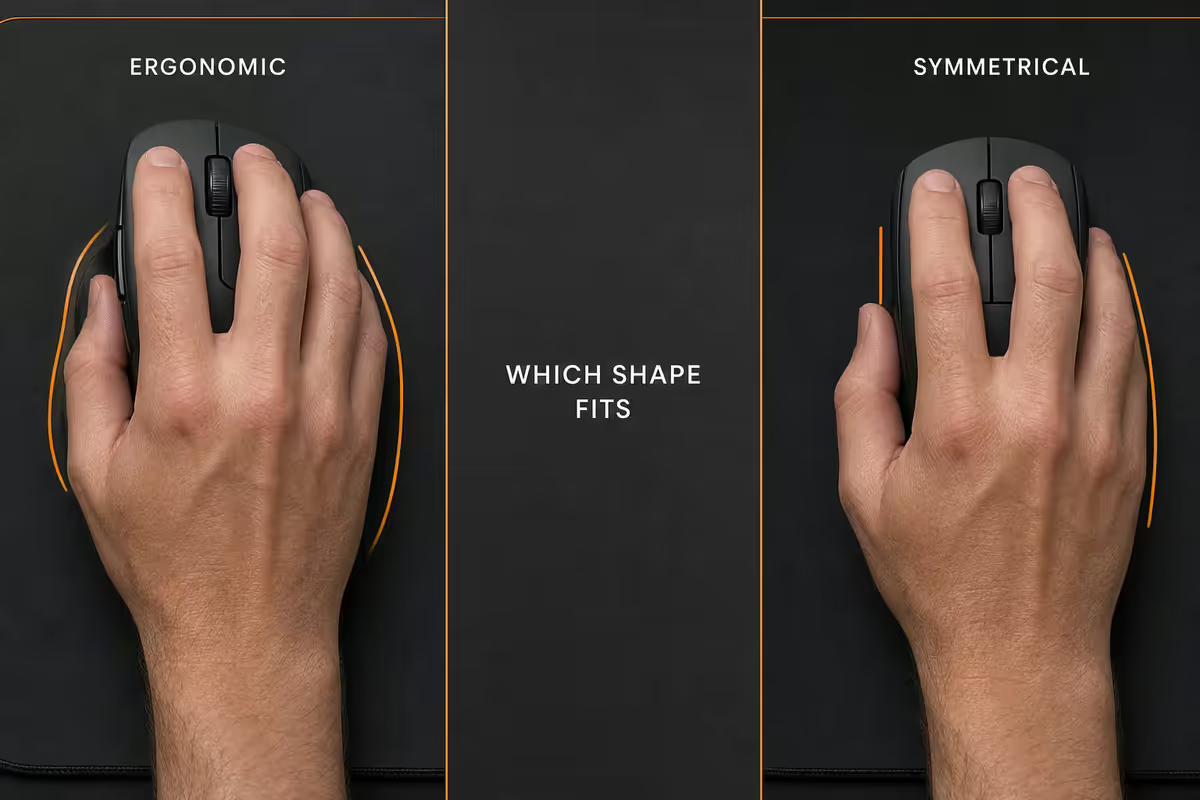
Right-handed sculpted, with a thumb rest, scooped index/middle finger grooves, and a tall hump that fills the palm. Pros: most comfortable for long sessions, fills the palm naturally, plenty of side buttons. Cons: right-handed only, heavier (often 90-115g), can feel restrictive for fast claw flicks.
The SA-stocked ergonomic-shape kings for large hands:
- Logitech G502 X Plus (length 131mm, weight 106g, RGB-lit, hybrid optical-mechanical switches) — the long-standing king of palm-grip ergonomic. Heavy but the shape fills 19-20cm palms perfectly.
- Logitech G502 X Lightspeed (same shape, wireless, 102g) — same shape sans RGB. Lighter, no battery tradeoff for the daily driver.
- Razer Basilisk V3 Pro (length 130mm, weight 112g, HyperScroll Pro tilt wheel, 11 buttons) — the productivity beast. Heavy but the thumb shelf is unmatched for resting between actions.
- Razer DeathAdder V3 (length 137mm, weight 59g wireless, 7 buttons) — the long-shape outlier. Closer to symmetrical proportions but right-handed ergonomic. Light enough for FPS use too — popular crossover pick.
Symmetrical shapes
Ambidextrous shells, generally lighter, more neutral feel. The competitive FPS standard. Pros: lighter (54-75g typical), works for left-handed users with software remap, faster for claw and hybrid grips. Cons: doesn't fill large palms as comfortably; fewer side buttons (typically 2 or 4).
The SA-stocked symmetricals that suit large hands:
- Logitech G Pro X Superlight 2 (length 125mm, weight 60g) — the FPS pro choice. Smaller than ideal for 19cm+ palms in pure palm grip but works brilliantly for claw and hybrid.
- Razer Viper V3 Pro (length 127mm, weight 54g) — even lighter than Superlight 2. Same medium-symmetrical FPS shape.
- Pulsar X2H (length 121-126mm, weight 55g, taller "H" hump variant) — the X2H specifically has a higher 39mm hump that suits large-hand claw grip far better than the standard X2.
- Endgame Gear OP1 8K (length 132mm, weight 50g, 8,000Hz polling) — the lightest "large" symmetrical. The OP1's elongated shape works well for 19-20.5cm palms.
- Lamzu Maya / Atlantis Mini Pro (varies, ~50-60g) — newer SA-import options; Maya is taller-humped and works for large-hand claw.
Comfort & macro picks — top 3 for 19cm+
| Mouse | Length / Weight | SA price (2026) |
|---|---|---|
| Logitech G502 X Plus | 131mm / 106g | R3,300-R3,800 |
| Logitech G502 X Lightspeed | 131mm / 102g | R2,800-R3,300 |
| Razer Basilisk V3 Pro | 130mm / 112g | R3,400-R4,000 |
| Razer Basilisk V3 (wired) | 130mm / 101g | R1,400-R1,800 |
| Logitech MX Master 3S (productivity) | 124mm / 141g | R2,500-R3,000 |
For pure office and productivity workflows on a large hand, the Logitech MX Master 3S remains unmatched despite being a "productivity" rather than gaming mouse — the sculpted thumb rest, hyperscroll wheel and palm-filling shape make it the bench's daily driver for hours of Excel and code.
Competitive FPS picks — top 4 for 19cm+
| Mouse | Length / Weight | SA price (2026) |
|---|---|---|
| Razer DeathAdder V3 | 137mm / 59g | R2,400-R2,900 |
| Endgame Gear OP1 8K | 132mm / 50g | R2,000-R2,500 |
| Pulsar X2H | 121-126mm / 55g | R1,800-R2,300 |
| Logitech G Pro X Superlight 2 | 125mm / 60g | R3,200-R3,800 |
| Razer Viper V3 Pro | 127mm / 54g | R3,500-R4,000 |
The Razer DeathAdder V3 is the single most-recommended FPS mouse on this list for the 19-20cm palm category because of its 137mm length (the longest in the lineup) and lightweight wireless build (59g). It bridges ergonomic comfort with FPS-grade speed in a way few mice manage.
For 20.5cm+ extra-large palms, the OP1 8K's 132mm length and tall hump pair best, with the DeathAdder V3 as second pick. Avoid sub-126mm shapes (Superlight 2, Viper V3) for pure palm grip at this hand size — they'll work for claw, but not all-session palm comfort.
Weight reality — 60-90g is the modern range
Mouse weight perception is heavily relative to hand size. A 100g mouse feels light to a 20cm-palm user and slow to a 17cm-palm user. The modern 2026 flagship range:
| Weight | Feel for large hands | Examples |
|---|---|---|
| 50-60g | Feather-light, esports tier | OP1 8K, Viper V3 Pro, X2H, Atlantis Mini |
| 60-75g | Light, modern flagship norm | Superlight 2, DeathAdder V3 |
| 75-95g | Neutral, feels balanced | Pulsar X2H Wireless, Lamzu Maya |
| 95-115g | Weighty but liveable | G502 X variants, Basilisk V3 |
| 115g+ | Noticeable, fatigue over hours | Basilisk V3 Pro, MX Master 3S |
Large-handed users tolerate heavier mice better than small-handed users because the lever arm from wrist pivot is longer — the same gram counts move smaller relative to your motion. A 100g mouse on a 19cm palm feels closer to 80g on a 17cm palm in subjective weight perception. Don't blindly chase sub-60g if you're palm-gripping a large hand; choose by comfort, not spec sheet.
Wireless vs wired in 2026 — the gap has closed
Modern wireless gaming protocols — Logitech Lightspeed, Razer HyperSpeed Wireless, Pulsar's PAW3950 wireless, Endgame Gear's 8K wireless — transmit click and sensor data at 1-4ms latency. Blind A/B tests on professional players consistently fail to distinguish wireless from wired in this latency range.
Wireless advantages: no cable drag (especially on hard mousepads where cable resistance is real), no snagging on monitor stands, cleaner desk. Battery life on top-tier wireless mice runs 70-100 hours of active use; a weekly charge handles even heavy schedules.
Wired advantages: ~5-15g lighter than wireless equivalents (no battery), no risk of charge failure mid-tournament, slightly cheaper for the same shape, no charging cradle to lose.
For SA 2026 buyers, wireless is the default unless budget pushes you to the wired variant of the same shape (Basilisk V3 wired = R1,400 vs Basilisk V3 Pro wireless = R3,400). The Basilisk V3 wired is the SA value pick for large-hand ergonomic comfort.
Preventing hand cramp on long sessions
Mouse choice prevents shell-induced cramp; technique prevents repetitive-stress micro-injury. Both matter for big hands using mouses sized close to the limit of comfort.
Shell-level fixes:
- Make sure the mouse you choose is at minimum 125mm long for 19cm+ palms. Below this and your fingers force into a claw position even when you're trying to palm grip — guaranteed cramp.
- Hump height matters more than length once you're in the 125mm+ range. A taller hump (38mm+) means the back of your palm rests on the mouse rather than hovering, reducing thumb and pinky tension.
- Side button placement — ergonomic mice with side buttons too far back force thumb extension. Test before buying that your natural thumb rest position reaches the buttons without strain.
Technique-level fixes:
- Arm sweep, not wrist sweep. Mousing from the elbow keeps wrist neutral; mousing from the wrist alone overloads the carpal tunnel quickly.
- Forearm flat on the desk, never hanging in air. A desk pad or arm rest at the right height matters as much as the mouse.
- Mix grip styles across the day. Two mice on the same desk (productivity ergonomic + gaming symmetrical) lets you switch hand position every few hours.
- Rotate input devices on long work blocks. A trackball or vertical mouse for some workflows takes the load off the same tendons that play games.
- Take 60-second stretches every 30 minutes. Open-and-close fist 10 times, forearm rotation 10 times. Trivial; cumulative protection.
Key takeaways
- Measure palm length and width first — 19cm+ palm or 10cm+ width means large hand category.
- For palm-grip daily comfort: G502 X Plus, Basilisk V3 Pro, DeathAdder V3. 130mm+ length with 38mm+ hump.
- For FPS competitive: DeathAdder V3 (best crossover), OP1 8K, Superlight 2, Pulsar X2H. Lighter and shorter.
- Big hands tolerate weight better than small. Don't chase sub-60g if it sacrifices shell fit.
- Wireless = wired for everything except elite competitive verification. Two-mouse setup (productivity + FPS) is the long-session answer for big hands.
Frequently asked questions
How do I measure my hand for a mouse?
Two measurements matter: palm length (wrist crease to base of middle finger) and palm width (across the knuckles when relaxed). Palm length 17-18cm with width under 9cm = medium. Palm length 19cm+ or width 10cm+ = large hands. Total hand length including fingers matters less than palm-length-plus-width — these determine which mouse shells distribute pressure correctly across your palm.What's the best gaming mouse for 19cm+ palms?
For 19-20cm palm length: Logitech G502 X Plus / Lightspeed (ergonomic, ~131mm), Razer Basilisk V3 / V3 Pro (~130mm), Razer DeathAdder V3 (137mm wireless), Pulsar X2H (medium-large symmetrical). For 20cm+: Logitech G Pro X Superlight 2 (125mm but tall hump), Endgame Gear OP1 8K (132mm), Razer DeathAdder V3 (137mm). Match length to your palm and look for taller hump heights (38mm+) to fill the palm in palm-grip.Is ergonomic or symmetrical better for big hands?
Both work; depends on grip and use. Ergonomic mice (Razer Basilisk V3, Logitech G502 X, Razer DeathAdder V3) have a sculpted right-handed thumb rest that fills the palm — generally more comfortable for long sessions and palm-grip large hands. Symmetrical mice (Logitech G Pro X Superlight 2, Razer Viper V3 Pro, Pulsar X2H) are lighter and the standard FPS pro shape — better for claw and fingertip grip. For 8+ hour mixed use, ergonomic. For pure competitive FPS, symmetrical.What shape do FPS pros actually use?
The vast majority of FPS pros in 2026 use symmetrical lightweight mice — Razer Viper V3 Pro, Logitech G Pro X Superlight 2, Pulsar X2V2 / X2H, Endgame Gear OP1 8K, Lamzu Atlantis Mini. Even pros with large hands often use medium-sized symmetricals because lighter weight and ambidextrous shape help with claw/hybrid grip flicks. The 'pro shape' is closer to medium than large — but the few pros with very large hands gravitate to OP1 8K, DeathAdder V3 or Lamzu Maya.How heavy should a gaming mouse be?
Modern flagship mice in 2026 sit between 50g and 90g. Sub-60g 'esports superlight' shapes (Logitech G Pro X Superlight 2 at 60g, Razer Viper V3 Pro at 54g, Pulsar X2H at 55g) feel feather-light and ideal for low-sensitivity FPS. Feature-rich mice with extra side buttons and weighty wireless tech (Razer Basilisk V3 Pro at 112g, Logitech G502 X Plus at 106g) feel weightier but offer comfort and macros. Big hands tolerate weight better than small hands — 80-90g feels neutral, 100g+ noticeable but liveable.Should I prevent hand cramp with mouse choice or grip changes?
Both. Mouse choice prevents the shell from forcing your fingers into awkward angles — for large hands, a too-small mouse (under 120mm length, under 35mm hump) causes claw cramp within hours. Grip changes (alternate between palm and claw across the day, use mouse + trackball + tablet for different work modes) prevent repetitive-stress micro-injuries. Wrist position matters: forearm flat on desk, wrist neutral, never resting on a sharp edge.Are wireless gaming mice as good as wired now?
In 2026, yes for FPS and general use. Logitech Lightspeed, Razer HyperSpeed Wireless and Pulsar's PAW3950 wireless transmit at 1-4ms latency — indistinguishable from wired in blind tests. Battery life on top-tier wireless mice runs 70-100 hours typical. Wired remains marginally lighter (no battery) and reduces buying complexity (no charger to lose), but the wireless quality gap has closed for pretty much every use case except sub-millisecond competitive verification.What polling rate should I use?
1,000 Hz polling has been the standard for two decades and remains plenty for almost everyone. 4,000 Hz and 8,000 Hz polling exist on Razer, Logitech, Pulsar and Endgame Gear flagships in 2026 — measurably reduces input latency by 1-3ms over 1,000 Hz, but burns CPU cycles and battery (wireless). Use 4,000 Hz if you have a high-refresh monitor (240Hz+) and a CPU with headroom. Use 1,000 Hz for everything else. 8,000 Hz is mostly diminishing returns outside pro-level FPS at 480Hz+ monitors.
Get the Evetech app
Exclusive app-only prices, daily flash sales, and free delivery on orders over R4,000 — download the app and start saving.