Mouse Switch Chatter Repair
How to fix mouse double-click. — Debounce first. Solder second. Replace third.
That extra click on a single press isn't a software bug — it's worn contacts inside the switch bouncing past the firmware's filter window. Here's how to fix it for free, then for R80, then properly.
- stock debounce
- 8 ms
- switch click life
- 20-80M
- pair of switches
- R80-R150
Why your mouse double-clicks (contact chatter)
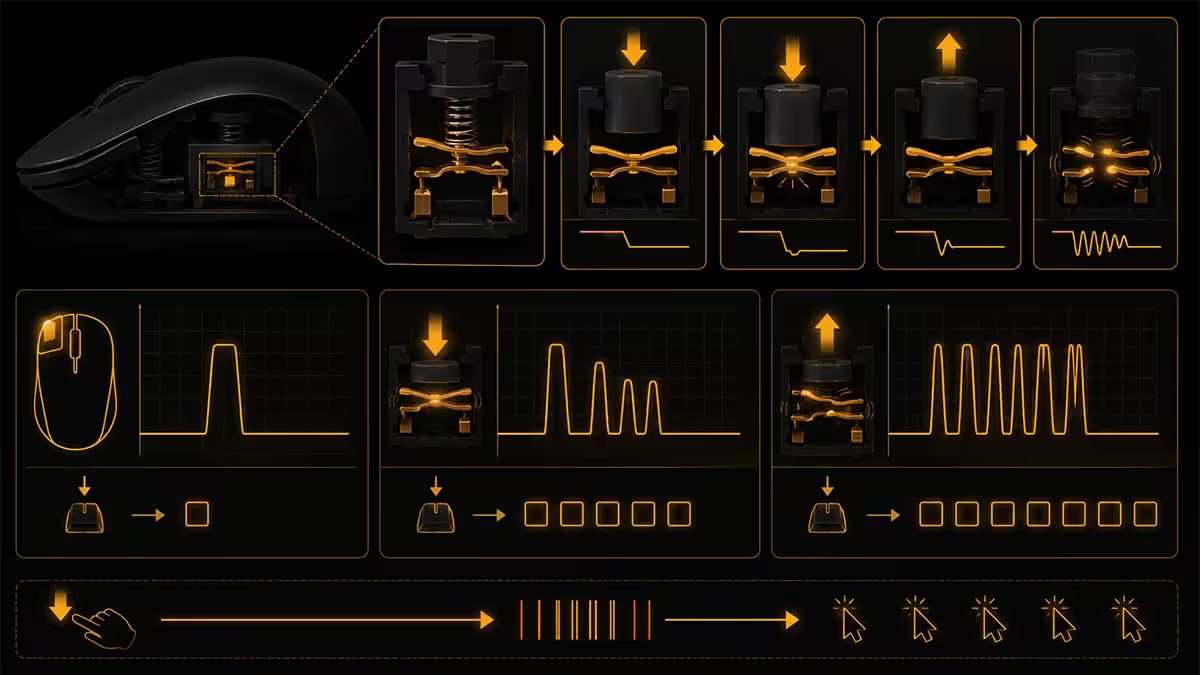
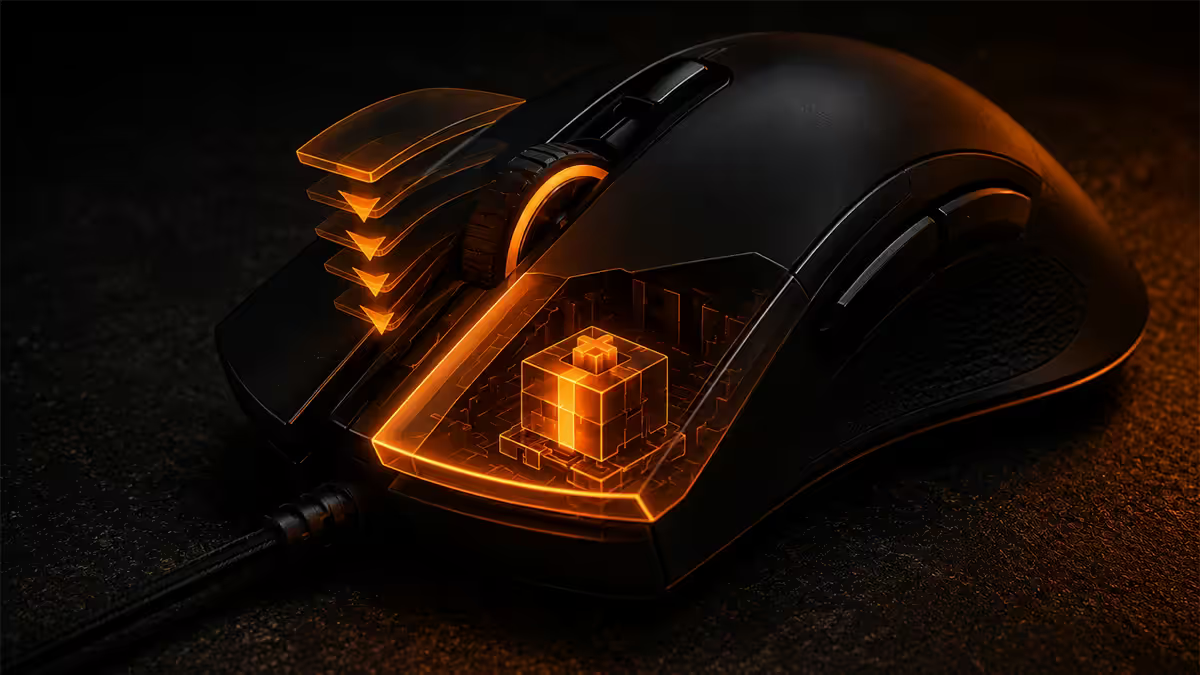
When you press the left mouse button, a tiny metal leaf inside an Omron D2FC-F-7N switch (the stock switch in most gaming mice) physically slams into a copper contact. For 1-5 milliseconds, those contacts bounce against each other — opening and closing dozens of times in quick succession — before settling into a stable closed state.
Mouse firmware handles this with a debounce window — typically 8ms — during which it ignores any further state changes after the first detected edge. Inside the window, only one click registers. Beyond the window, every new edge counts as a fresh click.
Over time, three things degrade the switch:
- Oxidation on the contact surfaces increases bounce duration.
- Mechanical wear on the leaf spring weakens the snap action, producing slower, longer-lasting bounces.
- Dust and skin oil creep into the switch housing and create intermittent contact paths.
Once the bounce duration exceeds the 8ms debounce window, a single physical press registers as two clicks. That's the symptom you're hitting.
Software debounce — the free first fix
Both major brands let you widen the firmware debounce window from inside their config app. This costs nothing, takes 30 seconds and will often eliminate the double-click symptom for weeks or months while you decide what to do next.
Razer Synapse (Razer mice)
Open Synapse → select your mouse → Performance tab → scroll to Debounce Delay. Default is usually 4-8ms; bump it to 16ms or 20ms. Click Save. The change writes to the mouse's onboard memory and persists if you move it to another PC.
Trade-off: at 20ms debounce, the absolute fastest possible double-click (e.g., a competitive game macro) might be merged into one click. For almost every user this is invisible. For a Counter-Strike pro it might matter.
Logitech G HUB (Logitech mice)
Open G HUB → select your mouse → click the gear icon → Click Speed or Debounce setting (location varies by mouse model). Same idea: raise from default 8ms to 16-20ms.
On older mice without a debounce slider in G HUB, the setting is fixed in firmware. In that case skip to the MouseFix software approach below.
MouseFix tool for unbranded mice
If your mouse doesn't have a config app — most office mice, cheap third-party gaming mice, or older models — Daniel Jackson's free MouseFix tool intercepts clicks at the Windows driver level and applies its own debounce filter.
Download from the original developer's site (search "MouseFix Daniel Jackson" — there are clones with adware so verify the source). Run as administrator, set the debounce threshold to 50ms (default), and leave it running in the system tray.
It's not as elegant as firmware debounce — it adds 1-2ms of input latency and can occasionally drop deliberate fast double-clicks — but it's the only software route for non-branded mice and it's free.
Switch replacement — the proper DIY fix
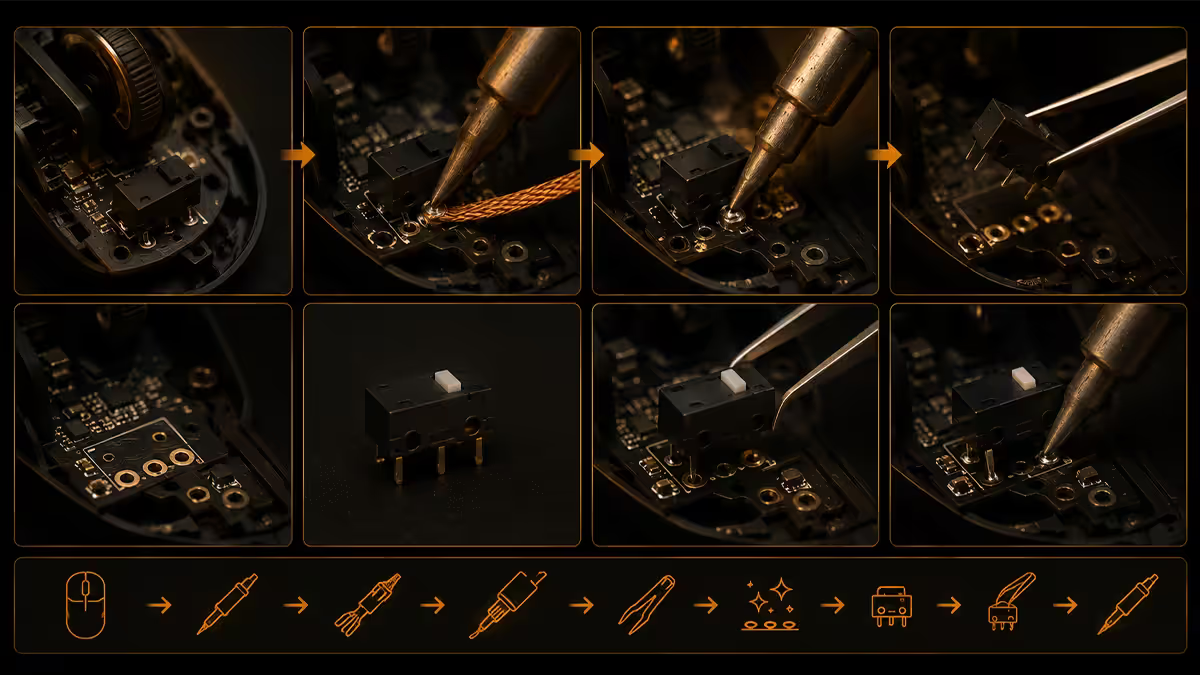
If the mouse is out of warranty and you've soldered through-hole components before, swapping the worn switch for a fresh one solves the problem permanently. The whole job takes 30-45 minutes.
What you need
- Soldering iron (25-40W with a fine tip, R200-R450 in SA from Communica or Mantech)
- Lead-free solder and either a desoldering pump or desoldering braid
- Replacement switches: Kailh GM 8.0 (80M clicks), TTC Gold (60-80M) or Omron D2FC-F-K(50M) — buy a pair
- Tri-wing or Phillips screwdriver (open the mouse — screws often hidden under foot pads)
The procedure
- Open the mouse — peel back foot pads carefully (warm with a hairdryer if stuck) and remove the screws underneath.
- Separate the top shell — note any ribbon cable connections to scroll wheel or RGB and unplug gently.
- Identify the failed switch — usually the left-click. Note the orientation of the actuator (the small plunger) — the replacement must face the same way.
- Flip the PCB. Apply desoldering pump or braid to each of the three solder pads on the back of the switch until solder is removed.
- The switch should lift out. If it sticks, alternate heat between the three pads and gently rock it — never force it (you'll lift a copper pad and brick the mouse).
- Insert the new switch through the holes with the actuator facing the same direction as the old one. Solder all three pads.
- Reassemble, plug in, test with CPSTest. Job done.
Warranty RMA — when to skip the soldering
If the mouse is under warranty, send it back. Both major brands honour double-click chatter as a defect and replace the mouse, often with a newer model than the one you sent in.
Logitech in SA — via Reflex Online
Logitech's official SA distributor is Reflex Online. Warranty is 2 years from purchase date (sometimes extended to 3 years on G-series via promotion). Go to logitech.com/en-za/support, select your product, raise an RMA ticket with proof of purchase. Expect 7-14 days turnaround. Reflex sometimes upgrades you to a newer model if the original is discontinued.
Razer in SA — via Apex Interactive
Razer's SA distributor is Apex Interactive in Johannesburg. Warranty is 2 years. Raise a ticket via support.razer.com — for SA customers, Apex handles the RMA. Turnaround is similar 7-14 days. Apex generally replaces with the same model where available.
When to just replace the mouse
Sometimes the right move is to stop fighting it. Replace the mouse outright if any of the following apply:
- The mouse is over 3 years old and out of warranty.
- You don't solder and don't want to learn for one repair.
- The double-click is affecting work, competitive gaming or creative tools (Photoshop, CAD).
- Other components are also worn — scroll wheel slipping, sensor drift, frayed cable braid, foot pads peeling.
- You bought a low-end gaming mouse and the next tier up is now within R500 of where you started.
Current SA replacement picks (June 2026):
| Use case | Pick | SA price |
|---|---|---|
| Daily driver / mixed use | Logitech G502 X Lightspeed | R1,899-R2,299 |
| FPS / competitive | Razer DeathAdder V3 Pro | R2,799-R3,299 |
| Esports lightweight | Endgame Gear OP1 8K | R2,199-R2,599 |
| Office / productivity | Logitech MX Master 3S | R2,399-R2,899 |
| Budget gaming (no chatter) | Razer Cobra (wired) or Logitech G203 | R549-R899 |
Mouse double-click is the <strong>single most common peripheral fault</strong> we see across the <strong>200,000+ custom PCs</strong> we've shipped from Centurion. Of every 100 mice that come back for the symptom, <strong>~70 are still under warranty</strong> and get RMA'd at no cost to the owner, <strong>~20 are post-warranty Logitech/Razer flagships</strong> worth a Kailh GM 8.0 swap, and <strong>~10 are budget mice</strong> where replacement makes more sense than repair. Trying software debounce first is free, takes 30 seconds, and decides the path: if 20ms fixes it, you have time. If 20ms doesn't fix it, the switch is gone.
Behind the Build · From our service bench
Preventing chatter on your next mouse
Three habits dramatically extend switch life:
Don't slam-click. Rage clicks and reflexive finger smashes in losing rounds shorten switch life faster than anything else. Steady, deliberate clicks reach 30-50% of rated life; aggressive clicks halve it.
Keep the mouse clean. Crumbs, dust and skin oil all migrate into the switch housing through the actuator gap. A quick blast with compressed air every couple of months prevents debris-induced chatter.
Pick the right switch tier. If you click intensively, buy a mouse rated for 70-100 million clicks. Optical switches (Razer Optical, Bloody LK Optical) avoid mechanical contact entirely — no oxidation, no bounce, no chatter ever. They feel slightly different but most users adjust within a day.
Key takeaways
- The switch is worn — contact bounce escapes the firmware debounce window. Software didn't cause it.
- Free first: raise debounce delay to 16-20ms in Synapse or G HUB. MouseFix tool for unbranded mice.
- Under warranty? RMA via Reflex (Logitech) or Apex Interactive (Razer) — never open it first.
- Out of warranty, comfortable soldering? Kailh GM 8.0 or TTC Gold swap, R80-R150 a pair.
- Replace if old, beat-up or budget — modern flagships use 70-100M click switches and last 5+ years.
Frequently asked questions
Why does my mouse double-click on a single press?
The mechanical switch under the left button has developed contact chatter — the metal leaf inside bounces on release and registers a second click within milliseconds. Most cheap Omron D2FC-F-7N switches start chattering between 12-30 million clicks.Can software fix mouse double-clicking?
Often yes, temporarily. Razer Synapse and Logitech G HUB let you raise the debounce delay to 16-20ms. MouseFix does the same at OS level for unbranded mice. It buys weeks or months but doesn't repair the worn switch.How do I replace a mouse switch myself?
Open the mouse, desolder the three pins of the failed switch with a soldering iron and desoldering pump or braid, fit a Kailh GM 8.0 or TTC Gold the same orientation, solder it in. Total time: 30-45 minutes for someone with prior soldering experience.Should I RMA my Razer or Logitech mouse instead?
Yes if still under warranty. Logitech and Razer both offer 2 years in SA via Reflex and Apex Interactive respectively. Don't open the mouse first — it voids the warranty.When should I just replace the mouse entirely?
When it's over 3 years old, out of warranty, you don't solder, the failure affects work or gaming, or other parts (scroll wheel, sensor, cable) are also worn out.What is switch debounce and why does it fail?
Debounce is a firmware window (usually 8ms) that ignores switch contact bounce after the first detected edge. Over time, oxidation and wear extend the bounce past the window, so the firmware sees the bounce as a second valid click.Which switches are best for replacement?
Kailh GM 8.0 (80M clicks) is the standout DIY upgrade. TTC Gold (60-80M) is a popular alternative. Avoid unbranded AliExpress switches — many are counterfeit and fail in months.How can I prevent double-click chatter from coming back?
Don't slam-click, keep the mouse clean of dust and crumbs, and choose a mouse with 70-100M click switches or optical switches (Razer Optical, Bloody LK Optical) which never chatter.
Get the Evetech app
Exclusive app-only prices, daily flash sales, and free delivery on orders over R4,000 — download the app and start saving.