Troubleshooting · Diagnostic
Why is my PC so slow, and how do I actually fix it?
“Slow PC” feels like one problem but is almost always one of six root causes. Identify the right one in 10 minutes — then the fix is usually simple, often free, and rarely requires replacement.
- Real causes
- 6
- Diagnostic time
- 10 min
- Fix without replace
- 87%
The 10-minute diagnosis
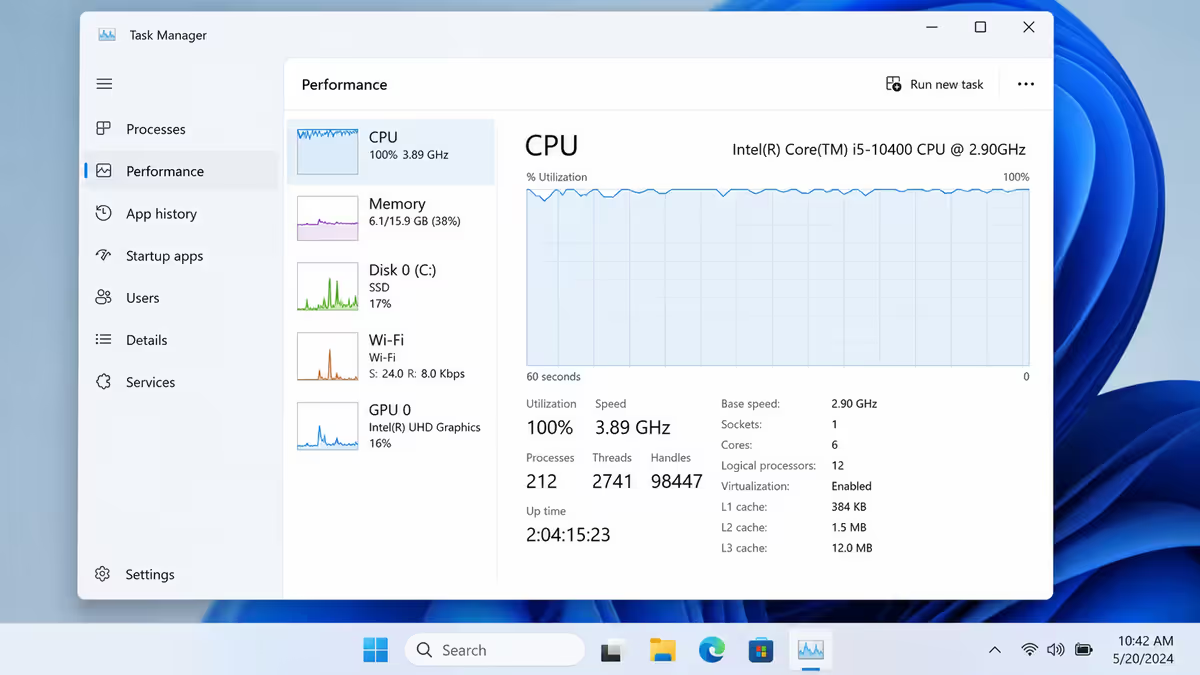
Before throwing money at parts, find out what’s actually slow. The tool you already have on Windows answers most cases.
- 1
Open Task Manager.
Ctrl + Shift + Esc, then click “Performance” tab at the top. - 2
Use the PC normally for 5 minutes.
Open a browser, launch the app or game that feels slow, do whatever triggers the slowdown. - 3
Watch the four graphs.
CPU, Memory, Disk, GPU. Whichever one pegs at 90-100% during the slowdown is your bottleneck. - 4
Match to the causes below.
Disk pegged → cause 1 (storage). CPU at 100% with no obvious process → cause 5 (malware). RAM at 95% → cause 3. And so on.
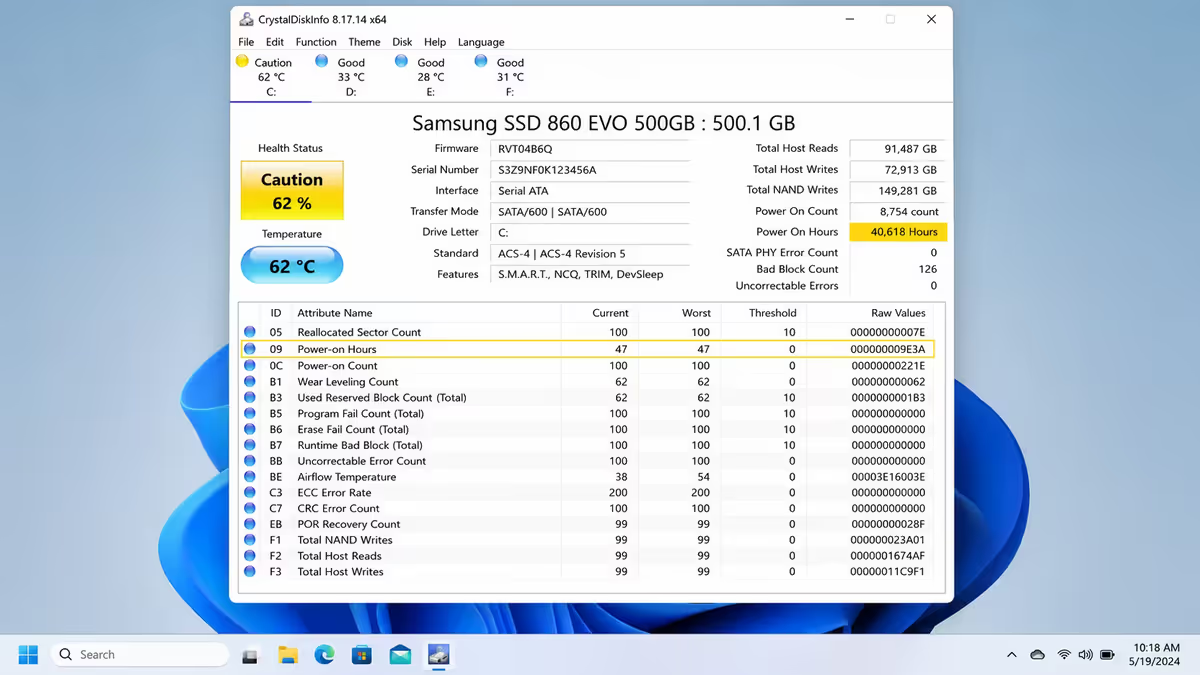
The remaining cases need deeper tools — CrystalDiskInfo for SMART health, HWiNFO64 for temperatures, Malwarebytes for scans. We’ll point to each where relevant.
Cause 1 — Storage problems
Most common
Storage is the single most common slowdown cause we see. Three sub-cases dominate:
1a. Aging mechanical HDD
If your PC has a hard drive (HDD) and not a solid-state drive (SSD), this is almost certainly the answer. HDDs slow as they age, fragment, and approach capacity. The single biggest perceived speed improvement most older PCs can get is migrating Windows from HDD to SSD — boot times drop from 60-90 seconds to 8-15 seconds, app launches feel instantaneous.
Fix: clone Windows to a new 1TB Lexar NM790 or Kingston KC3000 NVMe SSD (~R1,100). Use free tools like Macrium Reflect Free or Clonezilla. The whole migration takes 30-90 minutes.
1b. SSD over 90% full
SSDs need free space for wear-levelling and write performance. When they’re >90% full, sustained write speeds drop dramatically. Free up at least 15-20% of capacity. Move large game installs to a secondary drive if you have one.
1c. Failing or low-quality SSD
Run CrystalDiskInfo (free) — it reads SMART data from your drive. Healthy SSDs show “100%” or “Good”. Below 50% health or “Caution”/“Bad” warnings, plan a replacement. Cheap unbranded SSDs often hit wear-out at 2-3 years; tier-1 brands routinely last 7-10 years.
Cause 2 — Thermal throttling
Common
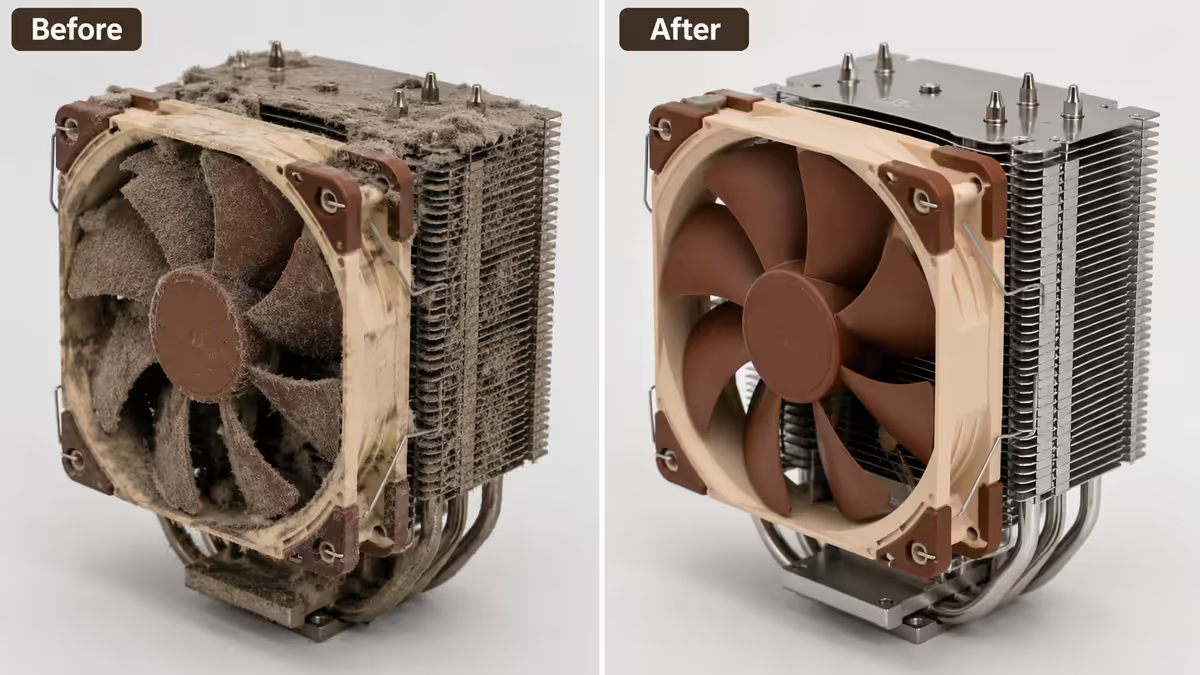
CPUs and GPUs are designed to slow themselves down rather than overheat. If your heatsinks are dust-clogged, fans are dying, or thermal paste has dried out, your chips throttle — and the whole PC feels slower than it is.
Diagnose: install HWiNFO64 (free). Run it alongside whatever slows your PC. Watch CPU package temperature and GPU temperature. Anything sustained above 85°C on CPU or 80°C on GPU means thermal throttling is happening.
Fix:
- Compressed air cleaning. R80 cans from CNA or Builders. Blow out CPU heatsink, GPU heatsink, case fans and PSU intake. 30 minutes, 90% of dust-related throttling solved.
- Replace thermal paste. If 3+ years since CPU cooler installation, R200 of Arctic MX-6 + 60 seconds of cleaning solves dried-paste cases.
- Check fan health. Listen for rattling/grinding fans — replace any failing units. Arctic P12 PWM is R150-R200 each.
- Improve case airflow. If you have solid-glass front panel, swap to a mesh-front case (R750-R1,500) for 5-15°C lower component temps.
Cause 3 — Running out of RAM
Common
When you run out of RAM, Windows swaps data to the pagefile on your SSD — which is dramatically slower than RAM. The result: stuttering, hanging, and disk usage pinned at 100% even when you’re not doing disk-heavy work.
Diagnose: Task Manager → Performance → Memory. Check “In use” during the slow moment. If it’s at or near total capacity, you need more RAM.
2026 RAM minimums:
| Use case | Practical minimum | Comfortable |
|---|---|---|
| Office / browsing | 8 GB | 16 GB |
| Gaming 1080p | 16 GB | 32 GB |
| Gaming 1440p + streaming | 32 GB | 32 GB |
| Video editing | 32 GB | 64 GB |
| 3D rendering / AI / heavy work | 64 GB | 128 GB |
Fix: verify your motherboard supports a RAM upgrade and add matching modules. For DDR5 systems, a second 16GB stick costs R1,200-R1,400 in SA.
Cause 4 — Software bloat & background processes
Common
Years of installing apps that quietly run at startup add up. By the time you have 30-50 startup programs, boot times double, RAM is half-consumed before you open anything useful, and CPU sits at 15-30% idle.
Diagnose: Task Manager → Startup apps. Sort by “Startup impact”. Anything “High” that you don’t recognise or actively need should be disabled.
Fix:
- Disable high-impact startup items you don’t need (gaming launchers, OEM bloat, old printer software, manufacturer updaters).
- Uninstall apps you don’t use. Settings → Apps → Installed apps, sort by date. Be honest about what you haven’t opened in 6 months.
- Run Disk Cleanup. Windows key + R → “cleanmgr” → select drive → Clean up system files. Often clears 5-30 GB of old updates and temp files.
- Update GPU and chipset drivers. Outdated drivers (especially after a Windows feature update) can drop performance 10-30% in specific games.
Cause 5 — Malware or cryptominer
Less common
When the CPU sits at 80-100% during desktop idle and no Task Manager process explains it, malware is the prime suspect. Cryptocurrency miners and adware are the two most common types in 2026. They hide in suspicious processes, scheduled tasks, and sometimes legitimate-looking system files.
Diagnose & fix:
- Run Malwarebytes Free (malwarebytes.com) — best general-purpose malware scanner. Full scan, 20-40 minutes.
- Run Windows Defender full scan as a second pass.
- If issues persist, run ESET Online Scanner or Kaspersky Free as a third-party second opinion.
- Disable suspicious scheduled tasks: Task Scheduler → Task Scheduler Library, sort by “Last run”. Remove anything you don’t recognise.
Cause 6 — The PC actually is too old
Sometimes
Sometimes the answer is honestly that the hardware is past its useful life. The hard replacement triggers:
- CPU 2+ generations old. A 4-5 year old i3/i5 or Ryzen 3/5 will feel slow regardless of cleanup. Modern apps assume modern CPU features.
- DDR3 or older DDR4 platform. Memory bandwidth limits everything; replacement is the only fix.
- No SSD — running Windows on HDD. While the SSD upgrade is in cause 1, severely old systems may not benefit if everything else is also outdated.
- Motherboard with no upgrade path. If you can’t upgrade CPU or RAM on the current platform, replacement is the right call.
Decision rule: if two or more of these apply, build a new mid-range PC rather than spending R5,000-R10,000 trying to extend the old one. The R30,000 mid-range build outperforms 8-year-old high-end PCs by 4-6×.
Key takeaways
- Diagnose before you buy. Task Manager → Performance tab answers most cases in 5 minutes.
- Storage is the single most common cause (41%). HDD-to-SSD upgrade is the biggest single perceived speed-up most PCs can get.
- Thermal throttling (22%) is fixed by R80 of compressed air and 30 minutes of cleaning in most cases.
- 87% of slow-PC tickets fix without hardware replacement — usually for under R500 in parts or free with software.
- Replacement is justified when 2+ aging triggers apply: old CPU, DDR3/old DDR4, no SSD, no upgrade path.
Frequently asked questions
Why is my PC suddenly so slow?
Sudden slowdown almost always traces to one of three: failing/full storage, dust-clogged cooling causing thermal throttle, or a recently installed background app. Task Manager Performance tab will show which resource is pegged.What’s the most common reason a PC slows down?
Storage. Either ageing HDD, SSD over 90% full, or cheap unbranded SSD hitting wear-out. HDD-to-SSD is the single biggest perceived speed upgrade.Does my PC slow down because of dust?
Yes — dust on heatsinks traps heat, causing CPU/GPU thermal throttling. 30-minute cleaning with compressed air restores most lost performance.How do I know if my SSD is failing?
CrystalDiskInfo (free) reads SMART data. Below 50% health or any Caution/Bad warnings: plan replacement. Files vanishing or random freezes are also signs.Will more RAM fix a slow PC?
Only if you’re actually running out. Task Manager Memory at 95%+ during normal use means yes. Below 70% usage, RAM isn’t the bottleneck — look elsewhere.Should I reinstall Windows to fix a slow PC?
As a last resort. Fixes 60-70% of non-hardware cases but takes 4+ hours. Try cleanup, scan, driver updates first.Why is my PC slow only in games?
Check GPU temp (above 85°C = throttle), GPU usage (99% = upgrade), or below 80% in demanding game = CPU bottleneck or background process. Update GPU drivers first.How long should I keep an old PC before replacing it?
5-7 years for general use. Replace when 2+ apply: CPU 2 generations behind, DDR3/old DDR4, no SSD, no upgrade path on motherboard.
Get the Evetech app
Exclusive app-only prices, daily flash sales, and free delivery on orders over R4,000 — download the app and start saving.