Day Trading PC Buying Guide
Best PC for day trading. — SA 2026. Eskom-proof. Six screens.
Day traders don't build the same PC as gamers. The CPU matters less than the monitor wall and the UPS behind it. Eskom doesn't care that you're long on Apple — protect the trade first.
- monitors typical
- 3-6
- UPS minimum
- 1.5 kVA
- tier builds
- R30-85k
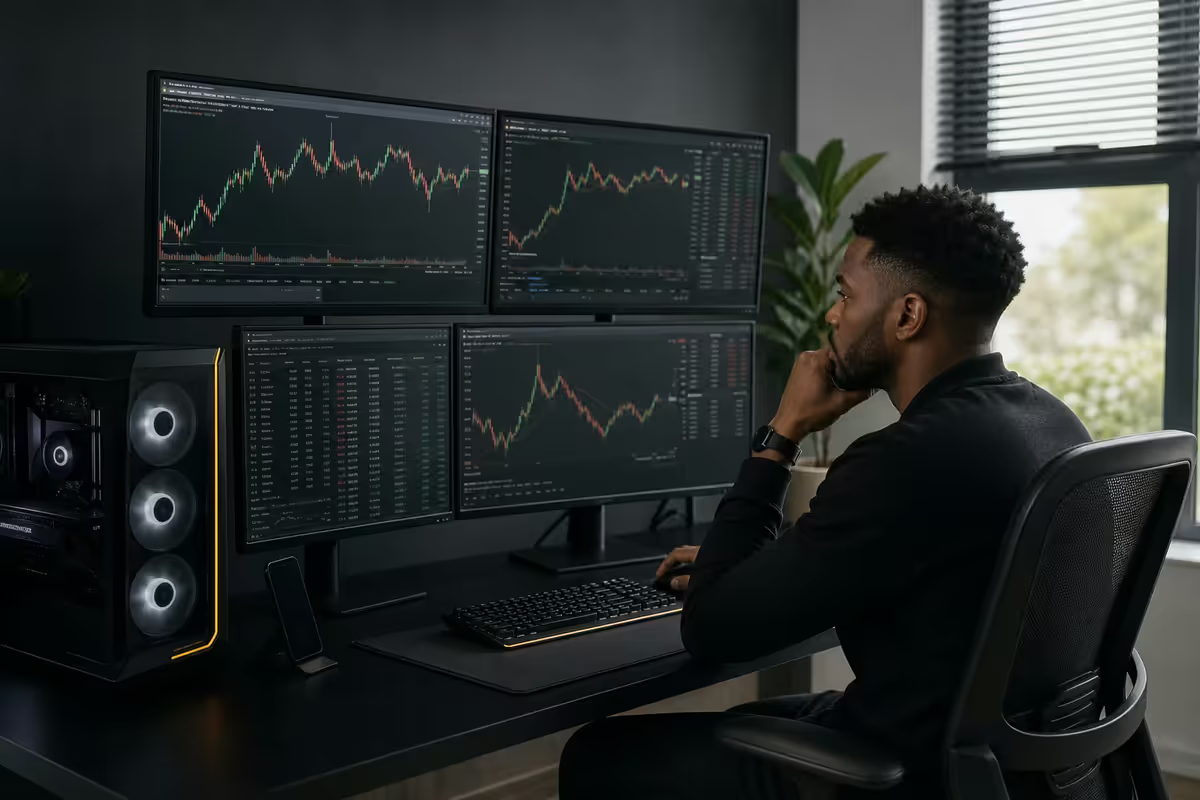
What actually matters — priority order for SA traders
Day traders coming from a gaming background usually over-spec the GPU and CPU and under-spec the things that actually protect the P&L.
The honest priority order for an SA day trading PC in 2026:
- Monitors and ergonomics. 3-6 screens, eye-level positioning, a proper chair. This is what you stare at for 6 hours a session.
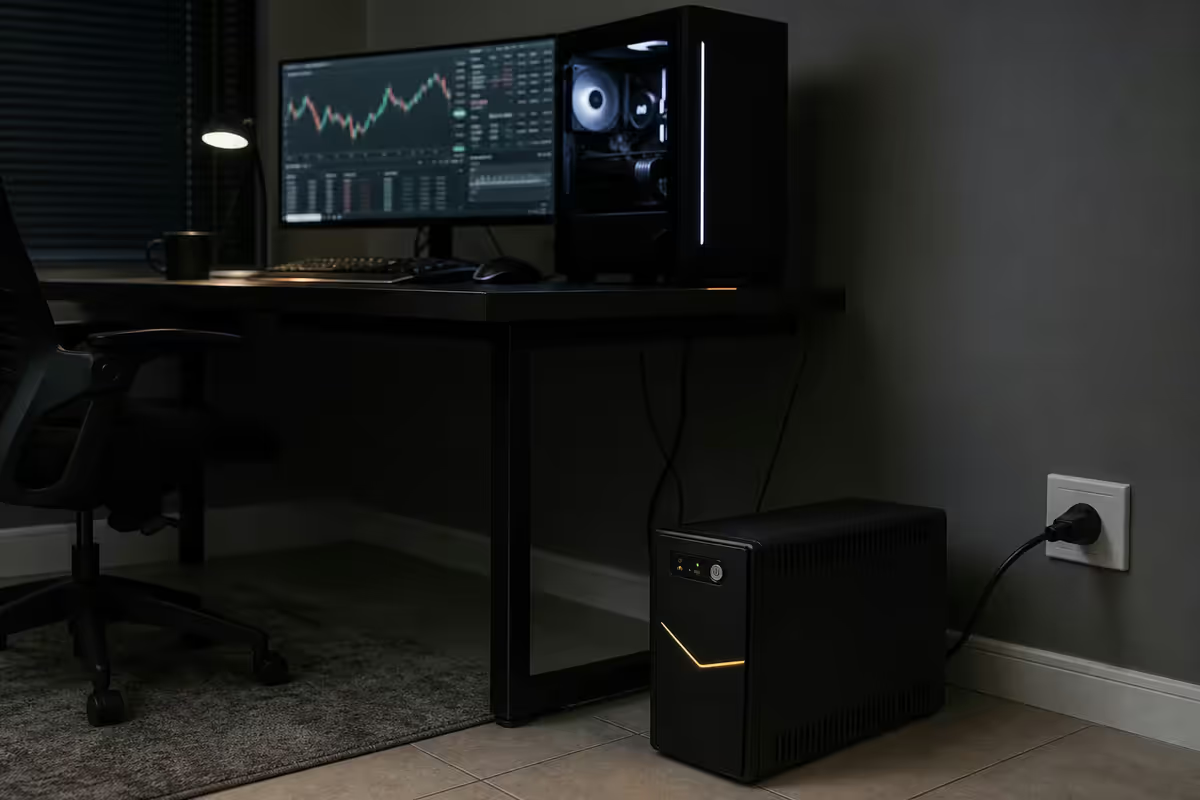
- UPS protection. Pure-sine, 1.5 kVA minimum. Eskom doesn't ask permission.
- Internet redundancy. Fibre primary + LTE/5G failover. A dropped connection mid-execution is the most expensive bug in trading.
- RAM. 32 GB for active trading. 6-8 charts plus broker terminal plus news plus chat plus browser uses every bit.
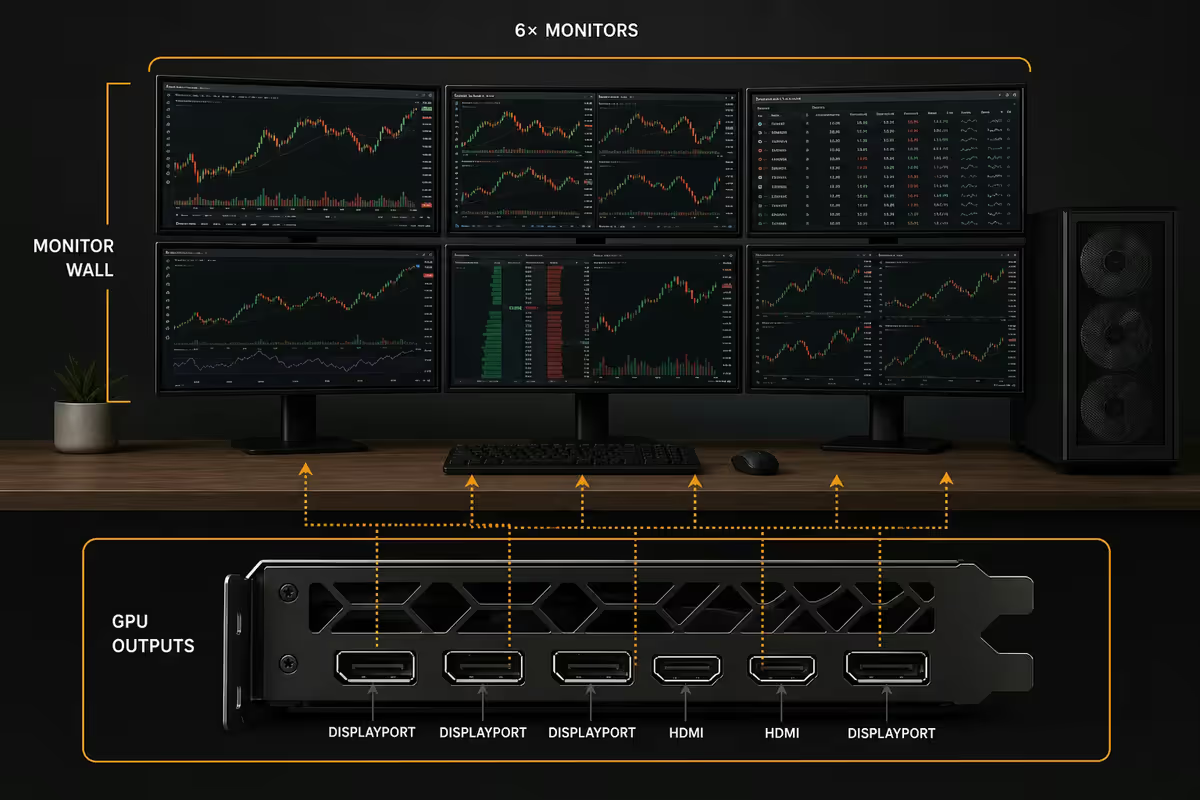
- GPU outputs. Enough DisplayPort/HDMI to drive your screen count. Performance is secondary to output count.
- CPU. Single-thread speed matters for Sierra Chart, NinjaTrader and indicator-heavy setups. Multi-core is overkill for manual trading.
- SSD. NVMe for OS and tick logs. Capacity over speed beyond the basic NVMe tier.
Monitor wall and GPU output maths
The number of monitors a typical day trader runs:
- 2 monitors — position traders and swing traders. Adequate, not optimal.
- 3 monitors — minimum for active day trading. Chart, level 2/DOM, news + watchlist.
- 4 monitors — common sweet spot. Add a P&L/trade journal screen.
- 6 monitors — power users monitoring multiple instruments. Practical ceiling.
- 8+ monitors — diminishing returns. You can't scan that many in real time.
The GPU output maths: a single RTX 4060 has 3× DisplayPort + 1× HDMI = 4 monitors directly. For 5-6 monitors, the cheapest option is a USB-C to DisplayPort multi-stream transport (MST) hub like the StarTech USB32DPES2 (R2,500-R3,500 in SA), which adds 2 more outputs to any free USB-C port.
Don't dual-GPU for monitors. Two NVIDIA cards in one PC is a driver nightmare for non-gaming workloads. A single mid-range card plus an MST hub is the simpler and more reliable answer.
| GPU | Native outputs | Day trader fit |
|---|---|---|
| RTX 4060 (R6,500) | 3× DP + 1× HDMI | 4 monitors. The standard pick. |
| RTX 4060 Ti (R8,500) | 3× DP + 1× HDMI | 4 monitors. Marginal upgrade. |
| RTX 4070 (R12,500) | 3× DP + 1× HDMI | 4 monitors. Pick if you also game. |
| RTX 4080 (R22,500) | 3× DP + 1× HDMI | 4 monitors. Overkill unless you ML/render too. |
| RTX A2000 workstation (R9,500) | 4× mini DP | 4 monitors. Driver stability premium. |
| USB-C MST hub add-on | +2 outputs | Cheapest 5th and 6th monitor path |
Trading platform system requirements
Not all trading platforms tax the system equally. Here's the realistic 2026 picture for the SA-popular options.
TradingView (web/desktop) — lightweight. Runs comfortably on a 5-year-old PC. Browser tabs are the limit. For SA traders on EasyEquities, Standard Bank Online Share Trading and JSE direct, TradingView is the go-to charting platform.
MetaTrader 5 — the SA forex standard for FXChoice, Hot Forex, Tickmill and IC Markets clients. 8 GB RAM, dual-core CPU, any modern GPU. Light on hardware.
cTrader — heavier than MT5, especially in algo backtest mode. 16 GB RAM, modern quad-core. Good for forex prop firms.
Sierra Chart — the power user's choice for futures and equities. Multiple replay sessions plus deep tick data can use 8-16 GB RAM per heavy session. Single-thread CPU speed matters more than core count. Ryzen 7 9800X3D or Core Ultra 9 285K are the right CPU picks for Sierra Chart users.
NinjaTrader — moderate. 16 GB RAM, decent CPU. Memory leaks on long sessions, so a daily restart is a known best practice.
Bloomberg Terminal (rare for retail, common for prop) — 16 GB RAM minimum, dual monitors expected, dedicated keyboard. Comes with its own SLA.
UPS for Eskom — non-negotiable in SA
In a country where load shedding can drop power without warning, an unprotected trading PC is gambling — with the wrong kind of P&L.
The three failure modes a UPS prevents:
- Mid-execution power loss. A trade in motion gets stuck in your broker's "in-flight" state. The reconciliation that follows is rarely in your favour.
- Mid-stop-update power loss. You moved a stop up to lock in profit, save didn't sync, power dies. Old stop becomes the executed stop.
- Position-monitoring blackout. Even without active trades, an unmonitored open position during a 4-hour stage 6 outage is exposure you didn't authorise.
The right UPS spec for a trading rig:
- 1.5 kVA minimum — enough headroom for PC + 4-6 monitors + router + small accessories.
- Pure sine wave output — modern PCs and active PFC power supplies can drop a modified-sine UPS load. Pure sine is mandatory.
- Recommended SA picks: Mecer M2K (R3,500-R4,500), APC Back-UPS Pro 1500 (R4,500-R6,000), Riello iDialog 1600 (R5,500-R7,500), CyberPower CP1500EPFCLCD (R4,800-R5,800).
- Expected runtime: 30-50 minutes at typical trading load. Enough to close positions cleanly and switch to a backup connection or call it a day.
Dual ISP failover — the second line of defence
SA fibre is mostly reliable, but "mostly" includes the day a cable gets cut on your street, an ISP routing change drops your peering, or a Vumatel/Openserve maintenance window lands during NFP. None of these tell you in advance.
The solution: a dual-WAN router with automatic failover. Fibre is the primary; an LTE or 5G connection is the backup. When fibre drops, the router rolls over to LTE in under 30 seconds without changing your IP from the broker's perspective.
SA-priced dual-WAN gear:
- MikroTik hEX (RB750Gr3) — R1,400-R1,800. Capable but needs configuration knowledge.
- TP-Link ER605 with TL-MR105 LTE backup — R3,500 total. Simpler config, decent failover.
- Peplink Balance 20X — R10,500-R13,500. SD-WAN class. Hot-swap failover under 1 second. The serious pick.
- Cellular backup SIM — Telkom or MTN data SIM at R250-R400/month for 50-100 GB. Cheap insurance.
For SA traders running 6-figure positions, a Peplink Balance setup pays for itself the first quarter it prevents a stuck trade.
SA tier builds — R30k / R55k / R85k
Starter — R30,000 (3 monitors, basics in place)
| Part | Pick | SA price |
|---|---|---|
| CPU | Ryzen 5 7600 | R4,800 |
| Motherboard | MSI B650M PRO-A | R3,400 |
| RAM | 32 GB DDR5-5600 | R2,400 |
| GPU | RTX 4060 8GB | R6,500 |
| SSD | 1 TB NVMe Gen4 | R1,400 |
| PSU / Case / Cooler | 650W Gold + ATX + 240mm | R3,500 |
| Monitors (3× 24" 1080p) | Samsung S33A | R4,200 |
| UPS | Mecer M2K 1.5 kVA pure sine | R3,800 |
Mid — R55,000 (4-5 monitors, dual ISP)
| Part | Pick | SA price |
|---|---|---|
| CPU | Ryzen 7 9700X | R7,200 |
| Motherboard | MSI X670E Tomahawk | R6,500 |
| RAM | 32 GB DDR5-6000 CL30 | R2,800 |
| GPU | RTX 4070 12GB | R12,500 |
| SSD | 2 TB NVMe Gen4 | R2,800 |
| PSU / Case / Cooler | 850W Gold + airflow ATX + 280mm AIO | R5,500 |
| Monitors (4× 27" 1440p IPS) | Samsung S6 or AOC Q27P3CV | R9,500 |
| UPS | APC Back-UPS Pro 1500 | R5,200 |
| Dual-WAN router + LTE | TP-Link ER605 + LTE | R3,500 |
Pro — R85,000+ (6 monitors, full redundancy)
| Part | Pick | SA price |
|---|---|---|
| CPU | Ryzen 9 9800X3D or Core Ultra 9 285K | R12,500 |
| Motherboard | ASUS ROG Strix X870E | R10,500 |
| RAM | 64 GB DDR5-6400 CL30 | R5,800 |
| GPU | RTX 4080 SUPER 16GB + USB-C MST hub | R26,000 |
| SSD | 4 TB NVMe Gen5 | R6,200 |
| PSU / Case / Cooler | 1000W Platinum + premium case + 360mm AIO | R8,500 |
| Monitors (6× 27" 1440p IPS) | Dell U2723QE x6 or Samsung S6 x6 | R28,000-R72,000 |
| UPS | Riello iDialog 2200 VA | R7,800 |
| Dual-WAN router | Peplink Balance 20X | R12,500 |
| Ergonomic chair | Herman Miller Aeron or local Ergohuman | R12,000-R28,000 |
Common day-trading PC mistakes
Buying a gaming PC and calling it a trading PC. Gaming PCs over-spec the GPU and skimp on the things traders actually need: UPS, ISP failover, ergonomics. Repurposing a gamer's rig leaves the trader exposed at the points that matter.
Skipping the UPS to save R4,000. Already covered — one missed stop-loss during stage 6 costs more than the UPS pays for itself ten times over.
Going dual GPU for "more monitor outputs." Driver conflicts and Windows display weirdness make this a permanent low-level annoyance. Single GPU + MST hub is cheaper, simpler, more reliable.
Buying 8 monitors before you can use 4. If you're new to active trading, start with 3-4. Add screens when your scanning capacity demands them — not the other way round.
Believing a faster PC reduces broker latency. It does not. Latency is your ISP routing + broker hop + exchange location. For manual trading the difference is irrelevant; for algo trading the only meaningful answer is a colocated VPS at the broker's data centre.
Key takeaways
- Priority order: monitors → UPS → ISP redundancy → RAM → GPU outputs → CPU. Not the gamer order.
- Single mid-range GPU + MST hub drives 5-6 monitors. Don't dual-GPU.
- 32 GB RAM for active trading. Sierra Chart power users want Ryzen 9 / Core Ultra 9 for single-thread.
- 1.5 kVA pure-sine UPS is mandatory in SA. Protect monitors, router and modem — not just the PC.
- SA tiers: R30k starter (3 screens), R55k mid (4-5 screens + dual ISP), R85k+ pro (6 screens, full redundancy).
Frequently asked questions
How many monitors do I need for day trading?
3 is the minimum (chart, level 2, news/watchlist). 4-6 is the sweet spot. Beyond 6 you context-switch too much.What's the cheapest way to drive multiple trading monitors?
Single RTX 4060 (3× DP + 1× HDMI = 4 monitors) plus a USB-C MST hub for 5th and 6th. Avoid dual GPUs.How much RAM does a day trading PC need?
32 GB is the sweet spot. 64 GB only matters for local algo backtesting or multiple VMs.Why does a day trader need a UPS?
Eskom outage during a trade can stick an execution, freeze a stop update, or leave you blind on an open position. A 1.5 kVA pure-sine UPS holds the rig 30-50 minutes.Do I need dual ISP for day trading in SA?
For serious day trading, yes. Fibre + LTE with auto failover via TP-Link ER605, MikroTik or Peplink. R600-R1,200/month combined.What's the system requirement for Sierra Chart vs TradingView vs MT5?
TradingView and MT5 are light. Sierra Chart with many sessions is heavier — 8-16 GB per session and fast single-thread CPU. Ryzen 7 9800X3D is the right pick for Sierra power users.What's the budget for a complete day trading PC setup in SA?
Starter R30,000 (3 screens, basics), Mid R55,000 (4-5 screens, dual ISP), Pro R85,000+ (6 screens, full redundancy). Monitors and ergonomics dominate the cost.Does my PC affect my JSE / forex execution latency?
For manual trading, no — latency is dominated by ISP, broker and exchange location. For algo trading, a colocated VPS at the broker's data centre is the answer, not a stronger home PC.
Get the Evetech app
Exclusive app-only prices, daily flash sales, and free delivery on orders over R4,000 — download the app and start saving.