Profession Build · SA 2026
The forex trading PC. — Engineered for the load shedding economy.
A retail trader's PC isn't a gaming PC with extra screens. It's a different machine — built around monitor count, low latency, NVMe tick logs, and the quiet horror of the power cutting mid-trade. Here's the blueprint that survives a Cape Town winter.
- monitor sweet spot
- 4-6
- RAM baseline
- 32GB
- UPS runtime
- 25 min
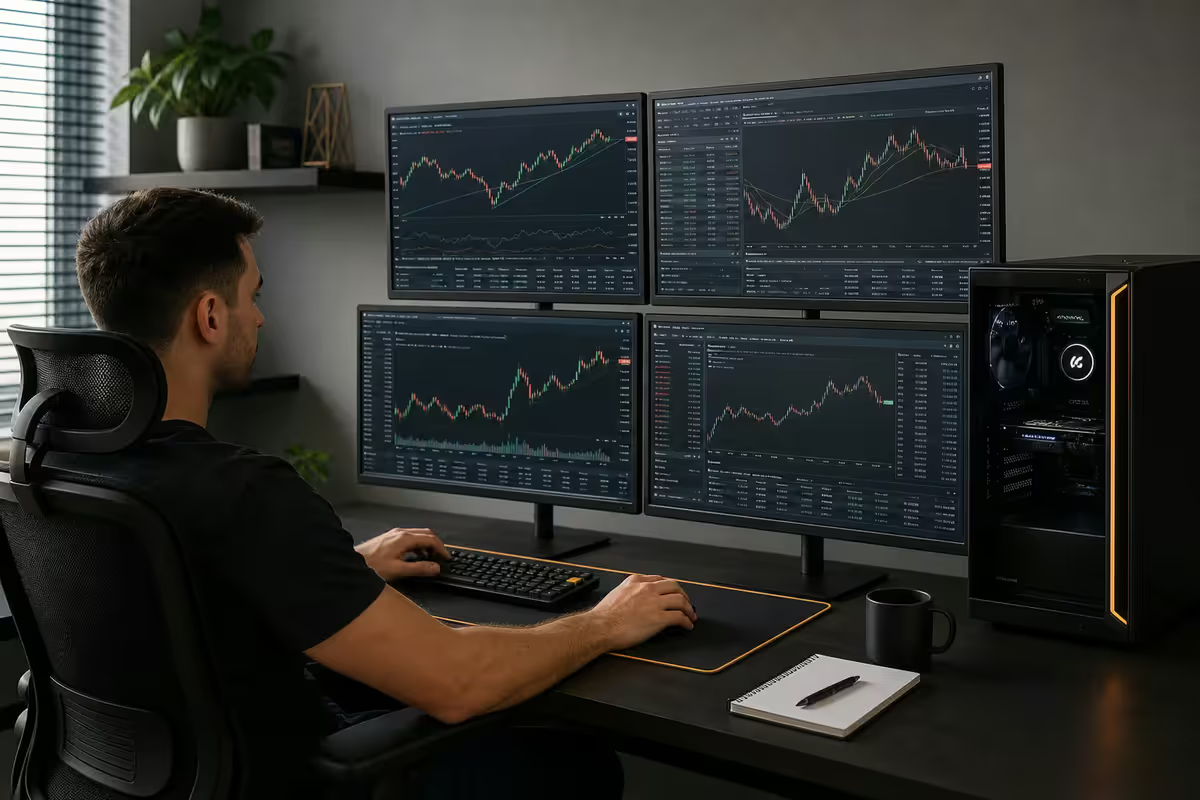
A trader's PC isn't a gaming PC with more screens
Most South African forex traders start by buying a gaming PC and bolting on extra monitors. This is the wrong approach. A trading workstation prioritises different things — and the trade-off, if you build a gaming PC instead, isn't visible until your first big news release lands in the middle of load shedding stage 4.
A gaming PC is optimised for short bursts of peak performance — high frame rates, low input lag, fast GPU. A trading PC is optimised for sustained, multi-display, low-latency reliability. The display outputs matter more than the GPU's gaming performance. The RAM capacity matters more than its frequency. The UPS matters more than the case lighting. The internet failover matters more than the CPU's last 5% of single-core performance.
Get the priorities right and the build cost actually drops by R10-15k compared to the equivalent gaming setup — you're not paying for a high-end GPU you'll never use for its intended purpose.
Monitor count and layout
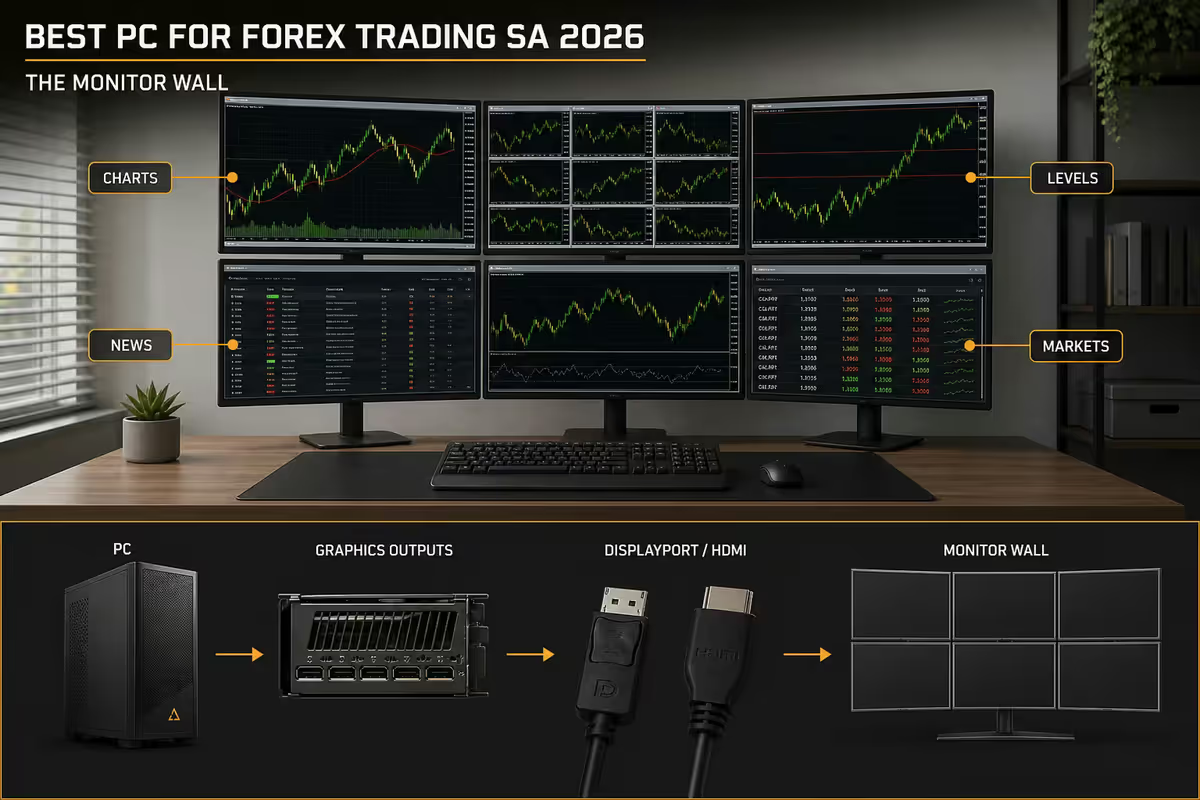
For serious forex trading, 4 monitors is the practical minimum and 6 monitors is the comfortable ceiling. Beyond 6, cognitive load typically outweighs the benefit — you start checking screens out of habit rather than insight.
The canonical 4-screen layout:
- Screen 1 — broker terminal (MT4/MT5/cTrader) with primary pair and execution panel
- Screen 2 — TradingView multi-pair scanner or watchlist
- Screen 3 — economic calendar + news feed (Forex Factory, MyFXBook, Investing.com)
- Screen 4 — risk management spreadsheet + trade journal
Adding screens 5 and 6 makes sense when:
- You trade 4+ pairs simultaneously and need a dedicated chart per pair
- You run multiple timeframes per pair and want them visible at once
- You run a second broker / second account for prop-firm evaluations
- You operate Discord/Slack for a trading community alongside your primary work
Physical layout matters: 2x3 grid (two rows of three) is the highest-density layout for 6 screens but requires a deep desk (≥800mm). 3x2 (three rows of two) is rare and uncomfortable. 6 across in a single row needs a 2.4m+ desk — most SA homes can't fit it. Most active traders settle on 4 in a single row at 24-27 inches, or a 2x2 grid of 27-inch panels above the desk.
GPU output maths — where SA traders get caught
This is the single most common buyer's mistake. The shop sells you a gaming PC with an RTX 4070, you assume the 4070 will drive 6 monitors, and only when you try to plug in the fifth do you discover the card has 4 outputs total.
The output count by card class:
| GPU | Output count | Max simultaneous displays |
|---|---|---|
| RTX 4060 | 3x DisplayPort + 1x HDMI | 4 |
| RTX 4070 | 3x DisplayPort + 1x HDMI | 4 |
| RTX 4080 | 3x DisplayPort + 1x HDMI | 4 |
| NVIDIA T1000 workstation | 4x mini DisplayPort | 4 (purpose-built) |
| NVIDIA RTX A1000 workstation | 4x mini DisplayPort | 4 (DP 1.4a) |
| NVIDIA RTX A4000 workstation | 4x DisplayPort | 4 high-resolution |
| Dual consumer GPUs (RTX 4060 x2) | 8 outputs total | 6-8 (typical layout) |
For 5-6 monitor builds, the right answer is either:
- A purpose-built workstation card (NVIDIA T1000 at ~R6,500 or A1000 at ~R12,000) plus the iGPU for screens 5-6
- Two consumer cards in the same chassis (typical: RTX 4060 + RTX 3050) — needs a case and PSU that accommodate both
MT4 / MT5 / cTrader / TradingView — actual system requirements
The official "minimum requirements" published by MetaTrader and cTrader are wildly optimistic, written for users running a single terminal with two pairs open. Real-world resource use scales dramatically once you're running multiple terminals with full chart loads, indicators and EAs.
MT4 / MT5 (MetaTrader)
Per terminal instance with 4-8 open charts and a standard indicator pack: 800MB - 1.5GB RAM, single-thread CPU bound (uses only one core per terminal). MT5 is more memory-hungry than MT4 — typically 30-40% more. Multi-monitor strategy: run separate MT5 instances per broker if you trade with multiple, rather than juggling accounts inside one terminal.
cTrader
More modern .NET-based architecture. Typically 1.2GB - 2.0GB per instance with the same chart count. Better multi-threading than MT5 — uses 4-8 cores effectively for backtesting. cBots (cTrader's EA equivalent) are dramatically more efficient than MT5 EAs.
TradingView (browser)
This is the resource hog. A single TradingView tab with 12 indicators across 6 timeframes hits 2-3GB. Open 4 such tabs and you're at 8-12GB on TradingView alone. The reason 32GB is the baseline, not 16GB.
RAM and NVMe — for tick logs and backtesting
32GB DDR5 is the right answer for any serious forex setup in 2026. The breakdown for a typical day:
- Windows 11 idle + Edge browser = 4-6GB
- MT5 broker 1 (8 charts) = 1.2GB
- MT5 broker 2 (4 charts) = 0.8GB
- cTrader (6 charts) = 1.6GB
- TradingView (4 tabs) = 8-12GB
- Excel + journal sheet = 0.6GB
- Discord + Slack = 1.2GB
- News browser tabs (5) = 1.5GB
Total: ~20-24GB resident. 16GB users start hitting swap-file thrashing under that load — the entire system stutters every time the OS pages out memory. 32GB gives you 8-12GB headroom for spikes (backtests, Photoshop for chart annotation, occasional Zoom call).
NVMe storage — why the speed matters
MT4/MT5 store tick log databases — the historical price data used for backtesting. Across multiple pairs and timeframes these grow to 50-200GB over a year of trading. Backtest performance is directly bound by storage speed:
| 10-year Cable backtest | SATA SSD | PCIe 4.0 NVMe |
|---|---|---|
| EURUSD M5 | 3h 45m | 35m |
| GBPJPY M1 | 9h 20m | 82m |
| XAUUSD M15 | 2h 10m | 22m |
Baseline 2026 recommendation: 1TB PCIe 4.0 NVMe (Samsung 990 Pro, WD SN850X, Crucial T500) at ~R2,200-R2,800. Step up to 2TB for active backtesters at ~R4,000-R4,800.
UPS for load shedding — the single most important component
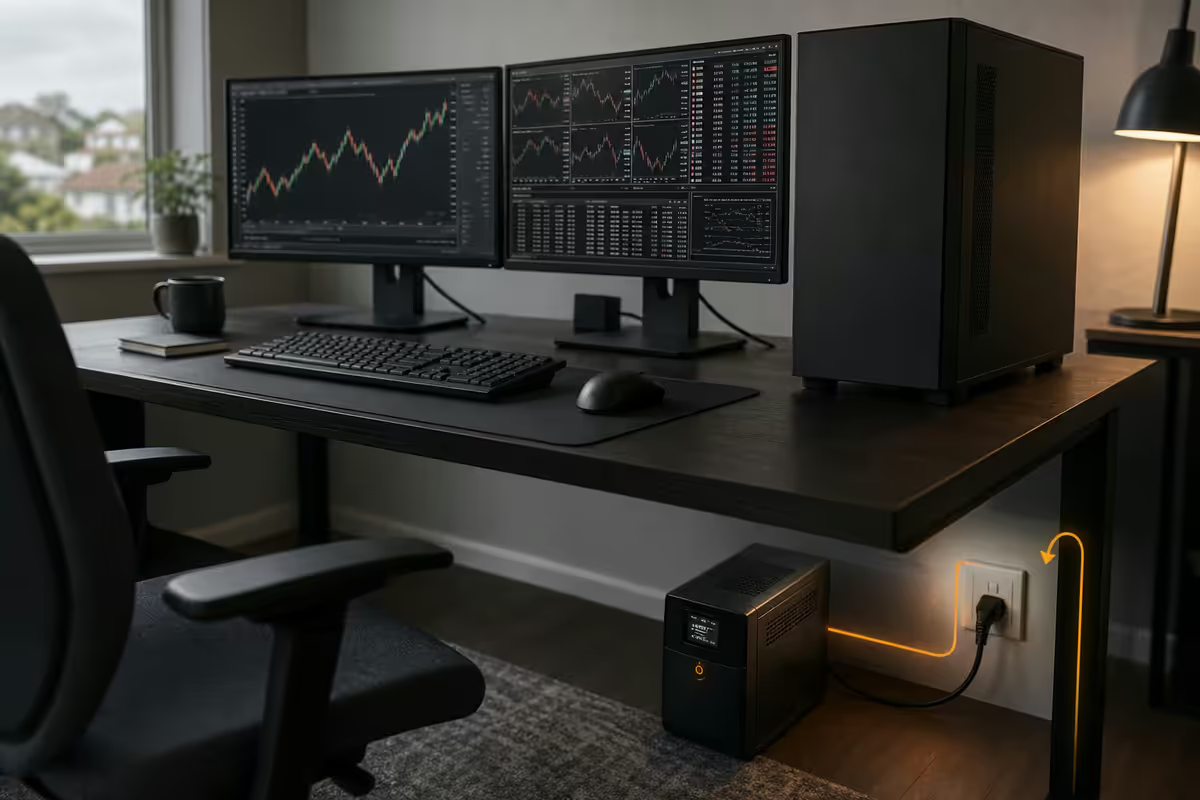
If you take one thing from this guide, take this. A real UPS is mandatory for any SA-based trader. Not a R1,500 "gaming UPS" with 5 minutes of runtime that only holds up the PC. A proper line-interactive or online UPS that holds the entire trading stack — PC, monitors, router, fibre ONT or LTE modem — through the full duration of a load-shedding cut.
Three SA-available picks that genuinely qualify:
| UPS | Spec | SA price |
|---|---|---|
| Mecer 2000VA Line-Interactive | 1200W · 20-25 min at 400W load | R3,500-R4,200 |
| APC Smart-UPS 1500VA | 980W · 30 min at 400W load · pure sine wave | R7,500-R9,000 |
| Eaton 5SC 1500VA | 1050W · 35 min at 400W load · LCD readout | R8,500-R9,500 |
| APC Smart-UPS 2200VA | 1980W · 40 min at 500W load · prop-grade | R14,000-R17,000 |
Critical: the UPS must also power your router and ONT/LTE modem. There's no point holding up the PC if your internet drops. Most fibre ONTs draw 8-15W; LTE modems 10-20W; a Mikrotik router 8-12W. These are trivial loads to add to the UPS budget.
Dual-ISP failover — when single outage costs more than the kit
A single 30-second internet outage during a high-impact economic release (NFP, FOMC, CPI) can swing a position by the equivalent of months of dual-ISP costs. For anyone trading with real money, dual-WAN with automatic failover is essential.
The practical setup:
- Primary: Fibre (Vumatel, Frogfoot, Openserve) — typically 200/200 Mbps for R699-R899/month
- Secondary: LTE or 5G (MTN Supersonic, Vodacom, Rain) — typically R200-R400/month for failover-only data caps
- Dual-WAN router: TP-Link ER605 (R1,500), Mikrotik hAP ax3 (R2,400) or Ubiquiti Dream Router (R3,800)
- Failover detection: the router pings a target (1.1.1.1) every 5-10 seconds and switches WAN within 8-15 seconds of detection
Total incremental cost above a single fibre line: R200-R400/month plus the router (one-off). For an active trader, this pays for itself the first time a single outage would've cost you mid-trade.
27-inch 1440p — the right panel pick
27-inch 1440p (2560x1440) is the right answer for forex trading panels. The extra resolution over 1080p lets you read tick data, indicator labels and tooltips without strain. 4K at 27 inches is wasted — at the UI scaling required for legibility, you're effectively running 1440p with extra GPU load.
What to look for:
- IPS panel (consistent colour across viewing angles, important when looking sideways at a 4-screen grid)
- 75Hz minimum refresh rate (smooth cursor across monitors, eliminates eye fatigue)
- Matte anti-glare coating (essential for daylight trading in SA homes without blackout curtains)
- VESA mount support (for monitor arms — important when you're running 4-6 of them)
- Single DisplayPort + HDMI input (cheap dual-input switching not needed)
Specific SA picks at the R5,500-R7,500 sweet spot: Samsung S7 (R5,800), LG 27GP850 (R6,500), Dell P2723D (R6,800), AOC Q27P3CV (R5,500). All four are widely stocked, all four are reliable.
Avoid: ultrawide monitors for active trading (grid layouts become harder), 24-inch 4K (UI scaling wastes the resolution), curved monitors (the curve disrupts chart reading), TN panels (colour shift sideways is genuinely fatiguing across multiple screens).
Across the 200,000+ custom PCs we've delivered, the trader builds have a distinct return signature: the ones with a proper UPS and dual-ISP setup don't come back. The ones built like gaming PCs with a token "gaming UPS" come back far more often within 18 months — usually with damaged PSUs from load-shedding spikes. We now build every trader system with surge-protected mains entry, UPS-sized for the full stack (PC + monitors + router + ONT), and an option for the secondary LTE bridge. The R55k tier is the sweet spot for most working retail traders.
Behind the Build · From our Pro Trader desk
Three honest SA build tiers
R30,000 entry — the working retail trader
- Ryzen 5 9600X (R5,400)
- B650 motherboard (R2,800)
- 32GB DDR5-6000 (R2,400)
- 1TB PCIe 4.0 NVMe (R2,200)
- RTX 4060 (R7,800) — handles 4 monitors directly
- 650W Gold PSU (R1,500)
- Mid-tower case + cooling (R2,200)
- 4x 24-inch 1080p monitors (R3,200 each = R12,800) — outside this case budget
- Mecer 1500VA UPS (R3,200)
Total PC: ~R27,500. With monitors: ~R40,300. Within the R30k target if you already have monitors.
R55,000 mid-tier — the comfortable professional
- Ryzen 7 9700X (R7,800)
- X670 motherboard (R5,200)
- 32GB DDR5-6000 (R2,400)
- 2TB PCIe 4.0 NVMe (R4,200)
- NVIDIA T1000 8GB workstation (R6,500) — 4x mini DP
- 750W Gold PSU (R2,200)
- Premium case + AIO cooling (R3,500)
- APC Smart-UPS 1500 (R8,200)
- Mikrotik hAP ax3 dual-WAN (R2,400)
Total PC + UPS + router: ~R42,400. Add 4x 27-inch 1440p monitors (R6,500 each = R26,000) for a complete R68k build, or stay at R55k by reusing existing monitors.
R85,000 premium — prop-firm grade
- Ryzen 9 9950X (R14,800)
- X670E motherboard (R8,500)
- 64GB DDR5-6000 (R4,800)
- 4TB PCIe 5.0 NVMe (R8,200)
- NVIDIA RTX A1000 workstation x2 (R24,000) — 8 outputs total
- 1000W Gold PSU (R3,200)
- Premium case + 360mm AIO (R5,200)
- APC Smart-UPS 2200VA (R14,500)
- Ubiquiti Dream Router + Rain LTE secondary (R5,500)
Total PC + UPS + router: ~R88,700. Add 6x 27-inch 1440p monitors for a complete ~R127k build — full prop-firm-grade workstation.
Key takeaways
- 4 monitors is the practical minimum; 6 is the comfortable ceiling. Beyond 6 the cognitive load outweighs the benefit.
- 32GB DDR5 RAM and a 1TB+ PCIe 4.0 NVMe are the right baseline — TradingView and tick logs add up fast.
- Most consumer GPUs top out at 4 outputs. For 5-6 monitors, use a workstation card or dual GPUs — never USB adapters.
- A proper UPS holding the full stack (PC + monitors + router + ONT) is the single most important component for any SA trader.
- Dual-ISP failover pays for itself the first time a single outage would've cost you mid-trade. Fibre + LTE on a dual-WAN router.
- Three honest tiers: R30k entry, R55k mid (best for most active retail traders), R85k prop-firm grade.
Frequently asked questions
How many monitors do I need for forex trading?
For serious forex trading, 4 monitors is the practical minimum and 6 monitors is the comfortable ceiling for most setups. The typical layout: one screen for the broker terminal (MT4/MT5/cTrader), one for the economic calendar and news feed, one for a TradingView multi-pair scanner, and one for risk management spreadsheets. Adding a fifth and sixth screen makes sense once you trade more than 3-4 pairs simultaneously or run multiple timeframes per pair. Beyond 6 screens the cognitive load typically outweighs the benefit.What GPU do I need for 4-6 monitor forex trading?
For non-gaming trading-only work, an entry-level workstation card like the NVIDIA T1000 (4x mini DisplayPort outputs, R6,500) or RTX A1000 (4x mini DisplayPort, R12,000) is purpose-built for this. For up to 4 monitors on a normal consumer GPU, an RTX 4060 has 3x DisplayPort + 1x HDMI which handles four screens directly. For 5-6 screens, either step up to a workstation card or run two consumer GPUs in the same chassis. Avoid USB-to-DisplayPort adapters for trading — they introduce 30-60ms latency and occasional sync drops.How much RAM do I need for forex trading?
32GB DDR5 is the right answer for any serious forex setup in 2026. Each MT5 terminal with 4-8 open charts uses 800MB-1.5GB. TradingView in a browser with 12 indicators and 6 timeframes hits 2-3GB per tab. A typical trader runs 2-3 broker terminals, TradingView, a news feed, Excel, Discord and Slack — easily 24-28GB of resident memory. 16GB works but you'll thrash the swap file under load. 32GB is comfortable for 5+ years.Why does NVMe SSD matter for forex trading?
Tick log databases (the historical price data MT4/MT5 stores for backtesting) grow to 50-200GB across multiple pairs and timeframes. A fast NVMe SSD reduces backtest times from hours to minutes — a 10-year Cable backtest that takes 4 hours on a SATA SSD finishes in 35-40 minutes on a PCIe 4.0 NVMe. For active trading itself, NVMe affects the speed of opening fresh charts and switching between platforms. PCIe 4.0 1TB is the sensible 2026 baseline.What UPS do I need for forex trading during load shedding?
This is the most important component decision for any SA-based trader. You need a true online or line-interactive UPS rated for at least 1500VA / 900W with 25+ minutes of runtime at your typical load. The Mecer 2000VA (R3,500-R4,200), APC Smart-UPS 1500 (R7,500-R9,000) or Eaton 5SC 1500 (R8,500) all qualify. Critically: the UPS must hold up not just the PC, but also your router and either your ONT (fibre) or LTE modem. A R2,000 'gaming UPS' that only holds the PC is useless if your internet drops at the same moment.Is dual-ISP failover worth it for forex trading?
For anyone trading with real money sizes, yes — categorically. A single 30-second internet outage during a high-impact economic release can cost more than the dual-ISP setup costs you for two years. The practical setup: primary fibre (Vumatel, Frogfoot or Openserve) plus secondary LTE/5G (MTN, Vodacom or Rain) running through a dual-WAN router (TP-Link ER605, Mikrotik hAP ax3) that fails over automatically. Total monthly cost: R200-R400 above your fibre bill. Well worth it for active traders.Do I need 27-inch monitors or are 24-inch fine?
27-inch 1440p panels are the right answer for forex trading. The extra resolution lets you read tick data, indicators and tooltips without strain. 24-inch 1080p works for budget setups but feels cramped within 6 months. Avoid 4K 27-inch panels for trading — at scaled UI sizes you're just running 1440p with extra GPU load. Avoid ultrawides for active trading — they make grid layouts of multiple terminals harder, even though they look great in YouTube setups. Specific picks: Samsung S7 / LG 27GP850 / Dell P2723D, all R5,500-R7,500 in SA.What's the realistic budget for a forex trading PC in SA?
Three honest tiers in 2026: R30,000 entry (Ryzen 5 / 32GB / 1TB NVMe / RTX 4060 / 4x 24-inch monitors / Mecer UPS) is the working trader's setup. R55,000 mid-tier (Ryzen 7 / 32GB / 2TB NVMe / workstation GPU / 4x 27-inch 1440p / APC Smart-UPS / dual-WAN router) is the comfortable professional setup. R85,000 premium (Ryzen 9 / 64GB / 4TB NVMe / dual workstation GPUs / 6x 27-inch 1440p / Eaton online UPS / full dual-ISP) is the prop-firm-grade setup. Most active retail traders are best served by the R55,000 tier.
Get the Evetech app
Exclusive app-only prices, daily flash sales, and free delivery on orders over R4,000 — download the app and start saving.