Profession · FL Studio Producer PC Guide
Best PC for FL Studio.
FL Studio is famously gentle on hardware — until your project hits 60 channels of Serum, Kontakt and Splice cache. Here's how to build a producer PC that stays quiet, stays in time, and stays under budget in 2026 South Africa.
- round-trip latency target
- < 10ms
- sweet-spot RAM
- 32 GB
- SA build tiers
- R20k–R65k
DAW priority — low latency beats raw GHz
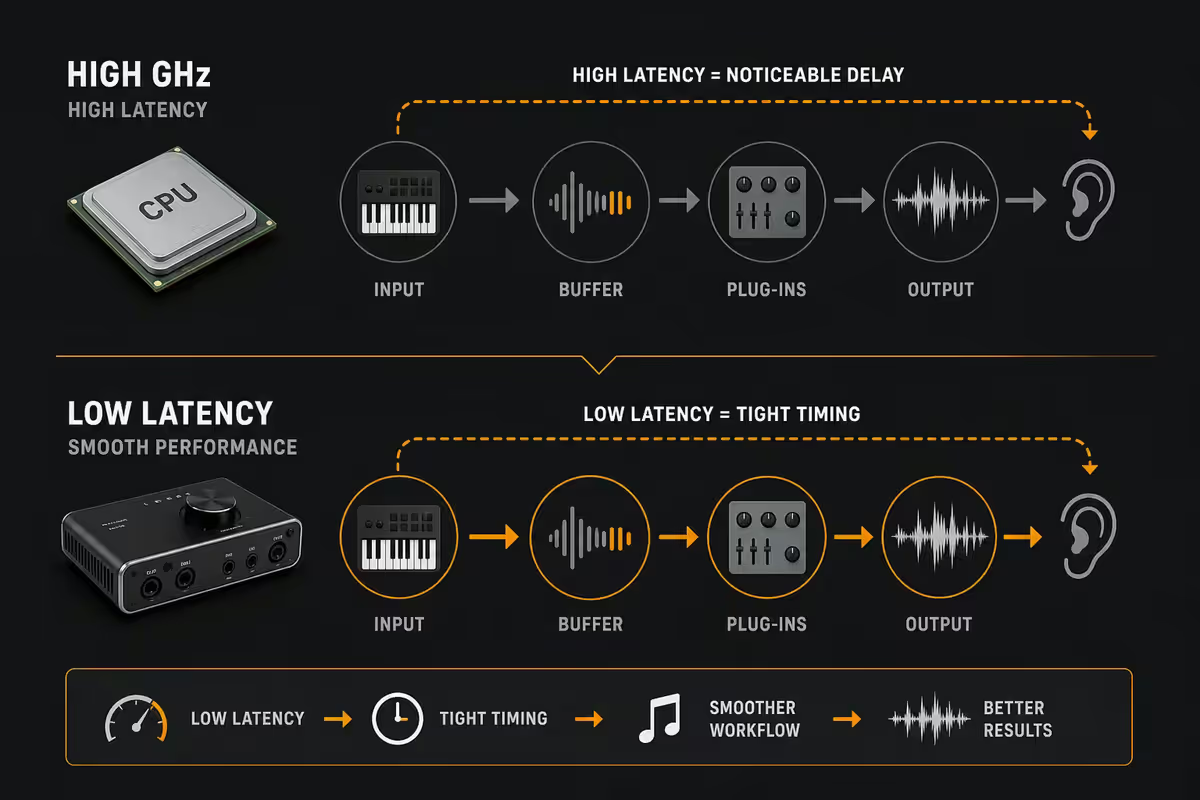
A gaming PC and a production PC are scored against different stopwatches. A gamer cares about average frame rate over a 5-minute match; a producer cares whether the kick lands exactly when their finger does. Those are different problems.
The single number that defines a good FL Studio machine is round-trip latency — the time between hitting a pad on your MIDI controller and hearing the sound. Sub-10ms feels invisible. 15–20ms feels mushy. Above 25ms, you stop playing in time at all. That number is decided more by your audio interface and ASIO driver than by your CPU's boost clock.
Consistent timing also matters more than peak speed. A CPU that holds 4.7 GHz steady is more useful to a DAW than one that boosts to 5.6 GHz for 30 seconds and then thermal-throttles back to 4.2 GHz. Cool, quiet, sustained performance is the goal.
| Latency at the buffer | What it feels like | Workflow impact |
|---|---|---|
| Below 5ms | Invisible — like an acoustic instrument | Tracking vocals, finger drumming, live MIDI |
| 5–10ms | Excellent — pro studio territory | All FL Studio workflows |
| 10–20ms | Noticeable on percussion, tolerable for melody | Mixing-only sessions are fine |
| 20–30ms | Mushy — you stop playing in time | Onboard audio + FL ASIO default |
| Above 30ms | Unusable for performance | Don't ship anything from this setup |
FL Studio 21 / 22 — what the engine actually wants
FL Studio's audio engine was rebuilt for native multi-thread scheduling in version 21 and tightened further in 22. In practice this means each mixer channel and plugin chain runs on its own thread — so 8 cores really do show up as 8 cores in CPU-meter readings.
Two consequences for hardware choice:
- Thread count matters for project size. An 8-core / 16-thread CPU like the Ryzen 7 9700X comfortably handles 40–60 mixer channels with active plugin chains. A 6-core part will start to clip at the 30-channel mark on dense projects.
- Single-thread performance still matters for dense channels. A single mixer track stacked with 7 plugins (Serum 2, OTT, Pro-Q 4, Soothe 2, ValhallaVintageVerb, Pro-L 2, FabFilter Pro-MB) runs on one thread. If that thread can't keep up, your kick-drum bus pops — even when the rest of the system is idle.
Image-Line's own engine benchmarks line up with this: linear gains across cores up to about 8–12 threads, then diminishing returns. Past that, single-thread speed is what unlocks the heaviest channels.
ASIO and the audio interface question
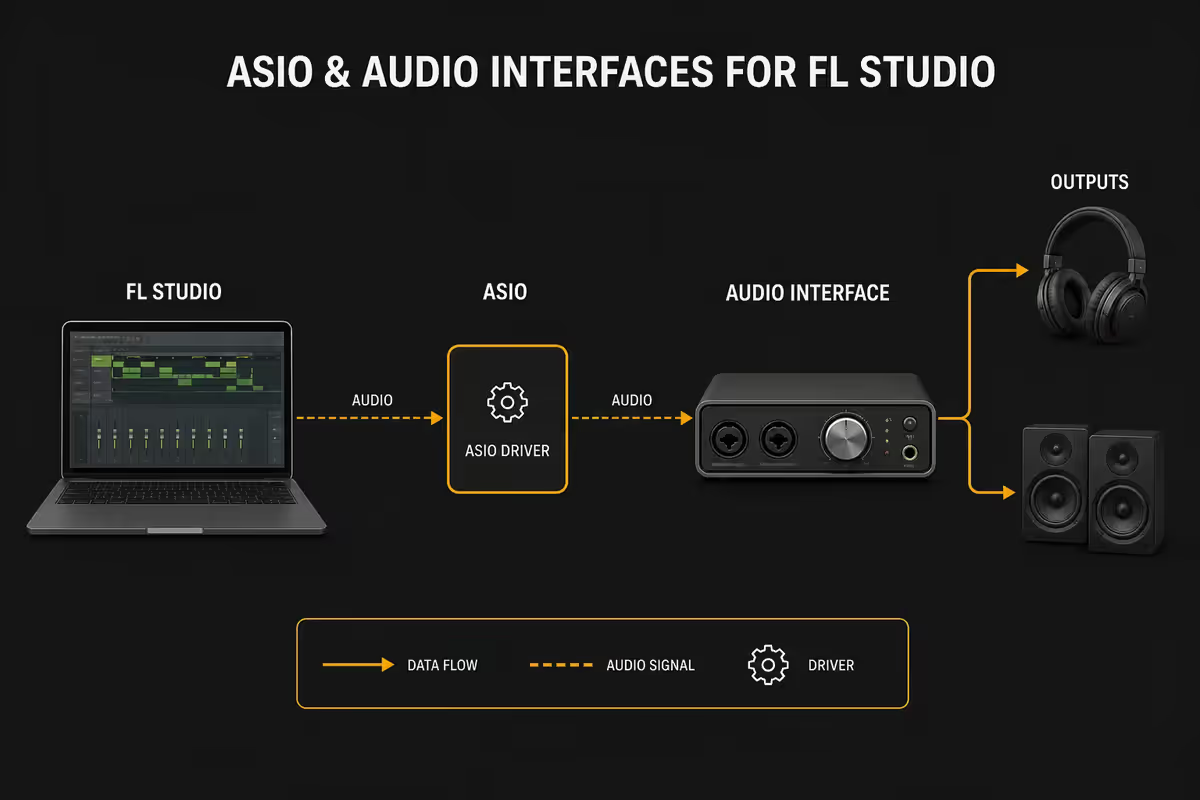
If you take only one piece of advice from this guide: buy an audio interface before you upgrade anything else. Onboard audio with FL Studio's bundled FL Studio ASIO driver works, but it sits at 15–25ms round-trip on most motherboards. A R3,500 USB interface drops you to 5–8ms — a bigger improvement than going from a Ryzen 5 to a Ryzen 9.
ASIO (Audio Stream Input/Output) is the low-latency driver model that bypasses Windows' shared audio stack. Every serious interface ships with its own ASIO driver — and they're consistently better than ASIO4ALL or FL's own emulation.
The three interfaces SA bedroom producers actually buy in 2026:
- Focusrite Scarlett 2i2 (4th Gen) — ~R3,500. The default recommendation. Two combo inputs, 48V phantom power, clean Focusrite preamps. Drivers are mature and stable. If you don't know what to buy, buy this.
- Audient EVO 4 — ~R4,500. Smaller, USB-C, smart-gain feature that sets input levels for you. Slightly better preamps than the Scarlett. Great pick for vocal-led producers.
- Universal Audio Volt 2 — ~R6,500. Includes a "vintage mode" hardware preamp emulation and a bundle of UA plugins. Worth it if you're moving from "making beats" to "tracking vocals seriously".
A Universal Audio Apollo USB or Apollo Twin X is the obvious next step up, but at R20,000–R35,000 it's out of most SA bedroom-producer budgets. Save it for when client work is paying for itself.
CPU, threads and RAM — the honest comparison
For FL Studio in 2026 the CPU shortlist is small and consistent across SA retail:
| CPU | Strength for FL Studio | SA street price |
|---|---|---|
| Ryzen 5 9600X | Entry. Fine for 6–30 channel beats and bedroom production. | R4,800–R5,400 |
| Ryzen 7 9700X | Sweet spot. 8-core scaling for medium-heavy projects. | R6,400–R7,200 |
| Ryzen 7 9800X3D | Top pick. Huge L3 cache helps sample streaming and dense plugin chains. | R11,500–R13,000 |
| Core Ultra 7 265K | Competitive. Slightly weaker SA price-performance vs 9700X. | R7,800–R9,000 |
| Core Ultra 9 285K | Overkill for FL — pick only if you also do heavy video work. | R13,500–R15,500 |
RAM is where most producers underbuy. 16GB is the bare minimum for FL Studio in 2026 — and it works fine for short patterns of stock plugins. The moment you load Komplete Standard (Kontakt + a few orchestral libraries) or pull a sample-heavy Splice cache, you're paging to disk and getting CPU spikes that aren't really CPU spikes at all.
32GB is the realistic sweet spot for any serious FL Studio workflow. Spitfire Audio's BBC Symphony Orchestra Discover alone wants 8–10GB resident; a Kontakt template with a few instrument racks can hit 20GB before you've made a sound. 32GB DDR5-6000 in a 2×16GB kit is around R1,800–R2,400 in SA and unblocks the rest of your build.
64GB only makes sense if you're running orchestral templates, heavy Kontakt sample libraries, or stacking multiple Serum 2 / Vital instances per project. For typical amapiano, gqom, hip-hop or pop production, 32GB is plenty.
Storage strategy — three drives, not one
FL Studio doesn't really tax storage in the same way Premiere Pro does — but sample-library workflows absolutely do. A single SSD setup is the most common bottleneck in SA producer builds.
The split that scales:
- OS & DAW — 1TB NVMe Gen 4 (Samsung 990 Pro, WD SN850X, Kingston KC3000). Windows, FL Studio, all your plugins. Fast and dependable.
- Projects & scratch — 1–2TB NVMe. Active projects, rendered stems, autosaves. Keeps project loads near-instant and protects your OS drive from constant write cycling.
- Sample libraries — 2–4TB SATA SSD or 2TB NVMe. Native Instruments Komplete alone is 300GB+. Splice cache grows fast. Spitfire libraries are huge. Give this one its own drive.
If you're starting at the entry tier with a single 1TB NVMe, that's fine — but plan a sample-library drive into the R40k tier upgrade. The performance difference between "Kontakt loading from the OS drive" and "Kontakt loading from a dedicated library drive" is night and day for project open times.
Silent build — quieter than the microphone
Fan noise is the single most overlooked spec in producer-PC builds. A gaming-style build with three 1500-RPM Corsair LL fans and a noisy AIO sits at 38–45 dBA at idle. A condenser mic in the same room picks up every kHz of it.
A studio-grade quiet build hits 22–26 dBA at idle — barely audible from a metre away — using parts that are widely available in SA:
- CPU cooler — Noctua NH-U12A (R2,200) or Be Quiet Dark Rock Pro 5 (R2,400). Both handle a Ryzen 7 9700X well below 70°C under sustained load while staying under 28 dBA. The Noctua NH-D15 G2 is even better but is overkill unless you're cooling a 9950X.
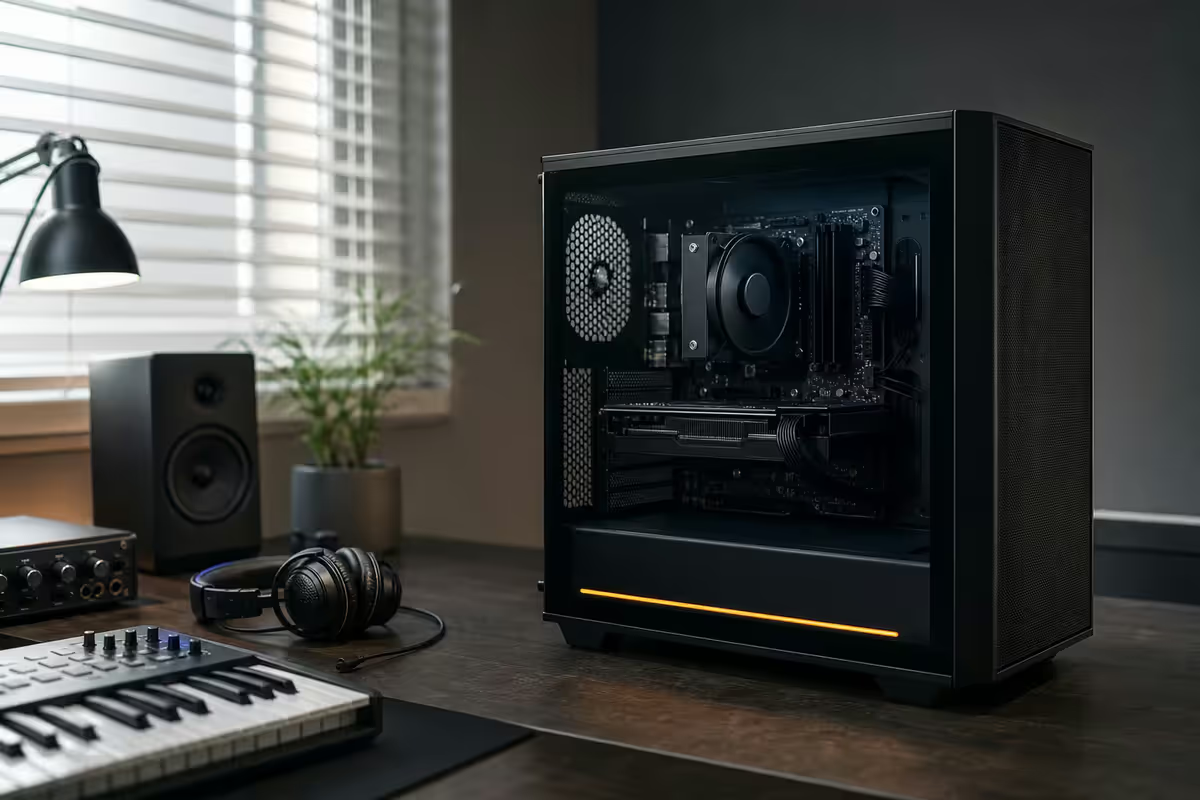
- Case — Be Quiet Pure Base 500DX (R1,800) or Fractal Design North (R2,800). Both ship with low-RPM, sound-dampened fans. The North looks like furniture, which matters if your studio is also your bedroom.
- Case fans — Noctua NF-A12x25 or Be Quiet Silent Wings 4. Replace whatever the case ships with if your budget allows. The NF-A12x25 at 800–1000 RPM is the quietest 120mm fan made.
- PSU — Be Quiet Pure Power 12 M, Corsair RM850x (2024) or Seasonic Focus GX. All three have semi-fanless modes — the PSU fan stays off below ~40% load, which means it's silent for most of your producing session.
- GPU — only if you need one. If you're not gaming on the same machine, the iGPU on a Ryzen 7 9700X or Core Ultra 7 is enough for two monitors at 1440p. A passive or low-RPM card (RTX 4060 with Zero RPM mode) is the right pick if you do need a dedicated GPU.
The microphone test: set up a condenser mic 30cm from your PC, record 30 seconds of silence, and look at the recorded waveform. A silent build produces almost nothing. A noisy build paints a continuous noise floor that you'll be fighting in every vocal mix forever.
In the 200,000+ custom PCs we've shipped from Centurion, producer machines are the fastest-growing segment of our build queue — driven by SA's amapiano, gqom and hip-hop scenes producing more than ever from bedrooms in Joburg, Cape Town, Durban and Soweto. The pattern we see: <strong>first-time producers underspend on the audio interface and overspend on the GPU</strong>. Almost every customer who returns for a second build flips that order. The build that ages best is the one with the boring CPU, the silent cooler, the real interface and the UPS — not the one with RGB.
Behind the Build · From our service bench
SA build tiers — R20k, R40k, R65k
R20,000 — Bedroom producer entry tier
For first-time producers, students, and anyone moving up from a laptop. Handles FL Studio 21/22 comfortably for any genre at typical bedroom project size.
| Part | Pick | Why |
|---|---|---|
| CPU | Ryzen 5 9600X | 6 cores, strong single-thread, runs cool |
| Motherboard | B650 ATX (Gigabyte / MSI Pro) | DDR5 ready, USB-C on rear |
| RAM | 16GB DDR5-6000 (2×8GB) | Start here, upgrade to 32GB later |
| Storage | 1TB NVMe Gen 4 (KC3000 or 990 Pro) | OS, FL Studio, projects |
| Cooler | Be Quiet Pure Rock 2 (R650) | Quiet, handles 9600X easily |
| Case + PSU | Pure Base 500DX + Pure Power 12 M 650W | Sound-dampened, semi-fanless |
| GPU | iGPU only (no dedicated card) | Save the budget for an interface |
| Total (ex-interface) | ~R20,000 | Add Scarlett 2i2 to reach a real studio |
R40,000 — Serious hobbyist / first paid client work
The sweet-spot build. Handles 60+ mixer channels of dense plugins, full Komplete library streaming, and tracking vocals — without breaking a sweat or your eardrums.
| Part | Pick | Why |
|---|---|---|
| CPU | Ryzen 7 9700X | 8 cores, FL's multi-thread engine loves it |
| Motherboard | B650E ATX with 2.5GbE + USB-C | Front USB-C for interface, fast LAN for samples NAS |
| RAM | 32GB DDR5-6000 (2×16GB) | Headroom for sample-heavy projects |
| Storage | 2TB NVMe + 2TB SATA SSD | Dual-drive split for projects vs samples |
| Cooler | Noctua NH-U12A or Dark Rock Pro 5 | Studio-quiet under sustained load |
| Case + PSU | Fractal North + Corsair RM850x (2024) | Furniture-grade looks, near-silent |
| GPU | Optional — RTX 4060 or iGPU | Only if you also game on the same machine |
| Total (ex-interface) | ~R40,000 | Pair with Audient EVO 4 or UA Volt 2 |
R65,000 — Semi-pro studio
For producers earning from their work: client mixes, mastering, orchestral templates, large Kontakt sessions. Built for sustained quiet performance over a long session.
| Part | Pick | Why |
|---|---|---|
| CPU | Ryzen 7 9800X3D | Big L3 cache helps sample streaming and dense channels |
| Motherboard | X670E ATX with Thunderbolt 4 | Headroom for high-end interfaces (Apollo, Antelope) |
| RAM | 64GB DDR5-6000 (2×32GB) | Orchestral templates, Kontakt sessions |
| Storage | 2TB NVMe (OS) + 2TB NVMe (projects) + 4TB SATA SSD (libraries) | Three-drive split, no contention |
| Cooler | Noctua NH-D15 G2 | The quietest dual-tower air cooler made |
| Case + PSU | Fractal North XL + Seasonic Focus GX 1000W | Cool air, semi-fanless |
| GPU | RTX 4060 / 4070 (passive / Zero RPM) | Multi-monitor + light video editing |
| UPS | Mecer 1200VA or APC Back-UPS Pro | Non-negotiable for client work |
| Total (ex-interface) | ~R65,000 | Pair with Universal Audio Volt 2 minimum |
FL Studio vs Ableton vs Pro Tools — does FL really need less?
The reputation is real: FL Studio is genuinely more CPU-efficient than Ableton Live or Pro Tools on light to medium projects. Image-Line's mixer routing and pattern-based workflow are very lean — short loops with stock plugins run on hardware that would have Ableton hitting 60% CPU.
But the gap closes fast on heavy work. Once you load:
- 50+ mixer channels with active plugin chains
- Sample-heavy Kontakt or Spitfire libraries
- Dense automation across the project
- Real-time vocal monitoring with FX
…the engines equalise. A R20k build is happy in FL and miserable in Pro Tools. A R40k build runs all three DAWs comfortably. A R65k build doesn't care which DAW you open.
Real answer: don't undersize a build because "FL is easy on hardware". You will absolutely grow into a 60-channel project, and you'll regret the 6-core CPU when you get there. Build for where you'll be in 18 months, not where you are now.
Common producer-PC mistakes in SA
High-RPM gaming fans in a studio build. RGB Corsair LL or Lian Li SL fans at 1500–2000 RPM sound great in YouTube reviews and terrible in a recording space. Swap them for Noctua NF-A12x25 or Be Quiet Silent Wings 4 before your first vocal session.
Ignoring USB-C bandwidth for multi-channel interfaces. A Focusrite Scarlett 18i20 or Apollo USB needs USB 3.2 or Thunderbolt to run all its channels at low buffer. Cheap motherboards expose only USB 2.0 on the rear — check the spec sheet before pairing a multi-channel interface with a budget board.
No UPS for load-shedding mid-render. Load-shedding intensity is down from 2023 in 2026, but unannounced trips and Stage 2 still happen. A 1000VA line-interactive UPS (Mecer 1200VA or APC Back-UPS Pro, R1,800–R2,800) gives you 8–15 minutes to save and shut down. Don't budget around hope.
Buying onboard audio "to get started" and never upgrading. The whole rest of your build is bottlenecked by 20ms latency. Buy the interface first, even if it means downgrading the GPU.
Ground loops and electrical noise. SA homes often have monitors, audio interface, mic preamp and PC plugged into shared circuits. A buzz or hum that won't go away usually means a ground loop. A simple ground-loop isolator (R250–R450), balanced TRS cables on your monitors, and — where possible — running the studio off its own circuit will fix 80% of these. A separate dedicated circuit isn't always possible in SA homes; balanced cables and isolators are the practical fix.
Skipping the 32GB RAM step. The R600–R800 saved by going 16GB instead of 32GB is the worst R800 you can save in a producer build. Just buy the 32GB kit.
Key takeaways
- Low latency beats raw GHz — your audio interface and ASIO driver matter more than the CPU's boost clock.
- FL Studio 21/22's multi-thread engine genuinely scales with 8-core CPUs. Ryzen 7 9700X is the SA sweet spot.
- 32GB RAM is the realistic minimum for sample-heavy work. 16GB only stays comfortable for short patterns with stock plugins.
- Split your storage: OS NVMe + projects NVMe + dedicated sample-library drive. Komplete alone is 300GB.
- A studio-quiet build (Noctua / Be Quiet, semi-fanless PSU, Fractal North or Pure Base 500DX) makes microphone tracking possible.
- Buy the audio interface first. A Focusrite Scarlett 2i2 (R3,500) before a better GPU, every time.
- SA reality: a 1000VA UPS is non-negotiable, ground-loop isolators fix most household electrical buzz.
Frequently asked questions
What's the best PC for FL Studio in South Africa in 2026?
Bedroom producers: R20,000 (Ryzen 5 9600X, 16GB DDR5, 1TB NVMe). Serious hobbyists: R40,000 (Ryzen 7 9700X, 32GB DDR5, 2TB NVMe + sample drive). Semi-pro: R65,000 (Ryzen 7 9800X3D, 32–64GB DDR5, triple-drive storage). All three tiers prioritise low-latency audio and silent cooling over raw GHz.How much RAM do I need for FL Studio?
16GB is the bare minimum and is fine for short patterns with stock plugins. 32GB is the realistic sweet spot once you load Komplete, Spitfire or chunky Splice cache. 64GB is overkill for FL Studio unless you also run orchestral Kontakt templates or stack multiple Serum 2 / Vital instances.Does FL Studio use multiple CPU cores?
Yes — FL Studio 21 and 22 use a native multi-thread engine. Each mixer track and plugin chain runs on its own thread. An 8-core / 16-thread CPU like the Ryzen 7 9700X shows clear gains over older quad-cores. Single-thread performance still matters for dense channels with many plugins.Do I need an audio interface for FL Studio?
Strongly recommended. Onboard audio with FL Studio ASIO sits at 15–25ms round-trip; a proper USB interface drops you to 5–8ms. Entry picks in SA: Focusrite Scarlett 2i2 (R3,500), Audient EVO 4 (R4,500), Universal Audio Volt 2 (R6,500).Ryzen or Intel for FL Studio in 2026?
Ryzen 7 9700X is the SA price-performance pick. Ryzen 7 9800X3D is the top pick for heavy projects or shared gaming use. Core Ultra 7 265K is competitive but typically pricier locally. Both platforms run FL Studio excellently.Is a silent PC really worth it for music production?
Yes — fan noise leaks into condenser-mic recordings and influences mixing decisions. A studio-quiet build (Noctua NH-U12A or Be Quiet Dark Rock, low-RPM Noctua case fans, semi-fanless PSU, Pure Base 500DX or Fractal North) measures around 22–26 dBA at idle versus 38–45 dBA for a gaming-fan build.How does FL Studio compare to Ableton or Pro Tools on PC requirements?
FL Studio is genuinely easier on hardware than Ableton or Pro Tools at light to medium project sizes. The gap closes fast on heavy projects (50+ channels, large libraries, dense automation). A modern 8-core CPU and 32GB RAM equalises the experience across all three DAWs.Do I need a UPS for music production in South Africa?
Yes — load-shedding is reduced in 2026 but unannounced trips still happen. A 1000VA line-interactive UPS (Mecer 1200VA or APC Back-UPS, R1,800–R2,800) gives 8–15 minutes to save and shut down. Also runs monitors and audio interface long enough to finish the bar you're recording.
Get the Evetech app
Exclusive app-only prices, daily flash sales, and free delivery on orders over R4,000 — download the app and start saving.