Music Production PC Guide
The DAW PC that disappears. — Low latency. Silent fans. Plenty of threads.
A music PC has different priorities to a gaming PC. Threads beat clock speed. Silence beats RGB. A 1 ms audio buffer matters more than 240 fps. Here's how to build for the studio, not the LAN.
- target round-trip
- 3 ms
- fan noise at load
- <25 dB
- RAM sweet spot
- 32 GB
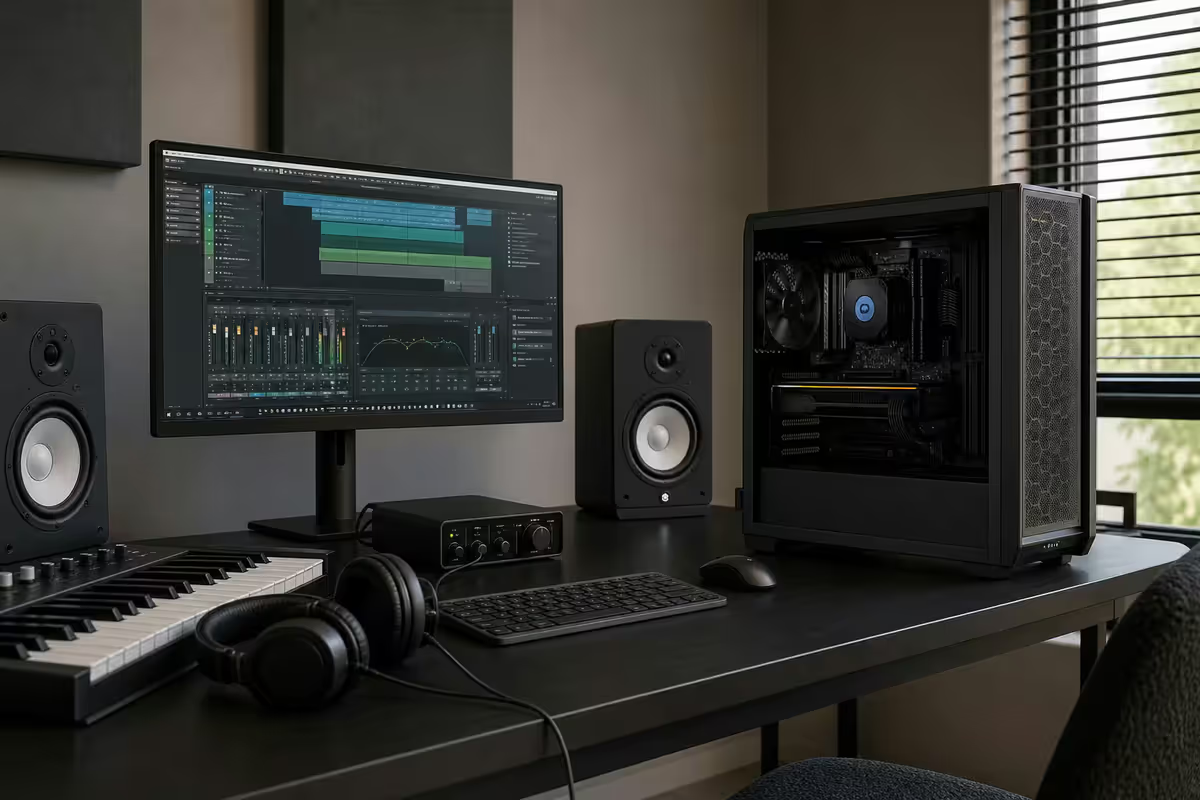
DAW priorities — what a music PC actually needs
A music production PC inverts most of the gaming wisdom you've absorbed online. You don't need a fast GPU; integrated graphics handle the DAW interface effortlessly. You don't need 240 Hz monitors. You don't need RGB. What you do need is a CPU that can chew through hundreds of plugin instances, memory and storage configured for sample streaming, and a chassis that doesn't bleed fan noise into your recordings.
The three numbers a music PC build optimises around are thread count, audio buffer round-trip latency, and fan noise at load. Get all three right and the PC genuinely disappears from your creative process. Get any of them wrong and you'll fight the machine instead of writing the music.
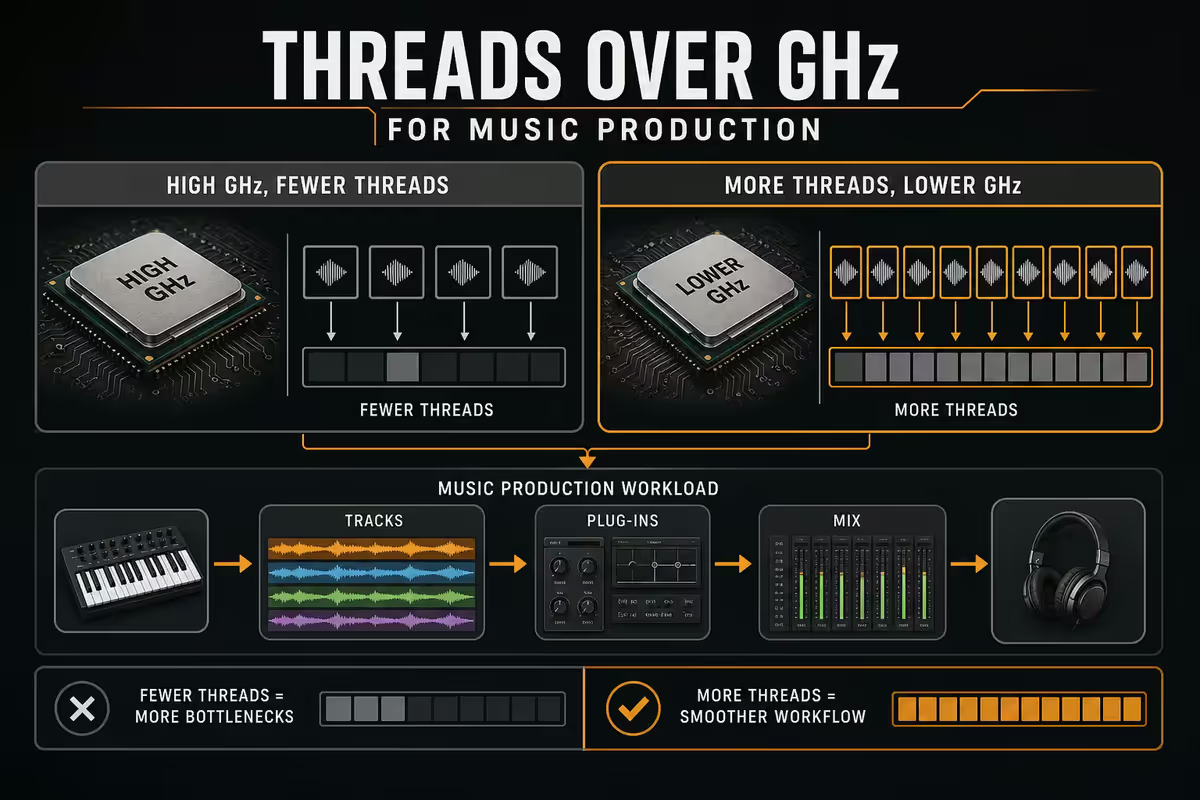
CPU — threads over GHz, almost always
Modern DAWs (Ableton Live 12, FL Studio 21, Studio One 7, Reaper 7, Cubase 14) distribute plugin processing across CPU cores. Each plugin instance is a thread; each track has its own chain of effects; sample libraries spawn their own threads for streaming. A six-core CPU at 5.2 GHz will run out of threads before a twelve-core at 4.7 GHz does — even though the six-core looks more impressive on paper.
| Use case | CPU pick | Why |
|---|---|---|
| Hip-hop / electronic — small templates | Ryzen 5 7600 (6c/12t) | Plenty for 30-40 track projects |
| Singer-songwriter / band recording | Ryzen 7 7700X (8c/16t) | Sweet spot for most workflows |
| Orchestral / film scoring | Ryzen 9 7900X (12c/24t) | Handles 100+ Kontakt instances |
| Heavy mixing + mastering | Ryzen 9 7950X3D (16c/32t) | Large mastering chains scale to threads |
AMD Ryzen is currently the better pick over Intel for most music workloads in 2026 — better multi-thread performance per rand, lower idle power draw (matters for silent cooling), and less thermal output. Intel Core Ultra 9 with its E-cores can be fine but introduces additional thread-scheduling complexity that some DAWs handle imperfectly.
RAM — 32 GB sweet spot, 64 GB for orchestral
Sample libraries are the reason musicians need more RAM than gamers. A typical Kontakt orchestral template — strings, brass, woodwinds, percussion, choir — can pre-load 12-18 GB of samples ready to play instantly. Add the Windows base, the DAW itself, Chrome with eight tabs and a Discord, and you're easily at 24 GB of in-use memory before you've recorded a note.
16 GB still works for purely electronic / hip-hop production where most sounds come from software synths rather than sampled instruments. As soon as Kontakt, EastWest Composer Cloud, Spitfire BBC Symphony Orchestra, Native Instruments Komplete, or any serious sample library enters the picture, 16 GB will start swapping to disk and your DAW will hiccup mid-take.
32 GB DDR5-6000 CL30 is the 2026 sweet spot — comfortably handles film-tier sample templates, leaves headroom for OS and browser. 64 GB is overkill for most but the correct call for working film composers running 100+ orchestral instrument instances.
NVMe storage — separate boot and sample drives
Sample library streaming is one of the most disk-bandwidth-intensive workloads on any modern PC. A 60-track orchestral session can be reading from disk at 800-1200 MB/s sustained during playback as multiple sample voices stream in parallel. If your Windows, browser cache and OneDrive sync are reading from the same drive at the same time, you'll get crackles.
The clean three-drive setup that works at every tier:
- System drive — 1 TB Gen4 NVMe (Kingston KC3000, WD SN770, Samsung 980 Pro). Windows + DAW install + active project files.
- Sample drive — 2 TB Gen4 NVMe (Lexar NM790, Kingston NV2, WD SN770). Kontakt, EastWest, Spitfire, Komplete — sample libraries only.
- Archive drive (optional) — 4 TB SATA SSD or HDD. Project archives, exported masters, raw recordings beyond current projects.
Don't put Windows on a Gen3 NVMe and try to save R400. Sustained 4K random read speeds on Gen3 are roughly half what Gen4 delivers, and project load times and plugin opens both suffer.
Audio interface — USB Class Compliant on any PC
A common worry for PC-curious Mac switchers: will my Focusrite Scarlett, my Universal Audio Volt, my RME Babyface still work? The answer is yes — all of these are USB Class Compliant devices that work identically on Windows and macOS. Drivers are official, manufacturer-supported, and updated regularly.
What matters for low-latency USB audio:
- USB 3.0 / USB-C port with sufficient bus power (any modern motherboard).
- Properly configured Windows power plan (High Performance, USB Selective Suspend disabled).
- BIOS settings — disable C-states for the lowest possible jitter (only if you're targeting sub-3 ms round-trip).
- Updated chipset drivers from AMD or Intel.
Properly configured, a Focusrite Scarlett 4i4 4th-gen will hit around 2.7 ms round-trip latency at 64 samples / 48 kHz on a Ryzen 7700X — comparable to anything you'd see on Apple Silicon for the same buffer settings.
Silent build — the spec the gaming guides skip
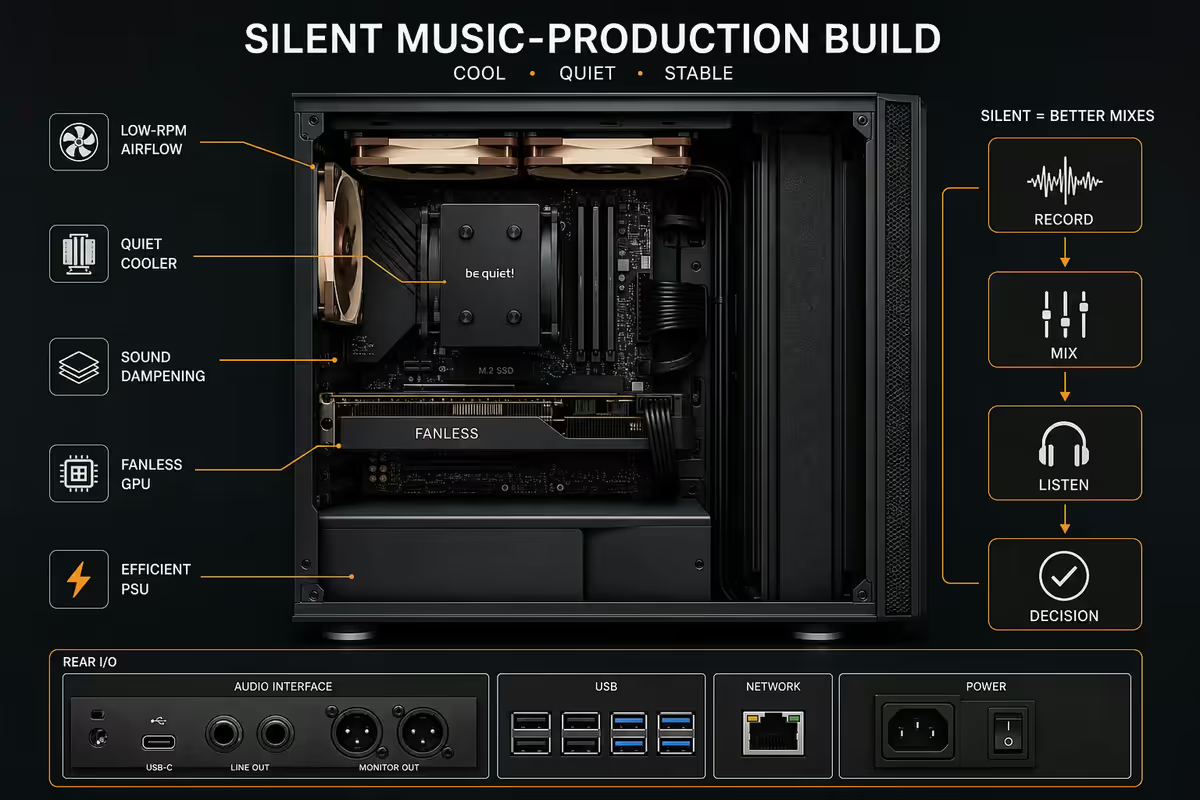
A typical mid-range gaming PC runs at around 30-35 dB under load — clearly audible across a quiet room. For audio recording, that's loud enough to leak into a vocal take, a guitar mic, a foley capture. The target for a music PC is sub-25 dB at sustained load, which is below the threshold most condenser microphones will pick up at typical recording distance.
The components that get you to a silent build:
| Component | Pick | Why |
|---|---|---|
| CPU cooler | Noctua NH-D15 G2 | Dual tower, sub-22 dB at full load |
| Case | Fractal Define 7 or Be Quiet Silent Base 802 | Sound dampening panels built in |
| Case fans | Noctua NF-A14 or Be Quiet Silent Wings 4 | Sub-20 dB at idle, 24 dB at load |
| PSU | Seasonic Prime Fanless or Corsair RM850e | Fanless under low load, silent above |
| Storage | NVMe only — no spinning HDDs | HDDs add 30+ dB of mechanical noise |
Avoid AIO water cooling for a silent music build — the pump emits a constant 30-35 dB hum that's actually more audible to a microphone than well-tuned tower-cooler fans. The Noctua NH-D15 G2 is dramatically quieter than any 360 mm AIO at the same thermal load.
Also undervolt the CPU. A modest -0.05 V offset on the Ryzen 7 7700X drops thermal output by 15-20% with no performance loss in DAW workloads — meaning the fans don't have to spin up at all during typical work.
Thunderbolt / USB4 — the reality on PC in 2026
For years "you need a Mac for music production because of Thunderbolt" was the standard advice. In 2026, that's mostly outdated. Most premium audio interfaces — Focusrite, Universal Audio Volt, RME, Audient, Motu — ship with USB-C / USB 3.0 interfaces that deliver fully professional latency on any modern PC.
Where Thunderbolt or USB4 genuinely matters: UA Apollo interfaces (Thunderbolt-only for their proprietary DSP), 32+ channel recording rigs (sustained bandwidth requirement), and external NVMe enclosures for fast project transfer between machines. For all three, USB4 / Thunderbolt 4 is now standard on Z890 motherboards and most B850 boards, so the hardware path is there.
For the typical singer-songwriter, beatmaker, podcaster, mixer or composer, the USB Class Compliant route delivers Mac-equivalent latency at lower hardware cost — and gives you the upgrade flexibility of the PC platform.
SA build tiers — R20k / R40k / R65k
R20 000 entry tier — Ryzen 5, 32 GB, single NVMe
For beatmaking, hip-hop production, podcast editing, singer-songwriter recording. Ryzen 5 7600 (6c/12t), 32 GB DDR5-6000, single 1 TB NVMe, integrated Radeon graphics (no separate GPU needed), Be Quiet Pure Rock 2 cooler, Fractal Pop Air solid case, 550W Corsair RM550. Quiet at idle, audible under heavy load but workable.
R40 000 sweet spot — Ryzen 7, dual NVMe, silent
The build that handles every workflow from acoustic recording to small orchestral projects. Ryzen 7 7700X (8c/16t), 32 GB DDR5-6000, 1 TB system + 2 TB sample NVMe, Noctua NH-D15 G2, Fractal Define 7 solid, Corsair RM750e PSU. Genuinely silent at all loads. Should last 5-7 years comfortably.
R65 000 orchestral / film tier — Ryzen 9, 64 GB, multi-NVMe
For working composers, film scorers, and serious orchestral writers. Ryzen 9 7900X (12c/24t), 64 GB DDR5-6000 CL30, triple NVMe (1 TB system, 2× 2 TB samples), Noctua NH-D15 G2, Fractal Define 7 XL, Seasonic Prime PX-850, optional RTX 5060 8 GB for occasional video work on cues. Inaudible. Capable of 100+ simultaneous Kontakt instances.
Key takeaways
- Thread count beats clock speed. Ryzen 7 7700X is the sweet spot; Ryzen 9 for orchestral.
- 32 GB DDR5 minimum for serious work; 64 GB for film scoring with full Kontakt templates.
- Two NVMes — separate boot and sample library drives. Bandwidth bottleneck if shared.
- Silent build is mandatory. Noctua NH-D15 + Define 7 solid + undervolt = inaudible.
- USB Class Compliant interfaces work on any PC at sub-3 ms. Skip the Thunderbolt premium.
Frequently asked questions
What spec PC do I need for music production in 2026?
Prioritise CPU thread count and low-latency audio over raw clock speed. Ryzen 7 7700X (8 cores, 16 threads) or Ryzen 9 7900X (12 cores, 24 threads) is the sweet spot. 32 GB DDR5 RAM minimum, 1 TB NVMe for system + DAW, and a separate NVMe for sample libraries. Silent cooling is critical. R20,000 entry, R40,000 sweet spot, R65,000 for orchestral / film scoring workloads.Why do thread count and low latency matter more than clock speed for DAWs?
Modern DAWs (Ableton, Logic via Hackintosh, FL Studio, Studio One, Reaper) distribute audio processing across CPU cores. More cores = more simultaneous plugin instances and tracks before you hit dropouts. Low-latency audio depends on the CPU being able to complete each audio buffer cycle before the next is due — usually 5-10 ms at 256 samples / 48 kHz. A 5 GHz CPU with 6 cores hits the wall before a 4.5 GHz CPU with 12 cores.How much RAM do I need for music production?
32 GB is the 2026 sweet spot for serious music production. Sample libraries (Kontakt, EastWest, Spitfire) want gigabytes of RAM streaming at once — a single full orchestral mock-up can easily use 16-24 GB. 16 GB still works for electronic / hip-hop production with mostly software synths, but you'll hit the wall fast on bigger templates. 64 GB makes sense for orchestral / film composers and is overkill for most others.Do I need a separate NVMe drive for sample libraries?
Strongly recommended. Sample streaming is bandwidth-intensive and competes with system reads from the boot drive. Configuration that works well: 1 TB Gen4 NVMe for Windows + DAW + project files (fast boot, snappy project loads), plus 2 TB Gen4 NVMe purely for sample libraries (Kontakt, EastWest, Spitfire). For orchestral composers, a third 4 TB drive for archive projects.Will my USB audio interface work with a Ryzen / Intel PC?
Yes, USB audio interfaces (Focusrite Scarlett, Universal Audio Volt, RME Babyface, Audient iD series) are platform-agnostic and work identically on any modern PC. USB 3.0 / USB-C with sufficient bus power is the requirement. Some older interfaces had Thunderbolt-only options that didn't work on PC — that's largely solved in 2026 with USB4 / Thunderbolt 4 now standard on Z890 and B850 motherboards.Why is silent / fanless cooling important for a music PC?
Audio production is the one workload where fan noise leaks directly into recordings — your studio monitor mics, your vocal takes, your acoustic instrument captures. A PC running at 32 dB will be audible in any quiet recording. Aim for sub-25 dB at load: Noctua NH-D15 (silent), tower case with sound dampening (Fractal Define 7), undervolted CPU, Be Quiet Silent Loop AIO with low-RPM fan profile. Liquid cooling helps but fans still produce some noise.Do I need Thunderbolt for music production in 2026?
Less than you think. USB4 and Thunderbolt 4 are now standard on Z890 and many B850 boards, so the hardware is there. But most premium audio interfaces remain USB or Thunderbolt 3 native — USB Class Compliant interfaces deliver sub-3 ms round-trip latency on a properly configured PC, more than enough for serious work. Thunderbolt matters mostly for legacy UA Apollo interfaces and 32+ channel recording rigs.What's the SA pricing reality for a music production PC?
R20,000 entry tier: Ryzen 5 7600 + 32GB DDR5 + 1TB NVMe + integrated graphics (no GPU needed for audio work). R40,000 sweet spot: Ryzen 7 7700X + 32GB + 2TB sample library NVMe + silent NH-D15 cooling + Fractal Define 7. R65,000 orchestral tier: Ryzen 9 7900X + 64GB + multi-NVMe storage + Noctua silent build + RTX 5060 for occasional video work on cues. All prices SA retail May 2026.
Get the Evetech app
Exclusive app-only prices, daily flash sales, and free delivery on orders over R4,000 — download the app and start saving.