Wi-Fi Router Buying Guide
How to choose a Wi-Fi router. — The ISP unit is the first thing to replace.
You're paying for 1Gbps fibre and getting 380 Mbps over Wi-Fi. The router is the bottleneck — and almost every SA home running a Vumatel or Openserve line has the wrong one. Here's the 2026 fix.
- 2026 sweet spot
- Wi-Fi 6E
- first upgrade
- ISP = Replace
- coverage rule
- Mesh @ 3BR+
Why ISP-issued routers are inadequate
When Vumatel, Openserve, MetroFibre, Frogfoot or any other South African fibre operator hands you a router as part of the install, that router is built to the cheapest spec that satisfies the line. It's not a gift — it's the minimum hardware required for them to claim the line is delivered.
The realities of the typical SA ISP router circa 2026:
- Wi-Fi 5 or entry-level Wi-Fi 6 chipset, often with 2-3 internal antennas instead of 4-6 external ones.
- Single-core or dual-core CPU that can't keep up with concurrent NAT, PPPoE handover, and 1 Gbps line throughput.
- No QoS, no proper traffic prioritisation, no parental controls beyond a basic timer.
- 2.4 GHz and 5 GHz only — no 6 GHz band, no MU-MIMO scheduling on the cheap models.
- 4× gigabit LAN ports at best; no 2.5GbE WAN port to feed a 1 Gbps fibre line cleanly.
- Firmware that ages out — no security patches after the first 18-24 months.
The result is the most common complaint we hear from new fibre customers: "My 1 Gbps line is only giving me 350-450 Mbps over Wi-Fi." That's the router throttling the line, not the line itself. Replace it and you'll see 800-950 Mbps over 5 GHz on a modern Wi-Fi 6E router, sitting in the same spot.
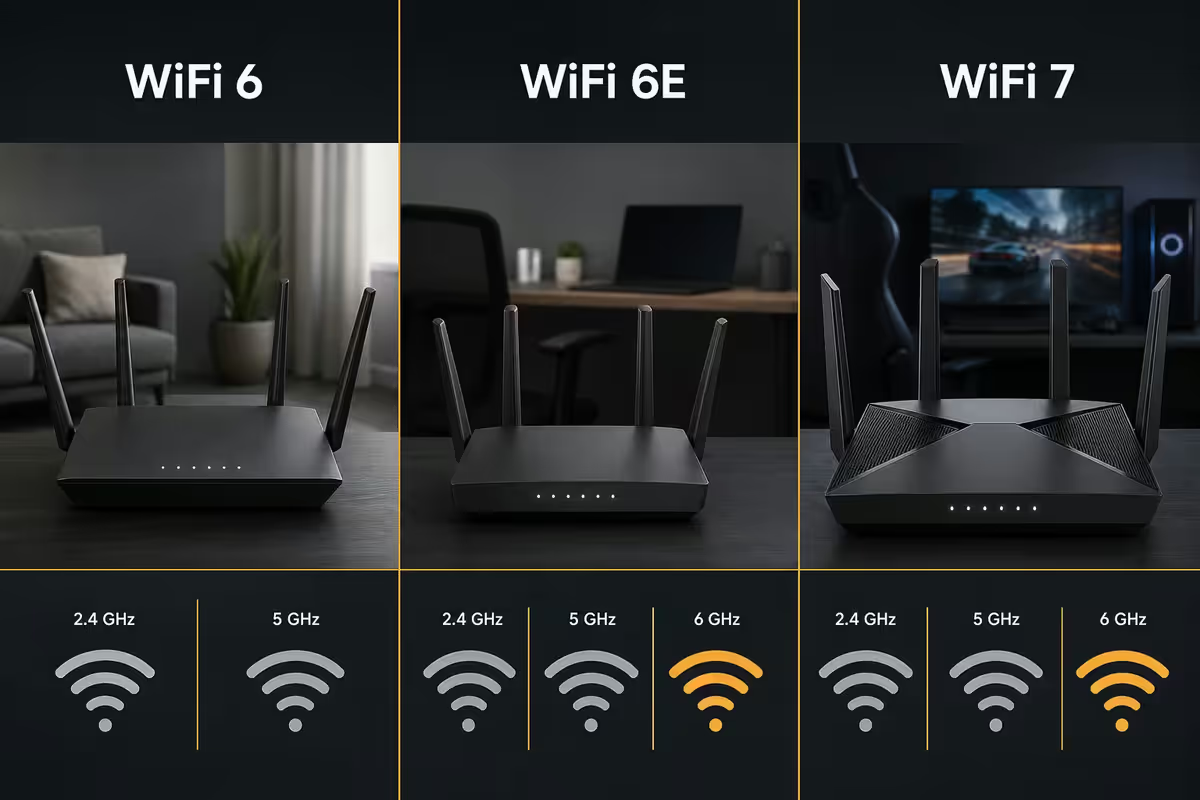
Wi-Fi 6 vs Wi-Fi 6E vs Wi-Fi 7 — what each one is for
Naming is confusing because the industry kept iterating. Here's the practical breakdown:
| Standard | Bands | Best for (SA 2026) |
|---|---|---|
| Wi-Fi 6 (AX) | 2.4 + 5 GHz | Budget builds, 200-500 Mbps fibre |
| Wi-Fi 6E (AXE) | 2.4 + 5 + 6 GHz | Sweet spot — 500 Mbps to 1 Gbps fibre |
| Wi-Fi 7 (BE) | 2.4 + 5 + 6 GHz with 320 MHz channels & MLO | Premium future-proofing, 1Gbps+ lines |
Wi-Fi 6E is the 2026 sweet spot
The 6 GHz band is what makes Wi-Fi 6E genuinely better than plain Wi-Fi 6. It's a fresh slice of spectrum with no legacy device interference — no neighbour's old printer, no microwave noise, no Bluetooth contention. In a typical Johannesburg or Cape Town apartment block, the 6 GHz band is empty enough to actually deliver the speeds the spec promises.
If your phone, laptop or console is from 2022 or newer, it almost certainly supports Wi-Fi 6E. iPhone 15+, Samsung S22+, Pixel 7+, the latest MacBooks, PS5 Pro and Xbox Series X with the right adapter — all use 6 GHz when available.
Wi-Fi 7 is the future but not yet
Wi-Fi 7 adds 320 MHz channels (double the bandwidth of Wi-Fi 6E) and Multi-Link Operation (MLO), which lets a device use multiple bands simultaneously. The headline numbers are spectacular — theoretical 40 Gbps in lab conditions. In reality:
- Client device support is still limited. Outside the latest flagships, most devices don't yet have Wi-Fi 7 radios.
- Routers are 50-80% more expensive than equivalent Wi-Fi 6E for marginal real-world gain on most SA fibre lines.
- The 320 MHz channel width is theoretical in most environments — regulatory limits in SA mean you'll rarely get the full channel.
Buy Wi-Fi 7 if you have a 1 Gbps+ line, multiple Wi-Fi 7 devices already, and want the router to last 5+ years. Otherwise Wi-Fi 6E delivers 95% of the real benefit at half the cost.
Single router vs mesh system — the coverage decision
This is the second-biggest decision after Wi-Fi standard, and the answer depends almost entirely on your home's floor plan and construction.
Single router works when…
- You live in a flat, townhouse or single-storey home under ~120m².
- The router can sit centrally — typically the lounge or hallway midpoint.
- There are no thick concrete or face-brick interior walls between router and main usage areas.
- You have 1-2 bedrooms and the bedrooms are within 8-10 metres of the router.
You need a mesh system when…
- Your home is 130m² or larger, or has 3+ bedrooms.
- Double-storey homes — stairwells and floors block signal more than walls.
- The fibre termination is at one end of the house (common in SA — wall plates are usually in the lounge or study).
- Face-brick or stone interior walls — SA homes especially in Pretoria and Centurion often have these.
- You have outdoor coverage needs — patio, garden, separate flatlet.
Wired backhaul is the secret to good mesh
Mesh systems either use wireless backhaul (the nodes talk to each other over Wi-Fi) or wired backhaul (the nodes are connected by Ethernet). Wired backhaul is dramatically better — same latency as a single router, no halving of bandwidth at each hop. If your home has CAT6 to multiple rooms (modern fibre installs often do), use it. If not, retrofitting CAT6 to one or two key rooms is worth the cost.
Why tri-band matters for gaming and streaming households
Dual-band routers (2.4 GHz + 5 GHz) are still the default in budget tiers. Tri-band adds a second 5 GHz radio or a 6 GHz radio. For a busy household, the extra radio is the difference between "Wi-Fi works" and "Wi-Fi works for everyone simultaneously".
Real-world example from our service bench: a typical SA family of 4 with a gaming console, two laptops on Teams calls, three phones streaming Netflix or YouTube, and a 4K smart TV is asking the router to manage 10-12 concurrent active streams. A dual-band router serialises all the 5 GHz traffic onto one radio — gaming latency spikes whenever Netflix asks for more buffer.
A tri-band router splits that load. Modern tri-band Wi-Fi 6E routers typically have:
- 2.4 GHz — for IoT, smart bulbs, doorbells, devices with long battery life.
- 5 GHz — for laptops, phones, console.
- 6 GHz — for the heaviest users (gaming PC, work laptop in calls, 4K stream).
Band steering (automatic) decides where each device sits. Most modern routers handle this well; you only need to manually assign devices in unusual setups.
QoS, Ethernet ports and 2.5GbE
QoS (Quality of Service) lets the router prioritise certain traffic. Gaming QoS bumps low-latency UDP traffic above bulk downloads. Adaptive QoS (Trend Micro on ASUS, HomeShield on TP-Link) does this automatically — recommended for households with mixed use.
Ethernet ports matter more than buyers think. Even if everything else is Wi-Fi, you want the option to plug in a gaming PC, NAS or 4K Apple TV directly. The minimum is 4× gigabit LAN. The premium feature is 2.5GbE — both for WAN (to take full 1 Gbps fibre without PPPoE overhead choke) and LAN (for NAS / PC at gigabit+).
| Fibre line speed | WAN port needed | LAN ports needed |
|---|---|---|
| 50-200 Mbps | 1 GbE | 4× 1 GbE |
| 500 Mbps | 1 GbE | 4× 1 GbE |
| 1 Gbps | 2.5 GbE preferred | 4× 1 GbE |
| 2-10 Gbps (enterprise) | 10 GbE | 2.5 GbE / 10 GbE |
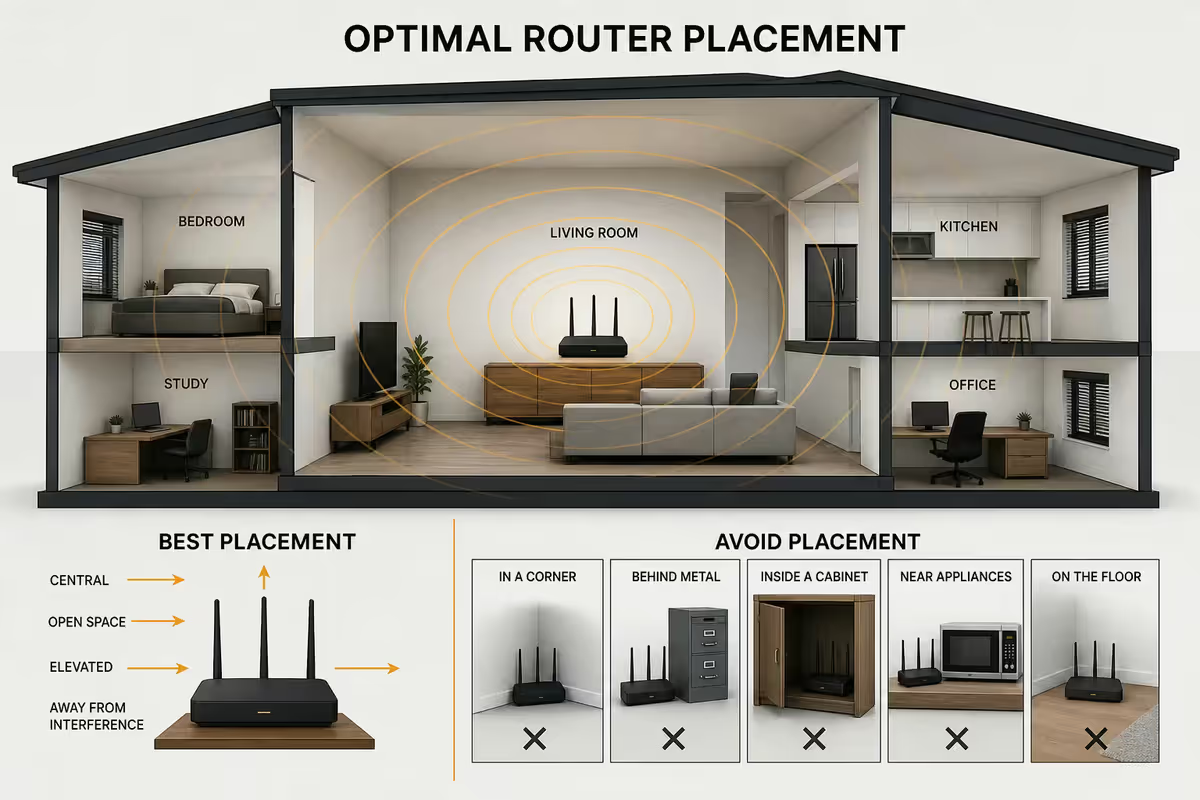
Router placement — the free upgrade
The single biggest "free" improvement to your Wi-Fi is moving the router. SA homes commonly have the fibre termination installed at the wall closest to the street — often in the lounge, study or even garage. That's the worst possible router location for whole-home coverage.
The placement rules:
- Central — geographically central in the home. If the fibre is at one end, run an Ethernet cable to the centre and put the router there.
- Elevated — at chest height or higher. Signal radiates outward and slightly downward. A router on the floor punishes anyone upstairs.
- Open air — not in a cabinet, not behind the TV, not on a metal shelf, not next to fish tanks (water absorbs signal).
- Away from 2.4 GHz interference — microwaves, Bluetooth devices, baby monitors, old cordless phones all sit in or near the 2.4 GHz band.
If you can't move the router, get a mesh. A R3,500 mesh kit placed correctly will outperform a R7,000 single router placed badly. Placement matters more than router quality past a certain threshold.
SA fibre context — PPPoE, Vumatel and Openserve quirks
SA fibre delivery has some local quirks that affect router choice and setup.
PPPoE handover is the default
Most SA fibre providers (Vumatel, Openserve, MetroFibre, Frogfoot) deliver the line as PPPoE — you authenticate with a username and password supplied by your ISP. The ISP-issued router has this baked in. When you replace it with your own router, you have two options:
- Bridge mode the ISP router — switch it to bridge / modem mode so it just passes the connection through, and let your new router do the PPPoE authentication. This is the cleaner setup but requires the ISP router to support bridge mode (most do).
- Direct PPPoE on your router — connect the new router directly to the ONT (the white fibre box on the wall) and authenticate from there. This bypasses the ISP router entirely. Cleaner but requires your ISP to allow it (Vumatel and Openserve generally do; some ISPs lock the ONT).
All current consumer routers (ASUS, TP-Link, Netgear, Linksys) support PPPoE WAN mode out of the box. Set the WAN type to PPPoE, enter your ISP username and password, set MTU to 1500 (some lines require 1492 — your ISP will tell you), and you're connected.
Vumatel and Openserve specifics
Vumatel generally allows you to bypass the ISP router entirely if your ISP supports it (Afrihost, RSAWEB and Vox are flexible). You can plug your own router straight into the ONT.
Openserve is similar but some ISPs (especially Telkom-resold lines) prefer their own router stay in the loop for support reasons. Bridge mode works fine here.
MetroFibre and Frogfoot are generally flexible — drop the ISP router, use your own, set up PPPoE.
SA brand picks across budget tiers
Budget — ISP replacement (R1,200-R2,200)
- TP-Link Archer AX55 (Wi-Fi 6, dual-band, ~R1,400) — solid step up from any ISP router.
- Mercku M2 (Wi-Fi 6, dual-band, ~R1,800) — strong SA reseller support, good for smaller homes.
- ASUS RT-AX1800S (Wi-Fi 6, dual-band, ~R2,100) — the ASUS ASUSWRT firmware is the budget tier's best.
Enthusiast single router (R2,500-R5,000)
- ASUS RT-AXE7800 (Wi-Fi 6E tri-band, ~R3,800) — the price-performance king for SA 2026.
- TP-Link Archer AXE75 (Wi-Fi 6E tri-band, ~R3,200) — slightly cheaper, comparable performance, HomeShield app.
- ASUS RT-BE92U (Wi-Fi 7 dual-band with 2.5GbE, ~R4,800) — entry Wi-Fi 7 if you want future-proofing without spending R8,000+.
- Netgear Nighthawk RAXE300 (Wi-Fi 6E tri-band, ~R4,500) — strong if you find it on sale.
Mesh systems (R3,500-R12,000)
- TP-Link Deco XE75 Pro (Wi-Fi 6E tri-band, 2-pack ~R5,500, 3-pack ~R7,800) — the SA mesh sweet spot.
- ASUS ZenWiFi XT9 (Wi-Fi 6 tri-band, 2-pack ~R6,200) — AiMesh ecosystem if you already have ASUS routers.
- TP-Link Deco BE65 (Wi-Fi 7 tri-band with 2.5GbE, 2-pack ~R9,500) — premium mesh future-proofing.
- ASUS ZenWiFi BT8 (Wi-Fi 7 tri-band, 2-pack ~R11,500) — top-tier mesh for large homes with 1Gbps+ lines.
Advanced / power user
- MikroTik hAP ax3 (~R2,400) — for users comfortable with RouterOS; massive feature set, steep learning curve.
- Ubiquiti UniFi Dream Router / Cloud Gateway (~R5,000-R12,000) — best-in-class for prosumers who want enterprise-grade features.
- Mikrotik Audience LTE — niche pick for SA users wanting LTE failover when fibre drops.
Common mistakes when buying a router
Keeping the ISP router and adding a "Wi-Fi extender". Extenders halve your bandwidth at each hop and create roaming problems. Replace the ISP router entirely or add a proper mesh node instead — never an extender.
Buying for the marketing number (AXE11000, BE19000). Those are theoretical aggregate throughputs you'll never see. Compare per-band 5 GHz and 6 GHz speeds, not the headline number.
Putting the router in a cabinet "for tidiness". Closed cabinets block signal by 30-50%. Wood is okay, metal cabinets are catastrophic. If aesthetics matter, get a router that looks good (TP-Link Deco, Mercku) and leave it visible.
Buying Wi-Fi 7 when no client device supports it. If your phones and laptops are pre-2024, they don't have Wi-Fi 7 radios. You're paying premium prices for headroom that won't connect until you upgrade every device.
Skipping wired backhaul on mesh. Wireless backhaul mesh degrades bandwidth by ~40% at each hop. If you have CAT6 already pulled, use it. If not, even a flat CAT6 cable along the skirting outperforms wireless backhaul.
Forgetting about 2.5GbE WAN on a 1 Gbps line. PPPoE overhead plus concurrent traffic means a 1 GbE WAN port caps real-world throughput at ~920 Mbps. A 2.5GbE WAN port unlocks the full gigabit.
Key takeaways
- The ISP router is the bottleneck on every SA fibre line — replace it first, before any other network upgrade.
- Wi-Fi 6E is the 2026 sweet spot — 50% cheaper than Wi-Fi 7 and 95% as good for typical SA fibre lines.
- Mesh systems with wired backhaul outperform single high-end routers in any home larger than 130m².
- Placement matters more than spec — central, elevated, open air beats a premium router in a cabinet.
- 2.5GbE WAN port is essential for 1 Gbps fibre lines — PPPoE overhead chokes the 1 GbE option.
Frequently asked questions
Is the router my ISP gave me good enough?
Almost never. ISP routers from Vumatel, Openserve and others are built to the cheapest spec. A R2,500-R4,000 standalone router typically doubles real-world throughput and cuts latency by 30-50%.What's the difference between Wi-Fi 6, Wi-Fi 6E and Wi-Fi 7?
Wi-Fi 6 is 2.4 + 5 GHz. Wi-Fi 6E adds the 6 GHz band (uncrowded, fast). Wi-Fi 7 adds 320 MHz channels and Multi-Link Operation. Wi-Fi 6E is the 2026 sweet spot — Wi-Fi 7 carries a 50-80% premium for marginal real-world gain.Do I need a mesh system or will a single router do?
Single router for flats and single-storey homes under ~120m². Mesh for double-storey homes, 3+ bedroom layouts, or thick-walled SA houses where the router can't sit centrally.What does AX and BE mean on router boxes?
AX = Wi-Fi 6 / 6E (AX5400, AXE7800). BE = Wi-Fi 7 (BE9300, BE19000). The number is theoretical combined throughput. Compare per-band speeds, not the headline number.Will a better router give me faster fibre speeds?
It gives you the speed you're already paying for. A modern Wi-Fi 6E router gets 800-950 Mbps on 5 GHz and full gigabit on 6 GHz versus 350-450 Mbps on a typical ISP router. The line was always that fast; the router was throttling it.How do I handle PPPoE with Vumatel or Openserve?
All current consumer routers support PPPoE. Set WAN to PPPoE, enter your ISP username and password, MTU 1500 (some lines require 1492). Either bridge-mode the ISP router or plug your new router directly into the ONT.Do I need 2.5GbE Ethernet ports on my router?
Yes if your fibre is 1 Gbps or faster — PPPoE overhead means 1 GbE WAN caps at ~920 Mbps. For 200-500 Mbps fibre, gigabit ports are fine.What's the best router placement for Wi-Fi performance?
Central, elevated (chest height or higher), open air. Avoid cabinets, fish tanks, microwave proximity, and exterior-wall placement. A R3,500 mesh placed well beats a R7,000 router placed badly.
Get the Evetech app
Exclusive app-only prices, daily flash sales, and free delivery on orders over R4,000 — download the app and start saving.