Networking Buying Guide
WiFi 6 vs WiFi 7. — Honest answer for SA homes in 2026.
WiFi 7's headline speed of 46 Gbps sounds revolutionary. The reality on a 200 Mbps fibre line is more boring — and that's most South African homes. Here's when WiFi 7 is genuinely worth the premium and when WiFi 6E is the smart pick.
- 2026 sweet spot
- WiFi 6E
- WiFi 7 premium
- R3,000+
- only counts
- End-to-end
WiFi 6 vs WiFi 6E vs WiFi 7 — the specs that matter
Three generations, often confused. Here's the practical difference between them, ignoring the parts of the spec sheet that don't affect real-world use.
| Standard | Bands | Max theoretical speed |
|---|---|---|
| WiFi 6 (802.11ax) | 2.4 GHz + 5 GHz | 9.6 Gbps |
| WiFi 6E (802.11ax) | 2.4 + 5 + 6 GHz | 9.6 Gbps (uncongested 6 GHz) |
| WiFi 7 (802.11be) | 2.4 + 5 + 6 GHz (with MLO) | 46 Gbps |
WiFi 6 introduced OFDMA and improved efficiency over WiFi 5 — better for crowded networks (many simultaneous devices) but raw speed similar to a good WiFi 5 router.
WiFi 6E adds the 6 GHz band — a new spectrum that no legacy devices use. It's uncongested and clean, giving WiFi 6E real-world speeds well above WiFi 6 even though the spec sheet's headline number is the same.
WiFi 7 brings three big technical changes: 320 MHz channels (twice as wide as WiFi 6E's 160 MHz), 4096-QAM (packs 20% more data per symbol), and MLO (simultaneous use of multiple bands). Combined, these deliver the 5× theoretical speed jump.
MLO — Multi-Link Operation, the WiFi 7 feature that matters most
MLO is the biggest practical improvement in WiFi 7, and the only feature that's fundamentally different rather than just incrementally faster.
What it does: in WiFi 6 and 6E, your device picks one band (2.4, 5 or 6 GHz) and connects on it. The router and device negotiate, settle on one band, and stick to it for the duration of the connection. In WiFi 7 with MLO, the device uses multiple bands simultaneously — sending one part of the data over 5 GHz, another part over 6 GHz, in parallel.
Why it matters:
- Redundancy. If one band gets congested (a neighbour's microwave, building interference), MLO instantly shifts more traffic to the clean band. WiFi 6E would have to renegotiate and switch — adding a 200-500ms delay.
- Combined throughput. Two bands carrying data in parallel deliver higher real-world speed than either band alone.
- Lower latency. Critical for cloud gaming (GeForce NOW, Xbox Cloud Gaming), VR streaming and high-quality video calls. Customers using MLO report ~30-40% lower jitter on competitive shooters.
Real-world speeds — what you actually get
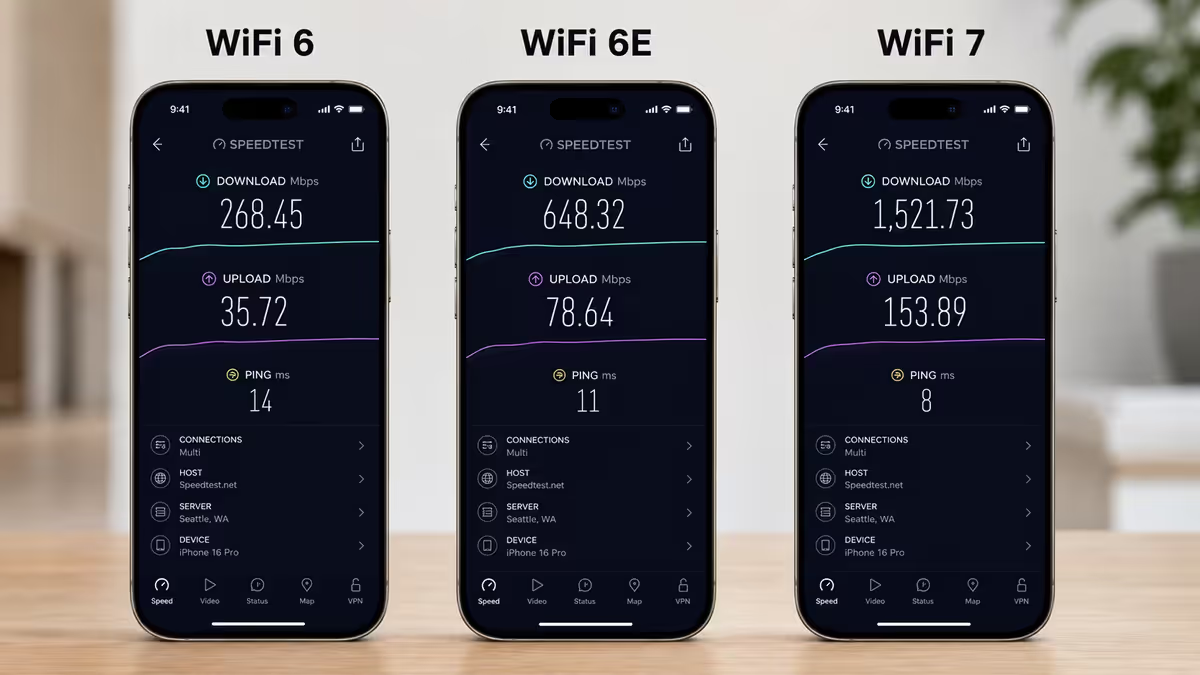
The spec sheet numbers (9.6 Gbps vs 46 Gbps) bear almost no relationship to what you see at home. Real-world WiFi is throttled by walls, distance, interference, device antenna design and the slower side of the connection. Here's what to actually expect in a typical SA home.
| Standard (same room as router) | Real-world download | Real-world latency |
|---|---|---|
| WiFi 5 (legacy, AC1900) | 300-600 Mbps | 5-15 ms |
| WiFi 6 (AX3000-AX5400) | 600-1,200 Mbps | 3-10 ms |
| WiFi 6E (AX5400-AXE7800) | 1,000-2,000 Mbps | 3-8 ms |
| WiFi 7 (BE5000-BE19000) | 2,000-4,000 Mbps* | 1-5 ms (with MLO) |
*Only when both router and device are WiFi 7. With WiFi 6 client devices, a WiFi 7 router delivers WiFi 6 speeds.
Real-world numbers in the next room: subtract 25-40% from the same-room figure. Through a concrete wall: subtract another 30-50%. Through two interior walls plus floor: half again. Most SA homes built since 2010 have plasterboard interior walls and concrete external walls — the practical impact is usually one wall of degradation between the router and most rooms.
Which devices actually support WiFi 7
The most under-appreciated reality: most devices in your home don't support WiFi 7 in 2026, and won't for another 2-3 years. Buying a WiFi 7 router doesn't make your existing devices faster — only WiFi 7 client devices can use the new features.
Laptops with WiFi 7 (2024-2026)
- MacBook Pro M4 (Apple's first WiFi 7 laptop, 2024+) and M5 generation.
- ASUS ROG Strix Scar series, ROG Zephyrus G16 (2024+).
- Lenovo Legion Pro 7i (2024+), ThinkPad X1 Carbon Gen 13 (2025+).
- Any laptop with Intel Killer BE1750 or Intel BE200/BE201 wireless card.
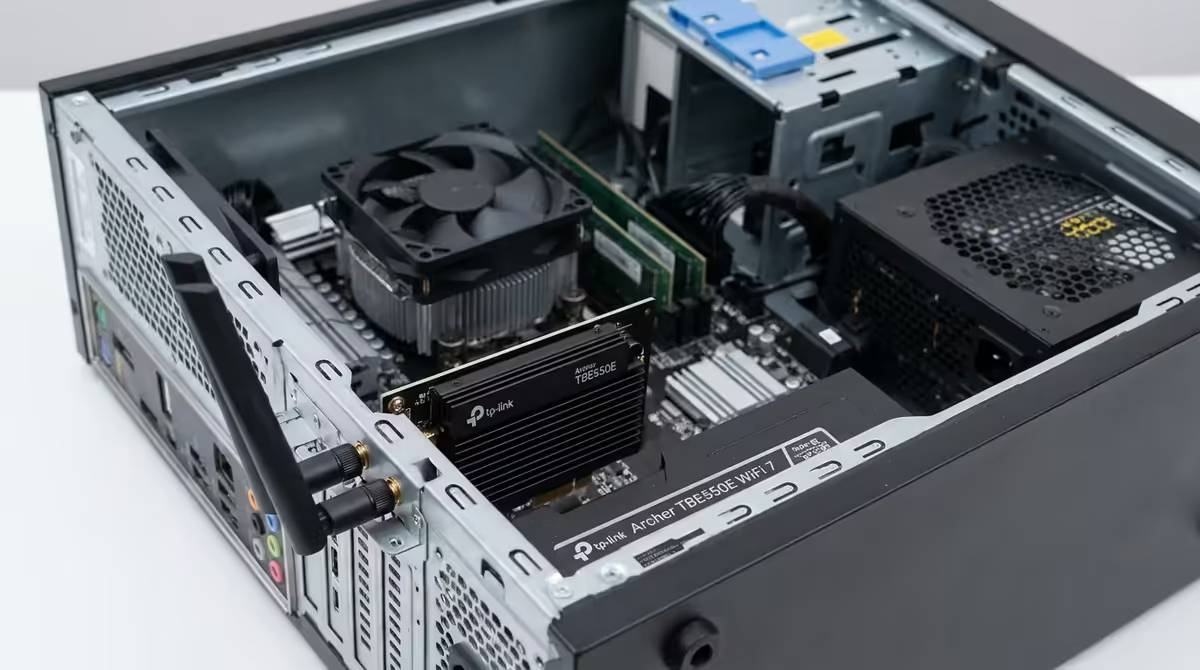
- Custom desktop PCs with aftermarket WiFi 7 cards (R1,500-R2,800 in SA).
Phones with WiFi 7 (2024-2026)
- Samsung Galaxy S24 Ultra (2024), S25 / S25 Ultra (2025), S26 generation.
- iPhone 16 Pro / Pro Max (Sept 2024), iPhone 17 generation.
- Google Pixel 9 Pro / Pro XL (2024), Pixel 10 series.
- OnePlus 13, OnePlus Open (2024+).
What doesn't support WiFi 7: most laptops sold under R30,000 in SA in 2024-2025 (still WiFi 6 or 6E), all current PlayStation 5 / Xbox Series consoles (WiFi 6 at best), nearly all smart-home devices (WiFi 4 or WiFi 5), printers, smart TVs prior to 2025 high-end models, robot vacuums, IoT sensors.
Backwards compatibility — buying WiFi 7 doesn't break old gear
A WiFi 7 router serves WiFi 6E, WiFi 6, WiFi 5 and even WiFi 4 (b/g/n) devices at their native maximum speeds. There's no compatibility issue — the router transparently handles multiple standards simultaneously.
What you don't get is the WiFi 7 advantage on legacy devices. Your WiFi 6 laptop on a WiFi 7 router gets WiFi 6 speeds. Your WiFi 5 smart TV gets WiFi 5 speeds. The router is a smart switch between standards, not a magic upgrade for everything connected to it.
Practical impact: don't worry about throwing out your existing devices. Upgrade the router when it makes sense for your fibre line and primary devices, and the rest of your devices keep working as they did. As you upgrade phones and laptops over the next 3-5 years, more of them will support WiFi 7 and the router will gradually deliver more of its potential.
The upgrade calculus — when WiFi 7 is worth it, when it isn't
The decision is mostly about three variables: your fibre speed, your device mix, and your primary use case.
Buy WiFi 7 if:
- Your fibre is 1 Gbps or faster (Vumatel Pro, Openserve 1000, Frogfoot 1Gig+).
- You have multiple WiFi 7 devices already (premium phone + premium laptop + console upgrade planned).
- You want a 5-7 year future-proof investment.
- Your primary use is latency-sensitive (cloud gaming, VR, competitive online).
- You're moving into a new build with structured wiring and want top-tier wireless to match.
Skip WiFi 7 and buy WiFi 6E if:
- Your fibre is 100-500 Mbps (the most common SA tier).
- Your devices are mostly WiFi 6 era (most laptops 2020-2024, most phones 2020-2024).
- Your home is under 120m² and a single router covers it.
- Your primary use is streaming, browsing, video calls, casual gaming.
- Budget is constrained and you'd rather upgrade fibre or buy better mesh.
Stay on WiFi 6 if:
- Your existing WiFi 6 router is performing well and your fibre is 50-200 Mbps.
- You have no WiFi 6E or WiFi 7 devices and no plans to buy them.
- Budget is best spent on fibre upgrade or wired ethernet to high-traffic rooms.
SA pricing tiers — WiFi 6 / 6E / 7 in 2026
| Standard / form factor | Recommended pick | SA price (May 2026) |
|---|---|---|
| WiFi 6 single router | TP-Link Archer AX55, Asus RT-AX55 | R1,400-R2,400 |
| WiFi 6 mesh (2-pack) | TP-Link Deco X20, Asus ZenWiFi AX | R2,800-R4,800 |
| WiFi 6E single router | Asus ROG Rapture GT-AXE11000, TP-Link Archer AXE75 | R3,500-R6,500 |
| WiFi 6E mesh (2-pack) | TP-Link Deco XE75, Asus ZenWiFi ET8 | R5,500-R10,500 |
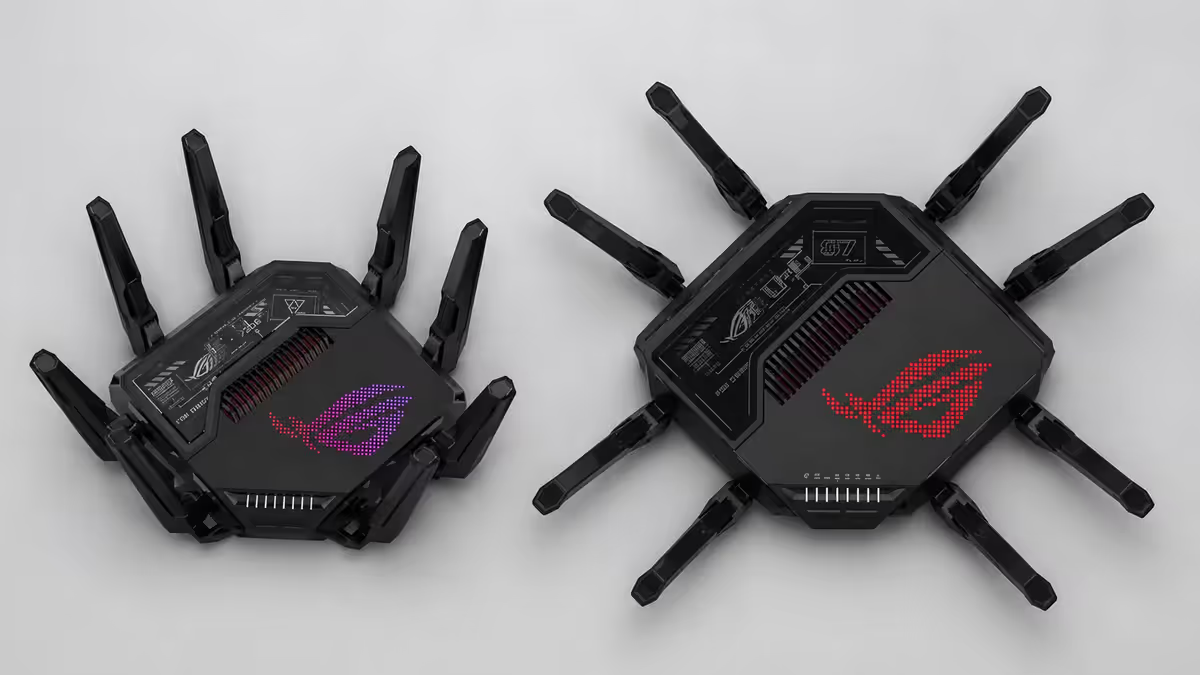
| WiFi 7 single router | Asus ROG Rapture GT-BE98, TP-Link Archer BE800 | R7,000-R14,000 |
| WiFi 7 mesh (2-pack) | TP-Link Deco BE65, Asus ZenWiFi BT10, Netgear Orbi 970 | R14,000-R28,000 |
| WiFi 7 PCIe card (desktop) | Intel BE200, TP-Link Archer TBE550E | R1,500-R2,800 |
Common WiFi upgrade mistakes
Buying WiFi 7 for slow fibre. The most common 2026 mistake. A WiFi 7 router on 100 Mbps fibre is a Ferrari in heavy traffic — the engineering is wasted. Upgrade fibre first, router second.
Assuming all WiFi 7 devices use MLO. Some early WiFi 7 client devices (cheaper laptops, lower-tier phones) support the WiFi 7 standard but not MLO. They get the 320 MHz channel speed boost but miss the latency advantage. Read the spec sheet for "MLO supported".
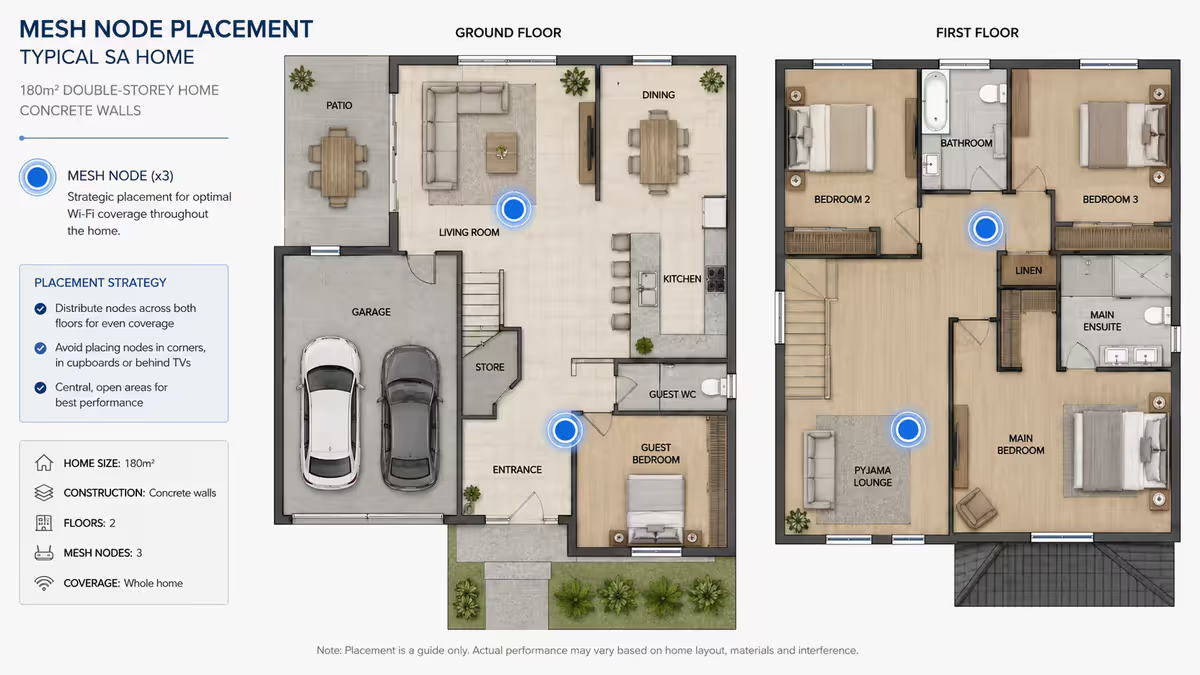
One single router for a 200m² double-storey home. Even WiFi 7 can't punch through three concrete walls and a slab floor. If your home is over 150m² or has multiple levels, mesh is the answer regardless of WiFi standard.
Ignoring the wired backhaul option. A mesh with wired ethernet backhaul between nodes (CAT6 between rooms) outperforms any wireless backhaul by 2-3× at the satellite nodes. If you have or can run CAT6, do it.
Forgetting the ISP router. Many SA fibre customers still use their ISP-provided router (Mikrotik, Huawei). Even with a fancy new WiFi 7 router, if you leave the ISP unit's WiFi on, devices can latch onto the slower signal. Disable WiFi on the ISP unit and put it in bridge mode if possible.
Key takeaways
- WiFi 6E is the 2026 sweet spot for 95% of SA homes — uncongested 6 GHz band, R3,500-R8,000.
- WiFi 7 only makes sense end-to-end: 1 Gbps+ fibre AND WiFi 7 devices. Without both, you're paying for unused capacity.
- MLO is the killer WiFi 7 feature — simultaneous bands deliver lower latency for cloud gaming and VR.
- Backwards compatibility is fine — WiFi 7 routers serve older devices at their native speeds. Don't worry about existing gear.
- Most-regretted 2026 networking buy: WiFi 7 router on 100 Mbps fibre. The router can't deliver what the line doesn't carry.
Frequently asked questions
Is WiFi 7 actually faster than WiFi 6 in real-world use?
Only with end-to-end WiFi 7. Real-world same-room speeds: WiFi 6 600-1200 Mbps, WiFi 6E 1-2 Gbps, WiFi 7 2-4 Gbps. With WiFi 6 client devices, a WiFi 7 router still delivers WiFi 6 speeds.What is MLO and is it the reason to choose WiFi 7?
Multi-Link Operation — devices use multiple bands simultaneously for redundancy and combined speed. The strongest single argument for WiFi 7, particularly for cloud gaming, VR and competitive online use.My fibre is 100 Mbps — does WiFi 7 help at all?
No. Even WiFi 5 saturates 100 Mbps. Latency benefits exist but you're paying R5,000+ for a router that mostly idles. WiFi 6E (R1,500-R3,500) is the smart pick at that line speed.Which devices actually support WiFi 7 in 2026?
Premium 2024-2026 devices. Laptops with Intel BE200/BE201 cards (MacBook Pro M4+, ROG Strix Scar, Legion Pro 7i). Phones: Samsung S24 Ultra+, iPhone 16 Pro+, Pixel 9 Pro+, OnePlus 13.Is WiFi 7 backwards compatible with my WiFi 6 devices?
Yes, fully. A WiFi 7 router serves WiFi 6, 6E, 5 (AC) and older devices at their native speeds. You don't break old gear by upgrading the router.WiFi 6 vs WiFi 6E — what's the difference?
WiFi 6E adds the uncongested 6 GHz band on top of WiFi 6's 2.4 + 5 GHz. Real-world speed jumps from 600-1200 Mbps to 1-2 Gbps. The sweet spot for SA homes in 2026.Should I get a mesh WiFi 7 system or a single router?
Single router covers up to ~120m² single-storey. Above that or double-storey with concrete walls, mesh delivers consistent coverage. WiFi 6E mesh (R5,500-R10,500) is significantly more affordable than WiFi 7 mesh (R14,000-R28,000).What's the most-regretted WiFi upgrade decision in 2026?
Buying a WiFi 7 router for a 100 Mbps fibre line. Router can't deliver what the line doesn't carry. Customers in that scenario are consistently underwhelmed, while the equivalent WiFi 6E mesh leaves them happy.
Get the Evetech app
Exclusive app-only prices, daily flash sales, and free delivery on orders over R4,000 — download the app and start saving.