WiFi Standards Explainer
WiFi 6 vs 6E vs WiFi 7. — Which do you actually need?
Three standards on the shelf, three price brackets, and a fibre line your ISP router can already barely fill. Here's the honest read for South African homes in 2026.
- new band on 6E/7
- 6 GHz
- WiFi 7 channel width
- 320 MHz
- tier price spread
- R1.5k-R6k+
The three bands, in one minute
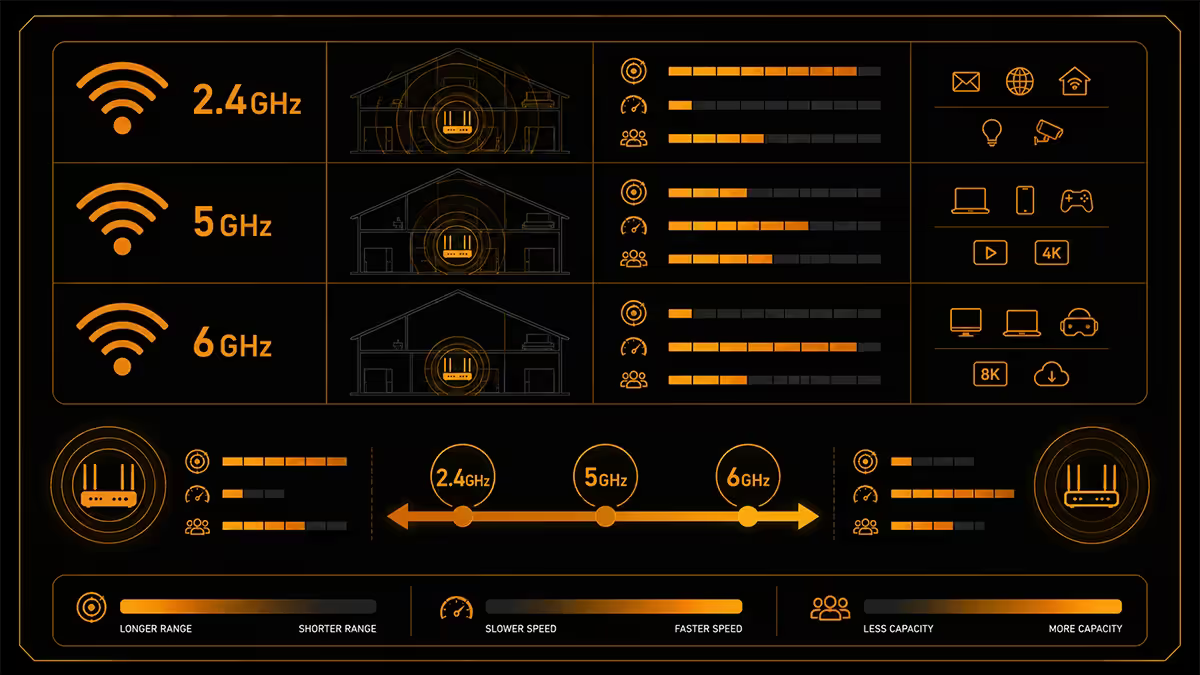
Every consumer WiFi standard since the early 2000s has lived on two slices of spectrum — 2.4 GHz and 5 GHz. The 2.4 GHz band travels far through walls but is shared with microwaves, Bluetooth, baby monitors and every old IoT widget in your neighbourhood. The 5 GHz band is faster and cleaner but loses signal more quickly through obstacles. Both are crowded in any block of flats by 2026.
In 2021 regulators worldwide started opening a third band — 6 GHz — for unlicensed WiFi use. It carries 1200 MHz of fresh spectrum, enough for seven non-overlapping 160 MHz channels (or three full 320 MHz channels under WiFi 7). South Africa's ICASA finalised local 6 GHz rules in 2023, which is why 6E and WiFi 7 routers can now operate legally here.
| Band | Used by | Real-world feel |
|---|---|---|
| 2.4 GHz | All WiFi 4/5/6/6E/7 | Best range, slowest, very congested |
| 5 GHz | All WiFi 5/6/6E/7 | Fast, medium range, moderately congested |
| 6 GHz | WiFi 6E and WiFi 7 only | Fastest, shortest range, virtually empty |
WiFi 6 — the standard you probably already have
WiFi 6 (802.11ax) launched in 2019 and is by now the baseline on every router an ISP ships in SA. The headline features were OFDMA (splits one channel between many clients efficiently, reducing latency in crowded homes), 1024-QAM (denser modulation for higher per-stream throughput), and BSS colouring (helps neighbouring networks share airtime).
Real-world throughput on a quality WiFi 6 router with a WiFi 6 phone close to the AP sits around 700-1100 Mbps over 5 GHz. That's enough to fully saturate every fibre line currently sold in SA up to and including 1 Gbps — by the time you account for protocol overhead and a couple of metres of distance.
WiFi 6E — same standard, fresh spectrum
WiFi 6E is not a new generation. It's WiFi 6 with permission to use the new 6 GHz band. Same MAC layer, same protocol, just an extra radio.
Why does that matter so much? The 6 GHz band is essentially empty. Walk into any block of flats and scan the 5 GHz band — you'll see twenty neighbour networks competing for nine usable channels. Now scan 6 GHz: yours and maybe one other. That cleanliness translates directly into lower latency, tighter jitter and fewer dropped packets — exactly what video calls, cloud gaming and VR headsets care about.
The catch: 6 GHz signals attenuate faster through walls than 5 GHz. In a townhouse with brick interior walls, a 6 GHz signal from a router two rooms away may be unusable while 5 GHz is fine. WiFi 6E earns its R3,000+ price tag when:
- You live in a flat or estate with heavy 2.4/5 GHz congestion (a network scan shows 15+ neighbour SSIDs).
- You have a WiFi 6E phone, laptop or VR headset that can actually use 6 GHz.
- Your router can sit in the room you use most, so 6 GHz range doesn't become a problem.
WiFi 7 — MLO is the real reason to care
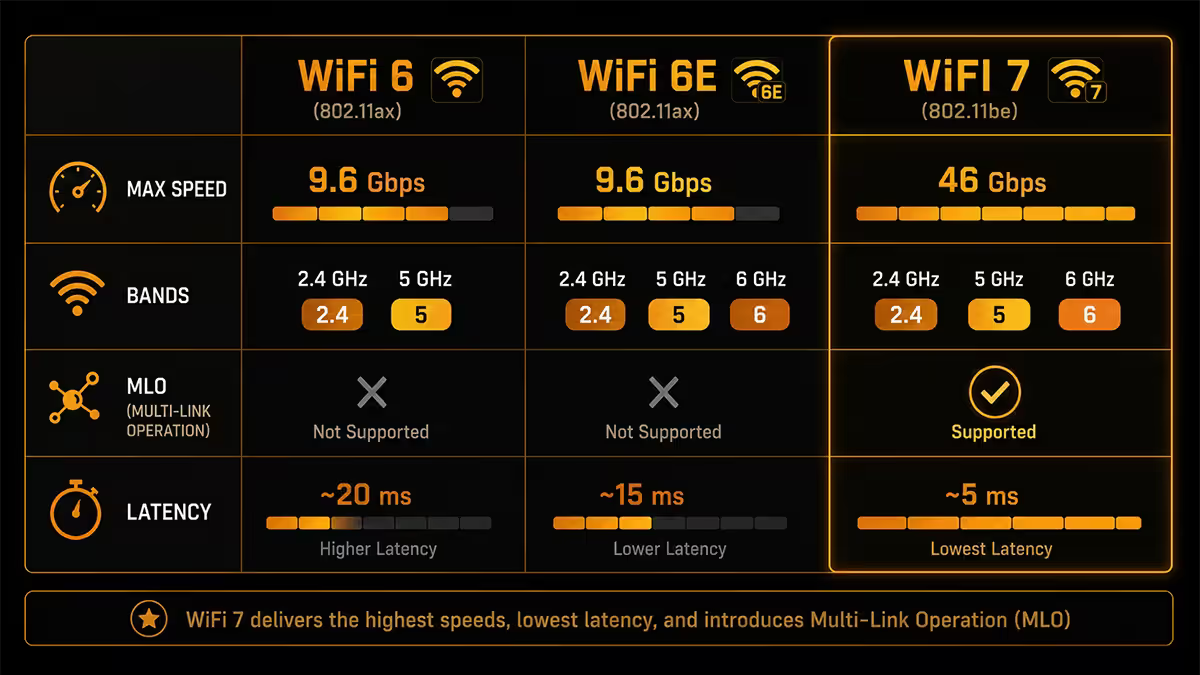
WiFi 7 (802.11be) brings three genuinely new tricks: 320 MHz channel width on 6 GHz (double WiFi 6E), 4096-QAM modulation, and most importantly Multi-Link Operation (MLO).
MLO lets a single client send and receive across two bands simultaneously — typically 5 GHz and 6 GHz combined into one logical link. Real-world benefits: lower latency (the radio picks whichever band has clearer airtime in the moment), smoother roaming between mesh nodes, and aggregate throughput that exceeds a single radio's maximum.
320 MHz channels push theoretical peak speeds past 5 Gbps per stream, but you need three things stacked correctly to see anywhere close: a fully clean 6 GHz band, a multi-Gig wired backhaul from the router, and a WiFi 7 client device within a few metres of the AP. None of those is the typical SA living-room scenario today.
The SA fibre reality check
Here's the awkward truth nobody marketing a R9,000 WiFi 7 router wants to say out loud: your fibre line is almost certainly the bottleneck, not the WiFi standard.
Vumatel, Openserve, Frogfoot and MetroFibre are still selling the vast majority of residential lines at 100-300 Mbps. Even on a 1 Gbps line, your real-world internet throughput tops out at roughly 940 Mbps after PPPoE and ISP overhead. A 1100 Mbps WiFi 6 link from a R1,500 router carries that without breaking a sweat.
Where the newer standards earn their money:
- Local network traffic. Backing up to a NAS, transferring files between PCs, streaming from a Plex server. A 10 GbE NAS feeding two WiFi 7 clients via MLO is the one place a home network can actually exceed Gigabit usefully.
- Cloud gaming and VR. Latency and jitter matter more than peak throughput. The 6 GHz band's emptiness is the win here.
- Multi-user homes in flat blocks. When 8 devices on 5 GHz are all fighting for airtime with 30 neighbour networks, moving the high-priority devices to 6 GHz frees up everything.
Router picks per tier — SA stock
| Tier | Best pick | SA price |
|---|---|---|
| Budget WiFi 6 (single router) | TP-Link Archer AX55 / ASUS RT-AX55 | R1,400-R1,700 |
| Mid WiFi 6 (small house) | ASUS RT-AX86U Pro / TP-Link Archer AX73 | R2,400-R3,200 |
| WiFi 6 mesh (large home) | TP-Link Deco X50 (3-pack) / ASUS XT8 | R3,500-R5,500 |
| Best-value WiFi 6E | ASUS RT-AXE7800 / TP-Link Archer AXE75 | R3,000-R3,800 |
| Entry WiFi 7 (dual-band) | TP-Link Archer BE3600 / ASUS RT-BE58U | R3,500-R4,500 |
| True tri-band WiFi 7 | ASUS RT-BE88U / TP-Link Archer BE800 | R6,000-R9,000 |
| WiFi 7 mesh (multi-storey) | TP-Link Deco BE65 (2-pack) / ASUS BT10 | R9,000-R14,000 |
The client side — what your devices support
A WiFi 7 router is useless if every device in your house tops out at WiFi 6. Check the spec sheet of your daily-driver devices before committing to an expensive router:
WiFi 7 native: iPhone 16/17 Pro, iPad Pro M4, MacBook Pro M4, Samsung Galaxy S24/S25/S26 Ultra, Google Pixel 9 Pro, Intel BE200/BE201 cards (most 2024+ premium laptops), AMD Ryzen AI 300-series with RZ717.
WiFi 6E natively: iPhone 15 Pro/Plus, Samsung Galaxy S23/S24 standard, most 2023-2024 mid-to-premium laptops with Intel AX211 or AX411.
WiFi 6 only: iPhone 14 and earlier, the bulk of pre-2023 laptops, Steam Deck, PS5, Xbox Series X/S, most smart TVs, every IoT device in your house.
A WiFi 7 router still serves WiFi 6 clients at full WiFi 6 speeds — there's no downside to forward-buying except your wallet. But if your phone is a Galaxy A-series and your laptop is a Dell from 2022, a R6,000 WiFi 7 router will give you exactly zero improvement over a R1,500 WiFi 6 router.
Mesh — when one router isn't enough
For most SA homes under 150 sqm on a single floor, a single quality router placed near the centre of the home outperforms cheap mesh systems. The moment you're in a 200 sqm+ home, a double-storey, or a townhouse with thick brick interior walls, mesh starts winning regardless of router quality — you cannot brute-force radio waves through 30 cm of concrete.
The key 6E/7 mesh advantage is dedicated 6 GHz wireless backhaul. Older mesh systems halved their throughput at each hop because clients and backhaul shared the same band. New tri-band 6E and WiFi 7 mesh kits reserve the 6 GHz radio for inter-node traffic, so client throughput on 5 GHz remains full speed.
Key takeaways
- Most SA homes on 100-500 Mbps fibre don't benefit from upgrading past WiFi 6 — the fibre line is the bottleneck.
- WiFi 6E is the value upgrade if you live in a flat block with heavy 5 GHz congestion — the 6 GHz band is still empty.
- WiFi 7's real advantage is MLO and latency, not peak throughput. Worth it for multi-Gig or low-latency-critical use.
- Many sub-R5,000 "WiFi 7" routers are dual-band only — no 6 GHz radio. Check for tri-band before paying.
- Your phone/laptop standard matters more than the router. A WiFi 6 phone won't use any WiFi 7 features.
Frequently asked questions
Do I actually need WiFi 7 in South Africa?
Not for most SA fibre customers under 1 Gbps. WiFi 6 already saturates those lines. WiFi 7 earns its price on multi-Gig fibre, fast local NAS, or homes with heavy multi-device latency demand.What's the difference between WiFi 6 and WiFi 6E?
Same standard, but 6E adds the 6 GHz band — 1200 MHz of fresh spectrum that's empty in most SA neighbourhoods. Cleaner spectrum means lower latency and fewer dropped packets.What is MLO and why does WiFi 7 need it?
Multi-Link Operation lets a WiFi 7 client send and receive over 5 GHz and 6 GHz simultaneously. Lower latency, smoother roaming, higher aggregate throughput.Will my old phone or laptop work with a WiFi 7 router?
Yes. WiFi 7 is fully backwards compatible. WiFi 5/6 clients connect at their native speeds. You gain nothing for the old client but lose nothing either.Which devices currently support WiFi 7?
iPhone 16/17 Pro, Samsung S24/S25/S26 Ultra, MacBook Pro M4, Intel BE200/BE201 cards, AMD RZ717. Mid-range phones and laptops are still WiFi 6/6E.Can I just keep using my ISP router?
Fine for 100-200 Mbps and one or two rooms. Problems start with large homes, multiple 4K streams, or thick walls. A R1,500-R3,500 standalone router typically doubles real-world throughput at distance.Is mesh worth it or should I get one big router?
Single-floor flats under 100 sqm — one good router. 200 sqm+ homes, double-storey or thick brick walls — mesh wins. 6E/7 mesh uses 6 GHz for dedicated backhaul, no more halving bandwidth.What about 320 MHz channels in WiFi 7?
Double the maximum channel width of WiFi 6/6E. Theoretical 5 Gbps per stream, but only achievable with clean 6 GHz spectrum, multi-Gig wired backhaul, and a WiFi 7 client close to the AP.
Get the Evetech app
Exclusive app-only prices, daily flash sales, and free delivery on orders over R4,000 — download the app and start saving.