Hardware Explainer
CPU cache, explained. — L1, L2, L3. Why bigger means faster games.
Cache is the spec that influences buying behaviour most after price and cores — yet most buyers don't know what it does. It's the difference between a CPU waiting 1 nanosecond or 80 nanoseconds for data. Here's the full picture.
- fastest access
- L1 ~1ns
- shared cache
- L3 ~10ns
- X3D V-Cache
- +64 MB
What CPU cache actually is
CPU cache is small, very fast memory built directly into the CPU itself. It exists because the CPU is much faster than the system RAM it reads from. Without cache, the CPU would spend most of its time waiting for memory.
Think of it as the CPU's scratchpad. The CPU keeps recently-used data, instructions and frequently-accessed information in cache so it can pull them up instantly. Whenever the CPU needs to do something, it checks cache first. If the data is there (a "hit"), it processes immediately. If not (a "miss"), it has to fetch from slower memory — which costs orders of magnitude more time.
All modern CPUs from AMD, Intel and Apple use the same three-tier cache structure: L1, L2 and L3. Each level is bigger but slower than the previous. The combination lets the CPU keep the right data close at hand without making the chip prohibitively expensive (cache uses a lot of silicon — and silicon is what you're paying for in a CPU).
The three levels — L1, L2, L3
Each cache level serves a different purpose. They're designed as a hierarchy: data starts in L3 (or RAM), gets pulled into L2 as it's needed, and lands in L1 when actively being processed.
L1 cache — the smallest and fastest
L1 is the CPU's innermost cache, sitting right next to each core's execution units. It's split into two halves: L1-data (for actual data) and L1-instruction (for code). Typical size in 2026: 32-64KB per half, so 64-128KB total per core. Access time: roughly 1 nanosecond — almost as fast as the CPU's own registers.
L1 is tiny because it has to be both fast and physically close to the core. Bigger L1 would slow it down. Hit rates in L1 are extremely high (95-99% for typical workloads), because the CPU keeps the data it's actively chewing on right there.
L2 cache — mid-size, mid-speed
L2 is the second tier — bigger than L1 but slower. In 2026 CPUs: 256KB-1MB per core on AMD Ryzen, 1.25-3MB per core on Intel Core Ultra. Access time: ~3 nanoseconds. When data isn't in L1, the CPU checks L2 next. Almost always finds it there (combined L1+L2 hit rate is ~98%).
L2 is private to each core — like L1 — but bigger. It holds the working set of recent operations so cores don't have to share or wait for shared cache.
L3 cache — large, shared, the gaming spec
L3 is the largest cache, shared across all cores. In 2026: 32MB on mid-range Ryzen, 96-128MB on X3D variants, 36MB on Intel Core Ultra 9. Access time: ~10 nanoseconds — still 8× faster than RAM.
L3 is the cache size you see advertised on CPU spec sheets. It's the one that influences gaming performance most, because games tend to have working sets larger than L1/L2 but small enough to fit in big L3 caches.
| Level | Typical size | Access time | Scope |
|---|---|---|---|
| L1 (data + instruction) | 64-128KB per core | ~1 ns | Private to each core |
| L2 | 256KB-3MB per core | ~3 ns | Private to each core |
| L3 | 16-128MB total | ~10 ns | Shared across cores in CCD |
The full memory hierarchy
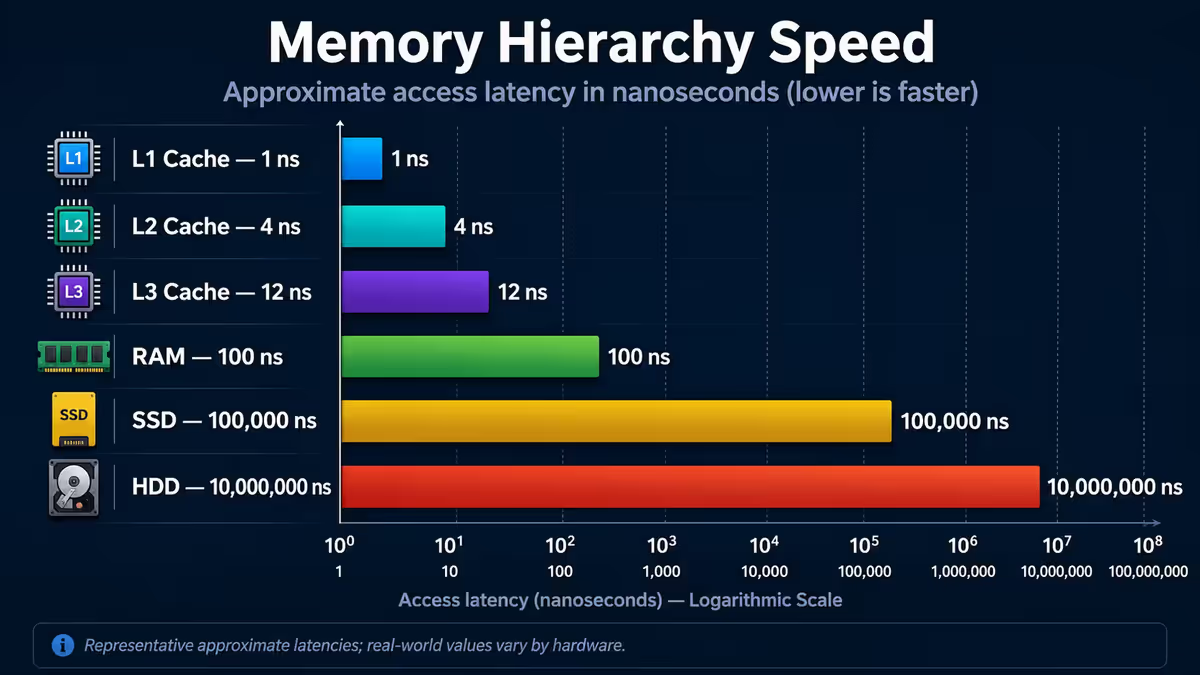
Cache is part of a broader hierarchy. Each step is roughly an order of magnitude slower than the previous — that's a 10× speed drop per tier. The numbers below are approximate but tell the story of why cache matters.
- Registers — the CPU's actual working memory, ~0.3ns access (a few hundred bytes total)
- L1 cache — ~1ns, 64-128KB per core
- L2 cache — ~3ns, 1-3MB per core
- L3 cache — ~10ns, 16-128MB shared
- RAM (DDR5) — ~80ns, 16-128GB typical
- NVMe SSD — ~30,000ns (30μs), 1-8TB typical
- SATA SSD — ~100,000ns (100μs), various
- HDD — ~5,000,000ns (5ms), 1-20TB
Said another way: in the time it takes to do a single RAM access, the CPU could have completed roughly 80 operations if all its data were in L1 cache. In the time it takes to read from an SSD, the CPU could have done 30,000 operations. This is why cache hit rates matter so much — every miss is a missed opportunity to keep the CPU working.
Why cache matters — CPU stalls
Modern CPUs complete operations in roughly 1 nanosecond or less (at 4-5 GHz clock speeds). When the CPU needs data not in cache, it has to wait for RAM — about 80 nanoseconds. During those 80ns, the CPU is doing nothing. That's a "stall".
An 80ns stall doesn't sound long until you realise it's 80 wasted cycles of execution. If the CPU stalls frequently, it spends most of its time waiting, not computing. Cache exists to minimise stalls by keeping the right data close enough that the CPU rarely has to wait.
Modern CPUs do clever things to hide stalls — out-of-order execution, branch prediction, prefetching (guessing what data the CPU will need next and pulling it into cache pre-emptively). These optimisations make cache utilisation even more important: a CPU that prefetches data successfully into L3 ahead of time effectively eliminates the RAM wait.
Cache hits vs cache misses
Every time the CPU reads or writes data, it checks cache first. The result is either a hit (data found in cache) or a miss (data not in cache).
- L1 hit — data found in L1 cache, ~1ns. Fastest possible outcome.
- L1 miss / L2 hit — data not in L1 but found in L2, ~3ns. Still fast.
- L2 miss / L3 hit — data not in L1 or L2 but found in L3, ~10ns. Still 8× faster than RAM.
- L3 miss — data must be fetched from RAM, ~80ns. The expensive case.
Typical hit rates for general workloads: ~99% L1, ~98% L2, ~95% L3. That last 5% — the L3 misses — is where cache size matters most. Bigger L3 means fewer of those expensive RAM fetches.
For gaming specifically, cache misses correlate directly with frame time spikes. A miss during a critical render path can push the next frame past the 16.6ms (60 FPS) budget. Reducing miss rate by 30% via a bigger L3 cache often translates to substantially fewer stutters — even if average FPS only rises 15%.
Why gaming benefits from cache
Games are unusually cache-sensitive workloads. Game engines maintain large data structures — the world geometry, asset metadata, physics state, AI behaviour trees, animation blends. These structures are accessed thousands of times per frame and don't change between frames. If they fit in L3 cache, the CPU never has to fetch them from RAM.
Working set sizes for popular games in 2026:
- Esports titles (CS2, Valorant): 8-32MB working set — fits comfortably in any modern L3
- Modern AAA (Cyberpunk, Hogwarts): 32-80MB working set — fits in X3D's 96MB but spills out of 32MB L3
- Simulation games (MS Flight Simulator): 60-120MB working set — even X3D struggles, but benefits more from cache than non-X3D
- MMOs (WoW, FFXIV): 40-90MB working set — heavy cache benefit
When a game's working set spills out of cache, the CPU has to repeatedly fetch from RAM — adding 70+ nanoseconds per miss. This shows up as: lower average FPS, higher frame time variance (more stutters), and reduced 1% lows (the FPS during the worst moments). All three improve when more of the working set fits in cache.
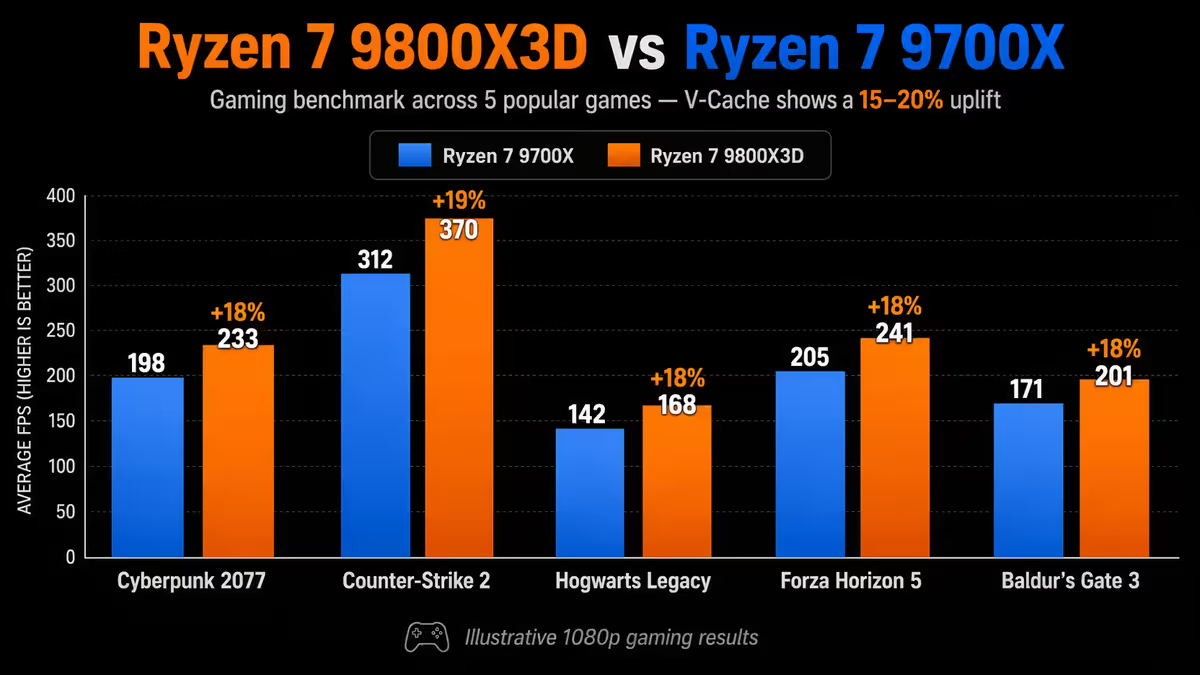
This is why AMD's X3D variants — with 96-128MB L3 thanks to V-Cache — deliver 15-20% higher FPS in CPU-bound games compared to non-X3D versions of the same chip. Same cores, same clocks (slightly lower in some cases), but the extra cache eliminates many of the RAM trips that bottleneck gaming.
Current 2026 CPU cache sizes
A snapshot of what current-generation CPUs ship with. Numbers are total L3 (the headline cache spec); L1 and L2 are similar across the range.
| CPU (2026) | L3 cache | L2 per core | Cores |
|---|---|---|---|
| Ryzen 5 9600X | 32MB | 1MB | 6 |
| Ryzen 7 9700X | 32MB | 1MB | 8 |
| Ryzen 7 9800X3D | 96MB (32 + 64 V-Cache) | 1MB | 8 |
| Ryzen 9 9900X | 64MB (2× 32MB CCD) | 1MB | 12 |
| Ryzen 9 9950X | 64MB (2× 32MB CCD) | 1MB | 16 |
| Ryzen 9 9950X3D | 128MB (32 + 64 V-Cache + 32) | 1MB | 16 |
| Intel Core Ultra 5 245K | 24MB | 2-3MB | 14 |
| Intel Core Ultra 7 265K | 30MB | 2-3MB | 20 |
| Intel Core Ultra 9 285K | 36MB | 2-3MB | 24 |
Apple Silicon for comparison — different architecture, but similar caching idea: M4 has 16MB system-level cache with very large per-core L2 (16MB shared on performance cores). M4 Max has 48MB system cache. Apple doesn't quote "L3" in the same way because the unified memory architecture works differently.
AMD V-Cache — the gaming game-changer
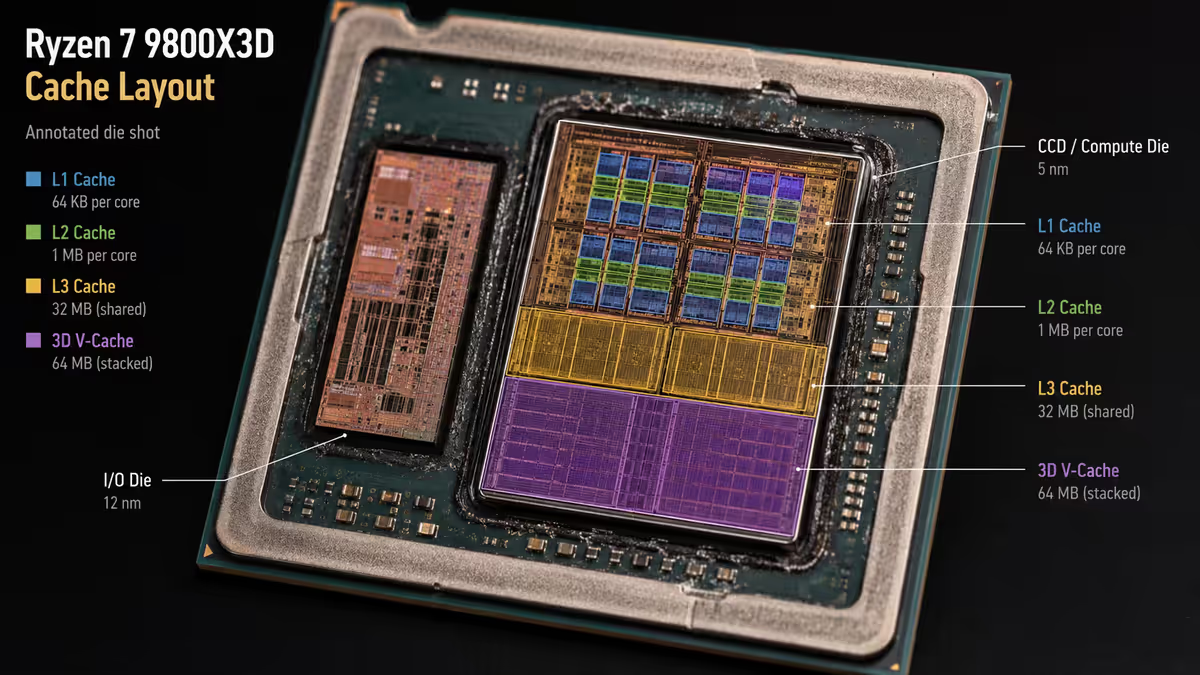
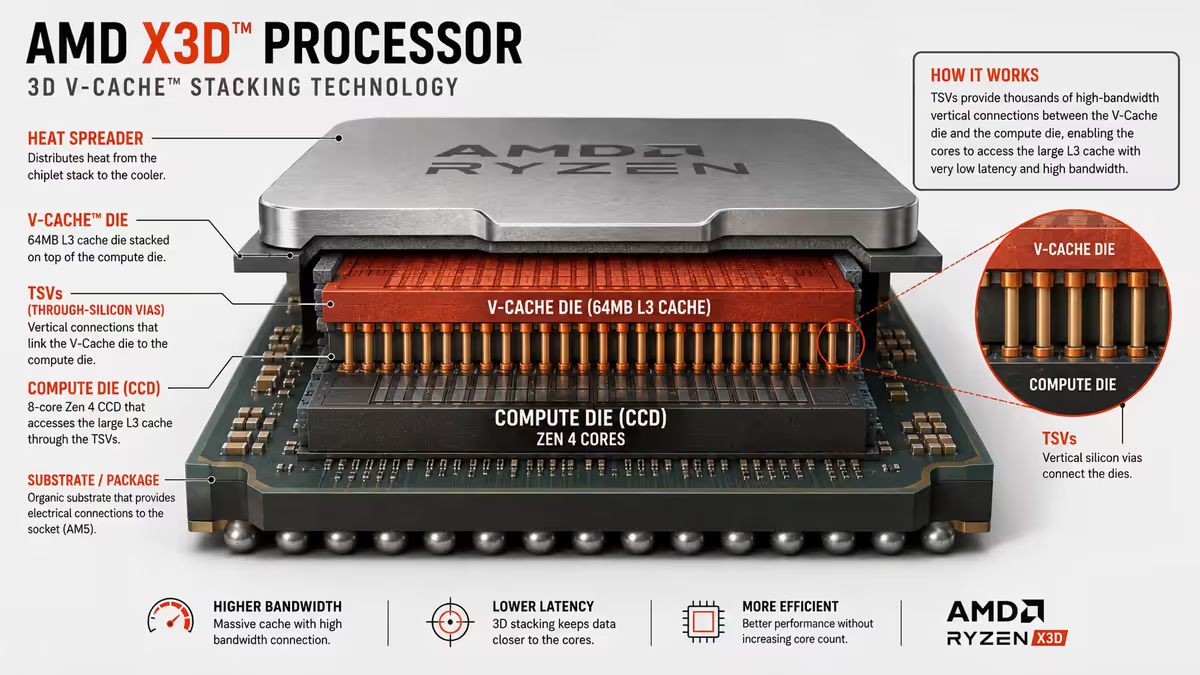
3D V-Cache (formally "AMD 3D V-Cache Technology") is AMD's innovation of physically stacking an additional cache die on top of the CPU compute die. The stack adds ~64MB extra L3 cache to chips that get the treatment.
The benefits and trade-offs:
- Benefit: huge cache uplift. Ryzen 7 7800X3D = 96MB L3 (32MB base + 64MB stacked). Eats game working sets whole.
- Benefit: 15-20% gaming FPS uplift over non-X3D equivalents in CPU-bound titles.
- Trade-off: lower clocks. First-gen V-Cache reduced max boost by 200-400 MHz due to thermal limits. Second-gen (7800X3D, 9800X3D) reduced the penalty dramatically.
- Trade-off: slightly lower productivity performance. In compute-heavy non-gaming workloads, the slight clock penalty means non-X3D variants pull ahead.
- Trade-off: thermal headroom is tighter because the stacked die complicates heat removal.
For most gamers in 2026, the Ryzen 7 9800X3D is the single best gaming CPU available — combining 96MB L3 with high clocks and proper thermal behaviour thanks to AMD's second-generation V-Cache layout. Intel doesn't have a direct equivalent.
Per-core vs shared cache — the CCD effect
L1 and L2 are per-core (each core gets its own cache). L3 is shared, but the scope of sharing depends on chip architecture.
On AMD Ryzen, cores are grouped into CCDs (Core Complex Dies) — physical chiplets containing up to 8 cores plus an L3 pool. Each CCD has its own L3. On 6/8-core chips with one CCD (Ryzen 5/7 series), all cores share one L3 pool. On 12/16-core chips (Ryzen 9), two CCDs each have their own L3.
This matters for two reasons:
- Cross-CCD latency. When a core on CCD 1 needs data in CCD 2's L3, the round-trip is slower than same-CCD access. Modern games and applications are aware of this and pin threads to one CCD when possible.
- X3D variants and CCD pinning. The Ryzen 9 9950X3D has V-Cache on only one of its two CCDs. Games perform best when pinned to the V-Cache CCD; productivity workloads benefit from spreading across both. AMD's Game Bar integration in Windows handles this automatically.
On Intel Core Ultra (Arrow Lake) and earlier, L3 is shared across all cores via a ring or mesh interconnect. No CCD complexity, but absolute L3 sizes tend to be smaller than AMD's flagship X3D parts.
Workload-dependent — cache isn't universal
Cache benefits aren't uniform across workloads. Some tasks see huge gains; others barely notice.
Highly cache-sensitive (big benefit from larger L3):
- Modern AAA games — 15-20% FPS uplift typical with X3D
- Simulation games (flight sim, MS Train Sim, factory sims) — sometimes 25%+ uplift
- Database workloads (SQL, in-memory indexes)
- Software development (compiling, large IDE state)
- Stock trading / algorithmic workloads
Less cache-sensitive (compute-bound, scales with core count and clock instead):
- Cinebench, GeekBench — synthetic compute benchmarks
- Blender rendering, Cinema 4D — GPU-accelerated anyway
- Video encoding (x264, x265, AV1) — streams through cache, hit/miss ratio matters less
- Pure computation workloads (scientific simulation, Monte Carlo)
Practical buying advice: if you're primarily gaming, X3D variants are worth the premium. If you primarily edit video, render, or do CPU-heavy productivity, non-X3D variants with higher clocks and equal or more cores can outperform X3D for the same budget. The Ryzen 9 9950X3D tries to be both — and largely succeeds, at a price.
Common cache misconceptions
"More cache is always better." True in general, but with diminishing returns. Going from 8MB to 32MB L3 is huge. From 32MB to 96MB matters only for cache-sensitive workloads. From 96MB to 128MB is barely measurable in benchmarks.
"L3 cache is what matters." For gaming, yes. For most workloads it's the most-felt level. But L1 and L2 architecture also matter — generation-on-generation IPC improvements often come from L1/L2 refinements, not just L3 size.
"Bigger cache means slower CPU." Not really. Cache size and clock speed are separate trade-offs. V-Cache historically reduced clock speeds due to thermal stacking, but second-gen V-Cache (9800X3D, 9950X3D) doesn't suffer this penalty significantly.
"Cache equals memory speed." No — they're complementary. Cache reduces how often you access RAM. Fast RAM helps when you must access RAM. Both matter; they don't replace each other.
"Apple Silicon doesn't have cache." Apple Silicon has cache like every CPU — they just don't advertise sizes the same way. M4 Pro has roughly the same L1 size per core as Ryzen, plus a unified system-level cache that functions similarly to L3.
Key takeaways
- L1 (~1ns) → L2 (~3ns) → L3 (~10ns) → RAM (~80ns). Each level 3-10× slower than the previous.
- L1/L2 are per-core; L3 is shared across cores within a CCD. Cache hits keep the CPU working at full speed.
- Games are cache-sensitive — bigger L3 means 15-20% higher FPS in CPU-bound titles.
- AMD's 3D V-Cache stacks an extra ~64MB L3 onto the chip — the reason X3D variants win at gaming.
- For productivity (rendering, video, compute), cache matters less than cores + clock speed.
Frequently asked questions
What is CPU cache?
Small, very fast memory built into the CPU itself. Stores recently-used data so the CPU can access it instantly rather than waiting ~80ns for slower system RAM.L1 vs L2 vs L3 — what's the difference?
L1 is smallest/fastest (~64KB per core, ~1ns). L2 is mid (256KB-1MB per core, ~3ns). L3 is largest (16-128MB shared, ~10ns) but still 8× faster than RAM.How much cache do 2026 CPUs have?
Ryzen 5 9600X: 32MB L3. Ryzen 7 9800X3D: 96MB L3 (V-Cache). Ryzen 9 9950X3D: 128MB L3. Intel Core Ultra 9 285K: 36MB L3.Does more cache mean better gaming?
For many games, yes. Bigger L3 fits more game state, reducing RAM accesses. X3D variants deliver 15-20% higher FPS in CPU-bound games vs non-X3D.What is AMD's 3D V-Cache?
AMD physically stacks an extra cache die on top of the CPU compute die — adding ~64MB extra L3. The Ryzen 7 9800X3D ends up with 96MB total L3, which is gaming-optimal.Is cache shared between cores?
L1 and L2 are private to each core. L3 is shared across cores in the same CCD. Ryzen 9 chips have two CCDs each with their own L3 pool.Cache hit vs cache miss?
Hit = data found in cache (fast, 1-10ns). Miss = data not in cache, must fetch from next level or RAM (~80ns). Modern CPUs achieve 95-99% hit rates.Does cache matter for video editing?
Less than for gaming. Video editing and rendering are compute-bound — they benefit more from cores and clocks. Cache helps but isn't the bottleneck.
Get the Evetech app
Exclusive app-only prices, daily flash sales, and free delivery on orders over R4,000 — download the app and start saving.