Comparison · Display Geometry
Flat or curved? — Honest answer: it depends on the size and the work.
The Samsung and LG marketing pretends curved is universally better. The reality is more interesting: curve genuinely helps at ultrawide sizes, mostly disappears at 27-inch, and actively gets in the way of straight-line work. Here's where the curve earns its keep.
- tightest curve
- 1000R
- curve sweet spot
- 34" 21:9
- avg SA price gap
- ~R300
What 1000R, 1500R, 1800R actually mean
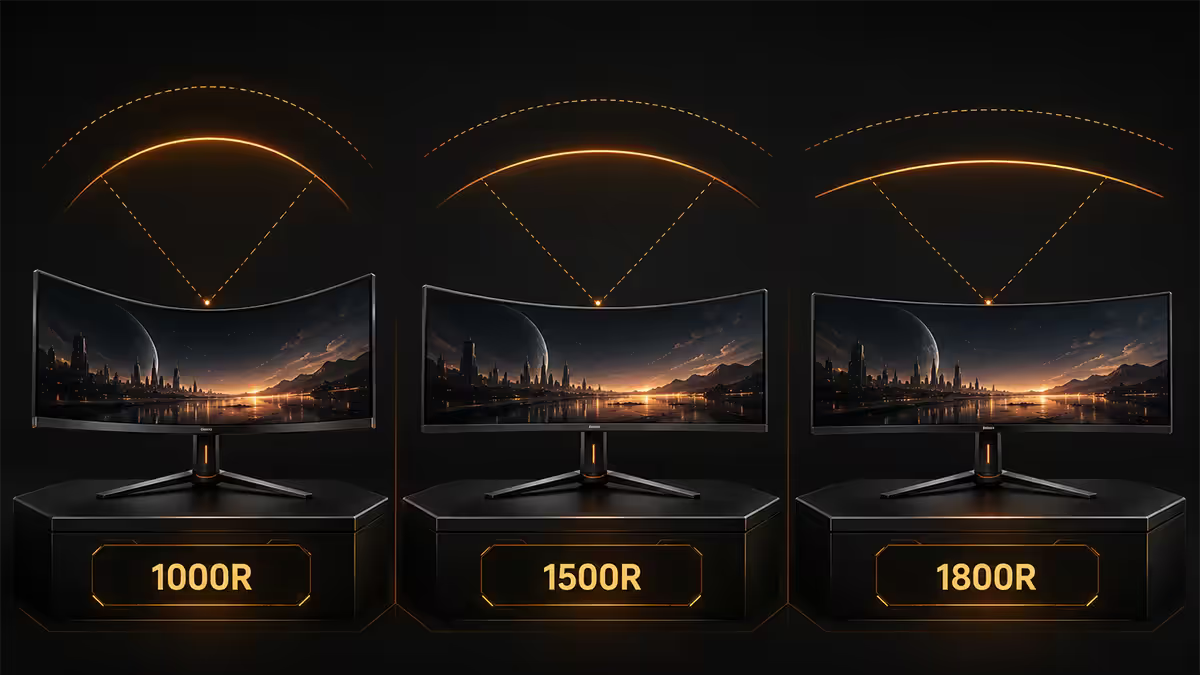
The "R" in monitor curvature is the radius of the imagined circle the screen forms part of, measured in millimetres. A 1000R panel is part of a circle with a 1m radius. 1500R is part of a circle with a 1.5m radius. 1800R is 1.8m. Smaller number = tighter curve = more wrap-around.
The numbers are also a viewing-distance recommendation. A 1000R panel is designed for someone sitting roughly 1m from the screen — so that every point on the curve is equidistant from the eye. Sit too close to a 1000R and you start to perceive the curve as a fishbowl effect. Sit too far from a 1000R and you lose the equidistance benefit.
| Curve | Designed distance | Best size pairing |
|---|---|---|
| 1000R | ~1m | 49-inch super-ultrawide, 32-inch close-sit |
| 1500R | ~1.5m | 34-inch ultrawide, 32-inch typical desk |
| 1800R | ~1.8m | 27-32 inch standard, conservative 34-inch ultrawide |
| 2300R / 3800R | ~2.3-3.8m | Subtle curve, mostly cosmetic at typical desk distances |
For context, human peripheral vision has a curvature comfortable around 750-1000mm radius. A 1000R panel approximates this — which is why aggressive curves on big screens feel uncannily immersive when sized correctly. A 1800R panel is gentler and largely a cosmetic choice on smaller screens.
Immersion vs distortion — the real trade-off
The benefit of a curve is geometric: every point on the screen is closer to equidistant from your eyes. On a flat 34-inch ultrawide at 70cm centre distance, the edges sit at roughly 85cm — a 20% difference your eyes have to refocus across as you scan. On a 1500R 34-inch at the same centre distance, the edges sit at roughly 75-78cm. Less refocus, more uniform image plane.
The cost is straight-line distortion. A horizontal line drawn on a curved panel reads as curved in your perception when you focus on the centre. For game environments and video, this is harmless and arguably more cinematic. For Excel rows, photo horizons, page layouts and architectural CAD, this is annoying at best, professionally unacceptable at worst.
There's no "right" answer — only fit. Gaming-and-Netflix-first users love the curve. Pixel-precise workflow users hate it. The middle group (developers, office work, casual photo touch-up) generally don't notice either way and should buy on size and panel quality.
Which curvature pairs with which size
27-inch standard (1920x1080 / 2560x1440)
At 27 inches, the screen is small enough that a flat panel's edges sit close to the centre distance anyway. A 1500R or 1800R curve on a 27-inch is a marketing curve — present but barely perceived. Recommendation: buy flat. The price-equivalent flat 27-inch is almost always the better build (often IPS at this size, vs VA on most curved 27s).
32-inch standard (2560x1440 / 3840x2160)
At 32 inches the case for curve gets stronger because the panel width is wider, but the choice depends on use. Flat 32-inch IPS or OLED remains the productivity default. Curved 32-inch VA is a comfortable middle-ground for gaming-first builds at a slightly lower price than equivalent flat IPS.
34-inch ultrawide (3440x1440)
The genuine curved-monitor sweet spot. The 21:9 aspect ratio means edges are far enough out that a curve meaningfully equalises viewing distance. Recommendation: 1500R or 1800R curved. 1000R on a 34-inch is borderline aggressive — fine if you sit very close (under 70cm), too much for most.
38-inch ultrawide (3840x1600)
All commercial 38-inch ultrawides are curved (typically 2300R) because flat at this size becomes visually awkward at desk distance. Choose by panel — most are LG Nano IPS or Samsung Quantum-Dot OLED.
49-inch super-ultrawide (5120x1440 / 5120x2160)
Curve isn't optional at this size — every 49-inch SUW is 1000R curved. Without the curve the edges would sit 30%+ further from your eyes than the centre. The Samsung Odyssey G9 OLED, Samsung G93SC and LG OLED Bendable 45 sit at this tier.
Content creator drawback — straight lines warp
For anyone whose work involves judgement of straight lines or precise geometry, a curved monitor is a measurable drawback. The bend is small but real and your brain compensates differently depending on focus point.
The use cases where curved screens genuinely hurt:
- Photo and video editing. Horizons in landscape photos read straight in the file but visually bowed on a curved screen. Compositional balance judgements drift.
- Architectural CAD, mechanical drawing. Precise straight references are the entire job. Curved screens force constant re-centring of focus.
- Page layout (InDesign, Affinity Publisher). Column edges and margin guides bow slightly at the panel edges.
- Programming with a wide IDE. Long horizontal code lines acquire a subtle curve that breaks fast visual scanning.
- Excel and large spreadsheet work. Row alignment is one of the first things that breaks down.
For these workflows the professional default remains a 27 to 32-inch flat IPS or OLED. The Dell U2723QE / U2725QE, LG 27UP850N, BenQ PD2725U, ASUS ProArt PA279CV are the SA standards. None come in curved variants by design.
Eye fatigue claims — honest assessment
Samsung and LG marketing leans hard on "reduced eye strain" as a curved-monitor benefit. The physics is correct — your eyes refocus less when scanning across equidistant screen edges. The clinical evidence is thinner than the marketing suggests.
What actually moves the eye-fatigue dial in real desk work:
- Screen brightness matched to ambient. A monitor too bright in a dim room or too dim in sunlight is the #1 fatigue source.
- Refresh rate. 60Hz vs 120Hz is a real comfort upgrade across long sessions. Less to do with the curve.
- Blink rate. Focused screen work cuts blink rate by 50-70%. Conscious blinking and lubricating drops do more than any curvature.
- 20-20-20 rule. Every 20 minutes, focus on something 20 feet (~6m) away for 20 seconds. Decades-old advice that still works.
- Flicker-free certification. Older PWM-dimmed monitors flicker imperceptibly and cause fatigue. Buy flicker-free (most 2026 panels are).
Curve marginally helps fatigue on large screens. It is not a primary fatigue intervention. If you experience eye strain on your current flat monitor, fix lighting and refresh rate first; consider curve last.
The "you stop noticing" reality
Almost no review mentions this, but after a few hours of use, the curve disappears from conscious perception. Your brain calibrates to the new geometry. The curve only becomes obvious again when you look at a screenshot, photograph the screen at an angle, or switch back to a flat monitor.
This means two things:
- The first-impression "wow" of a curved screen at a store demo is misleading. The immersion premium you feel in five minutes is roughly half of the daily-use experience.
- Switching between flat and curved (e.g., curved primary, flat secondary) feels jarring for a few weeks, then becomes unconscious. The brain is remarkably flexible.
Once you stop noticing, the curve mostly works through other channels — slight edge-distance benefits, slightly faster horizontal scan, subjective immersion increase in games. None of these justify a 30%+ price premium, which mercifully no longer exists in 2026.
Single curved vs dual flat — different tools
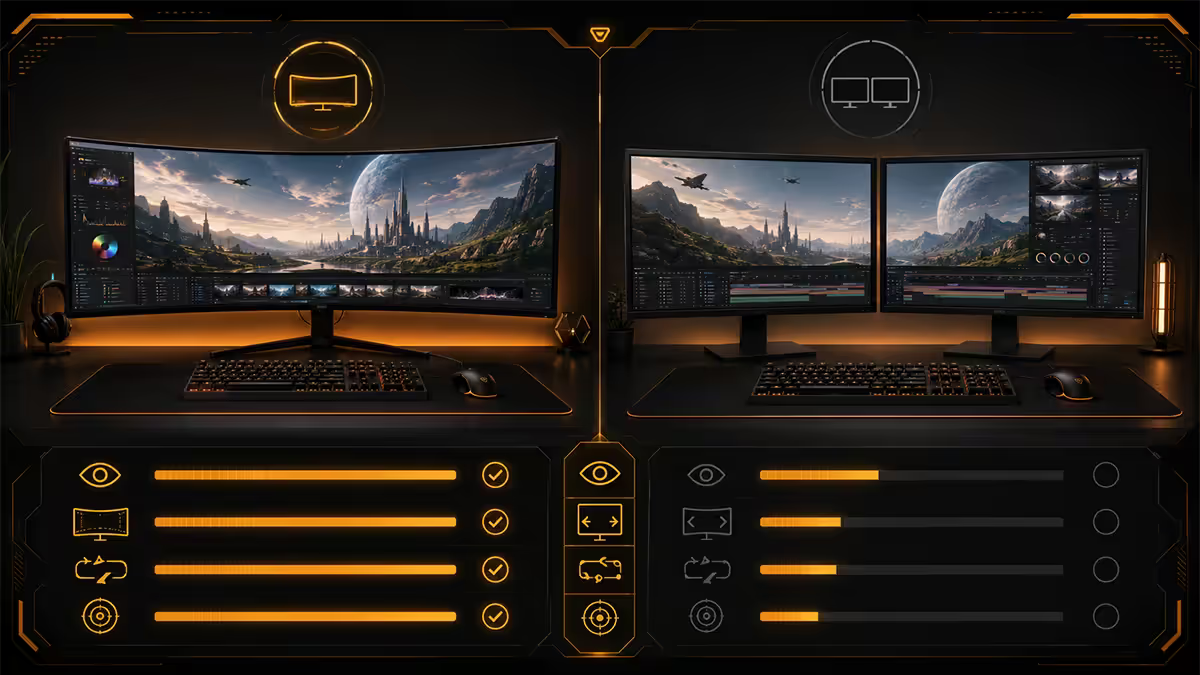
For SA buyers comparing a 34-inch curved ultrawide against dual 27-inch flats at similar total spend, the trade-off is real and choice-dependent.
| Use case | 34" curved ultrawide | Dual 27" flat |
|---|---|---|
| Immersive gaming | Better — single canvas, no bezel | Bezel breaks immersion |
| Competitive FPS | Most pros prefer flat | Predictable target tracking |
| Single-doc focus work | More immersive, less switching | Window-snap forces split focus |
| Multi-window productivity | Snaps work but feel narrower | More total real estate, better snap |
| Reference + main work | Tight on horizontal space | Reference on secondary, main on primary |
| Streaming + game on one | Tight | Game on primary, OBS/chat on secondary |
| Desk footprint | Single arm, neat | Two stands, more visual clutter |
For productivity-heavy work, dual flat 27-inch still wins on total pixels (5120x1440 vs 3440x1440) and snap-window behaviour. For gaming-first builds, curved 34-inch is the more elegant choice and avoids the bezel-in-the-middle problem.
SA picks 2026
| Use case | Recommended | SA price |
|---|---|---|
| 27" productivity flat | Dell U2725QE, LG 27UP850N, ASUS PA279CV | R7,000-R12,000 |
| 27" gaming flat 1440p 165Hz | LG 27GP850, Gigabyte M27Q P, AOC Q27G3XMN | R5,500-R9,500 |
| 34" curved ultrawide 1500R | LG 34GP850, MSI MAG 341CQP QD-OLED, Samsung Odyssey OLED G8 | R10,500-R26,000 |
| 34" curved ultrawide 1800R | Gigabyte M34WQ, AOC CU34G2X/BK, Samsung S34C500 | R7,500-R14,000 |
| 49" super-ultrawide 1000R | Samsung Odyssey G9 OLED, Samsung G95SC | R28,000-R48,000 |
| 32" curved gaming VA | Samsung Odyssey G5, LG 32GP750 | R7,500-R11,500 |
Key takeaways
- Curvature radius numbers match a viewing distance — 1000R for 1m, 1500R for 1.5m, 1800R for 1.8m.
- 27-inch: flat. 34-inch ultrawide: curved (1500R / 1800R). 49-inch super-ultrawide: only comes curved (1000R).
- Content creators stay flat. Straight lines warp at the edges of a curved panel — a real drawback for photo, video, CAD.
- You stop noticing the curve after a few hours. The "wow factor" at store demos is misleading.
- SA price gap is negligible in 2026. Choose by use case, not budget.
Frequently asked questions
What do 1000R, 1500R and 1800R mean on curved monitors?
The number is the curvature radius in millimetres. A 1000R panel forms part of a circle with a 1000mm (1m) radius — the most aggressive consumer curve, designed for a 1m viewing distance. 1500R is gentler (1.5m radius), 1800R gentler still. Smaller number = tighter curve = more wrap-around effect. 1000R is roughly the curvature of human peripheral vision, which is why it feels the most immersive at a desk.Is a curved monitor genuinely better for gaming?
For ultrawide and super-ultrawide gaming, yes — the curve keeps the edges of a 34-inch or 49-inch screen at roughly equal viewing distance from your eyes, which reduces edge-focus shifts and feels more immersive. For a 27-inch flat-vs-curved at typical desk distance, the difference is minor. Competitive FPS players generally prefer flat for predictable target tracking; immersive sim and racing/flight players prefer curved.Does a curved monitor make content creation worse?
Yes for any work involving straight horizontal lines — page layout, CAD, photo editing where you need a calibrated reference, video editing where shot composition matters. Curved screens distort straight horizontal references (a horizon line in a photo bends inward at the edges of your perception). For these use cases, flat IPS or OLED at 27-32 inches remains the professional default.What's the right curvature for a 34-inch ultrawide?
1800R is the most common 34-inch ultrawide curve and works well at a 70-90cm desk distance. 1500R is the immersive sweet spot — wraps just enough to keep edges equidistant without distorting straight lines too aggressively. 1000R on 34-inch is borderline aggressive and best for users who sit very close (under 70cm). For most SA buyers, 1500R or 1800R is the right pick.Do curved monitors actually reduce eye fatigue?
The Samsung/LG marketing claim is overstated. The physical mechanism is real — by keeping screen edges at equal viewing distance, eyes refocus less when scanning across — but the measurable effect is small. Bigger eye-fatigue factors are screen brightness vs ambient light, blue-light exposure, blink rate, and the 20-20-20 rule (look 20m away every 20 minutes for 20 seconds). Curve helps, marginally. Don't buy curved purely for eye comfort.Is a curved monitor better than dual flat monitors?
Different tools for different jobs. A 34-inch 21:9 curved ultrawide gives a single unbroken canvas — better for immersive games and a focused single-document workflow. Dual 27-inch flats give more total pixels (5120x1440 vs 3440x1440) and better multi-window snap behaviour, with the bezel gap as the drawback. For productivity power users, dual flats still win on total real estate. For gaming-first builds, a single curved ultrawide is more elegant.Will I notice the curvature once I'm used to it?
No — and this is the honest reality almost no review mentions. After a few hours of use, the curve disappears from conscious perception. It only becomes obvious again when you snap a screenshot or photograph the screen at an angle. This is why the 'curved or flat' debate is often less consequential than buyers think. Both are fine. Pick the screen that suits your size, panel and resolution preferences first; curvature second.How big is the SA price gap between flat and curved in 2026?
In 2026 the price gap has effectively collapsed for mid-range models. A 27-inch 1440p 165Hz IPS flat vs the equivalent curved VA panel are within R200-R500 of each other in SA. For premium OLED, the gap is also marginal. Where price still differs meaningfully: the highest-spec 49-inch super-ultrawide OLEDs (Samsung G9, LG OLED 45) carry a premium for their massive curved panels. Otherwise, choose the panel that fits your use case — the cost difference no longer drives the decision.
Get the Evetech app
Exclusive app-only prices, daily flash sales, and free delivery on orders over R4,000 — download the app and start saving.