Laptop Lifespan Guide
How long should a laptop last? — Budget 3, mid 5, premium 7.
The honest tier-by-tier breakdown of how long modern laptops actually last, what fails first, and when the maths says repair beats replace.
- tier lifespan yrs
- 3 / 5 / 7
- battery cycles
- 500-800
- battery swap SA
- R1.2k-R2.8k

Realistic lifespan by price tier
Laptops aren't all built to the same lifespan target. Manufacturers design the chassis, hinge, cooling and battery cell choice around an expected ownership window, and the price point tells you almost exactly what that window is.
| Tier | Realistic lifespan | What you're paying for |
|---|---|---|
| Entry (R8,000-R14,000) | 3-4 years | Plastic chassis, baseline cooling, soldered storage |
| Mid-range (R15,000-R25,000) | 5-6 years | Aluminium frame, better cooling, replaceable SSD |
| Premium (R30,000-R45,000) | 7-9 years | Metal chassis, premium hinge, mature cooling |
| Workstation / MacBook Pro (R45,000+) | 8-10 years | Magnesium / unibody, serviceable design, long OS support |
Those are realistic averages, not ceiling values. The biggest single influence on lifespan is not the brand or the tier — it's whether you used the laptop within its design envelope. A thin-and-light Acer Swift used for spreadsheet work will outlive a Razer Blade gaming laptop pushed at 90°C eight hours a day, regardless of original price.
The other surprise: build quality of the hinge and chassis matters more than CPU generation for long-term ownership. A 2020 ThinkPad with an i5-10210U is more likely to survive to 2028 than a 2023 budget HP with a faster Core Ultra 5, because the ThinkPad's frame and hinge will outlast the cheaper plastic shell.
Battery degradation — the universal first failure
Every lithium-ion battery in every laptop degrades on the same curve: roughly 80% original capacity at 500 cycles, 70% at 800 cycles, 60% at around 1,200 cycles. For typical student or office use, that's 2-3 years to noticeable shrinkage and 4-5 years to the point where the laptop barely makes it through a meeting unplugged.
Heat is the accelerant. Batteries left to roast at 40°C inside a gaming laptop's chassis degrade twice as fast as the same cell in a cool office laptop. Storing a fully charged battery at high temperatures (laptop in a hot car, or left at 100% on the charger for years) does measurable damage even when the machine is off.
There are two real-world ways to extend battery life:
- Don't store at 100% all day. Most modern laptops have a battery health setting that caps charging at 80% when plugged in long-term. Lenovo Vantage, ASUS MyASUS, Dell Power Manager and macOS Optimised Charging all do this. Turn it on.
- Keep the laptop cool. Don't game on a soft sofa where the vents are smothered. A R250 laptop riser improves airflow under the chassis and drops sustained temps 4-7°C, which the battery silently appreciates.
What actually fails first — in order
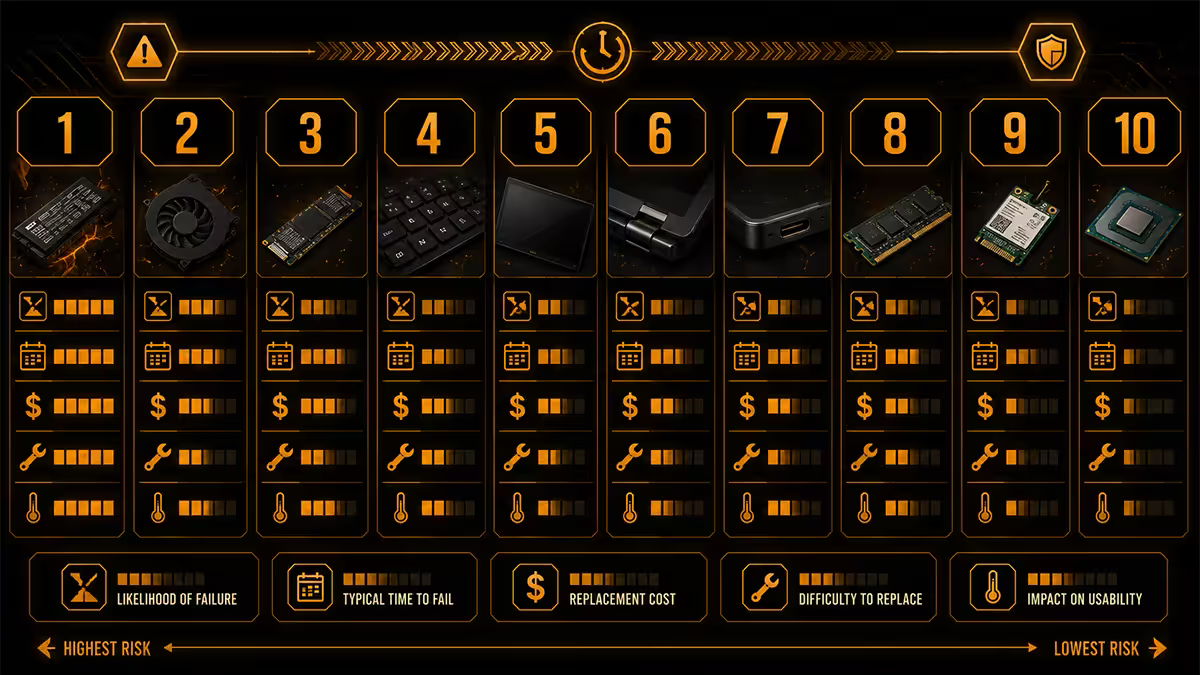
After two decades of laptop service-bench data, the failure order is remarkably consistent across brands. Here's what you can expect, roughly in order of when:
1. Battery (year 2-3). Universal. Capacity drops below useful daily endurance. Replacement parts are widely available, R1,200-R2,800 OEM, R600-R1,400 third party.
2. Hinge mechanism (year 3-5). Common on cheaper plastic-frame laptops, especially when users open them single-handed by the corner. Premium metal-chassis laptops (ThinkPad, MacBook, XPS, EliteBook) rarely see hinge failures inside 7 years. Repair is fiddly but cheap (R400-R1,200) if you find a competent technician.
3. Cooling fan (year 4-6). Dust accumulates inside the heatsink, fans wear bearings, thermal paste between CPU and heatsink dries out. The symptom is thermal throttling and louder fan noise. A R150-R350 fan replacement plus a R200 repaste restores the cooling to near-original performance.
4. Ports — especially USB-C and DC charging (year 3-7). Constant cable insertion and the inevitable tug of a tripped-over cable wears these mechanically. A worn USB-C port that won't charge reliably is one of the most common reasons laptops get prematurely retired. Soldered ports are repairable but require board-level work — R600-R1,500 in SA.
5. Keyboard (year 5-7). Specific keys wear out, become sticky or stop registering. Liquid spills accelerate this dramatically. Replacement palmrest-with-keyboard assemblies are R800-R2,500.
6. Display (year 5-9, usually accidental). LCDs and OLEDs rarely fail of natural causes. Most display replacements stem from accidental damage — a dropped lid, a child sitting on the closed laptop, a cracked panel from twisting force. R1,800-R5,500 in SA depending on panel.
What almost never fails: the CPU, GPU, RAM and motherboard traces themselves. Unless there's been a liquid spill, severe physical damage, or a power surge through the charger, the silicon outlasts everything mechanical around it. This is why "the motherboard failed" is almost always cheaper to replace the laptop than to repair.
OS support windows — when the software stops
A laptop's useful life ends when either the hardware fails or the operating system stops receiving security updates. The OS side of that equation has improved dramatically.
Windows 11 support
Windows 11 requires TPM 2.0 and an 8th-generation Intel Core or AMD Ryzen 2000-series CPU (or newer). That means any laptop from 2018 forward should still receive updates through at least 2031 on Microsoft's current timeline. Windows 12 (rumoured for 2026-2027) is expected to share similar minimum requirements, meaning a 2022 laptop today should comfortably reach 2030 supported.
Older laptops (pre-2018) running Windows 10 hit their formal end-of-support in October 2025. Extended Security Updates are available but expensive, and most users move to Linux or upgrade the machine.
macOS support
Apple's track record with Intel MacBooks gave 6-7 years of macOS updates after release. Apple Silicon MacBooks (M1 onward) are tracking similarly — an M1 MacBook Air from 2020 will likely receive macOS until 2027-2028. After official support ends, the OpenCore Legacy Patcher community keeps unofficial support running for another 2-3 years, but this is unofficial.
ChromeOS and Linux
ChromeOS Flex and lightweight Linux distros (Linux Mint, Pop!_OS, ZorinOS) are the actual second-life answer for laptops that drop off Windows or macOS support. An 8-year-old ThinkPad that no longer runs Windows 11 makes a brilliant Linux machine for browsing and writing for several more years.
When to repair vs when to replace

The decision is mostly maths, lightly seasoned with sentiment. Here's the rule we apply at our service desk:
The 50% rule. If the total repair cost (including labour and any side-issues likely to follow) exceeds 50% of the cost of an equivalent new laptop, replace. Otherwise, repair.
Battery replacements almost always pass this test — a R1,800 battery in a R20,000 laptop is 9%. Same for SSD upgrades, RAM doubling, fan swaps and repastes. These are all cheap relative to whole-machine replacement and they keep an already-good chassis in service.
Where the maths flips against you: motherboard replacement on a mid-life laptop, GPU failure on a gaming machine out of warranty, and cumulative repairs (the laptop just had a hinge fixed last year, and now the battery is gone, and the keyboard is sticky). When you're staring at three sequential repairs, the second-hand resale market becomes more attractive than throwing good money after old hardware.
| Repair | Typical SA cost | Worth it on... |
|---|---|---|
| OEM battery replacement | R1,200-R2,800 | Any laptop still meeting your needs |
| SSD upgrade (500GB to 1TB) | R900-R1,800 | Always, if upgradeable |
| RAM upgrade (8GB to 16GB) | R700-R1,500 | Always, if upgradeable |
| Fan replacement + repaste | R350-R800 | Mid-life laptops (4-6yr) |
| Hinge repair | R400-R1,200 | Premium chassis only |
| Screen replacement | R1,800-R5,500 | Premium machines under 5yr |
| Charging port resolder | R600-R1,500 | If port is the only issue |
| Motherboard replacement | R3,500-R12,000 | Rarely — only on premium machines under 3yr |
Second-life ideas — when retirement isn't binary
A laptop that's not your daily driver anymore isn't necessarily bin-material. Older machines have plenty of useful work in them if you reframe the role.
Kid's first laptop. A 5-year-old i5 with 8GB RAM and a fresh Linux Mint install is more than enough for homework, browsing and YouTube. The kid won't care that it's not the latest, and you won't lose sleep when juice spills on it.
Always-on home server. Plex media server, Pi-hole DNS blocker, Home Assistant for IoT, or a self-hosted Nextcloud instance — all of these will run happily on a retired laptop with Ubuntu Server, drawing 8-15W and tucked behind the TV.
Travel / loadshedding spare. A laptop you don't mind losing to airport theft, beach sand or a coffee spill is a strangely useful thing to own. Many SA users keep an old work laptop topped up specifically for use during stage 6 loadshedding when the battery becomes the UPS.
Workshop or learning machine. Want to learn Linux, try a different distro, mess with Stable Diffusion, or run security tools — do it on a laptop you're not afraid to brick. Tinkering on hardware you depend on is how you end up afraid to tinker.
Donate or sell. SA has a healthy market for sub-R5,000 second-hand laptops. Gumtree, Facebook Marketplace and Cash Crusaders move volume. Wipe the drive with DBAN or factory reset to manufacturer state before handing over.
SA repair and parts availability reality
South Africa has one specific lifespan-affecting reality that doesn't apply in larger markets: parts availability and skilled repair are uneven by brand. Choosing your laptop brand at purchase time affects whether you can actually repair it five years later.
Excellent SA parts availability: Lenovo ThinkPad, Dell Latitude/XPS, HP EliteBook/Pavilion, ASUS gaming and ROG. These have authorised service centres in major cities, third-party parts ecosystems and decent technician depth. A 6-year-old ThinkPad can usually be fixed in Centurion, Sandton, Cape Town, Durban and PE without import waits.
Good but slower: Apple MacBook (Authorised Service Providers in major centres, parts on order), Acer, MSI gaming laptops. Repair is possible but waits are longer and parts pricing reflects scarcity.
Limited: Razer, Framework, ASUS ROG Flow/ZenBook special editions, Microsoft Surface. Parts often need to be imported, and skilled technicians are concentrated in Joburg and Cape Town. Plan accordingly.
Key takeaways
- Budget 3-4 years, mid 5-6, premium 7-9. The biggest factor is chassis build, not CPU generation.
- Battery is always the first failure. R1,200-R2,800 OEM swap buys another 2-3 years on any decent laptop.
- Windows 11 support runs to 2031+ for any laptop from 2018 onward. macOS gets 7-8 years.
- The 50% rule decides repair vs replace. Battery, SSD, RAM and fan swaps almost always pass it.
- For long SA lifespan, buy ThinkPad, EliteBook, Latitude or MacBook — parts stay in country for 7+ years.
Frequently asked questions
How many years should a laptop realistically last?
Budget 3-4 years, mid-range 5-6, premium 7-9. Build quality and treatment matter more than CPU generation. A well-cared-for ThinkPad outlasts a thrashed gaming ultrabook.What part of a laptop fails first?
The battery, almost universally. After that: hinges (3-5yr on cheaper chassis), fans (4-6yr), ports (3-7yr depending on use), keyboards (5-7yr). The motherboard, CPU and RAM almost never fail.Is it worth replacing a laptop battery?
Yes if the rest of the machine still meets your needs. R1,200-R2,800 OEM, R600-R1,400 third party. On a R20,000 laptop with a tired battery, it's the single best-value repair in computing.How long does Windows 11 support last on older laptops?
Any laptop from 2018 with TPM 2.0 and an 8th-gen Intel / Ryzen 2000+ CPU should receive Windows 11 updates through at least 2031. Windows 12 is expected to share similar minimum requirements.How long do MacBooks get macOS updates?
7-8 years from release based on Apple's Intel-era track record. An M1 MacBook Air from 2020 should still get macOS updates in 2027-2028. OpenCore Legacy Patcher extends life unofficially.When should I repair vs replace my laptop?
The 50% rule: if total repair cost exceeds 50% of equivalent new laptop, replace. Battery, SSD, RAM and fan swaps almost always pass. Motherboard and GPU swaps usually don't.Are laptop hinges really a common failure?
Yes on plastic-chassis laptops, especially when opened single-handed by the corner. Metal-chassis machines (ThinkPad, MacBook, XPS, EliteBook) rarely have hinge failures inside 7 years.Can I extend laptop life by adding RAM or SSD?
Yes, if the laptop allows it. Many thin-and-lights have soldered RAM and storage. ThinkPads, business HPs/Dells and most gaming laptops keep SODIMM and M.2 slots. R1,500 of upgrades can add 2-3 years.
Get the Evetech app
Exclusive app-only prices, daily flash sales, and free delivery on orders over R4,000 — download the app and start saving.