Pre-Purchase Checklist
Check compatibility — before any money changes hands.
Every PC build has six matching pairs of parts. Getting any one wrong means a return, a delay, or a part that physically won't fit. Ten minutes of checking eliminates that risk completely.
- critical checks
- 6
- total verify time
- 10 min
- returns this catches
- 0
The verification flow — in this exact order
Run the checks in this order. Each check depends on the previous one being correct, so reversing the order means rework when the upstream component changes.
- 01
Pick the CPU you want. Verify socket.
AM5 (Ryzen 7000/8000/9000), LGA1851 (Intel Core Ultra), LGA1700 (12th-14th gen Intel). Note the socket name. - 02
Pick the motherboard. Verify socket + chipset support.
Match socket. Check motherboard QVL / CPU support list for your specific CPU model. Some boards need BIOS update for newest CPUs. - 03
Pick RAM. Verify type and QVL.
Match DDR5 vs DDR4. Check motherboard's memory QVL for the specific kit. AM5 especially — non-QVL kits often run at slower speeds. - 04
Pick the GPU. Verify length, slots, power connector.
GPU length must be less than case's "max GPU length". Slot count (2.5/3/3.5/4) must fit. 12VHPWR connector requires modern PSU or adapter. - 05
Pick the case. Verify GPU + cooler clearance.
GPU length fits. Max CPU cooler height fits (160-170mm typical). AIO radiator length supported at chosen mount (top/front). - 06
Pick the cooler. Verify socket compatibility.
Cooler must list your CPU socket (AM5, LGA1851). Tower height fits case. AIO radiator size fits case. - 07
Calculate PSU wattage with headroom.
Sum CPU TDP + GPU TDP + ~80W misc. Multiply by 1.4. That's your minimum PSU wattage. Pick 80+ Bronze minimum, Gold above R20k builds.
CPU + motherboard compatibility
The most fundamental check. Get this wrong and nothing physically connects. The current 2026 sockets:
| Socket | CPU Series | RAM Type | Common Chipsets |
|---|---|---|---|
| AM5 | Ryzen 7000, 8000, 9000 | DDR5 only | X870E, X670E, X670, B850, B650E, B650, A620 |
| LGA1851 | Intel Core Ultra 200 series | DDR5 only | Z890, B860, H810 |
| LGA1700 (legacy) | 12th-14th gen Intel Core | DDR5 or DDR4 | Z790, Z690, B760, B660, H670, H610 |
| AM4 (legacy) | Ryzen 1000-5000 | DDR4 only | X570, B550, B450, A520 + older |
The chipset gotcha: within a socket, not every chipset supports every CPU. The A620 chipset (cheapest AM5) supports Ryzen 7000 but has limited support for higher-end 9000-series chips. The B850 chipset supports the full Ryzen 9000 line. Always check the motherboard's "CPU Support List" on the manufacturer's website before locking in.
RAM + motherboard (the QVL check)
RAM compatibility is where the most subtle SA build mistakes happen. Two checks:
1. Type matches. DDR5 motherboards take DDR5 RAM only. DDR4 motherboards take DDR4. The physical keying is different — you cannot insert the wrong type.
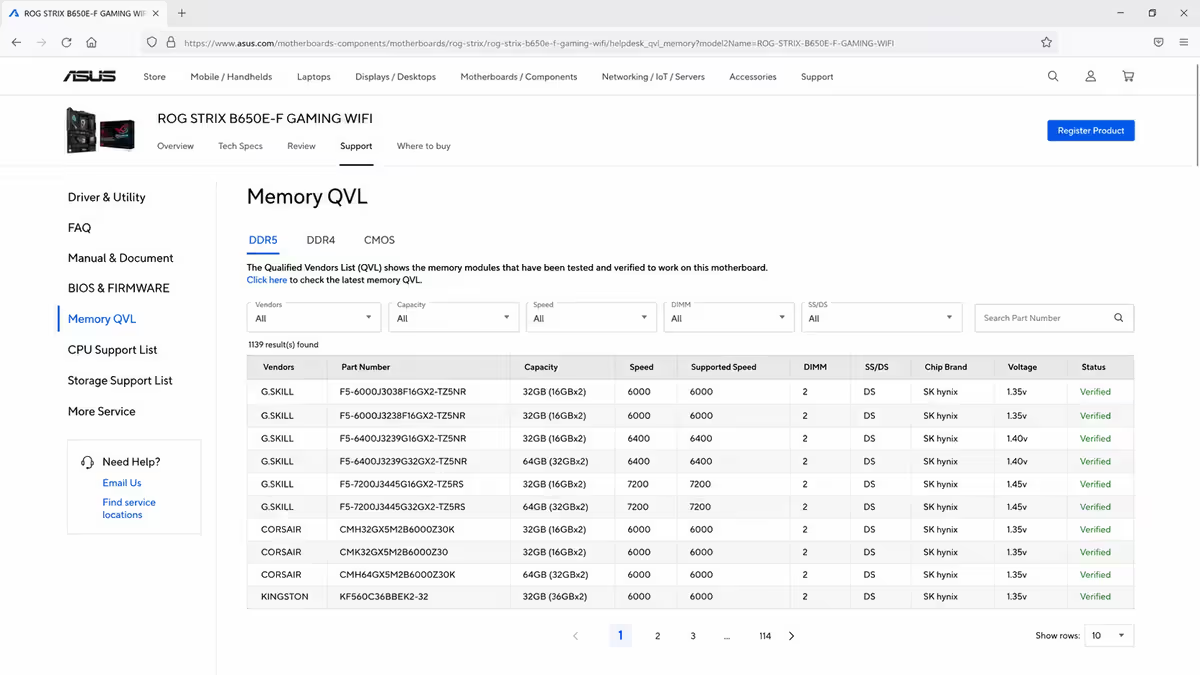
2. Kit is on the QVL. Open the motherboard's product page (e.g., MSI B650 Tomahawk WiFi). Look for "Memory QVL" or "Memory Compatibility". Find your RAM kit's exact model number. If it's listed, the kit will run at its rated speed. If it's not listed, the kit may default to a slower speed (DDR5-4800 instead of DDR5-6000) until you manually tune timings in BIOS.
On AM5 platforms specifically, RAM kits not on the QVL often run 800-1200 MT/s slower than rated — wasting most of what you paid extra for. The fix is either (a) buy a QVL-listed kit, or (b) plan to manually tune sub-timings in BIOS.
GPU + case clearance
Three measurements that all need to match:
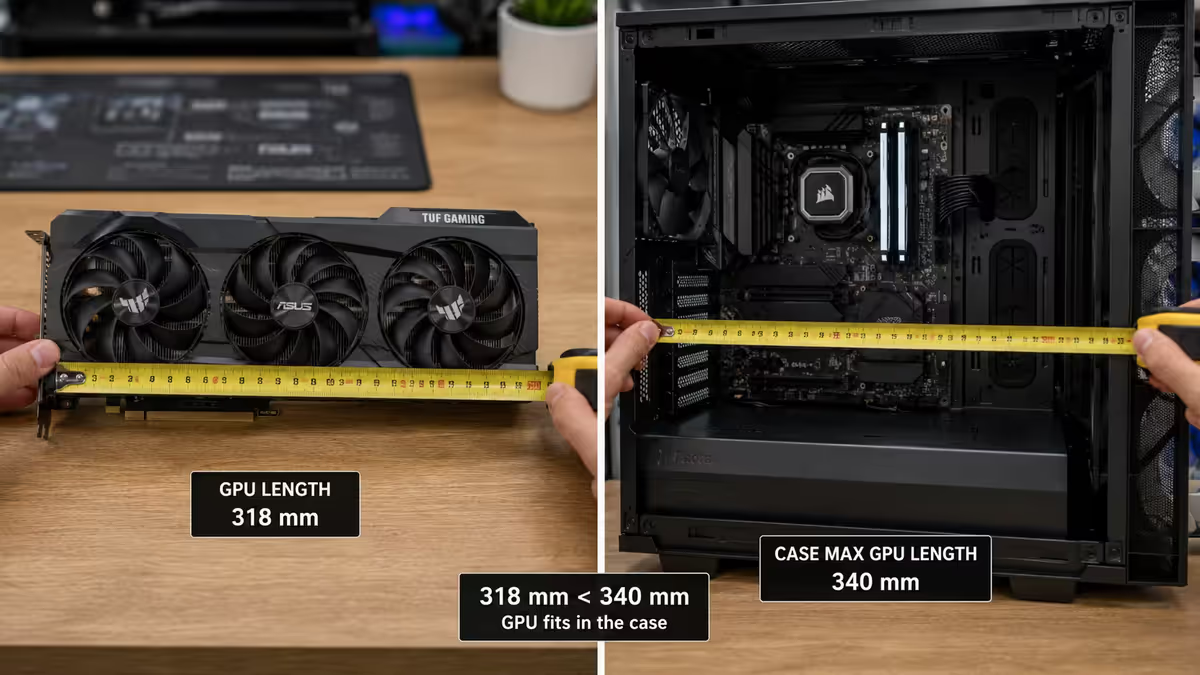
- GPU length (typically 280-360mm) must be less than the case's "max GPU length".
- GPU slot count (typically 2.5 to 4 slots) must fit within the case's expansion slot count.
- Power connector (8-pin × 2, or 12VHPWR / 16-pin) must match the PSU's available cables. Modern Ada/Blackwell-generation GPUs need the 12VHPWR connector, supported natively by ATX 3.0 PSUs or via adapter on older PSUs.
PSU wattage + system draw
The honest calculation:
| Component | Typical draw |
|---|---|
| CPU (Ryzen 5) | 65-95W |
| CPU (Ryzen 7 / Core Ultra 7) | 95-150W |
| CPU (Ryzen 9 / Core Ultra 9) | 170-250W |
| GPU (RTX 4060 / RX 7600) | 115-165W |
| GPU (RTX 5070 / RX 7800 XT) | 220-263W |
| GPU (RTX 5080) | 360W |
| GPU (RTX 5090) | 575W |
| RAM, SSDs, fans, motherboard | ~60-80W combined |
Calculation: CPU TDP + GPU TDP + 80W misc, then × 1.4 for safety headroom.
Example for Ryzen 7 9700X + RTX 5070: 65W + 250W + 80W = 395W × 1.4 = 553W → choose a 650W or 750W 80+ Gold PSU. The 750W gives upgrade headroom for a future GPU bump.
CPU cooler + socket
Coolers list their supported sockets explicitly. The big tower air coolers (Noctua NH-D15 G2, Thermalright Peerless Assassin, Be Quiet Dark Rock Pro 5) cover almost every modern socket out of the box with included mounting hardware.
Two additional checks:
- Tower height fits case. Most full towers are 158-170mm — must be ≤ case's "max CPU cooler height". Slim mid-towers sometimes only allow 155mm.
- RAM clearance. Large air coolers may overhang the first RAM slot. If you have tall heatsink RAM (some RGB kits are 50mm+ tall), pick a cooler with raised fan placement or use low-profile RAM.
For AIO water coolers:
- Radiator length (240mm, 280mm, 360mm) supported by chosen case mount (top or front).
- Radiator thickness + fan thickness must fit. Standard is 27mm rad + 25mm fan = 52mm total. Some thick "extreme" AIOs are 30mm+ rad — verify clearance.
- RAM clearance if top-mounted (tall RAM can collide with the AIO at the top of the case).
Tools to use for verification
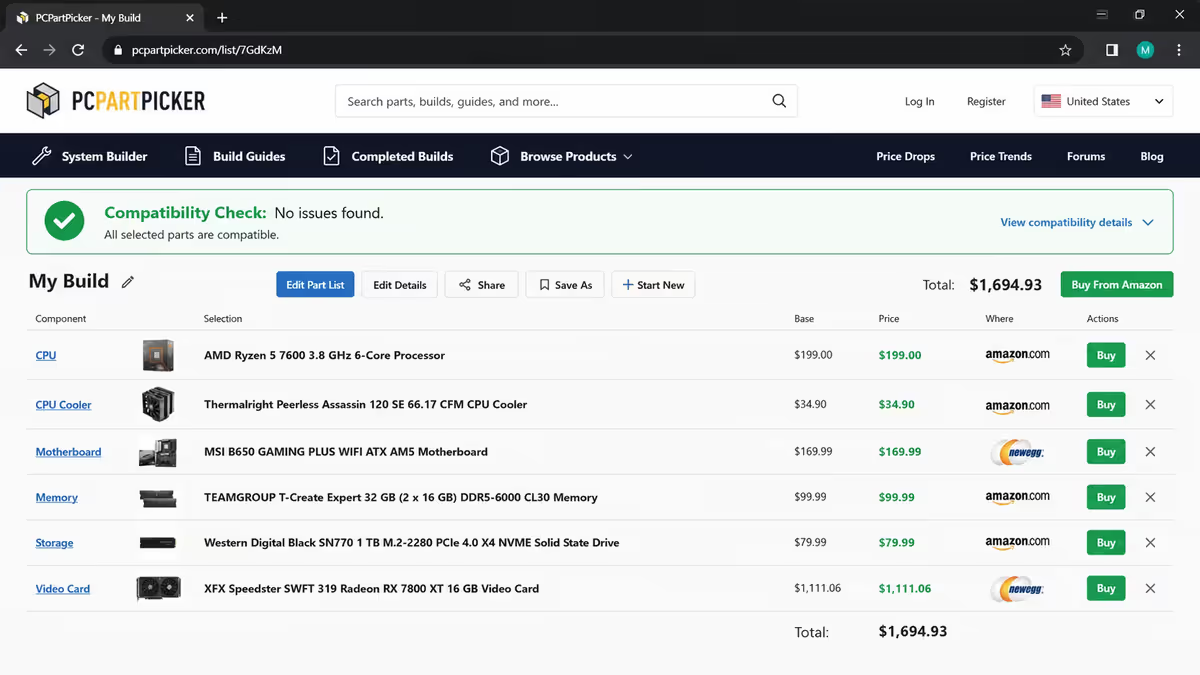
PCPartPicker (pcpartpicker.com) — the de facto compatibility checker. Cross-references CPU, motherboard, RAM, GPU, PSU, case automatically and flags incompatibilities. Use the SA region setting for relevant retailers. The compatibility logic is reliable; the SA price feeds are not — verify final prices at actual SA retailers.
The motherboard manufacturer's product page — the authoritative source for CPU support list, memory QVL, and accessory compatibility. Always cross-check PCPartPicker's results against the manufacturer page for your specific motherboard.
OuterVision PSU Calculator (outervision.com/power-supply-calculator) — best free PSU sizing calculator. More conservative than manufacturer calculators (which over-recommend). Use "Expert" mode for accurate results.
Reddit r/buildapc — for second opinions. Post your part list, ask for compatibility verification. Community spot-checks catch issues that PCPartPicker misses.
Key takeaways
- Six checks, ten minutes total. Run them in order: CPU+socket, MB+chipset, RAM+QVL, GPU+case, PSU wattage, cooler+socket.
- RAM QVL is the top SA build mistake — non-QVL kits often run slower than rated on AM5.
- GPU clearance is the second-most-common return cause — measure twice, order once.
- PSU = (CPU TDP + GPU TDP + 80W) × 1.4. Round up to nearest standard wattage tier.
- PCPartPicker for automated check, then verify manually on each manufacturer's product page.
Frequently asked questions
How do I check PC part compatibility?
Six checks: CPU socket vs motherboard socket, motherboard chipset CPU support, RAM type + QVL, GPU length vs case, PSU wattage, cooler socket. PCPartPicker automates most.What is a motherboard QVL list?
Qualified Vendor List — manufacturer's tested-and-validated list of CPUs and RAM kits for the board. Critical for AM5 RAM compatibility.Will an AM4 CPU work on an AM5 motherboard?
No. Different physical sockets, different pin counts. AM4 supports Ryzen 1000-5000; AM5 supports Ryzen 7000, 8000, 9000.Will DDR4 RAM work in a DDR5 motherboard?
No. Different physical slot keying and voltage. AM5 only DDR5. Modern Intel mostly DDR5.How do I check if a GPU fits in my case?
GPU length spec vs case "max GPU length" spec. Also check slot count (modern flagships are 3-4 slots) fits expansion slots.How much PSU wattage do I need?
(CPU TDP + GPU TDP + 80W) × 1.4. Pick 80+ Bronze minimum, Gold above R20k builds.What is PCPartPicker and is it accurate for SA?
Reliable compatibility checking worldwide; SA price feeds incomplete. Use it for compatibility, check actual prices at Evetech/Wootware/Rebel Tech/Takealot.What's the most common compatibility mistake?
RAM not on motherboard QVL (running slow) and GPU too long for case. Both caught in 30 seconds by checking manufacturer pages.
Get the Evetech app
Exclusive app-only prices, daily flash sales, and free delivery on orders over R4,000 — download the app and start saving.