RGB Setup Guide
How to set up RGB lighting in your PC. — Pick one ecosystem. Avoid the software chaos.
ARGB on every modern component looks incredible — for the first 48 hours. The thing nobody warns new builders about: getting five brands to sync requires juggling five apps that don't talk to each other.
- over RGB
- ARGB
- per ecosystem
- One app
- / Aura / CAM
- iCUE / L-Connect
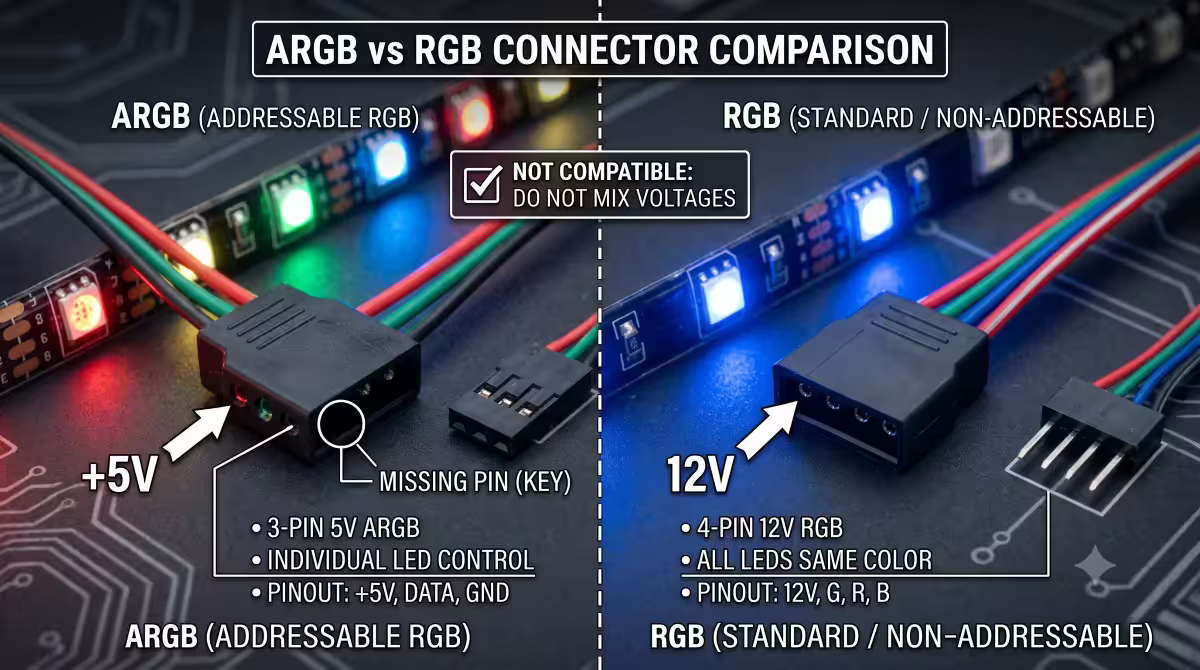
RGB vs ARGB — the most important distinction
Before any cable goes in, understand the two standards.
| Standard | Pinout / voltage | What it does |
|---|---|---|
| RGB (legacy) | 12V · 4-pin · G-R-B-12V | Whole strip one colour at a time |
| ARGB / DRGB (modern) | 5V · 3-pin · D-G-V | Per-LED control · waves, gradients, reactive |
ARGB (addressable RGB, also called DRGB) is the current standard. Every fan, strip, RAM kit, AIO and GPU released since around 2020 uses ARGB. If you're starting a build today, buy ARGB-only components.
RGB (12V 4-pin) is legacy — only relevant if you've inherited older parts or are mixing with very old strips.
What RGB components exist
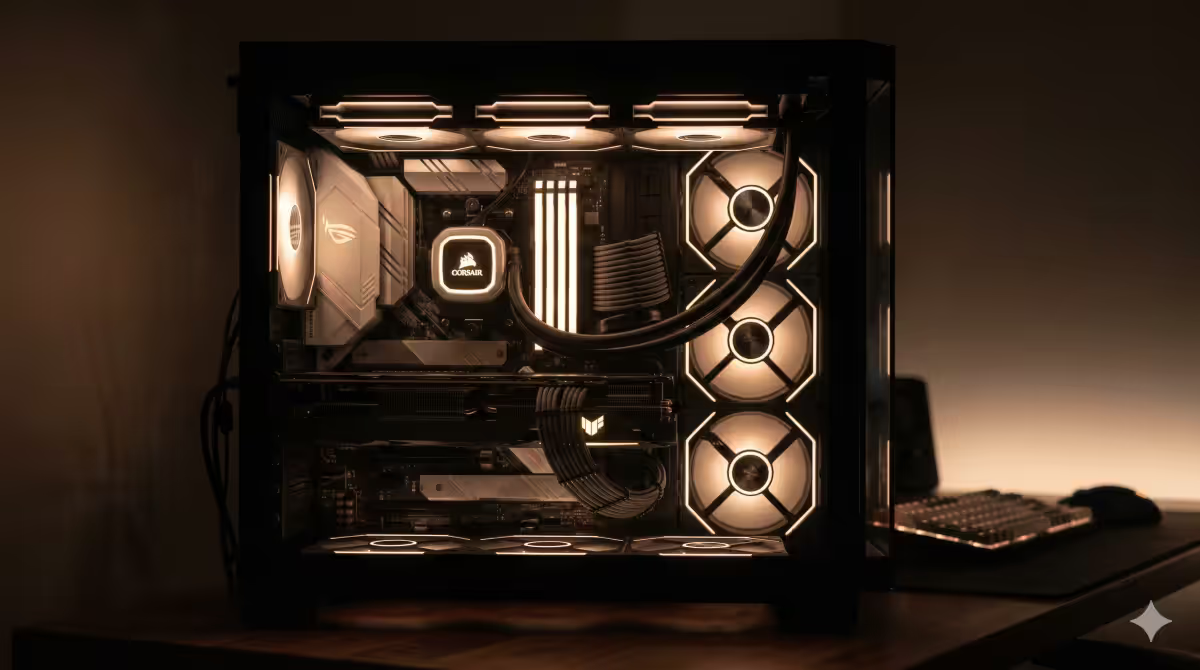
RGB can show up in many places in a modern build. Common ARGB-capable parts:
- Case fans. Most common — usually 120mm or 140mm front intake, top exhaust, rear exhaust.
- RAM modules. Sticks with a top ARGB strip — Corsair Dominator/Vengeance RGB, G.Skill Trident Z5 RGB, Kingston Fury Beast RGB.
- AIO pump. Most modern AIOs (Corsair iCUE H150i, NZXT Kraken Z73, Lian Li Galahad) have an LCD or ARGB pump cap.
- GPU shroud. ASUS ROG Strix, MSI Suprim X, Gigabyte Aorus and similar high-end cards have ARGB accents.
- Motherboard accents. ROG, MSI MPG and Gigabyte Aurus boards typically have built-in ARGB zones near the I/O shroud and chipset heatsink.
- ARGB strips. Standalone strips that mount inside the case for accent lighting (Phanteks Halos, Corsair LS100 Smart).
- Peripherals. Mouse, keyboard, headset, mousepad — most premium peripherals have brand-specific RGB.
The software ecosystem chaos
This is the bit nobody warns first-time builders about: each brand uses a different software app, and they don't talk to each other natively.
A typical "first build with mixed brands" looks like this:
- Corsair RAM and AIO → Corsair iCUE running.
- ASUS motherboard with Aura zones → ASUS Armoury Crate running.
- NZXT case fans → NZXT CAM running.
- Razer keyboard → Razer Synapse running.
- Logitech mouse → Logitech G HUB running.
Five resident apps eating 1.5-3% CPU each, none of them aware of the others. Set "rainbow wave" in Corsair iCUE; ASUS Aura runs its own independent wave at a different speed and starting colour. You spend a Saturday afternoon trying to get them all matching.
The fix is upfront discipline: pick one ecosystem before you buy.
Brand-specific software apps
| Brand | Software name | Notes |
|---|---|---|
| ASUS | Aura Sync / Armoury Crate | Strong with mobo + ASUS peripherals |
| MSI | Mystic Light / MSI Center | Bloated, but works for MSI ecosystem |
| Gigabyte | RGB Fusion / Control Center | Stable for board accents |
| ASRock | Polychrome RGB | Lightweight, good for ASRock-only |
| Corsair | iCUE | Best for full-stack Corsair |
| NZXT | CAM | Clean UI, fans + Kraken AIO |
| Lian Li | L-Connect 3 | Best for UNI Fan ecosystem |
| Phanteks | NeonOne | Good for Phanteks-only builds |
| Razer | Synapse / Chroma | Mostly peripherals, some 3rd-party |
| Logitech | G HUB | Peripherals only |
Universal sync solutions
When you absolutely can't avoid mixing brands, three tools attempt to unify lighting across ecosystems:
OpenRGB — free, open-source
The free champion. Supports a huge range of brands and motherboards. Doesn't require running each brand's bloated software in parallel.
Strengths: free, lightweight, no telemetry, open-source, active community development.
Weaknesses: initial detection can be tricky on some boards (need to enable SMBus access in some BIOSes), UI is functional rather than slick, some newer hardware support lags by 1-2 months.
SignalRGB — paid premium tier
The most polished commercial universal sync tool. ~R150/month subscription or ~R1,500 lifetime.
Strengths: beautiful UI, supports the widest brand list of any tool, game-aware effects, screen-mirror ambilight, large library of pre-made effects, Razer Chroma compatible.
Weaknesses: paid, subscription model is not loved by everyone, somewhat resource-heavy.
JackNet RGB Sync — free, older
Free utility that bridges Aura Sync, iCUE, Razer Chroma, Logitech and a few others. Development has slowed compared to OpenRGB; consider OpenRGB first.
Connecting ARGB to your motherboard
Every ARGB device terminates in a 3-pin female ARGB connector with a key/arrow indicating the data pin. This plugs into a 3-pin male ARGB header on the motherboard (sometimes labelled JRGB, JRAINBOW, ADD_HEADER or 5V_DG).
Modern motherboards typically have 1-3 ARGB headers — usually one near the top right (for top fans / RAM), one near the bottom (for case strip), one near the I/O (for shroud / GPU accent).
Daisy-chaining. Many ARGB devices have IN and OUT ports — letting you chain 2-4 devices into one motherboard header. Common with Lian Li UNI fans, Phanteks Halos, Corsair LS100. Each fan has a 6-pin connector that combines power + ARGB data into one cable.
ARGB hubs and controllers for many devices
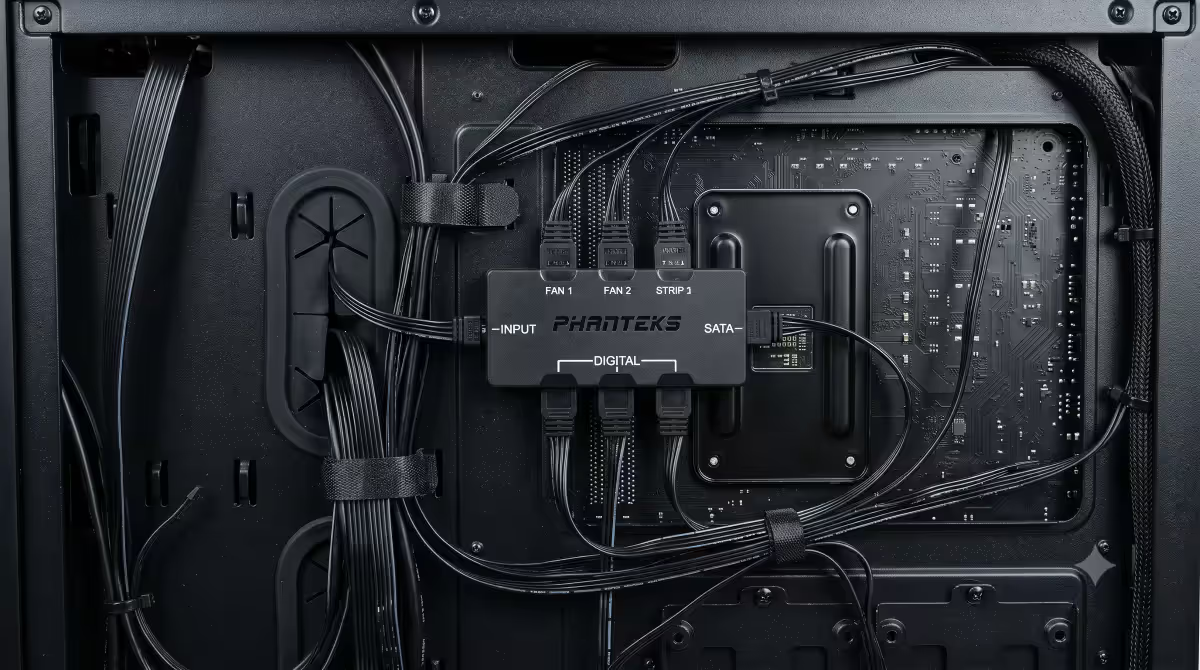
If you have more devices than motherboard headers (common with 6+ fans + GPU + case strip), use an ARGB hub. The hub plugs into one motherboard header and exposes 6-10 ports.
| Hub | Ports | SA price |
|---|---|---|
| Corsair Lighting Node Core | 6 ARGB + USB | R650-R850 |
| Phanteks DRGB Hub | 9-way ARGB splitter | R350-R450 |
| Lian Li L-Connect 3 Controller | 4 fan + 4 ARGB | R900-R1,200 |
| NZXT RGB & Fan Controller | 3 fan + 4 ARGB | R750-R950 |
| EZDIY-FAB ARGB Hub | 10-way splitter | R220-R320 |
Hubs from the same ecosystem as your fans give you software integration. A generic splitter just multiplies the motherboard's signal — fine for daisy-chained devices that all need the same data.
Software sync setup walkthrough
Generic flow for any ecosystem:
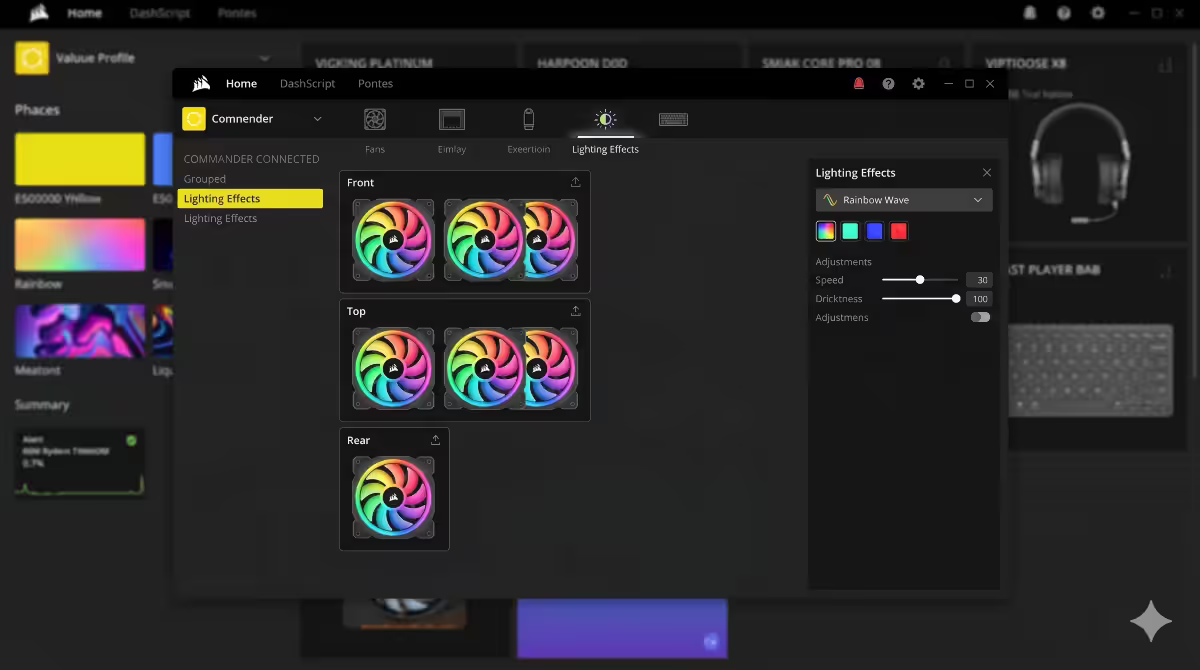
- 1. Install the manufacturer's software (iCUE / L-Connect 3 / Aura / CAM).
- 2. Run a device scan — the app detects connected ARGB devices via SMBus or USB.
- 3. Group devices by zone (e.g., "all front fans", "all top fans", "all RAM").
- 4. Choose an effect — rainbow wave, breathing, fixed colour, music-reactive, temperature-reactive.
- 5. Set effect speed, direction, brightness and colour palette.
- 6. Save as a profile. Most apps support multiple profiles (Idle, Gaming, Work).
- 7. Configure the app to start with Windows (or not — many users prefer manual launch).
Per-game lighting integration
A small but growing list of games support real-time RGB integration — lighting reacts to in-game events.
- Razer Chroma. Wide game support via the Chroma Studio SDK — Apex Legends, Overwatch 2, Diablo IV, many AAA titles. Works with Razer peripherals and some 3rd-party Chroma-compatible devices.
- SignalRGB. Game-aware effects driven by game telemetry — health bar mirrored on fans, ammo level on RAM, etc. Premium tier required.
- Wallpaper Engine + RGB plugins. Reactive wallpapers can drive ARGB devices via OpenRGB/SignalRGB plugins.
- ASUS Aura Creator. Scripted effects for ASUS ecosystem with timeline animation.
For ambient game lighting beyond the case, screen-edge ambilight strips (Govee TV Backlight, Razer Ambient Mode, Hue Sync) sample the screen edges and project matching colour around the monitor. Surprisingly impactful for movies and atmospheric games.
Minimalist alternatives to rainbow vomit
RGB doesn't have to mean rainbow. Some of the most-loved long-term setups are minimalist:
- All-white setup. Pure white at 30-40% brightness across every device. Clean, professional, never tires.
- Single accent colour. All devices in a single brand colour (your team, your favourite, your wife's favourite). Distinctive without being noisy.
- White + one accent. 80% of devices white, one strip or one fan in an accent colour. Modern and premium-feeling.
- Off-during-work. Many users set RGB to off during work hours (via profile or Wallpaper Engine), on for evening gaming. Best of both worlds.
- Temperature-coloured. Devices change colour based on CPU/GPU temp — cool blue at idle, red at thermal limit. Practical and looks intentional.
Daily-driver advice
Honest advice from across the customer feedback we collect:
Brightness matters more than effect. 100% rainbow at full brightness is exhausting after 48 hours. 30-40% brightness with subtle breathing or fixed colour is the long-term keeper.
Sleep mode matters. Configure RGB to turn off when the PC sleeps. Your bedroom shouldn't be a rave.
Fewer effects = more time gaming. If you spend an hour every week tweaking lighting, that's an hour not gaming. Set it once, leave it.
Match the room. Warm white in a warm-lit room. Cool blue in a clinical setup. RGB looks weird if it fights the room's existing ambient lighting.
SA brand picks (May 2026)
| Use case | Pick | SA price |
|---|---|---|
| Premium fans (full ecosystem) | Lian Li UNI Fan SL120 v2 (3-pack) | R1,600-R1,800/3-pack |
| Best software ecosystem | Corsair iCUE LL120 RGB or QL120 | R650-R750/fan |
| Best value RGB fans | NZXT F120 RGB (3-pack with controller) | R1,300-R1,500/3-pack |
| Performance + RGB | Phanteks T30 RGB (30mm thick) | R700-R800/fan |
| RGB RAM (DDR5) | G.Skill Trident Z5 RGB 32GB DDR5-6000 | R2,400-R2,800 |
| RGB AIO | Corsair iCUE H150i Elite LCD or NZXT Kraken Z73 | R5,200-R7,500 |
| ARGB strip kit | Phanteks Halos Lux Digital RGB | R350-R550 |
| Universal hub | Phanteks DRGB Hub (9-way) | R350-R450 |
Common RGB setup mistakes
Plugging ARGB into an RGB header (or vice versa). Different voltage. Will fry the LEDs. Modern headers and connectors usually have physical keying to prevent this — but if you've forced it in, the magic smoke escapes immediately.
Mixing 4-5 brands and expecting unified control. Each brand needs its own software. Settle on one ecosystem.
Running all five vendor apps with start-with-Windows. 1.5-3% CPU each, ~15% total CPU at idle. Use OpenRGB to consolidate.
100% brightness rainbow wave forever. Tires you within 48 hours. Reduce to 30-40% and pick a subtle effect for daily use.
Forgetting the ARGB cable when buying fans. Many fans need both a PWM cable (motherboard fan header) AND an ARGB cable (motherboard ARGB header). Both must be plugged in.
Daisy-chaining more devices than the header supports. Most ARGB headers handle 3-amp / ~120 LEDs max. Adding too many devices on one header causes dim or unstable lighting.
Running RGB software during gaming benchmarks. Vendor apps eat CPU and sometimes interfere with overlays. Close before benchmarking.
Key takeaways
- ARGB (5V 3-pin) beats RGB (12V 4-pin). Buy ARGB-only for new builds.
- Pick ONE ecosystem upfront — Corsair iCUE, Lian Li L-Connect, ASUS Aura or NZXT CAM.
- When you can't avoid mixing, use OpenRGB (free) or SignalRGB (paid) for universal sync.
- Use a hub if you have more devices than motherboard ARGB headers.
- Low brightness + subtle effect = long-term keeper. Rainbow vomit tires by week 2.
Frequently asked questions
What is the difference between RGB and ARGB?
RGB is 12V 4-pin, whole strip same colour. ARGB is 5V 3-pin, per-LED control allowing waves and gradients. ARGB is the modern standard — buy ARGB-only for new builds.Why does every RGB brand need its own software?
Proprietary protocols and controllers. Each brand's app doesn't talk to others natively. This is the biggest pain point of multi-brand RGB.How can I sync RGB across different brands?
OpenRGB (free, open-source) is the best starting point. SignalRGB (paid) supports more brands with polished UI. JackNet RGB Sync (free, older) is a third option.How do I connect ARGB devices to my motherboard?
3-pin female ARGB connector into 3-pin male ARGB header on motherboard (often labelled JRGB, JRAINBOW, 5V_DG). For more devices than headers, use an ARGB hub.Should I get all RGB from one brand or mix?
One ecosystem. Customers with mixed brands consistently tell us "RGB software is more pain than it's worth". Stick with iCUE OR L-Connect OR Aura OR CAM.Can I sync RGB to games for in-game effects?
Yes via Razer Chroma, SignalRGB game-aware effects (paid), or Wallpaper Engine + RGB plugins. Screen-edge ambilight (Govee, Razer Ambient) for monitor-area effects.What is the best RGB look for daily use?
Low brightness (30-40%), subtle effect (breathing or fixed colour). Or minimalist all-white with one accent. Rainbow vomit tires fast.Which RGB fans are best in SA right now?
Lian Li UNI SL120 v2, Corsair iCUE LL120, NZXT F120 RGB, Phanteks T30 RGB. All four ecosystems are well-stocked at SA retailers. Pick one and standardise.
Get the Evetech app
Exclusive app-only prices, daily flash sales, and free delivery on orders over R4,000 — download the app and start saving.