Hardware Explainer · Mobile vs Desktop GPU
Laptop GPU vs desktop GPU. — Same name. Half the wattage. Half the FPS.
Nvidia dropped "Mobile" from the model name in the RTX 40 generation and never put it back. An RTX 5070 in a thin laptop pulls 75W. The same name on a desktop pulls 250W. The gap is bigger than the marketing admits.
- laptop range
- 75-150W
- desktop equiv
- 250W
- real perf gap
- 40-50%
The naming problem Nvidia and AMD refuse to fix
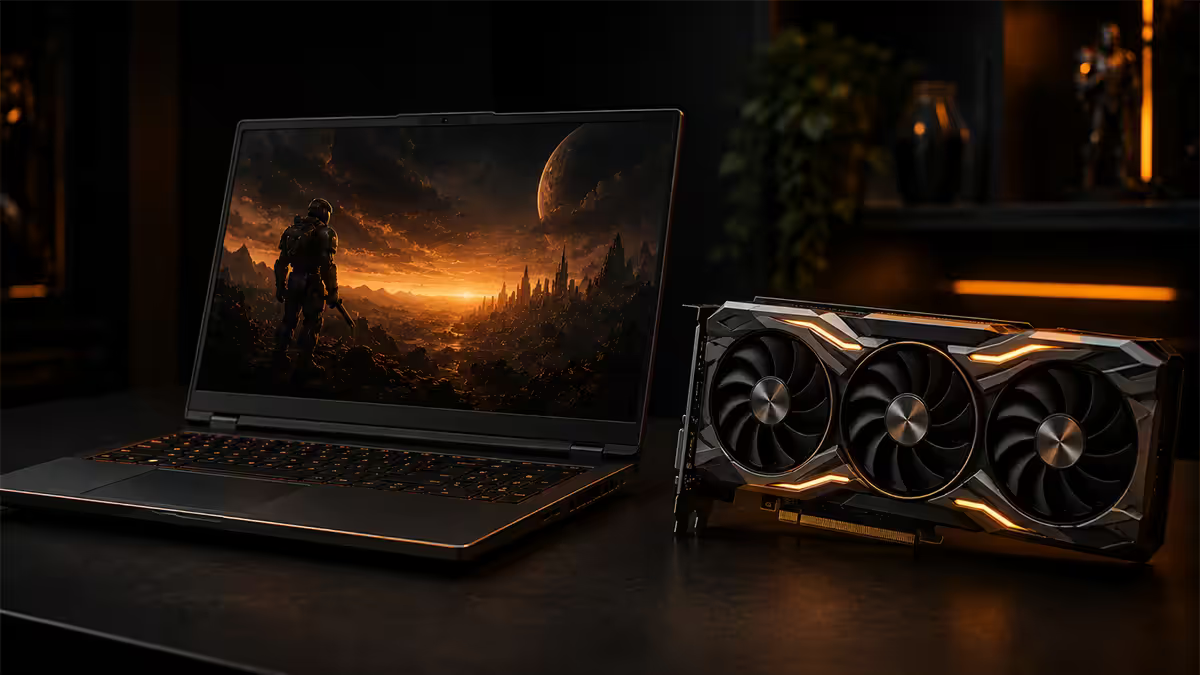
If you walked into a shop in 2019 and bought a laptop with a GTX 1660 Ti, you'd see "1660 Ti Mobile" on the spec sheet. The "Mobile" suffix told you it wasn't the same as the desktop part. In the RTX 30 series, Nvidia quietly dropped it. By the RTX 40 generation, the "Mobile" label was gone entirely from product naming. RTX 50 continues the same approach.
Today, the product page on a gaming laptop says "RTX 5070" — exactly the same name as the R12,000 desktop card you'd buy at retail. The two products are not equivalent. They share branding and very little else. This is a deliberate marketing choice, and AMD does the same thing with Radeon mobile parts.
The only honest signal you get on a laptop product page is the TGP figure (total graphics power, sometimes called "max graphics power" or "GPU power"). Some OEMs list it prominently; others bury it three clicks deep. Always find it before buying — it tells you which performance tier you're actually getting.
Wattage tiers and what they mean
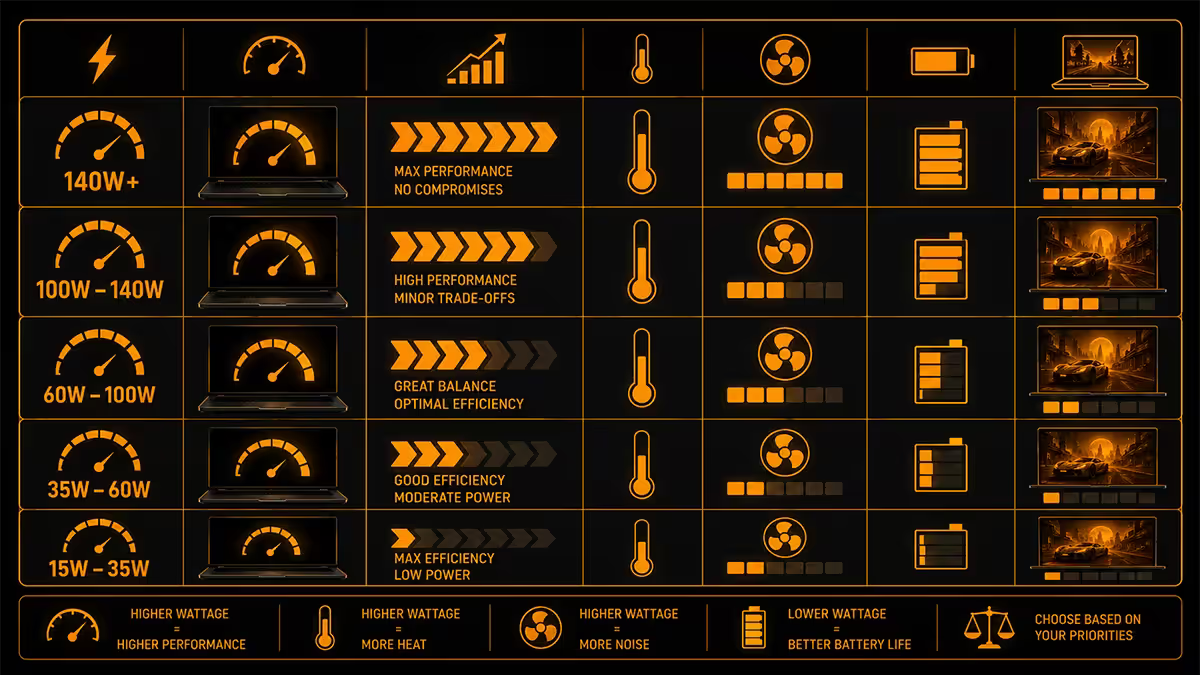
Nvidia provides OEMs a range of TGP values per chip. The OEM chooses where to place the GPU on that scale based on chassis thickness, cooling capacity and target noise level. Here's the 2026 RTX 50 series mobile range:
| GPU | Laptop TGP range | Desktop equivalent |
|---|---|---|
| RTX 5050 Mobile | 35-65W | RTX 5050 (130W) |
| RTX 5060 Mobile | 45-115W | RTX 5060 (170W) |
| RTX 5070 Mobile | 75-150W | RTX 5070 (250W) |
| RTX 5080 Mobile | 95-175W | RTX 5080 (360W) |
| RTX 5090 Mobile | 115-175W (+25W Dynamic Boost) | RTX 5090 (575W) |
The RTX 5090 Mobile is the most striking case. The desktop card pulls 575W; the laptop variant is capped at 200W including Dynamic Boost. The laptop version is roughly equivalent in raw performance to a desktop RTX 5070 — despite carrying the 5090 brand. This isn't deception so much as the unavoidable physics of fitting 575W of cooling into any portable chassis.
Dynamic Boost
Modern laptops can shift power between CPU and GPU dynamically. If the CPU is idle and the GPU is loaded, the system can route an extra 15-25W to the GPU on top of its base TGP. Marketed as "Dynamic Boost 2.0" by Nvidia. Useful in GPU-bound games, but it's already factored into the higher end of TGP ranges — don't double-count it.
The honest 40-50% gap in real games
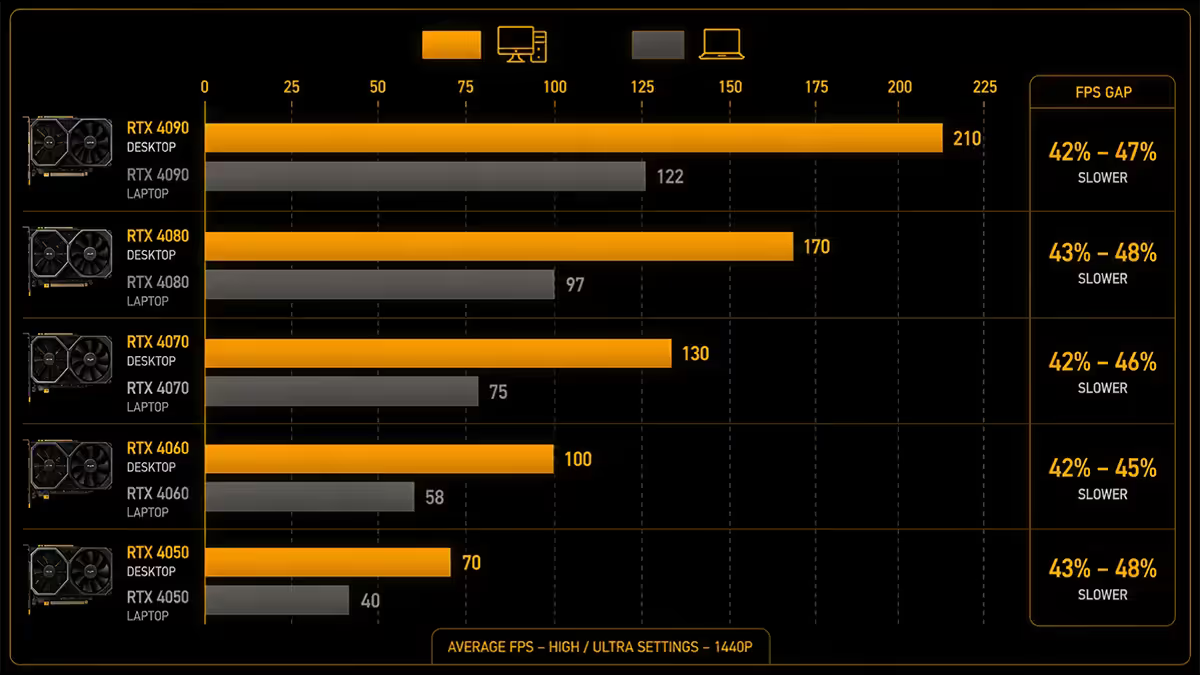
In identical games at 1440p Ultra, here's roughly what to expect. Numbers are averaged across Cyberpunk 2077, Black Myth Wukong, Alan Wake 2, Hogwarts Legacy and Forza Horizon 5.
| Configuration | Avg FPS | % of desktop |
|---|---|---|
| RTX 5070 Mobile @ 75W (thin) | 56 FPS | ~51% |
| RTX 5070 Mobile @ 115W (mid) | 71 FPS | ~65% |
| RTX 5070 Mobile @ 150W (thick) | 82 FPS | ~75% |
| RTX 5070 Desktop @ 250W | 110 FPS | 100% |
The shape of the curve matters more than the exact numbers. Performance roughly scales with wattage at the laptop end, then plateaus. You get strongly diminishing returns above 150W on mobile silicon because cooling and chassis power delivery start to limit further gains. Desktop scaling is more efficient because cooling is essentially unlimited.
Ray-tracing widens the gap. In RT-heavy titles (Cyberpunk 2077 with Path Tracing, Alan Wake 2 with full RT), the desktop pulls 45-50% more FPS than the 150W laptop variant. RT cores need sustained power to operate at peak, and the laptop's wattage cap hurts here more than in rasterised workloads.
MUX switch, Optimus and the hidden 10% tax
Modern gaming laptops have two GPUs: the integrated GPU on the CPU (for desktop use and battery saving) and the discrete Nvidia or Radeon GPU (for gaming). The way these two interact decides how much of the dGPU's performance actually reaches your screen.
Optimus mode (no MUX)
The dGPU renders the game, then sends the rendered frame to the iGPU, which sends it to the display. This adds an extra hop. Result: 5-15% performance loss, plus 5-10ms additional input latency, plus higher GPU memory bandwidth usage.
Optimus is the default on cheaper laptops without a MUX switch. You can't bypass it.
MUX switch (manual)
A physical/software switch that routes the dGPU output directly to the display, bypassing the iGPU. Recovers the 5-15% loss. Downside: kills the iGPU pathway, so battery life drops significantly when on dGPU-direct mode. Usually requires a laptop restart to switch.
Advanced Optimus (auto-MUX)
Nvidia's automatic version. The system switches between iGPU and dGPU-direct routing on the fly based on workload. No reboot needed. This is the gold standard — and is increasingly common on premium gaming laptops since 2024.
Why thin-and-light gaming laptops underperform their spec sheets
The thin gaming laptop is a perennial buyer's trap. You see an RTX 5070 or RTX 5080 in a 1.9 kg chassis with 12-hour battery life, marketed at a premium price, and assume you're getting flagship performance in a portable form factor. You are not.
Thin gaming laptops typically run their GPUs at the bottom of the TGP range — 75-95W for an RTX 5070, 95-115W for an RTX 5080. The chassis simply cannot dissipate more heat without becoming too loud or burning your lap. The result: an RTX 5070 in a thin chassis performs 25-35% worse than the same chip in a thick chassis of the same generation.
Pricing makes this worse. Thin gaming laptops cost more than thick ones with identical GPU names because the engineering effort to fit performance into thin chassis is real. So you pay more for less performance — to get less weight.
The honest assessment: if the laptop will live on a desk most of the time, buy thick. If you genuinely commute with it daily, thin makes sense. Don't pay thin gaming premium for what's mostly going to sit at a desk.
eGPU — the honest verdict
An external GPU enclosure (eGPU) lets you plug a full desktop GPU into a laptop via Thunderbolt or USB4. In theory it gives you desktop GPU performance with a portable laptop. In practice, it rarely makes financial sense.
The overhead is real. Thunderbolt 4 caps at 40 Gbps. PCIe 4.0 x16 native is 256 Gbps. The Thunderbolt connection is roughly 6x slower than the PCIe slot that GPU would use in a desktop. The result: 10-30% performance loss vs the same GPU in a desktop. Thunderbolt 5 (80 Gbps, available in 2025+ laptops) narrows but does not eliminate this gap.
The cost is brutal. A decent eGPU enclosure (Razer Core X, Akitio, Sonnet) costs R6,000-R10,000. Add an RTX 5070 desktop card (R12,000-R14,000) and you're at R18,000-R24,000 for a setup that performs worse than a R20,000 budget desktop.
Where eGPU still makes sense: Mac users who occasionally need CUDA, professionals with corporate-issued laptops who can't get a desktop, very specific niche workstation scenarios. For almost every buyer asking "should I get an eGPU?" — the answer is "no, buy a desktop instead."
When laptop GPU still wins
It's easy to read all the above and conclude desktop GPU is always better. But for a meaningful slice of buyers, the laptop GPU genuinely wins despite the wattage and naming disadvantages.
Portability is the only real argument — and it's enough. A 50% slower GPU you can take to a friend's house, to a coffee shop, to a conference, on holiday, between desks at work — provides infinitely more value than a desktop GPU you can't access. For students, frequent travellers, mobile professionals, people in small flats, and anyone whose "desktop" would otherwise live in a cupboard most of the year, laptops win.
Load-shedding in SA changes the calculus. A gaming laptop runs on battery during Stage 4-6. A desktop needs a UPS or inverter solution that adds R6,000-R20,000 to the build. If you don't already have a battery backup, that cost goes onto the desktop side of the comparison.
Space and noise. A laptop is silent when idle and tucks into a drawer. A desktop with a high-end GPU is large, fan-noisy under load, and needs desk space. For tight living spaces or shared environments, laptops are objectively better.
Key takeaways
- 01.
Check the wattage, not just the name
Laptop RTX 5070 = 75-150W variable. Desktop RTX 5070 = 250W. The naming hides a 40-50% real performance gap. - 02.
TGP wattage is the key spec
Always check TGP wattage on the laptop spec sheet. Same GPU name with different TGP = 30%+ FPS difference. - 03.
MUX switch recovers hidden performance
MUX switch or Advanced Optimus recovers 5-15% performance. No MUX = Optimus = performance tax. - 04.
Thin gaming chassis costs you FPS
Thin gaming laptops underperform thick ones by 25-35% with the same GPU name. Pay for chassis thickness if you game seriously. - 05.
eGPU rarely wins; portability and load-shedding tilt the balance
eGPU is rarely worth it. Buy a desktop instead. Laptop GPU still wins on portability and SA load-shedding battery resilience.
Frequently asked questions
Is a laptop RTX 5070 the same as a desktop RTX 5070?
No. The laptop RTX 5070 runs at 75-150W depending on chassis configuration. The desktop RTX 5070 runs at 250W. That's a 40-50% real-world performance gap in gaming. Nvidia drops the 'Mobile' suffix from the model name, which makes the two products look identical on spec sheets when they are not.Why does the same laptop GPU perform differently in different laptops?
Wattage tiers. Nvidia gives OEMs a range — a laptop RTX 5070 can be configured anywhere from 75W to 150W. A thin gaming laptop runs the chip at 75-95W to stay quiet and cool; a thicker chassis runs the same chip at 130-150W and gets significantly more FPS. Always check the actual TGP (total graphics power) figure for the laptop you're buying, not just the GPU name.What is a MUX switch and why does it matter?
A MUX switch lets the laptop send the discrete GPU output directly to the display, bypassing the integrated GPU. Without a MUX, the dGPU sends its frames to the iGPU first, which costs 5-15% performance and adds latency. Premium gaming laptops have MUX switches (often auto-switching via Nvidia Advanced Optimus). Cheaper laptops without MUX leave performance on the table.Are thin-and-light gaming laptops worth it?
Only if you genuinely need portability. A 16-inch thin gaming laptop with an RTX 5070 at 90W performs 25-35% worse than a 16-inch thick gaming laptop with the same chip at 140W. You're paying premium prices for less performance to get less weight. If the laptop lives on a desk 90% of the time, buy thicker.Is an eGPU a good investment?
Honestly, no for most people. Thunderbolt 4 and even Thunderbolt 5 add 10-30% performance overhead compared to running the GPU natively. The eGPU enclosure costs R6,000-R10,000 on top of the GPU itself. By the time you've spent R20,000-R25,000 on an eGPU setup, a desktop with the same GPU outperforms it and is cheaper. eGPU only makes sense for niche use cases (M-series Mac users who occasionally need CUDA, or workstation laptops that need rare-trip GPU compute).When does a laptop GPU still win over desktop?
When portability matters. If you commute, travel for work, take your gaming to friends' houses, edit video on location, or live in a small space — a laptop GPU that's 40-50% slower than desktop still wins because the desktop you don't have provides zero performance. For SA buyers specifically, laptops also win during load-shedding because they run on internal battery.Why does Nvidia and AMD allow this naming confusion?
Marketing. 'RTX 5070' sells better than 'RTX 5070 Mobile (75-150W variable)'. Nvidia dropped the 'Mobile' suffix officially in the RTX 40 generation and has continued it through RTX 50. AMD does the same with Radeon mobile parts. Both companies know this misleads consumers but neither will be the first to fix it. Always cross-reference the TGP figure on the laptop product page.How much FPS difference is the wattage gap actually?
Roughly linear with wattage at the high end. A 75W laptop RTX 5070 produces about 60-65% the FPS of a 250W desktop RTX 5070 in identical games at 1440p. A 150W laptop variant produces around 80-85%. The biggest gap is in ray-tracing heavy titles like Cyberpunk 2077 RT Overdrive where the desktop pulls 45-50% more FPS.Does the laptop CPU bottleneck the laptop GPU?
In most AAA games at 1440p/4K, no. The GPU bottlenecks first. In CPU-heavy esports titles (CS2, Valorant at 1080p, MMOs in big raids) the laptop CPU can bottleneck the laptop GPU, capping framerate below what the GPU could otherwise deliver. This is one of the few cases where laptop CPU choice actually matters for gaming.
Get the Evetech app
Exclusive app-only prices, daily flash sales, and free delivery on orders over R4,000 — download the app and start saving.