Hardware Explainer · Mobile vs Desktop Silicon
Laptop CPU vs desktop CPU. — Same name. Different chip.
A Ryzen 9 in a laptop and a Ryzen 9 in a tower share branding — and very little else. Wattage decides everything, and the marketing won't tell you the gap.
- laptop sustained
- 45-75W
- desktop sustained
- 95-170W
- multi-thread gap
- 25-50%
The TDP gap is the whole story
Everything that follows in this article — boost duration, real-world FPS, sustained rendering, why a Ryzen 9 in a laptop isn't a Ryzen 9 in a tower — flows from one number: thermal design power. TDP isn't quite "wattage drawn" but it's close enough for buying decisions, and the gap between laptop and desktop is enormous.
A flagship desktop CPU like the Ryzen 9 9950X or Core Ultra 9 285K runs at 170W sustained with a decent tower cooler — and pushes 200-230W under PBO or unlocked power limits. That same silicon design, slightly tweaked and slapped with a similar name, lives inside laptop chassis at 45-75W. A few HX-class gaming laptops will let the chip hit 85-100W in short bursts, but only the very thickest "desktop replacement" chassis can hold that for more than a minute.
| CPU class | Sustained TDP | Burst peak |
|---|---|---|
| Ultrabook (U-series) | 15-28W | 40-55W (15s) |
| Performance ultrabook (P/HS) | 28-45W | 60-75W (28s) |
| Gaming laptop (H-series) | 45-65W | 90-110W (45s) |
| Desktop replacement (HX) | 55-85W | 110-160W (60s) |
| Mid-range desktop | 65-105W | 140W indefinitely |
| Flagship desktop | 125-170W | 200-230W indefinitely |
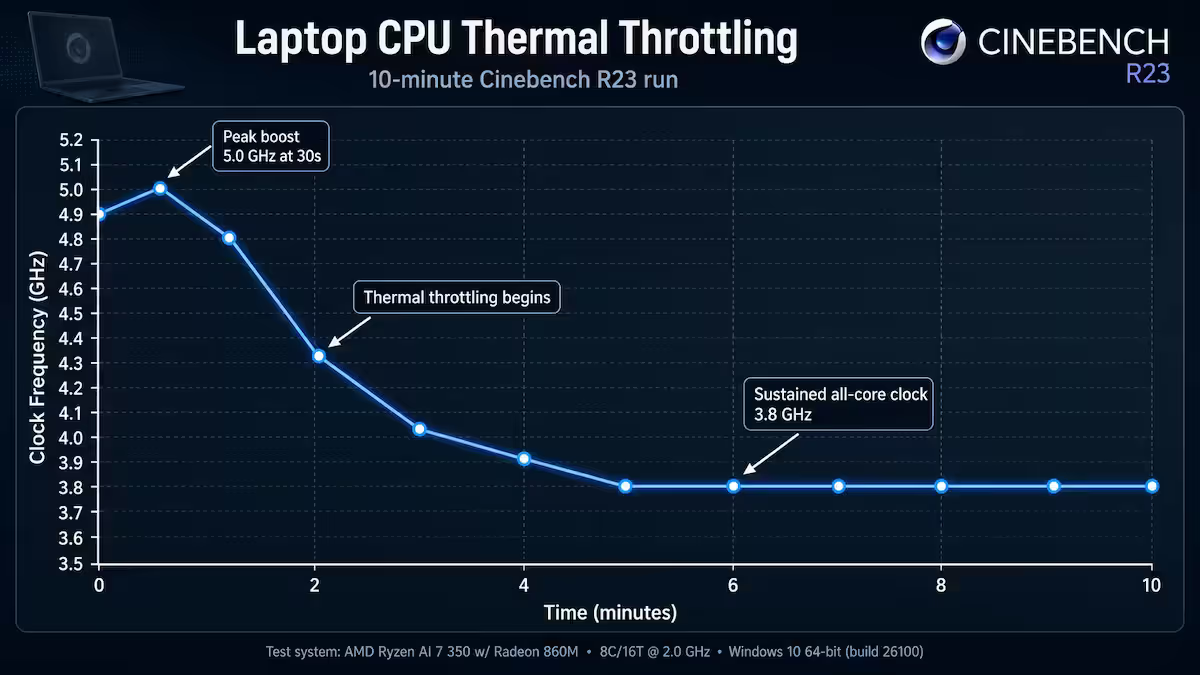
The boost peak numbers are the dishonest part of laptop marketing. Manufacturers quote "up to 5.2 GHz boost" knowing the chip will hold that for 25-45 seconds before throttling down to a sustained clock that's 600-900 MHz lower. Benchmark a laptop CPU for 10 minutes of solid load and you'll see exactly what's actually available.
Why boost duration matters more than peak clock
Open Activity Monitor or Task Manager while you open Chrome, launch a game, or compile some code, and you'll see the CPU spike to 100% for a couple of seconds, then settle. Most desktop tasks are bursty. Single-second sprints. That's why laptops feel snappy for everyday work — the boost window is long enough to handle anything UI-related.
Sustained workloads are different. Rendering a 4K timeline. Compiling a large C++ codebase. Encoding a stream. Training a small ML model. Running a benchmark. These aren't sprints — they're marathons, and the chip has to hold high frequencies for minutes or hours.
Cooling is the other half of this equation. A tower CPU cooler — even a basic R450 air cooler — has 5-10x the thermal mass and surface area of any laptop heatsink. Desktop CPUs hold boost frequencies indefinitely because heat has somewhere to go. Laptop CPUs throttle because heat has nowhere to go beyond the chassis vents.
Decoding H, HX, U and HS
The suffix on a laptop CPU model number tells you what wattage class you're actually getting. This matters because two laptops with "Core Ultra 9" on the spec sheet can have wildly different real-world performance depending on whether it's a U-chip ultrabook or an HX gaming machine.
Intel suffixes
- HX — Highest-performance mobile, essentially desktop silicon in a laptop. 55W base, 110-160W boost. Found in 16-inch+ gaming and workstation laptops. Closest to desktop in absolute performance.
- H — Standard gaming laptop tier. 45W base, 90-110W boost. The mainstream gaming laptop chip.
- P — Performance ultraportable. 28W base, 60-75W boost. Thin-and-light with some grunt.
- U — Ultraportable. 15-28W. Office work, web, light editing.
AMD suffixes
- HX — Top tier mobile. 55W+ base, up to 75W sustained. Equivalent to Intel HX class.
- HS — Balanced performance. 35-45W base, designed for thin gaming laptops where Intel H would run too hot.
- H — Standard performance, 45W class.
- U — Ultra-low-power, 15-28W, ultrabooks.
Why a Ryzen 9 laptop isn't a Ryzen 9 desktop
AMD and Intel both deliberately use shared branding across mobile and desktop. The marketing reason is obvious: "Ryzen 9" sounds premium regardless of where it's installed. The technical reality is messier.
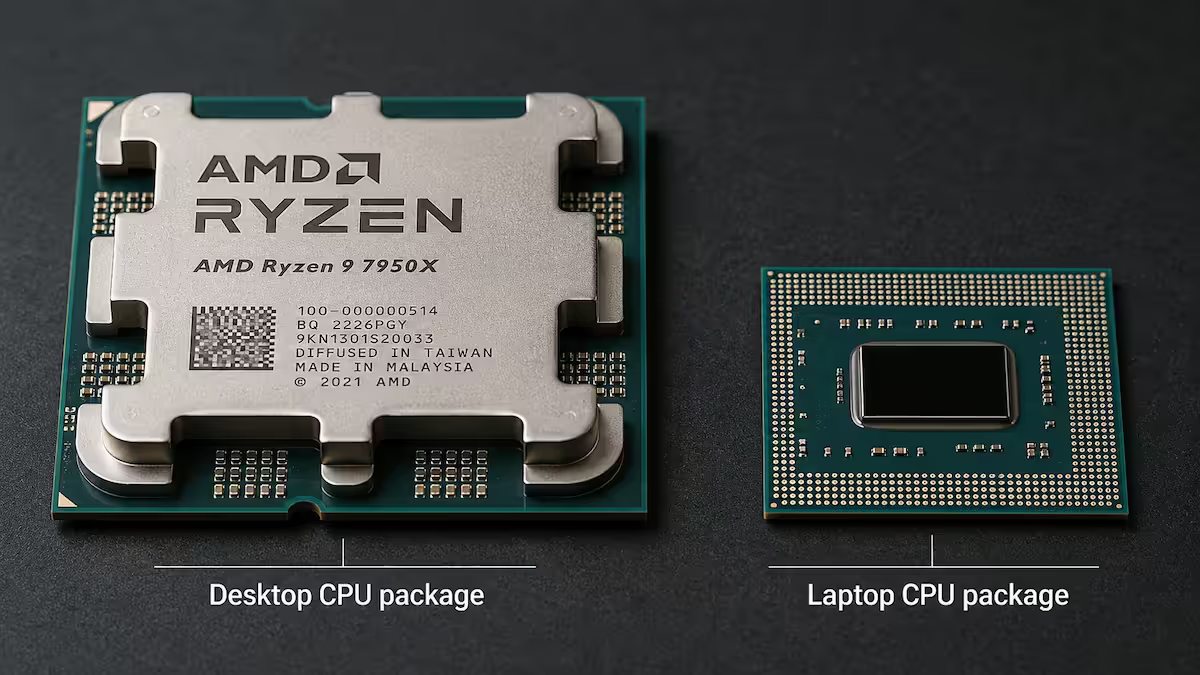
The Ryzen 9 7945HX (laptop) and Ryzen 9 7950X (desktop) both have 16 cores, 32 threads, Zen 4 architecture, similar peak clocks on paper. The laptop chip uses the same chiplet design as the desktop version. So what's different?
- Sustained power limit: Desktop 170W, laptop 55-75W.
- Cooling envelope: Desktop has 5-10x the heatsink capacity.
- All-core boost duration: Desktop holds 5.0+ GHz indefinitely; laptop drops to ~4.2 GHz after 60 seconds.
- Multi-thread Cinebench R23: Desktop scores ~38,000; the laptop version scores ~28,000-31,000.
- Memory configuration: Desktop accepts DDR5-6400+ with 4 DIMM slots; laptop is usually 2 slots, often soldered, lower frequency.
Single-thread performance is the closest match — both run within 5-10% in Geekbench single-core. That's why laptop CPUs feel responsive in everyday use. Most software runs primarily on one or two threads at a time.
Single-thread closeness vs multi-thread gap
The "feels just as fast" experience on a flagship laptop CPU is real — and so is the "30% slower at rendering" disappointment. Both are true at the same time. The split happens between single-thread and multi-thread workloads.
Single-thread is close
Single-core boost is determined by silicon quality and peak voltage — not sustained cooling. A laptop chip can hit 5.3 GHz on one core for ~20 seconds without overheating because only one core is generating heat. Desktop chips hit 5.4-5.7 GHz on one core indefinitely. The gap: 5-10% in single-thread benchmarks.
What runs on single-thread or 1-2 thread bursts? UI responsiveness, web browsing, Excel calculation, opening apps, file copy operations, most JavaScript on websites, single-track audio editing. This is why a fast laptop CPU feels indistinguishable from a fast desktop in everyday use.
Multi-thread is where the gap lives
When every core has to run at high frequency for minutes, the laptop's 45-75W envelope can't sustain it. The chip drops to a sustained "all-core" clock that's 800-1000 MHz lower than desktop's, and the multi-thread benchmark shows it. Cinebench R23 multi-core gaps run 25-50% in favour of desktop, depending on chassis and OEM tuning.
Multi-thread workloads: video export, Lightroom batch exports, 3D rendering, code compilation, virtualisation, streaming (encoding), large database queries, simulation work, scientific computing.
The honest game FPS gap
Gaming is the most asked-about workload and the most misunderstood. The honest answer: it depends on the game and the resolution.
CPU-bound games at 1080p
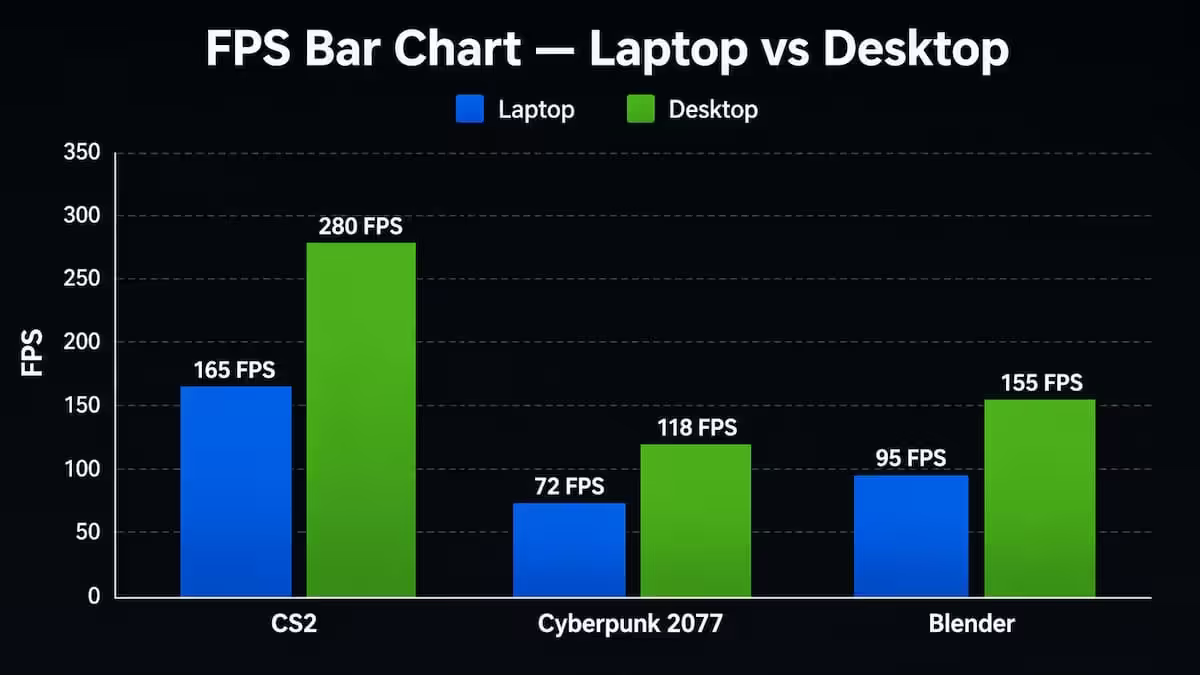
Counter-Strike 2, Valorant, League of Legends, Dota 2, Rainbow Six Siege at competitive settings — these are CPU-bound, especially at 1080p with low graphics presets. Desktop wins by 15-25% here. A laptop Ryzen 9 might pull 380 FPS in CS2; the desktop equivalent pushes 470. Both are above any monitor refresh rate, but the higher number means tighter frame consistency.
GPU-bound AAA at 1440p / 4K
Cyberpunk 2077, Black Myth Wukong, Alan Wake 2, Indiana Jones at 1440p Ultra or 4K — these are GPU-bound. The CPU isn't the bottleneck. Desktop wins by only 3-8% in this scenario. If both systems have an RTX 5070 (desktop wattage), the FPS gap will be small. If the laptop has a 75W RTX 5070 Mobile and the desktop has a 250W RTX 5070, the gap widens — but that's the GPU gap, not the CPU gap.
1% lows and stutters
This is where the desktop pulls ahead more consistently than average FPS suggests. Desktop CPUs hold their boost clock during background app activity, Windows updates, Discord chatter and shader compilation hits. Laptops will dip into thermal throttling under the same load combination, producing noticeable stutters in 1% low FPS. If you're a competitive shooter player who cares about frame consistency, desktop wins meaningfully.
Across the 200,000+ custom PCs and gaming laptops we've shipped from Centurion, the most common return reason isn't a faulty CPU — it's a customer who bought a Ryzen 9 HX laptop expecting it to render their After Effects timeline at desktop speed. The silicon is similar; the chassis is not. Our floor staff now ask one question before every laptop sale: "Will you plug into mains and run heavy workloads for hours, or are you on battery editing on the go?" The answer determines whether laptop or desktop is the right buy — and saves customers an average of R5,000-R12,000 in regret returns.
From our service bench · Behind the Build
When laptop CPU is actually enough
For most South African buyers in 2026, a current-gen H or HX laptop CPU is genuinely enough. The category of "you actually need desktop CPU performance" is narrower than the internet suggests.
Laptop CPU is enough for:
- Office work, web, email, video calls — overkill at any HX level, plenty even at U-class.
- Programming and software development — single-thread heavy, laptop matches desktop closely.
- Photo editing in Lightroom and Photoshop — single-image edits are fine; batch exports take 1.5x longer.
- 1080p / 4K casual video editing — the export is slower, but the timeline edit experience is identical.
- AAA gaming at 1440p / 4K — GPU-bound, CPU difference barely matters.
- Light data analysis, dashboards, BI tools — single-thread heavy.
Desktop CPU is meaningfully better for:
- Streaming gameplay while playing — encoder + game engine = both threads pinned, laptop throttles.
- 3D rendering (Blender, Cinema 4D) — straight-up wattage hours, desktop is 30-50% faster.
- Code compilation on large projects — sustained multi-thread, big gap.
- Competitive esports at high refresh — 1% lows matter, desktop wins.
- Local LLM inference — VRAM matters most but CPU sustained matters too.
- Multi-VM virtualisation — sustained multi-thread, laptop runs out of headroom.
Key takeaways
- TDP gap (45-75W laptop vs 95-170W desktop) is the entire story — everything else follows from this.
- Single-thread within 5-10% between laptop and desktop. Multi-thread sustained gap is 25-50%.
- H/HX/U/HS suffix tells you wattage class. Always check sustained TDP in reviews, not OEM model numbers.
- Real game FPS: 15-25% at 1080p competitive, shrinking to 3-8% at 1440p/4K AAA where GPU bottlenecks.
- Laptop is enough for most users. Desktop only meaningfully wins for sustained rendering, streaming and competitive 1% lows.
Frequently asked questions
Is a laptop CPU as fast as a desktop CPU?
In short bursts, modern laptop CPUs (Ryzen 9 HX, Core Ultra 9 HX) can match desktop chips in single-thread tasks like opening apps or web browsing. In sustained multi-thread workloads (rendering, compiling, streaming) the desktop pulls 25-50% ahead because it can run at 95-170W indefinitely while the laptop is throttled to 45-65W after the boost window.What do H, HX, U and HS mean on laptop CPUs?
On Intel: HX = highest-power desktop-class silicon (55W+ base), H = standard gaming laptop (45W), U = ultraportable (15-28W), P = performance ultraportable (28W). On AMD: HX = top-tier (55W+), HS = balanced performance (35-45W), U = ultra-low-power (15-28W). The suffix tells you what real wattage class you're getting — not the model number alone.Why is a Ryzen 9 laptop slower than a Ryzen 9 desktop?
The Ryzen 9 7945HX (laptop) and Ryzen 9 7900X (desktop) share architecture but live in completely different thermal envelopes. The desktop chip pulls 170W with a tower cooler; the laptop version is capped at 55-75W in the chassis, with cooling that can only sustain that for short bursts. Naming makes them sound identical — the silicon is similar, but the running envelope is not.Does single-thread performance match between laptop and desktop?
Almost. In single-core boost windows (under 30 seconds), laptop flagship chips run within 5-10% of desktop equivalents. The architecture and clock ceiling are the same. The gap widens dramatically in multi-thread sustained loads where the chip must hold high frequencies for minutes — that's where TDP and cooling decide the outcome.How big is the real-world game FPS gap?
In CPU-bound games at 1080p, desktop CPUs typically lead by 15-25% over the laptop equivalent (e.g., Counter-Strike 2, Valorant, esports titles). In GPU-bound AAA games at 1440p or 4K, the gap shrinks to 3-8% — the GPU bottleneck masks the CPU difference. For competitive gaming the desktop wins; for cinematic AAA at high resolutions the gap is smaller than you'd think.Is a laptop CPU enough for video editing?
Yes for 1080p and most 4K editing, even sustained. A Ryzen 9 HX or Core Ultra 9 HX laptop will export a 10-minute 4K timeline in 4-6 minutes vs 3-4 minutes on a desktop equivalent. If your job is exports back-to-back all day, desktop is faster and quieter. If you edit on the move and export occasionally, laptop is plenty.Can you undervolt or tune a laptop CPU?
Sometimes, depending on the laptop OEM. ThrottleStop and Intel XTU on older Intel chips, AMD Ryzen Master on some AMD laptops. Many modern OEMs lock voltage control — particularly thin gaming laptops. Repaste, repad and a cooling pad usually deliver more sustained performance than undervolting on locked systems.Will a laptop CPU last as long as a desktop CPU?
The silicon is just as durable, but laptop CPUs run hotter day-to-day because cooling is constrained. Expect 5-7 years of useful life from a laptop CPU before thermal degradation noticeably reduces sustained performance. Desktop CPUs in a well-cooled tower can run for 8-12+ years without thermal-related slowdown.
Get the Evetech app
Exclusive app-only prices, daily flash sales, and free delivery on orders over R4,000 — download the app and start saving.