SA Gaming Room Setup
Build the complete gaming room.
Most SA gaming rooms over-spend on RGB and under-spend on the things you actually touch for six hours a day. Here is the four-tier ladder from R20k to R150k+, the discipline behind good lighting, and how to fit it all into a Joburg flat.
- 4 budget tiers
- R20k-R150k+
- to splurge on
- 3 things
- minimum footprint
- 1.5 m²
The 4-tier SA budget ladder
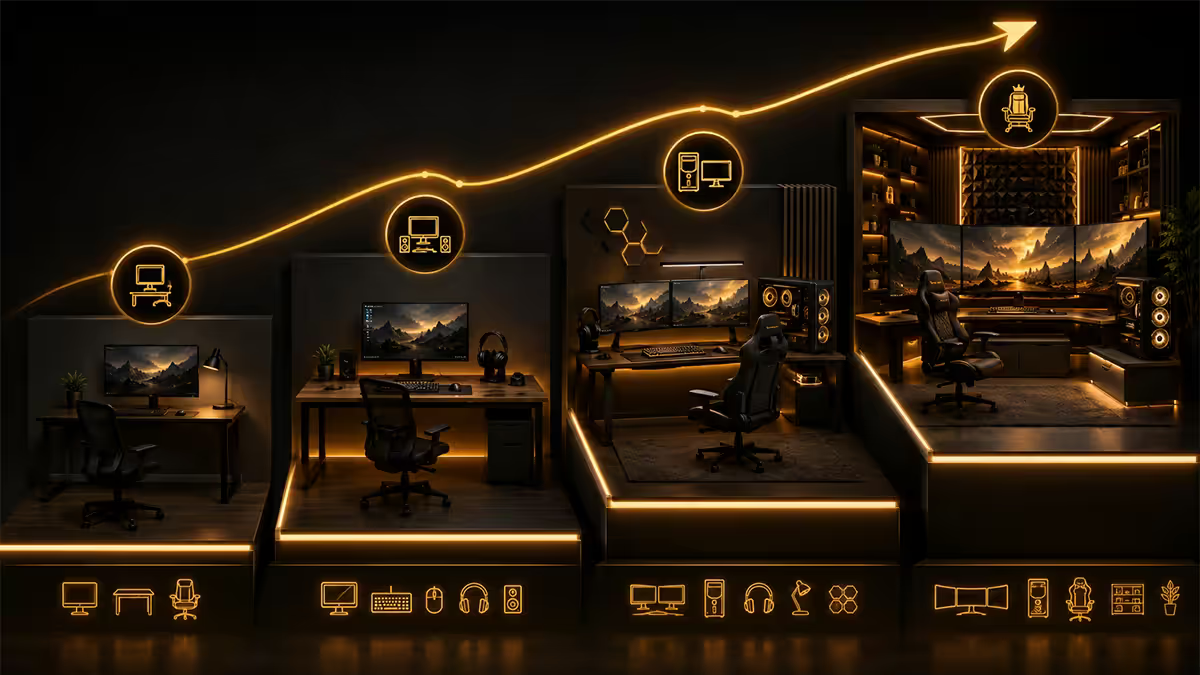
Almost every gaming room we see in South Africa lands in one of four budget bands. The bands aren't arbitrary — they map to specific component upgrades that genuinely change the experience.
| Tier | PC + monitor | Chair + desk | Lighting + audio | Total |
|---|---|---|---|---|
| Entry | RTX 4060-class build + 24" 1080p 165Hz | DXRacer-clone + IKEA-style desk | Bias strip + decent headset | R20k |
| Solid | RTX 4070 Super build + 27" 1440p 180Hz | Secretlab Titan Evo + 140cm desk | Bias + perimeter RGB + R3k speakers | R45k |
| Premium | RTX 4080 build + 27" 1440p QD-OLED 240Hz | Titan Evo + motorised standing desk | Full ambient + console corner + Edifier | R85k |
| Dream | RTX 5090 / 5080 build + 32" 4K OLED + dual | Titan Evo XL + Flexispot E7 + acoustic panels | Treated room + 5.1 in console corner | R150k+ |
The single biggest jump in real-world quality is from Entry to Solid — that R25k buys a 1440p panel (the resolution sweet spot for the next 5 years) and a chair you can sit in past midnight without your lower back filing a complaint. Premium and Dream are quality-of-life refinements, not transformations.
Splurge: chair, screen, keyboard
There are exactly three things in a gaming room you should over-spend on. They share one property — you are physically touching them or staring at them for the entire session. Everything else is decoration.
The chair
A Secretlab Titan Evo (R12k-R15k) or a high-end DXRacer is what 90% of long-term gamers settle on. They survive five years of daily use without the foam collapsing. The R3k chair from a department store will look identical for the first month and feel like sitting on a milk crate by month six. If gaming chairs aren't your aesthetic, a quality office task chair from Coricraft or an Ergohuman clone is equally valid — the criterion is lumbar support, adjustable armrests, and a 5-year warranty.
The screen
A 27-inch 1440p panel at 165Hz or higher is the sweet spot for the next 3-5 years. Below 1440p you'll outgrow it as soon as you upgrade the GPU; above 4K you'll spend more on the GPU than the rest of the build. For competitive shooters, a flat IPS or QD-OLED. For single-player and mixed use, a slight curve is fine. Avoid HDR400 marketing claims — real HDR starts at HDR1000 and a QD-OLED panel delivers it properly.
The keyboard
A mechanical keyboard with hot-swap switches (R2k-R5k) lasts a decade and feels distinctly better than the R600 membrane board it replaces. Keychron K2/K6, Ducky One 3, Razer Huntsman. Hot-swap means you can change switches without re-soldering when your taste evolves. Skip RGB-only marketing keyboards — chase the typing feel, not the lightshow.
Save: desk, RGB, mousepad
The flip side of the splurge rule — these three categories soak up R10k+ of budget if you let them, and the expensive version performs maybe 5% better than the budget version.
The desk. A 140cm IKEA Linnmon top on adjustable trestle legs (R1500 total) is functionally identical to a R6k "gaming desk" with a mousepad surface and cable trough. If you want height adjustment, a Flexispot E7 frame paired with a R600 plain melamine top from Builders Warehouse beats branded standing desks costing 3x more. The desk is a flat surface — pay for flatness, not branding.
RGB strips. The single biggest budget leak in SA gaming rooms. A R200 Govee strip behind the monitor is good. R5,000 of perimeter RGB cycling through rainbow mode looks like a Spur restaurant ceiling. Restrict accent lighting to one or two zones and one consistent warm colour. Less is more — both visually and budget-wise.
The mousepad. A R300 Razer Goliathus tracks identically to a R1,500 Razer Strider. Modern optical sensors don't care about surface — they care about consistency. Get a large pad (90cm wide minimum, edge-stitched) and skip the wireless charging RGB versions.
The headset stand, cable management trays, USB hubs and most accessories — adequate versions exist on Takealot for under R300. Don't let the gaming-aesthetic tax double these line items.
Lighting is the discipline
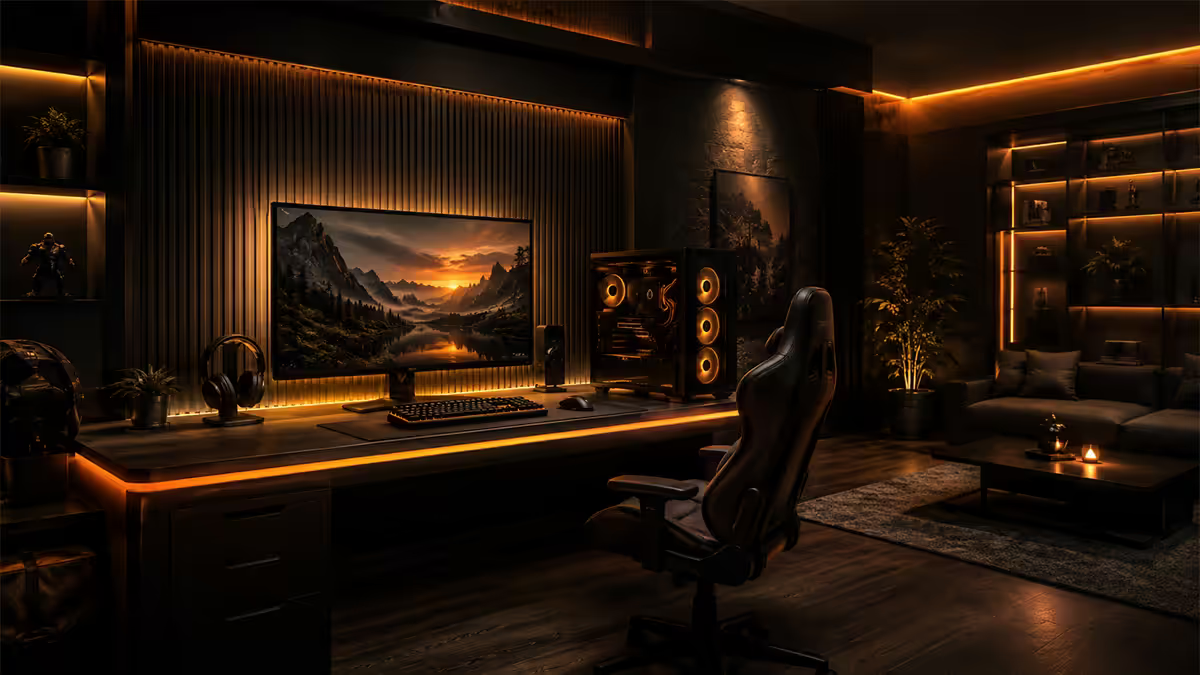
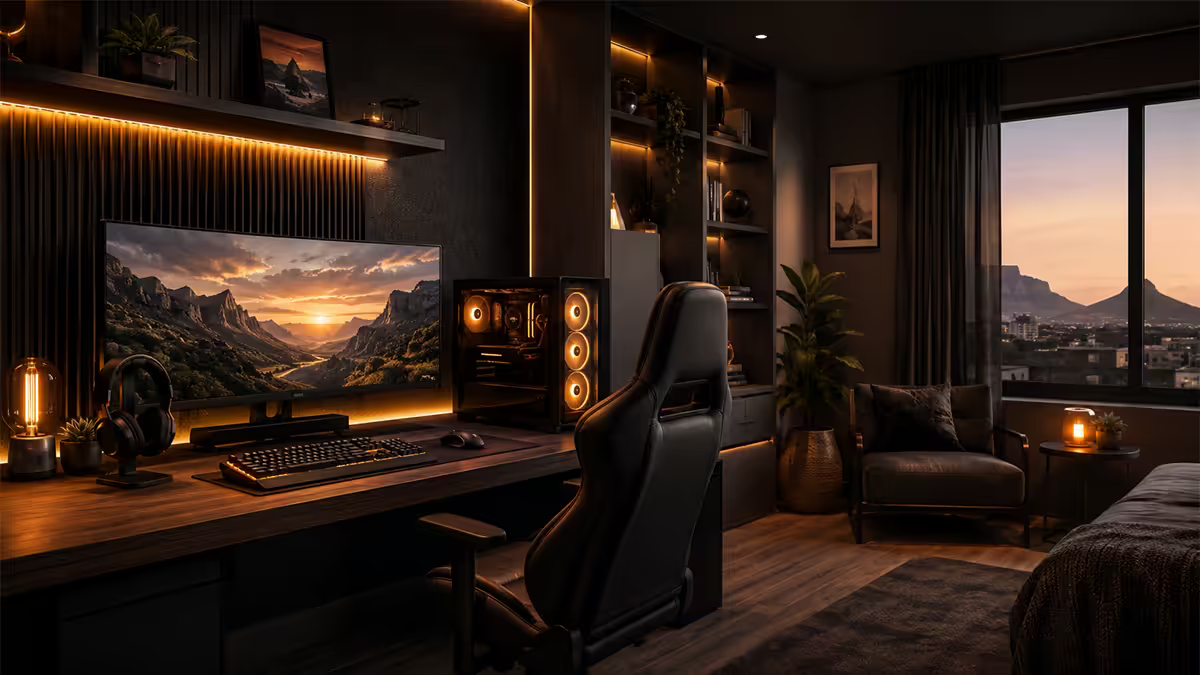
Of every gaming-room photo we see, the difference between "amateur" and "considered" is almost always the lighting. Not the cost — the discipline. Three layers, each doing one job:
1. Bias light (the one you cannot skip)
A neutral white LED strip behind the monitor, lighting the wall. It reduces eye strain dramatically by lowering the contrast between bright screen and dark room. USB-powered, R250 from Takealot (Govee or Xiaomi). It is the single highest-ROI upgrade in this entire guide.
2. Ambient (one warm light)
A single floor lamp or desk lamp at warm white (2700K-3000K), ideally with a smart bulb so you can dim it to 30% during sessions. Keep the colour temperature warm — cool white lighting fights the bias strip and makes the room feel like an office.
3. Accent (sparingly)
If you must have RGB, restrict it to one accent — under the desk, behind the TV in the console corner, or a single ring light. Choose one colour and stick with it. The "everything cycling rainbow" effect ages the room within weeks.
Audio — headset vs speakers (run both)
There's no "right" answer between headset and speakers because they solve different problems. The mature gaming room runs both, on a simple switch.
Headset — for competitive shooters, late-night sessions, voice chat, and total immersion. A HyperX Cloud III (R2,500), SteelSeries Arctis Nova 5 (R3,500) or Audeze Maxwell (R6,000) handles 99% of needs. Wireless is genuinely convenient now — battery life on modern sets exceeds 30 hours.
Speakers — for single-player games, films, music, the console corner. A pair of Edifier R1280T (R2,500) or Logitech Z407 (R3,000) will outperform an equivalently-priced headset for music and stereo film audio. Put them on isolation pads (R150 from Loot) to stop desk resonance, place them at ear height, and angle them inward toward your seated position.
A small USB DAC or motherboard mic-switch lets you flip between headset and speakers without unplugging anything. Total audio budget for both: R5k-R8k. Total quality gain: significant in both modes you use.
Secondary screen + console corner integration
A dedicated console corner is the upgrade most SA gaming rooms skip and then regret. The temptation is to plug the PS5 / Xbox into the PC monitor and call it solved. After two months of swapping HDMI cables in the dark you will understand why every premium setup has a separate console zone.
The console corner — what it needs
- A 43-inch 4K TV (R6k-R9k) — sweet spot for size vs price. Hisense U6N or TCL P735 deliver solid HDR for under R8k.
- A loveseat or 2-seater couch — Coricraft does a compact 2-seater from R8k, MRP Home has options under R5k.
- A low TV unit with cable management — keep the console visible (they're attractive hardware) and ventilated.
- The same lighting language as the PC zone — bias light behind the TV, one warm floor lamp, no overhead bright lights.
The secondary screen on the PC desk
If you stream, watch reference video, or run Discord/OBS while playing, a second 24-inch 1080p monitor (R3k) mounted vertically saves the alt-tab tax. Vertical orientation works better than horizontal as a second — chat logs, code, Discord, references all flow vertically by default.
SA flat-living: small-space tactics
Most South African gaming rooms aren't dedicated rooms — they're a corner of the bedroom or lounge in a 40-60m² Joburg or Cape Town flat. These tactics make the difference between "cramped" and "considered" in the same square footage.
Footprint. The minimum workable footprint for a single-monitor PC setup is 1.5m × 1.0m — a 120cm desk plus 100cm chair clearance behind. If you have less, go to a corner desk (90cm × 90cm L-shape) which fits into spaces a straight desk cannot.
Monitor arms. A R600-R1,200 single monitor arm frees up 30cm of usable desk depth by eliminating the stock stand. In a small flat this single change converts a cramped desk into one that has space for a notebook, drink coaster and headset rest. Highest ROI single accessory on the entire list.
Under-desk PC mat. Park the tower on a flat roller mat under the desk — when you need to vacuum behind it (and in SA flats, you will need to) you roll it out instead of dismantling cables. Cheap and underrated.
Wall-mount the TV in the console corner. Frees up the floor for the couch and visually shrinks the perceived size of the corner. Most SA TVs ship with VESA mount holes — a R250 universal bracket from Builders Warehouse does the job.
Acoustic basics. Hard tile floors and flat walls turn into echo chambers. A single 4m × 3m rug under the desk and chair (R1,500 from Hertex Haus or MRP Home) absorbs reflections more effectively than any acoustic foam. Add a few cheap fabric panels behind the desk (R300 each from Takealot) if you stream — that's enough treatment for Discord audio to sound clean without going studio-grade.
Across the 200,000+ custom PCs shipped from Centurion, the gaming-room photos customers send back tell us the same thing every time: the rooms that look best on Instagram cost the least to assemble. The shared traits — a bias light behind the monitor, one warm-temperature ambient source, no overhead glare, and exactly two RGB accents at most. The R85k builds with five RGB zones photograph worse than the R28k builds with one strip and a floor lamp. Lighting is the discipline. Spend the saved money on the chair and the screen instead.
Evetech Hardware Team — Behind the Build
Common gaming room mistakes
Buying the PC first and budgeting everything else from scraps. The most common mistake. The PC is roughly 55% of a good build — leaving 45% for chair, monitor, audio, lighting, desk and console corner combined. Plan the whole room as a single budget, not as a PC plus afterthoughts.
Over-investing in RGB. Spending R5,000 on RGB to compensate for a R3,000 chair and a R2,500 monitor. The room will photograph well for one week, then read as overbearing. Bias light is the only mandatory illumination; everything else is icing.
Sharing one monitor between PC and console. Cable-swapping in the dark gets old fast, and the colour calibration that suits 27" 1440p gaming monitors is wrong for a 4K HDR film on PS5. Separate the zones.
Skipping the chair upgrade. "I'll upgrade the chair later" is the line that becomes "my lower back hurts every evening" within four months. Buy the chair early. Used Secretlab off Gumtree if budget demands it.
Ignoring acoustics in a flat. Echo destroys both voice chat and game audio. One rug under the desk does 70% of the work — more than any single foam panel. Don't skip the rug.
Forgetting to leave service access. Build the room so you can move the tower out for cleaning without unplugging twelve things. Roller mats, modular cable management, leave 10cm gap behind everything.
Key takeaways
- Four SA tiers: R20k entry, R45k solid, R85k premium, R150k+ dream — the biggest jump in quality is Entry to Solid.
- Splurge on chair, screen, keyboard. You touch them or stare at them for six hours a day — pay for that.
- Save on desk, RGB, mousepad. The budget versions perform 90%+ as well at a third the price.
- Lighting is the discipline — one bias strip behind the monitor, one warm ambient, restrict RGB to one accent.
- Build a separate console corner with a 43" TV and a Coricraft 2-seater. Do not share monitors with the PC.
Frequently asked questions
How much does a complete gaming room setup cost in South Africa?
R20,000 entry to R150,000+ dream tier. The four common SA bands are R20k / R45k / R85k / R150k+. The PC and primary monitor are roughly 55-60% of the total — the rest is chair, audio, lighting and console corner.What should I splurge on for a gaming room?
Chair (Secretlab Titan Evo, R12k-R15k), screen (27" 1440p QD-OLED, R15k-R22k), keyboard (mechanical hot-swap, R2k-R5k). You physically interact with these for the entire session — they're worth the over-spend.What is bias lighting and do I actually need it?
A soft white LED strip behind the monitor that lights the wall. Dramatically reduces eye strain by lowering contrast between bright screen and dark surroundings. R250 from Takealot. Single highest-ROI upgrade after chair and screen.How do I fit a gaming setup in a small SA flat?
Minimum 1.5m × 1.0m footprint. Use a wall-mounted monitor arm (frees 30cm of desk), pick a desk under 60cm deep, choose a corner desk if space is tight, and park the PC on a roller mat under the desk for vacuum access.Should I use a headset or speakers?
Both. Headset for competitive shooters, late-night sessions and voice chat. Speakers (Edifier R1280T, R2.5k) for single-player, films and the console corner. A simple USB DAC switches between them.How do I integrate a console into the same room?
Build a separate console corner — 43" 4K TV (R6k-R9k), Coricraft 2-seater couch (R8k+), low TV unit. Don't share the PC monitor — cable-swapping ruins the experience and colour calibration differs.Do I really need RGB lighting?
No. Bias light (R250) and one warm floor lamp will look better than R5,000 of RGB. If you want RGB, restrict it to one or two accents on a single warm colour. Less is more — both visually and for budget.Where in SA should I buy gaming room components?
PC and monitor from Evetech or Wootware (proper RMA support). Chair from Secretlab SA, DXRacer, or Coricraft. TV and accessories from Takealot, Makro. Couch from Coricraft. Acoustic basics from Builders Warehouse and Takealot.
Get the Evetech app
Exclusive app-only prices, daily flash sales, and free delivery on orders over R4,000 — download the app and start saving.