Lifestyle & Setup Guide
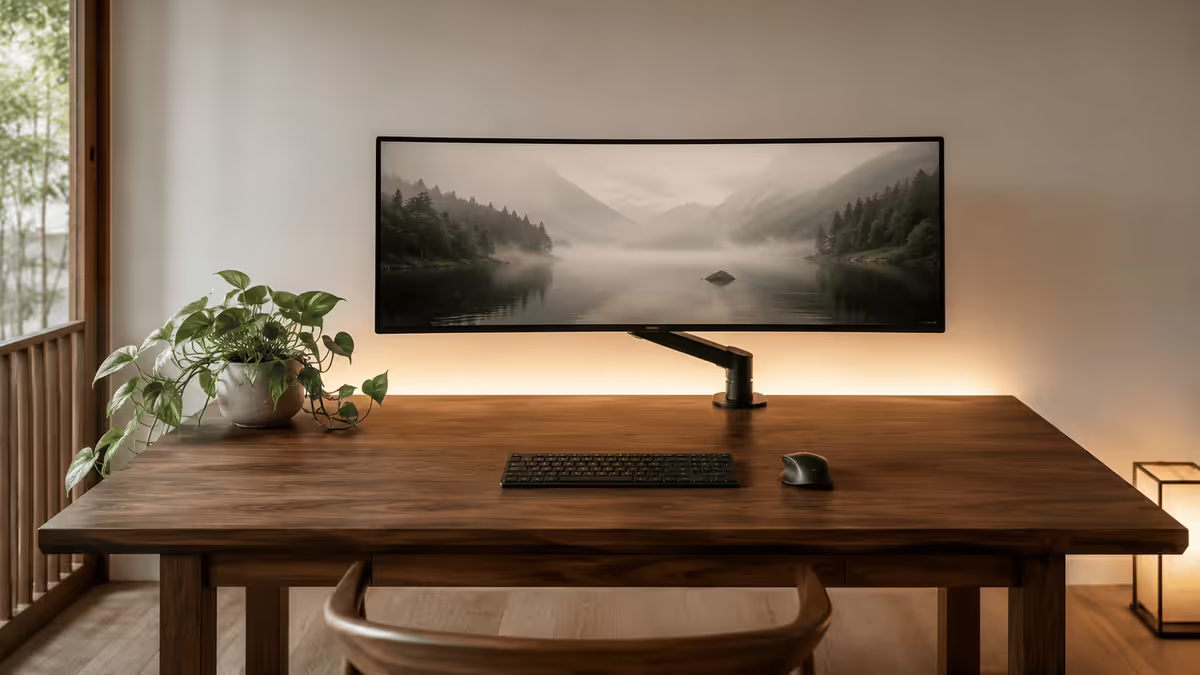
The minimalist gaming setup.
— Wireless. Zero cables. Aged-well.
- everything
- Wireless
- no dual setups
- One screen
- visible at desk
- Zero cables
The four design principles
Minimalism isn't bareness — it's intentionality. Every minimalist setup that holds up over time follows the same four principles. Skip any of them and it tips into "empty desk" instead of "calm space."
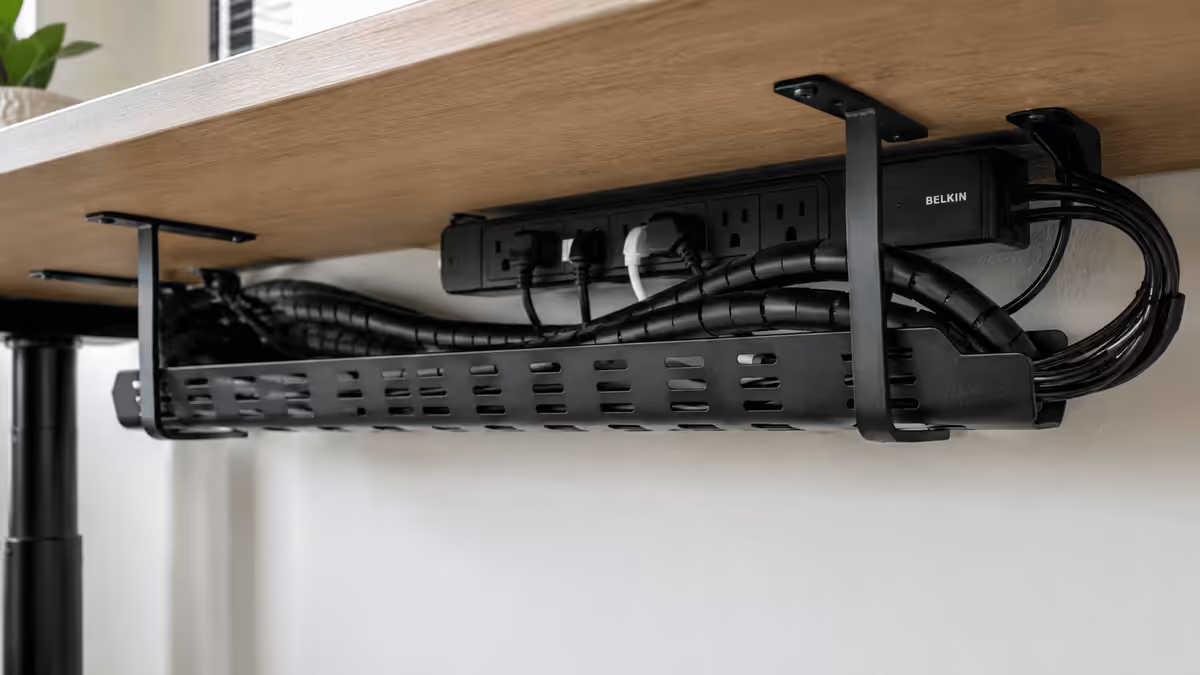
- Visible cable count is zero. Every wire is hidden via channels, sleeves, or routed through the desk frame. If you can see a cable, it ruins the entire aesthetic.
- Single statement piece per area. One monitor, one keyboard, one mouse, one speaker pair (or headphones). No duplicates. No backup mouse on the desk. No second keyboard "just in case."
- Neutral palette of 2-3 tones. Wood + white. Wood + black. Black + grey. Pick one combination and stick to it. Coloured accents (a green plant, a brass desk lamp) are allowed but tightly limited.
- Deliberate, not bare. Every item on the desk should serve a clear purpose. A monitor light bar earns its place (function: lighting). A decorative ornament that's just there doesn't.
The single sentence that captures all four: "If I can't articulate why an item is on the desk, it shouldn't be there." This becomes the deciding test for everything from a coffee cup to a figurine.
Wireless everything — the surface-cable killer
The fastest way to clean a desk is removing peripherals that need cables. In 2026, wireless peripherals have closed the latency gap with wired (0.5-1ms wireless polling rivals wired) — meaning there's no performance reason left to stay wired.
| Peripheral | Minimalist pick (2026) | Why it works |
|---|---|---|
| Mouse | Logitech G Pro X Superlight 2 | 60g, 95-hr battery, 2.4GHz GameLink — 0.5ms polling |
| Mouse (budget) | Logitech G305 Lightspeed | 250-hr battery on 1× AA, R600 in SA |
| Keyboard (TKL) | Logitech G915 TKL | Low-profile mechanical, Bluetooth + 2.4GHz |
| Keyboard (premium) | Keychron K3 Pro | Hot-swap mechanical, 75% layout, BT |
| Headset | SteelSeries Arctis Nova Pro Wireless | Dual-battery, no cable to PC |
| Headset (premium) | Audeze Maxwell | Planar magnetic, 80-hr battery |
| Mouse charging | Logitech Powerplay mousepad | Continuous wireless mouse charging — no dock |
Powerplay mousepad is the underrated minimalist hero — it's a mousepad that wirelessly charges the mouse while you use it. You never plug in the mouse, ever. The puck swaps into compatible Logitech G Pro X Superlight, G502 X Plus or G Pro mice. R3,500 in SA but eliminates the "battery anxiety" trade-off of wireless.
Single 27-32" or 34" ultrawide — not dual monitors
The most consequential minimalist decision: dual monitors don't work for minimalism. Even the cleanest dual-monitor setup has two power cables, two video cables, two stands or a wide arm, and double the visual weight. It's the single biggest reason setups look cluttered.
Two paths that do work:
Path 1 — Single 27-32" monitor
- 27" 1440p IPS — the classic minimalist choice. ASUS ProArt PA279, LG 27GP850, Dell U2723QE. R6,000-R12,000 in SA.
- 27" 1440p OLED — the premium choice. LG UltraGear 27GR95QE-B. R18,000-R22,000 in SA. Perfect blacks, 240Hz, no IPS glow.
- 32" 4K IPS or OLED — for productivity-heavy users. Dell U3225QE (R14k IPS) or LG 32GS95UE (R26k OLED).
Path 2 — Ultrawide 34" or 38"
- 34" 3440×1440 OLED ultrawide — Samsung Odyssey G8 OLED (G85SB), LG UltraGear 34GS95QE. R20,000-R28,000 in SA. Cinematic gaming + productivity multitasking in one screen.
- 34" 3440×1440 IPS — budget ultrawide path. LG 34GP950G, MSI Optix MAG342CQR. R12,000-R18,000 in SA.
- 38" 3840×1600 IPS — premium productivity ultrawide. LG 38WP85C-W, Dell U3824DW. R28,000-R36,000.
The ultrawide path wins for most minimalist setups because one screen replaces two monitors functionally while keeping the single-statement-piece principle intact. The downside: ultrawides are wider visually, so they dominate the desk more than a 27" panel. Pick based on the room — small desk, go 27"; wide desk, go 34" ultrawide.
Monitor arm — the unsung minimalist hero
The monitor arm does three minimalist-essential things:
- Frees the desk surface. Removes the heavy monitor stand, opening up usable desk area.
- Routes cables internally. The arm itself has a cable channel — power and video cables run through the arm, into the desk grommet, and out the back. Zero visible cables from monitor to PC.
- Adjustable height. Sit higher or lower, raise the monitor for standing desk use, push monitor away for non-screen work. Flexibility a fixed stand can't offer.
In SA, the standout monitor arms:
- Ergotron HX — R5,500-R7,500 in SA. Industry standard. Holds up to 19kg monitors. 10-year warranty.
- Herman Miller Ollin — R8,000+. Designer aesthetic, premium build. For matching premium chair / desk.
- BenQ ScreenPlus — R3,500-R5,000. Mid-range with integrated USB hub.
- NB North Bayou F80 — R1,200-R1,800. Budget option that works for most monitors under 9kg.
Skip the arm only if your desk is too thin / fragile to clamp to (most modern desks are fine — check load rating). Skipping the arm means the monitor stand dominates the desk surface, which is the opposite of minimalism.
Desk material — pick one aesthetic and commit
The desk is the largest visual element in the setup. Three popular minimalist aesthetics:
Japandi / warm minimalist
Solid wood (oak, walnut, ash) desk surface with white or matte black metal frame. Warm tones, organic grain visible, ages gracefully. Pairs with: white walls, single plant, brass or matte black accessories.
Scandinavian / clean minimalist
White melamine or pale birch surface with white or pale grey legs. Bright, clean, photographs well. Pairs with: minimalist white peripherals, monochrome art, sparse decor.
Industrial / dark minimalist
Black powder-coated steel frame with dark wood top, or full black painted MDF. Moody, dramatic, hides dust better. Pairs with: black peripherals, single warm light source, leather accents.
Avoid: glass desks (show every fingerprint, cables visible underneath), gaming-themed desks with built-in RGB or sloped surfaces (the opposite of minimalism), generic budget MDF desks (look cheap in photos and after 6 months).
Cable management — zero visible
Three-layer cable management is what separates "decent" from "magazine cover" minimalist setups.
- Layer 1 — Wireless peripherals. Removes the cables that would otherwise sit on the desk surface (mouse, keyboard, headset).
- Layer 2 — Drop cable channels. The cables that must exist (monitor power, monitor video, USB hub, audio out) get caught by a channel attached to the underside of the desk, hiding them from sitting-height view.
- Layer 3 — Bundling and routing. Multiple cables bundled into a single thicker strand using cable tube wrap (Cable Matters spiral wrap, or IKEA's SIGNUM tray) and routed along the back of the desk or down the desk leg into a discreet floor channel.
Tools that make this easy:
- IKEA SIGNUM — cable management tray that mounts to the underside of the desk. ~R200 in SA. Holds power strip + extra cable length.
- Cable Matters spiral wrap — flexible tube that bundles cables. ~R80-150 per metre.
- 3M Command cable clips — adhesive clips for routing along desk legs. ~R80 for 10-pack.
- Velcro one-wrap — better than zip ties because reusable. ~R100 for a roll.
- Floor cable cover — flexible channel that runs cables along the floor from desk to wall. ~R200-400. Useful if the wall socket is far from the desk.
Where the PC goes — three options that work
The PC chassis is large and visually heavy. Where you put it determines whether the setup looks calm or cluttered.
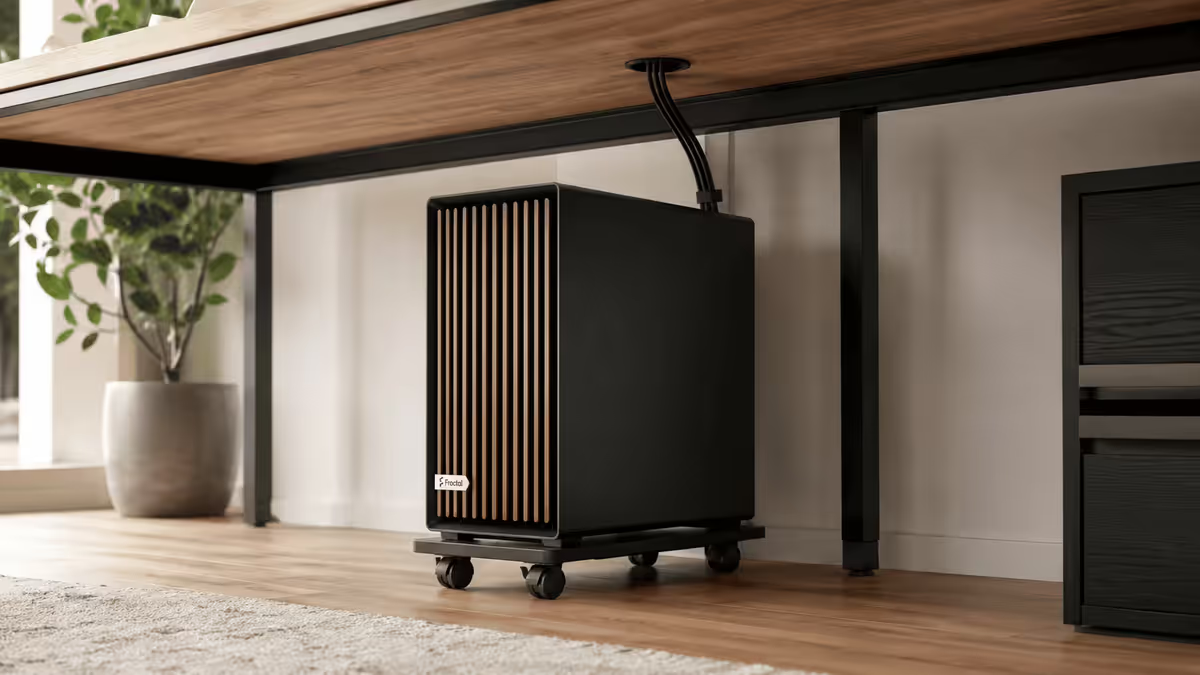
Option 1 — Under the desk on casters
Most popular minimalist choice. PC on a small set of caster wheels under the desk, hidden from sitting view, but easy to roll out for cleaning, upgrades and dust removal. Cables route up through the back of the desk via the monitor arm grommet. Recommended PC chassis: Fractal North, Lian Li O11 Air, NZXT H7 Flow — clean fronts, neutral colours.
Option 2 — Floating wall shelf (showcase)
If your PC is genuinely beautiful (clean cable management inside the case, no RGB chaos), mount it on a wall shelf behind the desk as wall art. Works best with vertically-oriented chassis (Hyte Y60, Hyte Y70 Touch, Fractal Terra). Cables run down behind the shelf into desk grommets. More expensive and complex to set up, but striking when done well.
Option 3 — Hidden in a sideboard or TV unit
For HTPC-style living-room setups or for users who genuinely don't want to see the PC at all. PC sits inside a closed cabinet with ventilation. Requires careful airflow planning to avoid thermal throttling — leave 10cm clearance on all sides, use mesh-front chassis (Fractal North, Lian Li Lancool 216), don't block intakes.
Avoid: putting the PC on the desk surface. It dominates the visual space, makes cable management awkward, and creates noise close to your ears. Every minimalist setup gets the PC off the desk.
Accessories that earn their place
The accessories pass the "is it serving a purpose?" test. Here are the items that consistently earn their place on minimalist desks:
- Monitor light bar (BenQ ScreenBar / Mi LED). Function: task lighting that doesn't reflect off the screen. R600-R2,500 in SA.
- Single plant (pothos, sansevieria, ZZ plant). Function: living visual interest, air quality, low maintenance. R150-R400 from Lifestyle Home Garden or Stodels.
- Wireless charger pad. Function: phone charging without cables. Belkin BoostCharge, Spigen, IKEA Sjömärke. R400-R1,200.
- Single coffee/water vessel. Function: hydration. Pick one quality piece and commit to washing it.
- Notebook + pen. Function: analogue note-taking. Single Leuchtturm1917 or Moleskine, one pen (LAMY Safari is the minimalist standard).
- One piece of art on the wall behind. Function: visual anchor. Single framed print at eye level, not a gallery wall.
Items that don't earn their place: figurines (no function), stacked books (decorative only), multiple plants (one is enough), gaming-merch posters (clutter), backup peripherals "just in case" (use them or remove them), RGB strips of any kind, motivational quote signage.
Audio — speakers or headphones, not both visible
Minimalist audio means committing to one approach. Two options:
- Premium headphones only. Audeze Maxwell, Audio-Technica ATH-M50xBT2, Sennheiser HD600 (with stand). Store on a single dedicated headphone stand when not in use — Pendragon Audio R600 stand, or wall-mounted hook. R3,500-R12,000 for the headphones.
- Single bookshelf speaker pair. KEF Q150, ELAC Debut 2.0 B6.2, Q Acoustics 3030i. Powered by a small amp (Audiolab M-DAC nano, Topping E50). Sit at ear height on stands behind the monitor or on monitor arms. R8,000-R25,000 total.
Avoid: 5.1 or 7.1 speaker setups (cables everywhere, subwoofer dominates), gaming "stack" speakers with LED accents (RGB chaos), USB-DAC stacks on the desk (Schiit Stack, Topping pair — they earn their place audio-wise but ruin the visual). If you need a DAC, hide it under the desk or behind the monitor.
Lighting — warm bias light only
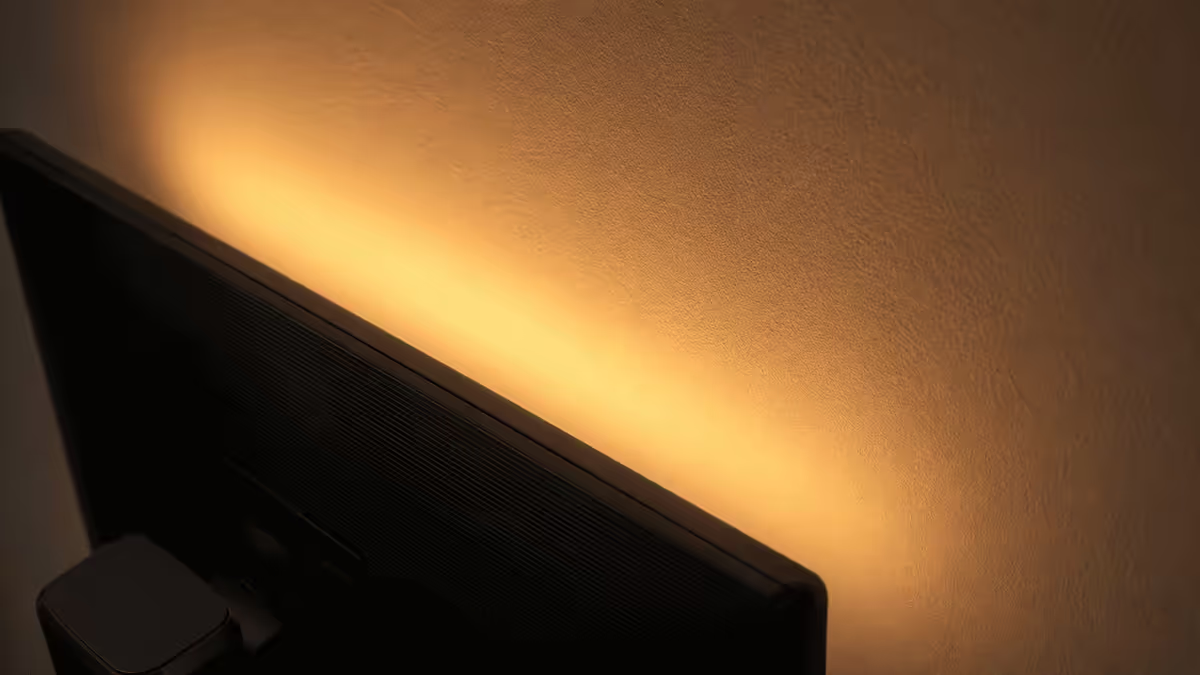
RGB chaos is the opposite of minimalism. One warm bias light (2700-3000K) behind the monitor is all the setup needs.
- Xiaomi Mi LED Strip / Yeelight — R200-R400 in SA. Set to warm white, attach behind monitor. Reduces eye strain by softening the screen-to-surrounding contrast.
- BenQ ScreenBar / Mi Computer Lamp — R1,200-R2,500. Clip-on monitor light bar. Lights the desk surface for task work.
- Anglepoise-style desk lamp — single warm-toned task lamp if you do paper-based work. Edison filament bulb (2700K) for warmth.
- Floor lamp — single warm-light floor lamp in the corner of the room for ambient light without overhead glare.
Avoid: RGB ecosystems (Razer Chroma, Corsair iCUE), under-desk LED strips, RGB peripherals (RGB mice, RGB keyboards, RGB headset stands), full-room smart-bulb colour-cycling, multiple competing light sources at different colour temperatures (mixing 2700K with 5000K LEDs looks chaotic).
The "serving a purpose" test
When in doubt, ask yourself: "What function does this item serve?" If you can articulate the answer in one sentence, the item earns its place. If you can't, remove it.
Examples that pass:
- Monitor — primary display surface (obvious)
- Monitor light bar — task lighting that doesn't glare
- Plant — living visual interest + air quality
- Coffee cup (one) — hydration vessel
- Notebook — analogue note-taking
Examples that fail:
- Figurine — purely decorative with no use
- Second mouse "in case the first one dies" — keep in a drawer, not on the desk
- Cable adapter "I might need it" — keep in a drawer
- Old gaming-merch poster — no current function, replace with one piece of art that anchors the wall
- Multiple plants — one earns its place, three is a garden
This test makes maintenance easy — every 6 months, do a desk sweep and apply the question to everything. Items that lost their reason get removed. Items still serving earn another six months.
SA furniture & accessory sources
South African sources tier by tier, vetted for minimalist aesthetic:
- Weylandts — premium Japandi solid oak / walnut desks. R20k-R45k. Long-lasting heirloom-quality.
- Loft — Scandinavian-style solid wood at mid-premium pricing. R8k-R20k.
- Officescape — premium office furniture, sit-stand desks (Lifeworks brand). R5k-R15k.
- Eureka SA (import via Takealot, Amazon) — budget-friendly sit-stand desk frames. R4k-R6k for frame only (source top separately).
- @home / Mr Price Home — budget melamine desks R2k-R5k. Entry-level, won't age as well but get you started.
- Sleepers (Pretoria, Cape Town) — local custom-made solid wood desks. R10k-R25k. Bespoke sizing.
- Lifestyle Home Garden / Stodels — single plant sources. Pothos, sansevieria, ZZ plant. R150-R400.
- Wootware, Evetech, Takealot — wireless peripherals, monitor arms, cable management gear.
- IKEA (online, Cape Town store from 2025) — SIGNUM cable tray, SKÅDIS pegboard, BEKANT desks, basic minimalist accessories.
Common mistakes in minimalist setups
Going too bare too fast. Remove items gradually — over weeks, not days. You'll discover which items you actually use vs which were habit. Bare-on-day-one setups usually accumulate clutter back within a month because the underlying habits didn't shift.
Forgetting that minimalism is about intentionality, not lack. An empty desk with cables tangled underneath fails. A thoughtful desk with one plant, one cup, and one notebook succeeds. The presence of objects isn't the problem — the lack of intent is.
Buying expensive minimalist gear instead of removing existing clutter. A R30,000 desk doesn't make a setup minimalist if it's covered in items. Start with what you have — remove first, then upgrade selectively.
Keeping a "showcase" PC that requires constant visible RGB. If you bought a custom PC for the RGB aesthetic, minimalism isn't your goal — and that's fine. But don't try to do both. Pick one direction.
Cable management as an afterthought. The cables are 60% of the visual weight in most setups. Plan cable routing before you place the monitor and PC. Retrofitting cable hiding after the fact is twice as much work.
Multiple competing aesthetics. Mid-century walnut desk + black gaming chair + white speakers + brass lamp — visually chaotic. Pick one direction (warm woody Japandi, or cool Scandinavian, or dark industrial) and commit.
Key takeaways
- Wireless everything (mouse, keyboard, headset) — eliminates the cables that ruin every surface.
- Single 27-32" monitor or 34" ultrawide — never dual monitors for minimalism.
- PC under the desk on casters or on a floating shelf — never on the desk surface.
- Single warm bias light (2700K) only — RGB chaos is the opposite aesthetic.
- Pass the "serving a purpose" test for every item on the desk — remove what fails.
Frequently asked questions
What are the core principles?
Zero visible cables, single statement piece per area, neutral 2-3 tone palette, deliberate not bare. Every item must serve a clear purpose.How do you hide cables on a desk?
Three-layer approach — wireless peripherals remove surface cables, drop cable channels under the desk catch the rest, tube wraps bundle and route along the back of the desk frame.Which wireless peripherals work best?
Logitech G Pro X Superlight 2 (mouse), Logitech G915 TKL (keyboard), SteelSeries Arctis Nova Pro Wireless (headset), Logitech Powerplay (charging mousepad).Single monitor or ultrawide?
Both work. 27-32" 1440p OLED is the classic minimalist pick. 34" ultrawide OLED works for cinematic gaming + productivity. Dual monitors don't work for minimalism.Where should the PC go?
Under the desk on caster wheels (most popular), on a floating wall shelf (showcase), or hidden in a sideboard. Avoid putting the PC on the desk surface.What lighting works?
Single warm bias light (2700-3000K) behind monitor — Xiaomi Mi LED, BenQ ScreenBar. Avoid RGB ecosystems entirely.Does minimalism hurt gaming performance?
No. Wireless peripherals have closed the latency gap with wired (0.5ms polling on top-tier wireless). PC hardware is independent of aesthetic.What does a minimalist setup cost in SA?
Budget: R12k-R20k (desk + monitor + basic wireless). Mid: R25k-R45k. High-end: R60k+. PC cost separate.
Get the Evetech app
Exclusive app-only prices, daily flash sales, and free delivery on orders over R4,000 — download the app and start saving.