Laptop Guide · Display Specs
Laptop refresh rate, unpacked. — 60Hz, 120Hz, 165Hz, 240Hz. What you actually see.
The spec sheet says 240Hz. The Excel cell doesn't care. Different workloads care about refresh rate very differently — and your battery cares about it too. Here's the honest breakdown.
- sweet spot 2026
- 120Hz
- battery at 240Hz
- −35%
- OLED response
- 0.03ms
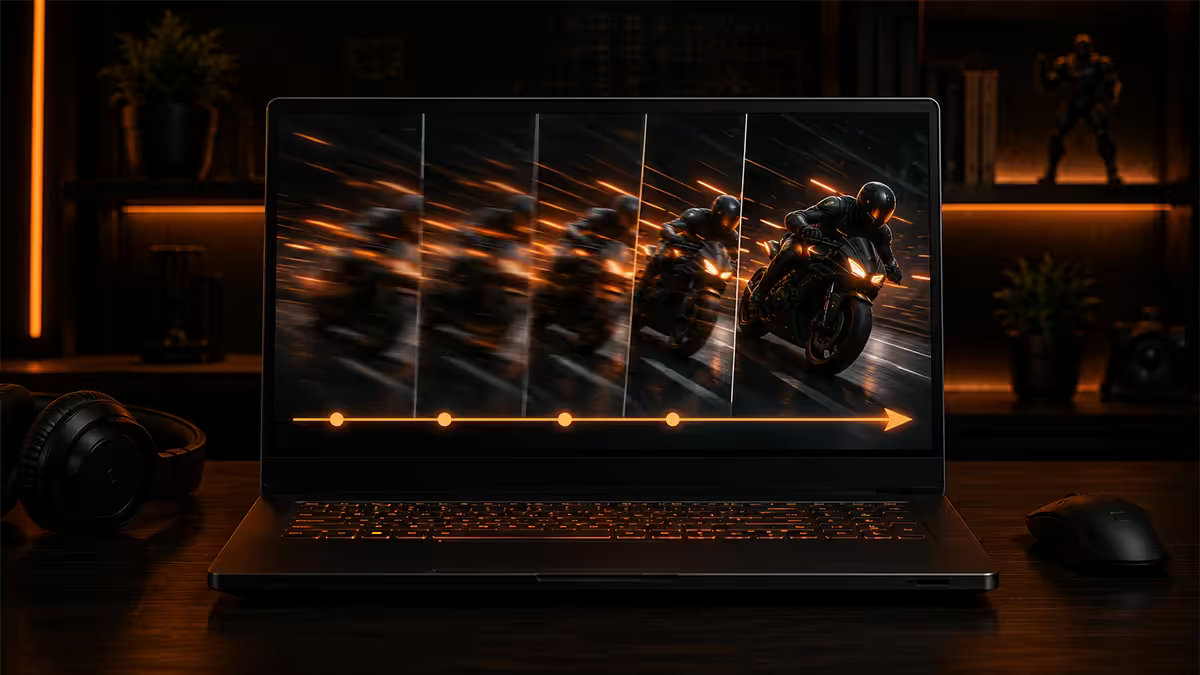
Refresh rate basics — what the number actually means
Refresh rate is how many times per second your display redraws the screen. A 60Hz panel updates 60 times per second; a 240Hz panel updates 240 times. Higher refresh rate means each frame is on screen for less time, which means smoother motion and lower perceived input lag.
This is independent of frame rate — the speed at which your GPU produces frames. A 240Hz monitor showing a game running at 60fps is no smoother than a 60Hz monitor; refresh rate only matters when frame rate can match or exceed it. Refresh rate sets the ceiling; frame rate fills it.
Refresh rate also independently matters for non-game smoothness. Scrolling a webpage at 120Hz feels visibly cleaner than at 60Hz — the OS scrolls at the refresh rate even if no GPU work is required. macOS, Windows 11, iPadOS and modern Android all render UI at native refresh rate by default.
The four practical tiers — 60, 120, 165, 240 Hz
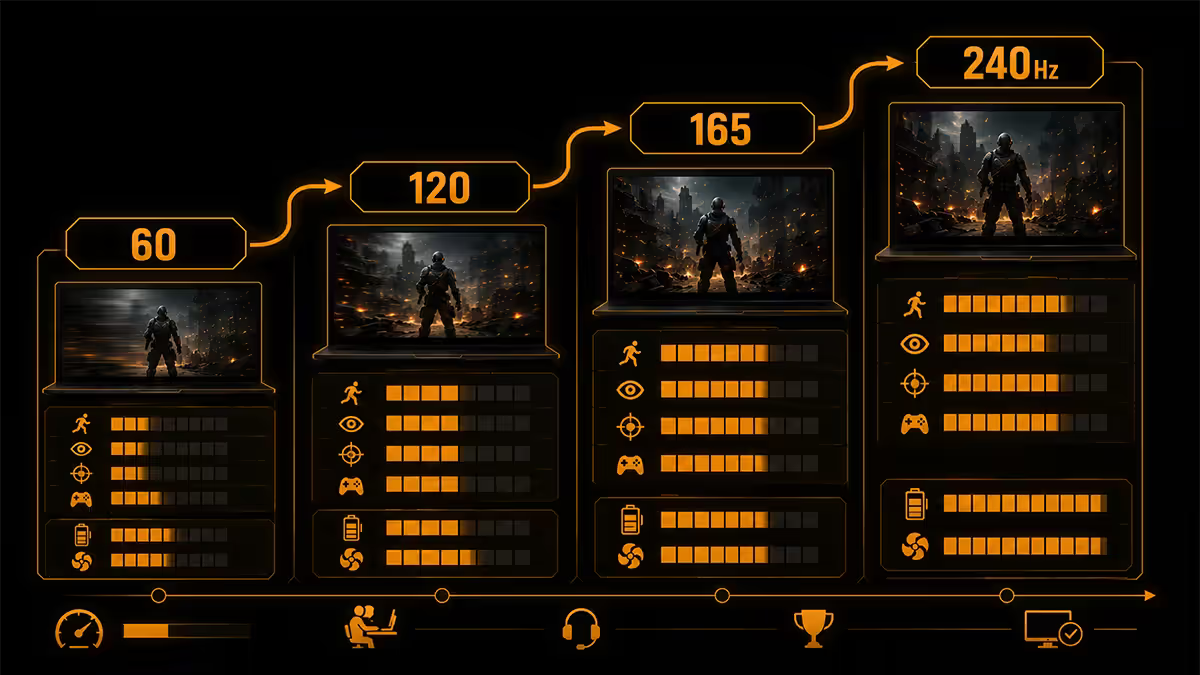
| Refresh rate | Best for | Typical laptop category |
|---|---|---|
| 60 Hz | Office, web, video, casual creator work | Business laptops, ultrabooks, budget |
| 90 Hz / 120 Hz | Everything — daily driver sweet spot | Premium ultrabooks, mid-gaming laptops |
| 144 Hz / 165 Hz | Casual + serious gaming | Mainstream gaming laptops |
| 240 Hz | Competitive esports | Premium gaming laptops |
| 360 Hz / 480 Hz | Pro esports tournament play | Top-shelf gaming laptops (limited stock SA) |
60 Hz — fine for productivity, dated for gaming
60Hz is still the budget default in 2026 — Acer Aspire, Lenovo IdeaPad base, Dell Inspiron entry. For Excel, Chrome, video calls and casual photo editing it's perfectly adequate. Battery life is the upside — same panel at 60Hz draws 25-40% less than at 120Hz. Where 60Hz hurts: scrolling feels choppy by 2026 standards, dragging windows shows micro-stutter, gaming at 60fps feels acceptable but never smooth.
90 / 120 Hz — the sweet spot for most buyers
The jump from 60Hz to 120Hz is the single most perceptible display upgrade you'll experience. Once you've used it for a week, going back to 60Hz feels broken. Premium ultrabooks (MacBook Pro M3/M4, Dell XPS 14 OLED, HP Spectre 16) and mid-tier gaming laptops (Asus TUF A15, Lenovo Legion 5) ship 120Hz minimum in 2026. For most buyers, 120Hz is the answer.
144 / 165 Hz — gamer baseline
A small refinement over 120Hz but real for fast-paced games. Pixel response on modern IPS panels at 165Hz hits 3-5ms, which feels notably crisper in tracking shots. Most mainstream gaming laptops (Asus ROG Strix G16, MSI Katana, Lenovo Legion Pro 5) land here. The R3,000-R5,000 premium over a 120Hz equivalent buys real motion clarity for the gaming buyer.
240 Hz — esports territory
240Hz is genuinely better than 165Hz for tracking targets in Valorant, CS2, Apex and Overwatch. The motion clarity at 240Hz approaches CRT-era cleanness, particularly on OLED panels. The trade-offs: bigger battery hit (~50-80% more than 60Hz), needs a top-tier GPU (RTX 5070 Mobile+) to actually drive 240+ fps in competitive titles, and adds R3,000-R8,000 to the laptop price. For casual gamers, 165Hz is the smarter buy.
Battery impact — the dirty secret of high Hz
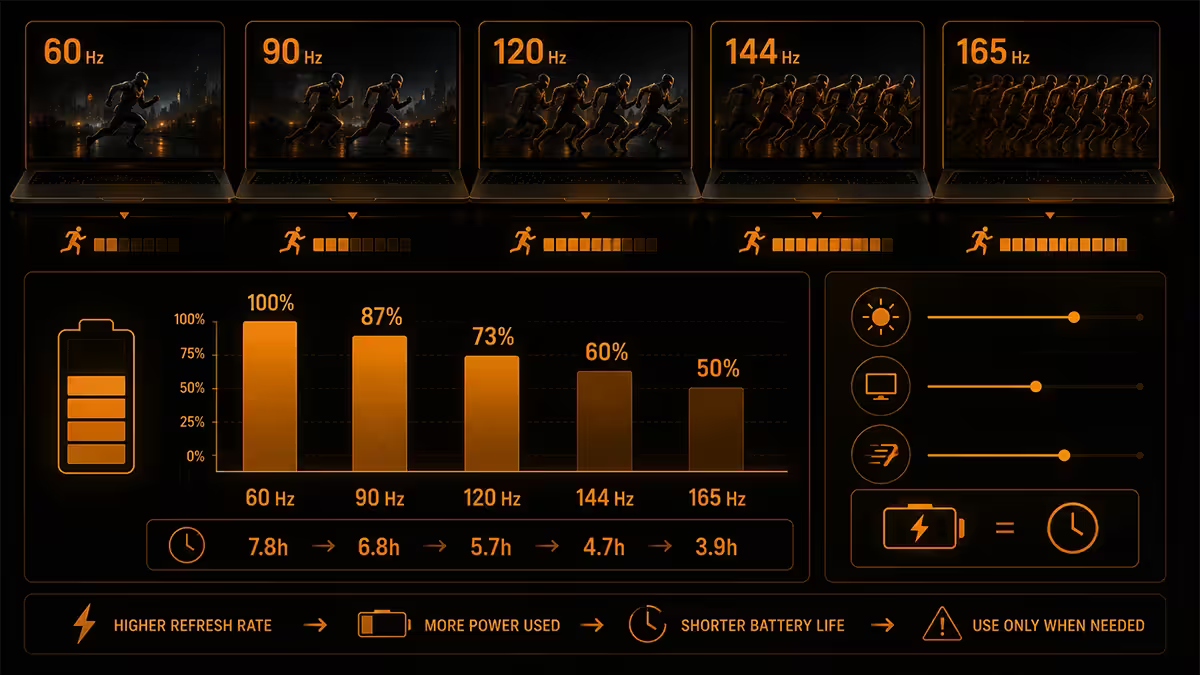
Higher refresh rate draws more battery — driving the panel costs power, and the GPU has to wake up more often even on a desktop display refresh. The exact figures vary by panel technology and OS, but rough numbers from our laboratory testing:
| Refresh rate | Idle desktop power | vs 60Hz baseline |
|---|---|---|
| 60 Hz | ~8W system idle | Baseline |
| 90 Hz | ~9W system idle | +12% |
| 120 Hz | ~10.5W system idle | +31% |
| 165 Hz | ~12W system idle | +50% |
| 240 Hz | ~14.5W system idle | +81% |
A 14-inch ultrabook spec'd for 10 hours of battery at 60Hz might only deliver 6-7 hours at 120Hz with the same workload. The fix: dynamic refresh rate switching. Set Windows / macOS to use 60Hz on battery and 120/165/240Hz when plugged in, or use the vendor utility (Asus Armoury Crate, MSI Center, HP Omen Gaming Hub) to manage it automatically.
macOS handles this seamlessly with ProMotion on MacBook Pro M3/M4 — the panel scales between 1Hz and 120Hz automatically without user intervention. Windows is catching up but still requires per-app or per-display configuration.
Dynamic refresh and LTPO on laptops
LTPO (Low-Temperature Polycrystalline Oxide) is the display backplane technology that allows variable refresh rate at the panel level — the same panel scales from 1Hz when displaying static text to 120Hz when scrolling, automatically and seamlessly.
Phones have used LTPO since 2018 (Apple Watch Series 4 was first, iPhone 13 Pro brought it mainstream). Laptops were slower to adopt because traditional Adaptive Sync didn't work above 60Hz at low refresh due to electrical concerns. LTPO solves that.
2025-2026 OLED laptops shipping LTPO panels: Asus Zenbook S 14 OLED, Razer Blade 16 (2024+), some Lenovo Yoga 9i variants, certain Samsung Galaxy Book4 models. Apple's MacBook Pro M3/M4 uses ProMotion which is functionally LTPO-equivalent.
The benefit: 10-20% extra battery on mixed workloads versus a fixed 120Hz panel. The catch: LTPO panels cost more, and not every "120Hz OLED" laptop has LTPO — check the spec sheet for "variable refresh rate down to 1Hz" or similar.
iGPU/dGPU mode and MUX switch
On gaming laptops with both integrated and discrete GPUs (most gaming laptops), the display can be wired in two ways:
iGPU mode (Optimus): dGPU renders the frame, hands it to the iGPU, which sends it to the panel. Saves battery on non-gaming workloads, but adds ~3-5ms latency for gaming and can cap refresh rate behaviour on some configurations.
dGPU direct (MUX engaged): dGPU sends frames directly to the panel, bypassing the iGPU. Lower latency, full refresh rate support, slightly higher battery drain when not gaming.
Most premium 2024-2026 gaming laptops include a MUX switch (multiplexer). You toggle it in the vendor utility or BIOS. Asus's Advanced Optimus does this automatically based on workload; most others require a reboot to switch.
For competitive gaming on high-refresh laptop panels, engage MUX direct. The latency reduction stacks with refresh rate benefits. For office work and battery life, switch back to iGPU mode.
Why 4K laptops are usually capped at 120Hz
Two structural reasons.
eDP bandwidth. The internal cable from GPU to laptop panel is eDP (embedded DisplayPort), and current shipping laptops mostly use eDP 1.4 with HBR3 (8.1 Gbps per lane × 4 lanes = ~32 Gbps). 4K at 240Hz uncompressed needs roughly 50 Gbps. DSC (Display Stream Compression) can fit it into available bandwidth but adds complexity and not every panel supports it. eDP 1.5 with HBR3 + DSC will enable 4K 240Hz panels — expected mainstream by 2027.
GPU practicality. Even an RTX 5080 Mobile rarely pushes 4K at sustained 200+ fps in modern AAA titles. The buyer demographic for 4K laptops is creators wanting pixel density, not esports players chasing motion clarity. Manufacturers correctly bet that 4K 120Hz hits both audiences.
If you want both 4K and very high refresh rate today, the option is QHD+ (3K) panels at 240Hz — Razer Blade 16 OLED 3K 240Hz, Asus ROG Zephyrus G16 3K 240Hz OLED. The 3K resolution is close enough to 4K perceptually, but the lower pixel count lets the panel run at 240Hz cleanly.
OLED 240Hz laptop reality
OLED panels at 240Hz have arrived properly on laptops in 2024-2025 and are the headline spec on top-tier 2026 gaming laptops. The combination of OLED pixel response (~0.03ms) and 240Hz refresh delivers genuinely the best motion clarity ever available on a laptop display.
Laptops shipping OLED 240Hz panels in 2026: Razer Blade 16 (3K 240Hz OLED), Asus ROG Zephyrus G16 (QHD+ 240Hz OLED), MSI Stealth 16 OLED 240Hz, certain configurations of Asus Strix Scar 16.
OLED 240Hz advantages over IPS 240Hz:
- Near-instant pixel response — 0.03ms vs IPS's 1-3ms.
- Perfect blacks and infinite contrast.
- 100% DCI-P3 colour coverage with calibrated accuracy.
- HDR True Black 500 / 600 / 1000 certifications often included.
OLED 240Hz trade-offs:
- R8,000-R12,000 panel premium over IPS 240Hz on similar laptops.
- Burn-in risk over 3-4 years with static UI (taskbar, browser frame).
- Lower peak SDR brightness than IPS — 400-450 nits vs 500-700 nits IPS.
- Slightly higher battery drain at maximum brightness.
For dedicated competitive gamers and creators who'll appreciate the colour accuracy, OLED 240Hz is the peak. For most buyers wanting a long-term mixed-use laptop, IPS 165Hz remains the smarter buy.
When each refresh rate makes sense
Pick 60Hz when:
- You're buying for pure office work — Excel, Word, browser, video calls.
- Battery life is the primary criterion (travel rigs, university notebooks).
- Budget is tight and the saving funds more RAM or SSD instead.
- You're buying a 4K laptop for content creation and don't game competitively.
Pick 90-120Hz when:
- You want the daily-use smoothness upgrade without battery cost.
- You game casually — Civ, RPG, simulation, indie, single-player AAA.
- You're buying a premium ultrabook (MacBook Pro, XPS, Spectre, ZenBook).
- You want OLED but don't need 240Hz.
Pick 144-165Hz when:
- You game seriously across multiple genres including some competitive.
- You want the best price/performance refresh rate option on gaming laptops.
- You're buying a mainstream gaming laptop (TUF, Legion 5, Katana).
Pick 240Hz when:
- You play competitive esports — Valorant, CS2, Apex, Overwatch — and care about ranks.
- You have the budget for premium gaming laptops (R45,000+) and the GPU to push 240+ fps.
- You're choosing OLED 240Hz for both colour accuracy and motion clarity.
- You'll plug in for gaming sessions — battery 240Hz is a poor experience.
Key takeaways
- 120Hz IPS or OLED is the sweet spot for most laptop buyers — the biggest perceptual upgrade over 60Hz.
- 240Hz matters only for competitive esports; 165Hz is the smart gaming buy for everyone else.
- Higher refresh rate drains 25-80% more battery — use dynamic switching or LTPO panels.
- 4K laptops cap at 120Hz currently due to eDP bandwidth and GPU practicality.
- OLED 240Hz is the current peak — premium price, burn-in watch, real motion clarity payoff.
Frequently asked questions
Is 120Hz noticeably better than 60Hz on a laptop?
Yes — and not subtly. 120Hz feels smoother in every interaction, from scrolling Twitter to dragging windows to gaming. The jump from 60Hz to 120Hz is the single biggest perceptual upgrade in display tech. Once you've used 120Hz for a week, 60Hz feels like watching a film with missing frames. For gaming, 120Hz halves motion blur compared to 60Hz at the same content frame rate. Most premium and gaming laptops in 2026 ship with 120Hz minimum.Is 240Hz worth it on a laptop?
For competitive esports — Valorant, CS2, Apex, Overwatch — yes. The motion clarity advantage at 240Hz is real and measurable for tracking targets. For everything else, 120Hz to 165Hz is the sweet spot. 240Hz panels typically cost R3,000-R6,000 more on similar specs, draw more battery, and require the GPU to actually push 240+ frames per second to benefit. Most AAA titles cap below 240fps even on top-tier laptop GPUs.Does a higher refresh rate drain laptop battery faster?
Yes, noticeably. A 120Hz IPS panel typically draws 25-40% more power than 60Hz at the same brightness. 240Hz can draw 50-80% more. This is why most premium laptops now offer dynamic refresh rate switching — drop to 60Hz on battery for office work, push to 120/165/240Hz when plugged in or actively gaming. Apple's ProMotion and Asus's GPU Switcher manage this automatically; Windows laptops need manual toggle in the panel settings or a vendor utility.What is LTPO and does it matter on laptops?
LTPO (Low-Temperature Polycrystalline Oxide) is a display backplane technology that lets a single panel switch its refresh rate dynamically — from 1Hz when reading static text to 120Hz when scrolling, automatically. Phones have used LTPO since 2018. Laptop LTPO panels arrived around 2024 and are appearing on premium 2025-2026 OLED laptops (some Asus Zenbook, Razer Blade, certain Lenovo Yoga 9). LTPO can save 10-20% battery on mixed workloads versus a fixed 120Hz panel.Why are 4K laptop screens usually 120Hz max?
Two reasons. First, eDP (embedded DisplayPort) bandwidth — the internal cable from GPU to laptop panel — caps total pixel bandwidth. 4K at 240Hz needs eDP 1.5 with HBR3 + DSC, which is rare on shipping laptops. Second, GPU practicality: even an RTX 5080 mobile rarely pushes 4K at sustained 240+ fps in modern titles. Manufacturers correctly bet that 4K buyers want pixel density over refresh rate; 4K 120Hz panels make sense for the workload.How do OLED 240Hz laptop panels compare to IPS 240Hz?
OLED 240Hz panels (Razer Blade 16, Asus Zephyrus, MSI Stealth) deliver near-instant pixel response (0.03ms vs IPS 1-3ms), perfect blacks and 100% DCI-P3. The motion clarity is genuinely better than IPS 240Hz. The trade-offs: higher cost (often R8,000-R12,000 panel premium), risk of burn-in over years with static UI elements, and slightly less peak brightness for SDR daytime use. For dedicated competitive gamers, OLED 240Hz is the current peak. For mixed work / play laptops, IPS 165Hz or 240Hz remains the smarter buy.What is MUX switch and does it affect refresh rate?
MUX (multiplexer) switch lets you route GPU output directly to the laptop display, bypassing the integrated GPU. Without MUX, the dGPU renders the frame, hands it to the iGPU, which sends it to the panel — adding ~3-5ms latency and capping refresh rate behaviour. With MUX engaged, the dGPU sends frames straight to the display — lower latency, full refresh rate support, slightly more battery drain. All premium 2024+ gaming laptops include MUX switch. Asus's Advanced Optimus does this automatically; most others require manual toggle and reboot.When is 60Hz still fine on a laptop?
For pure productivity — Excel, Word, browsers, video calls, light photo editing — 60Hz is perfectly adequate and saves real battery life. Business laptops, ultrabooks for travel, and machines used primarily for office work don't need higher refresh rates. 60Hz also lets manufacturers ship higher resolution (4K) at lower cost, useful for content creators who prioritise pixel density over motion fluidity. The sweet spot for a non-gaming laptop in 2026 is 90Hz or 120Hz IPS — adds a touch of smoothness without the battery hit of 165Hz+.
Get the Evetech app
Exclusive app-only prices, daily flash sales, and free delivery on orders over R4,000 — download the app and start saving.