Hardware Explainer
Monitor refresh rate. — 60Hz to 500Hz, the honest ladder.
Higher Hz numbers sell monitors. Some of that gain is enormous; some of it your eye literally can't see. The 60→144 jump is genuinely transformative; the 360→500 jump is buying a number on a box.
- value sweet spot
- 144Hz
- esports ceiling
- 240Hz
- OLED frontier
- 480Hz
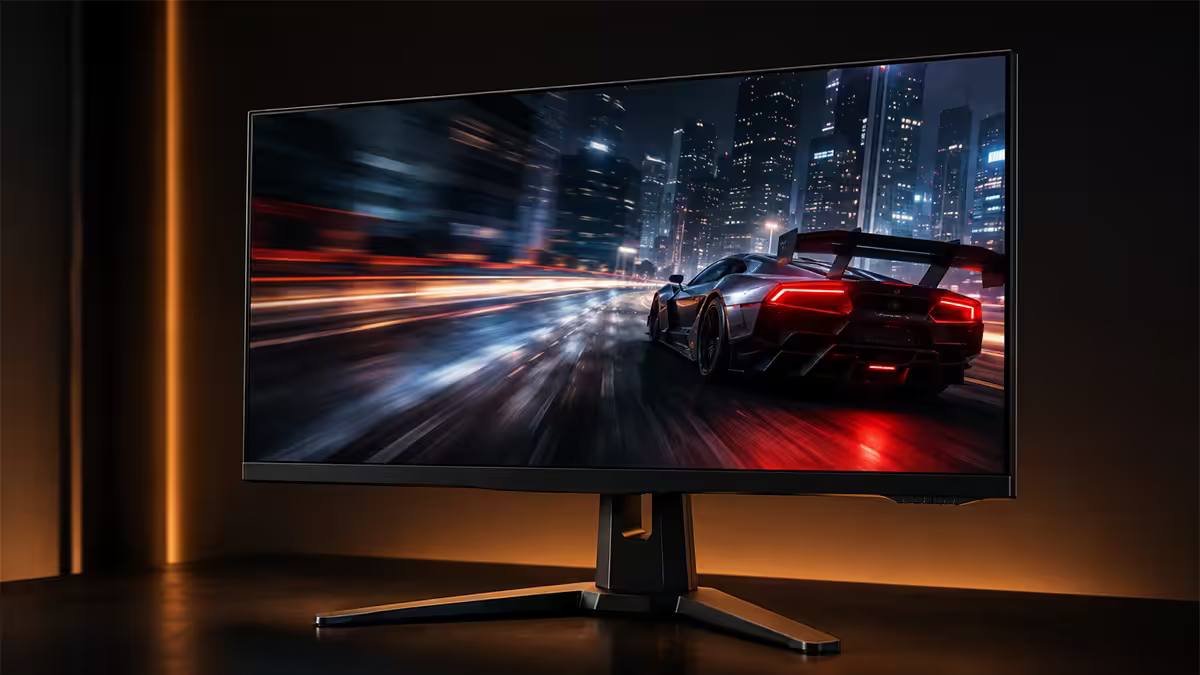
What refresh rate actually does
Refresh rate is the number of times per second the monitor draws a fresh image. A 60Hz panel draws 60 frames per second; a 240Hz panel draws 240. The number you see on the box is the maximum the panel can display, regardless of what the rest of the system delivers.
The benefit of a higher refresh rate isn't about "seeing more frames" — it's about the gap between frames being smaller. With a 60Hz panel each frame stays on screen for ~16.7 milliseconds; with 240Hz that drops to ~4.2ms. Your eye tracks moving objects continuously, and the longer a stale image sits on screen, the more your brain perceives the moving object as blurred. This effect is called sample-and-hold blur, and it's the dominant reason high-refresh panels look so much sharper in motion than 60Hz panels.
Two more practical consequences of more refreshes per second: input feels more immediate because the image catches up to your mouse movements faster, and animation appears smoother because there are fewer visible "steps" between frames. Both matter most in fast first-person games. Both matter least in turn-based strategy or office work.
60, 144, 240, 360, 500 — the honest ladder
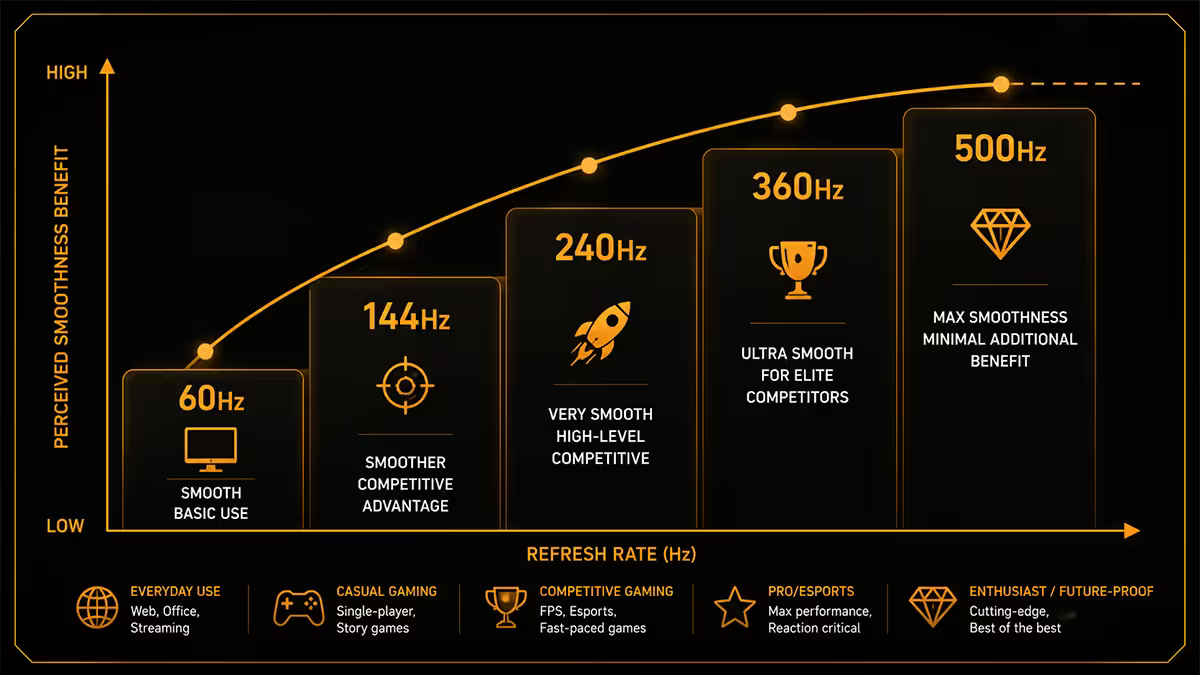
Every refresh rate tier exists because somebody can perceive the difference — but the size of the gap shrinks as you climb. Here's what each rung in the ladder actually buys you in 2026.
| Tier | Frame time | What you gain over the tier below |
|---|---|---|
| 60Hz | 16.7ms | Baseline — office, web, slow games |
| 120Hz / 144Hz | 8.3 / 6.9ms | Massive — the biggest single jump on the ladder |
| 165Hz / 180Hz | 6.1 / 5.5ms | Marginal — same panel, slightly faster |
| 240Hz | 4.2ms | Clearly visible for competitive gamers |
| 360Hz | 2.8ms | Subtle but real for pros, near invisible casually |
| 480Hz / 500Hz | 2.1 / 2.0ms | Diminishing returns — only OLED really benefits |
The single biggest jump on the entire ladder is 60Hz → 144Hz. If you've never used anything above 60Hz, the transition feels like a hardware upgrade — text scrolls clearly, mouse cursors stop ghosting and games look fundamentally smoother. Almost every honest reviewer agrees this is the most worthwhile upgrade in PC gaming.
The second clearest jump is 144Hz → 240Hz. Most people see it within five minutes of switching, especially in fast first-person shooters. Above 240Hz, perception varies by player. Esports professionals report a real edge at 360Hz; for everyone else the differences shrink quickly. By 480Hz you're paying for a number that mostly serves OLED panels and the trained eyes of CS2 tournament finalists.
Response time, overdrive and the actual cap
A monitor advertising "1ms" response time means the pixel takes 1 millisecond to change from one grey value to another (called grey-to-grey, or GtG). It's not the same as refresh rate — and it's where many cheap "240Hz" panels fall over. If GtG is slower than the time between refreshes, the pixel hasn't finished its previous colour change before the next refresh starts, leaving a smear behind moving objects.
For a panel to deliver clean 240Hz motion, the GtG needs to be around 4ms or faster. Most modern Fast IPS panels achieve this; cheaper "240Hz IPS" panels do not. You'll see the difference in fast camera pans — proper Fast IPS shows crisp edges, slow IPS shows persistent ghost trails.
Overdrive is the panel manufacturer's tool to push pixels harder so they reach the target colour faster. It works — until it works too well, at which point the pixel overshoots its target and produces inverse ghosting (a pale outline trailing behind moving objects). Every monitor has overdrive modes, usually named "Off / Normal / Fast / Extreme." For 144-240Hz panels, "Normal" or "Medium" is almost always the cleanest setting. "Extreme" tends to add visible artefacts.
IPS, Fast IPS, Nano IPS, OLED and VA — speed gap
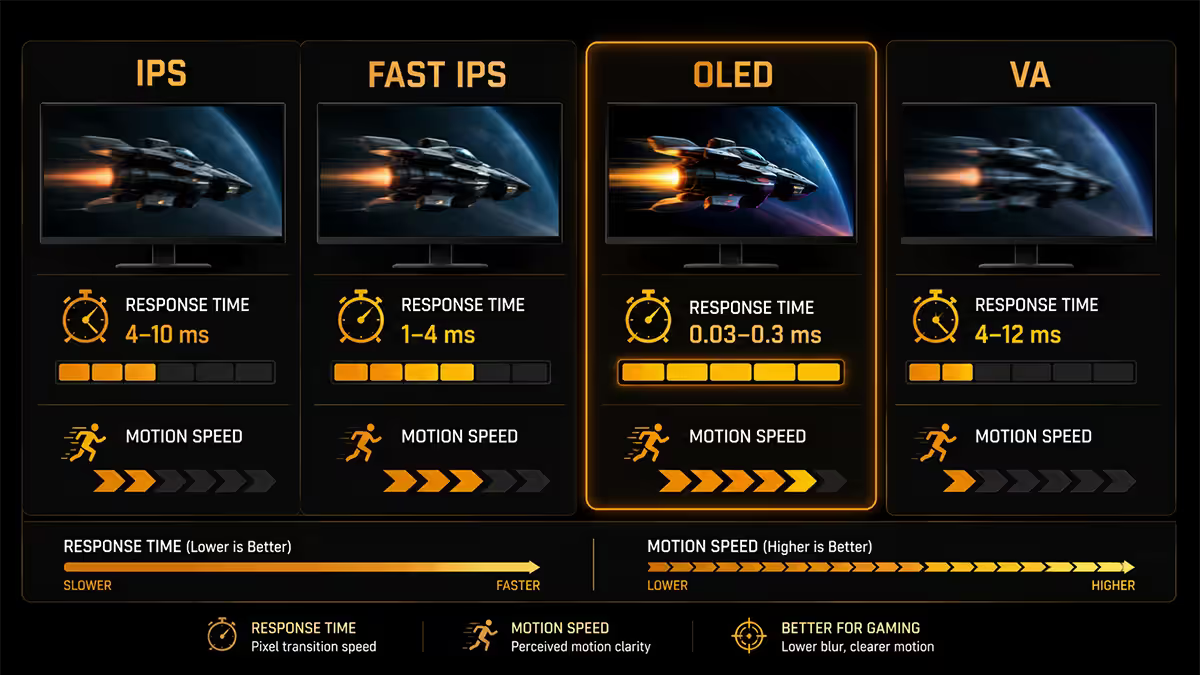
Panel technology determines what refresh rates a monitor can actually use without smearing. The speed gap between panel families is real.
Standard IPS — slow GtG (4-8ms). Best for content creation and office use. Fine at 60-120Hz; ghosts above 144Hz. Avoid for gaming unless price-constrained.
Fast IPS — the modern gaming-IPS standard. GtG of 1-3ms in real measurement. Powers most 144-240Hz IPS gaming monitors today (LG Ultragear 27GR series, ASUS PG279QM, Gigabyte M27Q). Excellent overall balance — colour, motion, viewing angles.
Nano IPS — LG's branded Fast IPS variant with wider colour gamut (98% DCI-P3). Same speed as Fast IPS, better colour for creators who also game. Premium pricing.
QD-OLED / WOLED — instant pixel response (0.03ms GtG). Powers all current 240Hz / 360Hz / 480Hz OLED panels (Alienware AW3225QF, LG 27GS95QE, Samsung Odyssey OLED G6). Best motion clarity money can buy in 2026. Drawbacks: burn-in risk on static UI, ~600 nits SDR peak brightness, premium price.
VA — best contrast (3000:1+) but slow dark-to-dark transitions cause "black smearing" in fast motion. Modern Samsung Odyssey VA panels mitigate this, but VA remains the slowest of the four for fast-paced gaming. Excellent for HDR cinema viewing.
TN — fastest legacy panel tech, but bad viewing angles and washed colour. Largely abandoned by 2026. Only worth considering on ultra-budget 240Hz monitors below R3,500, and even then Fast IPS is the better buy.
Motion clarity tech — BFI, DyAc, ULMB
Higher refresh rate alone doesn't eliminate sample-and-hold blur — it just shortens it. To truly cut motion blur to CRT-era levels, panels use backlight strobing. The backlight flashes briefly between frames; the panel is dark long enough that your eye/brain can't smear the moving image. The result is genuinely sharper motion than even 480Hz sample-and-hold.
The branded versions you'll see:
- DyAc / DyAc 2 (BenQ Zowie) — gold standard for esports monitors. The XL2566K+ at 360Hz with DyAc 2 is widely regarded as the clearest motion in any 1080p tournament panel.
- ULMB 2 (NVIDIA) — found on G-Sync-certified 240Hz+ panels. Excellent implementation; cuts brightness ~50%.
- BFI / Black Frame Insertion — generic equivalent. Works, but tuning varies by panel.
- OLED MPRT modes — OLED panels can pulse the panel itself; LG and Alienware ship 480Hz QD-OLED panels with a strobing mode.
The trade-off: backlight strobing cuts perceived brightness by 40-60% and almost always requires disabling adaptive sync. Most users leave it off for casual gaming and switch it on for competitive matches. Once you've experienced clean strobing on a Fast IPS or OLED panel at 240Hz, going back to sample-and-hold motion at the same refresh rate feels visibly blurry.
The GPU you actually need for each tier
A high-refresh monitor only delivers its benefit if the GPU keeps the FPS close to the panel's Hz. Below the panel's Hz, you're paying for capability you can't use.
| Target Hz at 1440p | GPU class (competitive) | GPU class (AAA high settings) |
|---|---|---|
| 144Hz | RTX 4060 / RX 7600 XT | RTX 4070 / RX 7700 XT |
| 240Hz | RTX 4070 Super / RX 9070 | RTX 4080 Super / 5080 |
| 360Hz | RTX 5080 | RTX 5090 (DLSS required) |
| 480Hz | RTX 5080 / 5090 | RTX 5090 + DLSS Performance |
Drop one resolution tier and the GPU requirement drops with it — a 240Hz target at 1080p is comfortable for an RX 7600 XT or RTX 5060 in competitive titles. Pushing 240Hz at 4K is a 5080+ proposition even in eSports games.
Buyer's lens — by player type
Casual gamer / story player: 144-165Hz 1440p Fast IPS or VA. R5,500-R9,000 in SA. Pairs nicely with a mid-tier GPU. Motion-clarity tech rarely needed.
Competitive shooter player: 240Hz 1440p Fast IPS minimum. R9,000-R15,000 range. Look for DyAc / ULMB if you play tournaments. QD-OLED 240Hz is the premium choice if budget allows.
Esports professional / aspiring: 360Hz or 480Hz 1080p / 1440p. BenQ XL2566K+ at 360Hz remains the standard. Alienware AW2725DF or Samsung G6 OLED for 360Hz with rich colour.
Content creator who games: Nano IPS or QD-OLED 240Hz 1440p. Wide colour gamut critical for video work, motion clarity adequate for casual play. LG 27GR95QL or Alienware AW3225QF.
Productivity-first user: 120Hz IPS 1440p is the floor in 2026. UI feels markedly smoother than 60Hz. Save the budget elsewhere unless you also game competitively.
Key takeaways
- The 60→144Hz jump is the biggest single upgrade in PC gaming. Skip 60Hz on any new gaming purchase.
- 240Hz is the 2026 value sweet spot — clear motion, mature panels, GPU-feedable at 1440p with a mid-high card.
- Above 240Hz, OLED is the panel that benefits most. 480Hz on Fast IPS shows diminishing returns.
- Response time and overdrive tuning matter as much as Hz number — cheap "240Hz IPS" can be smeary.
- Motion clarity tech (DyAc, ULMB, BFI) eliminates sample-and-hold blur but cuts brightness in half.
Frequently asked questions
What refresh rate do I actually need for gaming?
For competitive shooters (CS2, Valorant, Apex), 240Hz is the sweet spot in 2026 — you'll get most of the motion-clarity benefit at a fraction of the GPU cost of 360Hz or 480Hz. For story and AAA games, 144Hz to 165Hz is plenty and pairs well with mid-range GPUs. For productivity and casual gaming, 120Hz feels markedly smoother than 60Hz without much hardware penalty.Is the jump from 144Hz to 240Hz worth it?
Yes for competitive gamers — the motion blur reduction is genuinely visible and shaves a few milliseconds off reaction-relevant time. For everything else the difference is real but subtle. The bigger gain is from 60Hz to 144Hz; 144Hz to 240Hz is the second biggest; everything above 240Hz is diminishing returns most eyes will struggle to see in normal play.Are 480Hz OLED monitors actually usable in 2026?
Yes, but only on a top-tier GPU. The 27-inch 1440p QD-OLED 480Hz panels from LG, Samsung and Alienware are real products in SA at R28,000-R45,000. To actually push 480 frames per second in modern shooters you need an RTX 5080 or 5090 paired with lower graphical settings. At anything less, you're paying for refresh rate the system can't feed.What's the difference between IPS, Fast IPS and Nano IPS?
Standard IPS has 4-8ms grey-to-grey response time — fine for 60Hz, blurry above 165Hz. Fast IPS reaches 1ms GtG and supports 240-360Hz without smearing. Nano IPS is LG's wide-gamut Fast IPS variant — same speed, better colour. All three have similar IPS glow drawbacks. For 144Hz+ gaming, only Fast IPS or Nano IPS is worth buying.Why does my 240Hz monitor still look blurry?
Two reasons: sample-and-hold blur (the pixel holds the same image for a full frame, your eye tracks moving objects, brain perceives blur) and overdrive tuning (panel is pushed too hard, causing inverse ghosting). Motion clarity tech like Backlight Strobing (ULMB, DyAc, BFI) eliminates sample-and-hold blur but cuts brightness in half. Check the monitor's overdrive setting — 'Normal' or 'Medium' is usually the cleanest.What GPU do I need to hit 240Hz at 1440p?
For competitive titles (CS2, Valorant, Overwatch 2) at 1440p with high settings, an RTX 4070 Super, 5070 or RX 9070 will reliably push 240+ FPS. For AAA games at 1440p high, you'll need an RTX 4080 Super or 5080-class GPU to consistently hit 240 FPS with DLSS Quality. Triple-A games at native 240Hz 1440p remain a 5080/5090 game in 2026.Is 60Hz still acceptable for gaming in 2026?
Acceptable but markedly inferior. 60Hz is fine for slower-paced games (RPGs, strategy, Stardew) and office work. For any first-person shooter or fast-paced game, 60Hz feels noticeably stuttery once you've used 120Hz+. The price gap between 60Hz and 144Hz monitors in SA has collapsed — there's almost no reason to buy a new 60Hz gaming monitor in 2026.What is motion clarity tech (BFI, DyAc, ULMB)?
Backlight strobing techniques that briefly turn the panel backlight off between frames, effectively simulating CRT-style motion clarity. BenQ's DyAc 2 is the gold standard for esports monitors. NVIDIA's ULMB 2 is on G-Sync-certified panels. Generic BFI exists too. All cut brightness 40-60%, all require disabling adaptive sync. Once you've tried it on a 240Hz monitor in fast motion, going back feels visibly blurry.
Get the Evetech app
Exclusive app-only prices, daily flash sales, and free delivery on orders over R4,000 — download the app and start saving.