Display Glossary · Refresh Rate
What is refresh rate? — Hertz, frames, and why your eyes notice.
The number on the monitor box that everyone quotes and few really understand. Here's what 60Hz, 144Hz and 480Hz actually mean — and at what point the upgrade stops being worth it.
- frame time @ 60Hz
- 16.7 ms
- frame time @ 240Hz
- 4.2 ms
- 2026 minimum
- 144Hz
What refresh rate actually means
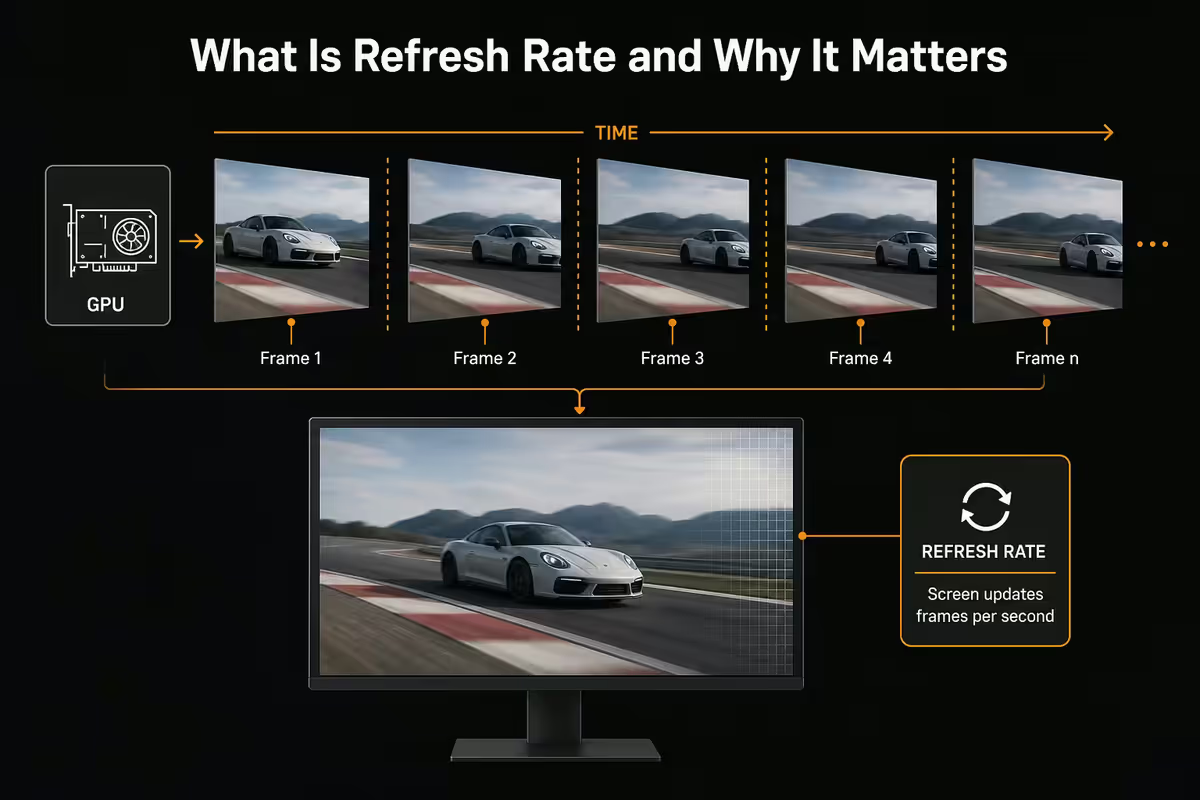
Refresh rate is the simplest spec on a monitor's box and the most misunderstood. It measures, in Hertz (Hz), how many times per second the panel can paint a complete new image. A 60Hz monitor can refresh its image 60 times per second. A 240Hz monitor can refresh 240 times per second. That's the whole concept.
The unit comes from the panel's internal redraw timing — the LCD or OLED pixels physically change state at this rate. The marketed Hz is the maximum the panel supports; depending on the cable, GPU and resolution, you might run lower. A 240Hz panel connected with a low-spec HDMI cable might only run 144Hz at 1440p, for instance.
The frame time interpretation is more useful for understanding why high refresh feels smooth. Frame time is how long each frame is held on screen: 1000 milliseconds divided by Hz.
| Refresh rate | Frame time | What this feels like |
|---|---|---|
| 60 Hz | 16.7 ms | Familiar, noticeable motion blur |
| 120 Hz | 8.3 ms | Big upgrade — visibly smoother |
| 144 Hz | 6.9 ms | Modern baseline — fluid feel |
| 165 Hz | 6.1 ms | Common 1440p gaming target |
| 240 Hz | 4.2 ms | Esports standard — clearly crisper |
| 360 Hz | 2.8 ms | Pro competitive — subtle gain |
| 480 Hz | 2.1 ms | Top tier — incremental over 360Hz |
Refresh rate vs FPS — the critical distinction
This is the part everyone gets backwards. Refresh rate (Hz) and frames per second (FPS) are not the same thing — they describe two different sides of the same handshake.
- Refresh rate is what your monitor CAN do. It's a hardware property of the panel.
- FPS is what your GPU IS doing. It's the output of the graphics card in the current game or app.
A 240Hz monitor showing a game running at 90 FPS displays that game at 90 FPS — smoothly, but not utilising the higher refresh ceiling. A 60Hz monitor receiving 200 FPS from the GPU still only shows 60 of those frames per second — the rest are wasted (and often cause screen tearing). The monitor and GPU work together; one cannot exceed the other.
| Monitor | GPU output | What you see |
|---|---|---|
| 60 Hz | 60 FPS | Matched — smooth at 60 |
| 60 Hz | 200 FPS | Capped at 60 — input lag advantage only |
| 240 Hz | 90 FPS | Smooth at 90 — refresh wasted |
| 240 Hz | 240 FPS | Fully utilised — silky smooth |
| 240 Hz | 140 FPS | Smooth at 140 — VRR helps |
What you can actually see — perceptual differences
Forget the "human eye can only see 30Hz" myth. The eye doesn't sample at a fixed frame rate the way a camera does — it perceives motion continuously. Higher refresh rates produce demonstrably smoother motion and most people notice the change immediately on a side-by-side comparison.
The perceptual stairs:
- 60Hz → 120Hz: the biggest single perceptual leap. Everyone notices. Mouse cursor tracking, scrolling, window dragging — all dramatically smoother. This is the upgrade that converts people who say "high refresh is marketing".
- 120Hz → 144Hz: subtle. The frame time difference is only 1.4ms. Most people would not pick the difference blind.
- 144Hz → 165Hz: within noise. Often the same panel running slightly faster.
- 144Hz → 240Hz: clearly visible in fast motion (FPS games, fast-paced strategy, large window drags). Less obvious during static work.
- 240Hz → 360Hz: visible only in extremely fast flicks. Most users would not pick the difference blind without trained perception.
- 360Hz → 480Hz: measurable but very subtle. Diminishing returns territory.
A useful mental model — the perceptual benefit follows a logarithmic curve. Doubling refresh rate from 60Hz to 120Hz delivers a huge gain. Doubling again from 120Hz to 240Hz delivers a smaller gain. Doubling again from 240Hz to 480Hz delivers a small incremental gain.
Sample-and-hold blur — why even slow motion benefits
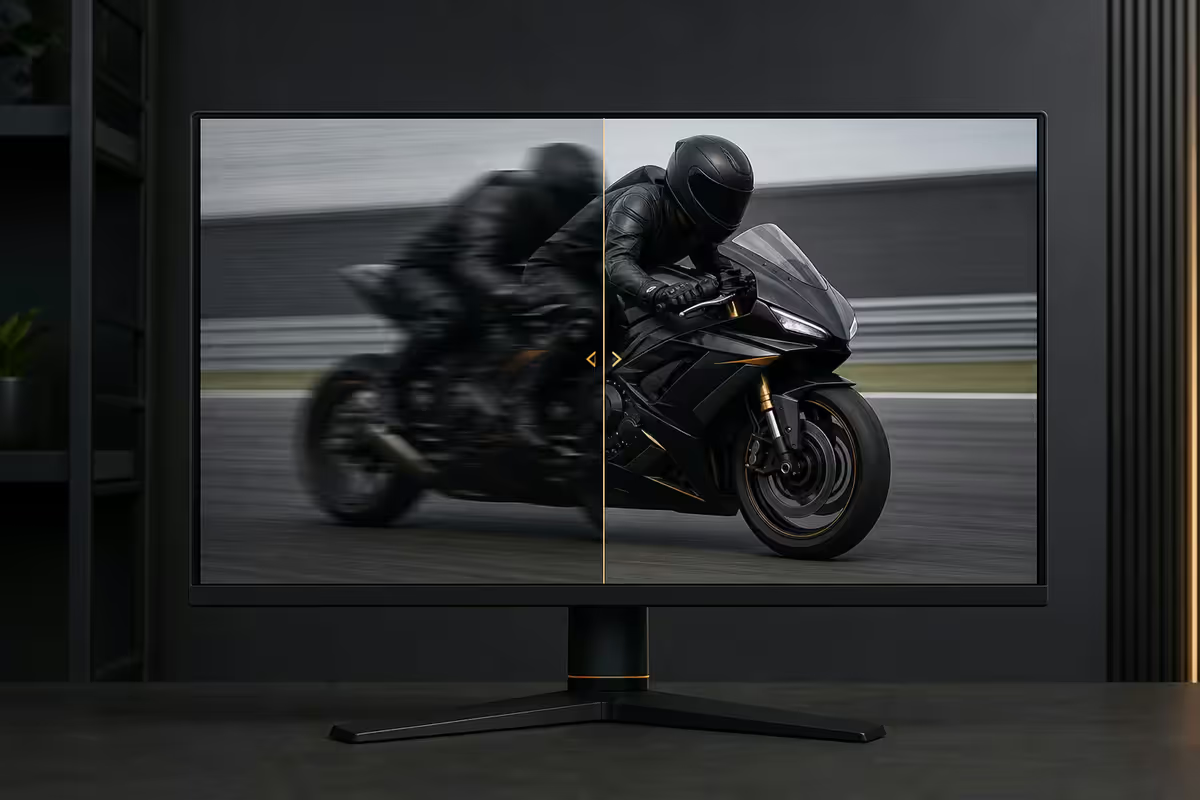
Modern LCD and OLED panels work on a "sample and hold" principle — each frame is held statically on screen until the next frame replaces it. On a 60Hz panel, each frame is held for 16.7ms. On a 240Hz panel, only 4.2ms.
Here's why this matters: the eye is actively tracking motion across the screen. When a moving object is rendered statically held in one position for 16.7ms, the eye's smooth-pursuit motion sees it as a smeared blur. The longer the hold, the more pronounced the blur. Higher refresh rates reduce hold time, which reduces this perceptual blur — even when the actual content motion speed is identical.
This is why high refresh rate looks smoother even at the same FPS. Someone scrolling a webpage at the same speed on a 60Hz vs a 240Hz panel sees demonstrably crisper text on the 240Hz panel. The content is the same; the perception is different.
Eye fatigue, headaches and the 120Hz productivity case
Beyond pure smoothness, high refresh rates reduce certain visual stresses associated with long screen sessions. The mechanism is partly biological — your eyes work less hard to track fast motion when individual frames are crisper — and partly subjective comfort.
Users who upgrade from 60Hz to 120Hz+ on their primary work display commonly report:
- Reduced eye fatigue after long sessions — particularly noticeable around hour 4-6 of focused work.
- Smoother cursor tracking at high mouse DPI settings, reducing micro-corrections.
- Less reading effort when scrolling — text remains legible during scroll instead of smearing.
- Reduced motion sensitivity for users with mild motion-induced discomfort.
The reverse experience is universal too: spending a week on a 144Hz panel and then switching back to a 60Hz panel produces a noticeable "sluggish" feeling that wasn't perceptible before the upgrade. You don't realise what's missing until you've had it.
When 60Hz is still acceptable
60Hz isn't dead — there are legitimate use cases where the refresh-rate premium isn't worthwhile:
- Pure office work — Excel, Word, browser-based forms. The motion content is minimal.
- Video editing source content at 24-30 FPS — the footage itself can't benefit from higher refresh during scrubbing.
- Content consumption — Netflix runs 24 FPS, YouTube runs 30-60 FPS. 60Hz panels reproduce both natively.
- Side / reference monitors in a multi-display setup where the panel rarely receives focus or motion.
- Strict budget builds under R10k where the saving on the panel funds storage or RAM.
- Public-facing kiosk and signage — refresh rate is irrelevant for static information display.
Even in these cases, the premium for 144Hz over 60Hz on a similar-tier panel has shrunk to R600-R1,500 in SA in 2026 — it's no longer the luxury it was five years ago. The argument for 60Hz is increasingly only "I have one already and it works".
Why 144Hz is the modern minimum
If you're buying a new monitor for a primary workstation in 2026, 144Hz is the floor. The price difference vs 60Hz is now small enough that the productivity and longevity arguments win every time.
Reasons to default to 144Hz:
- Price premium over 60Hz has collapsed to R600-R1,500 on equivalent-tier panels.
- Every modern GPU — even integrated graphics on Ryzen and Core Ultra — drives 1080p/1440p at 144Hz for productivity easily.
- HDMI 2.1 and DisplayPort 1.4 ship on every recent panel, supporting 1440p 144Hz natively.
- VRR support is universal at this tier — eliminating tearing on mismatched FPS.
- Productivity benefits (cursor tracking, scrolling, window drag smoothness) apply regardless of gaming.
- Casual gaming benefits without needing a high-end GPU — 144Hz on a 4060 in older or competitive games is easy.
1440p 144Hz is the modern sweet spot — sharper than 1080p, smoother than 60Hz, and well within range of mid-tier GPU horsepower in current AAA games.
Esports — when 240Hz and higher matter
For competitive multiplayer gaming, the refresh-rate ladder shifts upward. The diminishing returns curve is real, but at the elite competitive end, even small advantages matter.
Competitive tier guidance:
- 165Hz - 180Hz: ranked play, semi-competitive. The vast majority of competitive players will see no benefit going higher.
- 240Hz: the modern competitive standard. Valorant, CS2, Apex, Overwatch 2, Marvel Rivals — all benefit. Pro tournament default.
- 360Hz: noticeable in extreme flick scenarios. The serious-amateur upgrade.
- 480Hz / 500Hz+: top of the market. Real benefit for top 0.1% competitive players in fast-paced FPS. Negligible for the rest.
Critical caveat: these high-Hz panels are only useful if the GPU sustains matching FPS. Running CS2 at 240Hz means averaging 240+ FPS on the panel — easy on RTX 4070 at 1080p but requires care. Running Valorant at 480Hz means the GPU has to produce 480+ FPS. This is where competitive players run lower resolution (1080p) to maximise FPS at the cost of visual fidelity.
Recommended monitors by refresh rate
| Use case | Pick | SA price |
|---|---|---|
| Office baseline 1080p 60Hz | Dell P2422H 24" 1080p 60Hz | R3,200-R3,800 |
| Productivity step-up 1440p 144Hz | LG 27QN880 27" 1440p 144Hz | R7,500-R8,500 |
| Gaming 1440p 165Hz | LG UltraGear 27GR75Q 27" 1440p 165Hz | R8,500-R9,500 |
| Competitive 1080p 240Hz | ASUS TUF VG279QM1A 27" 1080p 240Hz | R6,800-R7,500 |
| Competitive 1440p 240Hz | MSI MAG 274QRF QD 27" 1440p 240Hz | R10,500-R12,000 |
| Premium OLED 1440p 360Hz | LG UltraGear 27GS95QE-B 27" OLED 360Hz | R18,500-R22,000 |
| Top-tier OLED 1440p 480Hz | ASUS PG27AQDM 27" QD-OLED 480Hz | R26,000-R30,000 |
Key takeaways
- Refresh rate (Hz) is the monitor's capability; FPS is the GPU's output — both need to match for full benefit.
- 60Hz → 120Hz is the biggest perceptual leap. 240Hz → 480Hz is the most incremental.
- Sample-and-hold blur makes high refresh useful even outside gaming — productivity benefit is real.
- 144Hz is the 2026 minimum on any primary panel. 240Hz is the modern esports standard.
- VRR (G-Sync, FreeSync) eliminates screen tearing when GPU FPS doesn't perfectly match Hz.
Frequently asked questions
What is refresh rate in simple terms?
Refresh rate is the number of times per second a monitor can update its image. It's measured in Hertz (Hz). A 60Hz monitor displays a new image up to 60 times per second; a 240Hz monitor up to 240 times. Higher refresh rates produce smoother motion and reduce blur, particularly visible when scrolling, panning camera views in games, or moving the mouse cursor rapidly.What's the difference between refresh rate and FPS?
Refresh rate (Hz) is the monitor's capability — how many frames it CAN display per second. FPS (frames per second) is the GPU's output — how many frames it IS producing. If your GPU outputs 200 FPS but your monitor is 60Hz, you see 60. If your monitor is 240Hz but your GPU only outputs 90 FPS in a game, you see 90 with smoother delivery. Refresh rate sets the ceiling; FPS determines actual smoothness up to that ceiling.Can the human eye see past 60Hz?
Absolutely yes. The 'eyes only see 30Hz' or '60Hz is the limit' claims are myths. Most people clearly perceive smoothness improvements from 60Hz to 120Hz, with diminishing returns from 240Hz to 360Hz to 480Hz. Trained esports players differentiate 240Hz from 360Hz in fast-flicking scenarios. The eye doesn't sample at a fixed rate the way a camera does — it perceives motion continuously, and higher refresh rates reduce sample-and-hold blur that the brain interprets as smoothness.Do I need a high refresh rate for non-gaming use?
Yes, surprisingly. Moving from 60Hz to 120Hz makes scrolling smoother, mouse tracking more precise, and reduces eye fatigue during long work sessions. Once you've used 144Hz for a few weeks, returning to 60Hz feels noticeably sluggish even for spreadsheet and code work. Apple's adoption of 120Hz ProMotion on MacBook Pros confirms the productivity benefit is real, not just marketing.What refresh rate do I need for esports gaming?
240Hz is the modern competitive standard for Valorant, CS2, Apex Legends and Overwatch 2. 360Hz adds marginal advantage in flick-shot scenarios. 480Hz is the new top tier for serious competitive players willing to pay the GPU cost of pushing that many frames. For semi-competitive and ranked play, 165Hz to 240Hz hits the sweet spot of meaningful improvement without overspending on a panel.Is 60Hz still acceptable in 2026?
60Hz remains acceptable for office work, video editing where source content is 24-30 FPS anyway, content consumption (Netflix, YouTube), and casual single-player gaming where you're prioritising visual quality over response. It's not acceptable for any competitive multiplayer game, and it's a noticeable downgrade once you've experienced 120Hz+ for general use. Budget builds should still target 144Hz minimum on the primary panel.Do I need a powerful GPU for high refresh rate?
Yes — the refresh rate is wasted if the GPU can't supply matching FPS. A 240Hz monitor showing 75 FPS still looks like 75 FPS. To exploit 144Hz in modern AAA games at 1440p, you need RTX 4070-class GPUs. For 240Hz at 1080p in esports titles (which are GPU-light), an RTX 4060 is enough. For 480Hz at 1440p in competitive games, RTX 4080 or higher. Match the panel to the GPU, not the other way around.What is sample-and-hold blur?
Modern LCD and OLED monitors hold each frame on screen until the next one arrives — this is 'sample and hold'. On a 60Hz panel, each frame is held for 16.7ms, which the eye-brain system interprets as blur during fast motion. At 240Hz, each frame is held for only 4.2ms, producing dramatically sharper perceived motion clarity. This is why high refresh rate looks smoother even at the same FPS — the eye perceives less hold-blur per frame.
Get the Evetech app
Exclusive app-only prices, daily flash sales, and free delivery on orders over R4,000 — download the app and start saving.